AI vs Automation Intelligence Understanding the Differences

Table of Contents
AI vs Automation Intelligence Quick Answer
Automation completes repetitive tasks by following a set of rules that someone built in advance. It doesn't think about the task; it just runs it. AI is different. It can understand what's being asked, gather context, generate content, analyze information, draw conclusions, and adjust its response depending on the situation.
Put simply, automation is about doing the same thing reliably every time. AI is about judgment and context. Sintra brings both together, giving businesses AI employees that don't just move tasks along a workflow but actually complete the work itself.
Most founders spend hours watching software move data around or send generic templates. It looks like a timesaver until you realize a human still has to write the messages and make every real decision. This gap is why the AI vs automation conversation has shifted.
Simple automation follows fixed rules to repeat the same step every single time. AI analyzes context, understands what a customer actually needs, and creates original work. Instead of just setting up software triggers, teams are now deploying full AI employees to handle daily marketing, sales, and support tasks end-to-end. Let's discover more about AI and automation intelligence.
AI vs Automation: Understanding the Key Differences
Automation runs on predefined rules. Give it a trigger and a set of steps, and it repeats them exactly every single time. AI works on a different model. It can recognize patterns, understand context, generate original content, analyze data, and adjust its output depending on what it's given. Here's how the two compare across the areas that matter most for business use.
The sections below break down what this looks like day-to-day and why AI tends to build on automation rather than replace it outright.
How AI and Automation Work
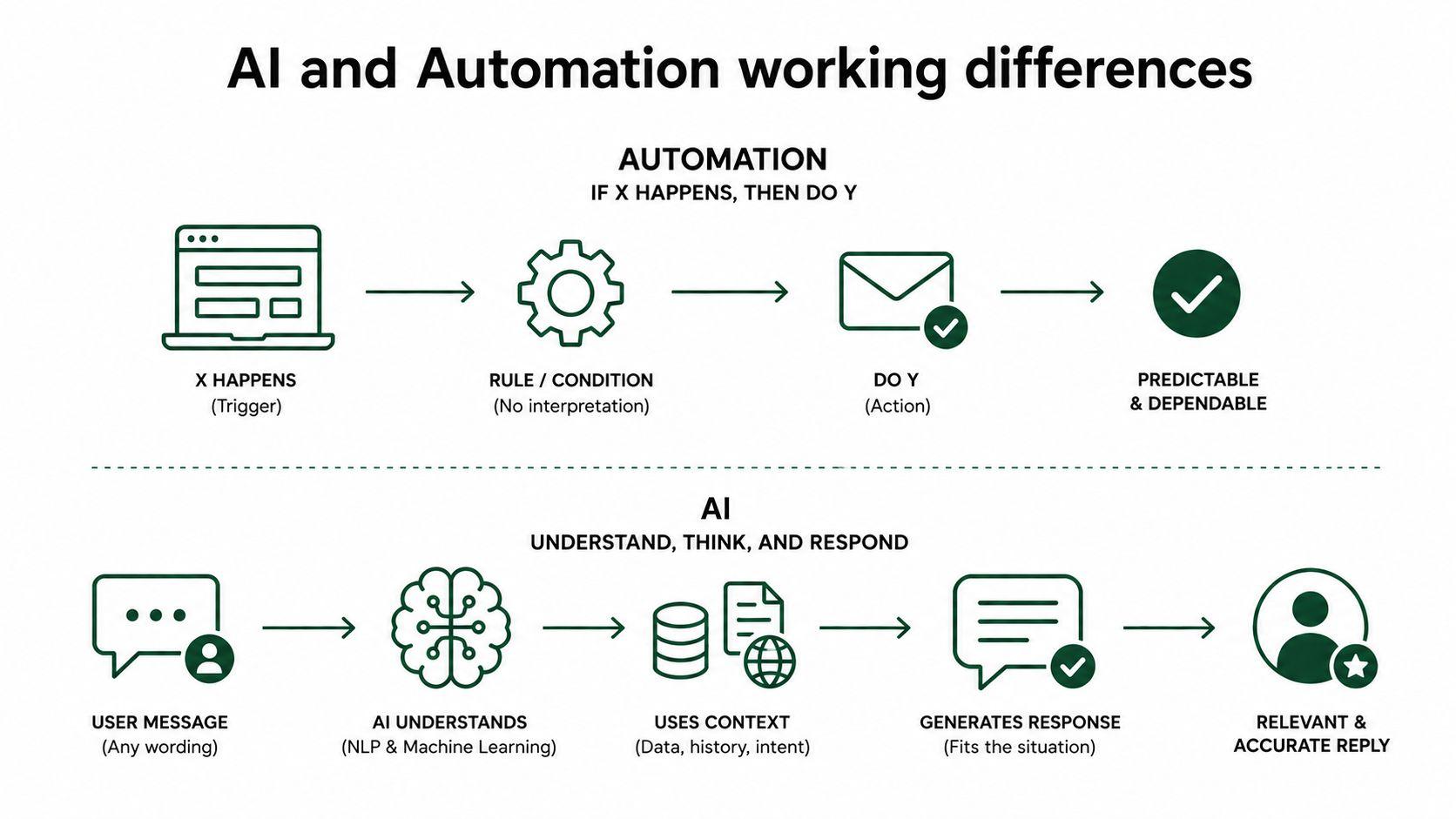
Automation runs on a fairly simple mechanism: if X happens, then do Y. There's no interpretation involved. A form gets submitted, and an email goes out. A file lands in a folder; it gets renamed and moved. It's dependable because it doesn't try to think.
AI works through machine learning and natural language processing instead. Rather than matching a fixed trigger, it reads the request, pulls in whatever context is available, and works out a response that fits the situation.
That's why AI can handle a customer message that doesn't match any predefined template, while a rule-based system would either ignore it or send the wrong reply.
Real Business Examples
The difference gets clearer when you look at the same task handled two different ways.
Take a small marketing agency owner comparing tools. A basic automation triggers a thank-you email once someone fills out a form. Nothing more.
AI goes further.
It can read what the prospect wrote, pull relevant case studies for their industry, and draft a personalized follow-up that references their specific situation. HubSpot's research on marketing workflows found that content creators save roughly 3 hours per piece with AI assistance, which, for someone producing several posts a week, amounts to a full working day freed up for strategy rather than drafting.
Sales and support show the same pattern. A basic automation might auto-log a call in the CRM. AI can summarize the call, flag buying signals, and draft a follow-up in the customer's own tone. In support, an automated system sends the same reply regardless of what the customer said, whereas an AI agent can read the message's tone and route it based on urgency or sentiment.
Operations and admin work the same way, too. Automation moves a file or updates a spreadsheet. AI can read a messy document, pull out the relevant numbers, and summarize what changed.
Why Businesses Use AI and Automation Together
Most companies get better results by using both rather than picking one over the other. Automation handles the background consistency, things that need to happen the same way every time without fail. AI handles the front-end intelligence, the parts that require understanding, writing, or decision-making.
This combination has a name: intelligent automation. It's worth understanding on its own, since it's quickly becoming the standard for how modern businesses operate.
Key Terms to Know
A few terms come up constantly in this space, and they get used loosely enough that it's worth pinning down what each one actually means before going further.
Automation or RPA (robotic process automation) refers to software that follows fixed, rule-based steps to complete a task. It cannot interpret new situations on its own.
AI (artificial intelligence) refers to systems that can understand language, recognize patterns, and generate original output based on context rather than a fixed script.
Intelligent automation combines AI's understanding with automation's ability to execute workflows.
Agentic AI goes a step further. These are AI systems capable of planning multiple steps, making decisions along the way, and completing a task with little to no manual input, closer to a digital employee than a chatbot.
LLM (large language model) is the underlying technology behind most modern AI tools, trained to understand and generate human language.
Understanding where each term sits helps explain why many "AI tools" on the market are still closer to basic automation with a chat interface bolted on than to genuinely agentic systems.
What Is Intelligent Automation in Business?

Intelligent automation connects AI's ability to understand unstructured information, things like emails, documents, images, and audio, with automation's ability to actually carry out a workflow once a decision has been made.
In practice, that means a system that can read a customer email, understand what they're asking for, and then trigger the right next step without someone manually reviewing it first. The result for businesses is faster execution, fewer manual steps, a better customer experience, and operations that scale without needing a proportional increase in staff.
Where Intelligent Automation Adds the Most Value
Some areas benefit more than others. Customer support is one of the biggest, since incoming messages rarely follow a predictable format. Sales follow-ups benefit too, especially when the next step depends on what a prospect said or did. Reporting and data entry are strong candidates as well, since they often involve extracting information from unstructured sources and organizing it into usable form.
Onboarding, marketing workflows, and general internal operations round out the list. In each case, the value comes from handling work that changes from one instance to the next, a customer email that doesn't match a template, a project variable that shifts halfway through, without losing the thread of what's actually needed.
Common Limits of Intelligent Automation
Even with AI built in, many intelligent automation systems still rely heavily on rigid API integrations and detailed manual setup. Someone still has to map out every scenario in advance, and the system often struggles the moment a customer's request falls outside what it was configured to handle. Broader industry research backs this up. Only 39% of organizations report any measurable financial impact from their AI use so far, and most of that impact remains under 5%. A lot of that gap comes down to systems that were adopted but never actually redesigned around, which is exactly the trap rigid, rule-heavy intelligent automation tools tend to fall into.
This is where Sintra takes a different approach: agentic AI employees that can create, analyze, plan, and carry out work on their own, with a working understanding of the business behind them, rather than a system that stalls the moment something falls outside its script.
Risks and Limitations of AI and Automation
Neither AI nor automation is a fix-everything solution, and it's worth being upfront about where each one struggles.
Automation's biggest weakness is rigidity. It breaks the moment an input changes in a way its rules didn't account for. A form field gets renamed, a vendor changes their file format, or a customer phrases a request slightly differently, and the whole workflow can silently fail without anyone noticing until later.
AI has different failure points. It depends heavily on the quality of the data and instructions it's given. Poorly written prompts or incomplete business context can lead to generic or inaccurate output. Left completely unsupervised, AI can also produce confident-sounding answers that are wrong, which is why most serious business deployments keep a human reviewing anything customer-facing or high-stakes.
There's also a trust gap worth naming. Zendesk's 2026 research on customer experience found that consumers are becoming more skeptical of AI decisions they don't understand, with 80% of CX leaders agreeing that transparency will become non-negotiable for customer-facing AI, even though only a small share currently provide any reasoning for AI's decisions. Businesses that treat AI as a black box, dropping it into a workflow without oversight or explanation, tend to run into exactly this kind of friction with customers and staff alike.
None of this makes AI or automation less useful. It just means both need to be set up with the right guardrails rather than treated as fully hands-off.
Common Myths About AI and Automation
A few misconceptions come up often enough that they're worth clearing up directly.
"AI will replace automation." In practice, most businesses still need both. Automation remains the more reliable choice for fixed, high-volume tasks where the outcome has to be identical every time. AI adds the judgment layer on top; it doesn't remove the need for consistency underneath.
"Automation is basically obsolete now." Not true. Automation is still cheaper, faster to set up, and more predictable for narrow, repetitive tasks. The mistake is using automation for work that actually needs interpretation, not automation itself being outdated.
"AI is too unreliable for real business use." This was fair criticism a couple of years ago, but it's dated now. Modern AI tools, especially ones built with business-specific context, are already handling meaningful volumes of real customer and operational work with measurable results.
"Intelligent automation and AI are the same thing." They're related but not identical. AI can generate and analyze without acting on anything. Intelligent automation adds the execution layer that actually carries a decision through to completion.
When Should You Use Automation, AI, or Intelligent Automation?
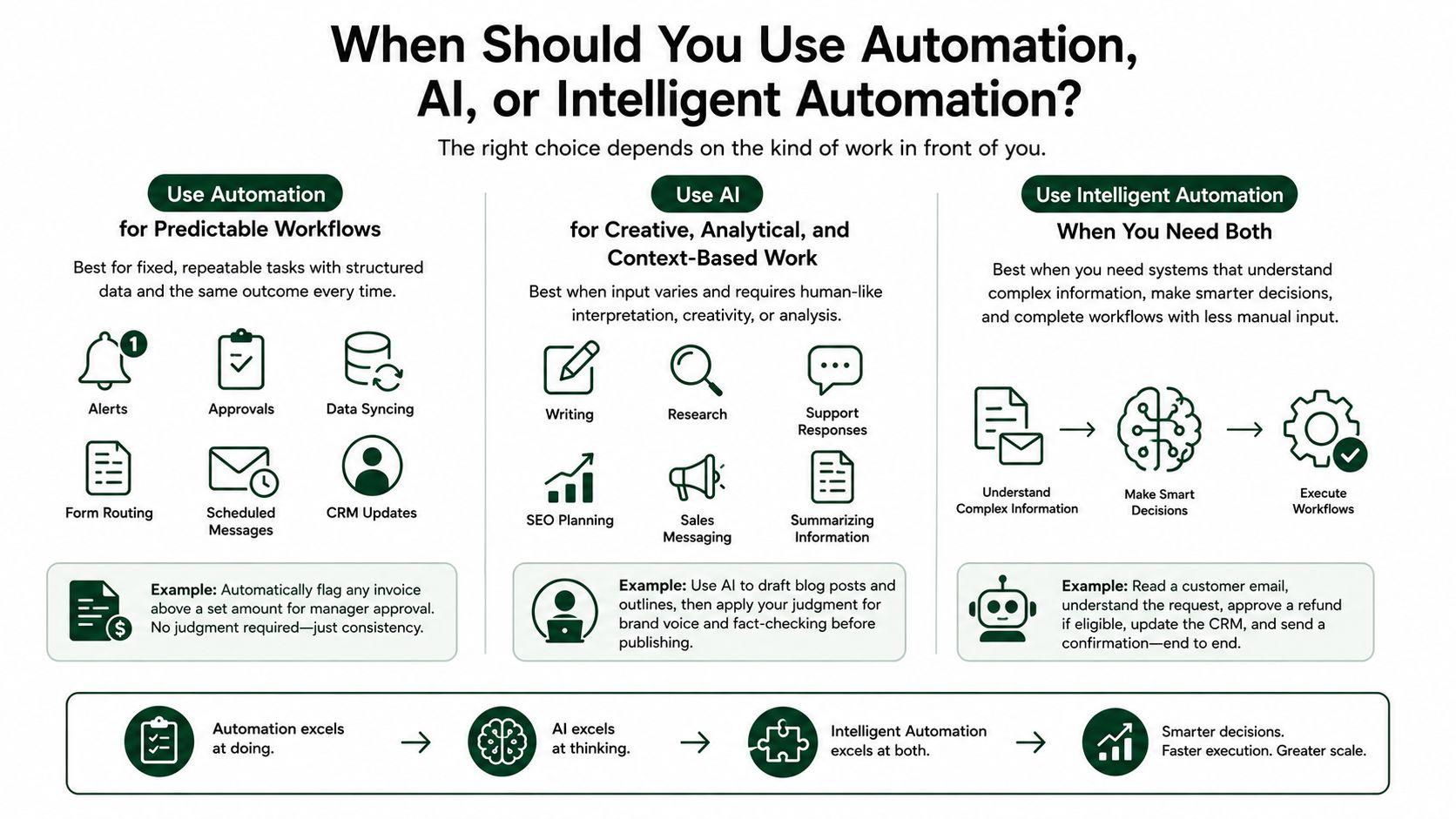
The right choice depends on the kind of work in front of you. Automation is the right call for fixed, repeatable tasks. AI is best for work that needs context, creativity, or analysis. Intelligent automation is best when businesses need both smart decision-making and workflow execution.
Use Automation for Predictable Workflows
Automation is the right fit for tasks where the data is structured, and the outcome needs to be exactly the same every time. Think alerts, approvals, data syncing, form routing, scheduled messages, and CRM updates. A finance team, for instance, might automate flagging any invoice above a set amount for manager approval. There's no judgment required there, just consistency.
Use AI for Creative, Analytical, and Context-Based Work
AI is a better fit anywhere the input varies and requires human-like interpretation. That includes writing, research, support responses, SEO planning, sales messaging, summarizing information, and business development. A solo founder managing content might use AI to draft blog posts and outlines, then apply their own judgment for brand voice and fact-checking before publishing.
Use Intelligent Automation When You Need Both
Intelligent automation is useful when a business needs systems that can understand complex information, make smarter recommendations, and complete workflows with less manual input. Think of it as the stepping stone toward full-scale AI teams.
How Different Teams Actually Use AI vs Automation
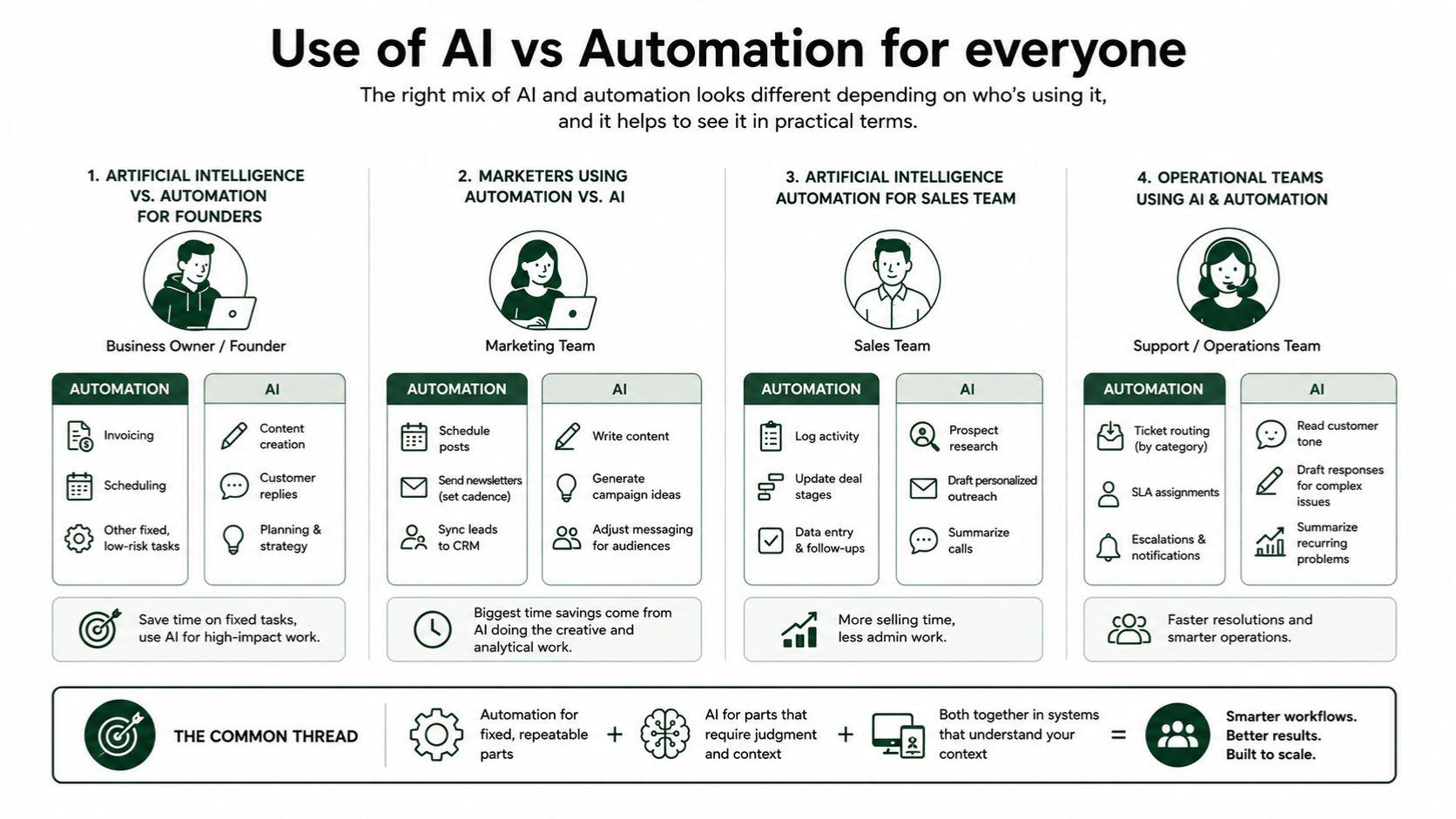
Artificial intelligence vs. Automation for founders
A business owner or founder comparing tools usually isn't deciding between AI and automation in the abstract. They're deciding where to spend limited time and budget. A founder running a lean operation might automate invoicing and scheduling, since those are fixed and low-risk, while using AI for content, customer replies, and planning work that would otherwise require hiring someone.
Marketers using automation vs. AI
A marketing team trying to save time typically automates repetitive tasks, like scheduling posts, sending newsletters on a set cadence, and syncing leads into a CRM, while relying on AI to write content, generate campaign ideas, and adjust messaging for different audiences. The teams seeing the biggest time savings tend to be the ones using AI for the creative and analytical work rather than trying to force automation to do a writer's job.
Artificial intelligence automation for sales team
A sales team looking to save time usually keeps automation for logging activity and updating deal stages, while using AI for prospect research, drafting personalized outreach, and summarizing calls, the parts of the job that used to eat into actual selling time.
Operational teams using AI & automation
A support or operations team typically automates ticket routing based on fixed categories and uses AI to read customer tone, draft responses for more complex issues, and summarize recurring problems for the team to review.
The common thread across all four is the same: automation for the fixed, repeatable parts; AI for the parts that require judgment; and, increasingly, businesses want both handled by systems that actually understand their context rather than juggling separate tools for each piece. That's the exact gap AI employees are built to close.
Cost and ROI: What to Expect
Cost is usually the first question decision-makers ask, and it's a fair one. Traditional automation tools tend to have a lower upfront cost and a predictable setup process, but their value has a ceiling. They can only ever do what they were explicitly configured to do.
AI tools have a wider range of outcomes. Deloitte's research on enterprise AI initiatives found that 74% of leaders say their most advanced AI projects meet or exceed ROI expectations, with 20% seeing returns above 30%. The businesses getting the most value tend to be the ones that treat AI as something to build workflows around, not just a tool bolted onto an existing process.
For most small and mid-sized businesses, the more practical comparison isn't automation versus AI on cost alone. It's the cost of piecing together several single-purpose tools versus one AI team that already understands the business and works across departments. Separate subscriptions for a writing tool, a support chatbot, and a scheduling automation add up quickly, and none of them share context with each other. That's the specific inefficiency Sintra is built to remove.
Why Sintra Is the Best Option for Moving Beyond Basic Automation
Traditional automation does a good job of eliminating repetitive manual work, but it's still constrained by the rules and workflows someone built in advance. Sintra moves past that. It combines AI-powered reasoning with workflow automation through a team of specialized AI employees, so businesses get more than task execution; they get work that's actually thought through.
A few things stand out here. Sintra's AI employees don't need workflows built from scratch; they come ready to work. They retain business context instead of starting from zero each time. And they connect to the tools teams already use, so the output doesn't just sit there; it moves into action.
Sintra AI Employees Execute Real Business Work
Sintra's AI employees are built around specific business functions rather than generic chatbot tasks. Soshie handles social media, Penn takes on copywriting, Cassie manages customer support, Buddy supports business planning, and Vizzy covers visual work. Each one is closer to an autonomous agent than to a simple automation trigger, enabling teams to move from simply automating steps to actually getting the work done.
Brain AI Keeps Work Consistent
A lot of AI and automation tools miss the same thing, i.e, the business context. Brain AI solves that by giving Sintra's employees a memory of the brand, the offers, the audience, and the company's general way of doing things. Instead of working with a generic model that starts from scratch each time, teams get output that remains consistent across channels and tasks.
Sintra Integrations Connect Daily Workflows
Sintra becomes more useful when it connects with the tools your team already uses, such as Gmail and Notion. By linking these apps, businesses can run connected workflows that turn AI outputs into real action without switching between applications. Setting up these AI integrations keeps your day-to-day operations centralized and moving forward.
Ready to Move From Automation to AI Execution?
Most businesses don't need one more tool automating a single step, they need a team that actually gets the work done, writing, planning, responding, and executing without waiting on a new workflow every time the request changes, and that's exactly what Sintra delivers through AI employees, Brain AI, and integrations that connect straight into the tools you already use, so you can get started with Sintra AI today and see the difference for yourself.
AI vs Automation FAQs
What is the main difference between AI and automation?
Automation follows fixed rules and repeats the same steps every time, without understanding what it's doing. AI can understand context, create content, analyze information, and adjust its response depending on the situation it's given. Automation is built for consistency. AI is built for judgment. Most businesses eventually need both working side by side.
Is intelligent automation the same as artificial intelligence?
Not quite. Intelligent automation combines AI's understanding with automation's ability to carry out workflows once a decision has been made. AI on its own can analyze and generate content, but it doesn't necessarily act on anything. Intelligent automation adds that execution layer, which is why the two terms are often used interchangeably, even though they aren't identical.
Can AI automate business tasks?
Yes, especially when it's paired with workflows, integrations, and business context. On its own, AI can draft, analyze, and summarize, but connecting it to the right tools is what lets it complete tasks end-to-end. That combination is why AI-driven support and sales teams are seeing measurable time savings, not just faster drafts.
What is an example of AI automation?
An AI employee reading a customer email, writing a reply based on the business's tone and past interactions, and then sending or organizing that response through a connected tool like Gmail. The system doesn't just generate text; it understands the request and follows through on the action, which is what separates it from a basic chatbot.
Which is better for business, AI or automation?
It depends on the task in front of you. Automation works best for simple, repeatable jobs where the outcome needs to be exactly the same every time. AI works best for creative, strategic, or context-heavy work where judgment matters. Sintra combines both, so businesses don't have to choose between them or manage them as separate systems.
Related articles