Comparing Anthropic vs ChatGPT


Table of Contents
Quick Answer: What Is the Difference Between Anthropic and ChatGPT?
Claude, built by Anthropic, leans toward safety, long-context reasoning, and clean structured output. ChatGPT, built by OpenAI, offers a wider feature set, stronger image generation, voice tools, and broad adoption across consumers and businesses.
Here is the short version before we go deeper:
- Claude AI tends to shine when you feed it large documents, ask for careful analysis, or work through coding problems step by step.
- ChatGPT tends to win in terms of flexibility, with image creation, voice chat, custom GPTs, and a huge library of plugins and connections.
- Neither is the universal "best." The right pick depends on your task, your budget, and whether you need a quick helper or a deeper thinking partner.
So the Claude vs. ChatGPT question rarely has a single answer. It changes based on what sits on your desk that day.
You sit down to finish a project, open your AI assistant, and ask it for help. It gives you a decent answer, so you copy it, paste it somewhere else, fix the parts that feel off, and then do it all again for the next task. The work piles up, and the tool that promised to save time keeps handing the heavy lifting back to you.
This is the quiet frustration behind the Anthropic vs. ChatGPT debate: most people are not really asking which model is smarter. They want to know which one actually helps them get things done.
We have tested and compared Claude AI and ChatGPT across reasoning, coding, pricing, multimodal features, and real-world business work, including where GPT-5 and the newest Claude models stand.
We have also looked at where both tools hit a wall for teams, and how AI can move past single chats into ongoing business execution. If you have ever wished your AI could act more like one of your AI employees instead of a chatbox, you are in the right place.
The Workflow Split: Micro-Utilities vs. Collaborative Thinking
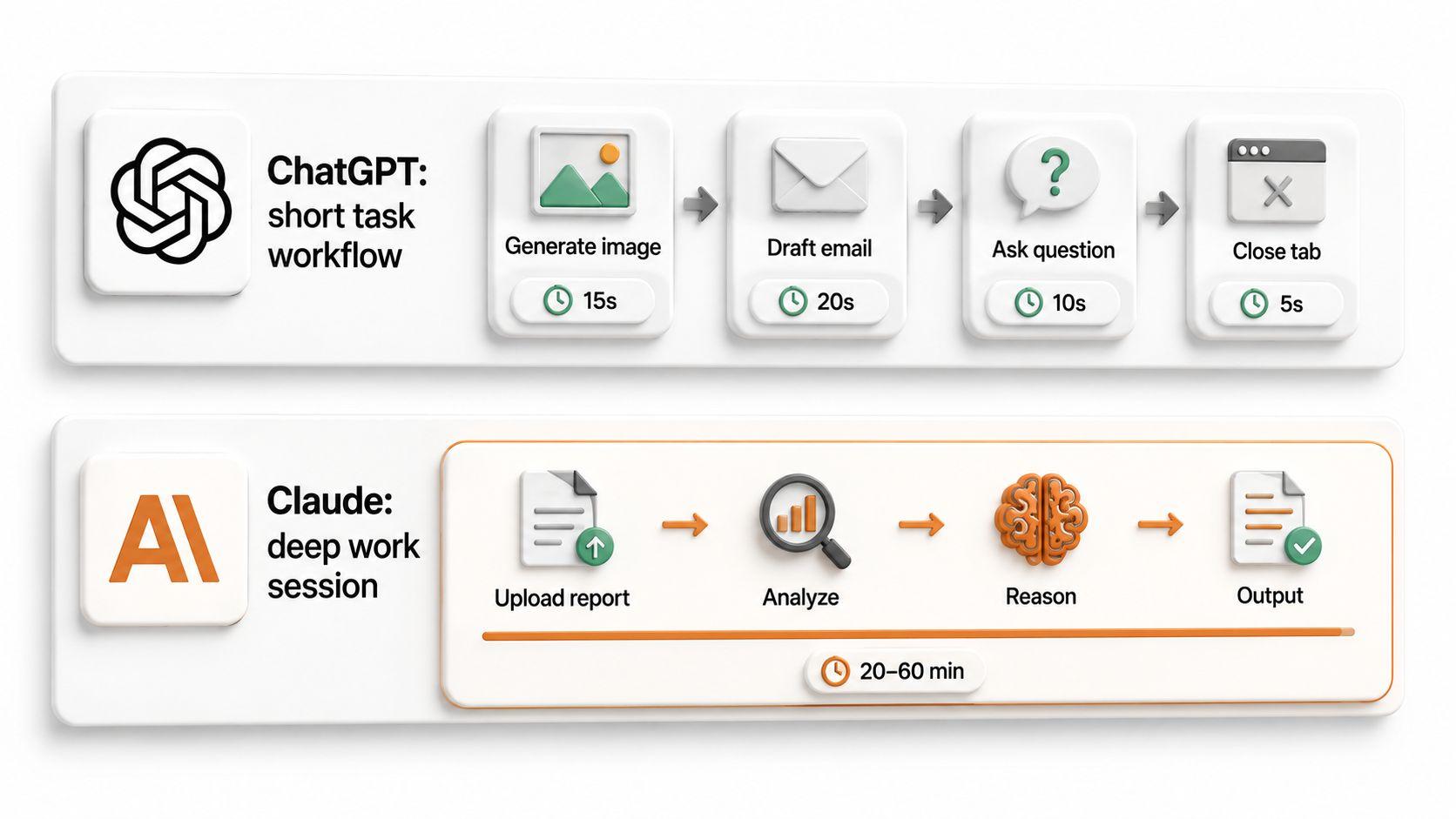
The clearest way to picture the difference is to watch how people actually use each tool.
ChatGPT often works like a multi-purpose pocket knife. You jump in for a quick task, generate an image, ask a voice question while cooking, draft a quick email, then close the tab. It fits short, standalone jobs where you want an answer and a small asset fast.
Claude often works more like a thinking room. You bring in a long report, a messy codebase, or a tangled problem, and you stay inside one conversation while you reason through it together. The model holds a lot of context at once, which makes it comfortable for prolonged, focused sessions.
- Reach for ChatGPT when the job is short, visual, or spread across many small tasks.
- Reach for Claude when the job is long, dense, and needs steady reasoning in a single space.
Claude vs ChatGPT: Core Feature Comparison
Here is a side-by-side look at how the two platforms stack up across the features people care about most.
| Feature | Claude AI (Anthropic) | ChatGPT (OpenAI) |
|---|---|---|
| Core models | Claude family (Opus, Sonnet, Haiku) | GPT models, including GPT-5 |
| Reasoning style | Structured, careful, step-by-step | Flexible, creative, broad |
| Coding support | Strong for repos and multi-file work | Strong for prototyping and learning |
| Multimodal input | Documents, images, text | Documents, images, text, voice |
| Image generation | Limited | Built-in via DALL·E |
| Context window | Up to 200,000 tokens | Large, varies by model |
| Memory | Project-based context | Cross-chat memory features |
| Integrations | Slack, Bedrock, Vertex AI, API | Plugins, Zapier, a broad ecosystem |
| Ease of use | Minimalist, focused | Feature-rich, varied |
| Data privacy options | Enterprise controls, API privacy | Enterprise and team controls |
| Enterprise readiness | Strong via cloud deployment | Strong via broad tooling |
A few of these rows deserve plain-language explanation.
- Context window is how much text the model can hold at once. Claude supports a context window of 200,000 tokens, which is roughly the length of a very long book, so it handles large documents in one go (Anthropic).
- Multimodal means more than text. ChatGPT adds voice and built-in images, while Claude focuses on reading documents and images you upload.
- Integrations decide how well the tool fits into your existing apps, which we cover in detail later.
None of these features alone makes one tool the winner. They simply point you toward the model that matches your daily work.
Model Architecture and Approach
Anthropic and OpenAI build their assistants with different priorities, and you can feel that in the output.
Anthropic designs Claude AI with careful reasoning and safety in mind. The company trains its models using a method called Constitutional AI, in which the models learn to follow a written set of principles rather than relying solely on human feedback. Claude uses Constitutional AI for safety and alignment, which is why its answers often feel measured and cautious.
OpenAI builds ChatGPT as a wide product ecosystem rather than a single model. Around the GPT models are memory features, custom workflows, voice and image tools, and a large market of add-ons. That breadth is why ChatGPT reached such wide consumer and business adoption.
What this means for you:
- If you want predictable, well-reasoned answers with clear safety guardrails, Claude's approach is a good fit.
- If you want a flexible toolkit that handles many tasks in one place, ChatGPT's approach fits the bill.
- Teams often keep both, using each where it feels natural.

UI Infrastructure: Artifacts & Projects vs. Canvas & GPTs
The interface changes how much work you can actually finish, not just how the model thinks.
Claude offers two standout work areas:
- Projects let you group chats, files, and instructions around one goal, so context stays in place across many sessions.
- Artifacts open a side panel where code, documents, or designs appear as living output you can edit and preview, instead of scrolling through a wall of chat text.

ChatGPT counters with its own tools:
- Canvas gives you an editable workspace for writing and code, where you and the model revise the same draft side by side.
- Custom GPTs let you build small, reusable assistants with predefined instructions, so you do not have to rebuild the same prompt every time.
For real productivity, Artifacts and Canvas both reduce copy-paste pain, while Projects and Custom GPTs both help you reuse context. The choice often comes down to which layout feels more natural for the way you work.
Reasoning and Accuracy
Both tools handle complex prompts well, though they take different roads to get there.
OpenAI ships dedicated reasoning models, often called the o1 and o3 lines, that pause to "think" longer before answering tough logic problems. Anthropic offers an "Extended Thinking" toggle that lets Claude spend more compute on hard questions. Both approaches trade a little speed for more careful answers.
Here is how that plays out in practice:
- Analyzing a legal-style document. Claude's large context and structured style help it extract clauses, summarize terms, and flag risky language throughout a long contract in a single pass.
- Building a marketing strategy. ChatGPT with GPT-5 can move quickly through audience ideas, channel plans, and creative angles, then reshape them on request.
- Debugging a complex workflow. Either model can follow the logic, but Claude often stays organized across many connected steps, while ChatGPT explains the "why" in a friendly, instructional tone.

Accuracy still depends on your prompt, the sources you provide, the model version, and the task itself. Claude excels in structured reasoning and coding tasks, while ChatGPT is known for its creative generation capabilities. On safety, Anthropic reports that Claude's hallucination rate decreased by 2× with version 2.1, meaning it made up false answers about half as often as the prior version. Treat every answer as a draft to verify, not a final fact.
Multimodal Capabilities
Both platforms read more than plain text, yet they differ in how you interact with files, images, voice, and visuals.
ChatGPT covers the widest range of input and output types
- ChatGPT can generate images using the DALL·E integration, so you can describe a picture and get it back without leaving the chat.
- ChatGPT generates images directly within its interface, keeping visual brainstorming in one place.
- Voice chat lets you talk through ideas hands-free, useful for quick questions on the move.
Claude focuses on reading and understanding what you bring
- Claude's models can analyze user-uploaded documents and images, so you can drop in a PDF, a screenshot, or a chart and ask for a breakdown.
- Claude offers interactive recipe cards for cooking assistance, turning a plain answer into a structured, easy-to-follow card.
- Claude's follow-up question module speeds up user interactions by suggesting the next questions so you can maintain momentum without retyping.
- Its long context makes it comfortable with very large files in a single session.
What matters by role
- Business users lean on document analysis for reports and contracts, where Claude is comfortable.
- Marketers and creators lean on ChatGPT's image generation and voice for fast visual ideas.
- Developers and researchers use both reading code and screenshots with Claude while sketching visuals with ChatGPT.
So, when comparing ChatGPT 5 and ChatGPT 4.0 against Claude AI on media, ChatGPT offers more ways to create, while Claude offers steadier ways to understand.
GPT-5 vs Claude: Which Model Performs Better?
Performance comes down to the job in front of you, not a single leaderboard number. The GPT -5 vs. Claude question splits along task type, prompt quality, and whether you need a broad assistant or a focused reasoning tool.
Here is the honest summary: GPT-5 tends to feel faster and more flexible across many tasks, while the latest Claude models tend to feel steadier on long documents and careful analysis. Both are strong, and both stumble when prompts are vague or sources are missing. The sections below walk through where each one tends to feel stronger.
Writing and Content Creation
For everyday writing, GPT-5 and Claude both produce clean drafts, with small differences in feel.
- GPT-5 often feels quick and adaptable. It spins up blog drafts, ad copy, email sequences, and creative variations quickly, and it shifts tone on request with little coaxing.
- Claude often feels polished and well-structured. It tends to hold a consistent voice across long pieces and follows detailed formatting instructions closely.
A practical example: ask both to write a landing page hero section for a budgeting app.
- ChatGPT with GPT-5 might give you three punchy variations in seconds, each with a different angle.
- Claude might give you one carefully ordered section with a clear headline, subtext, and call to action that needs little cleanup.
For rewriting a technical explanation for a general audience, Claude's structured style often reads smoothly, while GPT-5 adds friendly warmth. The Claude vs ChatGPT choice here is mostly about taste and workflow.
Research and Analysis
Both models help you make sense of dense material, but neither should be your only source of truth.
- Uploaded documents. Claude's large context lets it read a long market report in one pass and summarize it without losing the thread.
- Source comparison. Ask either model to compare two policy documents, and you will get a useful side-by-side, though you should confirm the key claims yourself.
- Customer feedback. Both can group hundreds of reviews into themes, which speeds up early analysis.
A grounded approach for the Anthropic vs ChatGPT research debate:
- Upload the real source instead of asking from memory.
- Ask the model to quote or cite the exact part it used.
- Check those quotes against the original before you act.
This habit keeps you safe regardless of which model you choose, since both can sound confident even when they're wrong.
Business and Professional Work
For daily professional tasks, both GPT-5 and Claude AI serve as capable assistants, though they share a common limit.
They handle planning, meeting prep, internal notes, customer replies, and project scoping well. You can draft an agenda, outline a proposal, or summarize a call in seconds.
Where they fall short is execution and memory across time:
- They do not remember your brand rules, offers, or processes unless you paste them in again.
- They do not carry a task from idea to finished action across your tools.
- They do not adapt to specific business roles without a heavy setup each session.
So you get strong answers, then you still do the operational work by hand. That gap is the reason we look at business execution platforms later in this article.
ChatGPT vs Claude Coding Comparison
Coding is where the ChatGPT vs. Claude coding comparison gets specific, so here is a focused table.
| Coding Task | Claude (Claude Code) | ChatGPT (GPT-5) |
|---|---|---|
| Code generation | Strong, structured | Strong, fast |
| Debugging | Strong across files | Strong with clear explanations |
| Refactoring | Handles multi-file edits | Good for single functions |
| Repository analysis | Reads large codebases | Reads pasted or linked code |
| Architecture planning | Methodical | Conversational and exploratory |
| Test writing | Reliable | Reliable |
| Documentation | Clean and detailed | Clear and beginner-friendly |
| Terminal workflows | Strong (agent-style) | Limited |
| API support | Full API access | Full API access |
| Best for | Project-level work | Prototyping and learning |
The table shows a pattern that holds up in real use. Claude tends to operate at the project and repository level, while ChatGPT tends to shine as a fast, friendly coding partner for smaller pieces and learning.
Claude Code and Developer Workflows
Claude Code runs in your terminal and project files, acting as an autonomous agent rather than a chat window.
It can move through a local repository much like a junior developer would:
- Repository understanding. It reads your file tree and builds a picture of how the project fits together.
- Multi-file edits. It can change several files at once to apply a single fix or feature.
- Debugging support. It traces an issue across functions and modules rather than focusing on a single snippet.
- Command-line workflows. It runs and reacts to terminal commands as part of the task.
A practical example: Suppose a login bug shows up only on mobile. You can point Claude Code at the repo and ask it to find the cause. It can inspect the auth files, mobile view components, and shared utilities, and then suggest a fix that touches each affected file. After you add a new feature, you can ask it to update the README and inline docs to keep the project up to date. This is where Claude's code earns its place for developers who live in the terminal.
ChatGPT for Software Development
ChatGPT works best as a conversational coding companion and a patient teacher.
It is comfortable in a scratchpad style, where you paste code, ask questions, and iterate quickly:
- Code generation. Describe what you need, and ChatGPT 5 drafts a function or component fast.
- Debugging and stack traces. Paste an error, and it explains what went wrong in plain words.
- Code reviews. It points out weak spots and suggests cleaner versions.
- Learning new frameworks. It walks you through unfamiliar tools with examples and context.
A practical example: paste a tangled function and ask ChatGPT to refactor it for readability. It returns a cleaner version with comments explaining each change. Drop in a confusing stack trace, and it tells you the likely cause and a fix. Ask for unit tests, and it drafts a set you can drop into your project. For prototyping and learning, both ChatGPT 5 and ChatGPT 4 feel approachable and quick.
Which AI Is Better for Programmers?
The best pick depends on how and where you write code.
The split is fairly clean:
- Claude suits terminal and local repository autonomy. It fits solo developers and engineering teams working in large codebases who want an agent that edits across files.
- ChatGPT suits UI-driven rapid scaffolding. It fits learners, prototypers, and anyone who likes a conversational partner that explains as it goes.
Rough guidance by the user:
- Solo developers often enjoy ChatGPT for speed and clear explanations.
- Startup teams may mix both, using Claude for deep project work and ChatGPT for quick help.
- Enterprise engineering teams often value Claude's repository-level edits and structure.
- Technical writers lean on either for clean documentation.
- Non-technical users working near code usually find ChatGPT friendlier.
For the overall ChatGPT vs. Claude coding comparison, consider codebase size, workflow style, security needs, and budget. The GPT 5 vs. Claude coding choice is less about raw skill and more about how you like to work.
ChatGPT Pricing vs Claude Pricing
Both providers offer free access, individual plans, team tiers, and enterprise options. Here is what you actually get, and one trap to watch for.
Individual plans line up closely on price:
- Claude Pro costs $20/month for standard access, with higher usage limits and access to capable models (Anthropic pricing & plan).
- Claude Max is $100/month for 5x usage, designed for heavy users who often hit usage limits.
- ChatGPT Plus is $20/month for premium features, including advanced models and tools (OpenAI pricing).
- ChatGPT Go costs $8/month with ads included, a lower-cost entry point for lighter users.
For developers building on the API, costs work differently:
- Claude's API pricing starts at $1 per million input tokens, which scales well for large-document work.
- ChatGPT's API costs $0.03 per 1K tokens for GPT-4 on that model tier, so heavy use adds up quickly.
Now, the trap is the Context Windows vs. Message Caps dilemma.
- Claude's huge context lets you analyze long documents, but each large document can quickly eat through your premium message allowance, so power users on Pro sometimes hit caps sooner than expected.
- ChatGPT's conversational stamina spreads usage across many shorter exchanges, which can feel more forgiving for back-and-forth chatting.
So a researcher loading 100-page reports may drain a Claude plan quickly, while a writer doing many short prompts may stay comfortable on ChatGPT. When weighing ChatGPT pricing against Claude pricing, match the plan to your real habits:
- Casual users do well on free tiers or ChatGPT Go.
- Power users benefit from Plus or Pro.
- Heavy document users may need Claude Max.
- Developers should model API costs against expected token volume.
- Enterprises should compare security, admin, and deployment features, not just the sticker price.
Plans and prices shift over time, so confirm current details on each provider's site before you commit. The Anthropic vs. ChatGPT and Claude vs. ChatGPT pricing gap is small at the individual level, so features and fit usually matter more than cost.
The Biggest Limitations of Claude and ChatGPT for Business Use
Both tools have grown significantly, yet they remain conversational assistants rather than full-fledged business systems. For teams, that gap shows up every day.
The core issue is what we can call "Prompt Engineering Debt". Every time you open a fresh chat, you re-explain your brand, your audience, your offer, and your process. That repeated setup adds up, drains energy, and leads to user fatigue. The smarter the model gets, the more frustrating it feels to keep feeding it the same context.
These limits surface across functions:
- Marketing gets ideas, but not scheduled posts.
- Customer support gets draft replies but not managed conversations.
- Sales gets outreach copy but not tracked follow-ups.
- Project management gets plans, but not assigned tasks.
- Operations get suggestions, but not connected actions.
The Anthropic vs. ChatGPT and ChatGPT vs. Anthropic comparisons rarely address this because it lies outside the models themselves. Both ChatGPT 5 and Claude AI are excellent at producing answers. The struggle begins when those answers need to turn into ongoing, coordinated work.
Generating Answers Isn't the Same as Getting Work Done
A great answer still leaves the doing to you.
Claude AI and ChatGPT 5 can write, recommend, and explain, but a person has to take the next step every time:
- A social media strategy still needs someone to schedule and post it.
- A batch of support replies still needs someone to send and track them.
- A list of outreach ideas still needs someone to email the prospects.
Isolated chat windows have no way to carry a task from start to finish. They hand you a draft and stop, which is fine for one-off help and tiring for daily operations. That is the quiet limit behind the ChatGPT vs Anthropic conversation for teams.
Limited Shared Memory Across Teams and Workflows
Businesses run on shared knowledge, and standalone chats keep that knowledge locked in single sessions.
Your team needs the same facts in every interaction:
- Brand voice and style rules
- Customer history and context
- Standard processes and approvals
- Past decisions and project background
Standalone AI tools require each person to resupply this in every prompt. When one teammate pastes the brand guide, and another forgets, the output drifts. The real risks are practical:
- Off-brand messaging when context is missing.
- Duplicated work when people redo the same setup.
- Slower execution when everyone re-explains the basics.
The Claude vs ChatGPT and Anthropic vs ChatGPT debate misses this because the gap is about shared memory, not model quality.
AI Workflows Often Depend on Multiple Separate Tools
Most businesses run across many apps, and AI chats stand apart from them.
A normal day touches email, a CRM, a calendar, ecommerce tools, docs, and team chat. When AI lives in its own window, you become the bridge:
- You copy a campaign idea from the chat into your scheduler.
- You manually move a support answer into your help center.
- You retype a draft email into your CRM.
This constant switching creates duplicated work, fragmented information, and manual coordination. The ChatGPT vs Anthropic question does not address it, since both tools mostly leave the connection to you. Claude AI does offer some links, and we will cover real integrations soon, yet the default chat experience still expects you to shuttle content between apps.
AI Models Are Not Designed Around Business Roles
General assistants do not match how businesses actually divide work.
Claude AI and ChatGPT 5 are built as one flexible helper for everyone. Real companies operate through roles:
- Marketing
- Customer support
- Sales
- Operations
- Admin
Each role needs its own workflows, consistent output, and repeatable steps. A single general assistant can imitate any role for a moment, then forgets the setup the next time you open it. Teams end up rebuilding the same instructions over and over.
What businesses really want is a persistent operational layer in which each function has a specialized helper that remembers its job. The Anthropic vs. ChatGPT comparison highlights which model thinks better, which points to why a chatbot alone is not enough for a team. That idea leads straight into the next section.
Beyond Model Selection: Turning AI Into Real Business Output
Picking the better model is only half the decision. Most businesses need AI that supports repeatable workflows, not just sharp one-off answers.
Once you account for Prompt Debt and the limits of a single chat interface, the upgrade becomes clear: instead of a smarter chat box, teams need an execution layer that sits on top of strong models. This is where the AI team's approach changes the picture. Tools like Sintra AI act as a business execution layer built around three ideas: role-based AI helpers, shared business context, and connected workflows.
The shift looks like this:
- From a single assistant to a set of specialized helpers.
- From re-pasting context to shared business memory.
- From copy-paste between apps to connected workflows.
The goal is practical. Move AI from isolated conversations into ongoing work across marketing, sales, support, operations, and admin, so answers become finished tasks.
Role-Based AI Helpers for Business Functions
Role-based helpers differ from general chatbots in that they have a defined role rather than resetting every session.
Where Claude AI or ChatGPT 5 acts as one assistant for any request, specialized helpers each focus on a function and keep that focus over time. Sintra's lineup gives clear examples:
- Soshie handles social media planning and posts.
- Penn focuses on copywriting and content.
- Cassie supports customer questions and replies.
- Buddy works on strategy and business development.
- Vizzy handles visual tasks and design ideas.
Because each helper stays in its lane, you get more consistent, usable output without having to re-prompt the basics every time. A copywriter helper already knows your tone, so you skip the setup and get closer to finished work on the first try.
Shared Business Memory and Context
Business AI gets far more useful when it remembers the things you would otherwise repeat.
A shared memory layer, called Brain AI, stores the context every helper needs:
- Brand voice and style
- Company details and offers
- Customer context and history
- Internal rules and processes
Instead of pasting the same background into every chat, you set it once, and every helper draws from it. That is a real contrast with standalone chat windows, where you manually feed context each session. The payoff is consistency, faster output, and better decision support, since every helper works from the same reliable picture of your business.
Integrated Workflows Across Business Tools
AI gets more valuable when it plugs into the tools you already use, so the work happens where it lives.
With AI integrations across common platforms, helpers can act inside your real stack:
- Gmail for email drafting and sending
- LinkedIn for outreach and posts
- Google Calendar for scheduling
- Notion for documentation
- HubSpot for CRM and contacts
- Shopify for e-commerce tasks
These connections cut down copy-pasting, context switching, and manual follow-up. A campaign idea can move into scheduled posts, and a support answer can flow into a help doc, without you acting as the courier between apps.
AI Models vs AI Business Systems: What's the Difference?
Here is a snapshot comparing standalone models with a business execution platform.
| Capability | ChatGPT Free | ChatGPT Plus | GPT-5 | Claude AI | Sintra AI |
|---|---|---|---|---|---|
| Conversation quality | Good | Strong | Strong | Strong | Uses strong models |
| Reasoning | Basic | Strong | Strong | Strong | Strong |
| Coding support | Limited | Good | Strong | Strong | Supported |
| Persistent memory | Limited | Some | Some | Project-based | Shared Brain memory |
| Workflow execution | No | No | No | No | Yes |
| Role specialization | No | Custom GPTs | No | No | Built-in helpers |
| Business context retention | No | Limited | Limited | Limited | Yes |
| Integrations | Limited | Plugins | Plugins | Slack, API, cloud | Many business apps |
| Automation | No | Limited | Limited | Limited | Yes |
| Collaboration | No | Team plans | Team plans | Team plans | Built for teams |
| Scalability | Low | Medium | Medium | Medium | High |
Most comparisons stop at model quality, which is why the Anthropic vs ChatGPT debate usually centers on ChatGPT 4, ChatGPT 4.0, ChatGPT 5, and Claude AI. Businesses, though, often need systems that span departments. This table is meant to show the difference between AI that generates answers and AI that helps execute business functions.
What AI Models Do Well
ChatGPT and Claude are excellent at producing information and ideas on demand.
Their strengths are real and worth using:
- Research and quick fact-finding
- Writing drafts and edits
- Brainstorming angles and options
- Coding help and explanations
- Analysis of documents and data
- Problem-solving through tough questions
For individuals and small teams, both ChatGPT 5 and Claude AI offer significant value here. If you mainly need answers, recommendations, and content, these models cover the job. The Claude vs ChatGPT choice for this kind of work comes down to feel and features.
Where AI Models Reach Their Limits
The trouble starts when you ask a chat tool to run ongoing operations.
The same limits we covered earlier show up clearly:
- Repeated prompting for context you already gave
- No persistent business memory across sessions
- Fragmented workflows spread across many apps
- Manual execution for every finished step
- Limited coordination across departments
These are not flaws in the models' intelligence. They are the natural edges of a single chat window. The Anthropic vs. ChatGPT and ChatGPT vs. Anthropic conversation rarely reaches this point, yet it is exactly where teams feel the most friction.
How Business Execution Platforms Extend AI Capabilities
A business execution platform is built around functions, not single conversations.
It combines four pieces to support recurring work:
- Role-based helpers that own a function
- Shared business memory that holds context
- Workflow automation that completes steps
- Integrations that connect your tools
The difference shows in examples. Instead of just drafting a support reply, the system can pull customer context and send it. Instead of only suggesting a sales email, it can draft, schedule, and log it. The same idea applies across marketing, administration, and business development. Strong models like ChatGPT 5 and Claude AI still power the thinking, while the platform handles the doing.
Why Growing Businesses Need More Than a Chat Interface
As a company scales, one-on-one chats can't keep up.
Growth brings new needs:
- Consistency across more people and content
- Collaboration between teammates and helpers
- Shared context so nobody starts from zero
- Operational efficiency as task volume rises
A business that already uses ChatGPT 4, ChatGPT 5, or Claude AI has felt the value of good answers. The next step is letting AI contribute directly to daily processes. For the Anthropic vs ChatGPT question at the team level, the real upgrade is moving from a chat box to a system that turns those answers into completed work.
Which AI Solution Should You Choose?
Start with your goal, not the spec sheet. Each option fits a different kind of need.
- Choose ChatGPT for general-purpose help, brainstorming, content creation, image generation, learning, and everyday productivity.
- Choose Claude for long-context analysis, document-heavy work, careful research, and project-level coding.
- Choose Sintra AI when you need more than conversation and want AI to support ongoing work across marketing, sales, support, operations, and admin.
Here is a side-by-side view to make the GPT 5 vs. Claude vs. Platform decision easier.
| Category | ChatGPT | Claude | Sintra AI |
|---|---|---|---|
| Ideal user | Generalists, creators | Analysts, developers | Teams and businesses |
| Primary strengths | Flexibility, images, voice | Long context, reasoning | Execution, roles, memory |
| Business readiness | Medium | Medium | High |
| Workflow support | Limited | Limited | Built-in |
| Memory and context | Cross-chat memory | Project context | Shared Brain memory |
| Integrations | Plugins, Zapier | Slack, API, cloud | Many business apps |
| Role specialization | Custom GPTs | None | Dedicated helpers |
| Scalability | Medium | Medium | High |
Quick recommendations by user:
- Individual users get plenty from ChatGPT or Claude on a personal plan.
- Developers often pair Claude for repos with ChatGPT for fast help.
- Content creators enjoy ChatGPT's images and Claude's polished drafts.
- Startups can begin with a model and add an execution layer as they grow.
- Agencies benefit from role-based helpers to maintain consistent client work.
- Growing businesses gain the most from a system with shared memory and integrations.
The Claude vs. ChatGPT and ChatGPT vs. Anthropic comparisons help you generate answers. When the goal is repeatable business output through specialized helpers, shared context, and connected workflows, a platform built for execution is a better fit.
Ready to Move Beyond AI Conversations?
If your team already relies on AI for answers and now wants those answers to become finished work, an execution platform is the logical next step.
Sintra AI is built for that shift, focusing on practical outcomes rather than chat alone:
- Business execution that carries tasks to completion
- Specialized helpers for marketing, support, sales, and admin
- Organizational memory through Brain AI, so context stays put
- Connected workflows through AI integrations with the apps you use
- A coordinated AI team that works across functions
The Anthropic vs ChatGPT decision still matters for picking strong reasoning and writing. To turn that intelligence into daily productivity, you can get started with Sintra AI and see how AI moves from conversation into real business work.
Anthropic vs ChatGPT FAQs
Is Claude better than ChatGPT?
Neither wins every time. Claude is often stronger for long documents, careful analysis, and structured coding. ChatGPT is often stronger for flexible everyday tasks, image generation, and its wide range of tools. Claude's refusals often cite ethical principles of transparency, which some users value.
What is the difference between Anthropic and ChatGPT?
Anthropic makes Claude, focused on safety and long-context reasoning. OpenAI makes ChatGPT, a broad product with memory, voice, images, and many integrations. Claude can be deployed via Amazon Bedrock and Google Cloud Vertex AI and integrates with Slack, while ChatGPT has a rich plugin ecosystem and integrates with Zapier for access to thousands of apps.
Which AI is better for coding, Claude or ChatGPT?
It depends on how you work. Claude Code suits project-level, terminal-based development with multi-file edits. ChatGPT suits fast prototyping and learning. Claude's API supports integration with private databases and tools for more advanced setups.
Is GPT-5 better than Claude AI?
GPT-5 tends to feel faster and more flexible, while Claude tends to feel steadier on long documents. Test both on your real work. Regarding safety, OpenAI states that its GPT-4 model was 82% less likely to respond to disallowed prompts than GPT-3.5 in its own testing, and Google's Gemini employs internal content policies to ensure safety.
What is better than ChatGPT or Claude for business automation?
A chat model alone often falls short, since it answers without executing work. Platforms like Sintra AI add role-based helpers, shared memory, and integrations, so AI completes tasks instead of stopping at a draft. Note that interfaces differ as well: Claude's interface is minimalist, with fewer features than ChatGPT's, while ChatGPT allows users to edit inputs after sending them.
Related articles