Claude vs ChatGPT: What’s the Difference & Which Should You Choose in 2026


Table of Contents

Quick Answer: Claude vs ChatGPT Key Differences at a Glance
ChatGPT and Claude are two capable LLMs, but they differ in core functionality. ChatGPT is an all-in-one personal productivity solution with native image generation, multimodal capabilities, and basic browser-based agentic automation. On the other hand, Claude is built for advanced coding and sophisticated creative work with natural-sounding responses, deep, multi-step reasoning, and logical reasoning.
OpenAI’s release of ChatGPT in 2022 completely transformed how we work. We used it for writing, debugging code, solving problems, and just chatting. Once Anthropic Claude entered the scene, experts turned to comparison.
“Anthropic Claude Vs ChatGPT: Which model is more capable?” became the hot topic. Four years later, in 2026, after numerous updates, model shifts, and innovations, the difference between Claude and ChatGPT is not as apparent.
To really compare these two LLMs, we need to look beyond features and go into specialized use cases, how each performs under different conditions, and the cost breakdown. In this guide, we have tested both AIs to help you understand which is better for your unique requirements.
Claude Vs ChatGPT At a Glance
Here is a side-by-side comparison of Claude and ChatGPT’s features, capabilities, and pricing.
| Capabilities / Features | ChatGPT | Claude |
|---|---|---|
| AI Models | GPT-5.5, GPT-5.4, GPT-5.3, GPT-5 Mini, GPT-5 Nano | Claude Sonnet 4.6, Claude Opus 4.7, Claude Haiku 4.5 |
| Context Window | Up to 400K tokens (1M tokens available, but penalizes users for crossing 272K tokens) | Up to 1M tokens |
| Memory and Context Handling | Broader persistent memory that picks up general preferences but is less reliable during long and complex chats. | Deep session-based memory that focuses on nuances and stable responses. Reliable for lengthy conversations. |
| Content Writing and Editing | Conversational tone that can feel template-driven. Better for quick brainstorming and learning new concepts. | Natural, human-sounding, high-quality long-form content writing. |
| Voice Interactions | Polished, real-time voice mode that picks up emotions and tones, recognizes voice easily, and has a natural conversation flow. | Raw conversations with difficulty recognizing voice and picking up emotions. |
| Data Analysis | Concise summaries from shorter texts. Struggles with context and data extraction in lengthy documents. | Superior data extraction from long-form and complex documents. Deeper insights and context from files. |
| Coding Performance | Codex for basic coding and quick on-the-fly solutions. | Claude Code for independent advanced coding, debugging, and production-ready code. |
| Image Generation | Built-in image generator and external video generator (Sora 2) that creates hyper-realistic visuals. | No native image or video generation. |
| Integrations | Broad integration ecosystem including Microsoft, Zapier, Google, and custom agents via the GPT store. | Specialized developer-focused integrations via app connectors. |
| Reasoning and Accuracy | Structured and fast reasoning that may not be as nuanced. | Nuanced, multi-step reasoning and deep document analysis with extended thinking. |
| Speed and Performance | GPT-5.4 is quick for conversational interaction and everyday use. | Claude Sonnet 4.6 is very fast for coding and quick tasks, whereas Claude Opus 4.7 is slower for extended thinking. |
| Message Limits | Not explicitly defined, but higher message freedom with updates every 3–5 hours. | Not explicitly defined, but lower message freedom with updates every 5 hours. |
| Individual and Teams Paid Plans | ChatGPT Go: $8/mo — ChatGPT Plus: $20/mo — ChatGPT Pro: $200/mo | Claude Pro: $17/mo (annual) or $20/mo — Claude Max: from $100/mo |
| API Pricing | $0.05/1M tokens (Nano) — $0.25/1M (Mini) — $1.75/1M (GPT-5.3) — $2.50/1M (GPT-5.4) | $1/1M tokens (Haiku 4.5) — $3/1M (Sonnet 4.6) — $15/1M (Opus 4.7) |
What Is Claude AI and What Is ChatGPT?
ChatGPT from OpenAI is an easy-to-use LLM (Learning Language Model) with advanced AI models for personal productivity. It can write, draft emails, brainstorm ideas, generate images, conduct research, solve complex problems, and hold a conversation. This chatbot is built on GPT or Generative Pre-Trained Transformer technology, meaning it can create original context-aware responses rather than just searching existing information.
Claude AI, developed by Anthropic, is another easy-to-use conversational LLM for coding and advanced reasoning tasks. It can also write long-form content and extract data from lengthy documents. Compared with ChatGPT, Claude excels at work requiring deep logical reasoning, multi-step queries, and context-driven conversations. You may use it for everyday tasks, but it truly delivers in developing code, conducting research, and writing long-form pieces.
Claude vs ChatGPT Features Compared
Wondering how Claude is different from ChatGPT and vice versa? Here is an in-depth guide to the differences between Claude and ChatGPT through tests and trials.
Reasoning and Accuracy
Reasoning, especially multi-step reasoning, is where Claude takes the edge over ChatGPT. To understand this, let’s see what each approach to explaining things looks like.
Claude Sonnet 4 uses chain-of-thought processing. This means the model breaks down your problem into multiple steps, analyzes it, and then responds. Hence, it excels at nuanced prompts and explicit assumptions, helping with objective accuracy and consistency.
In comparison, ChatGPT acts as a completion model. It predicts the next best possible output based on the semantics of your prompt rather than reasoning itself. The result: The AI may produce faster results but lacks consistency and logical reasoning.
Real Test
We tested both ChatGPT and Claude through a multi-step problem. For this test, here were the questions.
- How to get a driving license online?
- Is there a recommended course for it?
- What are the registration steps?
- Some insights into details like cost and time…
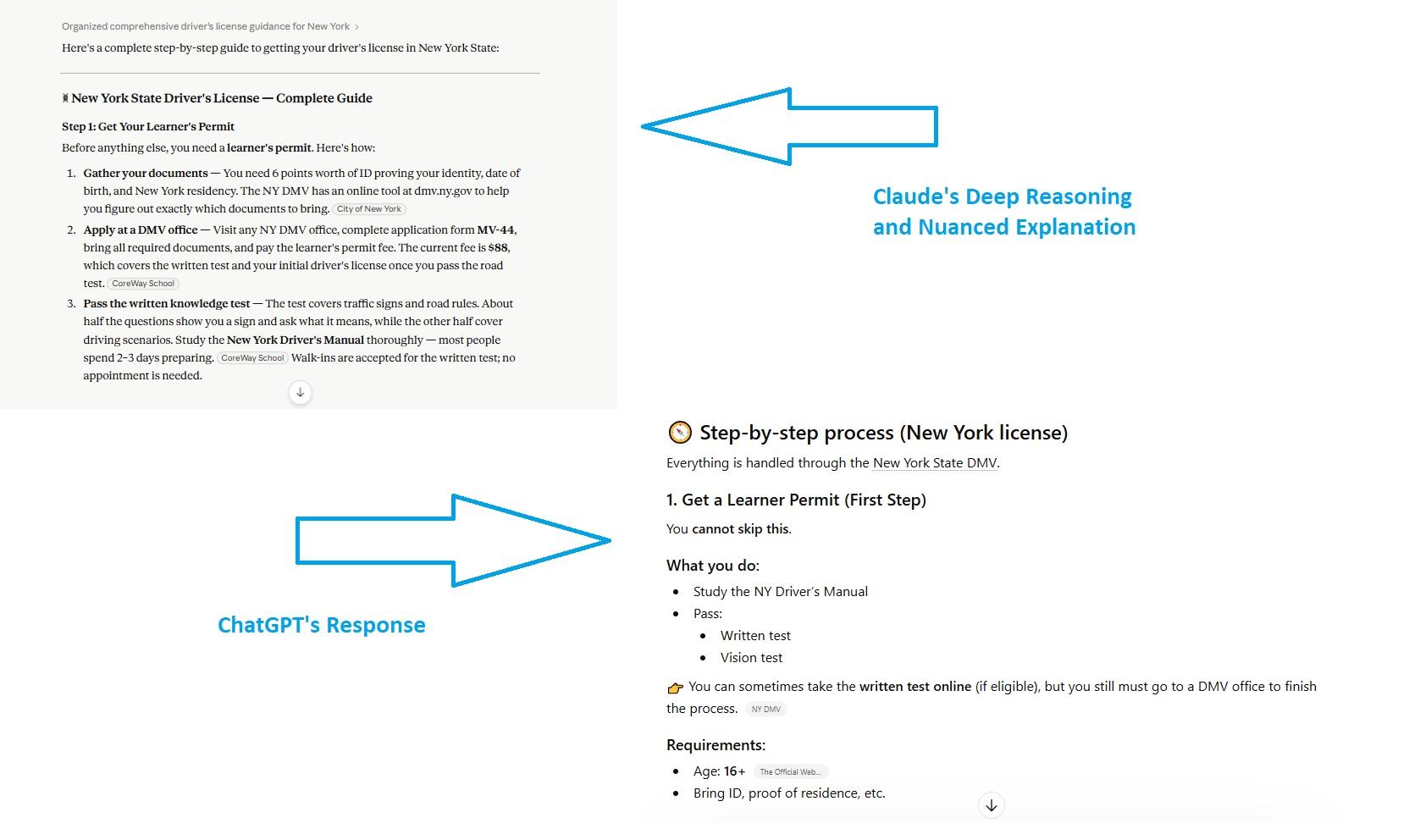
The Prompt: “I want to get a driver's license in New York. Can you guide me on the best way to do it online or recommend a course? Also, tell me exactly how I can register for the license? Do include details about how much it costs, how long it takes, or whether I have to take a test?”
Winner = Claude for Better Multi-Step Reasoning and Consistency
The difference between Claude and ChatGPT was obvious. Claude’s 4.5 Sonnet offered an in-depth and nuanced response. Though the information in both answers was similar, the clarity, supplementary notes, and no emojis helped us understand Claude better.
For instance, Claude offered a cost breakdown at each step (MV-44 registration, 5-hour pre-license course, driving test fee). Whereas ChatGPT mostly focused on the course’s cost. Here is what Claude’s and ChatGPT’s first steps to obtaining a driver’s license looked like.
Coding Performance and Technical Tasks
Claude Code definitely has the upper hand in coding, as it continues to dominate the enterprise agentic coding markets. As of 2025, Anthropic owned 54% of the business-grade coding market.
Unlike other chatbots that mainly autocomplete lines and debug, Claude Code takes on the entire project independently. All you need to do is describe what you want to do, and let the Claude Code handle the rest, from planning to execution. With Claude Code, developers are acting more like managers and validating the output, instead of putting all the effort.
In comparison, OpenAI’s Codex is also an agentic coding tool. It acts similarly to the Claude Code and has a few additional features, like mid-task steering. But the Claude UX gives it an edge. And, you can’t really expect Codex to do it all independently like Claude Code.
Real Test
We tested both Claude Code and ChatGPT Codex to build a web page for the following prompt.
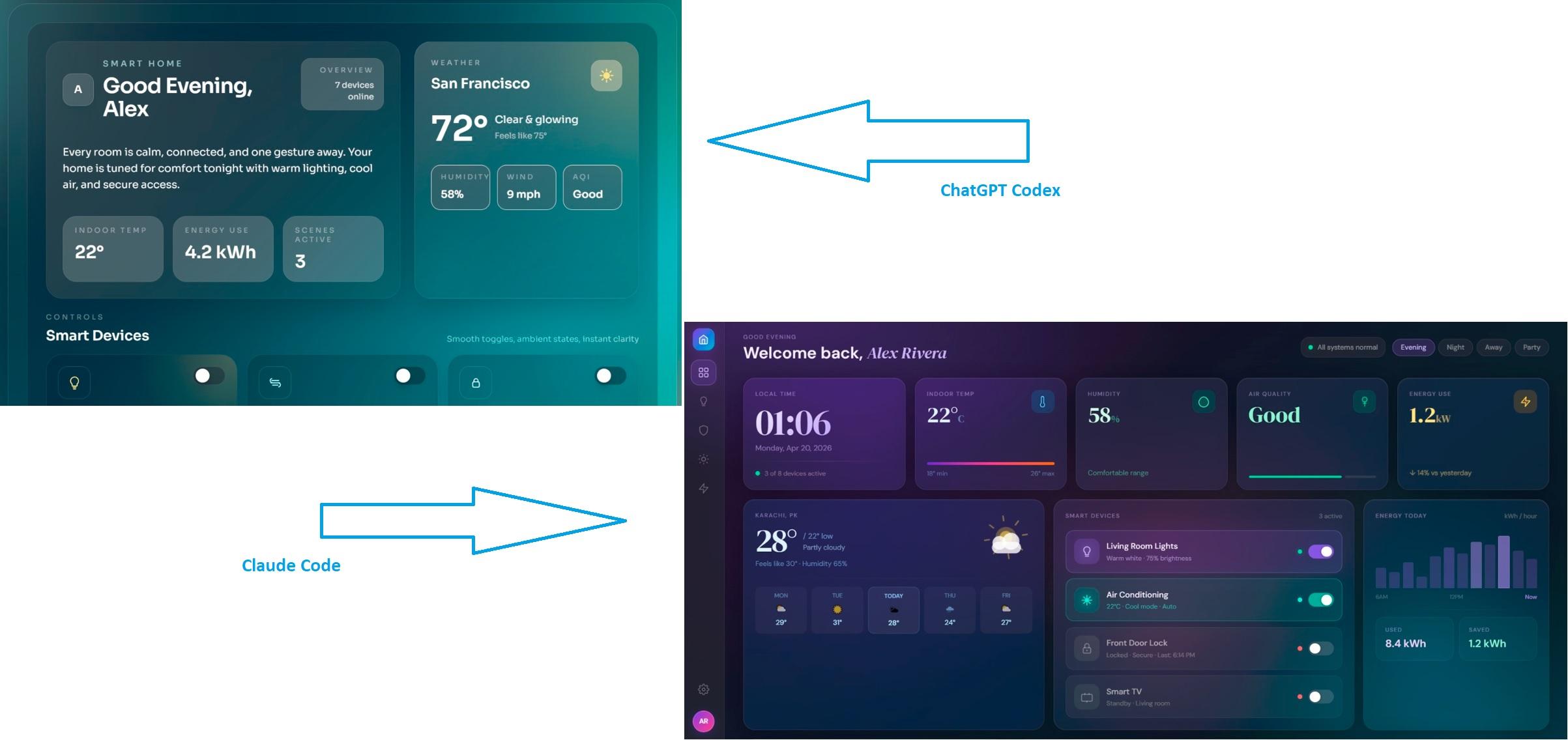
Test Prompt: Create a single-file HTML and Tailwind CSS web page for a ‘Smart Home Dashboard’. I want you to focus entirely on stunning, modern UI/UX design. Here are the requirements.
- Design Style: Use a ‘Glassmorphism’ effect (frosted glass, semi-transparent backgrounds, background blur) over a rich, vibrant gradient background.
- Layout (Single Screen): Center a main dashboard card on the screen. Inside the card, include: a sleek profile greeting (e.g., ‘Good Evening, Alex’), a modern weather widget (just visually, no real API needed), and three stylized toggle buttons for smart devices (Living Room Lights, AC, Front Door Lock).
- Typography & Spacing: Make it look like an award-winning Dribbble concept. Use perfect padding, rounded corners, and subtle drop shadows.
- Output: Provide only the complete, ready-to-run HTML file with Tailwind CDN included. Do not write complex JavaScript; just focus on making the visual layout perfect.
Winner: Claude for Considering the Nuances
Claude's webpage looked more polished, and despite this, it packed more useful options than Codex: weather forecast, energy bar, screen mode buttons, and smart device control. We also liked the sidebar navigation, which is a standard for dashboards. ChatGPT's Codex completed requirements as well. However, small inconsistencies (non-functional apps on the screen, less actionable navigation) could be a deal breaker.
Here is a side-by-side comparison of both.
Content Writing and Creativity
Claude’s Sonnet 4.6 is inarguably a better creative partner for long-form writing than OpenAI’s GPT-5. It sounds more natural, has various styles, and does not give you bullet-intense, over-formatted answers. Plus, it does not offer reassurances and emojis in every response, which can be annoying for serious writers.
The best ChatGPT can do is with the GPT-5.4 Thinking Mode. It reacts to your prompts and produces formal writing, but does not act strategically. While writing, you have to go back and forth. ChatGPT uses RAG (Retrieval Augmented Generation), meaning it searches data through your uploaded files. This could make ChatGPT miss context and need more clarification.
For similar reasons, Claude performs slightly better than ChatGPT in creative and long-form writing. It has a massive context window and allows you to upload numerous files. This helps Claude with context. Plus, Claude's collaborative approach often leads to better creative outcomes than ChatGPT's. Overall, it stays on track and does not need constant clarification.
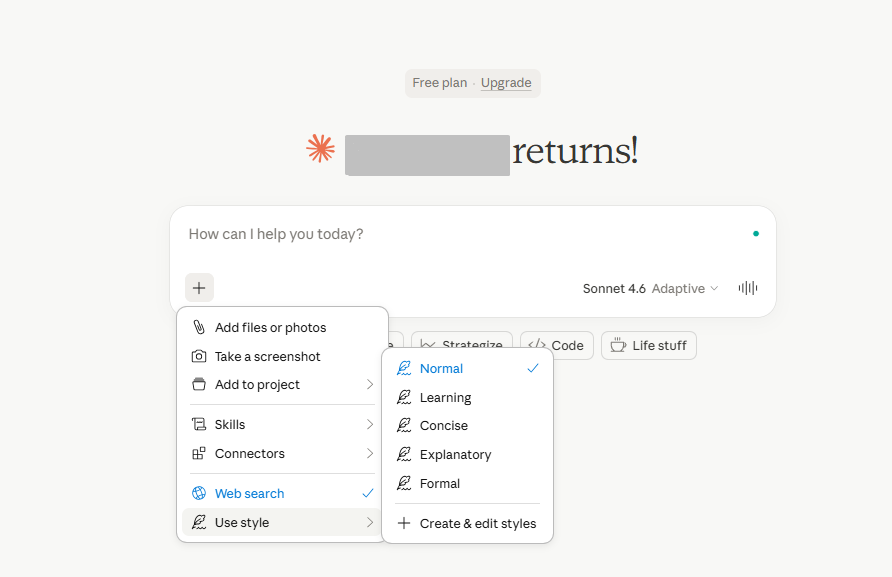
Claude also has style features, so it's easier to jump between different tones and vocabulary.
Real Test
For this test, we prompted both ChatGPT and Claude.
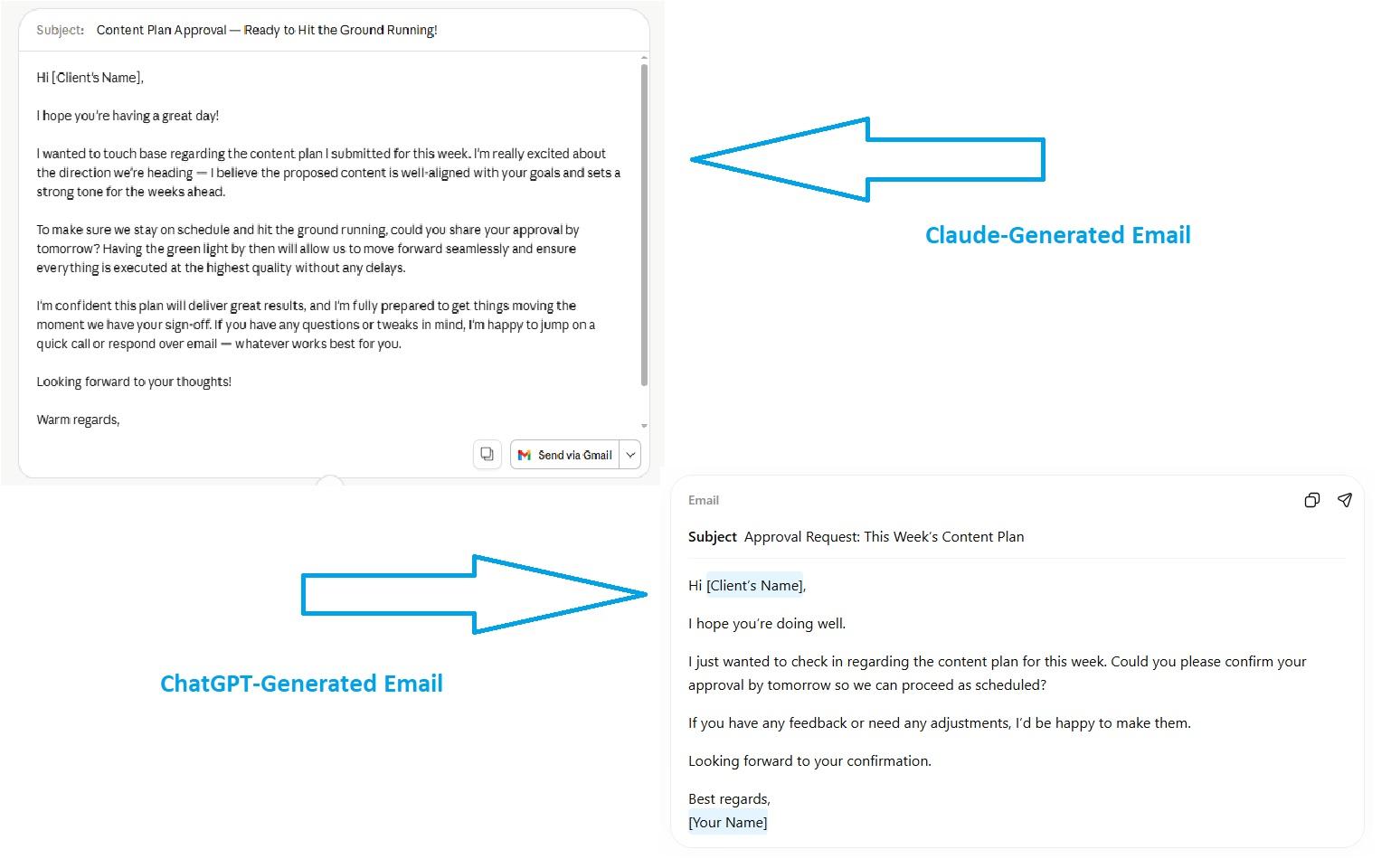
The Prompt: “Write an email asking my client if they have approved the content plan for the week by tomorrow. Sound confident, positive, and persuasive about the proposal.”
Winner: Claude for Sounding More Natural and Consistent
Claude took some time to respond. However, its response was more natural and to the point. It was still formal and needed some editing. We also liked that Claude included a “Send Via Gmail” button.
With ChatGPT, the response was instant. It did customize the tone, and both responses were similar. We just liked Claude’s a tad bit better.
Multimodal Capabilities
Claude’s biggest comparative weakness is its multimodal capabilities. With true multimodal capabilities, including native visual generation and advanced voice mode, ChatGPT offers a superior interactive experience. Let’s put it to the test and understand better.
ChatGPT Generates Visuals, and Claude Cannot
ChatGPT can generate images directly from the interface, which Claude cannot. Yet, Claude can interpret visuals, read through them, and respond. The GPT-1.5 images might not be the best, but they certainly do a similar job as others in the league (Gemini, Copilot).
Users also get Sora-2, a video generator. It’s a separate product, but available for Pro and Plus subscriptions. You can use it to turn text or existing images into video clips. Sora 2 also takes care of the basic editing (remixing, blending, looping, and more).
Real Test
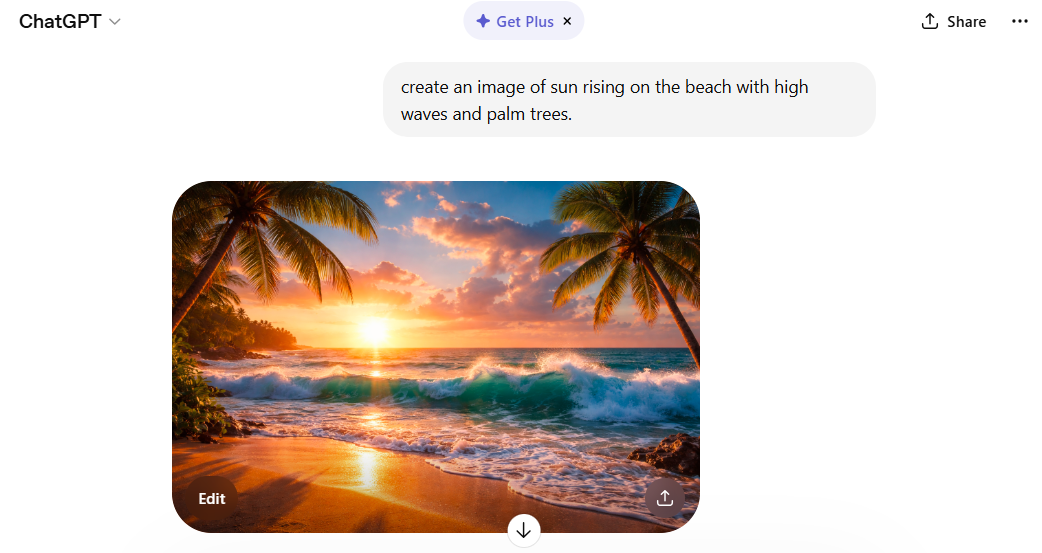
This is the image we generated using ChatGPT.
ChatGPT Understands You Better During Voice Interactions
ChatGPT’s advanced voice mode is slightly better than Claude’s. It sounds natural, conveys emotional nuance, and responds in real time, which is perfect for an interactive experience.
Real Test
We tested both for recognition accuracy, conversational flow, intent, and response quality.
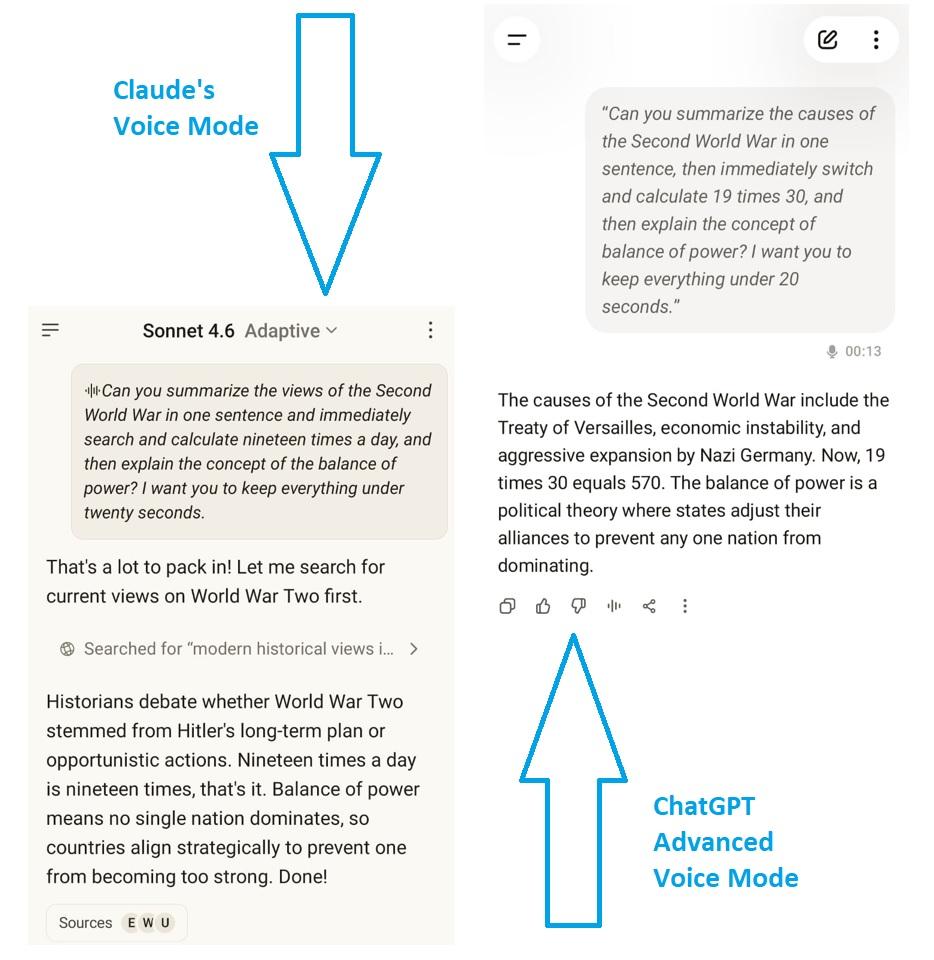
Test Prompt: “Can you summarize the causes of the Second World War in one sentence. Then, immediately switch and calculate 19 times 30. Then, explain the concept of balance of power. I want you to keep everything under 20 seconds.”
The difference in voice understanding between ChatGPT and Claude was obvious. Claude thought I said 19 times a day. It then responded with “19 times a day is 19 times, that’s it”.
In comparison, ChatGPT instantly picked the voice style, understood the intent, and responded.
Tie between ChatGPT and Claude for Document Handling
Typically, both ChatGPT and Claude excel in interpreting, analyzing, and summarizing documents (PDF, TXT, XLSL). You can use them to analyze resumes, parse textbooks, identify patterns, and more. However, businesses might find Claude slightly superior for complex and long-form documents due to its massive 200K-token context window.
Real Test
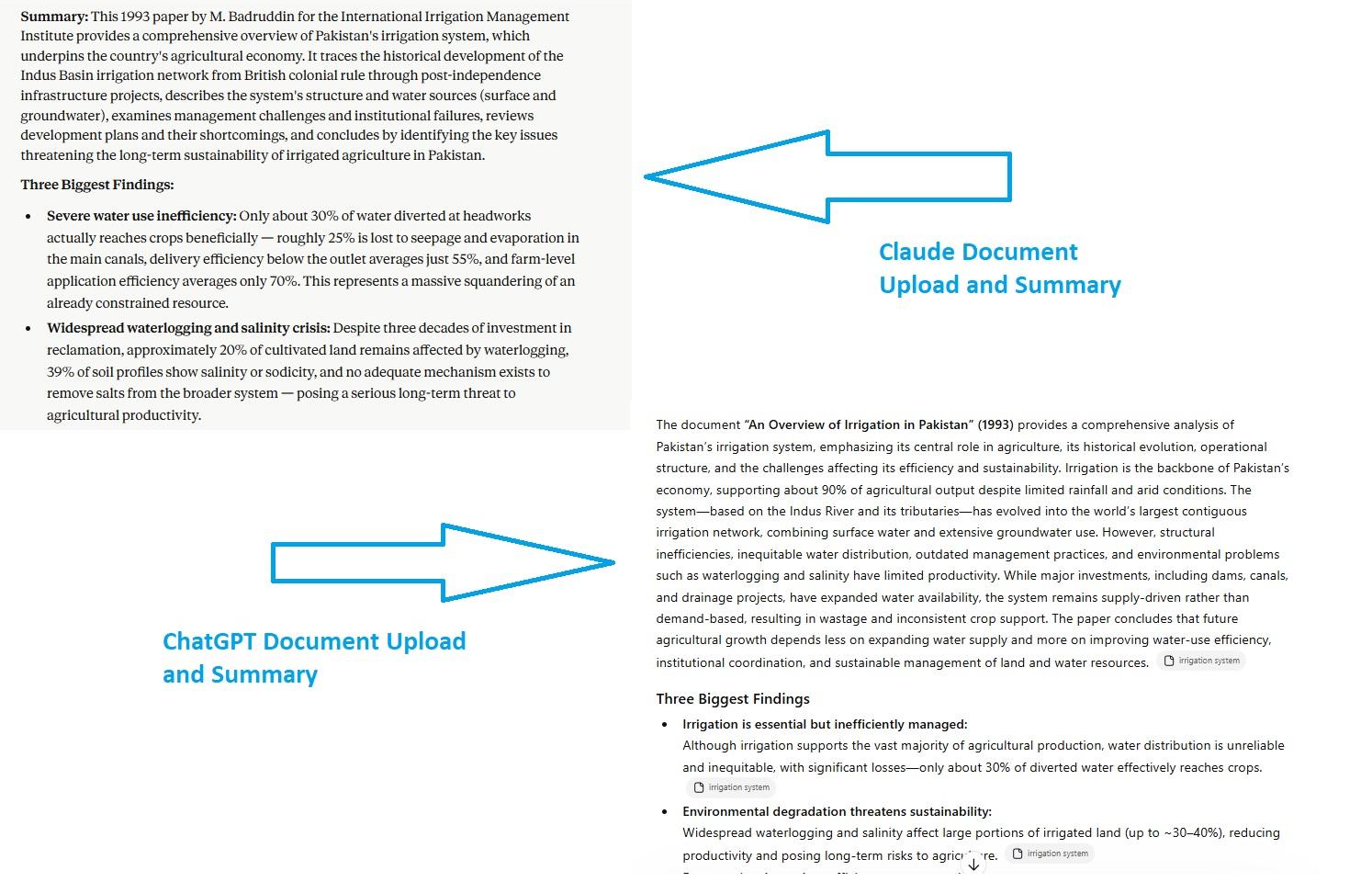
We tested both AI's capability to summarize a 27-page PDF, titled “System of Irrigation in Pakistan” by the IIMI Institute of Pakistan. Here is how it went.
Test Prompt: “I uploaded a PDF. Summarize the entire document in one paragraph and list the three biggest findings as bullet points.”
Unpleasantly, Claude asked me to wait for a couple of hours before I could even chat about anything else. That too, without a warning. Both tools answered in one paragraph with three bullet points, as I asked in the prompt.
ChatGPT’s response was factually accurate and concise. And so was Claude’s. How is Claude different from ChatGPT? Its summary was more nuanced and had deeper reasoning.
Memory and Context Handling
The difference between Claude and ChatGPT's memory lies in the approach to retention and context handling. ChatGPT offers a broader and more persistent memory. Yet, this memory is selective and not as deep as Claude’s. For instance, it cannot remember the entire document to retrieve context. So, Claude offers a more structured and project-specific memory for complex, focus-driven tasks.
Let’s understand the science behind Claude and ChatGPT’s memory.
For starters, Claude’s memory is built on two fundamentals;
- Claude starts every chat with a blank state and only activates memory when you explicitly invoke it
- Claude recalls things by referring to your raw conversations. There are no AI-generated profiles or summaries involved.
The good thing about this memory implementation is transparency. Simply put, you can clearly see when and how it retrieves the context, and it does so on your command.
Businesses and teams can also use Claude’s paid memory tool. In all enterprise accounts, you get an option labeled “Generate Memory of Chat History”. It focuses on learning your professional context, including team processes, clients’ needs, project details, priorities, and more. It works like OpenAI’s model but still offers control.
In comparison, ChatGPT’s memory might be broader and runs across conversations, but it is automated and lacks control. In 2025, OpenAI announced that ChatGPT would now reference all your past interactions to produce personalized responses. Meaning, it would keep your preferences and interests in memory when helping with writing, giving advice, and beyond.
However, the broader ChatGPT comes at the cost of control. Rather than letting the AI model decide when to access the memory tool like Claude, OpenAI automates it across your conversations.
Real Test
We tested both Claude and ChatGPT’s memory over time, and here are the results.
Winner: Claude for Better Context Awareness in Lengthy Conversations
Claude excels in a session-based context. We uploaded all our project documents on it, thanks to the massive context window (200K tokens) and file upload. With this context, it would refer back to the documents (brand guidelines, research, and previous project edits). This helped us with a relevant and accurate response. The tradeoff: the memory ends after the session.
ChatGPT
When the chats are going long and complex, ChatGPT tends to forget context and gets bizarre. It repeatedly gave the same answer that would have nothing to do with the prompt. However, we would always find references to previous interactions somehow. It treats everything equally, whether it's a random fact about you or something core to your identity.
Plugins, Integrations, and Ecosystem
ChatGPT vs Claude: Which has a better integration model?
ChatGPT offers an extensive network of connectors (called plugins) that let the AI function within external apps like Google, Slack, Jira, and Figma. There are 1000+ plugins available with ChatGPT, making it ideal for businesses. With ChatGPT, you also get access to the GPT store, where you can build your custom GPT for others to interact with.
In comparison, Claude offers specialized and secure integrations for coding and enterprise workflows. These are further divided into two categories.
- Native partners where Claude is directly embedded into the product.
- API-driven connectors that allow Claude to interact with external data, apps, and tools (Salesforce, Slack, Notion, etc).
In addition, Claude integrates with Google Workspace apps, allowing users to access Calendar, Drive, and Gmail for organizational productivity.
Real Test
Both platforms have a range of partners that can help users get the most done directly within the chatbot. We wanted to test how each works and if one is better. For this test, we needed a project timeline presentation in Canva using Claude and ChatGPT's connectors.
Test Prompt: “I’ve uploaded a PDF of my project details. Create a presentation with slides outlining each step. Add dates, tasks, and milestones with every step. Include cohesive visuals and a professional theme.”
Winner: ChatGPT for Broader Integrations and Plugins
ChatGPT immediately got to work on producing the slideshow script and confirmed with me before generating the design. Once I asked it to generate the design, it initially created a draft with white slides. Then, show me four to five variants of the same slideshow. This gave me options, and I loved each of the layouts and colors.
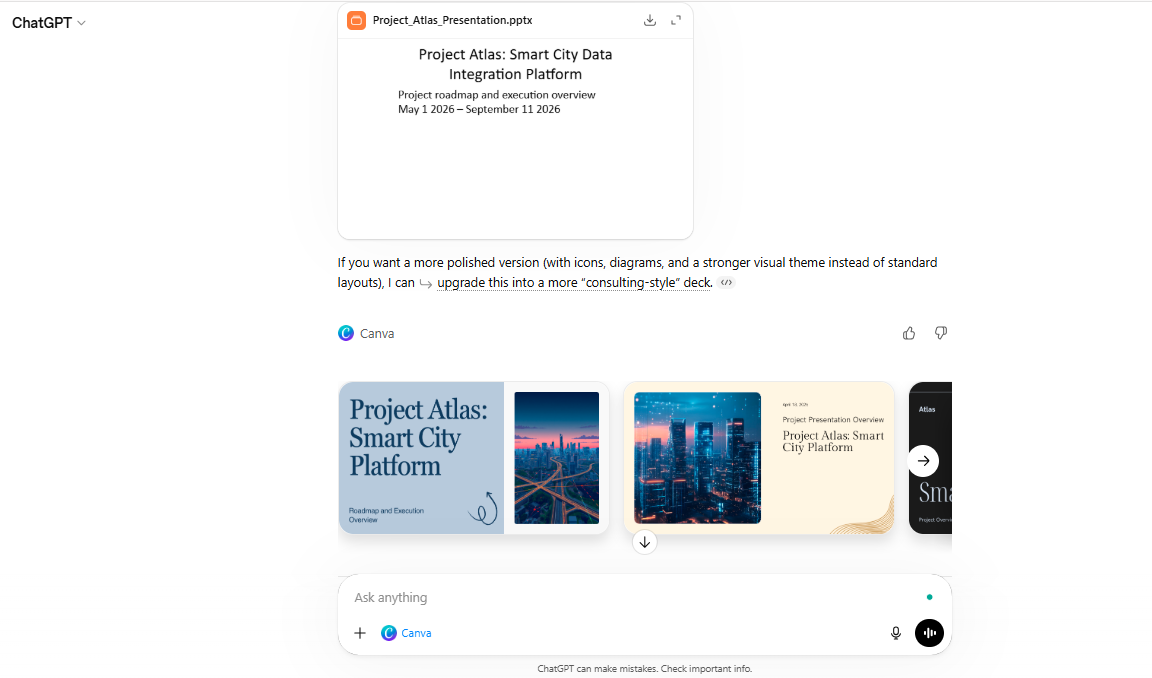
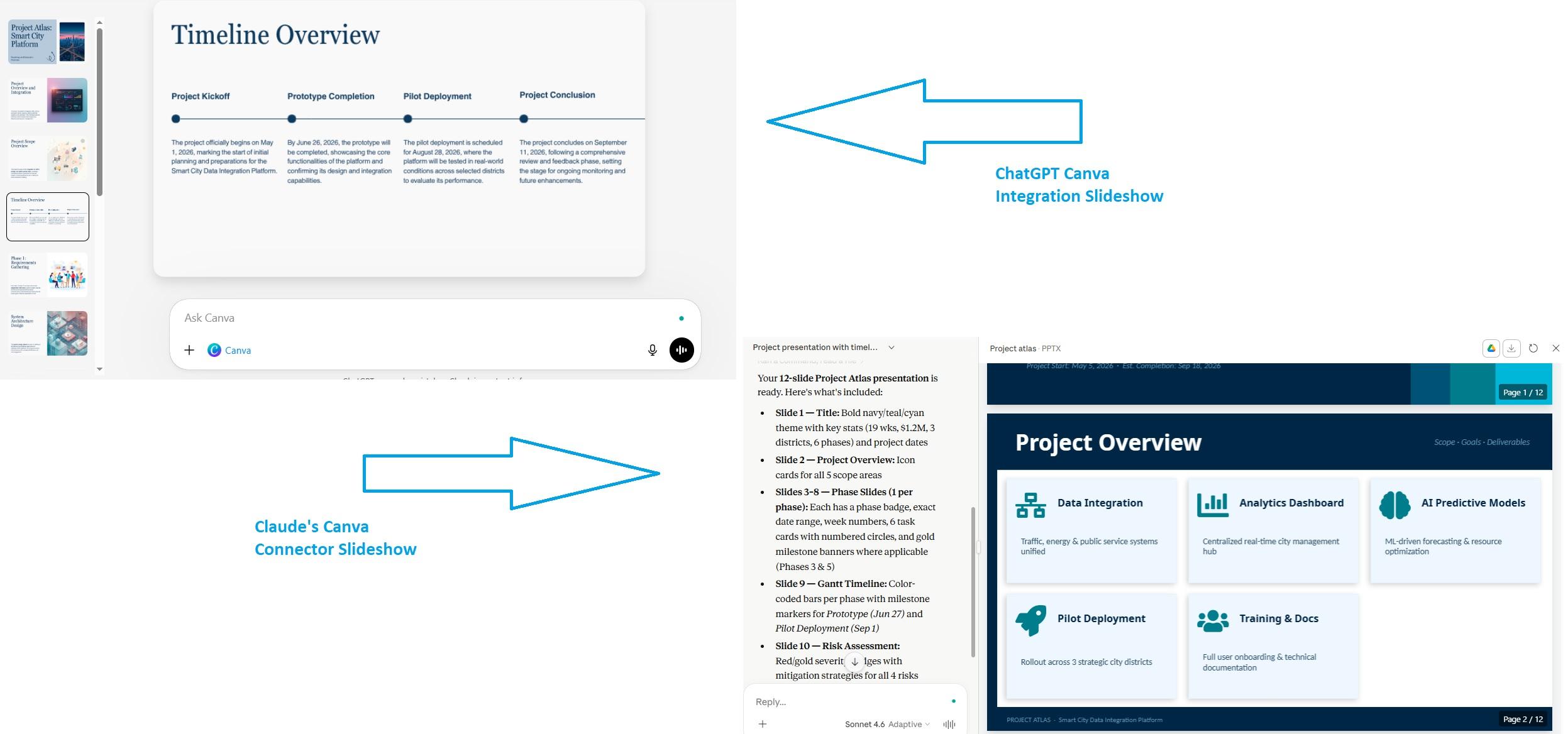
The generated slideshow itself was clear and visually coherent. The structure was in place, everything made sense, and it clearly picked the project timeline, which Claude wasn’t able to translate. I still would edit the slides lightly on Canva.
Now, how does Claude make presentations? Once I connected with Canva, Claude generated a 12-page presentation with coherent colors and an overall good design. However, the structure needed heavy manual editing. The timelines were at the end with no proper sequencing, and the stats were all over the place. I would not use this slideshow for a formal presentation.
Here, you can see the slideshow generated by both ChatGPT and Claude using Canva integration.
Speed Performance and Reliability
An AI response time and speed impact your productivity more than you think, especially when you are invested in the task. Thankfully, both Claude and ChatGPT invested heavily in latency reduction. You won’t even find a difference between their speeds as a general user.
Still, Claude vs ChatGPT: which is better in speed?
For reference, Claude Sonnet 4.6 is the fastest AI model with a benchmark of 113.3 minutes compared to the GPT-5.4 at 137.3 minutes. Sonnet is around 17% faster than its competitor, which you may slightly feel during interactions. The real advantage lies for developers and executives, as it helps with fewer context switches and less waiting time.
Many argue that the Claude Opus 4.6 has an even slower response at 288.9 minutes. But, for this, the comparison stands invalid. The Opus is capable of extended thinking, which means it is solving multi-step problems with higher-quality data analysis. So, users are really trading speed for nuances and accuracy.
Here is the comparison of the latest Claude and ChatGPT AI’s speed and performance at a glance.
| AI Model | Processing Benchmark | Best For |
|---|---|---|
| Claude Sonnet 4.6 | 113 minutes | Advanced coding, routine tasks |
| GPT-5.4 | 137 minutes | General-purpose productivity |
| Claude Opus 4.6 | 288.9 minutes | Complex, multi-step, deep reasoning |
Claude vs ChatGPT Models Explained (GPT3, GPT 4, GPT 5 Vs Claude 3, and Claude 4 Models)
Claude AI Vs ChatGPT AI models? You must be clear about the strengths and use cases of each model to use it wisely. So, let’s find out how they compare.
ChatGPT AI Models Explained
Here is a quick rundown of ChatGPT AI models, from the Series 3 to Series 5.
GPT-3.5 and GPT-3.5 Turbo
The older model of ChatGPT, the GPT-3.5, was an older AI for general-purpose text queries and code generation. Released in 2022, the 3.5 was the legacy model, capable of
- Interacting up to 3000 words
- Solving basic problems
- Communicating in different languages.
It was later extended to the GPT-3.5 Turbo in 2023. The Turbo model had a 16K context window, optimizing it for conversational tasks and improving chat experience. Still, the 3.5 Turbo lacked complex problem-solving and reasoning.
GPT-4 and GPT-4 Turbo
Within two weeks of launching the Turbo 3.5, OpenAI released the GPT-4. This version has a context window of 25000 words, which makes it great at complex tasks and intent recognition. It was the first AI model to accept multimodal inputs (including text and images).
The GPT-4 version increased parameters up to one billion, improving across technical and creative tasks. To give you an idea, this AI extended processing could pass the bar exam with top marks compared to 3.5, which would lie in the bottom spectrum of the same exam.
As a part of the GPT-4 series, Open introduced the extension GPT-4 Turbo, a more efficient and cost-effective alternative. This version supports a 128K token context window, which is 300 pages for reference. You will find that it understands you better and handles the complex tasks.
GPT-5 Series
The newest generation of OpenAI, GPT-5, can handle complex, multi-step tasks with multimodal capabilities. This version is capable of longer reasoning, end-to-end task execution, and identifying context changes. As an improvement over the 4 series, it has fewer hallucinations and codes more efficiently.
The latest GPT-5.5, codenamed Spud, was released on April 23, 2026. OpenAI claims that this version is more intuitive than any other, with advanced coding workflows, online research capabilities, and business task execution. The company also released its performance benchmark that outperforms Claude Opus 4.7. Here is a brief overview.
GPT-5.4 was launched in 2026 as the best ChatGPT model for advanced reasoning, complex coding, and agentic capabilities. An extension of 5.4, the GPT-5.4 Pro is optimized for research and innovative use cases. However, it requires more resources and time compared to other models in the 5 series.
Moreover, the GPT-5 mini and GPT-5 nano are more affordable options for basic reasoning and logical tasks. However, compared to previous series, they are still faster and more efficient.
ChatGPT AI Models at a Glance
Here is a quick comparison of ChatGPT Series 4 and Series 5 AI models.
| AI Model | Standout Features | Best For |
|---|---|---|
| GPT-5.5 | Strong agentic coding, better computer use, improved knowledge work, and better efficiency. | Longer coding engineering workflows, online research (technical and scientific), and professional-grade data tasks (synthesis, analysis, and business workflows). |
| GPT-5.4 | Advanced visual understanding, superior reasoning, and integrated deep search. | Complex coding tasks, agentic workflows, and research. |
| GPT-5.4 Thinking / Pro | Advanced reasoning, advanced coding, and upfront planning. | Agentic workflows, deep research, and advanced coding. |
| GPT-5.4 Codex | Native computer-use capabilities, improved agentic orchestration, and upfront thinking. | Autonomous agent workflows, complex computer-use tasks, and higher-quality coding production. |
| GPT-5 Mini / Nano | High-speed performance, multimodal capabilities, and strong agentic ability. | Structured content creation (summaries, data extraction, rewriting) and structured coding tasks (debugging, writing code). |
| GPT-4.5 | Reduced hallucinations, improved conversational flow, and enhanced creativity. | Writing, programming, and solving practical problems. |
| GPT-4o (omni) | Advanced multimodal capabilities, high-speed human-like conversations, and advanced integrations. | Natural audio conversations and versatile task execution (data analysis, creative writing, generating interactive visuals). |
| GPT-4 Turbo | Updated knowledge base, cost efficiency, better instruction following, and no lazy responses. | Document analysis (long-form), code generation, and custom chatbots. |
| GPT-4.1 | Superior coding performance, purpose-built AI agents, and advanced multimodal reasoning. | Advanced coding, long-form document analysis, and agentic workflows. |
| GPT-4.1 mini | Better instruction-following, cost efficiency, strong multimodal capabilities, and fine-tune support. | Lightweight coding tasks, high-volume applications, and agentic workflows. |
Claude AI Models Explained
Here is a quick rundown of Claude AI's evolution from the Series 3 to Series 4.
Claude Opus 3, Sonnet 3, and Haiku 3
Claude Opus 3 is Anthropic’s most capable LLM in the Claude 3 series. It’s built for complex reasoning and superior coding. With top-tier intelligence, the Claude 3 Opus outperforms GPT-4 in accuracy and deep nuances.
Sonnet 3 is the multimodal AI model from Claude, Anthropic. It offers a balance between skill and speed, so you can easily get faster performance in cognitive tasks. Sonnet 3 works best for heavy tasks like content generation, coding, and data analysis.
Claude Opus 4.7, Sonnet 4.6, and Haiku 4.5
Claude Haiku 4.5 is the fastest Claude model. It’s designed for lightweight coding drafts, debugging, and quick edits. Developers use it for small prompts and quick fixes. For reference, the Haiku 4.5 scores 73.4% on SWE-bench verified models.
In comparison, Claude Sonnet 4.6 is an all-rounder AI and the most capable in the Sonnet series for daily work. This includes connecting APIs, multiple file upload, writing logics, and generating basic code. Sonnet 4.6 excels at native computer use, long-context reasoning, knowledge work, and agent planning.
The latest model, Claude Opus 4.7, is a notable and latest improvement from Opus 4.6, as far as software engineering concerns. Released on April 16, 2026, this version handles complex, long-running coding tasks with consistency. You will like that it understands instructions better and verifies outputs before reporting to users.
Claude AI Models at a Glance
Here is a quick comparison of Claude’s older and Claude’s latest Opus, Sonnet, and Haiku models.
| AI Model | Standout Features | Best For |
|---|---|---|
| Claude 3 Opus | Top-tier reasoning, advanced vision capabilities, and high-stakes research. | Nuanced content creation, advanced reasoning, and complex coding. |
| Claude 3 Sonnet | High intelligence, rapid speed, advanced reasoning, and vision processing. | Coding, data analysis, and complex reasoning. |
| Claude 3 Haiku | Speed, reduced refusal, better instruction following, and cost-effective output. | Data analysis, vision-based analysis, and low-cost automation. |
| Claude Opus 4.7 | Autonomous agent workflows, high-resolution vision, and improved memory. | Deep research, complex reasoning, and high-fidelity vision tasks. |
| Claude Sonnet 4.6 | Enhanced computer use, adaptive thinking, reduced laziness, and integration. | Coding, writing, multi-step workflows, and analysis. |
| Claude Haiku 4.5 | High-speed coding proficiency, extended thinking mode, and multimodal capabilities. | Quick answers, summaries, and simple data extraction. |
Context Window and Token Limits Comparison
A context window in AI refers to the maximum number of tokens a chatbot can interpret and process at one time. Simply put, it means how much data (text, images, files, code) your LLM can memorize at once. The higher the context window, the better the accuracy and context.
For starters, Claude has a more stable and superior context window, with Series 4 offering up to 1M tokens. This helps the AI make nuanced reasoning in long-form documents and lengthy conversations.
In comparison, ChatGPT’s context window goes up to 400K tokens. Newer models like GPT-5.4 might offer up to 1M tokens, but once the prompt passes the 272K tokens threshold, tokens get priced at 2X input for the entire session.
Here is a quick comparison of Claude and ChatGPT’s context window and token limits.
| AI Model | Claude 3 (Opus, Sonnet, Haiku) | Claude 4.7 Opus, Claude 4.6 Sonnet | ChatGPT Series 4 (omni, 4.5, 4 Turbo) | ChatGPT Series 5 (5.4, 5.4 Pro, 5.4 Codex) |
|---|---|---|---|---|
| Context Window | 200K tokens | 1M tokens | 128K tokens | 1M tokens (maximum input 272K tokens) |
ChatGPT Vs Claude: Free vs Pro Pricing Comparison
Is Claude better than ChatGPT when it comes to price? Here is a complete cost and features breakdown of both tools.
Free Plan Comparison: What You Get Without Paying?
Both Claude and ChatGPT have free and paid versions, with free versions limiting access to features, models, and usage. Let’s check them out.
Free AI Model
Claude’s free version runs on Sonnet 4.5. It has superior reasoning, maths ability, and a 1M context window. However, you will not get the Opus 4.6, a more powerful model, in the free tier.
ChatGPT has recently made changes to its free version. In February 2026, OpenAI announced that it would no longer offer GPT-4o and other older models in the free tier. Rather, they now give the GPT-5.4 Instant, the same model as paid users.
Features
People using Claude for free can access Artifacts, app connectors (integrations), file uploads, and code generation. Whereas the free ChatGPT version offers web search, Thinking mode, and multimodal inputs. In addition, ChatGPT's free and paid versions have features that Claude doesn't support at all, such as image and video generation.
ChatGPT Plus vs Claude Pro Key Differences
Both ChatGPT Plus and Claude Pro start at $20 per month. How is Claude different? Claude Pro offers a discount when paid annually (at $17 per month). Plus, at $20 per month, Claude Pro lets you access the Claude Code in the terminal, which is absent in ChatGPT. ChatGPT does have Codex as a separate tool, but you will have to pay extra for it.
Usage Limits and Hidden Constraints
Claude’s free version gives you five to ten messages every five hours. However, this can vary, depending on your chat’s complexity.
In comparison, ChatGPT’s free version comes with a message cap (10 messages per five hours). And once you hit this limit, OpenAI will automatically switch you to GPT-5.2 mini without you realizing it. This will take a dip in the quality of answers.
Claude's Max plan offers 5x more usage than its Pro plan for $100 per month and 20x more usage for $200 per month. ChatGPT Plus has similar limitations. However, neither platform announces an explicit message count, as it depends on the complexity and load on the server. Moreover, do consider that the messages may run out even faster during peak hours, and Anthropic has admitted it publicly.
Which Plan Is Worth It Based on Your Needs?
Well, it depends on your unique requirements. For instance, if you are a casual user who uses AI for occasional brainstorming, email writing, and web search, a free plan is worth it. But if you are a professional writer who uses AI every day for research, writing, and editing, Claude Pro might be a better choice. The same goes for serious developers. ChatGPT Plus is a good start for anyone using AI to boost their workday productivity.
What’s Best for Business Use and Productivity?
Both ChatGPT and Claude are capable tools. However, they serve different business needs, depending on the desired outcomes. For instance, Claude delivers during client communication, data analysis, and content creation, while ChatGPT’s deep integration works best for operational workflows. Let’s see how both AIs compare for business use.
Email Management and Communication
Claude sounds more natural and warmer by default. Hence, its email drafts excel at client communication, high-priority client tickets, and complaints.
In comparison, ChatGPT might be better at customizing the tone, but it mostly relies on template phrases that customers and clients recognize as AI-generated. Businesses can still use it for low-stakes replies, such as automated order confirmation and welcome messages.
Customer Support
Both Claude and ChatGPT have semantic clarity, which means they can understand human emotions and respond accordingly. Claude is slightly superior in customer support for its better contextual consistency.
Cox Automotive integrated Claude across VinSolution CRM and Dealer.com to transform the car-buying experience. The result: Through VinSolution, the customer lead responses doubled, and the listings achieved 80% positive feedback.
Whereas ChatGPT is better at handling structured scripts. So, in high-volume situations where a faster response time is needed, ChatGPT delivers. This includes data entry into CRM, processing order payments, and more.
Research and Document Analysis
Data analysis is where Claude has an obvious edge. With a massive context window, you can feed it multiple long documents, from business guidelines to reports and client briefs. Plus, it has a session-based memory, which means businesses can extract and summarize data while keeping the context intact.
Marcus Rodriguez, the founder of a local marketing agency, was struggling to manage proposals, client reports, and invoices. He automated the document organization using Claude data handling. The result: the agency saved eight hours per week of admin work, with 50% increase in the production of client reports. And, it helped them completely reduce the human error.
In contrast, ChatGPT can extract data from files, but only when the material is shorter. That said, it is a better choice for idea exploration and web search.
Workflows and Integrations
The difference between Claude and ChatGPT’s workflow is rooted in their core functionality. For instance, Claude is a reliable yet restricted alternative for documentation-intensive businesses. ChatGPT has an advantage in operational work for businesses already running on Microsoft.
Limitations of Claude and ChatGPT in Real Workflows
Whether you choose ChatGPT or Claude for personal or business productivity, there are some demerits to be mindful of. Let’s find them out.
Heavy Reliance on Manual Prompting
Neither AI truly remembers your tone preferences or corrections you made earlier. It’s true, Claude’s in-session context can handle instructions well, and ChatGPT’s persistent memory reduces repeated clarifications.
However, despite this, the problem persists.
- Both AIs keep forgetting your suggestions and preferences across conversations.
- Refining the prompt constantly to get the desired output.
- Every team member commands differently, resulting in inconsistent output.
- Manually editing the output until it’s usable.
What does this look like in practice? You have to reply to the client’s inquiry about the proposal. You ask for a quick summary, retrieved from project documents. It’s too long. You re-prompt for a shorter and easier-to-digest version. Now, it’s too informal. You ask for a professional tone. The format is wrong, and it’s stiff now. You spend some time adjusting it.
Lack of Structured Workflows and Automation
ChatGPT and Claude are standalone chatbots and not structured persona agents that help you automate workflows. How they work: you ask for a query, and they solve it. Such interactions excel in one-off tasks but not entire multi-step task sequences. You will find them lacking triggers, approvals, sequencing, and more.
In comparison, AI workflow agents follow a specific pipeline. For instance, you ask them to generate your startup’s content for an entire week. They would
Receive a brief from you — draft content — edit it for SEO — wait for approval — and publish it directly on the website.
Context Loss and Inconsistent Outputs
AI chatbots, be it ChatGPT and Claude, struggle with context and consistency due to a fixed context window. Simply meaning, you can only upload or fit a limited amount of information at once. Within this session, the AI delivers. But completely forgets everything as soon as you switch the chat and start from scratch.
ChatGPT’s persistent memory may help you a bit, but it only stores general preferences. Specific things like client guidelines, tone, decisions, and documents do get missed. This might not become a problem for one-off tasks. But, for long-term projects, coordinated across sessions, this can cause context loss and inconsistencies in outputs.
Tool Fragmentation and Workflow Switching
ChatGPT and Claude do not help you with workflows, and rightfully so. They are not built to manage work. Every output your AI generates needs to be manually taken to the work platform.
Let’s say you open the AI bot (Claude or ChatGPT), ask it to document project procedures, copy and paste the output into MS Word, where your team edits it. Then, one team member adds the tasks to Notion to review the progress and share the updated document on Slack.
So, for one task, you are switching four to five platforms, and the chatbot is involved in only one step. And, none of these tools communicates with each other. The tasks don’t get updated in project calendars, and feedback doesn’t reach collaboration tools. With this much context switching comes the risk of decision fatigue, concentration loss, and constant human errors.
Scaling Limitations for Teams and Businesses
Both Claude and ChatGPT are individual-focused. They help one person chat with the AI and get help with personal productivity. The system errs when you try to run it across even a small team. With no common shared memory, no collective learning, and no collaboration space, everyone works in isolation.
In practice, what does it look like: a team of five people working with five different writing styles, different brand guidelines, and different prompt preferences. With the knowledge that is personal and non-transferable, scaling becomes impractical.
A Better Alternative Turning AI Tools into a Scalable AI Team
The above-mentioned limitations can trap your employees in the process rather than focusing on growth. When workflows become more complex and teams expand, it’s better to move beyond Claude Vs ChatGPT and turn to sophisticated AI employees.
From Single Prompts to Structured AI Workflows
Most businesses start with chatbots like Claude and ChatGPT. They answer your queries, conduct basic research, and collect project information. However, they rely on predefined scripts, repeated prompting, and lots of manual editing. Over time, it leaves businesses with broken workflows, fragmented processes, and context losses.
This explains businesses transitioning to persona-based AI teams. Gartner predicts that, by 2026, 40% of the enterprise apps will have task-specific AI assistants. These AI agents use powerful LLMs to direct their own processes without manual intervention. Unlike chatbots like ChatGPT and Claude, these character agents can process massive amounts of information, reason independently, and automate complex, multi-step tasks (coding, creative tasks).
Let’s say you want to employ ChatGPT to answer your questions. It will need extensive training on hundreds of thousands of interactions, lots of context switches, and constant errors. In comparison, businesses upload their brand knowledge once and let the agent take care of everything - from sensitive emotional interactions to autonomous decision making.
What Does an AI Team Look Like in Practice?
MAS or multi-agent system is an AI team of persona-based agents, each specializing in a business domain, such as Sintra AI and Crew AI. Here, you will find an AI customer service rep, an AI sales assistant, an AI copywriter, an AI email manager, and an AI marketing specialist.
These persona-based agents communicate with each other and collaborate to execute routine business tasks. Think of this AI team as a digital workspace where expert employees are doing everything, from coordinating tasks to reasoning with each other, and making decisions independently.
Now, what do these MAS look like in practice? Imagine an AI marketing team where
- The research assistant connects with your social media and business database to explore new ideas and trending topics.
- A copywriter/ content writer who produces high-quality content at scale based on the conducted search.
- An SEO specialist who optimizes your written pieces as per the updated search engine protocols and algorithms.
- Finally, once a human validates the output, the social media manager publishes it across channels (website, social media, and more).
How Brain AI Improves Consistency Across Workflows?
All these role-based agents in your AI team connect to your work tools and a business knowledge space. For Sintra AI, this knowledge base is called Brain AI. Think of this as the digital brain of your business that stores every important detail, including business goals, project statements, client guidelines, customer interactions, company policies, and more.
Unlike chatbots like ChatGPT and Claude that pull context from conversations with limited memory, these agents treat the knowledge space as their business playbook. They use Retrieval Augmented Generation to ground their answers in material documents rather than making things up. So every output from the agents is accurate and includes your brand voice.
How Structured Workflows Improve Consistency and Scale?
Modern MAS AI teams enforce brand consistency across interactions, thanks to automated style checking and repeated AI orchestration systems. Instead of relying on lengthy prompting, constant clarifications, and repeated memory refreshes, these systems use multiple specialized agents that work in sync.
This system does not treat brand voice as prompt instructions. Rather, they build a permanent system in which all agents operate through the same guidelines, vocabulary preferences, product specifications, and structural templates. So, even if you onboard a new team member, and they use the system on day one, the output would match what a senior rep would produce after one year of training.
When to Move Beyond Claude and ChatGPT?
AI chatbots might be a great starting point, but you must not limit yourself to them. Here are some signs you must look for to understand whether it’s time to move beyond the Claude vs ChatGPT debate and transition to an all-in-one multi-agent system.
- If your team spends half of their day prompting rather than doing actual tasks.
- If there is an inconsistency in your output quality.
- If your team members are always juggling between tasks.
This is where systems like Sintra AI become the right next step. Rather than a single assistant, it gives you a coordinated team of specialized agents that executes tasks and makes decisions on your behalf.
Ready to Move Beyond Chatbots? Build Your AI Team?
Claude Vs ChatGPT: Which is better? The answer lies in your unique requirements. Claude might excel in context-driven, reasoning-based tasks, such as content creation, communication, and data analysis. In comparison, ChatGPT offers structured operational solutions, including one-off tasks, image generation, and multimodal capabilities.
However, if you are a small team or startup still relying on chatbots, you might need to rethink your AI policy. They might be powerful standalone tools. However, constant context switches, limited integrations, and prompting can make things messier than sorting them. Don’t know where to begin? Get started with the Sintra AI team and see how it goes.
Claude vs ChatGPT FAQs
Is Claude better than ChatGPT overall?
It depends on your unique requirements. Claude excels at content writing, coding, and handling documents. Whereas, if your day-to-day work includes idea exploration, web search, image generation, or interacting through multimodal inputs, ChatGPT might be a better choice.
What is the difference between Claude and ChatGPT?
Claude by Anthropic and ChatGPT by OpenAI are powerful LLM models with distinct core functionality. Claude is primarily developed for long-form content production and coding with context-driven responses. In contrast, ChatGPT is an all-in-one general-purpose solution for personal productivity with multimodal capabilities.
Which AI is better for coding tasks?
Claude 3.5 Sonnet (Claude Code) and Cursor AI are powerful code editors with advanced logic. Specifically, Claude Code runs within the terminal, meaning it has advanced coding abilities, complex reasoning, and complex architecture navigation.
Which tool is better for content writing and SEO?
Claude is comparatively better at producing high-quality and natural-sounding long-form content. ChatGPT may produce writing in high volume, but they require heavy manual editing.
What’s the best alternative to Claude and ChatGPT?
Well, the best alternative to Claude and ChatGPT depends on your unique requirements. For instance, Gemini and Copilot excel in executive productivity, whereas Perplexity AI helps professionals and academicians in research. However, if you are a running business seeking an AI solution, Sintra’s AI employees deliver well across domains.
Related articles