Grok vs ChatGPT (2026): Key Differences, Models, and Pricing Compared

Table of Contents

Quick Answer: Grok Vs ChatGPT Comparison
Grok and ChatGPT are AI-driven chatbots that serve different needs. ChatGPT is an advanced solution for executives and professionals who need help with creative writing, coding, and routine professional tasks. It offers structure, context, and accuracy. On the contrary, Grok is an X-focused AI that offers real-time, unfiltered information from X in social trends, cultural dynamics, and breaking news.
In the world of AI assistants, xAI’s Grok and OpenAI’s ChatGPT are two big names. Elon Musk, after a bitter end with OpenAI, founded his own venture, xAI, and built Grok. He marketed this chatbot as the unfiltered, unconventional, real-time alternative to ChatGPT. He called it a personality-driven model that is more engaging and willing to interact with users.
Ever since, "Grok vs ChatGPT" has become a never-ending debate. This 2026 comparison breaks down how xAI’s Grok and OpenAI’s ChatGPT differ across models, pricing, speed, and real-time data, so you can see which one is better for your work. Keep reading to find out whether either can actually run your business, or whether you need AI employees that go beyond boosting productivity.
Grok vs ChatGPT at a Glance
Here is a side-by-side Grok vs ChatGPT comparison in 2026.
| Features | ChatGPT | Grok |
|---|---|---|
| Model Access | GPT-5.3 / GPT-5.4 / GPT-5.5 (free tier includes 10 messages, reset every 3–5 hours) | Grok-4.3 Beta / Grok-4.1 / Grok-4 Heavy (free tier includes 10 prompts, reset every 2 hours) |
| Reasoning Mode | GPT-5.5 Thinking with nuanced reasoning for multi-step tasks and autonomous agentic capabilities | Big Brain Mode for complex, analytical tasks and technical tasks |
| Writing Quality | Professional and refined writing that is brand-safe and consistent. Ideal for long-form content, professional communication, and marketing. | Opinionated and personality-driven writing. Less predictable for brand and marketing content. |
| UI Focus | Productivity-first design with a whiteboard workspace, custom GPTs, and a chat interface for structured work. | Social-focused and media-forward design with an expressive persona and trend signals. |
| Tone and Personality | Polite, neutral, and adaptable. Remains consistent across contexts. | Witty, cheeky, and edgy. Less predictable, unfiltered, and opinionated. |
| Coding Capabilities | Codex is an advanced coding agent that offers strong debugging and refactoring capabilities, enhanced further in GPT-5.5. | Basic coding generation. No coding agent and lacks an advanced ecosystem. |
| Data Analysis | Advanced data analysis with file upload support (CSV, XLSX, PDFs, etc). Visualizes charts and graphs and runs statistical figures. | Basic data interpretation in conversations. File upload available but limited. |
| Image Generation | DALL-E 3 / GPT-Image-1.5 / GPT-Image-2.0 with hyper-realistic output. Offers 3 free images per day. | Aurora engine with hyper-realistic images. Faster than ChatGPT image generation. |
| Web Search | Connects to online sources (articles, news, research papers) for structured summaries. Searches through 24-hour trending queries. | Connects to the X platform for breaking news, social trends, and hot conversations. Offers better real-time accuracy. |
| Research Support | Deep Research with multi-source browsing (5–30 minutes). Produces long-form cited reports. | SuperGrok+ DeepSearch blending X and web sources into concise summaries. |
| Voice Mode | Advanced voice mode that understands nuances and sentiments and follows up in real time. | Real-time conversational audio mode that feels natural with the same personality as the text version. |
| Enterprise Fit | Basic to intermediate. Business version starts at $25/user/mo with shared workspace, high-security protocol, and agent mode. | Basic. Business version starts at $30/user/mo with shared projects. |
| Integrations & Plugins | Massive and mature ecosystem with plugins and third-party integrations including Google Drive, Slack, GitHub, and more. | Less mature ecosystem with native X integration for real-time information access. |
| Additional Features | Sora for video generation, canvas with whiteboard capabilities, scheduled tasks, and Custom GPT creation. | Aurora for video generation. No content restrictions. |
| Best For | Professionals, businesses, and teams that need consistent and structured help to save time and boost productivity. | Journalists, social media managers, and marketers who want up-to-date insights into social trends and STEM reasoning. |
Grok vs ChatGPT AI Models Compared (2026)
Both OpenAI and xAI offer powerful AI models in the free and paid tiers. Here is a complete AI model Grok vs ChatGPT comparison 2026.
Free vs Free Models (Grok vs ChatGPT)
Grok vs ChatGPT: which AI offers a free tier? Well, both have a free version.
ChatGPT is powered by the GPT (Generative Pre-Trained Transformer). Its free version gives you access to one of the newest variants of GPT-5.3. This model can handle complex, multi-step prompts and has multimodal capabilities. You can deploy it for deeper reasoning and complex coding as well. However, it has a message cap (roughly 10 messages) that gets updated after three to five hours.
Once you cross the message threshold, OpenAI silently switches to a mini version of the model until it resets. The mini version produces lower-quality outputs, hallucinates frequently, and offers surface-level reasoning. Beyond this, the ChatGPT free version offers a 16000-token context window.
On the contrary, the free version from Grok is limited. It gives you access to the Grok-4.1 model with roughly 10 prompts for text and image generation, each. The limit resets every two hours. The Grok-4.1 model comes in two configurations.
- Grok-4.1 Thinking Mode offers front-level reasoning, better emotional intelligence, and creative writing.
- Grok 4.1 Fast Mode offers immediate responses without the reasoning. It’s ideal for simple queries.
Free users also get two other variants. The first is Auto mode, where you let the system choose whether to use Grok-4 or a lighter version, depending on how complex your prompt is. And, Grok-4 Heavy mode is more capable and lets you perform executive-grade tasks, such as content generation, data analysis, and more.
Free vs Pro (What Changes When You Upgrade?)
When you upgrade to ChatGPT Plus (priced at $20 per month), the immediate change you notice is speed and accessibility. With this version, you can send up to 160 messages, and the limit resets after three hours. As for speed, the GPT-5.3 Plus answers 2X/3X the free version, which makes a real difference in your typical workday.
Moreover, the ChatGPT Plus version gives you access to different reasoning models, including
- GPT-5.1 Instant handles routine tasks, balancing intelligence and speed. It is polite and more conversational. Plus, it understands your instructions better than the free version.
- GPT-5.1 Thinking is developed for complex problems that need deeper reasoning. It can adapt the search level depending on your question’s complexity.
This GPT-5.1 access is different from the free version and has no limitations.
In comparison, Grok’s paid version is SuperGrok. It is generally more capable, offers better context, and is faster. This version has no message cap and removes the two-hour reset window. Plus, as you upgrade, Grok-4 and Grok-4.1 get stable access. And, it has additional features, including a 128K-token context window and DeepSearch.
Pro vs Pro (Full Power Comparison)
The ChatGPT Pro tier (priced at $200 per month) offers the substantial advantage of speed and scalability. This version is designed for professional solutions with access to GPT-5.4 Pro and GPT-5.5, unlimited file uploads, and agent mode. You can also expand it to the coding tool, Codex.
Whereas the SuperGrok Heavy (4.2/ 4.3-Beta) costs around $300 per month. This version exceeds its previous variant by 50% on the specific STEM subsets. Moreover, it can reason through medium complexity problems with a context window of 256K tokens.
Newest Models GPT-5.5 vs Grok-4.3 Beta
ChatGPT launched its latest model, GPT-5.5, on April 23, 2026. Codenamed Spud, this model is highlighted for improved coding, online knowledge work, data analysis, and business task execution. OpenAI claims that, unlike previous models, GPT-5.5 does not require you to manage prompts at every step. You can simply give it a messy, multi-task prompt and leave everything to it: planning, using the right tools, and execution.
Here are the core capabilities of GPT-5.5.
- Strong agentic coding that handles longer engineering workflows, such as debugging, refactoring, testing, and validation across large codebases.
- Better computer use for operating software, creating lengthy documents (populated spreadsheets, PDFs, etc), and navigating multiple interfaces.
- Improved knowledge work, meaning it is built for professional-grade tasks, such as research, data analysis, information synthesis, and business workflows.
- Beyond being smart, GPT-5.5 is also efficient and matches GPT-5.4's per-token latency in real-world cases.
In comparison, xAI released its newest model, Grok-4.3 (Beta), on April 17, 2026, which is exclusively available to SuperGrok subscribers (priced at $300 per month). xAI claims that this pre-trained model offers improved step-by-step reasoning and better structured outputs.
Here are the key features of the newest Grok-4.3 Beta model.
- Computer access, meaning it can write code, run it, and produce real files, beyond just writing code snippets.
- Native video understanding that allows you to upload and share videos directly from the chat interface (mp4, webm, and mov files).
- Professional document generation means this model can generate downloadable files (PDFs, spreadsheets, and PowerPoint slides) directly from the conversations.
Grok vs ChatGPT: Shared Features, Different Approaches
While many are comparing ChatGPT vs Grok, it turns out that their feature overlap is huge. Both AIs can generate text, summarize content, produce visuals, analyze data, and code. Still, their approaches to all these functions are slightly comparable. Let’s see how it goes.
Text Generation Capabilities
ChatGPT and Grok both have writing capabilities. You can prompt these chatbots to draft emails, generate lengthy blog posts, and produce bulk marketing copies. However, there is a clear difference in ChatGPT's and Grok’s approaches to writing.
For instance, ChatGPT handles complex writing briefs well and adapts the output to your preferences. Marketers can ask it to adopt a compelling or reassuring tone, while educators can ask it to replicate an academic tone. Plus, you can always connect it to plug-ins (news sources, web browsing platforms, etc.), so it can fact-check in real time.
Grok, whereas, leans towards casual writing. You will find it humorous and sarcastic, which is natural for its personality-first design. This type of writing works better for social media content and creative projects, but not for professional business communication.
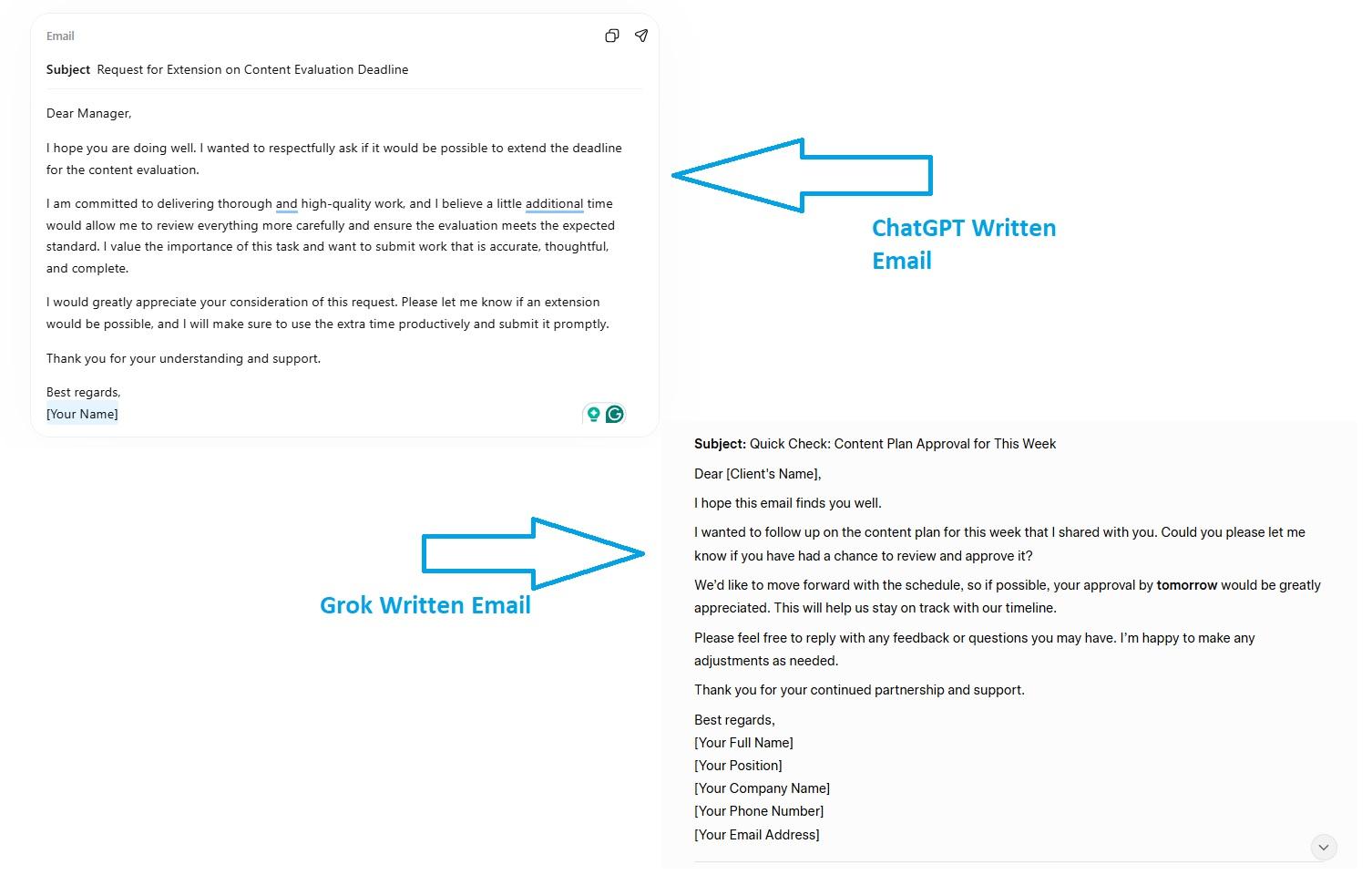
We tested both tools to draft an email for the following prompt: “Write an email asking my client if they have approved the content plan for the week by tomorrow.”
Here is a side-by-side ChatGPT vs Grok writing comparison. While both were professional, ChatGPT’s email was slightly more formal. Be the judge yourself.
Summarization and Content Simplification
Both ChatGPT and Grok have NLP (Natural Language Processing) capabilities and contextual awareness. This helps them convert dense texts or documents into easy-to-digest summaries. But their approach to summaries differs.
For instance, as Grok is renowned for its native X integration, which means it excels in real-time summaries with an edgy tone on live data from X, whereas ChatGPT has an edge in providing consistent and structured summaries from documents and internet data alike.
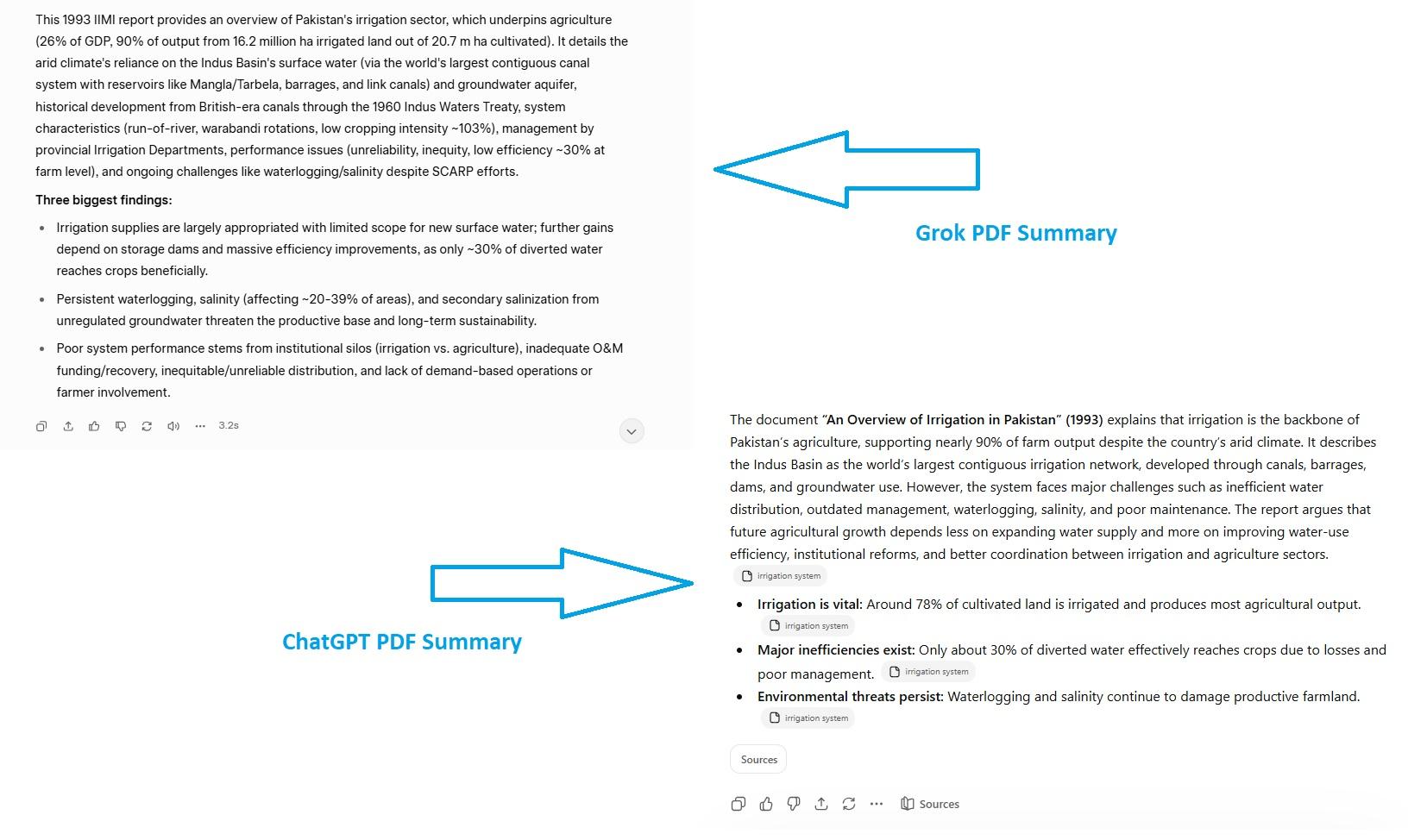
We tested both tools for a document summary using a prompt: “I uploaded a PDF. Summarize the entire document in one paragraph, and then list the three biggest findings as bullet points. Keep it under 100-150 words.” And here is a side-by-side comparison of both.
Coding and Technical Assistance
Both ChatGPT and Grok can do basic coding, from debugging to writing logic, and solving technical problems. Their multimodal capabilities allow you to analyze codes from images, diagrams, and UI designs for better problem-solving.
However, developers consider ChatGPT, especially the version-o3 and 5.2, superior in advanced coding, as it possesses deep reasoning capabilities. Plus, it has a mature coding ecosystem, which includes deep integration with development tools and extensive documentation for use cases.
In comparison, Grok excels in pulling real-time data, trends, and technical discussions from X. Yet, its ecosystem is less mature and restricted to X. One impressive thing about Grok 4 is its contextual awareness of different programming languages. So, whether you are running a web application in Java or a machine learning code in Python, Grok can help you.
Here is a performance benchmarking score of ChatGPT vs Grok coding.
| Benchmark | Grok-4 | GPT-5.1 | Measurement |
|---|---|---|---|
| SWE-Bench Verified | 74.9% | 76.3% | Real-world GitHub issue resolution |
We tested both ChatGPT and Grok's coding capabilities using the following test prompt
"Act as an Expert Frontend Developer and UI/UX Designer. Your task is to generate the complete code for a single-page "Modern Cafe POS (Point of Sale) Screen". The goal is to create a visually stunning, highly interactive iPad-style cashier interface.
Strict Technical Constraints (Must Follow):
- Single File: The entire project must be contained within a single index.html file. Use inline <style> and <script> tags. Do not link to external CSS or JS files (Google Fonts or FontAwesome are permitted).
- No External Images: Do not use <img> tags for external assets. Use CSS shapes, vibrant background colors, emojis, or icon fonts for all visuals.
- Desktop/Tablet Optimized: Design the layout primarily for a widescreen landscape orientation.
- Strict HTML Formatting Rules: * Under absolutely no circumstances should you use the <strong> tag anywhere in the document. You must use <b> tags for bold text where explicitly needed.
* You must include a small "Cashier Instructions" section (perhaps below the cart or in a modal). The steps in this section must be formatted exactly as <h5 class="step-fill">Step X</h5> (where X is the step number), and the explanation for that step must be in a separate, immediate <p> tag below it. Do not nest the <p> tag inside the <h5>.
Design & UI Requirements:
- Vibrant & Modern: The design should look like a premium, modern tablet app (think Square or Toast POS). Use a clean background, vibrant colors for categorization (e.g., warm colors for hot drinks, cool colors for iced), and soft drop shadows to make the buttons pop.
- Grid Layout: Use CSS Grid extensively to organize the main item buttons so they look perfectly aligned.
Functionality & Layout Requirements (The Visual Test):
The interface must include the following UI areas:
- Category Sidebar/Top Bar: Prominent, styled buttons for categories (e.g., "Hot Drinks", "Iced Drinks", "Pastries").
- Main Menu Grid: A large grid of chunky, colorful buttons representing items (e.g., "Espresso", "Caramel Macchiato", "Blueberry Muffin"). Each button must have a price label, an emoji/icon, and a smooth CSS hover animation (like a slight scale up or shadow increase).
- The Receipt/Cart (Right Sidebar): A distinct visual column showing a dummy current order. (It must list at least 3 dummy items. Each item row must visually include cleanly styled + and - quantity buttons and a price. At the bottom of the receipt, display a "Tax" and "Total" calculation area.)
- Checkout Action: A massive, visually striking "Pay / Checkout" button at the very bottom of the right sidebar. It should have a vibrant gradient or solid primary color, and clicking it should trigger a simple visual change (like updating the button text to "Processing..." for 2 seconds using JavaScript).
Final Output:
Provide ONLY the complete, functional HTML code block. Do not include placeholders; write out the full CSS and JS logic so I can copy, paste, and run it immediately in the browser to judge the UI."
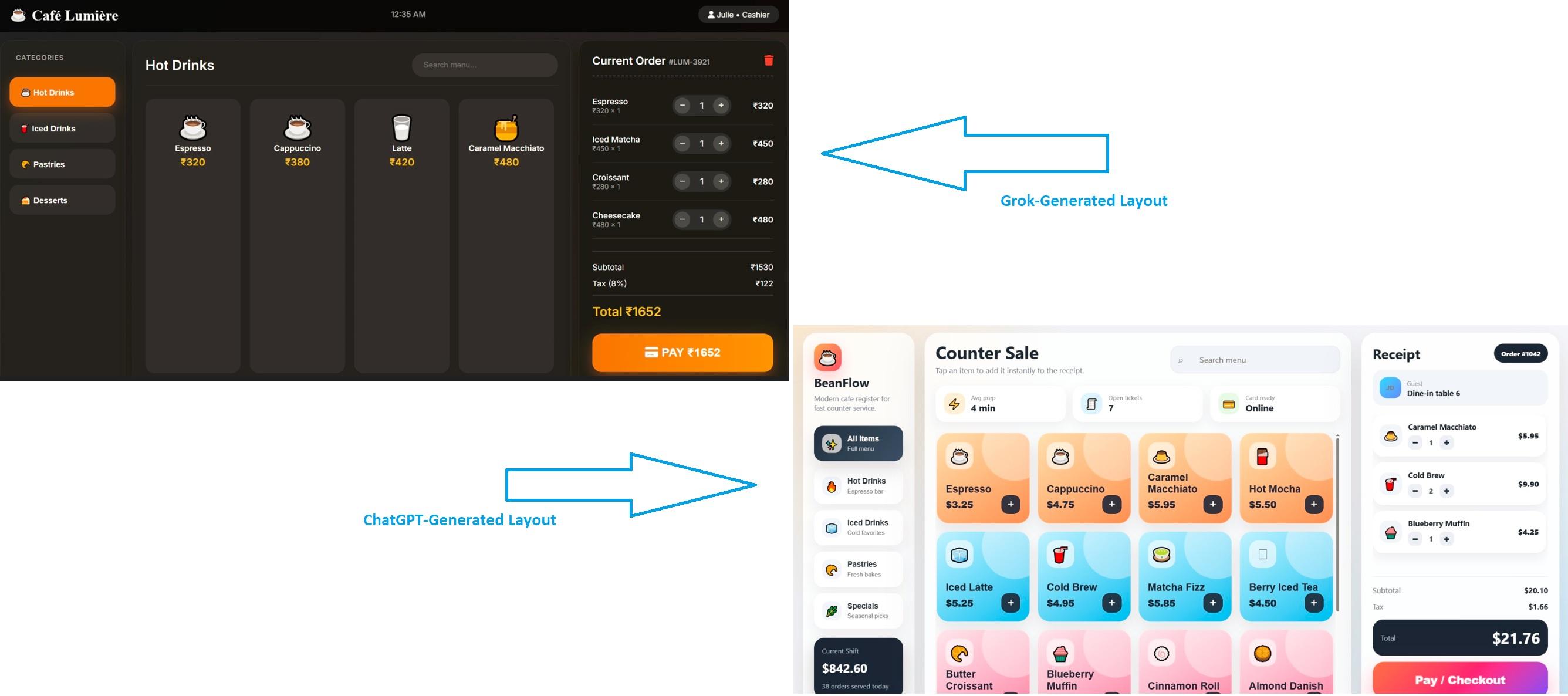
Grok's generated layout is functional. However, the layout is not fully optimized and lacks interactability. The menu boxes are unnecessarily long, space is not fully utilized, and the information does not add up to the users' experience.
In comparison, ChatGPT's generated UI feels clean and refined. It has color-coded menu items (blue for icy drinks, pink for pastries) and shows every single detail (from current sales to revenue generated in this shift).
Here is a side-by-side comparison of both.
Question Answering and Research Support
ChatGPT vs. Grok: Which is better for conducting research? While many would say ChatGPT, the answer is both. Both of these platforms are capable of research; the only difference is the kind of answers you are looking for.
For instance, Grok excels in retrieving current social media trends in real time. Its X integration helps social media managers, content directors, and journalists get answers about hot topics, social media news, and trending discussions. Its DeepSearch mode can also help you conduct broader research combining X resources and web search.
On the contrary, ChatGPT offers holistic research capabilities with its web browsing and data analysis. You can ask ChatGPT about any topic, and it will pull information from news sites, research papers, documents, and web articles. That’s not it. Researchers can also get insights from structured data and synthesize information from multiple sources. Though not the best, it is still superior to Grok in academic or business research.
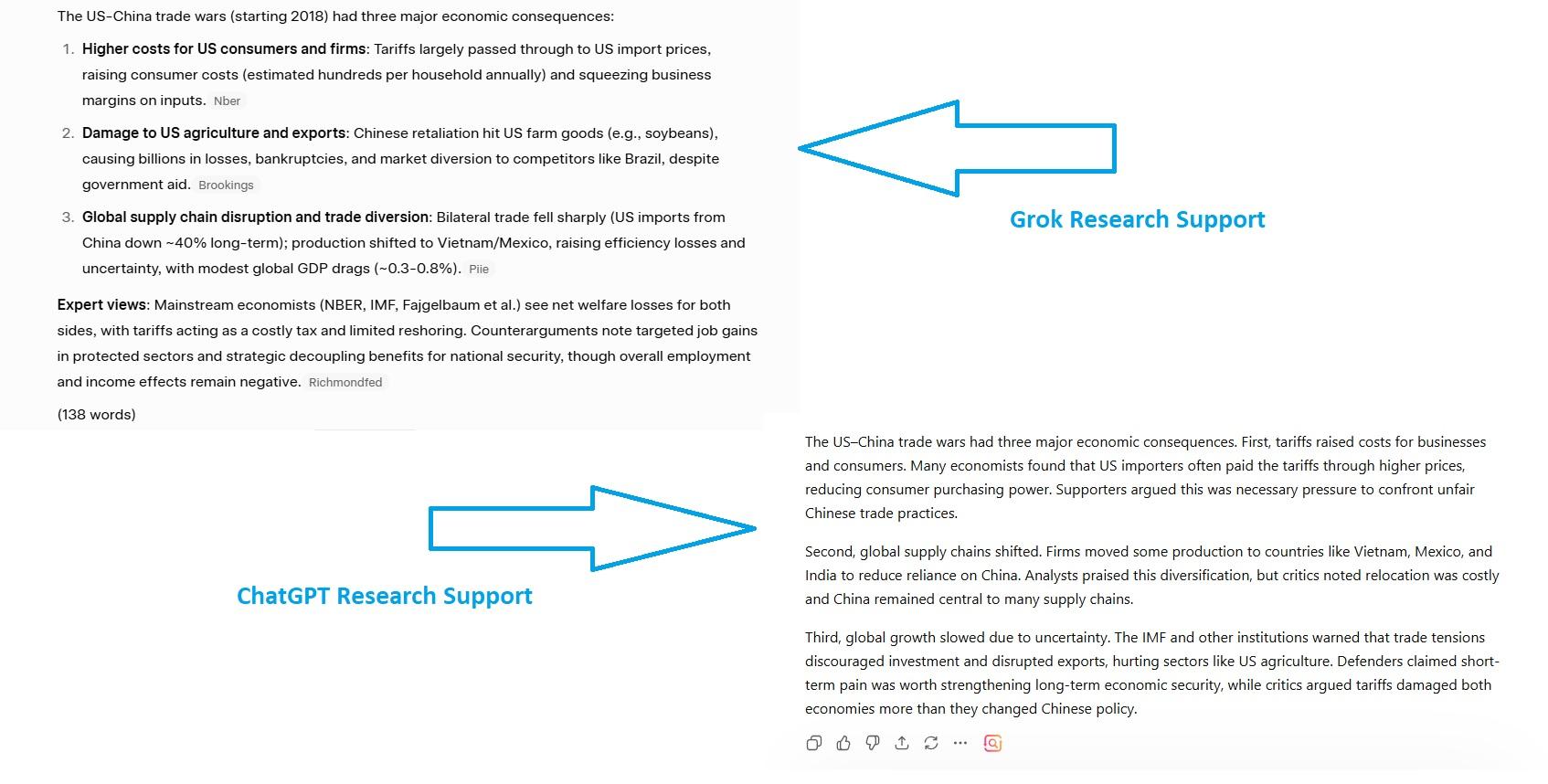
We tested both tools on a topic that is socially relevant yet educational in core. For this test, our prompt was “Analyze the three most significant economic consequences of the US-China Trade Wars. Include any opinions and counterarguments made by experts or economists. Keep the answer under 100-150 words”.
Here is a side-by-side comparison. More or less, the answers were similar.
Where Grok and ChatGPT Actually Differ: 8 Key Differences
Grok AI vs ChatGPT: how do they differ? Now that we’ve covered the shared ground of both AIs, it's important to see how they actually diverge in theory and practice. So, let’s check out and answer the most asked question: Is Grok better than ChatGPT or vice versa?
Design and Personality
Both ChatGPT and Grok are personality AI chatbots. However, their philosophies differ.
ChatGPT is your AI-driven general-purpose productivity partner who is friendly, polite, professional, and ready to help. It can draft your emails, sort your calendars, conduct research, and produce marketable assets. Rooted in reasoning and structured, this AI companion comparatively offers in-depth responses across domains. Simply put, ChatGPT is
- Neutral and consistent
- Applicable across domains
- Ideal for professional use
- Structured in reasoning
Grok, on the other hand, has a sarcastic, casual, and witty personality, developed to help you with real-time social media insights and raw conversations. Talking to it feels like interacting with humans on a Reddit thread. Unlike ChatGPT, Grok is opinionated and direct in its responses because it taps into ongoing conversations and data sources within X. In essence, Grok is
- Context-aware and conversational
- Closely relevant to trending real-world discussions
- Less formal and unfiltered
- Willing to engage in unconventional topics
Information Access and Knowledge Cutoff
ChatGPT and Grok both have different information centers. Grok largely relies on its native “live X integration” to retrieve data for responses. Getting data from X conversations, trending threads, and breaking news helps it identify public sentiments and opinions about edgy and hot topics.
Conversely, ChatGPT relies largely on web browsing and crawling to get current information. Hence, it excels in background information, in-depth analysis, and academic research. Another difference between Grok and ChatGPT is that advanced web browsing gives you responses backed by citations, making it reliable for business research.
Moreover, many wonder whether Grok vs ChatGPT has any knowledge cutoff. Turns out, Grok claims it has no hard cutoff, meaning it pulls live data from X and the web and interprets it in real time. But this freshness comes at the expense of proper sourcing. ChatGPT's newest model, GPT-5.4, has a knowledge cutoff of August 2025.
Context Window and Long-Context Reasoning
Grok vs ChatGPT: which has a larger context window? The answer: Grok. Grok 4.2 has a massive 2M context window, which helps it to analyze big datasets, long threads, and code libraries. In comparison, ChatGPT’s context window lies around 400K tokens.
However, context size does not alone reveal an AI’s reasoning capability. You also need to account for the context coherence. Simply put, it is the AI’s ability to maintain the reasoning quality throughout the conversation, as the context grows.
Here, GPT-5.4 might perform better, as its contextual memory and stable reasoning architecture show in long-context scenarios. This specific mode is also capable of monitoring relationships between distant elements of the input (technical specs, multi-document data, long research papers). While Grok 4.2 has a massive window, it mostly focuses on speed and immediacy, which is where reasoning tends to diverge.
Data Handling
As already discussed, Grok and ChatGPT differ in their data sources and handling. Grok primarily focuses on real-time data analysis and summaries via social media, and specifically Twitter. With Grok AI, you get faster and immediate live updates.
On the contrary, ChatGPT uses web data and extensive documents to produce structured analysis and summaries. It’s better for synthesizing large data consistently and producing data-driven responses.
Platform Ecosystem
Grok's ecosystem is newer and more focused on X, while ChatGPT benefits from years of development, resulting in a mature ecosystem of tools and integrations.
Most of ChatGPT's success comes from its extensive ecosystem, consisting of 1000+ plugins, third-party integrations, and the GPT store. With these connectors, ChatGPT interacts with external apps (Slack, Jira, Figma, Google, etc) and executes business tasks. Moreover, with the GPT store, you can build custom agents for customer service, sales, project management, and more.
In April 2025, Grok announced the xAPI, which would pull real-time X data (posts, threads, trends) and offer up-to-date insights. They’ve since released model variants, including Grok 4, Fast, and Heavy.
Performance Benchmarking
Performance benchmarking is yet another differentiator between ChatGPT and Grok. For instance, these two AI models are tested on different benchmarks.
For instance, Grok focuses more on EQ-bench (emotional intelligence), creative writing, and the quality of the conversations. In contrast, ChatGPT focuses on professional coding tasks (SWE-bench), science reasoning, and knowledge work (GDPval). Both tools excel in their specific domains.
ChatGPT Offers More Useful Features
Aside from basic AI chatbot features, ChatGPT offers additional useful capabilities. Here are some of them.
- Codex, an OpenAI coding agent, was integrated into ChatGPT for autonomous software engineering. Beyond basic coding, it can execute end-to-end tasks, such as complex refactors and migrations.
- Canvas, a parallel workspace within ChatGPT, for collaborative writing and coding. It lets you highlight sections in the AI-generated text, use tools to revise the output, and directly edit within the ChatGPT interface.
- Agent Mode is where your AI acts as a digital assistant, keeping tabs of everything from executing business tasks to researching and booking events. Executives use it to break down their workday into actionable steps to easily manage work and personal life.
- Users' freedom to build custom GPTs. These are specialized ChatGPT agents programmed to perform specific tasks, including sales, customer support, marketing, etc.
Over time, Grok has also ventured into a few areas (image generation, video generation, and now, automation features). However, project features and automations are included in expensive plans. Here, Grok deploys multiple agents simultaneously to solve problems.
Grok Does Not Believe in Content Restrictions
Grok has minimal content restrictions, meaning it will answer questions that other AI tools are filtered to block. This is what Grok calls “anti-woke” stance, where the AI is more willing to engage in contentious, debatable, and controversial topics with unfiltered responses. This approach to queries appeals to people who want to identify public opinion and conversations on such topics.
Where Grok and ChatGPT Both Fall Short for Business Execution
Grok vs ChatGPT: which AI excels in business workflows? Many would say ChatGPT. But the truth is, not entirely. It may help executives with detailed data analysis, content production, business research, and visual generation. However, this is not enough for multi-step workflows, and this is why.
Manual Prompting Slows Down Workflows
Interactions with Grok and ChatGPT start from scratch. Every time you write a detailed prompt manually, and the AI responds accordingly, regardless of its memory. No saved workflows and no idea of how it wrote an email for you last Tuesday.
Let’s say your team’s week goes into generating project progress reports, client proposals, outreach emails, and tracking a calendar. So, each time, one member from your team has to reconstruct the command, edit the output, and carry on with the lengthy conversation.
And, when your startup tries to scale, consistency fails. When multiple people give independent prompts, the results become fragmented, hence, no coherence in workflows and messaging.
For instance, a marketing director would write an in-depth prompt with proper detailing about the audience, goals, and objectives. Whereas a junior assistant might write a three-sentence prompt. Both are right, as there are no set standards, but the output is different.
Lack of Structured Task Ownership
Neither ChatGPT nor Grok knows who is on the other side of the screen - their roles, duties, or what function they serve. Whether it is someone from the marketing team or customer support, everyone accesses the same blank interface and capabilities.
The result: a lack of structure that leads to ambiguity in roles and eventually, scattered workflows.
Imagine you are to launch a marketing campaign. The input for this campaign would be cross-functional, including a product brief, proposal for the client, marketing strategy, and compliance review. But there is no structure to who handles what. Anyone can do anything.
From afar, it might feel like flexibility, but it is actually a hurdle to your operations. Unfortunately, Grok vs ChatGPT bypasses this structure. They just react and produce assets without knowing whether the legal team has approved the content. This unawareness of the roles, expertise, or authority makes these two platforms less effective for a coordinated business.
Limited Memory and Context Across Workflows
Both ChatGPT 5.4 and Grok 4.2 have persistent memory. But what they remember does not concern your business operations. These tools carry details that are personal. For instance, it might be recalled that you like concise responses and that you work in the service industry.
One may argue that ChatGPT’s project memory might excel in a ChatGPT vs Grok context battle. But it is more like a flat list of facts (with limited storage space). Businesses require navigating between millions of data points across departments. And, what this memory can’t do is remember the entire context of your ongoing operations, from the client’s guidelines to special briefs, feedback surveys, and decisions you took earlier.
Plus, ChatGPT and Grok’s memory is user-specific, which means one employee's memory is not shared with others, compromising context and clarity. There is no concept of a single brand voice, unanimous project guidelines, and so on. A support rep has no idea what context the marketing team has established for the brand.
Not Built for End-to-End Execution
Grok vs ChatGPT: which is better at end-to-end task execution? The answer: neither. Both these AIs are conversational chatbots, meaning they are tasked to do certain actions, such as responding to customer queries. But it’s not the same as executing an entire task sequence that looks something like this.
A customer complains on your portal. A sales rep interprets it and drafts a response, logs the problem, and updates the entry into CRM. After this, he notifies the relevant team and closes the ticket. Grok and ChatGPT have limited usability in this scenario, which only goes up to writing a response. Everything else is done manually or through advanced automations.
How Sintra AI Turns ChatGPT and Grok into an AI Team?
Running a business and aiming to scale it in the future? It's time to look beyond Grok AI vs ChatGPT. Neither ChatGPT nor Grok qualifies to run a coordinated business, regardless of size. For this purpose, you need an all-rounder AI that goes beyond chatbots and acts as an execution layer to automate your routine business operations.
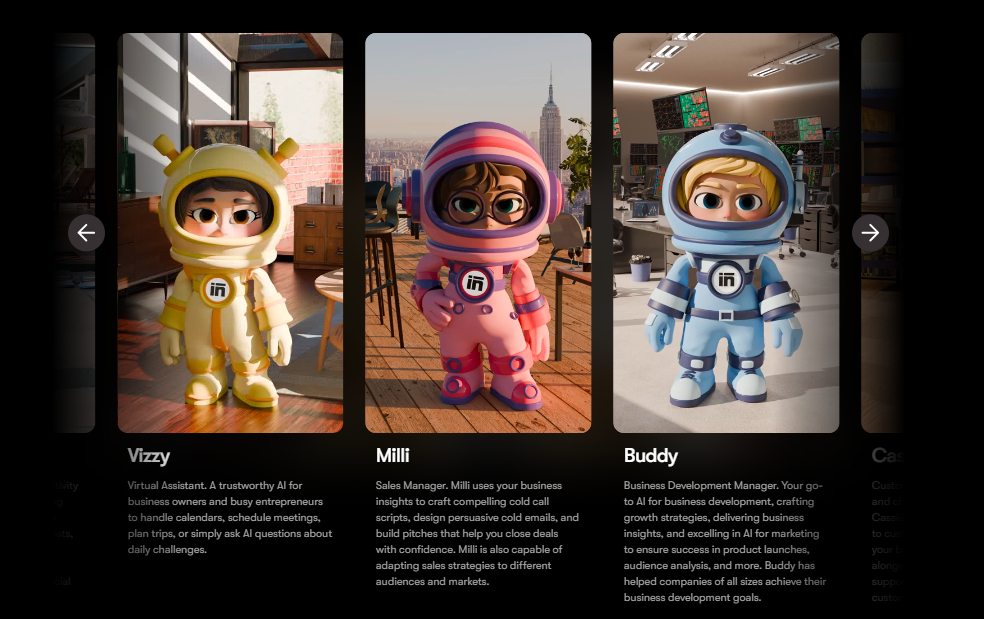
This is where Sintra AI helpers come in. These specialized AI helpers have useful integrations and a knowledge business space. Let’s visualize these helpers in action.
Role-Based AI Helpers for Every Business Function
Anyone aiming to automate business operations with contextual awareness must go beyond the Grok and ChatGPT debate. They may have an interface to help you with personal productivity. But Sintra AI acts as an expert across domains, thanks to its role-based AI employees.
Each of these agents specializes in a business domain: marketing, customer support, sales, writing, and more. Beyond their expertise, you can train these AI helpers on your brand data (client guidelines, brand voice, customer feedback, etc). So, understanding your priorities, language, and output requirements, they act just like how you want.
For instance, your AI marketing helper is not a generic chatbot like ChatGPT or Grok, which is prompted to think like a marketer. It’s already an expert in that. It can handle your marketing execution end-to-end, from approving content briefs to messaging audiences and producing content, all while communicating with other AI helpers.
So, no more context switches within the team. Any member using these helpers (trained on particular data) will produce similar output every time, regardless of the employee’s skills.
Shared Memory with Brain AI for Consistency
The problem in the Grok AI vs ChatGPT memory debate was that the context was limited and only specific to individual users. Sintra AI resolves this issue with a shared business memory called Brain AI. Think of Brain AI as your digital brain that carries every detail about your business (vision, objectives, projects, client guidelines, brand priorities, tone, and decisions).
So, whenever you interact with an expert helper from the AI team, it pulls the context from this shared knowledge space and produces consistent output. Prompt a marketing helper to launch an outreach campaign, and it will connect with Brain AI to pull your project details, brand voice, and other details. Plus, when a new employee gets on this project, he is not starting from zero.
Built-In Integrations That Enable Real Execution
Sintra AI picks up where Grok and ChatGPT fail, all thanks to its third-party AI integrations. These integrations let your AI helpers connect with tools businesses already run on, including Google Workspace, Notion, Slack, and more. Once connected, these helpers automate entire multi-step complex task sequences. And, you don’t have to paste the output from the chat.
With these integrations in place, a support helper is directly responding to customers on the website and entering their information into the CRM. A marketing helper is planning and launching lengthy campaigns on its own, and more.
Real Business Use Cases and Outcomes
Beyond Grok AI vs ChatGPT, here is what real execution with Sintra AI’s role-based helpers looks like.
A mid-sized e-commerce agency that handles numerous tickets daily, and any inconsistency in the customer responses can cost it a fortune. Unlike ChatGPT or Grok, which produce answers independently, Sintra’s customer support specialist, Cassie, connects to your Gmail and website to process incoming queries, compare them with your brand details, and answer independently.
Similarly, a marketing startup is managing multiple campaigns across emails and popular social media channels. Using multiple marketing tools in addition to multiple prompting sessions of ChatGPT or Grok comes with a lot of context switching and inconsistencies. Sintra’s suite of marketing tools (social media manager, copywriter, email assistant, and business strategist) helps you manage everything from one window, while staying true to your brand voice.
Moreover, a sales team that manages a high volume of pipelines is struggling to send personalized outreach and follow-up messages at scale. Tools like ChatGPT might help generate these emails in bulk. However, there will be a lot of copy-pasting, which takes time. To resolve this, Sintra’s email assistant, Emmie, automates follow-ups and outreach messages, personalized to individual leads and customers.
ChatGPT vs Grok: Which Should You Choose?
If you are still confused about ChatGPT vs Grok, understand their objectives. Grok is a socially-driven AI that helps you with social intelligence, real-time information access, and unconventional perspectives. Whereas ChatGPT is your personal/ executive productivity partner to brainstorm ideas, analyze data, produce content, and generate visuals.
Here is a quick rundown of when to choose which AI.
Choose ChatGPT
ChatGPT is your best bet for the following.
- Polished Content Writing: ChatGPT excels at writing professional, academic, and marketing content that holds up under scrutiny. This may include technical reports, client proposals, investor updates, product descriptions, and more. Turn to its deep thinking mode to get access to reliable sources and fact-check before you publish.
- Managing Multi-Step Tasks: ChatGPT’s comparatively deeper reasoning and logic can process complex prompts well. Plus, it has a deep integration with Google Workspace, making it ideal for multistep workflows like creating business presentations, managing spreadsheets, and more.
- Building or Reviewing Codes: ChatGPT’s Codex has an innate advantage over Grok when it comes to accuracy. It explains logic better, writes code, provides working examples, and integrates easily into the development workflows.
- Strong Image Generation: ChatGPT’s generated visuals are hyper-realistic, which works ideally for marketable content.
- Data Analysis: ChatGPT has an edge over Grok when it comes to multi-format file support. It interprets and visualizes your professional data with charts and graphs, giving you easily digestible insights from data-intensive documents.
Choose Grok
Is Grok better than ChatGPT? Yes, if you need an AI for the following requirements.
- Real-Time Social Intelligence: Grok’s xAPI integration lets it directly tap into X, giving you live updates and streams of public posts. This real-time data access into social trends helps you track sentiments, track breaking news, or understand cultural dynamics as they are happening in the real world.
- Off-Limit or Difficult Questions: Unlike other AI tools that outright reject difficult and controversial topics, Grok answers them immediately. It might be an ideal choice for research that taps into public discourse, censorship, and cultural dynamics. Grok also features a fun mode that offers a witty and edgy persona, allowing for more humorous and controversial interactions compared to ChatGPT.
- Unfiltered Perspective: Grok has an informal, witty, and sarcastic personality, which means it’s the best partner for unfiltered conversations. Writers, marketers, and designers can benefit from this cheeky yet socially relevant idea process.
- Fast Ideation: Grok excels in rapid prototyping and brainstorming, especially in creative projects. Plus, its personality-driven anti-woke answers help you think outside the box and explore unconventional angles.
- Basic STEM Solutions: Grok offers immediate answers to quick mathematics, physics, and logic puzzles. Its Brain Mode outperforms competitors in technical reasoning.
Ready to Turn AI Into Real Work?
Still confused about which AI to choose: Grok vs ChatGPT? Follow this rule. If you need help with professional or personal productivity (handling documents, sorting calendars, communicating), try ChatGPT. But, if you need a cheeky AI to answer all your socially-relevant answers from X or want to explore unconventional, sensitive topics, choose Grok.
However, if you are running a business, neither of these two is adequate. A coordinated business needs all-rounder automation solutions like the Sintra AI team with agentic capabilities and a shared memory. Get started with Sintra AI today and see how it goes.
Grok vs ChatGPT FAQs
Is Grok better than ChatGPT in 2026?
In 2026, the choice of whether Grok is better than ChatGPT depends on your unique requirements. Grok excels in real-time social intelligence, meaning it connects with X to give you live insights into social trends, breaking news, and pop culture. That said, it might not be a better choice for an executive's productivity than ChatGPT.
What is the main difference between Grok and ChatGPT?
The main difference between xAI’s Grok and OpenAI’s ChatGPT is their data sources and design philosophy. ChatGPT is a friendly and polite AI assistant that connects to web data and your uploaded documents to resolve problems and execute tasks. In comparison, Grok is an edgy AI that pulls real-time social exchanges from X. Both are capable of writing content, producing images, and summarizing data.
Which is more accurate, Grok 4.3 or GPT-5.5?
Accuracy depends on the benchmark. Grok 4.3 Beta scores higher on some STEM and technical-reasoning tests, while GPT-5.5 leads on real-world coding (SWE-Bench Verified: 76.3% vs 74.9%), structured knowledge work, and data analysis. For most business tasks that need reliable, well-sourced output, GPT-5.5 is the safer pick; for fast STEM reasoning and real-time context, Grok 4.3 holds its own.
Can Grok replace ChatGPT for business use?
No, although growing and despite huge marketing, Grok can still not replace ChatGPT for business use. This is because Grok is not meant for that. Instead, Grok's personality-driven approach appeals to users who want an AI that engages with controversial topics, while ChatGPT takes a balanced and safety-conscious approach.
Is Grok or ChatGPT better for coding?
ChatGPT is generally better for coding. Its Codex agent handles debugging, refactoring, and end-to-end engineering tasks, and it scores higher on SWE-Bench Verified (76.3% vs Grok’s 74.9%). Grok can write and run code and is strong at pulling real-time technical discussions from X, but its developer ecosystem is less mature. For serious development work, most developers choose ChatGPT.
Related articles