ChatGPT Plus vs Pro: Is Upgrading Really Worth It?

Table of Contents

Quick Answer
ChatGPT Plus ($20/mo) handles 90% of everyday AI needs just fine, like writing, research, light coding, and general tasks. Most people don't need more than this. Whereas ChatGPT Pro ($200/mo) is for power users who regularly hit limits and need maximum reasoning depth. There's now also a $100 Pro tier (launched April 9, 2026) as a solid middle ground for growing workflows.
You're mid-project. Your AI hits a limit. Everything stops.
That's the exact moment most people start Googling chatgpt plus vs pro. Not out of curiosity, but out of frustration. And that frustration is completely valid. When AI becomes part of how you work every day, a message cap feels like someone yanking the power cord from your wall.
We've tested both plans hard. We've hit limits, waited for resets, pushed models through heavy workflows, and watched where the cracks show. Here's the honest breakdown, no hype, no filler, so you can decide whether the price jump is worth it for your actual work.
A Quick Glance: The Main ChatGPT Plus vs Pro Difference
Breaking Update (April 23, 2026): OpenAI just released GPT-5.5 (internally codenamed "Spud"); the first fully retrained base model since the 4.5 era. This changes the Plus vs Pro comparison significantly, and you will see its reflection here too.
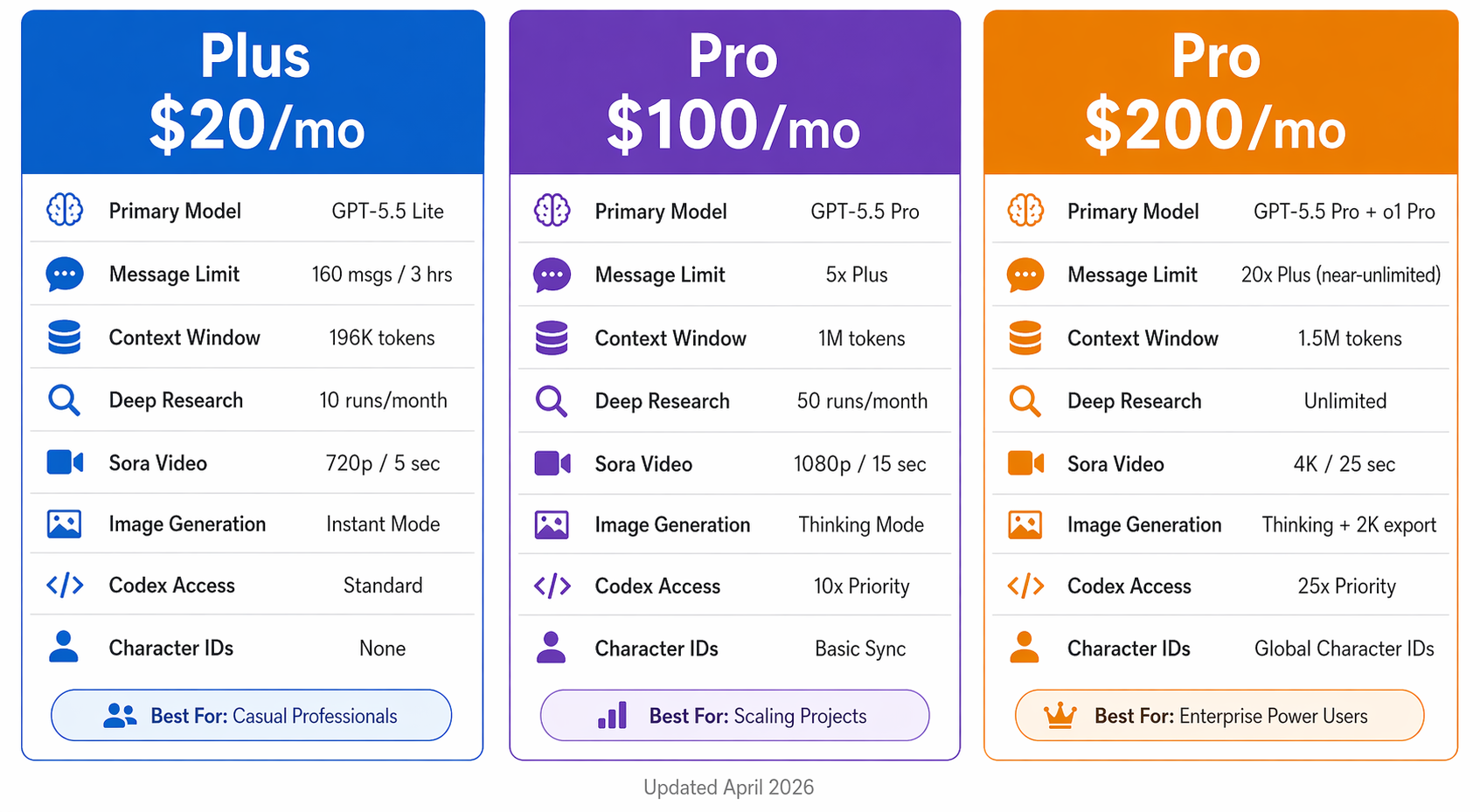
ChatGPT Plus vs Pro: Full 3-Tier Comparison Table:
Data verified as of April 24, 2026, following the release of the GPT-5.5 System Card.
| Feature | ChatGPT Plus ($20/mo) | ChatGPT Pro ($100/mo) | ChatGPT Pro ($200/mo) |
|---|---|---|---|
| Primary Models | GPT-5.5 Lite / Thinking | GPT-5.5 Pro | GPT-5.5 Pro + o1 Pro |
| Message Limits | ~160 msgs / 3 hours | 5x higher than Plus | 20x higher (near-unlimited) |
| Context Window | 196K (Thinking mode) | 1M tokens native | 1.5M tokens native |
| Deep Research | 10 runs/month | 50 runs/month | Unlimited |
| Sora (Video) | 1,000 credits (5s max, 720p) | 5,000 credits (15s max, 1080p) | 10,000 credits + 4K renders |
| Image Generation | Images 2.0 Instant Mode | Images 2.0 Thinking Mode | Images 2.0 Thinking + 2K export |
| Character Sync | Not available | Basic sync | Global Character IDs |
| Codex Access | Standard | 10x priority | 25x priority |
| File Uploads/Session | Limited | High | Up to 80 files |
| Agentic Tasks | Basic | Moderate | Full GPT-5.5 Agentic Mode |
| Best For | Casual professionals | Scaling projects | Enterprise power users |
The $100 tier is no longer a rumor or a soft launch. It's now an official, fully supported plan that fills a real gap for teams that have outgrown Plus but can't justify $200 yet. Such a great step it is!
Why Are People Comparing ChatGPT Plus and ChatGPT Pro?
AI isn't a toy anymore. It's infrastructure.
The ChatGPT Plus price 2026 of $20/month is still one of the best deals in software. But as people build real workflows around AI, such as analyzing reports, writing code, and running deep research, they start running into walls. Those frustrating message limits and slower responses. Also, the model "forgets" the beginning of a long conversation.
That's when the "Is Pro worth it?" question becomes urgent.
Here's what's driving the comparison in 2026:
- AI usage has exploded across industries. From solo freelancers to enterprise teams, it's no longer optional for competitive businesses.
- People aren't just chatting with AI anymore. They're running production workflows through it.
- OpenAI restructured its entire plan lineup in April 2026, adding a $100 tier and releasing GPT-5.5.
- The gap between Plus and Pro just got bigger, not smaller.
The pain isn't the price. The pain is the interruption. When your AI stops mid-project and tells you to wait three hours, that's a productivity tax nobody talks about, honestly.
Model Access: What You Actually Get With Plus vs Pro?
This is where most comparison articles get it wrong. They list specs. We're going to tell you what those specs feel like when you're actually working.
Model Access Overview
Up until April 23, 2026, the model gap between Plus and Pro was meaningful but manageable. Then GPT-5.5 dropped, and everything shifted again.
ChatGPT Plus ($20) now gives you:
- GPT-5.5 Lite: fast, capable, a significant jump from 5.4 for everyday tasks
- GPT-5.5 Thinking: slower and more deliberate, good for complex single questions
ChatGPT Pro ($100) gives you:
- GPT-5.5 Pro: the full-power version, not the speed-optimized Lite variant
ChatGPT Pro ($200) gives you:
- GPT-5.5 Pro: same as the $100 tier
- o1 Pro: exclusive to the $200 plan, built for sustained deep reasoning across extended sessions
April 2026 Update: With the release of GPT-5.5 on April 23, 2026, the gap between Plus and Pro has widened again. While Plus users get the new 5.5 architecture for faster everyday chatting, both Pro tiers give you the "Full-Power" GPT-5.5 Pro version. This model just set a new industry record on Terminal-Bench 2.0, scoring 82.7% on complex coding tasks autonomously. In production workflows, it's the difference between a model that finishes the job and one that hands it back to you halfway.
The ChatGPT Plus features are genuinely strong, don't get us wrong. But the gap between "smart enough" and "reliable under real pressure" matters enormously when your output depends on it.
Think of it this way: Plus is a brilliant junior hire. Pro is a senior engineer who spots problems before they ever become your problem.
Key Takeaway
Plus gives you GPT-5.5 in its speed-first form. Pro gives you the full-power version, which means more compute, stronger instruction-following, and agentic intelligence that plans and self-corrects without you pushing it every five minutes.
GPT-5.5: The "Agentic" Shift That Changes Everything
This deserves its own section because it's not just a model upgrade, it's a behavior upgrade.
GPT-5.5 is OpenAI's first model officially described as "Agentic." Here's what that actually means in practice:
How older models worked (GPT-5.4 and earlier):
- You ask → it answers → you ask again → it answers again
- Every step requires your active input
- Long projects required constant hand-holding to stay on track
How GPT-5.5 Pro works (Pro tiers):
- You give a goal → it builds a plan → it executes the steps → it checks its own work → it keeps going
- You can step away from a complex task and come back to real progress
- It flags blockers instead of silently going in the wrong direction
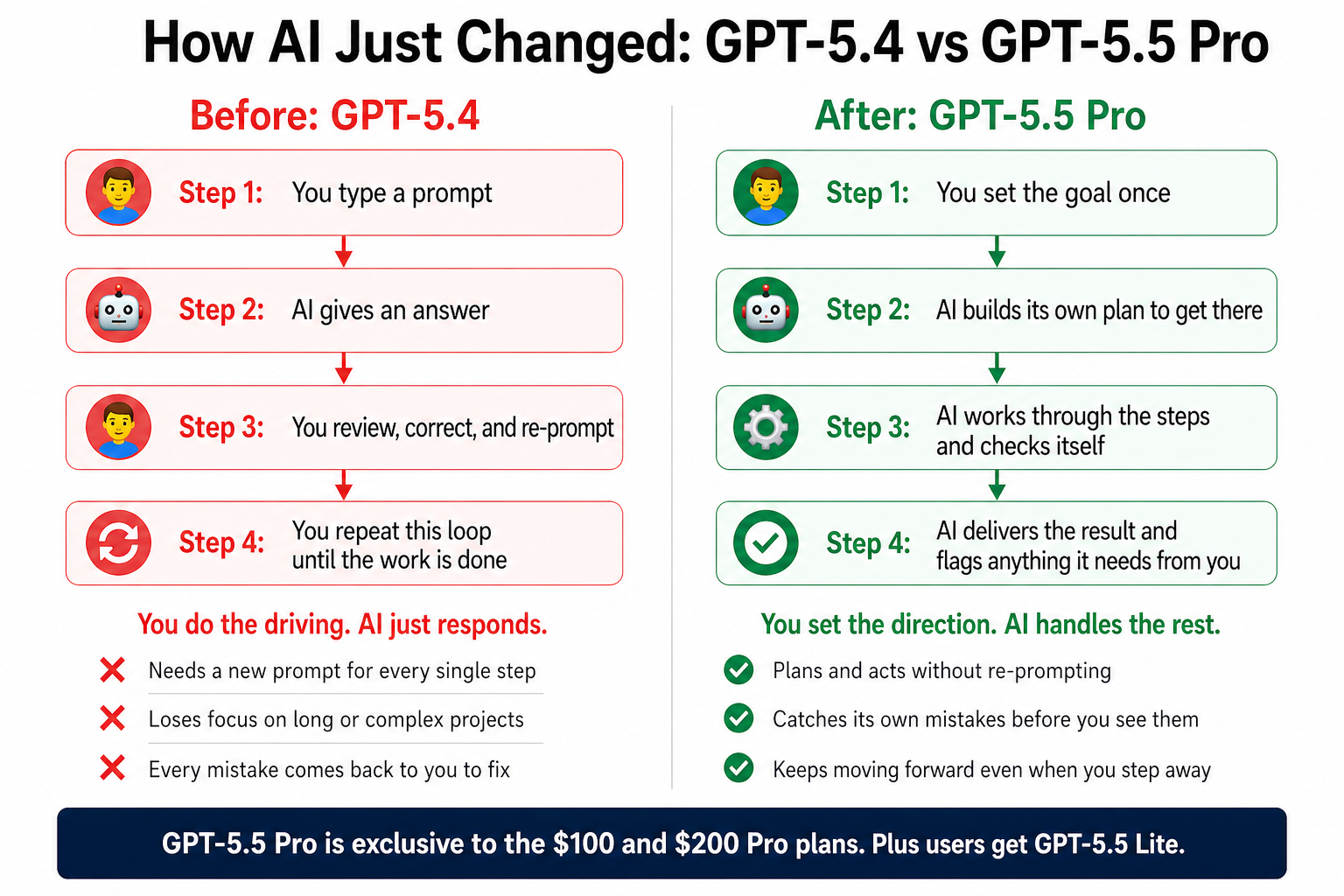
The practical result: GPT-5.5 Pro now achieves a 78.7% success rate in OSWorld benchmarks, meaning it can operate a computer independently to complete real tasks such as managing spreadsheets, filing data, or navigating software. That score actually surpasses the human baseline for those specific tasks.
On the $20 Plus plan, you get GPT-5.5 Lite. It's meaningfully smarter than anything from last year. But the agentic behavior is dialed back; it still needs you at the wheel for every turn.
Reasoning Performance Differences
Here's where ChatGPT Pro pulls ahead in ways you feel in real work, not just in benchmarks.
When you throw a complex, multi-layered problem at o1 Pro on the $200 plan, it doesn't rush to give you an answer. It builds a plan. It tests the logic. It checks for errors before showing you anything.
Real situations where this matters:
- Multi-step code debugging, one wrong variable five files deep can cascade. Pro tracks it.
- Academic and scientific research, layered citations, conflicting data, nuanced conclusions. Pro synthesizes without oversimplifying.
- Legal or financial documents, one wrong assumption can cost real money. Pro is built to catch those before they reach you.
- Strategic planning, competing variables, second-order effects, scenario mapping. Pro handles these without losing the thread.
Both ChatGPT Plus and Pro plans provide access to reasoning-optimized models, but Pro users receive significantly more compute allocation and higher operational limits, and with GPT-5.5, that allocation gap is larger than ever.
Multimodal and Advanced Tool Access
In 2026, both plans include image and video tools. The real question is how much access you actually get and at what quality level.
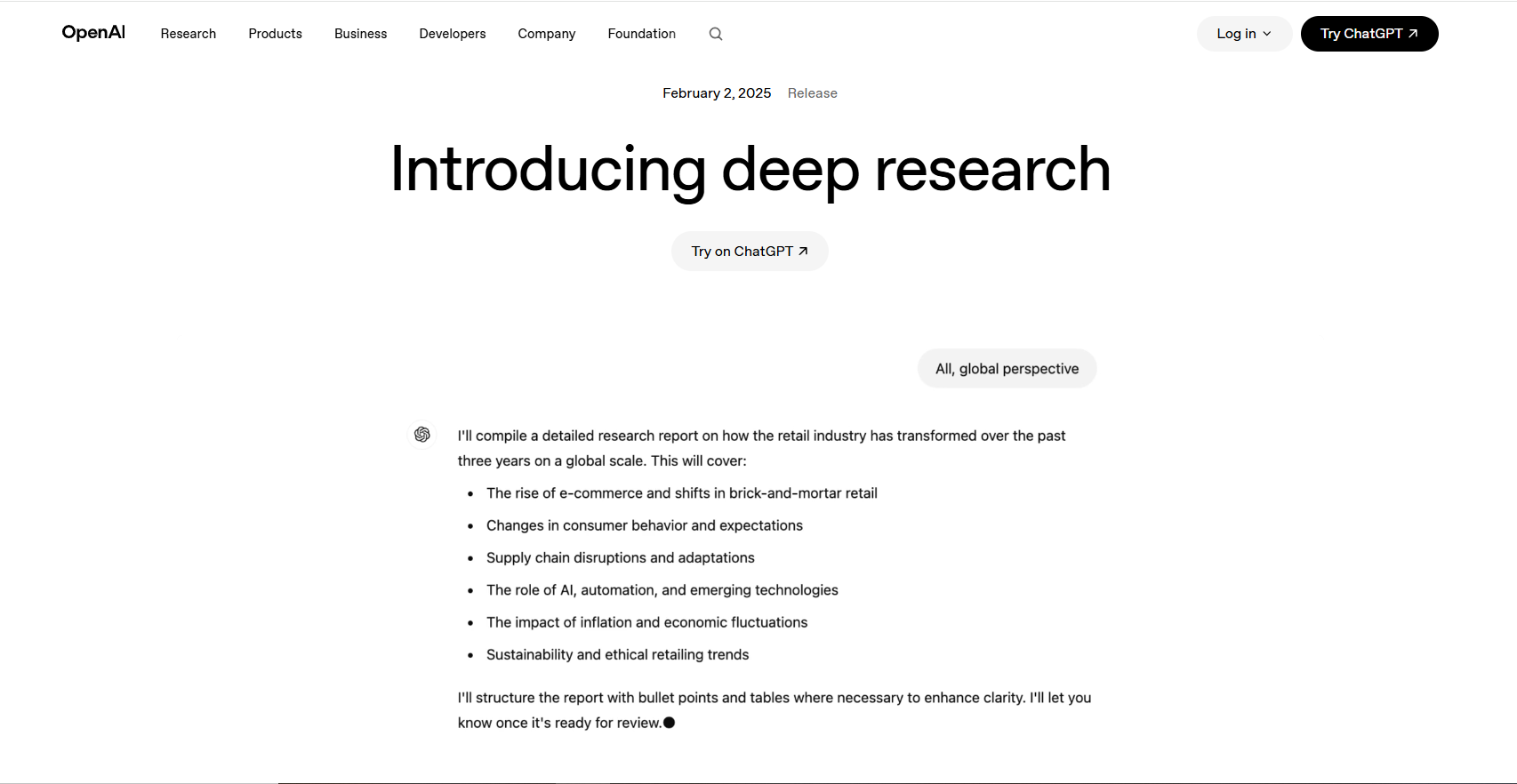
Deep Research
- Plus: 10 runs per month; enough for occasional research spikes
- $100 Pro: 50 runs per month; covers most regular research workflows
- $200 Pro: Unlimited; if research is a core part of your job, this alone can justify the plan
Sora 2 (Video Generation)
The credit system is now the key differentiator:
- Plus: 1,000 monthly credits (~12 videos at 720p, max 5 seconds per clip)
- $100 Pro: 5,000 credits (15-second clips, 1080p output)
- $200 Pro: 10,000 credits + Unlimited Relaxed Mode + 4K rendering (the only tier with 4K, and no watermarks)
If you produce video content for clients, social campaigns, or brand assets, the Sora upgrade alone can justify the Pro cost, especially with 4K output on the $200 plan.
Visual Production: Sora 2 and Images 2.0 Capabilities
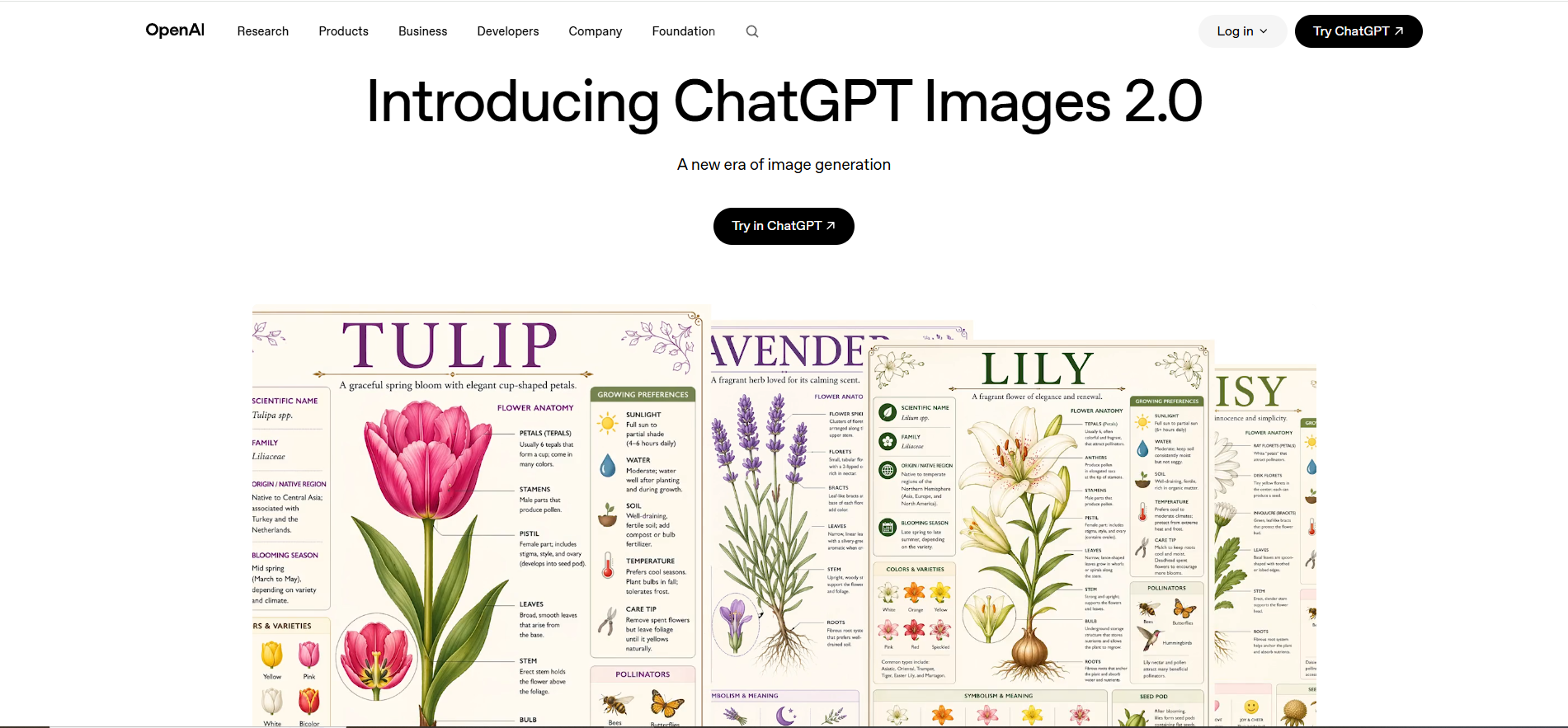
2026 is the year AI stopped being a "cool picture generator" and became a real production pipeline. The release of ChatGPT Images 2.0 (also called gpt-image-2) on April 21, 2026, introduced something genuinely new: Visual Reasoning!
Instead of just generating an image from your prompt, the model now plans the layout before it draws. Like a designer who sketches a wireframe before opening their design software.
Images 2.0 — Plus vs Pro breakdown:
| Feature | Plus | $100 Pro | $200 Pro |
|---|---|---|---|
| Image Mode | Instant Mode | Thinking Mode | Thinking Mode |
| Images Per Prompt | 1–2 | Up to 4 | Up to 8 consistent images |
| Max Resolution | Standard HD | HD | 2K (2560×1440) — production ready |
The 8-Panel Rule ($200 Pro exclusive): In a single prompt, you can generate up to 8 images that are visually consistent; same style, same characters, same lighting. This is the feature ad agencies, comic creators, and storyboard designers have been waiting for. Plus simply can't match this reliably.
Character Consistency — The March 2026 Update:
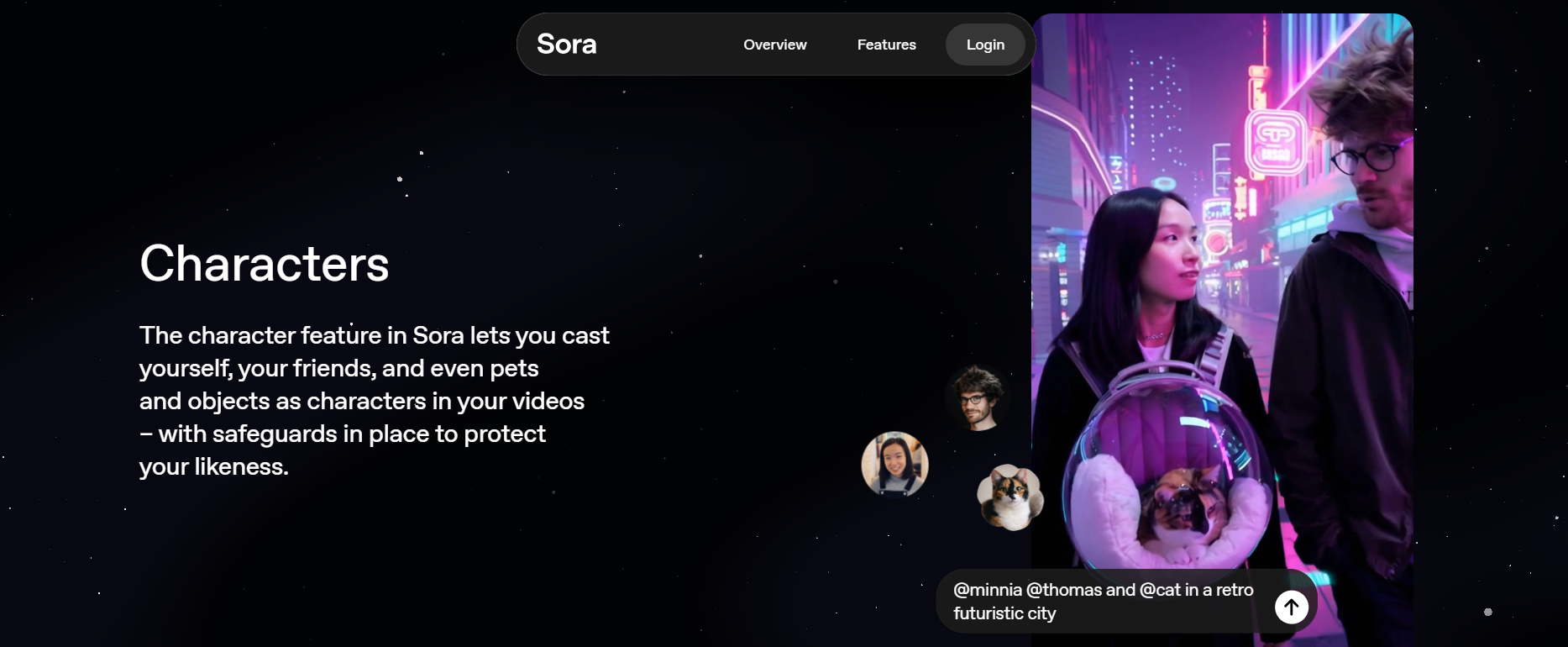
A major update introduced Global Character IDs on the $200 Pro tier. Here's the actual workflow:
- You design your brand mascot or character once
- Pro saves a unique "Character ID" for that design
- Every future image and every Sora video pulls from that ID automatically
- Your character looks identical across every format: photo, illustration, short-form video, campaign ad
For brand builders and agencies, this changes the game. Without Character IDs, you're essentially starting from scratch every time you generate a new visual. The $100 Pro tier gets basic character sync, consistent within a session. The $200 tier makes consistency permanent and cross-platform.
Why Model Access Matters for Power Users?
For professionals, model access comes down to one thing: reliability when the stakes are real.
A power user cannot afford for the model to "get lazy" mid-task. The additional compute allocated to Pro models ensures that, even during OpenAI's peak server hours, reasoning quality remains consistent. On Plus, you occasionally get "good enough." On Pro, especially with GPT-5.5 Pro's agentic design, you get a model that actively monitors its own output.
That consistency across hours, sessions, and your full workday is what separates a useful tool from dependable infrastructure.
Usage Limits and Capacity Differences
Every plan has a cap. The difference between ChatGPT Plus and Pro is how quickly you hit it and how painful it is when you do.
Message Volume and Session Capacity
The chatgpt pro vs plus difference is most immediately felt here.
- Plus: ~160 messages every 3 hours. For casual use, plenty. For a developer deep in a debugging session? Gone in under an hour.
- $100 Pro: 5x higher — enough for full professional workdays without interruption
- $200 Pro: 20x higher — it is nearly impossible for a single human to hit the message limit on the $200 Pro plan during a normal workday
The 3-hour reset on Plus isn't just annoying. It's a momentum killer. Imagine being three-quarters through a complex analysis and having to stop, wait, and reload all your context. That lost flow is very hard to recover.
Large Prompt Handling
Context window size determines how much your AI can hold in mind at once.
- Plus: 196K tokens in Thinking mode, it's a real improvement from earlier iterations
- $100 Pro: 1M tokens native
- $200 Pro: 1.5M tokens native, it's the largest context window available in any consumer AI plan as of April 2026
What does this mean in real terms?
- Analyzing a 200-page technical manual? Plus handles solid chunks, but the $200 Pro ingests the whole thing in one turn at 1.5M tokens.
- Reviewing a large codebase? The context window for ChatGPT Plus means it starts losing track of earlier files sooner. Pro holds significantly more in mind simultaneously.
- ChatGPT Pro offers a significantly larger context window, enabling users to work with more extensive documents and maintain longer conversations without losing context. The jump from 1M to 1.5M on the $200 tier is the biggest single upgrade in this spec since the product launched.
For legal professionals, researchers, and engineers who work with large documents every day, this spec matters more than almost anything else on the list.
Heavy Reasoning Workloads
When you use Extended Thinking mode on Plus, the daily limits tighten considerably; sometimes to just a few dozen high-complexity prompts per day.
Pro removes that friction at both tiers:
- No throttling during high server demand
- No silent downgrade to a lighter model when things get busy
- Sustained, full-power reasoning across your entire workday; not just the first hour
During heavy reasoning workloads, ChatGPT Pro provides excellent performance, while Plus users may experience limitations in handling complex multi-step reasoning tasks. We've seen this consistently in extended coding and research sessions.
Daily Workflow Reliability
This is the "hidden" feature of Pro that most comparisons gloss over.
On Plus, during peak usage hours, you'll occasionally notice:
- The model quietly switched to a lighter version without telling you
- Thinking mode vanishes mid-session
- Response times are slowing noticeably without explanation
ChatGPT Pro users experience significantly higher performance consistency and capacity during heavy use than Plus users. You're buying guaranteed access to OpenAI's highest-priority compute resources. The experience feels predictable from morning to late evening, and in professional settings, predictability is productivity.
The $100 tier delivers substantial reliability improvements over the Plus tier. The $200 tier gives you the full VIP guarantee.
Performance in Real Developer and Research Workflows
Enough about structure. Let's talk about what actually happens when you sit down and do real work.
Large Codebase Analysis and Debugging
This is where GPT-5.5 Pro on the $200 plan really separates itself from the pack.
On Plus with GPT-5.5 Lite:
- Excellent for isolated functions, syntax fixes, and short scripts
- Starts losing context with large files or deep project structures
- Needs you to re-explain the project architecture as you move through it
On Pro ($200) with GPT-5.5 Pro + 1.5M context:
- Holds an entire medium-sized repository in context
- Tracks relationships between files; knows how a change in one module affects another
- Actively flags architectural issues, not just surface-level bugs
The main distinction between ChatGPT Plus and Pro lies in the capacity and performance consistency, with Pro designed for users who run long sessions, complex prompts, and large reasoning tasks.
Research and Knowledge Synthesis
For researchers, the unlimited Deep Research tool on the $200 plan is the standout upgrade.
Plus (10 runs/month): Solid for occasional research spikes. Each run is thorough for web crawl, multi-source synthesis, and clean output.
$100 Pro (50 runs/month): Covers most regular research workflows without hitting a wall.
$200 Pro (Unlimited): Run exhaustive research every day. Pull from dozens of sources, synthesize contradictory findings, and produce polished long-form output, then do it all again tomorrow without checking a counter.
For academics and analysts whose entire job is knowledge synthesis, the per-month run limit on Plus is a hard ceiling on their daily output.
AI-Assisted Software Development
ChatGPT Pro includes o1 Pro mode, which allocates more computing resources to each query, enhancing accuracy for complex reasoning tasks, while Plus offers solid capability but with meaningful operational limits.
The Codex integration reveals the real hierarchy:
- Plus: Standard Codex access; great for individual coding tasks and isolated functions
- $100 Pro: 10x priority Codex; noticeably faster, better at suggesting structural changes, not just fixes
- $200 Pro: 25x priority Codex; acts like a senior architect reviewing your entire codebase, treating code quality as an ongoing project rather than a single-prompt response
At 25x priority, you're not just getting faster responses. You're getting a model that tracks patterns across sessions, flags recurring issues, and questions your structure before you've committed to it.
Data Analysis and Technical Reasoning
Data analysts push models differently than developers, but just as hard.
- Plus: Solid for clean, well-formatted data analysis. Starts struggling with massive files or complex multi-table operations that require sustained logic.
- $100 Pro: Handles most professional data workflows comfortably; a significant step up
- $200 Pro: Up to 80 file uploads per session. Handles complex regressions without timing out. Cleans large CSVs without losing the logical thread halfway through.
For users running continuous analytical workflows, ChatGPT Pro provides a more stable environment and higher reliability for heavy reasoning tasks than ChatGPT Plus. When you're combining data from 15 separate sources or running logic across 50,000 rows, the $200 tier handles it without you babysitting every step.
Long-Form Content and Document Production
This use case gets overlooked in most tech comparisons. But writers, editors, marketers, and content teams push models hard, too, just in different ways.
The challenge on Plus: Long documents eventually hit the context ceiling. The AI starts "forgetting" tone, structure, and key details from earlier in the document. You end up editing for consistency more than you edit for quality.
On Pro ($100 or $200): The 1M–1.5M token context window means the model holds your entire document in mind while writing. It produces chapter 8 with full awareness of what happened in chapter 2. Consistency becomes something the model handles, not something you fix in post.
For agencies and writers producing long-form content at volume, the 1.5M context window on the $200 tier is genuinely brilliant, not just a convenience feature.
The Key Pattern Across All Workflows
Every single workflow tells the same story:
Plus is a tool for tasks. Pro is a tool for projects.
Plus gets you started and handles discrete work well. Pro stays with you through multi-hour grinds that define professional output. And with GPT-5.5's agentic capabilities on the Pro tier, it doesn't just stay with you; it keeps moving forward even when you're not actively at the keyboard.
That's the real shift in 2026. It's not just "more messages." It's a model that acts more like a teammate than a calculator.
AI Security, Privacy, and Data Workflows
Most comparison articles skip this. We won't, especially because Pro users are uploading far more sensitive data at far higher volumes.
The basics that apply to all plans:
- Privacy and anonymity are vital considerations, especially in industries like healthcare, legal services, and finance, where data sensitivity is regulated
- Both ChatGPT Plus and ChatGPT Pro plans do not include API credits, which are billed separately; any API usage you build on top of ChatGPT is a completely separate cost at every tier
For teams using AI at scale, these questions compound fast:
- Who in your organization has access to shared sessions?
- Are document uploads being used for model training?
- Can you audit or delete what gets stored?
These aren't hypothetical concerns. When you're running 80-file sessions on the $200 Pro plan with proprietary business data, governance matters.
For teams building data pipelines that feed into ChatGPT:
- Web scraping involves extracting data from websites, often using proxies to avoid detection and access geo-blocked content; a common pattern for teams automating research inputs or competitive monitoring
- Uptime and bandwidth are critical factors for any reliable data pipeline; instability at the collection layer directly degrades the quality of what your AI works with downstream
- Residential proxies provide IP addresses from real devices, useful for testing how data pipelines behave across realistic network conditions
- Static IPs remain the same and are useful for tasks requiring consistent identification, particularly relevant for repeatable, authenticated data workflows that need a stable identity
- Datacenter proxies can offer fast speeds for tasks like web scraping, but may trigger rate limits or detection on certain platforms
- Mobile proxies use IP addresses from mobile devices, which can bypass mobile-specific content restrictions or device-based access controls
The short version: for individuals and small teams, both Plus and Pro are fine from a data perspective. For teams running automated pipelines that pull real business data into ChatGPT at scale, think through your data flow architecture before you go to production.
The Final Verdict: ChatGPT Plus vs ChatGPT Pro
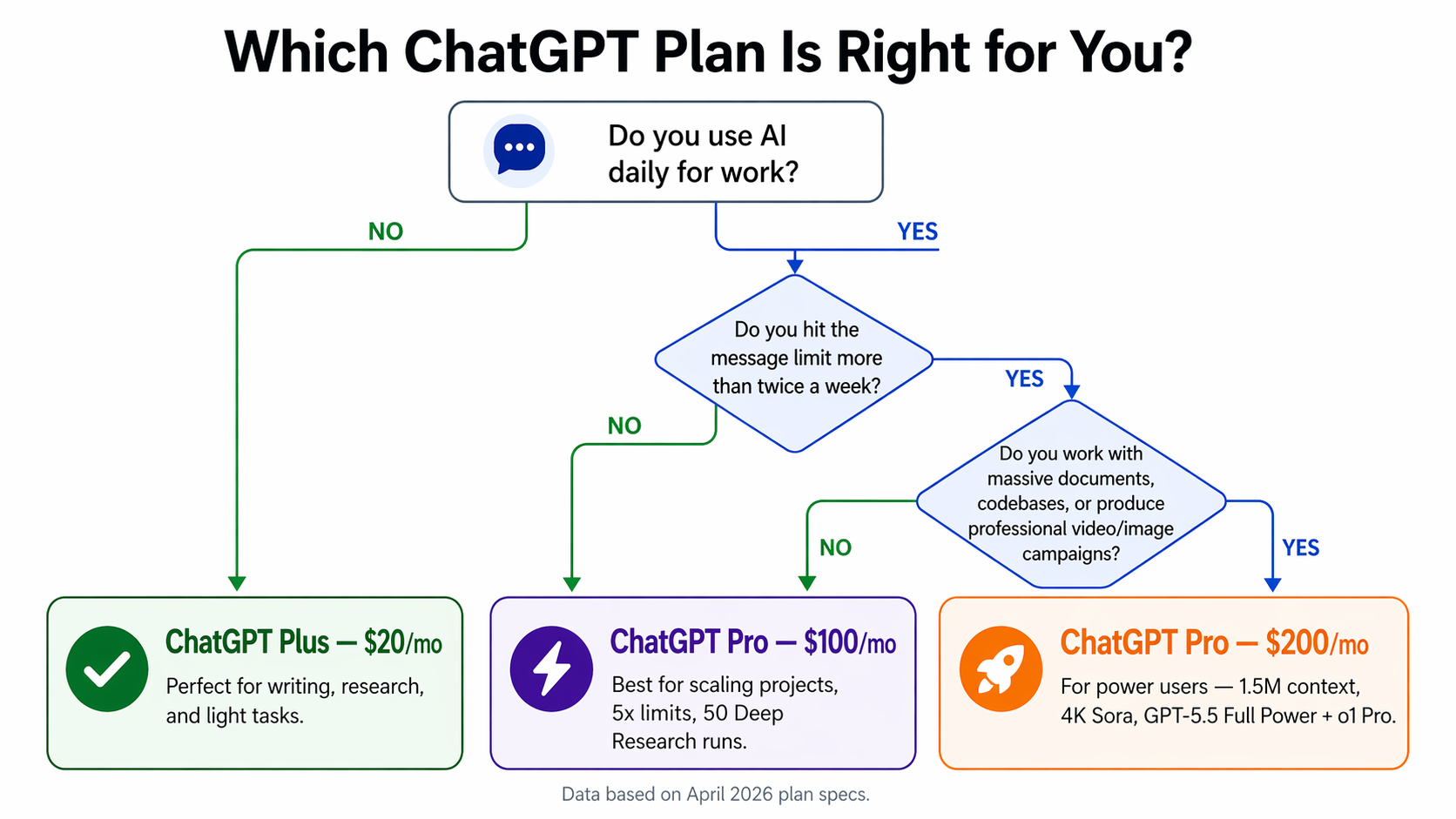
No hedging. Here's the honest test:
Does being throttled, losing context, or getting inconsistent reasoning cost you more than $80–$180 a month in lost time or compounded errors?
Here's how to think through it:
Stay on Plus ($20) if:
- You use AI for writing, light research, and occasional coding help
- You've never hit the message limit in a single workday
- Your work is task-based, not extended multi-hour deep dives
- You don't need 4K video output or 8-panel image campaigns
Upgrade to $100 Pro if:
- You regularly hit Plus limits, a couple of times per week
- You do real research workflows (50 Deep Research runs/month, covering most teams)
- You work in software development and want a 10x priority Codex without paying $200
- You're scaling fast, but the $200 plan isn't yet justifiable
Jump to $200 Pro if:
- You're hitting limits multiple times every day
- You work with massive documents or codebases (1.5M context makes a real difference)
- You produce professional video or image campaigns; 4K Sora, 8-panel images, permanent Character IDs
- You need o1 Pro for sustained deep reasoning work across long sessions
- AI is core business infrastructure, not just a useful add-on
Here is a tip: Stay on Plus until you hit the message limit twice in one week. Then go $100 Pro first. Only move to $200 when the $100 tier starts feeling tight, and for most people, that takes time.
Best Alternative to ChatGPT Plus and Pro: AI Teams Instead of Single Models
Here's the question most people never ask, but eventually have to face: What if the problem isn't which ChatGPT plan you're on, but the whole approach of prompting a single chatbot?
No matter the tier, ChatGPT is a tool you operate manually. You prompt it. You apply its output. You manage the whole conversation every single time. That works brilliantly for individuals. For teams? It's a bottleneck wearing a subscription label.
The shift we're seeing in 2026 is from "better chatbot" to AI employees; systems that execute in the background, know their role, and don't need you to type a prompt every time something needs to happen.
Moving Beyond Chat Interfaces
Every ChatGPT session starts exactly the same way: you type something. There's no memory of yesterday's work. No awareness of your brand's voice. No background execution while you're doing other things.
For growing teams, this model breaks down fast. You become the bottleneck; the human who has to translate every business need into a prompt and then manually apply every single output to the actual work.
Multi-Role AI Helpers for Business Functions
AI helpers from Sintra AI take a fundamentally different approach. IInstead of one generic assistant doing everything at a surface level, you get specialized AI helpers:
- A marketing assistant who already knows your brand voice, audience, and content calendar
- A sales helper who understands your pipeline stages and common objections
- A support assistant who knows your product documentation inside out
- An ops assistant that tracks your workflows and flags blockers before they become problems
They don't need re-briefing every session. They know their role. They stay in it. Unlike any ChatGPT plan, they automatically remember your context from previous sessions.
Shared Memory and Consistency With Brain AI
The most underrated frustration with standard AI subscriptions? You explain yourself constantly.
Every new ChatGPT session, you're copy-pasting brand guidelines, company context, and tone preferences. You're re-establishing ground zero every single time.
Brain AI solves this with a shared memory layer. Upload your brand guide, SOPs, company context, and product docs once. Every AI helper in your workspace pulls from that same knowledge base automatically, which means no re-briefing, no inconsistency, no "wait, what was our tone again?" moments.
For teams where brand consistency matters, such as agencies, marketing operations, and content teams, this alone is worth more than a plan upgrade.
Workflow Automation With Integrations
Here's where the comparison gets concrete.
ChatGPT Pro ($200/mo) generates a beautiful 25-second 4K Sora video. Genuinely impressive. But what happens next?
You download it. You open Instagram, write a caption, and set a schedule. Then TikTok; same process, different format. Then LinkedIn, again. You've just spent 30–45 minutes distributing something that took 30 seconds to generate.
Sintra's Soshie (the social media manager) doesn't stop at video generation. It takes the video, generates platform-specific captions, and automatically schedules it across Instagram, TikTok, and LinkedIn, all in one workflow.
Same with images. Vizzy (the virtual assistant) generates your visuals and pushes them directly into your content calendar. No manual steps between "create" and "published."
Through AI integrations, these assistants connect to:
- Your CRM, where they update records as work happens without manual entry
- Your project management tools, where marking tasks get completed as outputs are delivered
- Your social platforms, where scheduling and publishing content automatically get done
- Your email inbox, where they handle routine communication in the background
This is execution-level AI, not just generation, not just answers, but actual work getting done without you in the middle of every step.
Why does this change the Plus vs Pro Decision?
When you stop looking for a better chatbot and start building a real AI team, the Plus vs Pro debate changes shape entirely.
You're not buying a higher message limit so you can do more work. You're investing in a system that does the work for you, while you're in meetings, while you sleep, while you're focused on the decisions only you can make.
The question stops being "how much AI can I use?" and starts being "how much can AI do without me?"
Ready to Move Beyond ChatGPT Plans?
If you find yourself constantly managing your AI instead of managing your business, something needs to change.
ChatGPT is powerful. But it's a tool you have to pick up every single time. Every session. Every prompt. Every manual application of every output.
The next step in productivity isn't a higher message limit. It's an AI team that runs in the background — specialized AI employees handling marketing, operations, sales, and content automatically, so you don't have to babysit every step of the process.
Get started with Sintra AI and build a system that works while you do.
ChatGPT Plus vs Pro FAQs
What is the main difference between ChatGPT Plus and Pro?
The core differences are model quality, capacity, and agentic capability. The ChatGPT Plus plan offers 160 messages every 3 hours and 3,000 weekly messages, while Pro tiers go 5x–20x higher. Plus users get GPT-5.5 Lite; Pro users get GPT-5.5 Full-Power, a model that plans and executes tasks autonomously without constant prompting. The $200 Pro tier also adds o1 Pro, a 1.5M token context window, 4K Sora video, 8-panel image generation, and permanent Global Character IDs.
Is ChatGPT Pro better than Plus?
Pro is more powerful, but "better" depends on how you work. Pro gives you higher usage limits, the full-power GPT-5.5 Pro model, and stronger reasoning for heavy coding, research, and long documents. For everyday writing, search, and light coding, Plus delivers almost the same experience for a tenth of the price. If you rarely hit limits, Plus is the better value; if you hit them daily, Pro is worth it.
Who is ChatGPT Plus best for?
ChatGPT Plus is suitable for most users who need reliable AI assistance with everyday tasks such as writing, coding, and research. Solo founders, marketers, students, and content creators get excellent value from Plus. With GPT-5.5 Lite now included at $20, the case for casual users rushing to Pro has weakened. Plus is more capable now than it was six months ago.
Can ChatGPT Free users upgrade directly to Pro?
Yes. ChatGPT Free users can jump directly to the $100 or $200 Pro tiers. The $100 tier (launched April 9, 2026) is now a fully supported plan, as it's not a soft launch or beta. For most people, starting with Plus and upgrading as you hit real limits is still the most logical and cost-effective path.
Is there a better alternative to ChatGPT Plus and Pro for businesses?
For teams that need automation, consistency, and background execution, yes. Sintra AI offers role-based AI helpers that don't just answer questions; they run specialized workflows, remember your business context across sessions, and integrate directly with your tools. Unlike any ChatGPT plan, Sintra's assistants can generate a video and auto-schedule it across platforms, or update your CRM without a prompt. For businesses that have moved from "using AI" to "operating AI," it's a completely different tool category.
Related articles