Comparing Copilot vs ChatGPT

Table of Contents

Quick Answer: Copilot vs ChatGPT
If you spend most of your day inside Microsoft Word, Excel, Teams, or Outlook, Copilot is the smarter pick. It works right inside those apps, reads your documents, and automates tasks without you ever having to switch tabs.
If your work spans multiple tools, requires creative thinking, or involves coding, brainstorming, or long-form writing, ChatGPT offers greater flexibility, deeper creative depth, and greater control over how the AI responds. The honest answer is that neither tool beats the other on everything. The right one depends entirely on where you work and what you need done.
Microsoft Copilot and ChatGPT are the two biggest names in AI right now, but they're built for very different things, and picking the wrong one can slow you down rather than speed you up. We break down the Microsoft Copilot vs ChatGPT debate for you.
Copilot lives inside Microsoft 365 and works quietly in the background of Word, Excel, Teams, and Outlook. ChatGPT is a standalone AI you can open in any browser on any device and use for almost anything.
This guide breaks down the real differences between Microsoft Copilot and ChatGPT with side-by-side prompt examples, so you can see exactly how each tool responds and which one better fits your work. We also look at an AI team approach that goes further than both.
Before we get into the details, here is a table that covers everything: models, pricing, integrations, and key features, so you can see the whole picture at a glance.
| Category | Microsoft Copilot | ChatGPT |
|---|---|---|
| What it's for | Microsoft 365 productivity | Creative, flexible, standalone tasks |
| Where it works | Word, Excel, Teams, Outlook, Edge | Browser, mobile app, API, any platform |
| AI Model | GPT-5 (Microsoft optimized, auto-selected) | GPT-5, GPT-4o, GPT-5.4, GPT-5.5 (you choose) |
| Free Plan | Yes — web chat, image generation, basic search | Yes — GPT-4o with usage caps |
| Entry Paid Plan | $20/user/mo (Copilot Pro) | $8/mo (ChatGPT Go) |
| Mid Paid Plan | $30/user/mo (M365 Business) | $20/mo (ChatGPT Plus) |
| Team Plan | $30/user/mo (annual, needs M365 license) | $25/user/mo (annual) |
| Microsoft 365 Integration | Native — reads your docs, emails, and meetings | None — you copy-paste manually |
| Google Workspace | No | No (but works alongside it) |
| Third-party integrations | Limited | 3M+ Custom GPTs, plugins, API |
| Custom AI | No | Yes — build Custom GPTs |
| Real-time web access | Yes | Yes (on paid plans) |
| Data privacy | GDPR + HIPAA compliant, data stays in your tenant | Opt-out available, stronger controls on paid plans |
| Image generation | Yes (Designer) | Yes (DALL-E / GPT Image 1.5) |
| Best for writing | Structured documents, emails, reports | Creative copy, blogs, storytelling, tone control |
| Best for coding | Autocomplete in IDEs | Debugging, explaining, refactoring |
| Best for teams | Microsoft 365 Teams | Cross-platform or creative teams |
| Model selection | Automatic — Microsoft decides | Manual — you pick the model |
What Is Microsoft Copilot
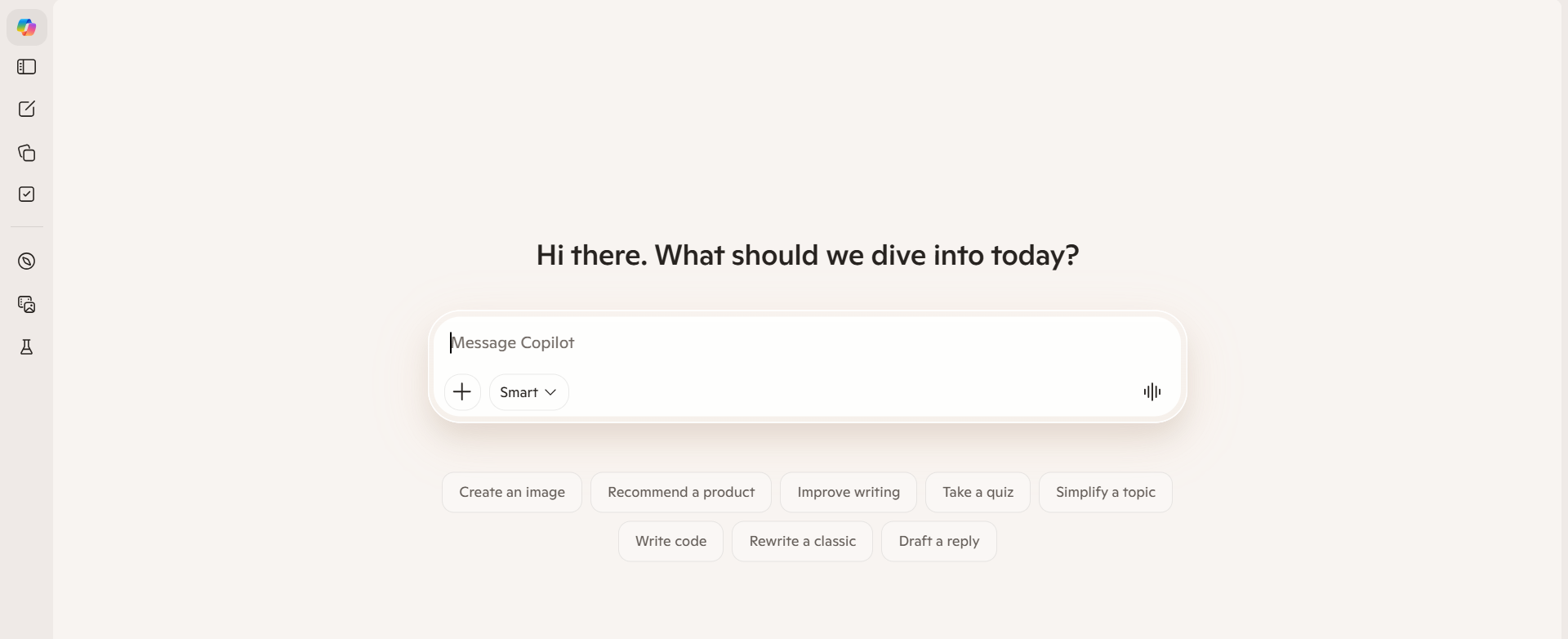
Microsoft Copilot is an AI assistant built directly into Microsoft 365, Windows, and Edge. It does not live in a separate tab. It sits inside the apps you already use every day, and it can read what is already in them.
Here is what that looks like in practice:
- Ask Copilot to draft an email in Outlook based on a previous conversation thread
- Ask it to summarize a 40-page Word document in three bullet points
- Ask it to build a formula and a chart in Excel from your raw data
- Use it in Teams to get a recap of a meeting you missed, with action items included
Microsoft Copilot is designed for organizations that need seamless integration with Microsoft Office applications like Word, Excel, and Teams to automate tasks and provide contextual assistance.

It does not replace your apps. It works inside them quietly, in the background, available whenever you need it.
What Is ChatGPT
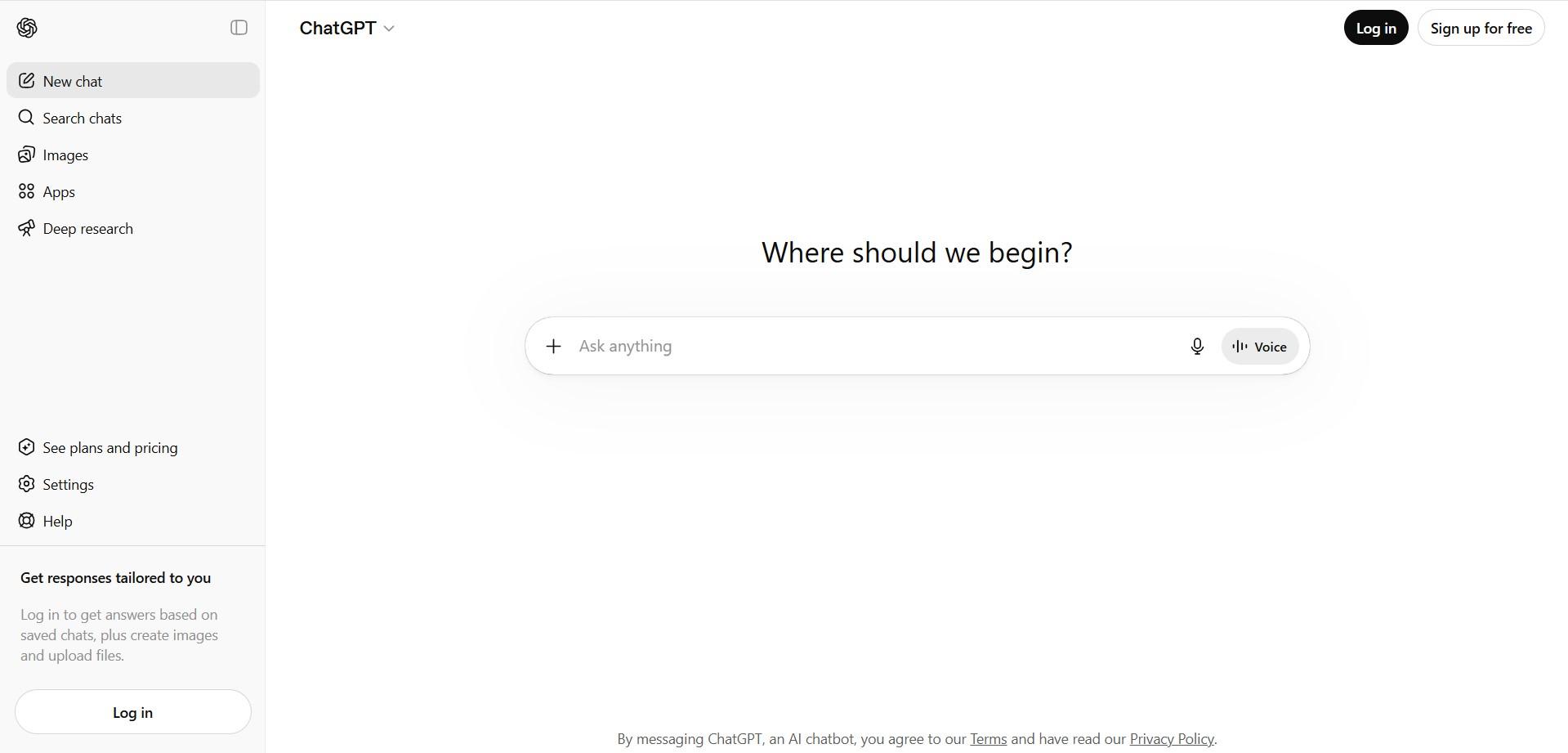
ChatGPT is an AI assistant made by OpenAI. You open it in a browser, type something in plain English, and it responds. You do not need Microsoft. You do not need any specific app. You just need an internet connection.
People use it for a huge range of things:
- Writing blog posts, ad copy, emails, and social captions
- Debugging and writing code in any programming language
- Brainstorming names, ideas, strategies, and plans
- Summarizing articles, research papers, and long documents
- Explaining complicated topics in simple words
ChatGPT operates primarily as a standalone web application, with APIs and plugins for integration, making it versatile across various platforms and tools.
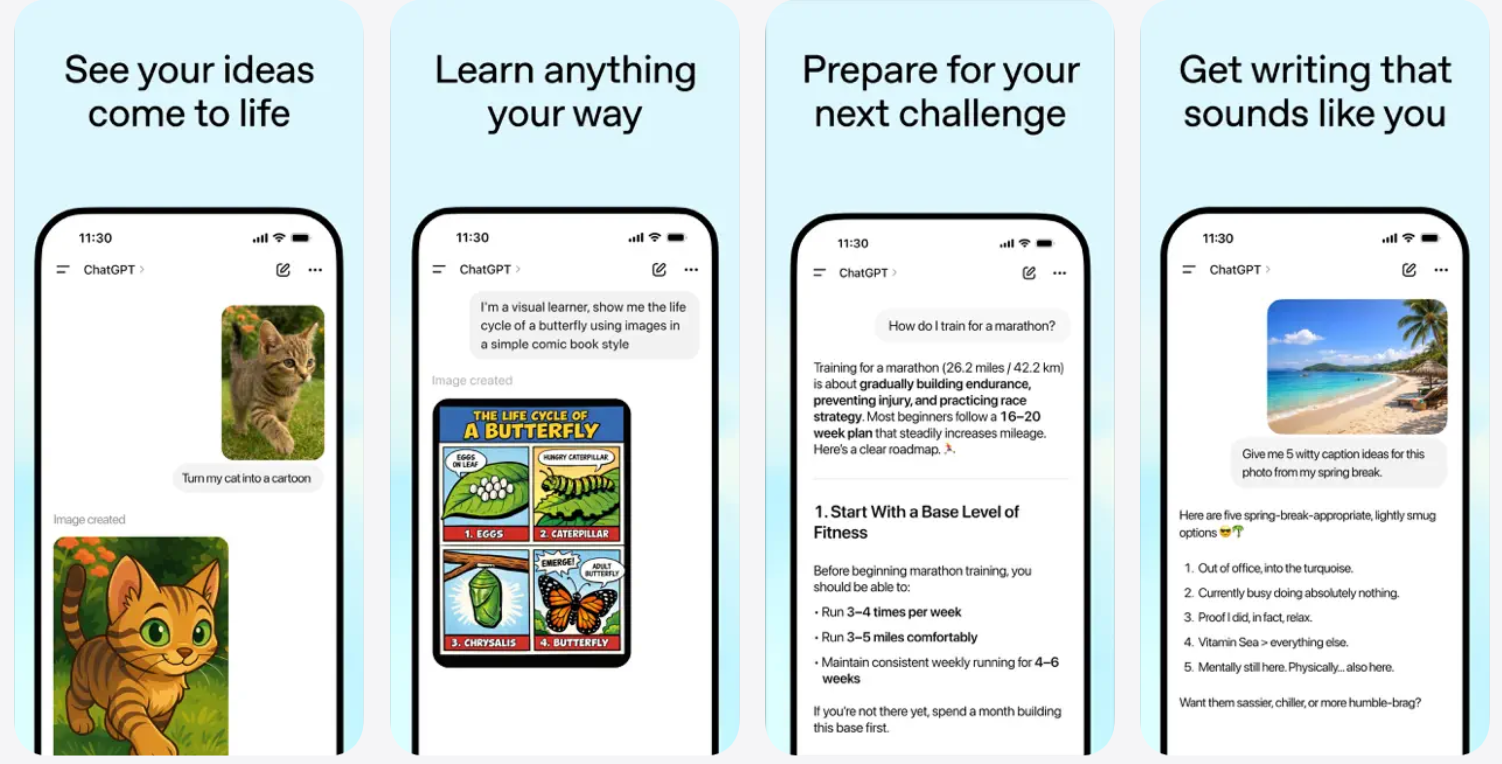
Unlike Copilot, ChatGPT is not tied to one ecosystem. You can use it on your phone or laptop, or connect it to other tools via its API. In the Microsoft Copilot vs ChatGPT debate, this flexibility is one of ChatGPT's strongest selling points.
Copilot vs ChatGPT Features Comparison
Both tools are powerful, but they are built around different ideas of what "helpful" actually means. Here is how they compare across the features that matter most.
| Feature | Microsoft Copilot | ChatGPT |
|---|---|---|
| Writing | Structured, inside Office apps | Flexible — any format, any tone |
| Coding | Autocomplete suggestions in IDEs | Debugging, explaining, and generating code |
| Automation | Automates tasks inside Microsoft apps | Relies on prompts or external tools |
| Customization | Limited, within Microsoft's structure | Custom GPTs, full prompt control |
| Accuracy | Best with structured data and documents | Best for open-ended reasoning |
| Team Collaboration | Built into Teams and shared docs | Shared chats and workflows |
| Data Privacy | Enterprise-grade — GDPR and HIPAA | Good — with opt-out controls |
Content Writing and Generation
Prompt tested on both tools:
"Write an Instagram caption for a new coffee brand launching its first canned cold brew. Make it fun and under 50 words."
This is how Copilot responds:
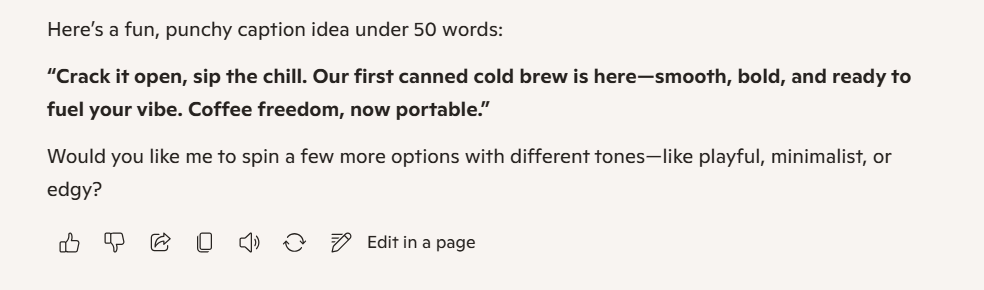
This is how ChatGPT responds:

The difference is clear. Microsoft Copilot gives you something direct and clean. ChatGPT gives you something you actually want to post.
ChatGPT is more versatile for creative tasks, such as brainstorming and storytelling, while Microsoft Copilot excels at structured tasks, such as summarizing documents and generating reports within Microsoft applications.
When it comes to content writing, here is how to choose:
- Need a blog post, ad copy, or social caption → ChatGPT
- Need a professional email drafted inside Outlook → Copilot
- Need a business report formatted in Word → Copilot
- Need five versions of the same message in different tones → ChatGPT
Coding and Development Capabilities
Prompt tested on both tools:
"I have a Python function that loops through a list of emails and sends each one, but it crashes when the list is empty. Fix it and explain why."
This is how Copilot responds:
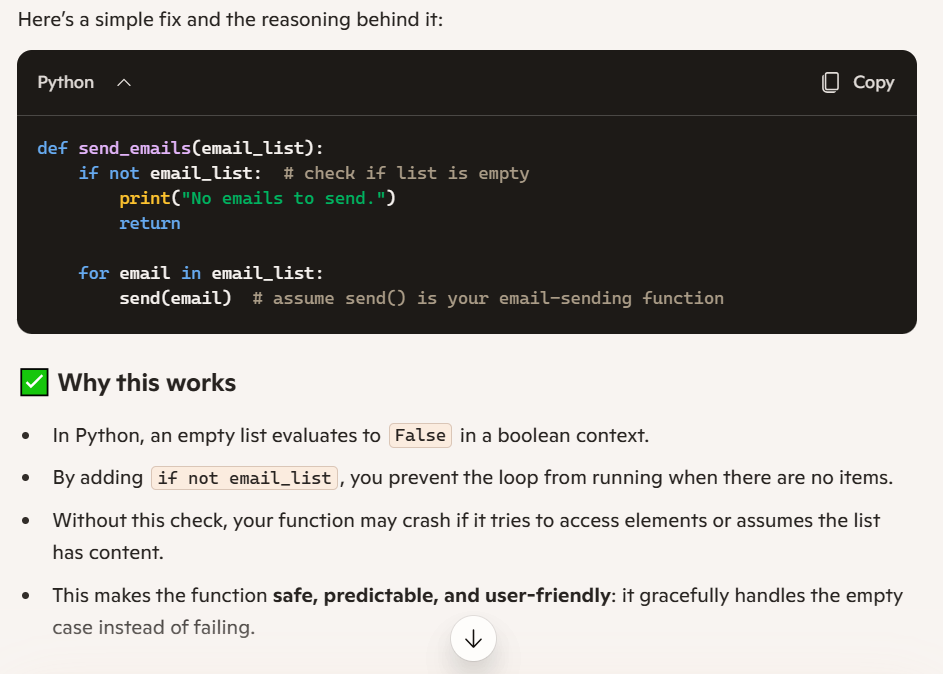
Microsoft Copilot is simple and to the point, offering a recommended solution to the problem. No reasoning about the bug, no considerable situation lectures, just the fix and conclusion strategy.
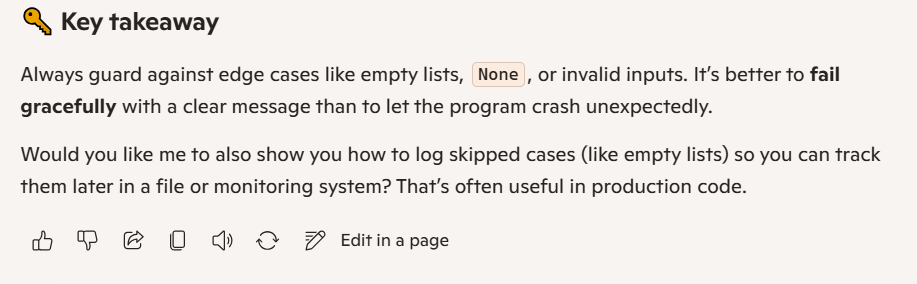
This is how ChatGPT responds:
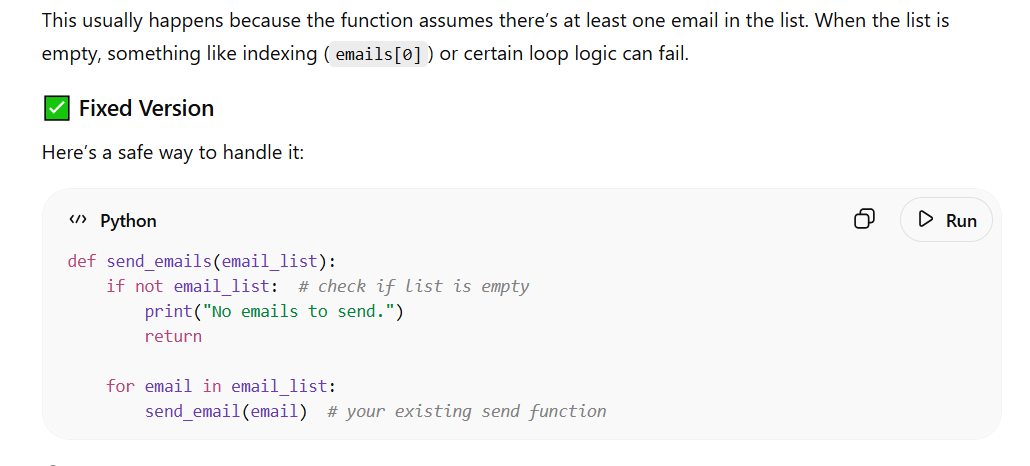
ChatGPT is a teacher. It doesn't just give you a solution and walk away. It outlined possible scenarios that could cause the problem. Like, "If this is not the reason, then this might be the one" type of explanation from different angles.
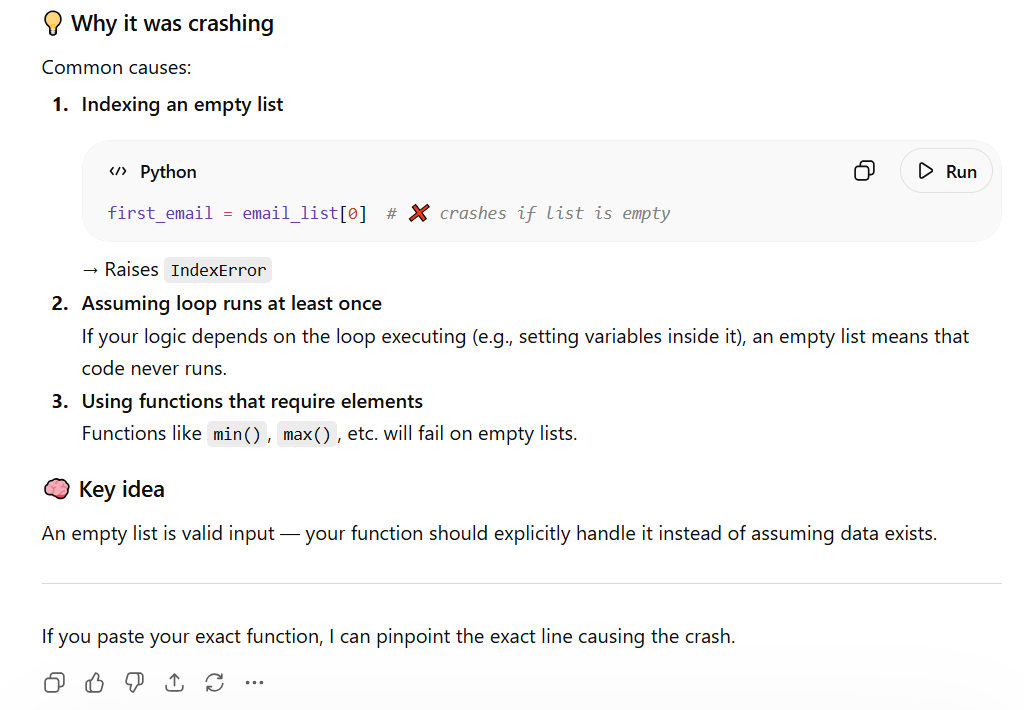
ChatGPT's response is descriptive and clear. You feel little or no need to ask follow-up questions to that response because it is already full. The solution it provides also explains why it will work and what you should avoid implementing.
Microsoft Copilot is fast. ChatGPT teaches you. For serious development work, the difference matters.
ChatGPT is beneficial for individual users needing assistance with creative writing, complex brainstorming, and coding tasks.
- Quick autocomplete in your editor → Copilot
- Debugging a tricky bug with full explanation → ChatGPT
- Refactoring a large codebase → ChatGPT
- Generating boilerplate code fast → Both work well
Automation and Task Execution
This is where the difference between ChatGPT and Copilot is biggest, and most practical.
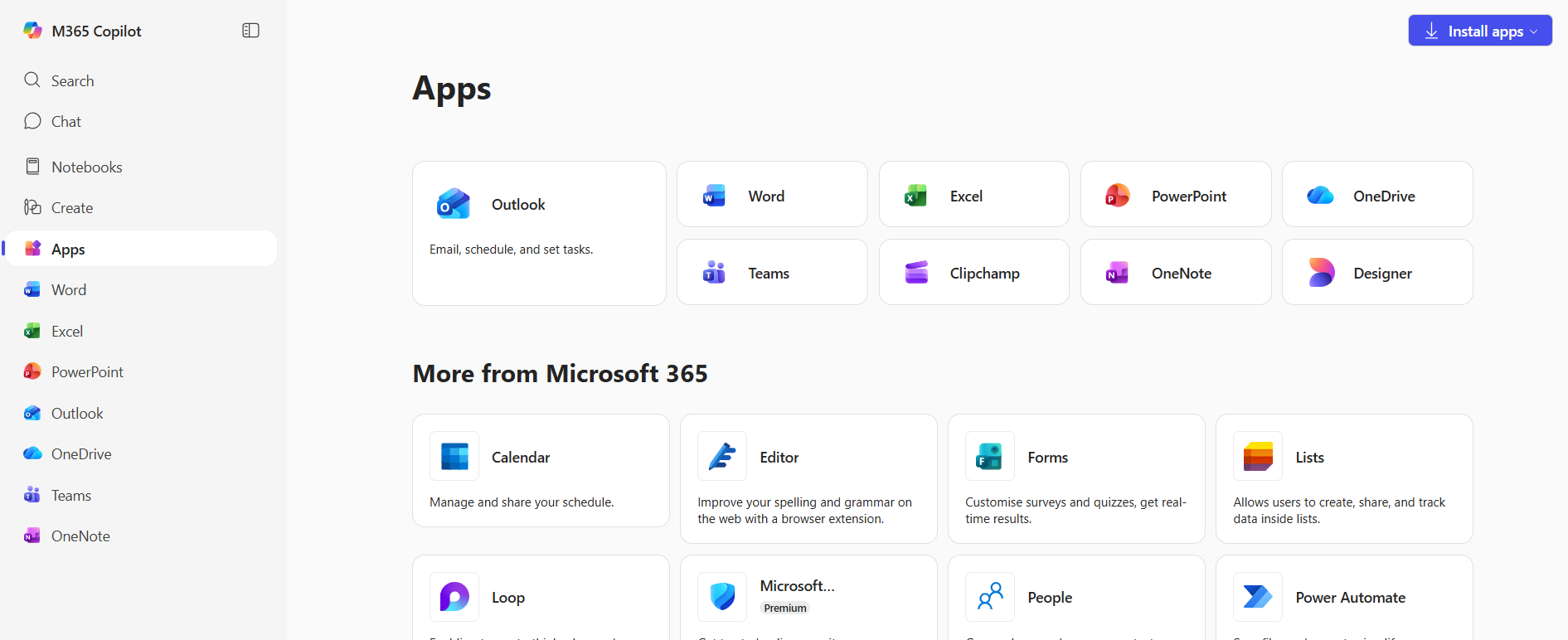
Microsoft Copilot actually does things inside your Microsoft apps:
- Opens your last Teams meeting transcript and writes a summary with action items
- Reads your Excel sheet and flags rows where revenue dropped more than 10%
- Drafts a reply to an email thread in Outlook based on what was already said
ChatGPT gives you a great output, but you still have to act on it yourself:
- It writes the email, but you paste it in and hit send
- It analyzes data you upload, but it does not connect to your live spreadsheets
- It suggests a workflow, but does not run it
Example:
Ask your tool to: "Summarize the key decisions from today's project meeting and list the action items."
- Microsoft Copilot in Teams reads the actual meeting transcript and automatically returns a structured summary with assigned owners.
- ChatGPT asks you to paste the transcript first, then gives you an equally good summary, but the manual step is on you.
If your workflows live inside Microsoft 365, Copilot removes the friction. ChatGPT is better when you work across multiple tools.
Customization and Control
ChatGPT:
- Offers custom GPTs for tailored applications and specialized tasks
- You control the tone, format, style, and instructions completely
- Build a Custom GPT that always responds in your brand voice, uses your company's tone, and knows your products, all pre-loaded
Copilot:
- Works within the boundaries Microsoft sets
- You can adjust how you prompt it, but the underlying behavior is controlled by Microsoft
- No equivalent of Custom GPTs
Real example: Imagine you run a legal tech startup. With ChatGPT, you can build a Custom GPT that always responds in formal legal language, avoids casual phrases, and adds disclaimers automatically. With Copilot, you would have to add those instructions every single time you start a new session.
If you need an AI that consistently works your way, ChatGPT gives you that control. Microsoft Copilot keeps it simpler, but less flexible.
Accuracy and Output Quality
Prompt tested on both tools:
"Our sales dropped 18% in Q3 compared to Q2. We had the same marketing budget. What are the most likely causes?"
This is how Copilot responds
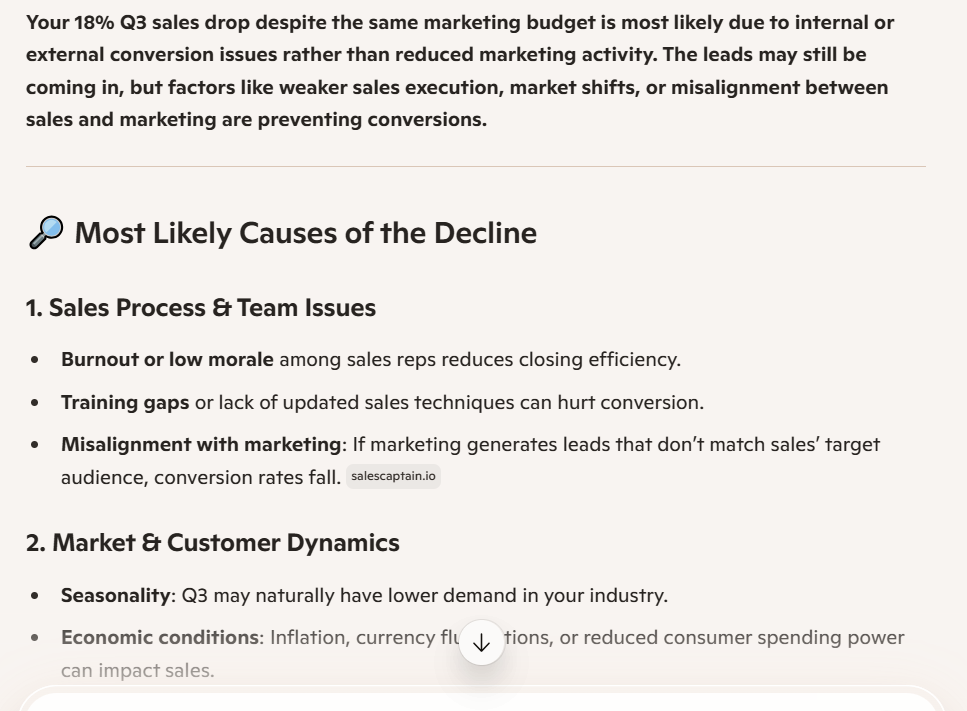
A clean, numbered list of possible reasons: seasonality, product issues, market changes, competitor activity. Well-organized and professional.
This is how ChatGPT responds:
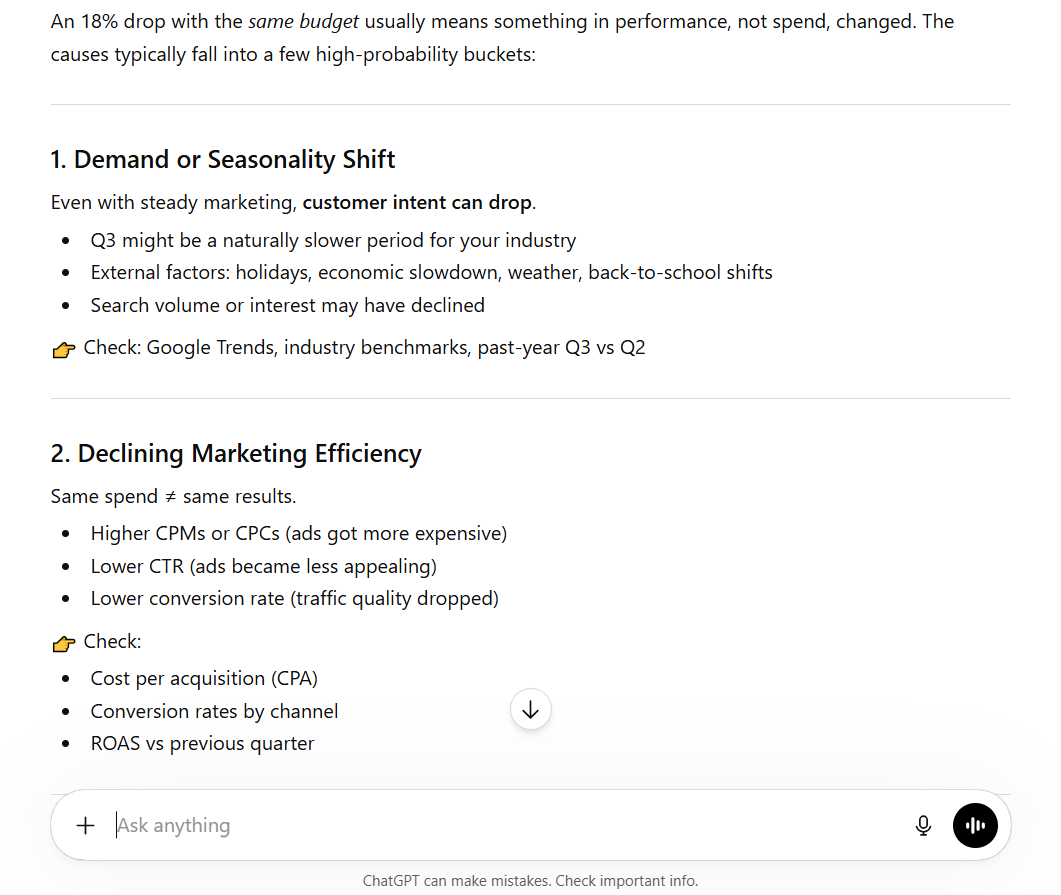
Started by separating demand-side causes from supply-side causes. Then, I built a layered analysis that included seasonality, competitor pricing shifts, delivery delays, and product quality dips, and suggested which data to pull first to narrow it down. It treated the question like a real business problem, not just a prompt, and ended with a clear priority order for investigation.
For data analysis tasks, Microsoft Copilot excels in providing structured insights and actionable recommendations, particularly when integrated with Excel, while ChatGPT is better for exploratory data analysis and generating insights from unstructured data.
Both tools can hallucinate, meaning they sometimes make up facts that sound confident. Always review important outputs before sharing them.
Collaboration and Team Use
Copilot:
- Summarizes what happened in shared Word documents as they evolve
- Recaps missed Teams meetings with action items and assigned owners
- Suggests edits inside shared Docs as your team writes together
ChatGPT:
- Let's you share a chat link with a teammate
- Works well for solo brainstorming or creative workflows
- No native link to shared documents or meeting transcripts
Example: Your team finishes a one-hour product strategy call. With Microsoft Copilot in Teams, everyone gets a meeting summary emailed automatically. With ChatGPT, someone has to copy the transcript, paste it in, and manually share the output.
For companies that use Microsoft 365 daily, Copilot wins hands down for team collaboration.
Security and Data Privacy
Copilot:
- Microsoft Copilot adheres to enterprise-level security, including GDPR and HIPAA, ensuring the protection of sensitive data
- Your data stays inside your Microsoft tenant. It is not used to train global AI models
- Built for regulated industries: healthcare, finance, legal
ChatGPT:
- You can turn off chat history to stop your inputs from being used for training
- Team and Enterprise plans provide stronger data controls
- Free plan users should avoid pasting in sensitive business information
If your company handles patient data, financial records, or client contracts, Copilot's enterprise-grade setup is the safer choice.
Copilot vs ChatGPT Models Comparison
Both tools run on strong AI models. But how you access those models is very different.
| Feature | Microsoft Copilot | ChatGPT |
|---|---|---|
| Primary Model | GPT-5 (Microsoft Optimized) | GPT-5 (Plus/Pro), GPT-4o (Free) |
| Who picks the model | Microsoft — automatic | You — manual selection |
| Free Tier Model | GPT-4o equivalent | GPT-4o |
| Reasoning model | Available on Pro | GPT-5.5 Thinking (Plus/Pro) |
| Context window | 1M tokens (enterprise) | 1M tokens (paid), 32K (free) |
| Output tokens | 32K | 65K on GPT-5.4 |
What Models Power ChatGPT
OpenAI gives you a full lineup, and you choose which one runs.
| Model | Speed | Best For | Access |
|---|---|---|---|
| GPT-4o | Fast | Everyday writing, research, and Q&A | Free + Plus |
| GPT-5.3 Instant Mini | Fastest | Quick drafts when limits hit | Free + Plus |
| GPT-5 | Moderate | Advanced writing, deep analysis | Plus + Pro |
| GPT-5.4 | Moderate | Writing, coding, analysis, and computer use | Plus + Pro |
| GPT-5.4 Thinking | Slower | Multi-step reasoning, complex problems | Plus + Pro |
| GPT-5.5 | Moderate | Agentic coding, autonomous tool use, complex research | Plus + Pro |
| GPT-5.5 Thinking | Slower | Deep reasoning, steerable mid-task thinking | Plus + Pro |
| GPT-5.5 Pro | Slowest | Research-grade intelligence, long-horizon workflows | Pro only |
What Models Power Microsoft Copilot
Microsoft uses GPT-5 and optimized GPT-4.5 models, but you never pick them yourself. The system automatically chooses the right model for each task based on what you are asking.
This is simpler for everyday users. But if you want to decide whether a faster or smarter model handles a specific task, ChatGPT lets you do that. Microsoft Copilot does not.
Model Performance, Speed, and Output Quality
Think of it like choosing between a fast food order and a sit-down meal:
- Quick email reply → Both free tiers handle it in seconds
- Summarize a meeting → Copilot wins — it reads the transcript natively
- Analyze a complex financial report → Copilot in Excel pulls structured insights faster
- Write a creative pitch deck → ChatGPT GPT-5.4 gives you more depth and originality
- Debug a 300-line script → ChatGPT GPT-5.5 handles it autonomously with multi-step execution
Both Microsoft Copilot and ChatGPT utilize natural language processing to facilitate user interactions, but Copilot is specifically tailored for use within the Microsoft ecosystem, while ChatGPT is more flexible and adaptable across different environments.
Model Transparency and User Control
- ChatGPT shows you exactly which model you are using and lets you switch anytime mid-conversation
- Copilot hides this; Microsoft decides what runs, and you do not see it
If you want full transparency about what AI is doing to your work, ChatGPT is the more open option.
Which Models Are Better for Different Use Cases
| Task | Best Tool | Why |
|---|---|---|
| Creative writing | ChatGPT GPT-5 | Better tone control and originality |
| Coding and debugging | ChatGPT GPT-5.5 | Agentic coding handles long-horizon tasks and complex debugging |
| Document summarizing | Copilot | Reads your actual files natively |
| Excel data analysis | Copilot | Native integration, no uploading needed |
| Complex reasoning | ChatGPT GPT-5.4 Thinking | Built for multi-step logic |
| Quick Q&A | Either free tier | Both handle this fine |
| Long business reports | Copilot | Structured, professional output |
| Marketing copy | ChatGPT | More creative range and personality |
Copilot vs ChatGPT Pricing Comparison
Here is how every plan stacks up in 2026.
| Plan | Price | What You Get |
|---|---|---|
| ChatGPT Free | $0/mo | GPT-4o, basic usage caps, file uploads |
| ChatGPT Go | $8/mo | More usage, image generation, and file uploads |
| ChatGPT Plus | $20/mo | GPT-5.4, custom GPTs, DALL-E, higher limits |
| ChatGPT Team | $25/user/mo | Admin console, shared workspaces, priority access |
| ChatGPT Pro | $200/mo | Unlimited advanced model access |
| Copilot Free | $0/mo | Web chat, basic search, image generation |
| Copilot Pro | $20/user/mo | AI inside Office apps, priority model access |
| M365 Copilot Business | $30/user/mo | Full Microsoft 365 integration, Teams, Excel, Outlook |
ChatGPT Plus costs $20 per month and offers users priority access and advanced features compared to the free version.
Microsoft 365 Copilot for Business is priced at $21–$30 per user per month, depending on the organization's size.
One important detail many buyers miss: Copilot's business plan requires an existing Microsoft 365 license (E3 or E5) on top of the Copilot fee. ChatGPT has no such requirement; you pay one price, and you are in.
Also worth noting: Microsoft 365 Copilot is included at no additional cost for users with an eligible Microsoft 365 subscription, while standalone access may require a subscription fee. And a promotional rate of $18/user/mo is available for new commercial customers through June 30, 2026.
Pricing Note: All pricing in this article reflects the latest available information as of April 2026. AI platforms update their plans frequently. Before making any purchase decision, we recommend checking the official pages for the most current rates.
When to Use Copilot vs ChatGPT
Microsoft Copilot is designed to enhance productivity in Microsoft 365 applications, automating tasks such as document creation and data analysis, while ChatGPT is a general-purpose conversational AI tool suitable for a wide range of tasks across various platforms.
Here are real-world scenarios to help you decide.
Choose Copilot if:
- Your team lives in Word, Excel, Teams, or Outlook every day
- You need meeting recaps and document summaries without extra manual steps
- You handle sensitive data that must meet GDPR or HIPAA standards
- Microsoft Copilot is best suited for users who primarily work within the Microsoft ecosystem, as it enhances productivity by automating tasks in applications like Word, Excel, and Teams
- Copilot is designed for organizations that need seamless integration with Microsoft Office applications
Choose ChatGPT if:
- You need creative writing, brainstorming, or storytelling help
- You are a developer who debugs, explains, or writes code regularly
- Your workflows span tools outside of Microsoft
- You want to build Custom GPTs tailored to your exact use case
- ChatGPT is more versatile and is ideal for open-ended tasks such as brainstorming, creative writing, and coding, making it suitable for users who need flexibility across different platforms
Head-to-Head Prompt Battles: Real Examples
This is the part that actually helps you decide. We ran the same prompts through both tools. Here is what each one responds with, and what that means for you.
Battle 1: Writing a Cold Email
Prompt:
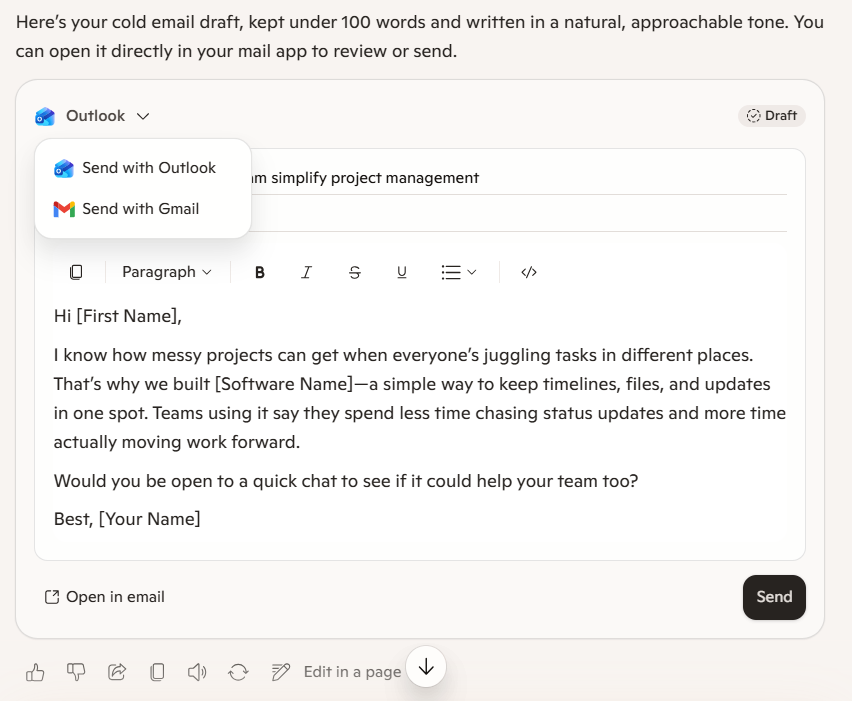
"Write a cold email to a potential client selling project management software. Keep it under 100 words. Sound like a real person, not a salesperson."
Copilot responded:
It opened with the customer's pain, "juggling tasks at different places," and positioned the software as the fix in two clean sentences. The email landed directly in an Outlook draft, ready to edit or send with a single click.
ChatGPT responded:
It skipped the pitch entirely in the first line, leading instead with a genuine question about how the prospect currently manages their work. The tone stayed conversational all the way to the sign-off: "Either way, appreciate your time," a line that actually gets replies.
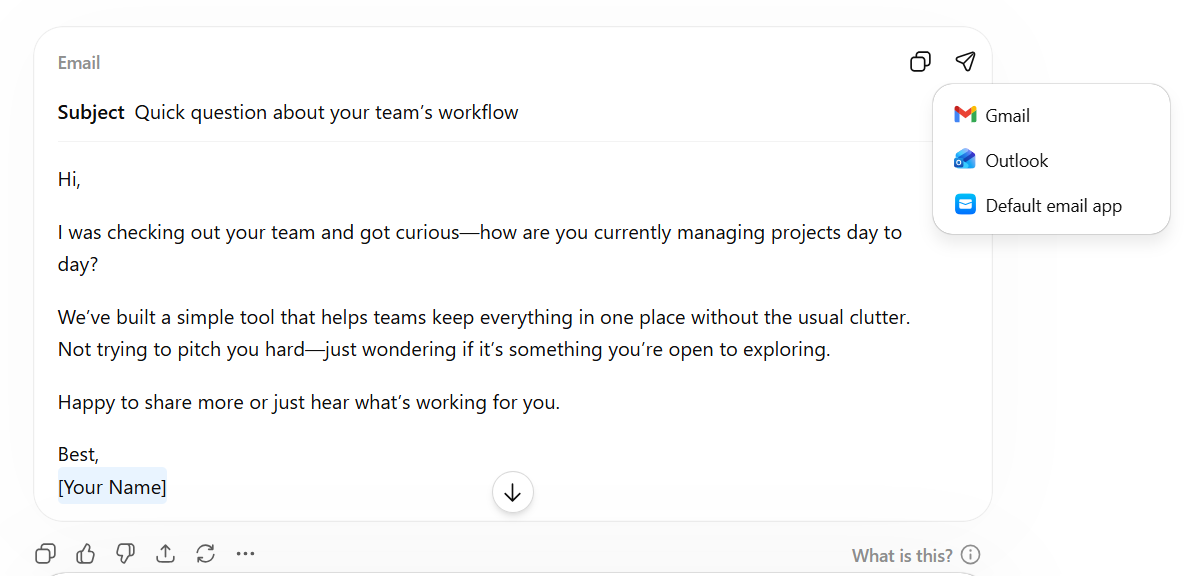
Verdict: Copilot's version is professional and solid. ChatGPT's version sounds like a human wrote it, which is exactly what makes people actually reply. For creative outreach copy, ChatGPT wins on personality. For speed and integration into your existing email tools, Microsoft Copilot is unbeatable.
Battle 2: Explaining a Complex Topic Simply
Prompt:
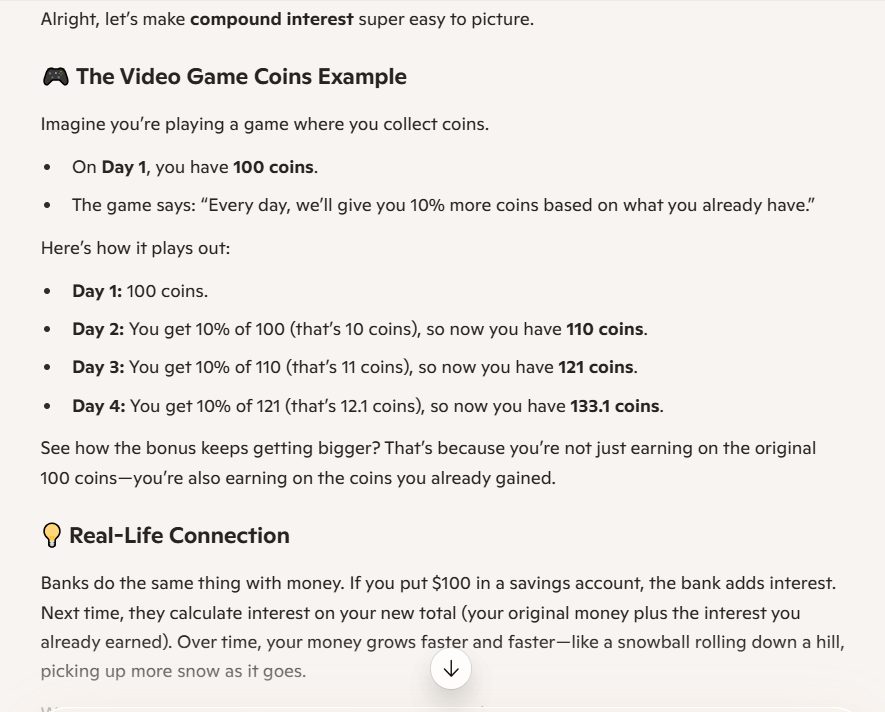
"Explain compound interest to a 12-year-old using a real-life example."
Copilot responded:
It used a video game coins analogy to make the concept feel instantly familiar, walking through four days of growth step by step, so the math never feels intimidating. It ended with an offer to create a visual chart that shows it can go beyond text and turn the explanation into something you can actually see.
ChatGPT responded:
It opened with the snowball analogy, then layered in the actual compound-interest formula alongside a year-by-year breakdown, giving the reader both the intuition and the math at once. The apple tree analogy at the end added a second memorable hook, making it more likely that the concept actually sticks.
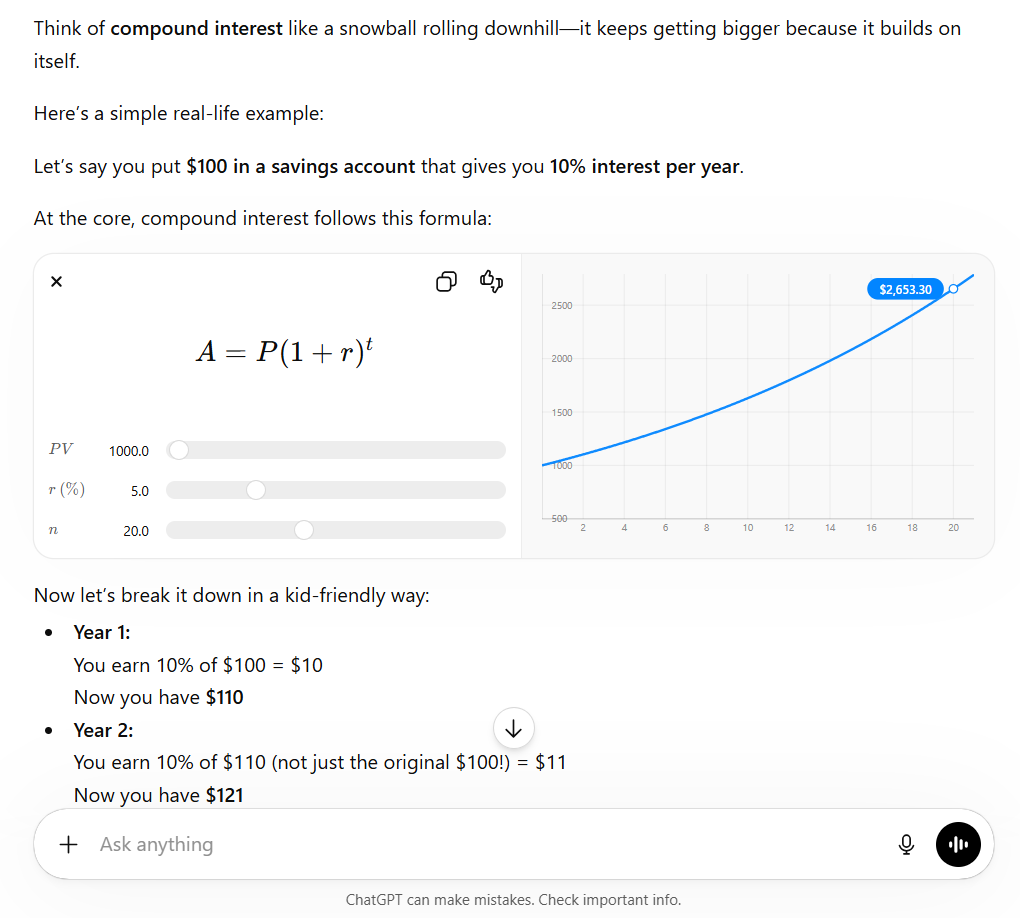
Verdict: Both answers are accurate. But ChatGPT breaks it down more nicely, adds a personal touch that makes it easier to understand, and ends with a lesson that actually sticks. If you are creating educational content, explainer guides, or tutorials, ChatGPT is clearly the better choice.
Battle 3: Summarizing a Business Document
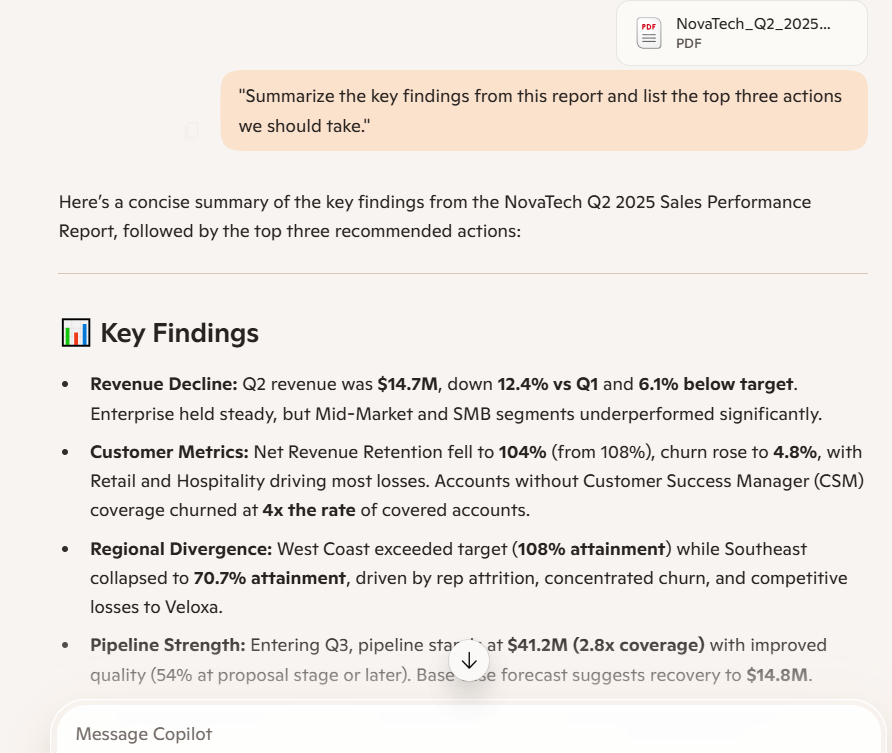
Scenario: A 12-page sales performance report was open in Word. Both tools were asked the same thing.
Prompt:
"Summarize the key findings from this report and list the top three actions we should take."
Copilot responded:
It delivered a clean, structured summary, organized into clear sections with bullet points, pulling the exact numbers, percentages, and expected impacts directly from the report with no guesswork. It also offered to generate a visual dashboard with charts for leadership, showing it understood the next practical step a real executive team would need.
ChatGPT responded:
It went beyond summarizing and started diagnosing, adding translation lines like "you're selling more deals but smaller ones" and "this isn't a minor issue, this is a primary revenue blocker" that turn raw findings into actual business insight. It structured the output as a decision-making tool rather than a reading summary, ending with a single "Bottom Line" that a CEO could act on in thirty seconds.
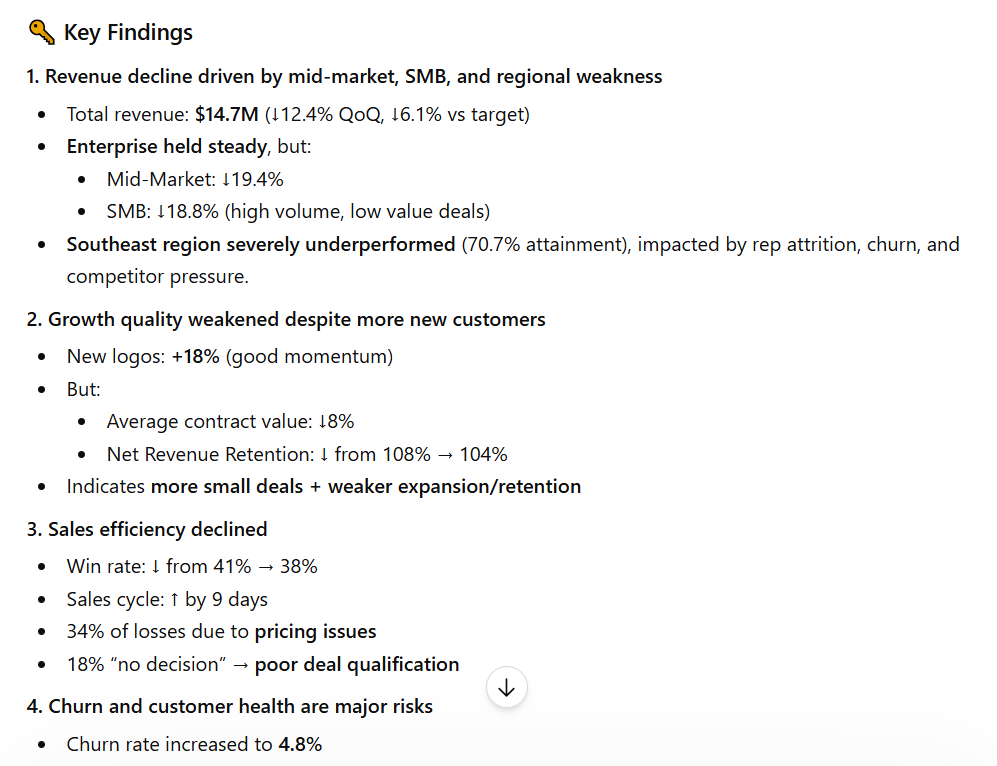
Verdict: Microsoft Copilot wins on speed and accuracy. ChatGPT wins on depth; it didn't just repeat the report; it interpreted it, adding the "so what" layer that turns data into decisions. If you need something to share with leadership fast, Copilot. If you need something that actually tells leadership what to do and why, ChatGPT is it. For document work inside Microsoft 365, Copilot removes all friction. For strategic analysis, ChatGPT thinks one level deeper.
Battle 4: Brainstorming Product Names
Prompt:
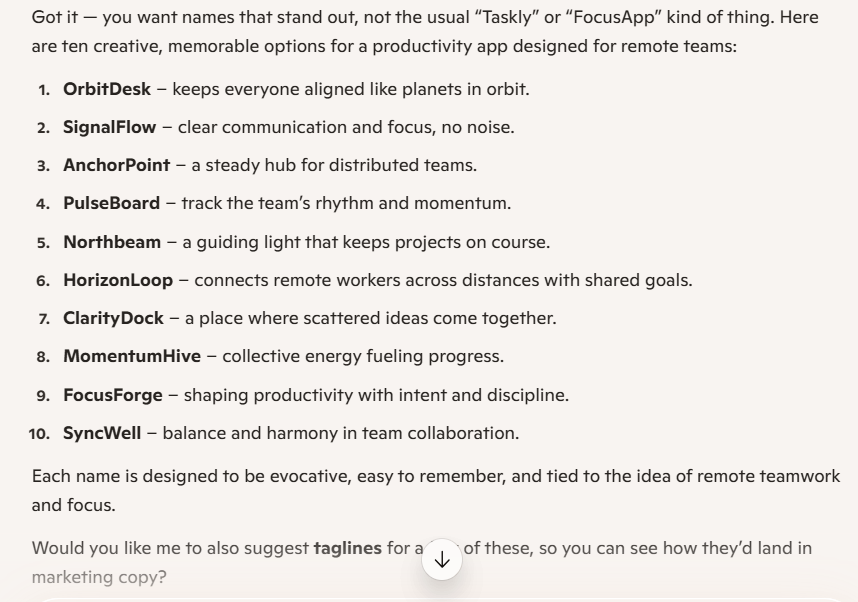
"Give me 10 creative names for a productivity app that helps remote teams stay focused. No generic tech names — make them memorable."
Copilot responded:
It acknowledged the brief upfront and delivered ten names that are clean, professional, and each paired with a one-line rationale, feel polished and safe enough for a boardroom pitch. It closed by offering to write taglines, showing it was thinking about the next step in the marketing process.
ChatGPT responded:
It matched the energy of the prompt from the very first line and delivered names with genuine personality that actually sound like apps people would download. It also offered to check domain availability, which is the one practical next step any founder actually needs.

Verdict: Copilot's names are safe and forgettable. ChatGPT's names are interesting, distinct, and actually memorable. NoPing and Undisturb could be real apps tomorrow. ChatGPT is recognized for its versatility and creativity, making it better suited for open-ended tasks such as brainstorming, creative writing, and complex problem-solving.
Battle 5: Data Analysis Support
Prompt:
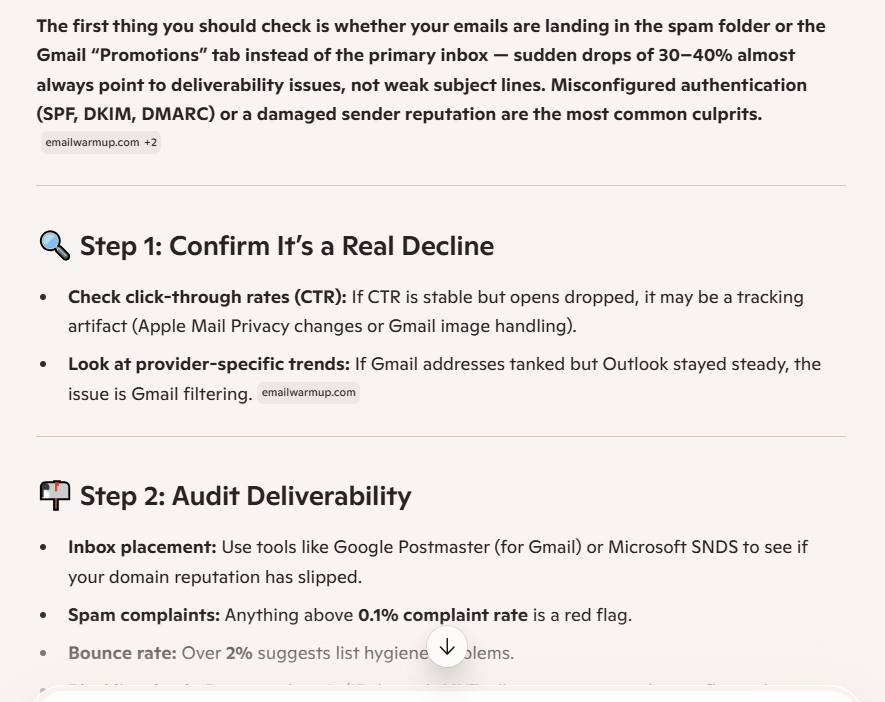
"Our email open rates dropped from 42% to 27% in two months. What should I check first?"
Copilot responded:
It jumped straight to the most likely culprits: deliverability and spam filtering, and built a structured four-step diagnostic process with specific tools for each stage, such as Google Postmaster, MXToolbox, and DKIM record checks. It also flagged the Apple Mail Privacy Protection issue, which is the kind of detail that separates a surface-level answer from one that actually saves you from chasing the wrong problem.
ChatGPT responded:
It organized the diagnosis by impact priority rather than just category, walking through seven possible causes in the order you should actually investigate them, starting with deliverability and ending with tracking errors. The "Quick Diagnosis Shortcut," with three yes/no questions at the end, was the standout addition, giving any marketer a mental framework to narrow down the root cause in under 2 minutes without running a single tool.
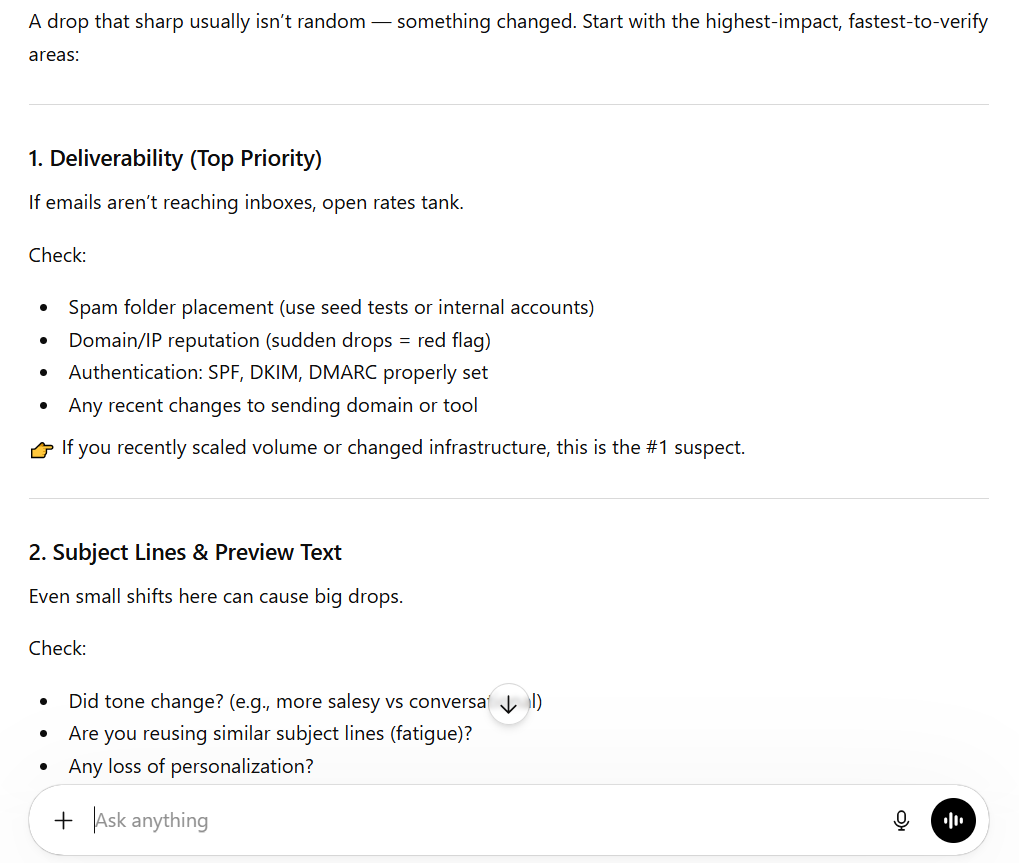
Verdict: Copilot gives you a checklist. ChatGPT provides a diagnostic process with a clear, logical rationale for each step. ChatGPT's ability to maintain context over longer conversations and generate coherent responses is a significant strength, making it effective for interactive and conversational tasks. For exploratory analysis and problem-solving, ChatGPT thinks at a different level.
Limitations of Copilot and ChatGPT
Neither tool is perfect. Here is where both fall short.
Shared limitations
- Both can hallucinate. They sometimes make up facts with full confidence
- Neither runs truly automated workflows without a human connecting the steps
- Free plans have usage caps that kick in during peak hours
- Neither remembers your preferences automatically without deliberate setup
Copilot limitations
- While Microsoft Copilot is strong in structured tasks and productivity, it may lack the flexibility and creative depth that ChatGPT offers for more nuanced and varied tasks
- Requires an existing Microsoft 365 subscription for full access
- Limited customization. You work within Microsoft's defined rules
- Weak outside the Microsoft ecosystem
ChatGPT limitations
- No native connection to your documents, emails, or meeting transcripts
- Without setup, it forgets your preferences the moment a new session starts
- Heavy daily users will hit message limits on Plus plans
- Microsoft Copilot integrates deeply with Microsoft 365 tools, allowing it to access organizational data and provide context-aware assistance, whereas ChatGPT operates primarily as a standalone application without automatic access to enterprise systems
Best Alternative to Copilot and ChatGPT: Sintra AI
Copilot and ChatGPT are tools that respond to you. Sintra AI is a system that works for you. Instead of one general AI assistant you have to manage, Sintra gives you a full AI team built around specific business roles, and they actually execute tasks instead of just generating text.
What Makes Sintra AI Different
Every helper on Sintra is trained for one job, not a hundred:
- A Copywriter that writes in your brand voice without you explaining it every time
- A Social Media Manager who creates platform-specific posts and captions
- A Sales Assistant who handles follow-up emails and lead qualification
- An Email Marketer that writes, sequences, and manages newsletters
- A Customer Support helper that drafts consistent, on-brand replies
This is the AI team model. You assign tasks the way you would to real team members, and each helper already knows their role.
Compare this directly to ChatGPT and Copilot, where one general AI adapts to every prompt and starts fresh each time. With Sintra, there is structure, and structure leads to consistency.
What You Can Do With Sintra AI
Here is a real content workflow using Sintra, no copy-pasting, no tab switching:
- Brief → Tell the Copywriter the topic, audience, and goal
- Draft → The Copywriter writes using your saved brand voice and style
- Optimize → The SEO Specialist adds keywords, meta descriptions, and structure
- Distribute → The Social Media Manager creates posts for every platform
- Email → The Email Marketer writes the newsletter that sends readers back to the post
Every step connects to the next. You stay in the loop as the decision-maker, not the executor.
Check out all available AI helpers to see every role.
Brain AI and Shared Memory
Ask ChatGPT to write in your brand voice today. Ask again in a new session tomorrow. You will get a different result because ChatGPT starts fresh every single time.
Brain AI fixes this with a shared memory layer that stores:
- Your brand voice and writing style
- Your audience details and preferences
- Your past instructions and decisions
Every helper draws from it automatically. Your emails, posts, and support replies all sound like they came from the same team because they did.
Integrations and Workflow Automation
ChatGPT and Copilot generate great outputs. You still have to do something with them.
Sintra's AI integrations connect to 5,000+ tools, like Gmail, Notion, Slack, CRMs, and more, so the AI output becomes a real action:
- Generate an email → it gets sent automatically
- Write a report summary → it posts directly to your Slack channel
- Create a social post → it schedules to your calendar
This is the gap neither ChatGPT nor Copilot closes on their own. AI that executes, not just generates.
Ready to Automate Your Workflows?
Copilot and ChatGPT are excellent tools for individual tasks. But if you are building something bigger, like a content operation, a customer support system, or a sales process, you need more than a smart chat window. You need a system that runs without you in the loop for every single output.
Get started with Sintra AI and see what it looks like when your AI team and AI helpers actually run the work end-to-end.
Copilot vs ChatGPT FAQs
Is Copilot the same as ChatGPT?
No. Both tools use OpenAI models under the hood, but they are built for completely different purposes. Copilot is embedded in Microsoft's apps and optimized for structured tasks such as document work, meeting recaps, and data analysis in Excel. ChatGPT is a standalone, flexible tool you can use for nearly anything across any platform. Same engine, very different vehicle.
Which is better: Copilot or ChatGPT?
It depends on where you work and what you need. If you're a heavy Microsoft 365 user who mostly wants documents summarized and meetings recapped, Copilot is the natural fit since it lives right inside the tools you already use. If you're after creative writing, brainstorming, coding help, or an AI you can use flexibly across different platforms, ChatGPT is the stronger pick. And if what you actually need is to automate recurring business tasks across roles in a consistent way, that's where Sintra comes in.
Does Copilot use GPT-4 or GPT-5?
As of 2026, Microsoft 365 Copilot uses GPT-5 for complex reasoning and enterprise-scale tasks, though Microsoft does not show the model name in the interface. You never choose — Microsoft picks the right model automatically based on what you ask.
What is the best AI tool for teams that want full automation?
Neither Copilot nor ChatGPT offers true end-to-end automation out of the box. For teams that need repeatable, automated workflows with shared memory and role-based AI execution, Sintra AI is built specifically for that use case.
Can AI tools like Copilot or ChatGPT replace a full marketing or operations team?
Not on their own. They are strong at individual tasks such as drafting, summarizing, and brainstorming. But they do not coordinate across functions, maintain a consistent brand voice across team members, or run multi-step workflows automatically. ChatGPT is recognized for its versatility and creativity, making it better suited for open-ended tasks such as brainstorming, creative writing, and complex problem-solving, but someone still has to connect each step. Tools like Sintra AI are designed to close that gap.
Related articles