



Midjourney vs ChatGPT: Which AI Tool Wins for Image Generation?


Table of Contents

Quick Answer: Midjourney vs ChatGPT
Midjourney and ChatGPT are capable image generators, designed for distinct purposes. Midjourney is an advanced artistic image generator that focuses on image quality, stylistic depth, and creative control. It’s purpose-built for creators and graphic designers. Whereas ChatGPT is a versatile AI that combines image generation with text and ideation.
Midjourney and ChatGPT are two leading AI image generators. Both can create images from simple prompts, but their purpose differs.
Since its launch in 2022, Midjourney AI has transformed static AI imagery into cinematic concept art, mood boards, and striking illustrations. As of 2026, more than 16 million people use it to generate detailed, artistic, and stylized visuals. ChatGPT followed. It extended the AI image capabilities to convenient editing, ideation, text adherence, and workflow integration.
The question is: Midjourney vs ChatGPT: which is better? To answer this, we have curated this in-depth comparison guide based on features, use cases, key strengths, and limitations
Businesses and content creators favor ChatGPT for social media visuals and commercial photography. Here is a quick, side-by-side Midjourney vs ChatGPT comparison.
| Criteria | Midjourney Image Generator | ChatGPT Image Generator |
|---|---|---|
| Core Functionality | A purpose-built, artistic, and stylized AI image generator. | Multi-purpose productivity AI for conversational queries, image generation, data analysis, and coding. |
| Output Quality | Detailed, cinematic, artistic, and photorealistic AI images with different textures, colors, and lighting. | High-fidelity visual outputs with commercial realism, prompt adherence, and color depth. |
| Prompt Style | Keyword and parameter-focused prompts (--stylize, --chaos, etc). | Natural conversational prompts that carry on through editing. |
| Learning Curve | Moderate to high (advanced editing toolkit, fine-tune settings, and personalization). | Low (minimal setup and natural conversations). It requires no prior knowledge. |
| Creative Control | Advanced control with style references, aspect ratio, personalization, upscaling, raw modes, and more. | Limited control. It has basic refinements such as colors, object positioning, and aspect ratio via to-and-fro prompts. |
| Text Integration | No. It is an image-only tool that accepts keyword prompts and images as references. | Full. It accepts textual and visual inputs and includes textual renditions within generated images. |
| Workflow Integration | Standalone AI tool; it does not integrate into external tools. | Embedded within the ChatGPT interface. You can download images, connect to external tools via APIs and connectors. |
| Iteration / Editing Method | Button-based controls (upscale, re-roll, pan, vary, etc). | To-and-fro conversational prompts for generation and editing within the same thread. |
| Consistency Across Outputs | High because of style references and manual fine-tuning. | Moderate. Outputs vary depending on your prompt details. |
| Pricing | No free tier available; the basic plan starts at $10/mo, the standard plan at $30/mo, and the pro plan at $60/mo. | Free tier available; Go plan starts at $8/mo, the Plus plan at $20/mo, and the Pro plan at $200/mo. |
| Platform Access | Via Discord and web app. | Desktop app, mobile app, and web. |
| Best For | Professional artists, creative people, and graphic designers who need hyper-realistic, stylistic, and artistic images with better creative control. | Non-designers, beginners, marketers, and content creators who need highly accurate text and close-to-prompt images without a learning curve. |
Midjourney vs ChatGPT: Key Differences
Midjourney and ChatGPT are both capable tools. One emphasizes artistic renditions of written commands, while the other focuses on prompt alignment and text renditions within visuals. Here is an in-depth, tested Midjourney vs ChatGPT comparison for anyone confused between the two.
Image Quality and Style
Image quality and style are where Midjourney and ChatGPT truly diverge. Midjourney dominates cinematic art and creative aesthetics, while GPT Image-2.0 is known for its thinking-first design, text renditions, and photorealism.
Whenever someone thinks of Midjourney, the first thoughts are dramatic art and cinematic styles. Its AI models are excellent for complex, surreal scenes and high-end photography. For instance, if you want to show people running in the fields or characters exploring another dimension, Midjourney wins. Let’s find out what goes behind it.
Till now, Midjourney has used the V7 version, which inherently favors artistic, creative, and mood-driven interpretations. This model favored rich colors, a moody atmosphere, spatial awareness, and artistic outputs. Even if you generate a hyperrealistic photo, it will have a more obvious color grading effect. The saturated palettes and soft lighting make it popular among designers, commercial photographers, and illustrators.
In April 2026, Midjourney announced the V8.1 version, claiming it to be the fastest model. It is not something new. The V8 Alpha has been in experimental stages since 2025 and was accessible to paid subscribers.
Most people would think of V8 as a refinement of V7. But that’s not true. Midjourney has completely re-architected it around new priorities. So, if you have been using V7, it’s important to understand what’s different.
- Compared to V7, the new V8 can more accurately render physical details like hands, figures, and facial features.
- V8 can better understand how lights interact with different surfaces. It can demonstrate how light reflects through glass, scatters through skin, and creates a shadow when directed toward an object.
- V8 tends to take your prompts literally. It renders every element you specify and detail you want to focus on. Hence, you have to be careful with prompting. In comparison, V7 performed better with loose and mood-driven prompts.
- V8 also does better with scene coherence. Ask it to illustrate a multi-element composition, including crowded markets, dense interiors, or a landscape with background details, and it will do so.
Here is a good example of what a typical V8-generated image looks like.
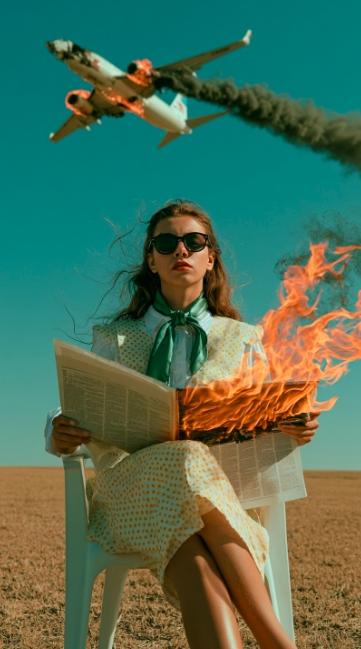
In comparison, ChatGPT’s image generation models excel at rendering accurate text within images. These models also have a better understanding of numbers and spatial awareness. So, as long as you describe details well, the renditions are pretty accurate.
In 2025, OpenAI upgraded from GPT-4 to GPT Image-1.5. This model was four times faster and much better at rendering logos, mimicking lighting, and preserving facial structure. And, it understood typography, which can be a real challenge with Midjourney. For designers and bloggers building WordPress sites, the textual capabilities are a game-changer.
Another advantage ChatGPT has over Midjourney is its memory. Midjourney focuses on style consistency, but it does not remember your style or brand preferences. ChatGPT does. You can ask the AI to update memory with your stylistic suggestions and apply them across generated images. This is huge for freelancers and agencies generating content at scale.
Good news: OpenAI has already launched an improved GPT Image-2.0. It is a reasoning-first model that has topped the LM Arena image generation leaderboard (a benchmark established by real human votes).
What does this mean? Many Gen AI tools treat prompts as a set of keywords and compare them against datasets to identify patterns. The GPT Image-2.0 works differently. It breaks down your prompt into sub-sections, interprets them by considering elements (visual logic, text placement, and spatial relationship), and then generates an image. Result: refined and accurate renditions, especially on complex prompts.
This is a typical example of what ChatGPT is capable of creating.
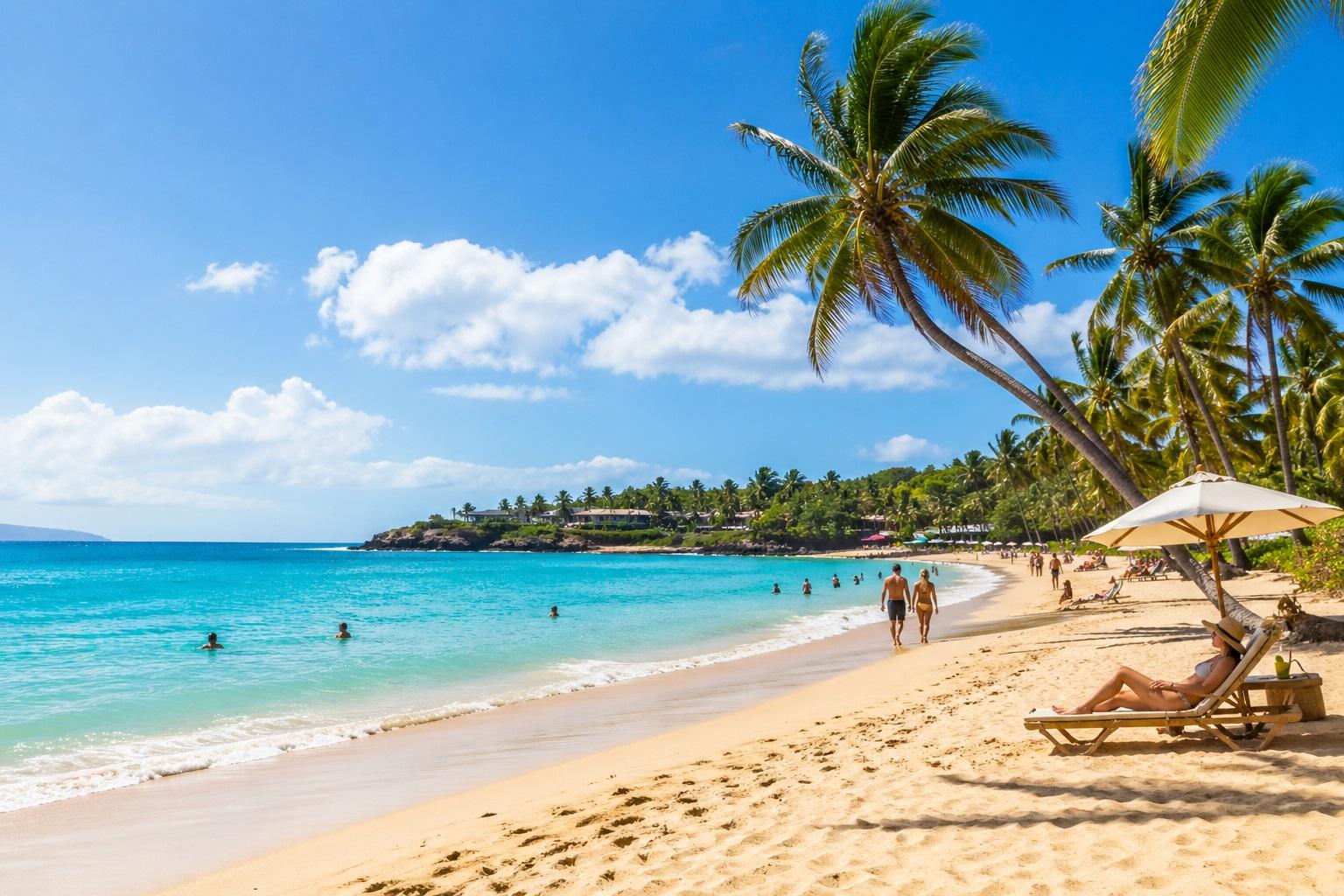
Here is a quick rundown of the ChatGPT Midjourney image quality comparison.
| Feature | GPT Image-2.0 | Midjourney V8 |
|---|---|---|
| Core Advantage | Prompt-to-image accuracy, text generation, and logical reasoning. | Artistic/whimsical style, creative work, inspiration moodboards, and cinematic aesthetics. |
| Text Rendering | Advanced text understanding within images. | Better than V7 but still struggles with longer sentences. |
| Editing and Control | Conversational to-and-fro editing, convenient iterations, intermediate control, memory-driven. | Advanced control, sophisticated editing toolkit for generating different variations. |
| Best For | Quick mockups, marketing assets, product photography, e-commerce visuals, and social media visuals. | Character illustrations, concept art, lifestyle photography, and interior visualization. |
Ease of Use
Midjourney is excellent at giving you realistic images just as you like. However, it does not compare with ChatGPT when it comes to usability and convenience.
GPT Image 2.0 is accessible directly from the chat interface. Hence, with ChatGPT, creating images feels like you are chatting with your friend, telling them your requirements, giving feedback, and editing outputs in real-time.
- Can you create an image of a beach during golden hour?
- Make it brighter.
- Add a sales description right on top of the sand: “Flat 50% Off”.
- I want you to add some palm trees as well.
And that’s it. Even a non-designer can create a realistic image with ChatGPT almost instantly. The back-and-forth with this AI does not feel robotic. Rather, you will find it like a natural conversation with a designer that lives inside your computer.
The only downside is that free users are allowed only three to five images per day. And, they are limited to GPT instant, which does not think deeply when generating visuals. So, free users will have to be extra thoughtful with the prompts.
Midjourney, in comparison, does not feel conversational. Originally, you could only use this AI through Discord, which is a team chat app. Now, the AI is accessible via the web, which allows logging in with your Google account.
But, unlike ChatGPT, it’s not free, though you may get occasional free access if you are lucky. The starting price is $10 per month. This basic plan can let you create 200 photos.
Once you are logged in, the process is similar to ChatGPT. Click the create tab and explain your requirements. For every prompt, Midjourney generates four images. Till now, the process has been easier. But from here, editing means going deeper into complicated fine-tuning options. Don’t stress yet. If you have some prior experience with image editing, it won’t be an issue.
| Aspect | ChatGPT | Midjourney |
|---|---|---|
| Accessibility | Directly within the ChatGPT interface. | Through Discord or a web app. |
| Interface | Conversational prompts (explain what you want in casual language). | Imagine (command-based prompts). |
| Learning Curve | Low (understands and converses in human language). | Moderate-to-high (requires expert knowledge of image parameters). |
| Iteration | Follow-up prompts in the same session. | Button-based controls for re-rolling, upscaling, color grading, etc. |
| Account Requirements | Yes, it is only available for paid subscribers. | Yes, it has a free tier as well as paid subscription plans. |
Flexibility and Use Cases
Midjourney vs ChatGPT: which AI offers better flexibility? The answer: both, but in different ways.
ChatGPT is a productivity-first tool with image generation capabilities. Meaning, beyond creating photoreal visuals, this AI can integrate into real workflows. For instance, you can ask ChatGPT to generate an image, write a compelling ad copy, analyze competitors, and update your content calendar - all in the same conversation.
For businesses, these multimodal capabilities boost productivity. It fits their routine operations: generating reports, creating presentations, producing product mockups, and so on. It removes the effort and time of juggling multiple tools to execute a single task sequence.
That’s not it. It also offers editing flexibility. Instead of complex parameters, you just tell the AI to adjust elements in casual language. This is a lifesaver if you are a non-tech, non-designer person who needs publish-ready images almost instantly.
Here’s where using the ChatGPT image generator can benefit you.
- Blog feature images - ChatGPT can replicate unique and consistent on-brand visuals for all your social media handles. With this AI, you do not have to rely on stock photo sites.
- Social media visuals - This AI generates visuals with readable text. So, if it’s a sales call, a new opportunity for your customers, or a giveaway, a simple ChatGPT-generated visual can save you time and effort.
- Quick client mockups - ChatGPT can generate different variants of your prompts to show clients during meetings. Produce a few mockups with different logo placement, colors, and see how your client responds to that.
- Tutorial illustrations - ChatGPT can create clear interface visuals without Photoshop. This way, you can write and demonstrate how-to tutorials with less effort and resources.
- Product visuals - This AI can create realistic product concepts with brand labels and highlighted text. With this, businesses can build marketable assets with minimal resources.
In comparison, Midjourney’s flexibility lies in its refined image generation process. It focuses on one thing, and that is near-professional-level images. This directly helps designers and content creators experiment with different moodboards, cinematic illustrations, and concept art work. Moreover, it also gives you creative control through parameters like upscaling, styling, and sref.
Thanks to its unparalleled editing toolkit, Midjourney takes advantage in the following use cases.
- Traditional art styles - Midjourney has several style mediums, including oil paintings, charcoal sketches, and watercolors. Artists can experiment with these styles and implement them in modern art.
- Creating Surreal Landscape - Midjourney creates exceptional hyper-realistic landscapes and nature photography. You can use it in wide-format with controlled lighting.
- Product photography and mockups - Midjourney creates hyper-realistic concept images with aesthetic backgrounds, lighting details, and rich color palettes.
- Interior visualization - Midjourney helps interior designers with early-stage ideations, presentation-ready concepts, and mood boards for style exploration.
- Character illustrations - This AI excels at generating 2D, 4D, pixel, and anime characters with great attention to detail.
- Concept art - Midjourney uses descriptive text prompts to visualize characters, props, and surroundings to establish mode, enhance color palettes, and generate detailed concept art.
Customization and Prompt Control
Midjourney - better spatial awareness, better aesthetics, better detailing, advanced editing options
For starters, you can customize ChatGPT-generated images directly within the interface. It has native conversational editing, meaning you carry on the chat and ask the AI to adjust parameters, such as aspect ratio, contrast, and brightness. This way, you do not have to regenerate the entire picture.
We created an image with ChatGPT using the test sample, “Create an image of a beach during the golden hour with some palm trees. I also want you to write a sales call stating 50% off right on top of the sand”. Here is what the picture looked like. It was closer to the prompt instructions.
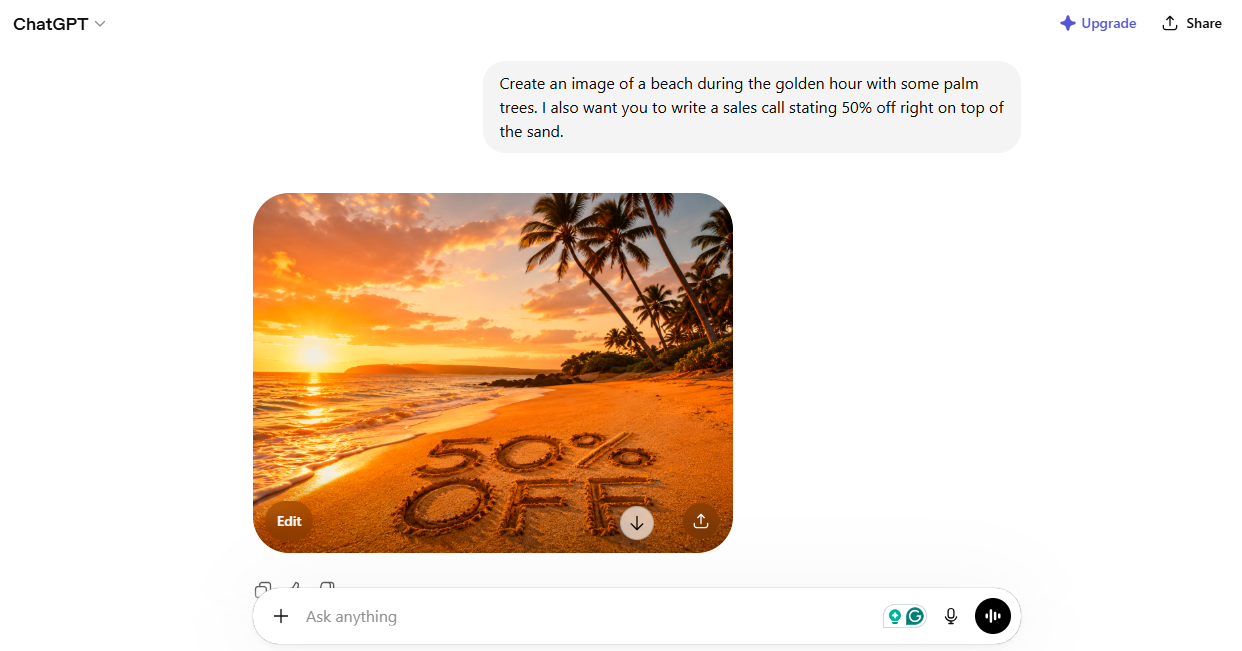
However, we were not completely satisfied with the sales call and palm tree placement. To adjust that, we clicked edit, selected the improvement area, and asked it to “write this in white text that is floating over sand and not carved in it. Also, it's better if you change the location of the palm trees and keep it closer to our sales call (50% off).”
Here were the results. Much better than the first draft.
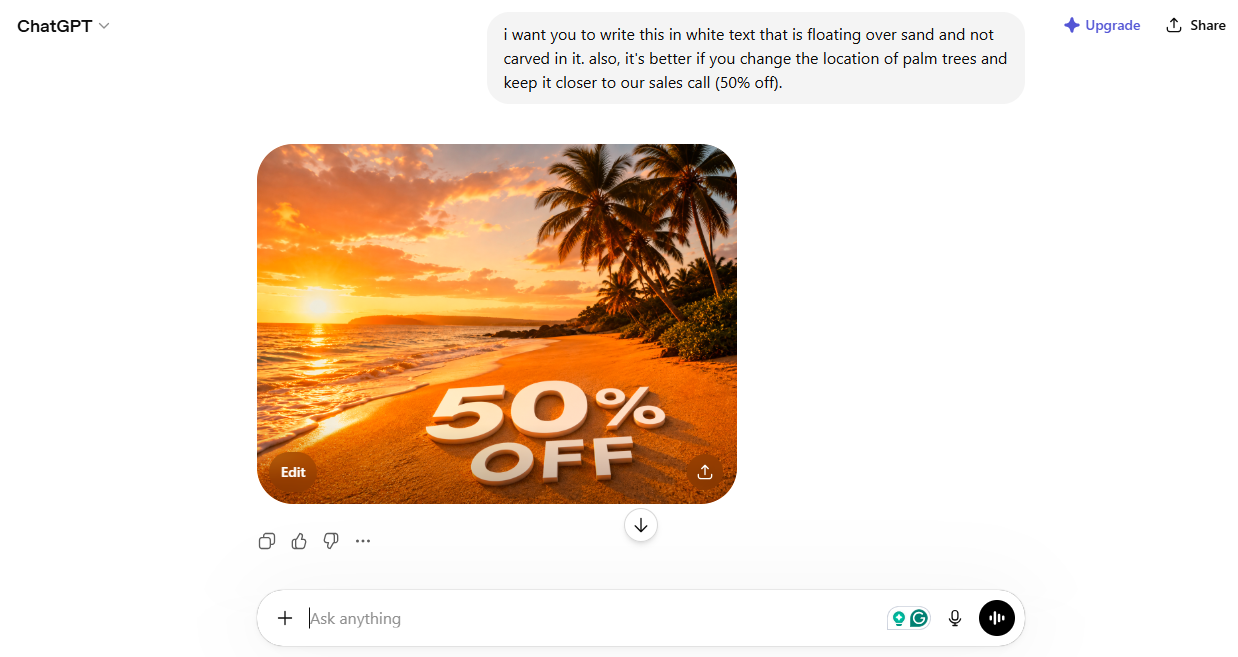
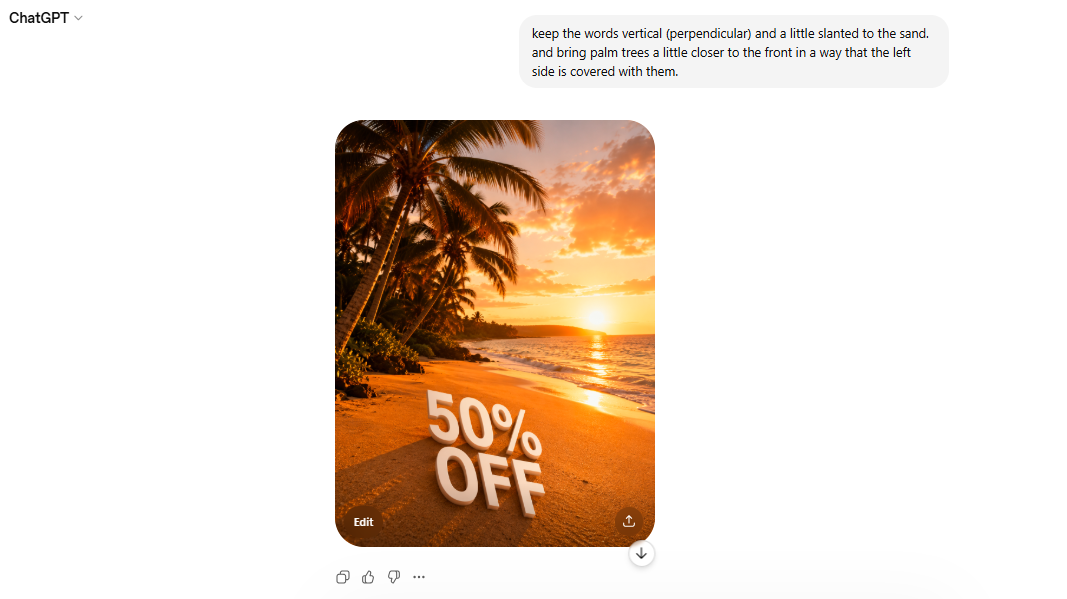
Still, the text and palm trees were not as we wanted. So, we give it another prompt: “Keep the words vertical (perpendicular) and a little slanted to the sand. and bring palm trees a little closer to the front in a way that the left side is covered with them.” Here were the results. Workable but still needs some fine-tuning.
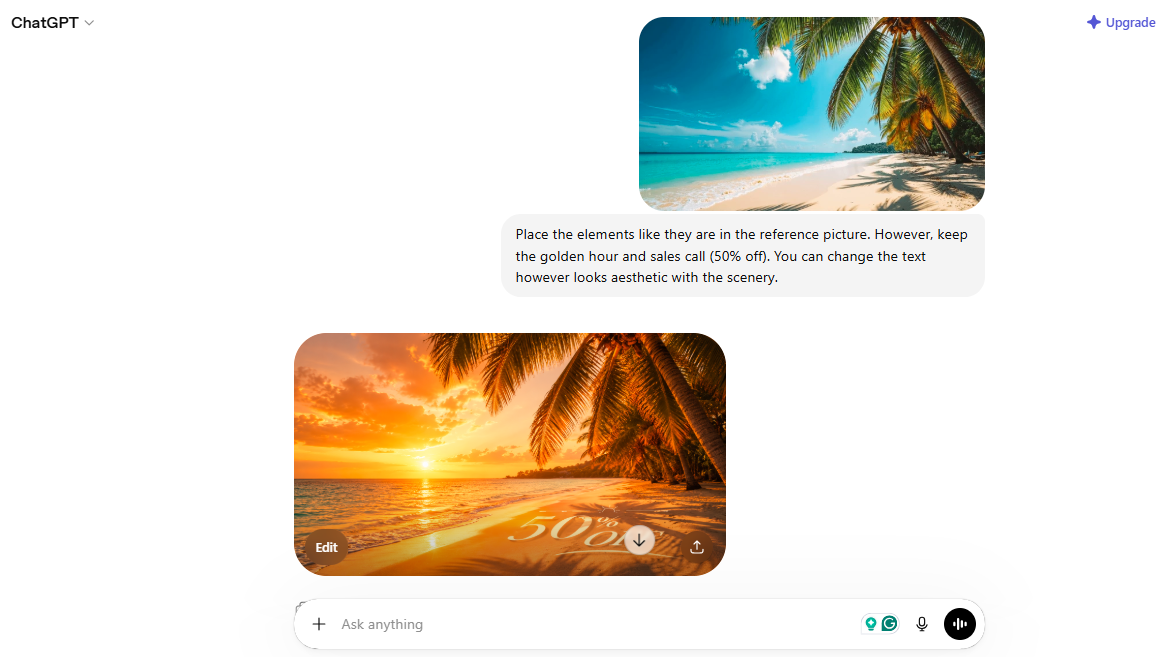
ChatGPT has multimodal capabilities. Meaning, it can understand and interpret prompts using multiple formats: images, audio, and text. Hence, we added a reference picture and asked the AI to “place the elements like they are in the reference picture. However, keep the golden hour and sales call (50% off). You can change the text to whatever looks aesthetic with the scenery.” The results were noticeably better than they were with the text instructions.
In comparison, Midjourney has an advanced editing toolkit. With Midjourney, you can add details about different artistic styles, textures, and reference pictures in the prompt. Accordingly, it generates a closer visual. But this is just the beginning.
Compared to ChatGPT, which offers intuitive and basic AI-driven edits, Midjourney AI image generation and customisation are on another level. It has advanced editing parameters, including
- Image scaling and resolution adjustment
- Style references that allow you to feed the AI specific images to match your style.
- Advanced features, such as inpainting, upscaling, and refining.
We created a basic image with Midjourney using the test command, “a cat with the hat”. And, here were the four variations Midjourney produced with no additional guidance.
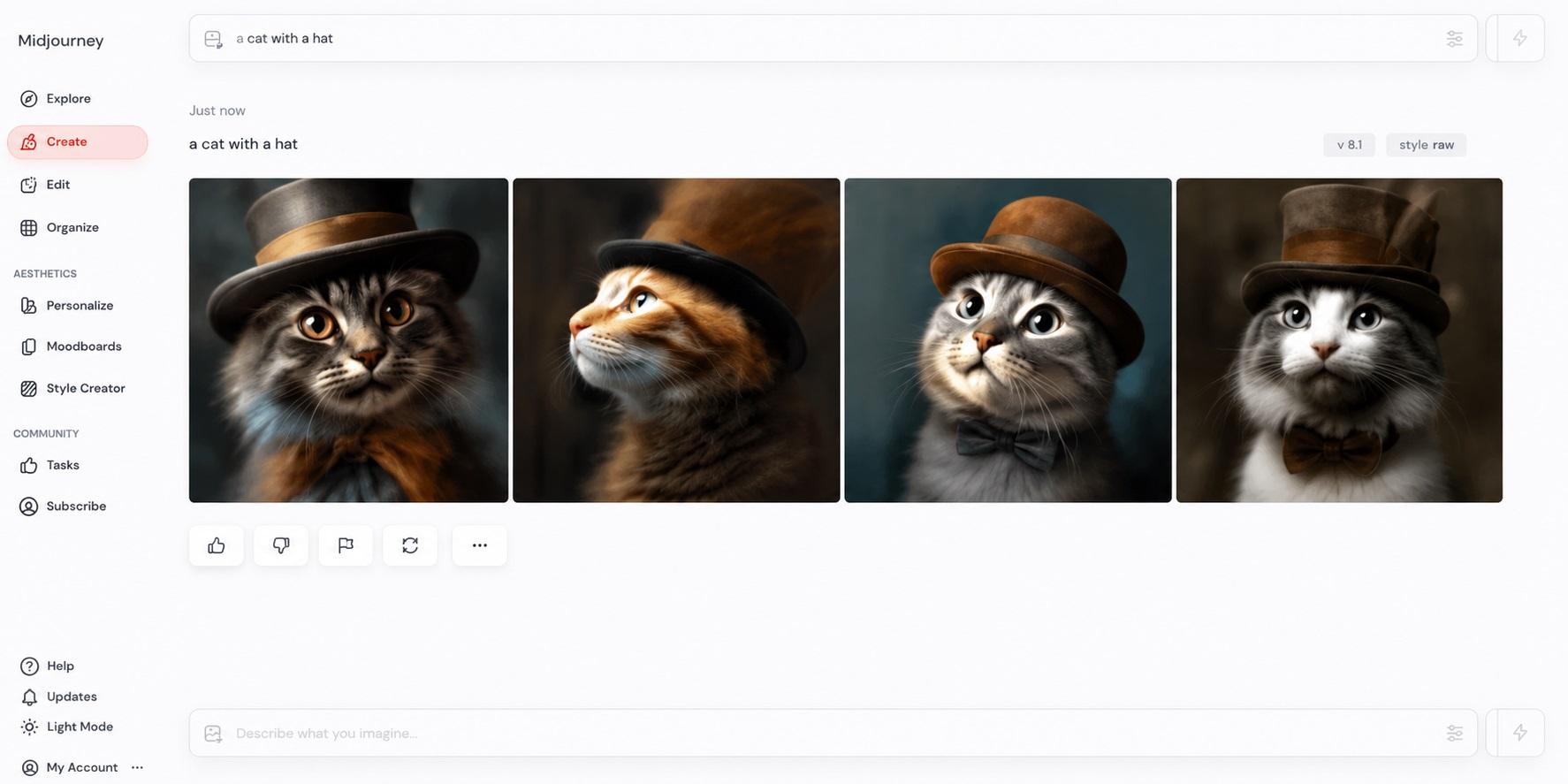
We selected one that we liked the best. On clicking it, we could see different upscaling options for the image. For instance, we could upscale it subtly or more creatively, we could re-run it, or we could use its style for another prompt.
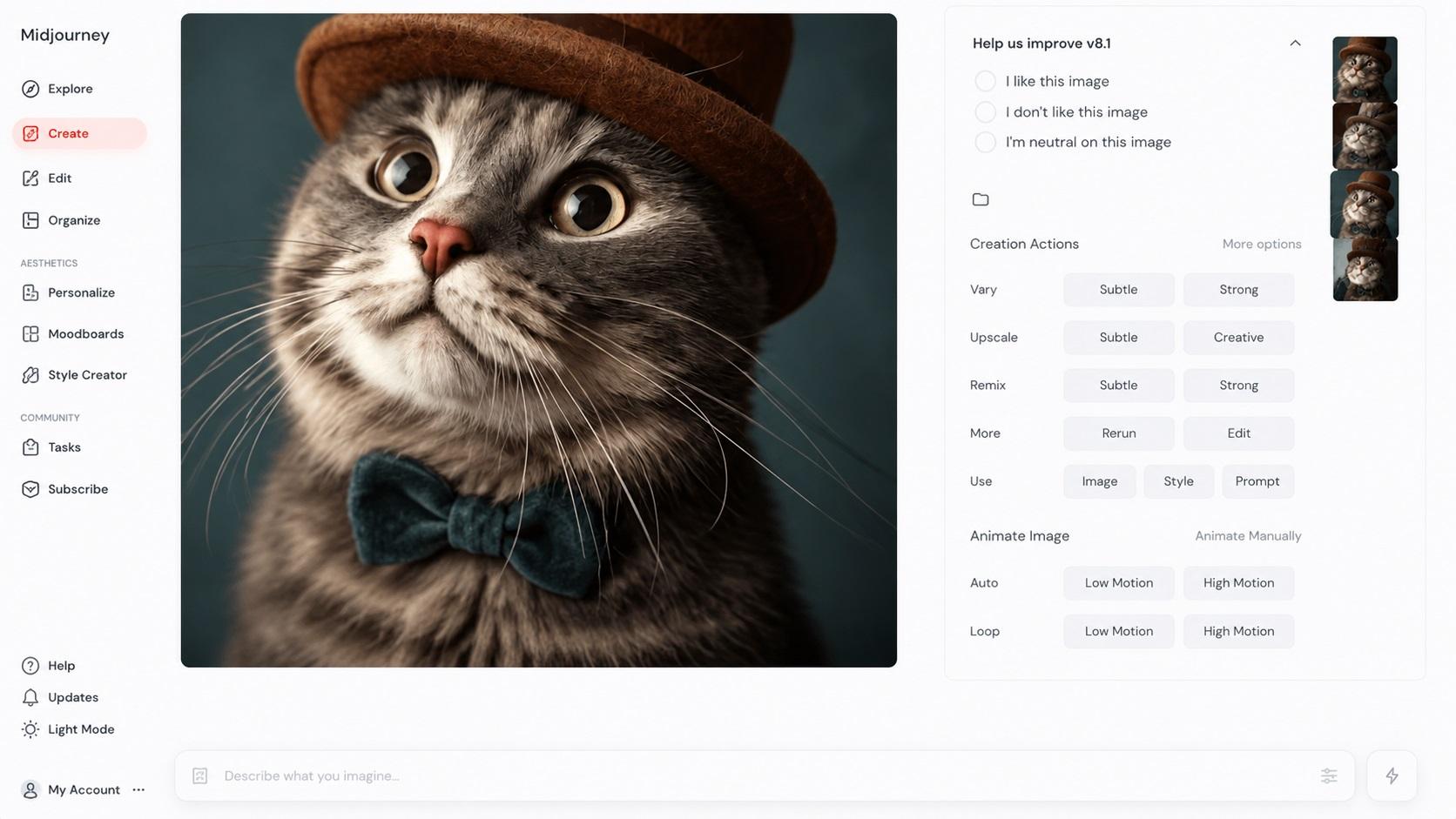
But that’s not it. Midjourney also gives you creative control over the output. The customization options at the top of the display helped us with the image sizing and aesthetic details. With this, we could adjust the aspect ratio, change colors, and so on.
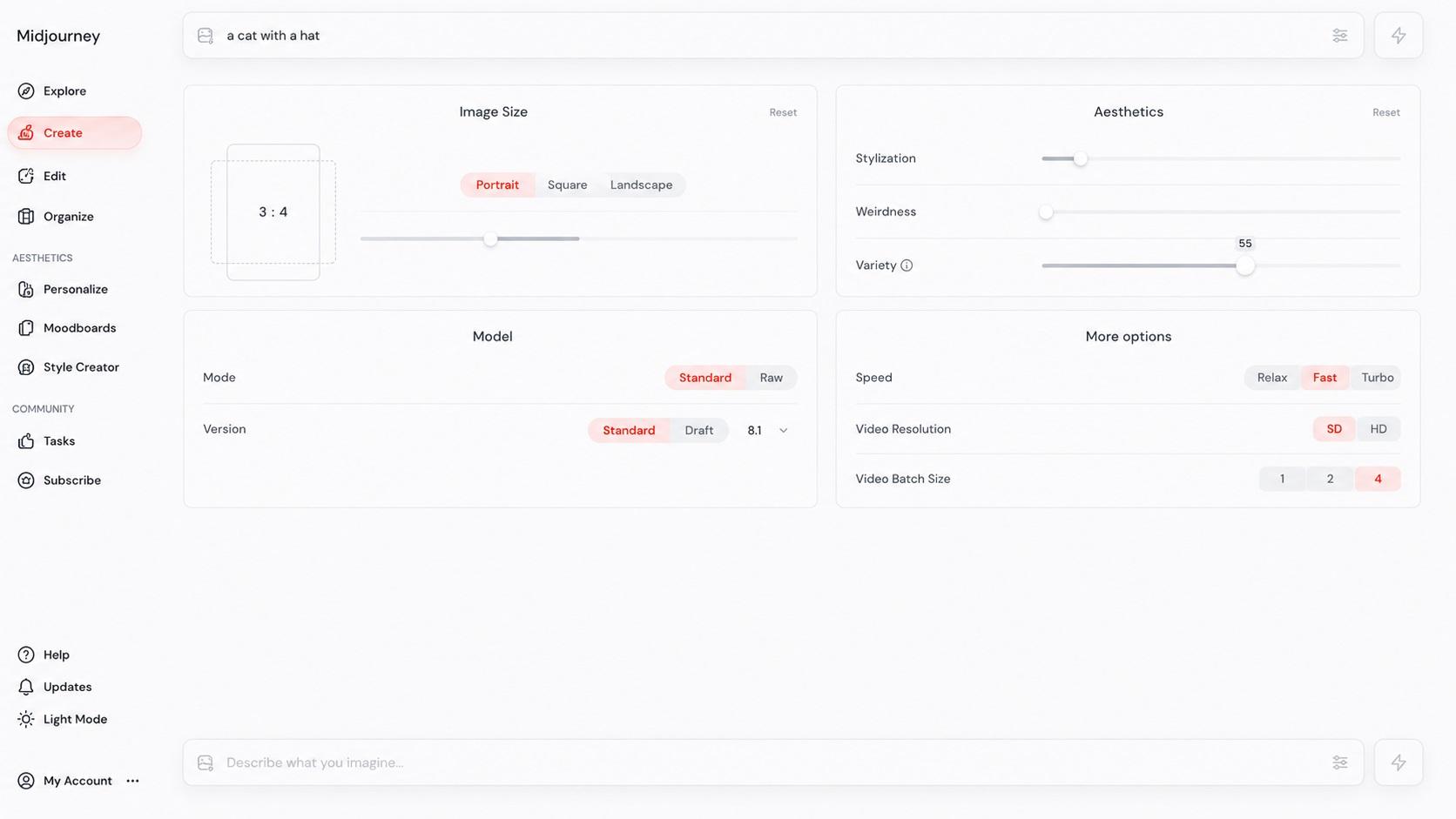
To test one of these options, we chose variety, and Midjourney came up with a few more out-of-the-box variations of the prompts. These variations showed different art styles, mood boards, and concepts.
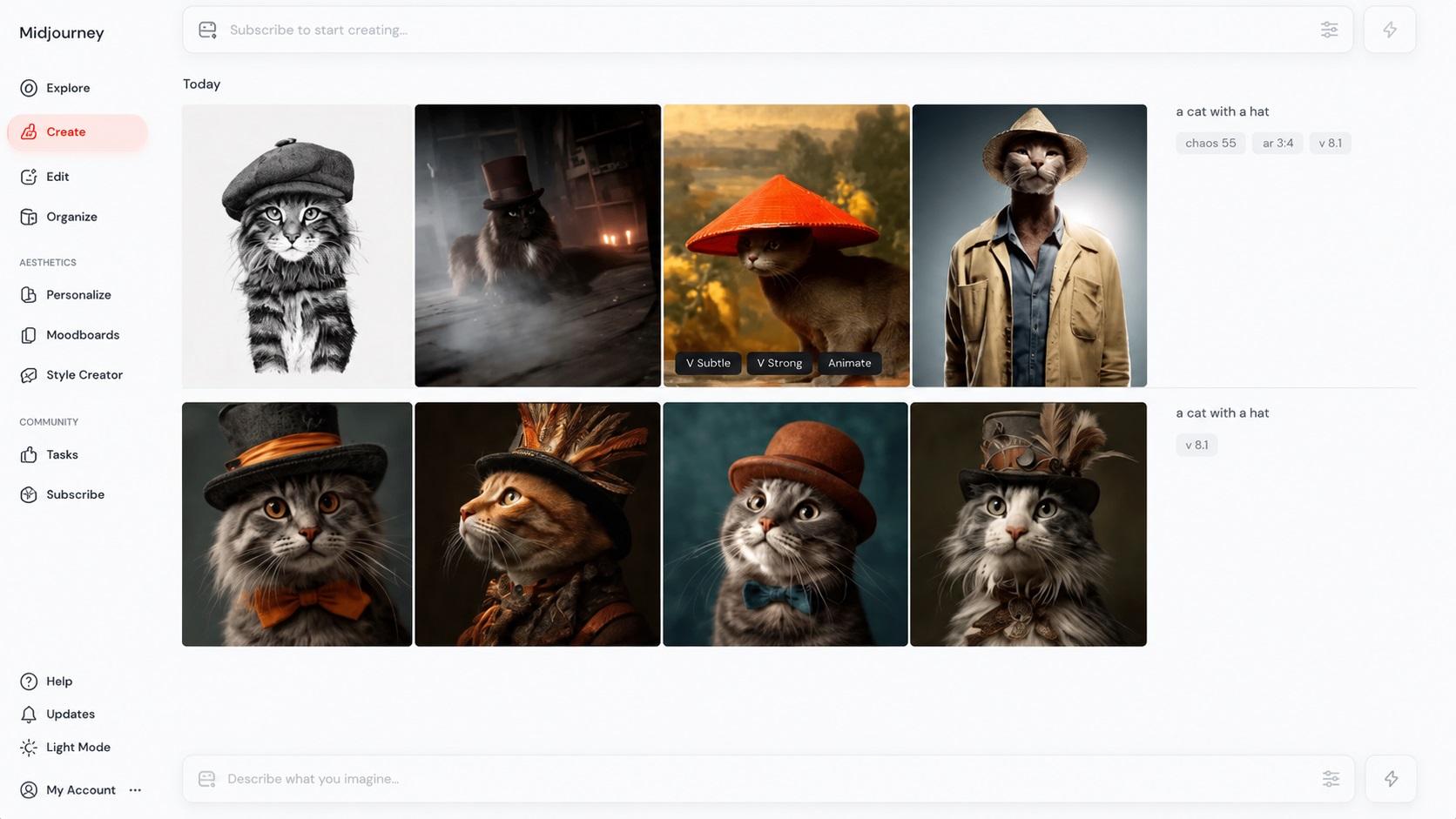
Overall, ChatGPT’s editing feels intuitive, but it is no comparison with the creative control you get with Midjourney.
Midjourney vs DALL·E vs ChatGPT
Midjourney vs DALLE 3 vs ChatGPT: what is the real difference between these three AIs? Let’s find out what goes on behind the scenes in each image generation process.
Midjourney

Best for: Designers, artists, and photographers who need stylized, in-depth, photorealistic visuals and creative control on parameters like upscaling, variations, aspect ratio, etc.
Midjourney is an art-focused image generator that helps graphic designers and artists create detailed and artistic images. Developed by an independent research lab, Midjourney is accessible via Discord and its web version. Unlike DALL-E and ChatGPT, this AI is paid and does not offer a free tier.
Midjourney’s models are trained on billions of text-to-image pairs. With these data pairs, the AI better understands basic concepts like hats, dogs, and colors. So, when a user inputs a command, such as “a cat with a hat”, Midjourney’s LLM processes the text and deciphers its meaning and intent.
Then, it converts the text into a numerical vector. These numerical vectors guide the diffusion process. Think of it as the blank field of noise that will be refined step-by-step. After this, the noisy version goes through high-performance GPUs (Graphics Processing Units) that convert it to detailed visuals that match the intent of your prompt closely. This is why you get a different image even if you use the same prompt for the second time.
Here is a quick rundown of Midjourney’s toolkit.
- Version control, which allows users to choose from different model versions (V7, V8.1, etc).
- Niji's collaboration focuses on generating anime and illustrative-style images.
- Upscaling tools help designers achieve higher resolution, improving the image clarity and detail.
- Variation mode lets designers adjust variance in outputs. Meaning, they can control how much an image diverges visually from the original reference image.
- Stylistic commands with which designers can influence the artistic style of the image to be generated. This adds a unique flair to the visuals.
- Advanced editing parameters, including raw, serf, and so on. Each stylized value adjusts the texture, lighting, and colors of your image.
DALL-E

Best for: Marketers and content creators who need exact adherence to the prompt, especially when working with specific text and layouts.
In comparison, DALL-E is a generative AI from OpenAI. It used to be available via ChatGPT (as a version of GPT-3) till 2026, when the chatbot phased out in native multimodal models, such as GPT-4o, GPT-Image-1.5, and GPT-Image-2.0.
But that does not mean it has stopped existing. OpenAI still lets you use DALL-E via ChatGPT, Bing Image Creator, Microsoft Paint, and other services using the DALL-E API.
DALL-E works similarly to Midjourney. It is trained on huge datasets consisting of images with textual descriptions. With this knowledge, the AI can imitate different art styles and projects of real humans and produce new visuals.
DALL-E’s transformer language model accepts both textual and image inputs. It then breaks down your inputs into smaller tokens and compares them with its training data. The result: unique and original images. Here are a few things DALL-E can do for you.
- It can produce original, visually appealing, and captivating images in multiple art styles.
- Like GPT, DALL-E has contextual awareness. Meaning, it can process and interpret your prompts, understanding different moods, emotions, and atmospheres.
- DALL-E can generate multiple image variations using the same prompt.
- DALL-E can outpaint images. It analyzes a picture and expands it to add more details than the original.
- DALL-E can also inpaint images: remove objects and elements from an image.
ChatGPT
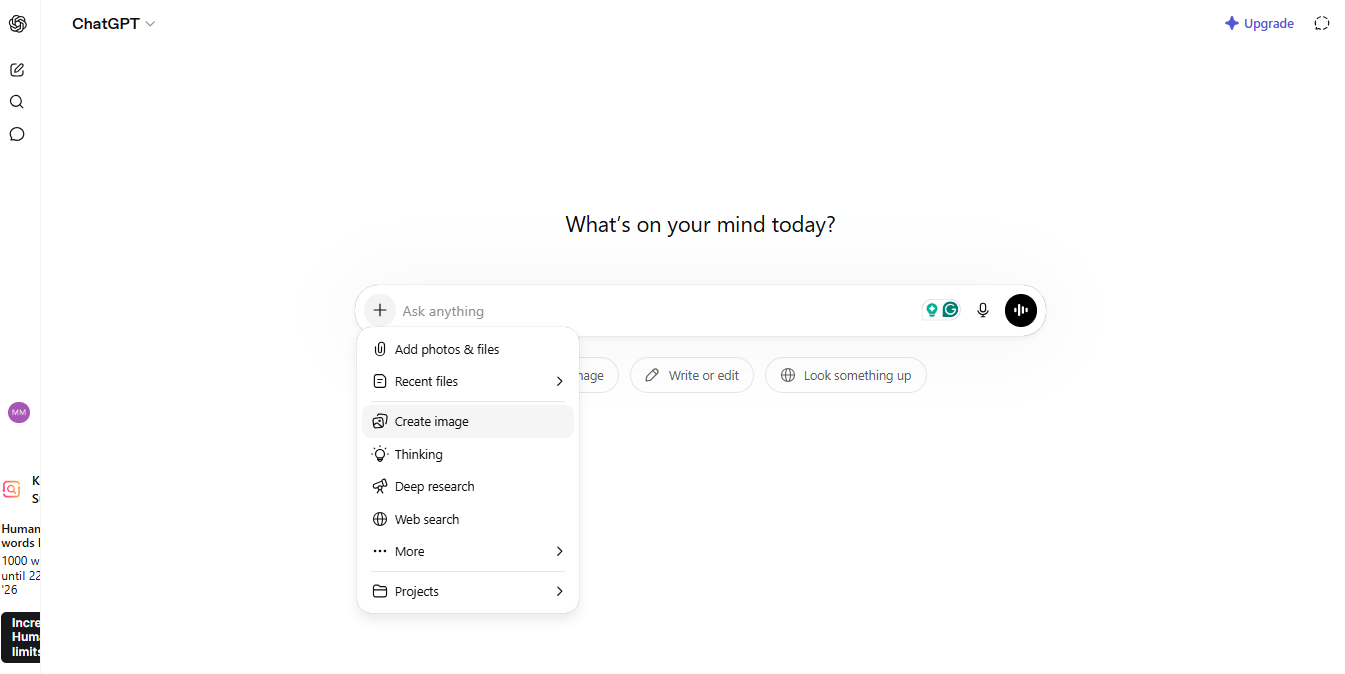
Best for: Beginners, non-designers, marketers, and content creators who want to create and edit images with ease and convenience. It also excels at prompt adherence, reasoning, and textual renditions.
ChatGPT works differently from DALL-E and Midjourney. These models are entirely multimodal, meaning they were trained on text, visuals, audio, and video. So, naturally, they are bigger and have a better understanding of worldly things. For instance, all three AIs can understand a complex prompt like “a traditional oil painting of a Slovakian man riding a horse through thick and dense maple trees”. But ChatGPT can add a lot more nuance than the other two.
The earlier models, like GPT-4o, use a process called visual autoregressive modeling. So, instead of noisy blank fields, these models start with a rough draft and improve things from there. Combined with its reasoning capabilities and language understanding, ChatGPT tries to get the image closest to the description.
Thankfully, the newer models are even better. In GPT-Image-2.0, the latest version, there are three new things. First, there’s a thinking mode that reasons through a prompt before generating the image. It breaks down your prompt to understand the intent better. Second is the web search, which pulls all image references from the internet. And the third is 8-frame coherence, which keeps the style, character, and lighting consistent throughout multiple image versions.
Here is what makes up the ChatGPT image generation toolkit.
- Human feedback where expert reviewers and routine users rate the generated images for aesthetic appeal and prompt alignment.
- Semantic alignment, through which the model compares the generated image against the intent to ensure all elements are accurately rendered.
- Advanced text rendering, where the AI model accurately spells and demonstrates text within an image.
- Interactive editing that allows users to highlight specific areas in the generated image and ask the AI to modify them using a to-and-forth conversation.
- Aspect ratio control, which helps users generate images in custom sizing.
When Should You Use Midjourney vs ChatGPT for Images?
Knowing when to use which AI saves you from a lot of random trials and gives your creative processes a direction. Here is a quick use case Midjourney vs ChatGPT comparison.
When to Use Midjourney?
Midjourney AI is unparalleled in artistic image generation. Hence, it truly excels in areas where the image itself is the deliverable and parameters like quality, texture, colors, and style are non-negotiable. Here are a few common uses of this AI.
Concept Art and Creative Projects: Filmmakers, creative directors, and game developers widely use Midjourney to visualize their fictional worlds, unique characters, and immersive surroundings. Its ability to design drafts with varying moods, eras, and styles makes it a great pre-production tool.
Brand Identity Visuals: Midjourney’s stylistic depth and unusual aesthetics help brands build their identity from scratch. For instance, a designer working with their brand’s visual language can target specific areas like a defined color palette, consistent lighting, and illustrative style visuals. This way, the brand feels personal and resonates with your audience.
Campaign Visuals: Want people to stop mid-scroll and notice your product or service? Midjourney is the way to go. It helps creative agencies build editorial images, campaign visuals, and character illustrations for luxury brands that feel human.
When to Use ChatGPT for Images?
ChatGPT’s image generator, however, has an advantage when image generation is only a part of a larger task sequence. Here, it’s speed, convenience, and toolkit flexibility that matter more than image quality and texture perfection.
Blog Visuals: Content writers can use ChatGPT to generate images that resonate with their article content, instead of relying on stock images. The image is not gallery-worthy. But, it’s clean and relevant - what really matters to readers.
Social Media Content: Businesses posting across their social media consistently can benefit from ChatGPT’s visuals. It helps them create on-brand images and write captions for each within a single conversation. ChatGPT’s image capabilities are great at crafting product highlights and informational posts, where speed and substance matter more than aesthetics.
Rapid Prototyping: ChatGPT is great at prototyping. Product teams and marketing agencies can use this AI to mock up rough images quickly to show to clients. These mockups are enough to communicate your idea before you put in resources for polished production.
Routine Productivity Tasks: ChatGPT’s multimodal capabilities help it generate written content and images in a single session. Whether it's documenting a report, drafting a pitch, or planning an email campaign, ChatGPT stands out.
The Real Limitation: Creation Without Execution
Both Midjourney and ChatGPT are capable image generators. ChatGPT excels at speed and convenience, while Midjourney has the advantage of stylistic depth. However, generating an image and publishing it or using it in task sequences are two different things. This is where these two AIs stop being useful.
Output Stops at the File
You use an AI to generate an image for your brand. But that’s just the start. Before it is published across your sites and social media, designers and marketers must resize it for multiple formats, rename it, organize it, and write descriptions.
None of these steps happens on its own. Someone from your team does it manually. And, when you have to do this for a high-volume content cycle, the problem intensifies.
Just imagine a marketing team that generates weekly content for social media, email campaigns, and the web. Their problem is not just image creation. They are dealing with constant delays and deployment bottlenecks. Standalone image generators cannot solve these issues.
Inconsistency at Scale
Both Midjourney and ChatGPT run on prompting. Meaning, the better you explain the prompt, the closer the image will be to your requirement. And, if you have not structured a workflow for image generation in your team, the result is inconsistency at scale.
Let’s say a startup has a weekly content cycle in which they use Midjourney or ChatGPT to generate images. However, different members of the team prompt differently. The different vocabulary and phrasing mean output varies in style, tone, and sizing. They save images, both edited and raw, in personal folders, which further mixes up everything.
The result: inconsistent branding, no visual identity, and images that look nothing similar. No amount of fine-tuning, editing, and better prompting (if it is at the individual level) can save you in this situation.
Time Investment is Real
The time your team spends between generating an image and publishing it rarely gets noticed. But it is a real investment. Formatting images for different platforms, writing their captions, crafting alt texts, and integrating them into your CMS platforms means real investment. You could be doing a lot more productive tasks in this time.
A Lot Goes After Creation
For brands that are consistently drafting and publishing content, image creation is only half the problem. Here, AI image generators don’t operationalize workflows. A business that treats image generation as a finishing task will go down the manual workload lane. The answer to their problems is not only a better image generator but automated trigger sequences that take care of the next step for you.
How Sintra AI Connects Midjourney and ChatGPT?
Both Midjourney and ChatGPT are impressive at generating content. But they never tell you what to do with it once done. Sintra AI bridges the gap between creating and publishing content. It is an advanced automation solution that takes the outputs from your favorite Gen AI models and executes them via real workflows. Let’s visualize how it works in practical scenarios.
Meet Vizzy: AI Image Creation Inside Your Workflow
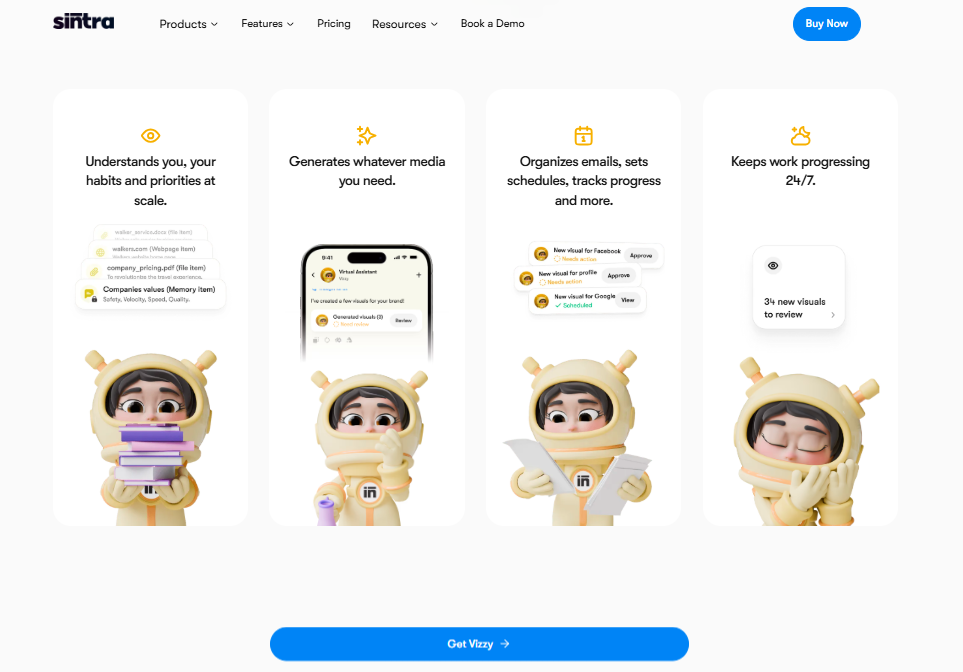
Vizzy is an advanced image creator that uses a combination of high-performing Gen AI models, including Gemini-2.5-Flash, Gemini-3-Pro-Preview, and Imagen4-Preview-Ultra. So, whether it’s an artistic style rendition of a character or marketable assets for your new product launch, this AI can create almost everything for you.
Unlike ChatGPT image generator and Midjourney AI image generation, this AI assistant lives inside your workflows. So, you do not have to generate an image in a separate tab, download it, reformat it in an isolated tool, and manually fine-tune it to make it publish-ready. Vizzy does it all for you, and that too, directly from your workspace.
For starters, it understands your team and content preferences and applies them at scale. Meaning, you do not have to write lengthy prompts re-explaining your business, brand voice, client guidelines, and style preferences.
How does this look in practice? Let’s say you are a social media manager who needs at least three images for Instagram and two email visuals for the upcoming product launch. With this image creator, you just have to connect it to your business knowledge space and ask it to build and publish these visuals. It will do so in minutes, without downloading, reformatting, or constant context switches.
AI Helpers: Turning Ideas Into Action
Stanalone AIs (ChatGPT, Midjourney, etc) generate content. But they stop at that. It’s not a critique. They are structurally developed for this task, though ChatGPT goes further at assisting individuals with routine productivity tasks. But they are not as capable as multi-agent systems (MAS) like SIntra AI for handling real business workflows.
This multi-agent system consists of twelve role-based AI employees, each specializing in a business domain. These purpose-built helpers help you execute tasks after you already have an asset (marketing visuals, email copy, and so on). A social media helper adds your visuals to the publishing queue. The SEO specialist writes the alt texts and social media captions. The email assistant adds your visuals to the email sequences and sends them.
Once your action triggers a task sequence, these helpers get to work and don’t wait for your instructions. This way, you do not have to keep a close eye on individual steps manually. Here is what a real workflow looks like with this MAS setup.
- Your team member generates multiple visuals with Vizzy.
- The social media helper formats it for Instagram, Facebook, LinkedIn, and Twitter.
- The copywriter crafts alt texts and captions for the visuals.
- Once you validate the output, the social media manager updates it on the content calendar and schedule them for posting across your accounts.
What would’ve taken your team an entire day happens in the background while you focus on strategy, growth, and customer engagement.
Brain AI: Centralizing Knowledge for Smarter Execution
Whether Midjourney vs ChatGPT, if your team relies on standalone AIs for image generation at scale, inconsistency is inevitable. Everyone prompts differently, meaning every time, you will get a different output. But, Brain AI solves this by grounding the context in your business.
Think of Brain AI as the digital brain of your business. It carries everything from brand voice, objectives, goals, client preferences, stylistic guidelines, campaign history, audience data, and product information. So, whenever you ask the helpers to execute a task, they connect with this knowledge space, pull the context, and apply it to every output, ensuring consistency.
This way, visuals from a marketing campaign you generated today will stay consistent with another campaign you might launch two months later. The message is on-brand and resonates with your audience's pain points. New members may add to your team, but the result stays the same, regardless of who’s using the AI.
Seamless Integrations With Your Existing Tools
The usability of your multi-agent automation solutions depends on the tools it connects to. Thankfully, Sintra AI offers third-party AI integrations that connect to the platforms your business already operates on. This can be your email providers, content calendars, project managers, dashboards, and CMS.
Plus, all these integrations are no-code, plug-and-play. So, all you need to do is select one and log in to your account.
When all your tools are connected and accessible through a digital workspace, work happens without context switches and fragmented tasks. Through these integrations, the helpers communicate with each other and external tools, finishing work independently. Vizzy creates visuals, Penn writes their caption, and Seoshi posts them to your Instagram account. No exporting to Canva, no copying results into a spreadsheet, and no manual Instagram posting.
From AI Outputs to Automated Business Workflows
Midjourney vs ChatGPT: Both are impressive in image generation. Midjourney lets you experiment with different art styles, textures, colors, and lighting. ChatGPT can brainstorm ideas, act on them, and create marketable visuals. But tools give you ready-to-publish visuals and leave the follow-up to you.
However, businesses today are running proactively, meaning they anticipate audience needs, focus on growth, and automate repetitive processes. Hence, they need a connective execution layer, such as SIntra AI, that changes the equation to an extent. It creates the visual, refines it, and posts it - all while staying on-brand. Your AI-generated visuals no longer sit in the download folder, ready for someone to act on them.
With this execution layer, marketers can transform a concept into a live campaign that gets into action without bottlenecks and manual production.
Turn AI Creations Into Real Business Results
There you have it - all about Midjourney vs ChatGPT image generation. Whether you choose one or the other solely depends on your unique requirements. Midjourney is a purpose-built AI for artistic renditions with textural richness, bright colors, and better spatial awareness. In comparison, ChatGPT is a native multimodal model that excels at text renditions within images and better prompt alignment.
However, if you are a business struggling with high-volume content production and inconsistencies at scale, it’s time to move beyond the ChatGPT Midjourney debate. A good call would be to switch to a role-based AI team, like that of SIntra AI, that takes care of everything, from creation to personalization and publishing. So, get started with Sintra AI today and see how it works for you.
Midjourney vs ChatGPT FAQs
Is Midjourney better than ChatGPT for image generation?
Neither is better, as both Midjourney and ChatGPT have different strengths. Midjourney is superior at generating pure artistic, cinematic, and compelling images with better creative control. Whereas ChatGPT excels at marketable content that requires speed, efficiency, and better prompt alignment.
Can ChatGPT replace Midjourney?
No, ChatGPT cannot completely replace Midjourney. ChatGPT is easy to use, understands instructions better, and includes clear text within images. It can produce photorealistic images. However, this AI cannot yet mimic the creative liberties Midjourney takes with style variations, textures, color palettes, and art styles.
What is the difference between Midjourney and DALL·E?
Both Midjourney and OpenAI’s DALL-E are powerful AI image generators, but they differ in their output. Midjourney creates artistic aesthetics with rich colors, various textures, and an advanced editing toolkit. While DALL-E is integrated into general chatbots (Bing, ChatGPT). It focuses on prompt adherence, typography, and speed.
Which AI tool is easier to use for beginners?
Between ChatGPT, DALL-E, and Midjourney, ChatGPT is the easiest for beginners. It has a conversational interface that talks to you in a human language. So, asking for a task seems like you are casually chatting and explaining how you want things to be. DALL-E works similarly. However, Midjourney has an advanced toolkit, which requires you to have prior fine-tuning experience.
How do businesses use AI image generators effectively?
To make the most of AI image generators, businesses integrate them into existing workflows. This helps them cut costs, speed up content creation, and scale at personalization. For instance, instead of expensive photoshoots, brands are shifting toward Canva, Adobe Firefly, and Midjourney to create product mockups and marketable visuals.
Related articles









Copyright © 2026 PlayOS, Inc. All rights reserved