ChatGPT 4.1 vs 4o: A Complete Guide


Table of Contents

Quick Answer: GPT-4.1 vs GPT-4o Key Differences
GPT-4.1 is the smartest, non-reasoning model for document analysis, coding, and multi-step workflow automation. It excels at instruction following and context handling. In comparison, OpenAI GPT 4o is a native multimodal model, optimized for faster and more efficient responses. Users find it ideal for everyday tasks, such as data analysis, summaries, and real-time interactions.
If you want conversational responses to everyday problems like image interpretations, explaining graphs, or answering basic questions, choose GPT 4o. However, for anyone wanting an upgrade to facilitate coding workflows, GPT-4.1 is the right choice.
ChatGPT 4.1 vs 4o; what’s the difference? On the surface, both OpenAI models sound similar. However, once you employ them for real-world scenarios, the difference shows. One is optimized for faster and cost-effective everyday tasks, while the other has higher intelligence for complex coding workflows.
Choosing the wrong model can cost you time, effort, and resources. But worry not. This in-depth GPT 4o vs 4.1 comparison guide can help you see how they manage workflows, multimodal inputs, coding tasks, and more. So, dive right in and see which model suits your work better. Here is a side-by-side comparison of both models.
What Are GPT-4.1 and GPT-4o?
Before we jump into comparing OpenAI GPT-4.1 model and OpenAI GPT-4o features, it’s important to understand what philosophy lies behind their design. So, let’s get in.
GPT-4.1 Core Features
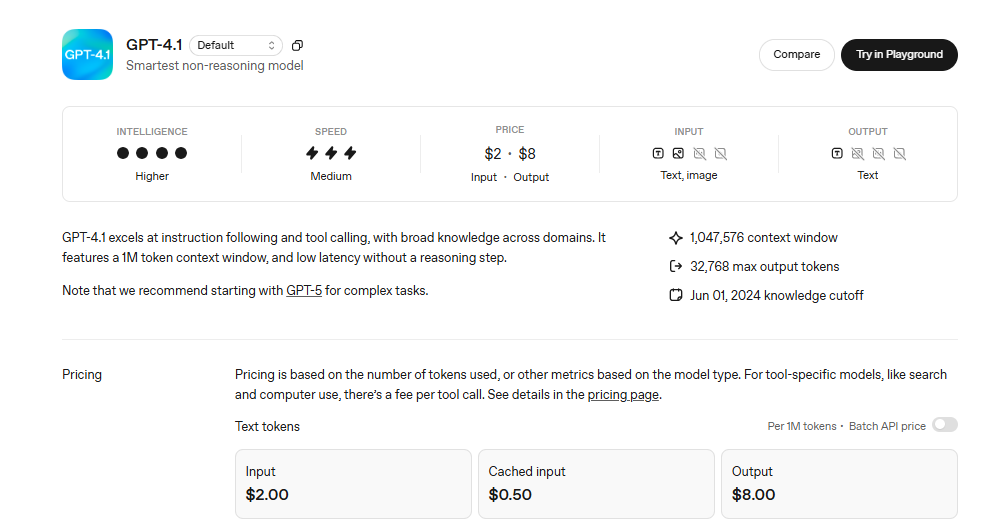
OpenAI released GPT-4.1 in April 2025 as the smartest, non-reasoning model for complex tasks. The model comes in three variants, including the base model (GPT 4.1), the GPT 4.1 mini, and the GPT 4.1 nano. While designing them, OpenAI has focused on a larger context window (up to 1M tokens), instruction following, and broader knowledge across domains. Meaning, it has low latency, better coherence, and a conversational tone without reasoning involved.
Like any other non-reasoning model, GPT-4.1 is built on generative pre-training. Meaning, OpenAI has trained this model over millions of textual and visual data points. But unlike GPT-4o, GPT-4.1 does not support multimodal capabilities. It can accept textual and visual inputs; however, you cannot use it for audio or video interactions.
However, this model has a knowledge cutoff of June 2024. Meaning, it cannot access internet sources beyond this time.
GPT-4.1 Mini Explained
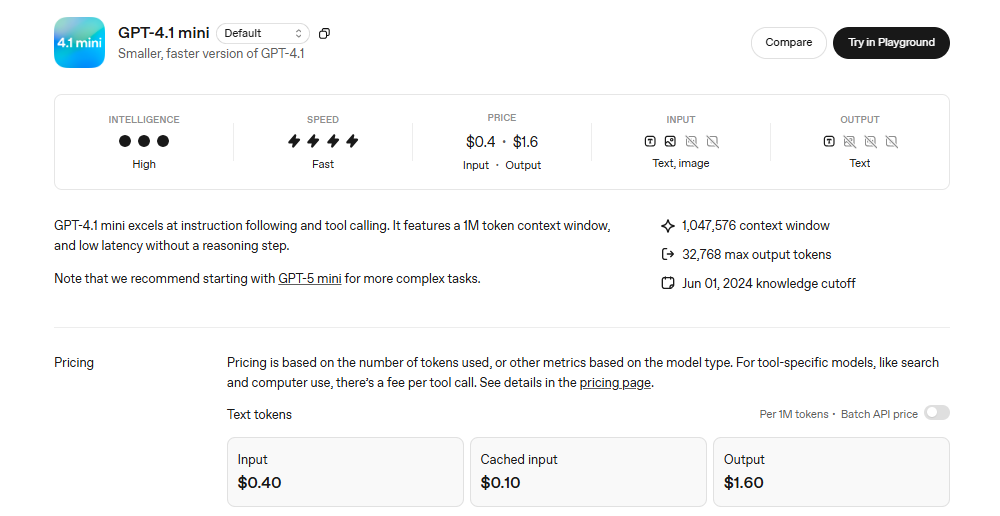
GPT 4.1 Mini is the mid-tier version of GPT 4.1. It is a faster, cost-effective, smaller, and low-latency model with almost the same capabilities as the base model. Think of it as a GPT-4o equivalent in coding benchmarks, instruction following, and visual interpretations.
Casual users and corporate officials find this model a great help in handling customer queries, generating short-form content, and writing basic code. Like the base model, it has a longer context window and picks up on nuances quite well. This is why it balances performance and speed quite well.
GPT-4o Features and Multimodal Capabilities
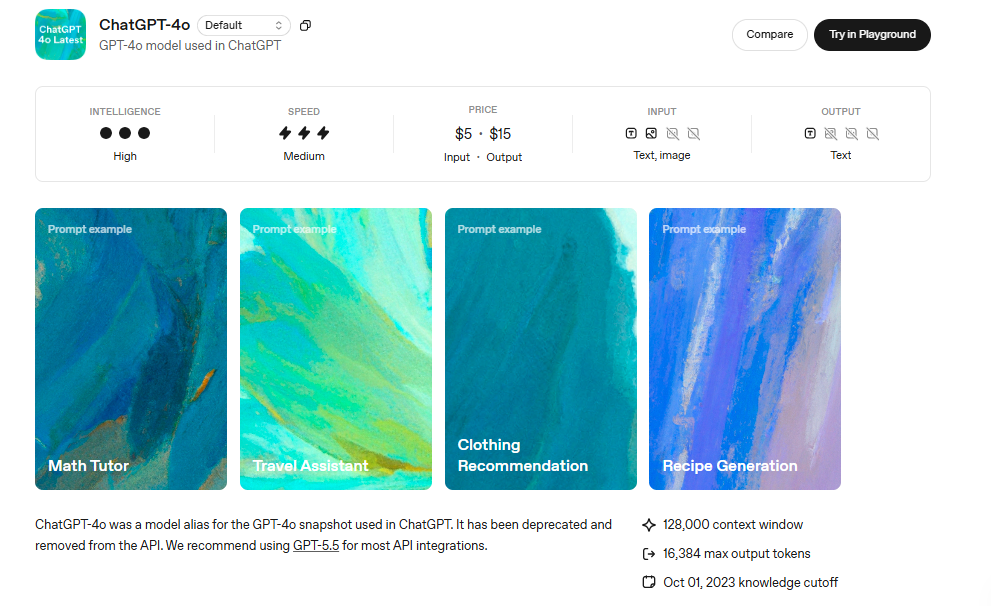
OpenAI released GPT 4o in May 2024 as a fast, intelligent, and flexible flagship GPT model. It has several variants (some specialized), including GPT 4o mini, GPT 4o nano, and GPT 4o vision. The “o” in 4o stands for omni, which means multimodal. Hence, the model’s unique selling point is its ability to accept multimodal inputs (combining videos, audios, images, and text) in a single prompt.
It is considered the most capable and versatile model in the series. Hence, professionals use it across tasks, such as data summarization, content production, brainstorming, image analysis, code writing, etc. However, it struggles with long-form content and preserving context in lengthy conversations. Compared to a 1M token window of GPT-4.1, GPT-4o supports 128K tokens.
It is also a non-reasoning model. Similar to GPT-4.1, it is built on generative pre-training. Meaning, it is trained on massive data (including audio, images, and texts) to identify patterns and language intuition. Simply put, it does not think before answering; rather, it relies on information retrieval and pattern recognition. This is also why it is faster and much more efficient for everyday tasks.
Do note that this GPT 4o model has a knowledge cutoff of October 2023.
GPT-4o Mini Explained
GPT-4o mini is the lightweight version of GPT-4o, optimized for everyday focused tasks, such as data analysis, real-time multimodal interactions, and casual queries. It’s even cheaper than GPT 4o. Like the base model, it has a 128K token context window. This is approximately 200 pages of text in a single session.
GPT-4.1 vs GPT-4o: Practical Decision Factors
GPT 4o vs 4.1: which one to choose? If you are still confused and don’t know where to start, here is an in-depth comparison of their output quality, performance, speed, benchmarks, and more. So, dive right in and see which model suits your workflow better.
Task Complexity and Output Quality
The OpenAI GPT-4.1 model shows a significant improvement in the context window, instruction following, and low latency. All these capabilities combined make GPT-4.1 effective at research, enterprise-grade productivity tasks, advanced coding, and lengthy document analysis. This model can also power agents and systems to execute tasks on your behalf, though there’s still room for improvement.
For starters, GPT-4.1 comes in three variants, including
- GPT 4.1 (the base model) is designed for complex reasoning and large-scale coding operations. It performs exceptionally well at coding benchmarks, including SWE-bench and Aider Polyglot. It’s also the most expensive of the three.
- GPT 4.1 Mini excels in small-model performance for everyday tasks (such as answering queries, summarizing text). Compared to GPT 4o, it has reduced latency by half and cost by 83%.
- GPT 4.1 Nano is the fastest and cheapest model, with better performance at a small size. It’s ideal for coding, classification, autocompletion, tool calling, and data analysis.
In comparison, GPT-4o is a native non-reasoning multimodal model from OpenAI. It can process a combination of text, audio, and images simultaneously in a single prompt using a single base model. The result: it's faster and more efficient than reasoning models. Given it’s a non-reasoning model, GPT-4o doesn’t think, which makes it excellent at high-speed, high-volume tasks, natural conversations, and real-time information retrieval.
GPT-4o has several variants, each optimized for different tasks and resource requirements. Here are some of them.
- GPT 4o is the base model, optimized for a higher intelligence and a 128K-token context window. It excels at real-time voice and text processing.
- GPT 4o Mini is a cost-efficient, lightweight version of GPT-4o. Compared to the original model, it is cheaper and faster. This is why it works great at routine tasks like data extraction, data analysis, and everyday queries.
- GPT 4o Vision is a specialized model, optimized for interpreting and processing visual content, including handwritten notes, diagrams, and image documents.
When it comes to output quality, you need to understand the purpose of each. While both GPT-4o and GPT-4.1 are non-reasoning models, their speed, performance, and ability to handle complex prompts differ significantly.
For instance, as GPT-4o was designed for fast retrieval and human-like responses, thanks to its pre-training mechanism and native multimodal understanding. This is also why it might struggle with complex prompts and longer conversations. Whereas OpenAI intentionally added a massive context window and instruction-following capability to make GPT-4.1 better at complex tasks, such as agentic flows and coding.
Team Productivity and Workflow Fit
GPT 4o vs 4.1: which is better for your workflow? The right fit for your team’s productivity lies in what you need AI for, the complexity of your routine work, and who will be using the AI.
For instance, GPT-4.1 is a better choice for developers and researchers to write code, synthesize data, analyze documents, and retrieve information. In contrast, GPT-4o would be fitting for corporate officials and casual users who need an AI for lightweight routine tasks, including voice interactions, image analysis, and basic queries.
Here are a few scenarios where using GPT-4.1 can make a notable difference in your team’s productivity.
- Browser Tasks - web scraping with minimal hallucinations, automated form filling, and organizing data (feedback responses, surveys, etc).
- Multi-Step Automation - sorting and routing customer support tickets, maintaining conversations across departments, and building visual workflows.
- Software Engineering - writing code, debugging repositories, explaining libraries, refactoring, and reasoning over entire codebases.
- AI Agentic Workflows - API-driven workloads, technical work automation, and independent task execution.
- Data Synthesis - visual analysis, sifting through legal and technical documents, information retrieval, carrying on longer conversations, and summarizing extensive reports.
Here’s when you should use GPT-4o as a workflow AI assistant.
- Logic Flow Management - multi-step approval processes, conditional routing with specific criteria, and following decision trees based on multiple data points.
- High-Volume Tasks - sorting emails and messages based on content analysis, monitoring live content, summarizing routine emails, and generating quick replies.
- Speed-Critical Workflows - quick summaries, data analysis, answering casual queries, and writing FAQs.
- Customer Service Chatbots - real-time customer interactions where latency and human voice matter.
- Content Creation - generating ad copy, CTAs, landing page content, social media captions, marketing visuals, and audio-based scripts.
- Real-Time Translation - language learning, mockup interviews, meeting notes, and translating foreign languages.
Context Length and Reliability
All variants of GPT 4.1, including GPT-4.1 Mini and GPT-4.1 Nano, support a massive context window of up to 1 million tokens. With this size, you can easily parse lengthy documents, entire codebases, customer data, and carry on with long conversations. Whereas GPT 4o supports a 128K context window, which is enough to answer everyday questions with little difficulty.
OpenAI claims that GPT-4.1 is trained to pick up relevant context and nuances within bulk text. To better understand it, OpenAI put GPT-4.1 to the haystack accuracy test, which involves retrieving a small hidden needle (information) located in different points across the context window. The results: GPT-4.1 consistently retrieved the needle, all the way up to 1M tokens.
That’s not it. GPT-4.1 also outperforms GPT-4o at OpenAI MRCR (Multi-Round Conference) benchmark. This benchmark tests a model’s ability to find and distinguish between multiple needles hidden in the context. The better the MRCR score, the better a model can help in understanding user intent and instructions. In this benchmark, GPT-4.1 shows 90% accuracy, which is better than non-reasoning (GPT-4o, 4o mini) and reasoning (GPT o3, GPT o1 high) models.
Meaning, GPT-4.1 does a better job at handling customer queries from your business documents, cross-referencing multiple files to write code, and jumping between files to pick on relevant details (such as legal questions, research references, and so on).
The benchmarks don’t really tell the entire story. Thankfully, GPT-4.1 also excels in real-world examples. Thomson Reuters, a content-driven technology company, tested PT-4.1 with CoCounsel, which is their dedicated AI for professional legal work. Against GPT-4o, they could improve multi-document review accuracy by 17%.
Pricing and Scalability
The 4-series models have officially retired from the ChatGPT interface and app as of now. However, you can access the GPT-4o model via the Assistant API, Batch API, and Chat Completion API. Similarly, the APIs and Playground support all three variants of GPT-4.1, Mini, and Nano.
Through the APIs, you can fine-tune all of these variants with custom instructions, tone-sensitive outputs, and domain-specific wording. Here is how much it can cost you for a 4o and 4.1 APIs.
Moreover, both models, GPT 4o and 4.1, have their rate limits, which put caps on tokens, audio durations, inputs, and so on within a specific time. Here is their side-by-side comparison.
Which Model Should You Use?
Knowing when to use which model is crucial, as both GPT 4.1 and GPT 4o are purpose-built and serve different needs. Here is a quick rundown of their common use cases, so you know better.
Best for Developers and Technical Teams
GPT 4.1 is automatically a better choice for developers, as it naturally excels in coding, multi-step technical automations, and long-context handling. It was also designed with better instruction-following capabilities, which is reflected in its coding workflows. Developers favor it over 4o for agentic coding tasks, front-end coding, editing codebases, and tool use.
Coding Workflows
GPT 4.1 does better than GPT 4o in most coding benchmarks. In the SWE-bench verified, GPT-4.1 completed 54.6% of tasks compared to GPT-4o, which completed 33.2% task, and o3 Mini, which completed 49% of tasks. This indicates the model's ability to search through a code repository, analyze it, and produce code that passes fundamental tests.
On the Aider Polyglot diff benchmark, GPT 4.1 beat GPT 4.5 by 8% and GPT 4o by 50%. Meaning, beyond coding capabilities across various programming languages, this model can also add code in whole and diff formats. OpenAI claims that GPT 4.1 improves on GPT 4o in front-end and creates web apps that are visually appealing and functional. Human experts preferred GPT 4.1 web designs over GPT 4o’s most of the time.
The performance is not dependent on benchmarks alone. Several companies have incorporated GPT-4.1 in their day-to-day coding workflows. For example, Windsurf, an alpha tester, used GPT 4.1 in their coding workflows, and employees noted that it was 30% more efficient than GPT 4o for tool calling and does not make unnecessary edits while interpreting code bases.
Context Handling
All variants of GPT 4.1 can process up to 1M tokens of input compared to 128K tokens for GPT 4o models. This means developers can use it to read entire code bases and process large volumes of long documents. Think of it as your API storing everything from product specifications to style guides, and code repositories in a single context window. The result: consistent and reliable output throughout the session.
Structured Tasks
GPT 4o is also better when it comes to handling longer instructions in code-intensive workflows. According to OpenAI, the GPT 4.1 model focuses on picking up nuances in your prompts and doing fewer things to make sure nothing is missed. Developers and small-sized businesses are using it for agentic work and multi-step automations.
Best for Content, Support, and Daily Productivity
OpenAI defines GPT 4o as a faster, cost-effective, and flexible AI model, which makes it a natural fit for content teams and corporate officials. Its conversational tone and ability to handle queries quickly help you accelerate everyday processes, like data analysis, content production, image interpretation, and so on. Plus, it is designed for real-time multimodal interactions.
Content Creation
For starters, GPT 4o has a warm human-like tone that works best at crafting short-form content, such as ad copies, video scripts, social media captions, and outreach messages. In addition, GPT 4o is pre-trained and can predict your follow-up questions and produce structured responses. This helps the model retain a predictable and formal style that works best for client communication and technical documentation.
Ideation
GPT 4o is also a great ideation partner, thanks to its massive training data that includes billions of images and thousands of hours of audio notes. This means marketers can employ this model to explore fresh ideas, filter the best one, suggest content format, recommend messaging frameworks, and build risk lists. This way, all your decisions are informed and grounded in data.
Multimodal Interactions
As previously explained, GPT 4o uses a single base neural network to produce a combination of audio, visuals, and text in a single prompt. This helps corporate officials get assistance on repetitive tasks like interpreting data-heavy images, diagrams, graphs, audio meeting notes, and interview recordings. You can also use it to translate foreign language content and reach out to a wider audience.
High-Volume Workflows
In routine business workflows, where the priority lies with volume and speed, GPT 4o naturally shines. Given that it is trainable and flexible, you can upload your business data and dictate to answer routine customer questions. It saves your support team from spending hours responding to repeated questions about payment orders, deliveries, and troubleshooting steps. Rest assured; with fewer hallucinations, GPT 4o’s answers are accurate and structured.
Why Model Choice Alone Is Not Enough for Business Workflows?
Choosing between GPT 4.1 and GPT 4o answers just one thing: which AI is better equipped to perform a specific task in isolation? The benchmark performance and key capabilities do not tell you if GPT 4o vs 4.1 can run your coordinated business.
Think of this. An in-house developer from your team is writing code using GPT 4.1, while a sales rep uses GPT 4o to draft replies for customer queries. Both of these are working in a silo, are from different departments, use different tools, and have no shared context. The result: even though work is being done, the output is inconsistent, and processes are fragmented.
Sach models are useful for assisting with one-off tasks. You may find them useful for individual guidance, but for business workflows, such models are only as genuine as the system built around them. Here are some reasons why individual models are inadequate to run entire task sequences.
- Standalone AI models do not have shared context for cross-departmental tasks. Imagine a support rep resolves a customer query using GPT-4o, but it does not automatically enter this ticket information in your product teams' repository or FAQ. Plus, every time an employee asks the AI to do a task, they have to start fresh with a carefully-crafted prompt, product details, and organizational memory.
- Isolated AI models cannot support repeated workflows independently. GPT is a general productivity-focused app that runs on conversations. It does not have pre-configurations for your onboarding support, sales processes, or content approvals. Every time a team member uses the AI, they start fresh, prompt differently, and produce outputs that do not necessarily match the others.
- In a business setup, it's important to assign roles and responsibilities, hand off tasks, and monitor progress. A simple chat interface does not provide any of this.
- An in-house developer using 4 GPT 4.1 or 4o API will have to do manual engineering, constantly maintain the system, and fine-tune the model according to changes in business operations. Given that most startups and medium-sized businesses outsource this work, the constant manual maintenance can get overwhelming.
As a team, you need to understand that ChatGPT, whether powered by GPT 4o or GPT 4.1, is designed for one-off task assistance. You can ask it to write a code, draft an email, debug a function, or write a summary for a document. But, businesses do not rely on individual tasks; rather, they need to coordinate processes with defined rules, allocated tasks, and cross-department communication. This is where such models struggle with consistency and coherence across operations.
Why Sintra AI Is the Better Alternative for Business Workflows?
So, what’s the next step? If your team has fewer employees and high-volume tasks, it’s time to switch from ChatGPT or standalone AI models to an advanced execution solution. Let’s learn more about this solution.
How Sintra AI Uses Specialized AI Helpers?
Most standalone AI chatbots have a blank chat interface where you start a conversation and explain the details of what you want to do. The quality of the output largely depends on how effectively you have communicated your requirements, tone, task details, and so on. In a team setup, this means every member prompts differently and gets different results. Once scaled, this can result in inconsistent and fragmented processes.
Sintra AI prevents this through its persona-based AI team. There are twelve AI helpers in this team. Each employee is pre-configured to take on business responsibilities, including customer support, social media management, email assistance, and so on.
Depending on the job, you pick a helper and chat with them using simple vocabulary. no need for technical skills, prior experience, or lengthy prompts. As the helpers are already trained in a domain, the employees do not have to spend their time and effort explaining again and again what their business and project are about, tone guidelines, or client requirements.
Here are a few helpers from this AI team and their routine responsibilities.
Unlike AI chatbots, these helpers are useful in practical workflows, not just because of their expertise but also due to their communication. Sintra AI’s helpers talk with each other when executing tasks.
- Buddy plans the entire week’s content ideas.
- Once done, Seoshi follows up and generates visuals.
- Then, Penn takes over and writes social media captions.
- Next, Seomi sees if the content is optimized for search engines.
- Once everything’s done, Seoshie schedules the social media content for the entire week.
There you have it - the entire task sequence executed with minimal manual effort.
How Brain AI Keeps Business Context Consistent?
Another problem most businesses undermine is not having a shared context in their AI setups. In fact, most teams discover it after continuous use that having your business details and organizational memory supporting the AI models is crucial to executing tasks consistently. Also, it saves the employees from having to re-enter guidelines and lengthy prompts.
Sintra AI solves this problem using Brain AI. It is your business's digital memory that stores almost everything about your organization: brand guidelines, client details, target audience, project documents, previous decisions, website URLs, project specifications, and more.
Once you prompt an AI helper to execute a task, they connect with Brain AI, accesses relevant data, and responds. And, with this, you do not have to worry about ten people using the same AI. It executes an entire task sequence, regardless of your skills or experience. No messing with manual code or carefully curating lengthy prompts.
The question is, how does Brain AI benefit your work automations?
- It establishes the brand voice. You decide what the tone will be: formal, conversational, playful, or friendly, and all the helpers will follow.
- It has all your audience information - ideal customer persona, their pain points, demographic, and individual profiles, so the outputs are relevant and personalized.
- It knows everything about your company, including products, market positioning, messaging, and pricing.
Each Brain AI can support up to five different workspaces, each for a different business. Once the Brain AI is set up, your AI helper automatically gets access to it. Over time, it improves and learns about you and your work. You can also find feedback surveys that help this centralized knowledge space improve consistency across operations.
How Sintra AI Integrations Support Real Workflows?
Outputs from standalone AI chatbots remain in the chat window until someone manually takes action. Let's say you generated an email, and until you copy and paste it into Gmail, it will stay there. You produce a summary and manually pasted into your Notion knowledge space. It's like the AI is helping you think, and you are the one taking action manually.
Sintra AI takes a different approach. Its third-party AI integrations bridge the gap between AI outputs and task execution. What's better is that these integrations connect the tool that most teams already use, including Google Calendar, LinkedIn, Gmail, Shopify, Notion, Slack, and more.
To enable these AI integrations, you don't have to manually edit code or set up complex mechanisms. Simply press connect and enter your login details. The rest is left to the AI. It accesses your data from the respective platform and executes the task accordingly. Here is how the AI integrations, once enabled, look across common teams' workflows.
- Email outreach - Emmie drafts outreach emails and sends them directly through Gmail.
- Social media posting - Seoshi writes content and publishes it across Facebook, Instagram, and LinkedIn.
- Document management - Buddy conducts market research and saves the output to Google Drive automatically.
- Calendar management - Vizzy connects to your calendar, syncs events, makes new entries, and sets reminders independently.
For busy teams working at a fast pace, these integrations can move outputs automatically without manual effort. Hence, the saved time goes into growth and strategy building.
Move Beyond AI Chats With a Full AI Team!
There you have it - all about ChatGPT 4o vs 4.1 and where you should use each. While GPT-4o is a faster and cheaper alternative for everyday productivity, GPT-4.1 excels in complex tasks, such as coding, data analysis, and instruction following. However, these AI models are only useful when you approach them the right way: using them for individual task assistance.
Once you outgrow these models and decide to implement a collaborative AI for entire task sequences across departments, try something like Sintra AI. It’s a multi-agent AI team that automates your routine tasks with minimal guidance or human intervention. Get started with Sintra AI today and see how it goes for your workflows.
ChatGPT 4.1 vs 4o FAQs
What is the difference between GPT-4.1 and GPT-4o?
GPT-4o is a faster, affordable, and flexible alternative for real-time multimodal interaction, everyday queries, and web browsing. It is conversational and predictive in nature. In comparison, GPT-4.1 is a specialized model with a long context window and better instruction following. It excels in complex tasks, coding, and data analysis.
Is GPT-4.1 better than GPT-4o for coding?
Yes, GPT 4.1 is better for coding than GPT 4o, thanks to its long context window and better instruction following. Developers use it for front-end tasks, code explanations, debugging, and web design. The GPT 4.1 model also shows significant gains in benchmarks like SWE-bench, verified, and Aider Polyglot.
What is GPT-4.1 Mini used for?
GPT 4.1 mini is a faster and cost-effective variant of GPT 4.1. It works best for high-volume document synthesis, multimodal interactions, latency-sensitive queries, and code processing.
When was GPT-4o released?
OpenAI officially released GPT 4o on May 13, 2024. It is a flagship non-reasoning model with native multimodal capabilities, optimized for faster and cost-effective responses. After the release of GPT-5 in 2026, GPT-4o has officially retired from the ChatGPT interface.
Is Sintra AI better than using ChatGPT alone for business?
Well, it depends on your team’s requirements. ChatGPT is a versatile, general-purpose tool for one-off task assistance. It can help you draft content, brainstorm ideas, and analyze data. However, it does not take action and execute the next step. If you have fewer employees and need to automate the task sequence, Sintra AI might be a better execution solution.
Related articles