Grammarly vs ChatGPT: Which Tool Is Better for Writing in 2026?


Table of Contents

Quick Answer: Is Grammarly Better Than ChatGPT?
Neither Grammarly nor ChatGPT is better than the other. ChatGPT and Grammarly are two capable AI tools that help you in different stages of the content cycle. ChatGPT helps brainstorm new ideas, create creative briefs, and generate content. Whereas Grammarly is a content editor that helps you proofread text and make corrections (grammar, spelling, tone, clarity, and delivery).
ChatGPT has emerged as a strong competitor to Grammarly. A 2023 University of Montana study found that ChatGPT can match 1% of human thinkers. But does that mean ChatGPT is actually better than Grammarly? Not entirely.
Grammarly still stands out for its real-time proofreading, offering you language precision and convenience, which ChatGPT struggles with. That said, ChatGPT has its generative AI advantages in team workflows.
Here is an in-depth Grammarly vs ChatGPT comparison based on key differences, features, and use cases. So, dive right in and see which works best for you.
Here is a side-by-side Grammarly vs ChatGPT comparison.
Both AI tools are great for writing assistance. However, they fall short at scalability. The constant context switching, no knowledge sharing, and isolated operations make them inadequate to run coordinated professional workflows. They may produce and refine content, but lack brand voice, struggle with consistency, and cannot publish it directly onto your social channels.
Grammarly vs ChatGPT: Key Differences Explained
Grammarly vs ChatGPT, both capable AI tools have unique expertise that helps you in different stages of the content cycle. Let’s find out their key differences through real-world examples.
Writing and Editing Capabilities
Both ChatGPT and Grammarly have fundamentally different approaches to writing and editing.
For starters, Grammarly is built for real-time correction and proofreading. You type a sentence, and it automatically scans the writing for any grammar errors, spelling mistakes, and awkward phrasing and adjusts accordingly. Everything happens while you are writing, without breaking the flow.
Let’s dissect its writing and editing capabilities one by one.
Beyond basic editing, such as grammar and spelling mistakes, Grammarly has a full-sentence rewrite. These rewrites help you refine your ideas and bring clarity to your voice, so your messages get across. With every suggestion, you also get an explanation of why it is better than the original writing.
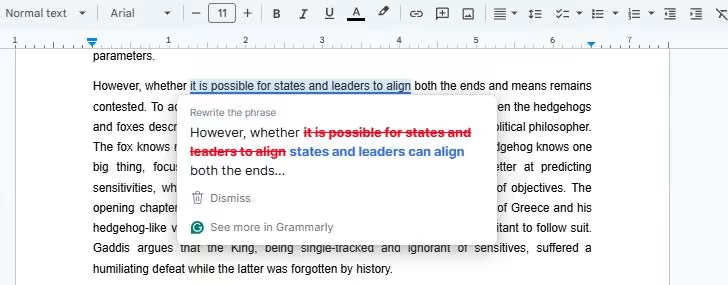
Moreover, Grammarly helps you convey emotions behind words, thanks to its tone adjustments. This AI changes the word choice and punctuation to adjust how readers perceive your messages.
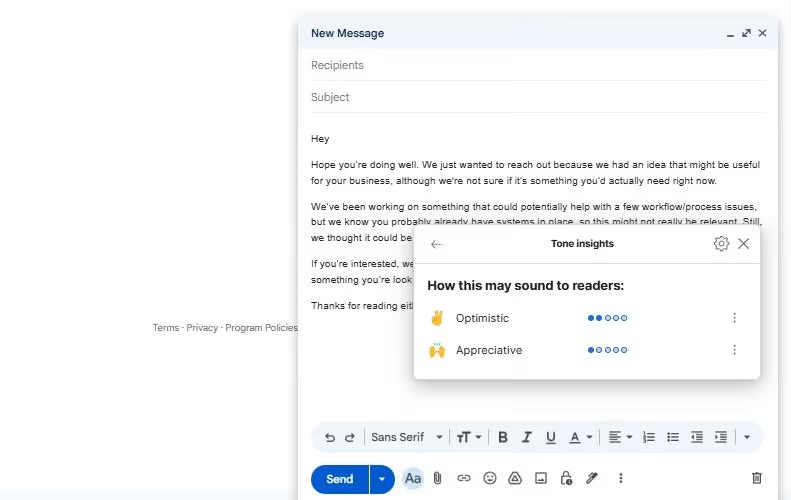
For instance, your junior employee wrote a flat business proposal email full of informalities. It lacks the confidence investors need to take action. Grammarly analyzes your writing and automatically identifies the casual approach. It then surfaces one-click suggestions to improve your confidence and strengthen the arguments in the email.
Another advantage Grammarly has over ChatGPT grammar checker is that it requires zero copy-pasting. It seamlessly integrates into your writing tools - Word, Docs, and Gmail. Meaning, within these documents, the AI understands the context and predicts how readers will perceive it by accounting for everything, including grammar errors, clarity, delivery, and engagement. Accordingly, it surfaces the style and material of your writing.
In comparison, ChatGPT is a prompt-based productivity-focused AI tool that helps professionals with basic writing and editing tasks. Like Grammarly, it can fix grammar and spelling errors, adjust tone, and rewrite for clarity. But to use it, you will have to log into its app or desktop version and make queries accordingly.
Imagine you are working on a project proposal summary and want to refine it. You copy the text from the original document and paste it into the ChatGPT interface. Then, give it a detailed prompt explaining what you want, and it generates the output accordingly. Is the first draft not satisfactory? Continue the conversation and ask ChatGPT to make changes. The results: excellent, but you need patience and effort with this AI.
ChatGPT’s true strength lies in synthesizing data from your documents and improving their coherence, clarity, etc. It lets you upload documents and give instructions on how to edit or refine them. But, unlike Grammarly, which automatically offers suggestions, ChatGPT relies on detailed prompting. If your instructions are not up to the mark, the AI errs.
Here is a small rewrite and tone suggestion test we did on ChatGPT. We uploaded the document and entered this prompt.
“I am writing an essay on John Locke's philosophy and what motivated it. Here is what I have gathered from research papers, books, and critical analysis. I want to rewrite this essay, fix grammar mistakes, spelling issues, and tone, stressing his state of nature and social contract philosophy, and how his life situation in the medieval times influenced it. Be critical and informative in your tone.” And here were the results.
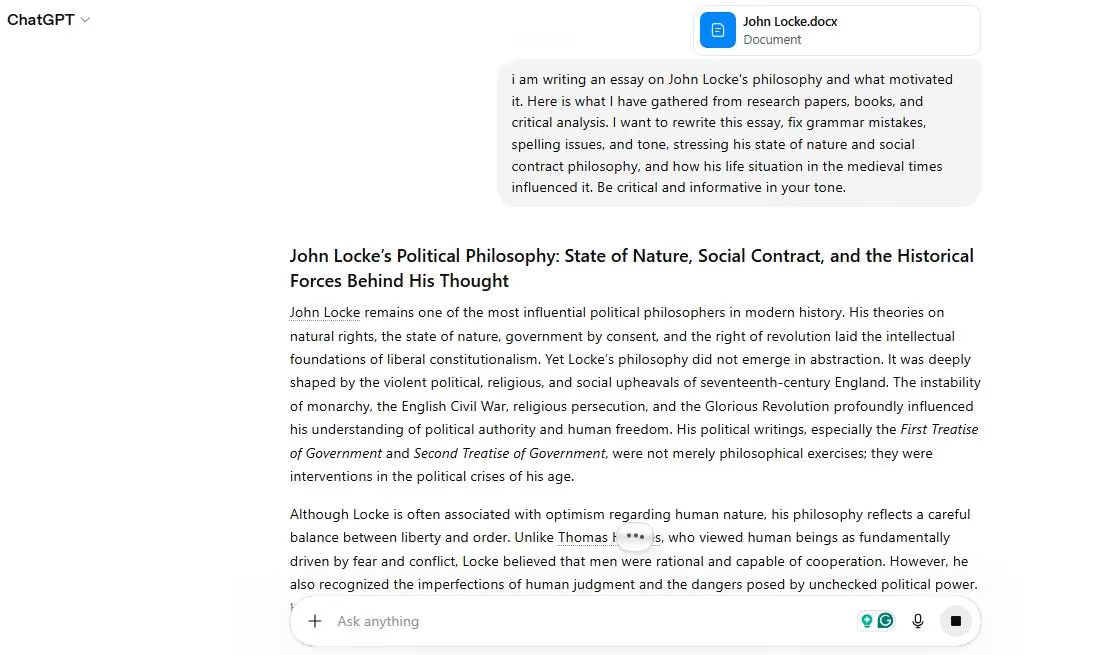
Also, because it is developed for regular non-tech users, ChatGPT tends to simplify everything. It lacks the disciplinary knowledge that enables judgment about what can be simplified or kept as it is (technical specifications).
Here is a side-by-side comparison of ChatGPT and Grammarly content editor.
Content Creation and Ideation
ChatGPT and Grammarly operate at different stages of the content lifecycle, which is why professionals use their combination for maximum efficiency. ChatGPT acts as a content generator, while Grammarly excels at refining this content.
As a conversational AI, ChatGPT interprets your prompts and generates content however you like. By structure, it is designed for ideation and brainstorming. Give details about your target audience, product details, and market trends, and ask this AI to draft your marketing campaign or project timeline.
ChatGPT is capable of web browsing and multi-step reasoning, meaning it breaks down your prompt into sections, connects with internet sources to scrape information, and answers your socratic questions. This gives you a multi-dimensional perspective on many things.
Beyond brainstorming, ChatGPT can
- Create structured content briefs.
- Draft formal and informal emails.
- Repurpose existing content with up-to-date stats and figures.
- Generating SEO-optimized tags (meta titles, descriptions, alt texts, etc).
- Produce marketable content (ad copy, product descriptions, long-form blog posts, and social media captions)
- Summarize lengthy documents into easy-to-digest text.
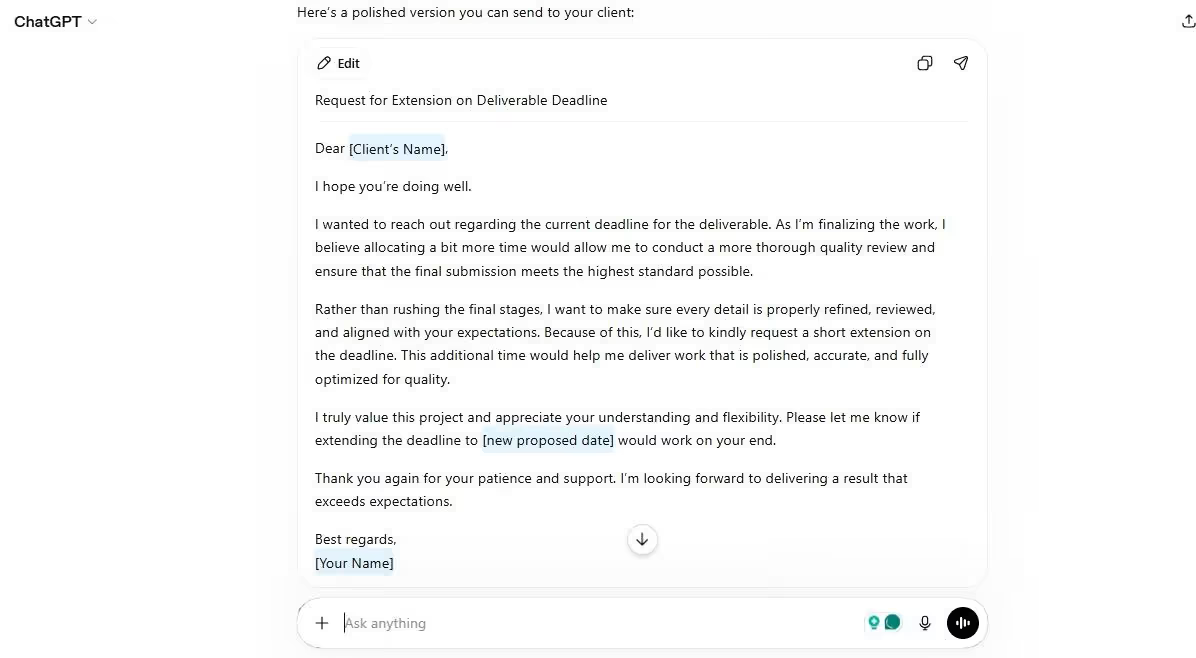
We asked ChatGPT to write an email for my client, requesting a deadline extension to ensure quality checks. Here is what this AI wrote. As asked in the prompt, ChatGPT remained persuasive and confident yet polite. We didn’t need heavy manual editing to use it.
Grammarly, on the other hand, is a partial Gen AI. Its content editor (the main toolkit) cannot solve your blank page problem and kick-start your writing journey. But its role begins once you have generated content with AI or written a rough draft yourself. You can ask it to rewrite sections of your writing, fix errors, and adjust tone.
But that’s not it. Grammarly has a separate AI writer that can produce content from scratch. You can use it to write emails, draft replies, and generate outlines. It uses a hybrid model (a combination of GPT from OpenAI and Claude from Athropic) to interpret your request and write. Like the traditional tools, you can access it from your browser or browser extension.
Within the ChatGPT interface, we asked Grammarly to rewrite the same email that ChatGPT generated. It did that well. The AI also asked us whether we want a concise version or to make it more assertive. Overall, the results were accurate. We just had to tweak the message a little before sending it.
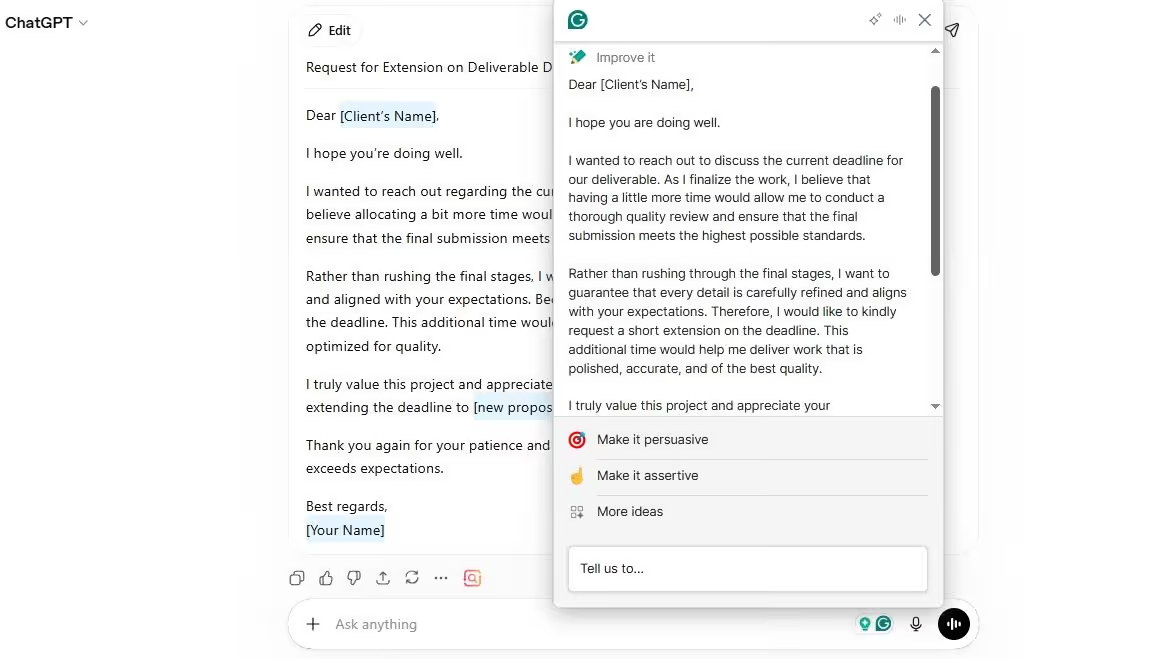
Here is a side-by-side Grammarly vs ChatGPT comparison for writing and brainstorming.
Accuracy and Reliability
Is ChatGPT better than Grammarly? The answer: depends on what you want the AI to do. While Grammarly sticks to rules, ChatGPT helps you with the context.
Grammarly has a disciplined structure that relies on rules to stay consistent across its corrections and suggestions. It uses linguistic rules across every piece of content, be it on Google Docs or MS Word. The result: it’s a great alternative for sentence clarity and proofreading.
This AI is not meant to improvise or interpret, but rather to check your text against the already established standards. It lets you fine-tune your tune while keeping the original voice of the text. Hence, you will generally find it more accurate than ChatGPT in tasks where language correctness is not negotiable.
However, it also comes with a tradeoff: Grammarly cannot reason about nuances or intent in your text. For instance, you may write a sentence that has an unconventional style and Grammarly flags it as an error or incorrect statement.
That’s where ChatGPT excels. Advanced GPT models have deep reasoning, meaning they generate dynamic responses driven by intent and not rules. Thus, it typically leans toward variability and creativity. For example, if you give it two different prompts on the same topic with different wording, it generates completely different results with varying tone and accuracy.
ChatGPT’s generated content is fluent and sounds professional. But it is prone to hallucinations. Whenever you ask a niche or complex query, ChatGPT tends to produce content that has factual inaccuracies and false claims. What’s even worse? The AI does this while sounding confident and authoritative.
Overall, ChatGPT’s accuracy depends on how well the prompt is written. Still, fact-checking is crucial when using this AI.
Does Grammarly Use ChatGPT or Similar AI?
Does Grammarly use ChatGPT’s AI models? Yes, but not entirely. Let’s understand this further.
Grammarly’s products and services run on an advanced system consisting of rules, patterns, and AI models. For starters, it uses a hybrid architecture that combines third-party large language models (LLMs), custom-built AI techniques, natural language processing (NLP), and machine learning.
Its traditional content editor uses a mix of machine learning and NLP approaches, including sentiment analysis, machine translation, writing enhancement, and essay scoring. Using this combination, the editor recognizes individual words and characters and compares them against language mechanics. Hence, you get grammar and spelling suggestions, sentence clarity, tone adjustment, and so on.
Grammarly trains its AI on a huge collection of sentences. Human researchers have sorted and labelled this data in a way that AI understands. Once done, Grammarly’s computational linguists and researchers take human feedback and incorporate it into training. For instance, when you click “ignore” or “accept”, the AI learns accordingly.
The LLMs or Gen AI are where Grammarly uses models like OpenAI’s GPT variants and Anthropic’s Claude. These models help GrammarlyGo produce content, brainstorm ideas, draft replies, and perform other writing tasks. With this technology, the tool also helps professionals humanize their content, rewrite sentences for clarity, or adjust tone in real time.
In comparison, ChatGPT runs on OpenAI’s in-house GPT models (Generative Pre-Trained Transformer) for deep reasoning, data analysis, summaries, and content creation. These models are capable of handling complex, multi-step, and multi-modal queries. Recently, OpenAI launched its latest GPT version, GPT-5.5, or codenamed Spud.
GPT-5.5 has amazing performance benchmarks for online knowledge work, data analysis, and content creation. And with better computer use, this model can access your screen for creating lengthy documents and navigating multiple interfaces at once. Good thing: it has lower hallucination than previous models, making it reliable for technical blogging.
When Should You Use Grammarly vs ChatGPT?
With both AIs having similar capabilities and familiar interfaces, everyone seems confused about which to choose and when. The reality is, they both enter the content cycle at different stages. ChatGPT acts as a kick-starter, and Grammarly picks up from its output. Here is a quick rundown of when you should choose Grammarly vs ChatGPT in routine workflows.
Drafting Content From Scratch
ChatGPT vs Grammarly: which AI is better at drafting content? The answer: ChatGPT. Brainstorming and content creation are ChatGPT’s core strengths.
ChatGPT is developed to help professionals counter writer’s block. You can customize the AI to adapt to different writing styles, tones, and other specific guidelines. Be it ad copies, scripts, cold emails, replies, or long-form SEO content, this AI does it all.
How does it look in practice? Imagine you need to send an email to a potential client whom you’ve never interacted with before. You log into ChatGPT and ask it to
“Draft a short cold outreach email to a potential client in the SaaS space. With this email, the intention is to propose a collaboration marketing project. Your project details (XYZ). Keep the message under 100 words. The tone should be formal and polite yet approachable”.
Within a few moments, you will get the first draft. Review it. Not satisfied? Ask ChatGPT to adjust the tone or give subject line variations, or include the project details by the end. Continue conversing and refining the email until you are ready to send it.
Grammarly also has a separate AI writer called GrammarlyGO. It can do the job, but with limited context awareness, you might prefer putting effort into a more mature and connected tool like ChatGPT. Both are free and frictionless as far as content creation is concerned.
Editing and Polishing Content
Once you’ve gotten over the blank page and have the draft, it’s time to check out the Grammarly editor. It understands language mechanics and checks your text against acceptable standards.
Paste your email or long-form article into the Grammarly editor or enable a browser extension where you are writing. You will get immediate feedback. Grammarly will flag any punctuation inconsistencies, spelling errors, tone mistakes, and weak word choices. Review them in real time, accept what works better, and reject others. And there you have it - a polished text.
ChatGPT’s grammar checker can do the same editing as well. But the experience is completely different. First, you need to log into ChatGPT, then paste the text, and add an extensive prompt explaining all your needs. After processing the request, it returns with a polished version. Still, you are not sure whether the draft is acceptable to your standards. If you are not satisfied, the entire process repeats. And, it gets frustrated.
Creating Marketing and Business Content
Marketing content thrives on your idea and language. So, in this case, you need to look beyond the Grammarly vs ChatGPT debate and use a combination of both. While ChatGPT handles your brainstorming and idea drafting, Grammarly refines it and makes it publish-ready.
ChatGPT is a great start when you are staring at a blank page. Open it and give it all the details about your product, audience, goal, platform, and so on. With these things, ChatGPT can produce multiple campaign angles, suggest outreach ideas, draft ad copy variations, and recommend messaging frameworks.
Good thing: it is fast and produces bulk content. Meaning you can generate multiple assets in a single session, an effective way to test multiple variations. This way, what took a copywriter an eternity will only need a prompt and a few minutes.
Imagine we are a healthcare-tech setup that has launched a productivity app. We are planning an email and social media campaign for the product, targeting non-clinical managers. We ask ChatGPT to write three Instagram ad captions and email sequences. Once it returns with what we requested, we select the strongest. Here’s what sounded the best out of three.

Once done, switch to Grammarly to refine the copy that survived trials and multiple prompts. In marketing, your content has brand voice, product specifications, and audience expectations. Meaning, there is no scope to make mistakes with the context and consistency.
Grammarly helps you with it. It checks every word ChatGPT wrote to fix punctuation, tighten the sentences, and flag anything that goes off-brand. It is not producing the messaging, but fixing it.
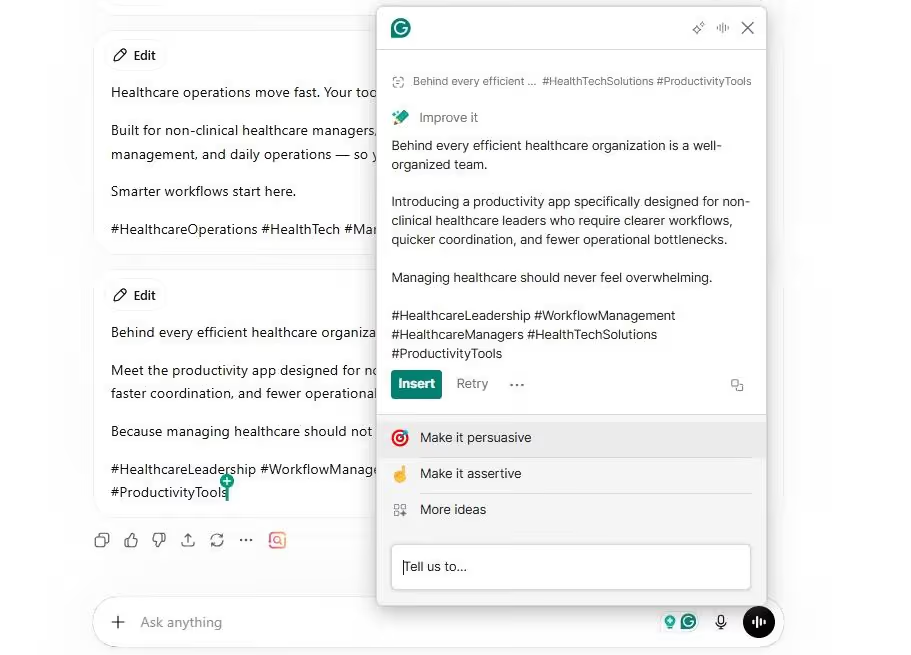
Remember the Instagram captions we asked ChatGPT to write. Within the same session, we asked Grammarly to improve it. And here’s what it came up with. Same copy but better word choices. It’s now ready to be published.
Limitations of Grammarly and ChatGPT
ChatGPT vs Grammarly: Both platforms have limitations in content usability and generation. Their outputs seem generic and do not fully encapsulate a unique personality, regardless of the control or personalization. Here are a few things you must consider before making up your mind.
Grammarly Limitations
While Grammarly is an excellent alternative for language precision, proofreading, and sentence clarity, it does have some drawbacks.
For starters, most of its features are available in a paid plan. For a solopreneur, it’s not cost-effective. But if you are a startup and aim to scale, the cost is justified.
Beyond finances, you need to be present in the editing process with Grammarly. It needs you to review every suggestion - be it for clarity, delivery, engagement, or punctuation. This is especially crucial when writing academic essays and other assignments to maintain the tone.
It can also not replace human writing. Though you get edits and suggestions with Grammarly, it tends to make you confide in it for every piece. Once you become overconfident, you don’t pay attention to why changes are being made,, and progress stops. It’s important to understand that it’s just fixing your writing, and not adding quality to it.
ChatGPT Limitations
The same goes for ChatGPT. It’s great for everyday productivity, brainstorming, and content drafts. Yet, you need to be mindful of before deciding to choose it over other AIs.
Unlike Grammarly, ChatGPT does not have a real-time grammar correction or plagiarism detection capability. To do this, you need to go through the entire process of uploading documents, copy pasting text, explaining your requirements, and reviewing the outputs repeatedly. Though the results are similar, it costs effort.
While doing so, it can also overdo things. It doesn’t give you the option to accept or reject suggestions, meaning you don’t have control over the output.
Another issue with ChatGPT is that the output relies on prompts. As long as you manage to convey everything clearly with language mastery, it works well. A junior employee with no prior experience in prompt engineering can miss context in the email drafts or ignore brand voice inconsistencies in ad copies.
Moreover, ChatGPT has a higher hallucination rate than other AIs. It tends to make false claims and fabricate information to satisfy you. You will often find it citing sources. But once you ask for links to these sources or their journals, it will turn out that most of them don’t exist. Hence, you need to verify all the information that ChatGPT writes.
Where Both These Tools Fail
ChatGPT and Grammarly both need your active participation. Every prompt and every review goes through you and requires a manual action. No trigger-based outputs and no background operations. This may work for individuals, but not for a startup managing an entire content pipeline requiring weekly blog posts, social captions, and email content.
Another problem with these two AIs is their inconsistencies. Neither tool retains shared context between sessions. You are using their combination to manage your marketing content. But ChatGPT cannot remember your brand voice until you add a lengthy prompt, and Grammarly does not have it to begin with. The result: inconsistencies across content pieces.
Moreover, both tools stop at content production. They cannot schedule it, publish it, or follow up on the progress. You need to manually move an email that ChatGPT wrote and Grammarly refined into your CRMs, approve it, and send it.
Meet the Smarter Alternative: AI That Writes, Edits, and Executes
Grammarly vs ChatGPT, whatever you choose, each solves a single puzzle of the content cycle. However, modern businesses need more than content drafts and grammar corrections. This is where role-based AI employees enter. Trained on real workflows, these setups act as an execution layer that handles the entire content pipeline from thinking ideas to publishing. Let’s see how these setups work.
AI Team That Handles End-to-End Workflows
Unlike standalone AI writing assistants like Grammarly or ChatGPT, Sintra AI is an advanced solution for marketers and startups. It has an AI team of specialized role-based digital employees with defined roles in a business setup. For instance, one helps you with drafting emails while another with customer support, one with marketing strategy, and so on.
What differentiates their AI helpers is that they don’t assist you with tasks but rather, execute the entire sequences. Someone using multiple standalone tools will write content with ChatGPT, refine it with Grammarly, and schedule it with a project management tool. Multiple tools, constant context switching, and
But this multi-agent system takes over the entire pipeline with minimal human interference. How does this look in practice? Imagine a manager planning weekly content for the new product launch. Here’s how the workflow goes with these digital employees.
- You log into the Brain AI (a shared memory for these agents) and enter details about your business (projects, products, customers, brand guidelines, etc).
- Connect to external work tools using AI integrations (LinkedIn, social media channels, Gmail, and so on).
- Ask the AI copywriter to write social media captions. The social media manager is busy drafting a blog post.
- Once the draft is complete, the SEO strategist refines the content so it’s visible to search engines.
- A human employee from your team validates the output and triggers the next step.
- The social media manager schedules the content for the entire week. And that’s it.
- The business strategist and data analysts are ready to keep an eye on views, clicks, and traffic for you.
There you have it - everything done with minimal human input with consistent brand voice and language expertise.
Built-In AI Copywriter for Content Creation
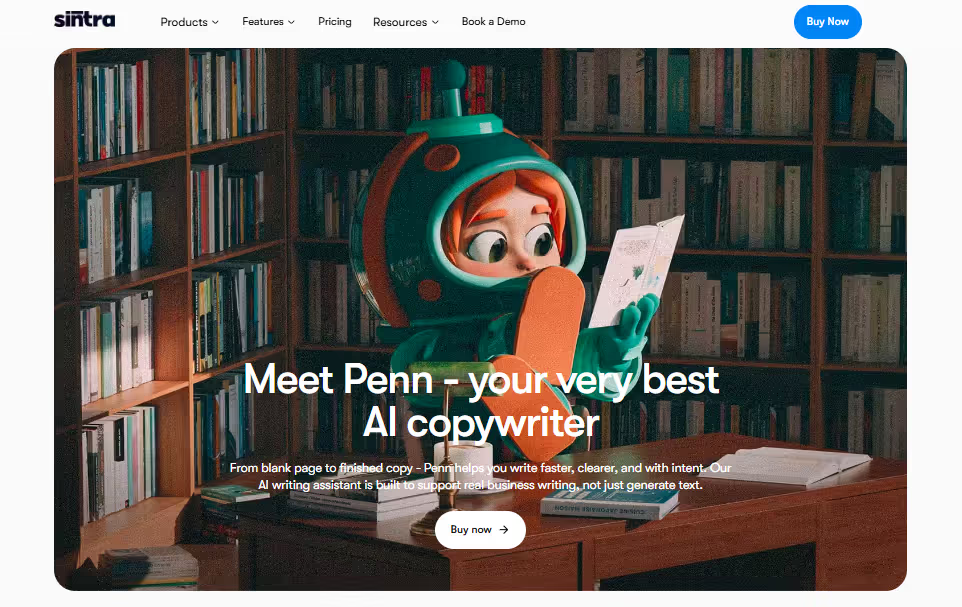
Among the twelve-member AI team is a dedicated AI copywriter, called Penn. Trained on thousands of data points from websites and top profiles, Penn helps you with consistent and high-volume content production. It’s purpose-built to understand your audience, context, and projects, turning raw ideas into copy. And, it is multilingual, meaning Penn generates localized content for your audience.
The best part: this AI copywriter does not require lengthy prompting. It already has your business context - your brand voice, content guidelines, regular audience, and so on. Meaning, the output is consistent, whether you generate one copy today or one six months later. For small businesses, freelancers, and marketing agencies, this means saving time and effort that could go into brainstorming and strategy building.
Another good thing about Penn is that it does not act in isolation. It communicates with other helpers, let's say Dexter for customer feedback and Buddy for creative strategy, and executes entire task sequences. Plus, the more you interact with these helpers, the more they add quality, learn about your preferences, and fit into how your business actually operates.
Shared AI Memory for Consistent Output
With ChatGPT, every conversation starts from zero. As soon as you close the session, the AI forgets about your brand voice and guidelines. You have to re-explain everything when you need to write a new email or Instagram ad copy. Apply this to a bigger team or a startup, and the problem amplifies. Beyond time consumption, five people adding prompts means inconsistencies, incoherence, and different interpretations.
Sintra AI solves this problem using Brain AI, the business knowledge space. Think of it as your brand’s brain that stores your business context, brand tone, product details, ongoing projects, audience, client guidelines, custom writing instructions, etc. Every time the AI helper is to execute the task, they connect to this shared memory and pulls context. The results; consisten brand voice across tasks.
The more you use Brain AI and helpers, the more it learns about your preferences and business operations. You do not need to re-brief it after some time. The knowledge space also creates feedback surveys where you answer questions about your business, so the agents know what your expectations are.
Sintra’s Brain AI space is also a no-code solution, meaning anyone from your team can use it with no onboarding issues.
One AI System That Does More Than Grammarly vs ChatGPT
There you have it - an in-depth ChatGPT vs Grammarly comparison and when you should use them. ChatGPT is your creative partner that helps managers explore new ideas, draft content, and personalize them to their brand. Whereas Grammarly acts as the content editor that picks up where ChatGPT’s output ends. It fixes grammatical inconsistencies, tone inaccuracies, awkward typos, and unclear structures.
However, though capable, both AI writing tools fall short in small teams and startups where accuracy, consistency, and convenience are crucial. Here, an automation solution like Sintra AI’s role-based agents delivers well. These agents streamline entire task sequences while aligning outputs with brand voice. Currently, the AI copywriter is on a 14-day free trial. So, get started with Sintra AI today and see how it goes for your team.
Grammarly vs ChatGPT FAQs
Is Grammarly better than ChatGPT for writing?
Neither Grammarly nor ChatGPT is better than the other. Both these tools are for different stages of your content cycle. ChatGPT excels at idea generation and producing drafts, while Grammarly helps you refine writing and polish it for publishing.
Can ChatGPT replace Grammarly completely?
No, ChatGPT cannot completely replace Grammarly. Grammarly offers real-time spelling, grammar, and tone adjustment suggestions, which ChatGPT does not. Meaning you can improvise writing and fix language inaccuracies while you are documenting your essays, articles, or academic research.
Does Grammarly use ChatGPT or OpenAI models?
GrammarlyGO does use OpenAI models for its generative features, such as drafting, rewriting, and idea generation. However, that’s only a part of it. Grammarly has its own proprietary model that uses machine learning and natural language processing to offer real-time suggestions for tone adjustment, awkward typos, and sentence clarity.
Which tool is more accurate for grammar correction?
Grammarly is more accurate and convenient for grammar corrections. Its proprietary AI model is trained on language mechanics and standard practices, which means it can spot grammar issues, spelling errors, and more. Plus, it sits directly in your documents, so you can always modify writings without any hassle.
Is ChatGPT a reliable grammar checker?
Yes, ChatGPT is a reliable AI to fix your grammar and spelling issues. However, it’s not a dedicated proofreader. Think of it as a prompt-driven conversational AI assistant that helps you with routine productivity tasks. Hence, its output is as good as you explain your unique requirements.
Related articles