10 Ways to Use AI in Social Media


Table of Contents

How to Use AI for Social Media: Quick Answer
AI is a powerful tool for social media management. It helps teams generate posts at scale, create engaging visuals, and schedule posts intelligently. Moreover, it responds to customers based on real-time sentiment, manages communities, runs A/B tests, targets audiences, discovers influencers, and even forecasts content trends.
When you started your business, "social media manager" probably wasn’t the job title you were most excited about. Yet, here you are, losing hours every week trying to cook up clever captions, hunt down trending hashtags, and respond to every stray comment before it goes cold. It’s exhausting, and frankly, it pulls you away from the actual work that pays the bills.
But the game has changed. You don't need a massive agency or a 24/7 social media intern to stay relevant anymore. AI has moved past basic chatbots; it's now a powerful engine that can handle the heavy lifting of content creation, community management, and trend forecasting. The numbers back it up - a Forrester study found social media AI tools deliver 268% ROI over three years, with teams reporting 60% time savings on scheduling and publishing, 80% on reporting, and 25% on influencer management. In this guide, we’re breaking down 10 practical ways to put AI to work so you can finally get your schedule back.
10 Ways How to Use AI in Social Media
- Set Up Role-Based AI Helpers to Mirror Your Team
- Centralize Brand Voice with a Knowledge Base (Brain AI)
- Generate Post Ideas, Captions & Variations at Scale
- Create Visuals Faster with AI-Assisted Assets
- Schedule Your Posts Smartly
- Social Listening & Sentiment for Real-Time Response
- Influencer Discovery & Brand Safety Checks
- Automate Community Management & FAQ Responses
- A/B Test Creative Content Before You Post
- Turn Long-Form Content into "Social Atoms" (Repurposing)
Benefits of using AI for Social Media
Using AI for social media gives your team leverage. Instead of spending hours brainstorming ideas, rewriting captions, checking analytics, and manually scheduling posts, AI automates repetitive tasks so you can focus on strategy and creativity. It reduces guesswork by analyzing engagement data in real time, helping you understand what content works, when your audience is most active, and which messages drive conversions. The result is faster execution and smarter decisions without adding extra headcount. To explore this further, check out our guide on automating marketing workflows with Sintra to see how AI can streamline your entire marketing operation.
7 Best Ways to Use AI for Social Media
AI can support every stage of your social media workflow, from planning to performance analysis. The most effective way to use it is not as a replacement for your team, but as an execution layer that speeds up repetitive work and strengthens decision-making. When applied correctly, AI helps you move faster, stay consistent, and react to trends before competitors do.
1. Set Up Role-Based AI Helpers to Mirror Your Team
One of the biggest challenges of managing social media with artificial intelligence is constant context switching. Jumping between multiple tools and tasks often makes it difficult to maintain a consistent brand voice. That’s why you need an all-in-one solution like Sintra AI to simplify your workflow — especially if you're using AI to launch a business and building your team from scratch."
With Sintra AI, you can set up role-based AI helpers that function just like your real social media team. Assign each helper a specific role to keep tasks centralized and organized. Managing everything from a single platform reduces context switching and enables your team to deliver focused, high-quality results.
Here’s how you can divide your social media management into four key roles:
- Social Media Manager – Generates post ideas, writes captions, and determines the ideal posting schedule.

- AI Data Analyst – Monitors content performance across platforms, analyzes engagement, and prepares reports.
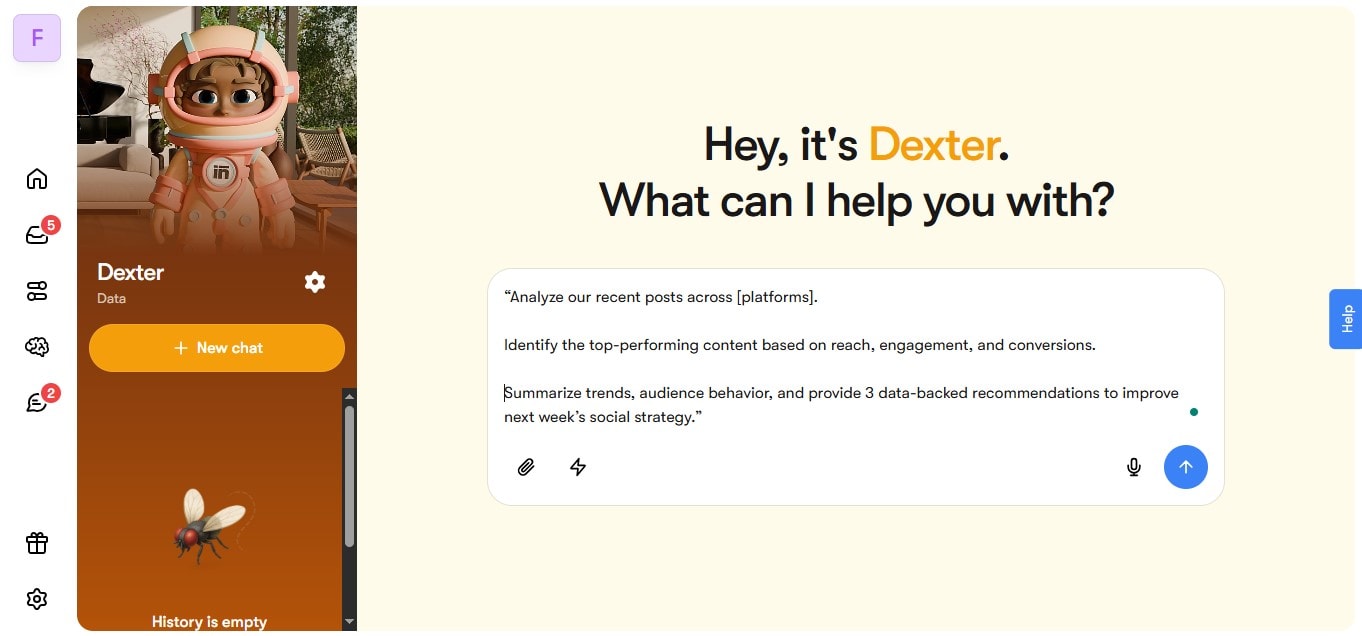
- AI Copywriter – Creates engaging post variations for different audience segments while maintaining brand voice.

- AI Business Strtegist – Reviews content before posting to ensure it aligns with your social media strategy.

By bringing Sintra’s AI helpers into your team, you’ll save time on repetitive tasks and maintain consistency across all your social channels.
3-Step Setup Checklist
- Identify the tasks you need assistance with.
- Find the corresponding AI helpers in Sintra.
- Integrate Sintra’s AI helpers into your workflow so your team runs smoothly and in sync.
2. Centralize Brand Voice with a Knowledge Base (Brain AI)
Keeping a consistent brand voice across social media platforms can be a real task, especially when different team members are creating content. But Sintra solves this problem with its powerful knowledge base called Brain AI. Think of it like a shared data pool for all your AI helpers.
The Brain stores all the key information about your business, making it instantly accessible to your AI team. This ensures that every interaction and output is contextually rich, consistent, and personalized.
Start by uploading your brand assets, such as style guide, tone of voice documents, product pages, FAQs, and campaign examples. The more data you feed into Sintra's Brain, the smarter your helpers become. Even better — your AI helpers ask daily questions about your brand to keep the knowledge pool fresh and aligned with your evolving strategy.
With Brain AI, all your helpers write with the same tone, personality, and compliance standards. That means every caption, customer interaction, and report reflects your brand’s authentic voice.
Prompt to Enforce Brand Voice:
"Generate a post in [Brand Name]'s tone: conversational, professional, and customer-focused. Follow the brand guidelines and ensure compliance with our social media policy."
Prompt to Refresh Knowledge Monthly:
“Update Brain AI with the latest brand materials, including new FAQs, product updates, and recent marketing campaigns. Review and absorb any changes in brand guidelines, social media policy, or overall strategy.”
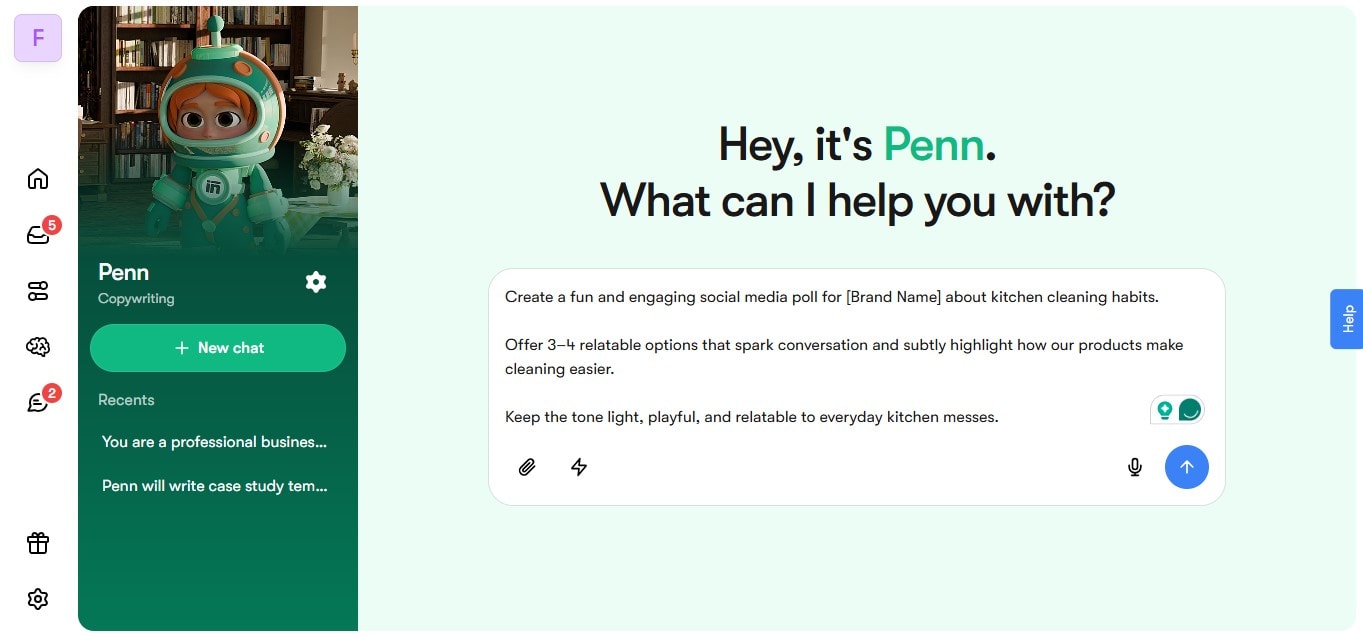
3. Generate Post Ideas, Captions & Variations at Scale
Creating regular content for social media content can feel overwhelming, especially when you're managing multiple platforms. Also, do not forget that your competition is using AI and updating content more regularly. Therefore, your business needs AI to compete.
Sintra AI may be one of the best AI solutions for your business. With this artificial intelligence for social media tool, you can streamline the entire content creation process, from idea to caption writing and posting — all in one place.
Here’s what an idea-to-caption workflow looks like with Sintra AI:
- Insert a trend prompt: Start with a trending topic, hashtag, or keyword for your posts. For example, #spookyseason, #beautytips, #gaming, and #diy. You can tailor hashtags/ keywords to your industry to reach the relevant audience. If you're unsure about trending topics, brainstorm fresh trending social media ideas with Sintra's AI marketing idea generator.
- Generate post angles: Next, generate different post angles: educational, how-to posts, user-generated content ideas, or community highlights. Thanks to Sintra's AI copywriter, you can test multiple variations to see which message or tone resonates best with your audience.
- Create platform-specific variants: Adapt each post for different platforms like Instagram, TikTok, X (Twitter), or LinkedIn. Sintra automatically adjusts tone, length, and structure to fit each platform’s best practices.
- Attach UTM-tagged links: Finally, add unique and trackable URLs to the posts so you can monitor audience engagement and conversions.
This structured flow helps marketing teams use Sintra AI to scale content creation without losing creativity or consistency.
Do/Don't for Avoiding Overused Hooks
Your post hook is the first thing people notice. It determines whether they will stop scrolling to read your post or keep going. So, what makes a hook worthy of attention? The trick is to strike a balance between fresh and clickbait content.
✅ Do: Start with a relatable question or statement that immediately connects with your audience.
✅ Do: Evoke an emotion such as curiosity, shock, or empathy to hook readers in.
✅ Do: Personalize the content's tone and words for different platforms.
✅ Do: Test out different hook styles to see which receives the most engagement.
❌ Don’t: Use clickbaity phrases like "You won't believe this" or "The next post will shock you."
❌ Don’t: Sound overly promotional. Prioritize storytelling over selling.
❌ Don’t: Follow social media trends that don't align with your brand voice.
❌ Don’t: Reuse the same hooks repeatedly. Instead, brainstorm fresh ideas to maintain engagement.
Caption Styles To Test In Your Next Post
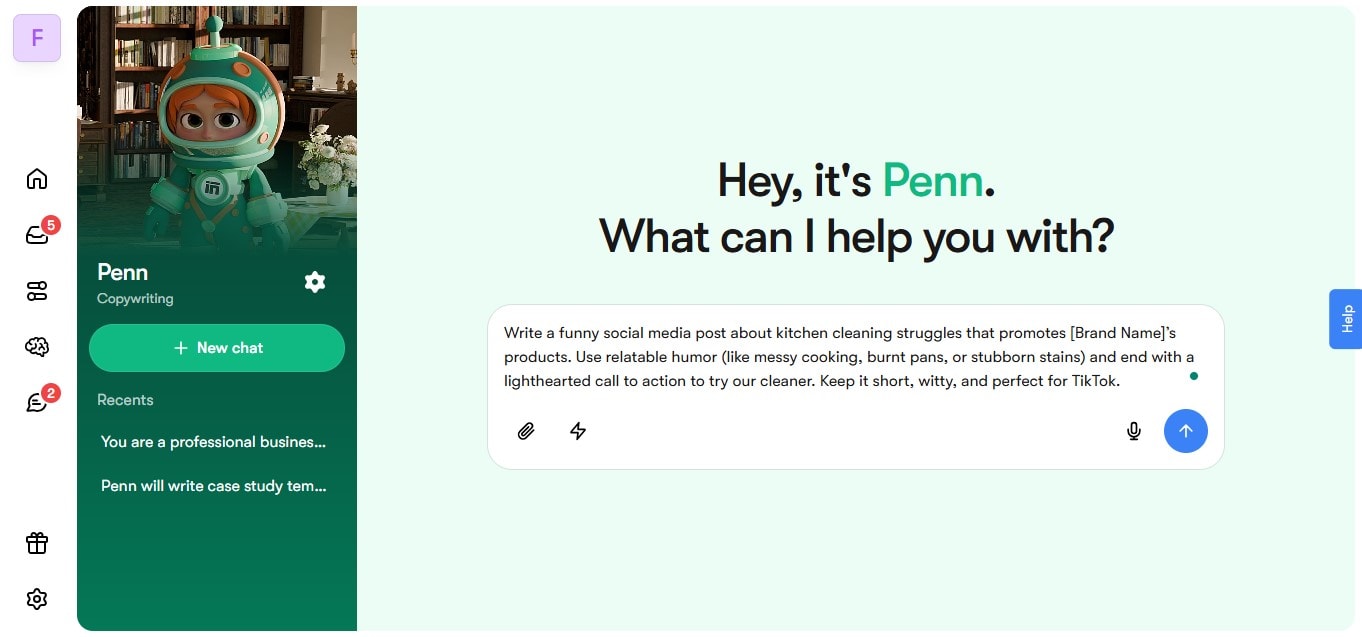
Funny Post: Humor is a great way to connect with your audience. Also, social media users often share a post when it's funny, so it can help increase your brand reach.
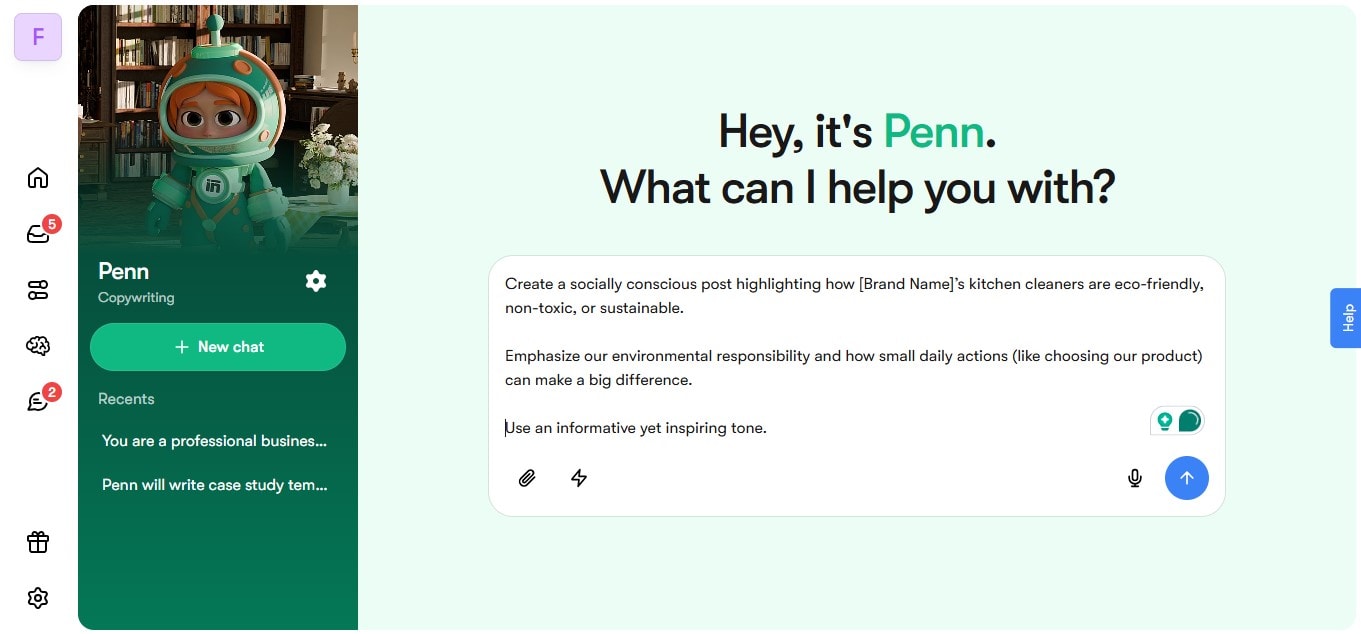
Socially Relevant Post: Audiences are interested in the social, environmental, and political positions of the brand they support. A socially relevant post can build trust and reassure customers.
Engagement Post: Posting a question or poll in the caption encourages your audience to engage with your post. These types of posts create a sense of community among the audience.
4. Create Visuals Faster with AI-Assisted Assets
Attractive visuals are almost as important as a great hook — after all, viewers notice your post long before they read the caption underneath. However, producing stunning visuals can eat up hours of your time, only if you are not using Sintra AI.
With Sintra, you can generate brand-aligned visuals in minutes without switching between different design tools. Sintra’s AI helpers can conceptualize image ideas, generate branded templates, resize visuals for different platforms, and even write alt text for accessibility. The best part? Everything stays consistent with your uploaded brand guidelines in Brain AI, so you never have to worry about tone or visual alignment across platforms.
Here's what your workflow can look like:
- Generate Image Concept
- Start by asking your AI helper to generate 4–5 image concepts based on a marketing strategy, campaign, or holiday theme.
- Example prompt: "Create product image ideas with a Christmas theme for a ‘House Paint Refresh’ campaign in the brand’s tone — friendly, vibrant, and colorful.”
- Resize Visuals
- Once you approve a visual, Sintra's AI assistants can automatically resize it for Instagram, TikTok, LinkedIn, and Pinterest, following each platform's best practices for performance and engagement.
- Generate Alt Text
- Ask Sintra's Assistant to write descriptive and SEO-focused alt text for every visual to boost accessibility.
- Draft Simple Video Scripts
- Generate a short 15-30 second script for different platforms, like TikTok, Instagram, etc. Include the purpose of the video, desired outcome, and campaign theme in your prompt.
- Example prompt: "Write a 50-65-word script for a Halloween-themed jacket drop in the brand's tone — friendly, professional, and assertive."
Accessibility Checklist
☐ Add Alt text to images and gifs
☐ Use Pascal Case in hashtags
☐ Limit the number of emojis
☐ Include a caption in any audio media
☐ Use a high-color contrast between text and background
☐ Use easily readable fonts like Calibri and Helvetica
5. Schedule Your Posts Smartly
Many marketers struggle with social media scheduling and posting. This can lead to inconsistent engagement and eventually reduce the impact of your messaging. Fortunately, AI in social media can help businesses optimize their scheduling efforts in several ways:
Recommend Optimal Posting Times
AI tools like Sintra and Buffer analyze user engagement patterns throughout the day to determine the most effective posting windows. They automatically adjust for time zones and schedule your posts when your audience is most active. This helps you maximize reach and engagement.
Bulk Posting
With Sintra, you can create and upload multiple social media posts in bulk, then let the platform publish them at the ideal time. Preparing content in advance is especially useful for seasonal campaigns, product launches, and special events.
Cross-Platform Posting
AI-powered scheduling also enables cross-platform posting, allowing you to share content simultaneously across networks like Instagram, X, and Facebook. Sintra adapts your content to meet each platform’s formatting and tone requirements in real time.
If you want your content calendar to stay organized and clutter-free, here’s a smart posting workflow you can follow:
- Upload a month’s worth of content, including captions, visuals, and hashtags. Sintra will analyze each post and recommend the best posting times based on your audience’s engagement patterns.
- Define posting rules to align with your strategy.
Example: “Don't post more than twice per day on the same social network,” or “Share customer stories on weekends.” - Balance baseline and reactive content.
- Baseline content: Product features, testimonials, and educational posts.
- Reactive content: Trending topics, news, and user-generated content.
A healthy posting cadence could include three baseline posts per week (on weekdays) and one to two reactive posts on weekends.
6. Social Listening & Sentiment for Real-Time Response
Social media is a go-to channel for brands to connect with their audience. But more than that, it is a way of understanding consumer sentiments around your products, services, and brands in general. So, how exactly can a business use social media to 'listen' to its audience? These are the two ways:
Social Monitoring: This involves tracking direct messages, mentions, comments, and replies on social media platforms. By focusing on one-to-one interactions, brands can respond quickly to customers and handle issues that need immediate attention.
Social Listening: This goes beyond direct mentions. It analyzes the broader conversation across your industry, including brand mentions, trending topics, and competitor discussions. Social listening helps in understanding overall consumer sentiment and guides a better campaign strategy.
When you integrate Sintra's Business Assistant into your social media workflows, it can automate both social monitoring and listening, helping you stay proactive and reactive simultaneously.
Here's how Sintra's sentiment flags drive smart action:
- Replies & Comments:
- When the AI detects positive sentiment, it responds immediately with encouraging words like "Thanks for sharing!" or "We're happy to hear that!" Such responses boost community connection.
- If a negative comment appears, Sintra generates empathetic responses such as "We're sorry you had to go through that." and instantly alerts the support of PR to review and address the underlying issue.
- For neutral feedback, the AI suggests clarifying and reassuring responses like "We're here to help." This approach often turns indifferent users into loyal advocates.
- Content Pivots:
- Positive sentiment spikes around certain visuals, captions, or tones prompt Sintra to recommend reusing a similar content style.
- Negative sentiment trends around specific topics or campaigns trigger recommendations to pause, adjust, or reframe messaging.
- Neutral sentiment signals that a different content approach, such as a more emotional or educational angle, may be needed to boost engagement.
- Crisis Routing:
- When sentiment shifts from positive to neutral or negative within a short time, the AI system triggers a 'Crisis Alert.'
- Sintra's AI virtual assistant then routes the issue to the PR or customer care team automatically, along with context and suggested replies.
Check out what a response template looks like:
Trigger: Negative review on product post
Playbook:
- Reply with empathy and offer a solution.
- Escalate the comment to the support team
Response time (SLA): Within 2 hours
7. Influencer Discovery & Brand Safety Checks
Influencers can help build trust for a brand in audiences. However, finding the right influencer can be tricky. You don't only have to focus on follower count anymore, but also check if the influencer's audience truly aligns with your target market. This is where AI steps in to make the influencer discovery process easier.
An AI tool like Sintra can identify influencers based on four key factors:
- Audience Fit: Identify the influencer's audience and match it with your ideal customer profile.
- Engagement Quality: Analyze likes, comments, and shares on their profile to differentiate organic reach from bot activity.
- Fake Follower Risk: Dig deeper into followers' accounts to detect suspicious or inactive ones.
- Brand Affinity: Assess how well the influencer's content, tone, and value align with your brand's identity and voice.
Once you have a list of potential influencers, you can share a simple brief to kickstart your collaborations. Not sure how to create a brief? Here's a template to get you started.
➜ Campaign name: Travel Easy With [Company Name]
➜ Campaign's purpose: Promote bookings
➜ Key message: Book your next trip with [Company Name]
➜ Deliverables: 2 Instagram Reels + 4 Stories + 2 TikTok videos
➜ Brand guidelines: [Tone of Voice, Brand colors, Hashtags]
➜ Disclosure requirements: Include #Ad or #Sponsored in every post
8. Automate Community Management & FAQ Responses
As your social media audience grows, responding to every comment, message, and question manually becomes difficult. Delayed responses can frustrate followers and cause missed opportunities to build stronger relationships with your community.
AI can help by handling the first layer of communication automatically while keeping your responses aligned with your brand voice.
With tools like Sintra AI, you can train AI helpers to answer common questions, moderate comments, and route more complex issues to the right team member. This allows your social media team to focus on meaningful conversations rather than repetitive replies.
Here’s how AI can support your community management workflow:
Automated FAQ Responses
Many questions repeat across social channels. AI assistants can instantly respond to common inquiries about pricing, delivery, product features, or availability using information stored in your Brain AI knowledge base.
Comment Moderation
AI can monitor comment sections and automatically hide spam, filter harmful language, and flag suspicious activity. This keeps your community space healthy without requiring constant manual monitoring.
Message Prioritization
Not every message needs the same level of attention. AI can categorize incoming conversations into urgent issues, support requests, or general engagement. Critical cases are automatically escalated to a human team member.
A simple automation rule might look like this:
Trigger: Customer asks about delivery time in Instagram DMs
Action: AI replies with shipping information and links to the FAQ page
Escalation: If the user asks for order tracking, forward to customer support
By automating these repetitive tasks, brands can maintain fast response times while still providing a human experience where it matters most.
9. A/B Test Creative Content Before You Post
One of the biggest challenges in social media marketing is predicting what will resonate with your audience. Even experienced marketers cannot always determine which caption, hook, or visual will perform best.
AI makes it easier to experiment with different content variations before publishing a post. Instead of relying on guesswork, you can generate multiple versions of a post using AI-assisted writing and test them against engagement benchmarks. AI analyzes patterns from past content performance and suggests which version is most likely to attract attention.
Here’s a simple AI-assisted testing process:
Generate Multiple Content Variations
Start by creating several versions of a caption or visual concept. AI can rewrite the same message with different emotional tones, storytelling angles, or call-to-action styles.
Evaluate Hook Strength
AI tools analyze opening lines and predict how engaging they may be based on patterns seen across successful posts.
Simulate Performance Signals
Some platforms estimate expected engagement by comparing your variations with historical data such as click-through rates, saves, and shares.
Example testing workflow:
Version A: Educational hook explaining a useful tip
Version B: Story-driven hook describing a relatable situation
Version C: Question-based hook inviting user interaction
After reviewing the predictions, you can choose the strongest option or combine elements from different variations.
Generating creative content ideas and testing them before publishing helps teams reduce risk and continuously improve their social media performance.
10. Turn Long-Form Content into “Social Atoms” (Repurposing)
Creating high-quality content often requires significant time and effort. But many businesses only publish that content once, missing the opportunity to extend its value across multiple platforms.
AI makes it easy to break long-form content into smaller, shareable pieces known as social atoms.
A single blog article, podcast, or webinar can generate dozens of social media posts when AI helps extract the most relevant insights.
Here’s how AI-driven repurposing typically works:
Extract Key Insights
AI scans long-form material and identifies the most important points, statistics, quotes, or tips that would perform well as social media posts.
Convert Ideas into Multiple Formats
The same insight can be turned into different content types such as carousel posts, short videos, infographics, or single-image quotes.
Adapt Content for Each Platform
AI adjusts tone, length, and formatting so the same idea fits Instagram, LinkedIn, TikTok, or X without sounding repetitive.
Example repurposing workflow:
Source content: 1,500-word blog article
Generated assets:
- 5 LinkedIn educational posts
- 3 Instagram carousel concepts
- 4 short-form video scripts
- 6 tweet-length insights
This approach helps brands stay active on social media without constantly creating content from scratch.
Instead of producing more material, AI allows your team to extract more value from the content you already have.
Ready to streamline your social workflow?
By now, you should have a clearer understanding of what is AI in social media. A powerful tool like Sintra AI can help businesses manage their social media networks more efficiently through role-based AI helpers.
From brainstorming fresh ideas to generating brand-aligned visuals, analyzing sentiment, and scheduling posts automatically, you can do it all with one complete solution.
Take control of your social presence and start building your smart, AI-powered workplace with Sintra today.
AI in Social Media FAQs
How is AI used in social media content creation without losing brand voice?
A major concern when using AI for social media is the risk of losing your brand voice. However, this can be mitigated by training the AI tool with your post style guide, tone of voice, product details, and social media guidelines. The more brand data you provide, the more accurately AI tools can mirror your brand’s tone and personality across all posts.
What are the best ways to use AI for social media scheduling and timing?
AI tools can identify optimal posting times for your social media channels and even adjust for time zone differences across international audiences. You can leverage this by scheduling a month’s worth of posts in advance, allowing the tool to publish automatically when your audience is most active. You can also set posting rules to prevent overlaps or excessive posting.
How can AI improve social media customer service and moderation?
When you integrate a smart AI assistant into your social media workflows, it continuously monitors mentions, messages, and comments across different networks. The system automatically responds in real time following your brand’s response playbook. It also analyzes audience sentiment to detect satisfaction or frustration and recommends adjustments to improve your posting and engagement strategy.
Are there risks with AI-generated posts or ads, and how do I mitigate them?
Yes. AI tools can occasionally produce off-brand or non-compliant content. To prevent this, train your AI tool thoroughly, just like you would train a new team member. Always review AI-generated posts before publishing and use brand-safe prompts guided by your tone and compliance documents. This ensures every piece of content reflects your brand accurately and responsibly.
Related articles