How to Use AI to Automate Tasks

Table of Contents

What is AI Task Automation?
AI automation refers to the use of artificial intelligence to perform tasks and streamline processes that would otherwise require human effort.When you automate workflows with AI, you're essentially combining traditional automation technologies with advanced capabilities like ML, NLP, and computer vision, including AI for qualitative data analysis. This powerful combination enables organizations to achieve greater operational efficiency.
The goal of AI-powered automation tools is to minimize repetitive work, allowing human teams to focus on higher-value tasks. It’s not a replacement for human decision-making, but rather a reliable foundation that empowers teams to innovate and scale without being held back by operational backlogs.
The discussion around AI has evolved beyond traditional chatbots to intelligent agents that can think, plan, and act independently. These AI agents are autonomous programs capable of monitoring data streams, automating complex tasks, and executing action sequences without constant supervision.
AI automation tools are smart, fast, and efficient—everything a business needs in today’s dynamic work environment. A recent survey by PwC supports this, reporting that 66% of organizations that have adopted AI agents have seen improvements in overall productivity.
If you're wondering how to use AI for writing, content creation, or maximizing your business's potential with AI tools, this article will walk you through everything you need to know. Starting with the benefits of AI-powered tools in automation, all the way to how you can integrate them into your business.
So, let's dive right in.
How Is AI Automation Different From Traditional Automation?
AI automation tools surpass traditional automation tools in numerous ways. Here are some major distinctions where AI models take the lead:
Intelligence
- Traditional automation follows fixed rules and patterns. It performs tasks based on user input and cannot think or act independently.
- AI automation analyzes data from multiple sources and executes tasks autonomously using contextual learning. It adapts to evolving situations with minimal human input.
Level of Automation
- Traditional automation performs rule-based tasks where human programmers must explicitly define every step. It operates at Level 1 autonomy, making it ideal for repetitive and predictable workflows.
- AI automation tools operate at level 5 autonomy, the highest level. They can analyze data, make decisions, and automate workflows without human intervention at every step.
Flexibility
- Traditional automation tools are not designed to handle unexpected inputs and changes. They often halt operations or trigger fallback mechanisms when encountering data errors.
- AI-powered systems can function effortlessly even with incomplete or evolving data. Through ML algorithms, these AI agents adapt to variability and continuously evolve over time.
Scope of Tasks
- Traditional systems are best suited for rule-based, repetitive tasks such as data entry, scheduling, and report generation.
- AI tools can automate complex projects such as customer support, AI writing workflows, demand forecasting, and predictive analytics.
Decision-Making Ability
- Traditional automation follows fixed commands, without trying to understand the context. This is why they can't make decisions autonomously.
- Automation tools that use AI features can analyze patterns and understand context. This enables AI assistants to make intelligent, data-driven decisions.
Data Handling
- Traditional automation tools can only process structured data.
- AI tools can work with both structured and unstructured data, including text, images, audio, and video.
Continuous Improvement
- Traditional automation systems don't evolve unless they're manually reprogrammed.
- AI automation tools update themselves constantly by learning from past interactions and outcomes. They ensure workplace productivity, even in changing environments.
Key Benefits of Using AI to Automate Tasks
The benefits of AI features aren't theoretical anymore. They are being realized by organizations that have integrated AI automation tools in their workflows every day. AI automation isn't just about doing things quickly; it's about making room for more collaboration, more personalization, and better experiences for users.
Let's explore why AI automation tools are the future of businesses today.

Improved Efficiency and Productivity
Automation tools can perform high-volume, repetitive tasks with precision. By reducing manual workloads and accelerating response times, AI tools make business processes more efficient and boost productivity. They enable marketing teams to focus on higher-value activities and accomplish more in less time.
Cost Savings
AI-powered tools are fast, accurate, and efficient—qualities that directly reduce operational and overhead expenses. By integrating AI-powered tools into everyday processes, businesses can minimize human errors, lower labor-related costs, and optimize resource allocation. This leads to substantial long-term cost savings and improved profit margins.
Improved Time Management
Automating routine tasks with project management tools saves significant time and resources. Instead of spending hours on manual research, drafting emails, and filling out Google Docs and Sheets, employees can focus on high-value tasks. According to a McKinsey survey, generative AI and automation tools can potentially save employees 60 to 70% of their time. With this extra capacity, teams can channel their efforts toward innovation and strategic growth.
Scalability
AI automation tools aren’t bound by the same limitations as human agents. They can operate around the clock, process large volumes of data rapidly, and handle multi-step tasks while maintaining consistent productivity. With AI features, businesses can scale their operations effortlessly and adapt to changing demands without major process overhauls.
Enhanced Accuracy
AI-powered systems follow rules with complete consistency, allowing them to execute complex tasks, detect anomalies, and flag issues with precision. The level of accuracy delivered by AI simply isn’t achievable with human agents, who are naturally prone to error. By ensuring reliable and error-free results, AI automation tools help marketing teams make more confident decisions and reduce time spent on rework.
Actionable Insights
The standout quality of AI-powered automation tools is that they don’t just complete tasks; they learn from them. Every interaction and iteration becomes a source of learning, enabling the system to improve future responses and outcomes.
As AI tools identify patterns and detect emerging issues, the predictive analytics they generate become invaluable for businesses. These actionable insights help them refine strategies and make smarter, data-driven decisions.
Better Customer Experiences
With AI helpers, businesses can deliver faster response times, more personalized interactions, and consistent service quality. AI systems also retain context from historical data and past conversations, allowing customers to continue where they left off instead of starting from scratch each time. Together, these capabilities enhance customer satisfaction, build trust, and foster long-term loyalty.
Main Components of AI Automation
The best AI automation tools combine several smart technologies that allow machines to think, learn, and act like humans. The three key components: Machine Learning (ML), Natural Language Processing (NLP), and Robotic Process Automation (RPA), play a crucial role in helping businesses save time, reduce errors, and make smarter decisions. The results are measurable - Enterprise ChatGPT users save 40–60 minutes per active day, 87% of IT workers report faster issue resolution, and 85% of marketing teams report faster campaign execution.
Machine Learning
Machine learning is the first core component of AI automation. You can think of it as the technology that gives AI its “brain.” Through ML, AI models learn from data and continuously improve over time, without needing constant human input.
Systems powered by ML can analyze performance data to make predictions about sales trends or customer behavior. They can also write code, detect anomalies such as fraudulent activity, or predict when equipment might fail. The more data you feed into an AI system, the better and smarter its decisions become.
Natural Language Processing
NLP helps AI models understand and use human language. NLP provides agents with specialized generative AI skills to read, listen, and respond just like people do. It powers AI chatbots, virtual assistants, content creation tools, and other AI solutions that automatically write or summarize reports.
NLP also enables AI systems to understand the context behind conversations, which is particularly useful in customer service or any area involving human interaction. By helping AI “speak human,” NLP makes communication smoother and more effective across organizations.
Robotic Process Automation
If machine learning is the “brain” of an AI system, then robotic process automation is its “hands.” RPA handles repetitive, rule-based tasks like data entry, invoice processing, and file management across systems.
When combined with ML and NLP, RPA enables AI to take on more advanced tasks while minimizing factual and contextual errors. With RPA, businesses can accelerate workflows, increase productivity, allowing teams to focus on more creative and strategic work.
Real-World Examples of AI Automation in Action

The best AI automation tools combine the speed and efficiency of traditional robotic process automation (RPA) with the decision-making capabilities of artificial intelligence. This makes them perfect for multiple business and automating administrative tasks.
Data Management
- Data Extraction: AI bots can process both structured and unstructured data. They can extract information from PDFs, images, and handwritten documents. Since they're powered by machine learning algorithms and natural language processing, these agents can extract useful data while reducing noise in documents.
- Data Entry and Update: AI tools can enter data automatically. They can connect with company systems and update databases across departments like customer service, sales, and HR. They pull information from customer data like emails, reports, and chats, and update records without human intervention.
Real-World Example: Netflix handles a massive volume of user interaction data that must be cleaned, sorted, and categorized. The company uses AI to automatically tag, organize, and correct errors in its datasets. This ensures that Netflix’s recommendation engine remains accurate and high-quality.
Customer Services
- Customer Support: AI-powered chatbots are programmed to offer 24/7 customer support. They leverage their generative AI capabilities to understand customer inquiries and personalize responses. From AI-generated chat support to providing personalized recommendations, the best AI automation tools can improve customer experience to a great extent.
- Customer Onboarding: Generative AI bots streamline onboarding by automating data collection, document verification, and account setup. They also personalize the process based on the customer’s feedback, profile, and behavior.
Real-World Example: Delta Air Lines has integrated an AI employee into its website and mobile app. The generative AI handles common customer queries and FAQs, allowing human agents to focus on more complex itinerary issues. At the same time, travelers receive quick, accurate responses about their bookings, improving overall customer satisfaction.
Human Resources
- Recruitment: HR automation tools amplify the recruitment process by continuously scanning data on recruitment websites. They identify potential candidates, gather their resumes, screen them against job requirements, and finally communicate their results to HR teams.
- Employee Onboarding: This is a time-consuming yet crucial process for HR teams. With AI tools, onboarding tasks across multiple departments can be personalized and streamlined. The AI generates user accounts, communicates credentials, grants access to system files according to the employee's role, and answers any FAQs they might have for human resources.
- Payroll Processing: AI simplifies payroll processing for HR teams by automating error-prone and repetitive tasks like calculating salaries, overtime, and taxes. It can extract data from attendance systems, track working hours, and deliver timely and accurate payments.
Real-World Example: Unilever uses AI-powered automation tools to conduct video interviews. The AI leverages natural language processing models to evaluate the candidates' soft skills, communication, and basic qualifications. This helps HR teams identify the most promising candidates while ensuring a fair and unbiased screening process.
Sales and Marketing
- Price Optimization: Autonomous digital workers for sales can help businesses operate by setting optimal prices for their products and services.They analyze changes in supply and demand, customer data, market trends, and competitor prices. In the end, they suggest pricing that is competitive and capable of maximizing ROI.
- Lead Nurturing: A sales AI assistant can automate the lead nurturing process effortlessly. Starting with data analysis of potential clients to lead scoring and sending personalized proposals to qualified leads, AI agents can improve the quality of qualified leads and lead them further down the sales funnel.
Real-World Example: HubSpot, a CRM provider, uses its own AI tools to automate sales engagement and content personalizations for its customers. The company has integrated AI automation into key areas such as lead scoring, generating personalized email sequences, and scheduling emails based on users’ digital activity.
Finance and Accounting
- Financial Reporting: The best AI agents can enhance financial reporting by automating data collection and analysis across different departments. They can generate financial statements in real time, detect anomalies, and ensure compliance with accounting standards. These agents are fast, accurate, and provide organizations with updated financial insights on the go.
- Accounts Automation: Intelligent AI solutions help businesses automate the Accounts Receivable and Accounts Payable processes with accuracy. For accounts receivable, the AI tools keep track of vendor data and transactions, extract data from invoices, and cross-check invoices against purchase orders. For accounts payable, the bots auto-generate invoices, track DSO, process payments, and reconcile balance sheets after payment. With AI tools, routine tasks of both processes become more efficient, lowering the chances of miscalculations and delayed payments.
Real-World Example: JPMorgan Chase uses an AI solution called COiN (Contract Intelligence) to instantly analyze thousands of commercial credit agreements and extract key details such as clauses and penalties. A process that once required extensive manual review by legal teams is now fully automated, saving time and significantly improving the speed and accuracy of document processing.
How to Get Started with AI Automation?
Integrating AI into your existing systems is not just about adding new tools; it's more about making them fit seamlessly into the flow of your operations. Instead of treating it as an add-on, think of it as the backbone of your workflows, the foundation that makes your business processes smarter, faster, and more efficient.
Here's a step-by-step framework to get you started with the best AI automation tools.
Step 1: Identify Automation Goals
Goals are the true measure of success. Start by identifying the specific problems you want to solve with AI automation. Establish clear objectives and measurable success metrics to track your progress effectively.
Step 2: Look for Automation Opportunities
Automation is not an all-or-nothing initiative. You can't automate every process and task, so instead of trying to automate everything at once, focus on areas that could benefit the most from automation tools.
Identify common and frequently performed tasks with low complexity that take up too much time. Also, look for repetitive tasks that are most prone to errors. Those are the areas where AI automation can make the biggest difference.
Finance, HR, and customer support and common starting points.
Step 3: Check your Infrastructure's AI Readiness
AI automation tools require reliable computing resources, strong and consistent internet connectivity, and secure data storage systems. So before you integrate an automation system, evaluate your current tech stack to ensure that it can support an AI integration.
Step 4: Select an Automation Tool
Once you’ve identified your focus areas, the next step is choosing the right tool for the job. Every business is different, so select an AI automation service that integrates seamlessly with your existing tech stack. Also, consider whether the tool can scale as your company grows.
Compare options based on AI-powered features, ease of integration, data security, and scalability. Don’t just pick a popular tool. Instead, choose one that aligns with your operational goals and workflow needs.
Step 5: Conduct Pilot Tests
Before implementing AI automation across your entire organization, start with small pilot tests. Select a few processes you want to automate and see how the tool performs in real-world conditions.
This will help you assess whether the tool's capabilities match the task requirements without risking critical business operations. Monitor the output continuously and make tweaks before expanding the automation system company-wide.
Step 6: Build Governance
Governance is essential for keeping even the best AI automation running smoothly. Set clear policies about how the AI tools would be used, who would deploy and manage them, and how performance will be monitored.
With strong governance, organizations can ensure transparency, security, and compliance while keeping their automated systems aligned with business goals.
Step 7: Train your Teams
AI automation offers many operational benefits, but rolling out the system at once can be disruptive. It's better to phase your implementation to allow time for system optimization and user training between each stage. Using an AI Studio, like Asana AI, can make this process easier, as it provides a centralized platform for teams to understand AI workflows.
Listen to employee feedback and make sure that your employees understand that the AI solution is there to help them, not replace them. A gradual expansion minimizes risk while allowing your teams to learn, adapt, and continuously improve the newly implemented system.
Automate Smarter: How Sintra.ai’s Bots Simplify Task Automation

Today's fast-paced business environments need an automation tool that can keep up with evolving workflow needs without compromising output quality. That's where an AI-driven automation tool like Sintra comes in.
This all-in-one AI platform offers 12 expert AI bots, each with specialized skills, designed to assist your HR, admin, finance, and sales teams, among others. What makes this tool better than others is its Brain AI, which acts as a shared knowledge hub—storing all information about your business so that every Sintra agent can access the data infrastructure for context-aware decisions and relevant responses.
Here are some of Sintra.ai's key features that can bring value to your business.
Automate Workflows
- Sintra's AI employees can handle complex projects and automate repetitive workflows.
- They free up content creation, administration, customer service, and hr teams, among others, to focus on higher-value work.
- These AI bots can adapt, learn, and execute autonomously, with minimal human intervention.
- Automated workflows reduce human error and boost consistency.
Streamline Operations
- Sintra offers multiple AI assistants that can be integrated into different departments. When used together, they can streamline processes across the organization.
- The platform acts as a central automation engine that connects different teams to create end-to-end workflows for smooth project management.
Improve Workplace Productivity
- Sintra's AI-powered bots free up human teams from routine tasks, allowing them to focus on strategic thinking and customer engagement.
- The AI agents provide predictive analytics, enabling organizations to make faster, smarter decisions.
- These autonomous agents work 24/7, increasing both efficiency and productivity.
Scalable Automation
- Sintra's employees can manage increasing volumes of tasks without compromising operational efficiency.
- The AI assistants are integrated in multiple departments, ensuring that new workflows and applications can be integrated seamlessly, without disruptions.
Multi-Agent Capabilities
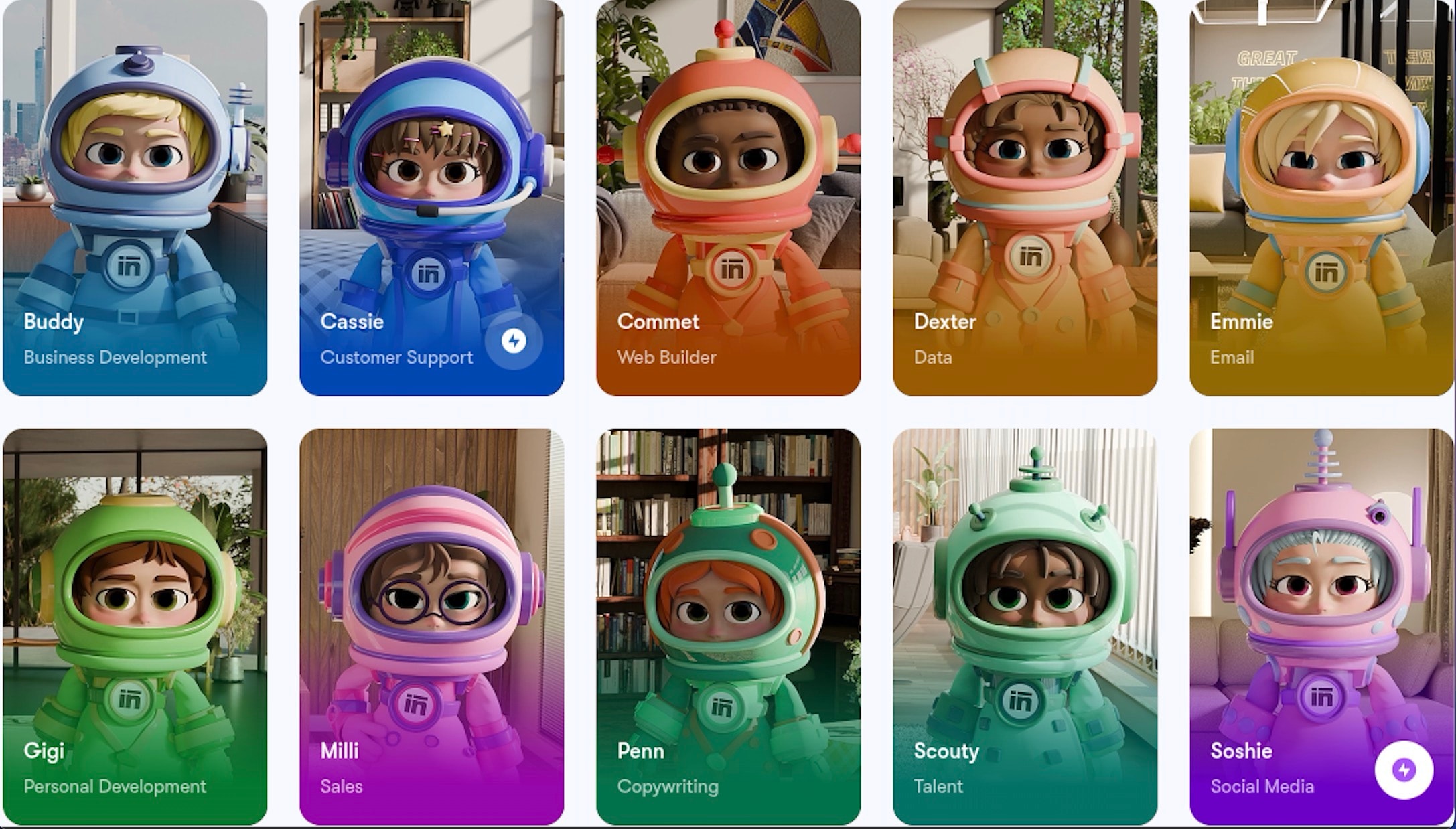
- Sintra's suite of autonomous agents communicates, delegates, and exchanges data to manage complex operations.
- Its multi-agent framework allows your business to scale easily without extra staffing and overhead costs.
- Each agent can access shared business memory for smarter problem-solving.
Sintra is one of the best AI automation tools that provides an intelligent AI workforce built to boost your business's efficiency and productivity.
The Core Challenges of AI Automation
AI solutions are ideal for dynamic business environments. However, implementing them into workflows can come with unique risks and challenges. That’s why businesses need to identify these challenges and develop strategies to overcome them
Data Privacy
AI models rely on large datasets to function effectively, and this data often comes from multiple sources. A major challenge is that AI systems may inadvertently use private or sensitive information without proper authorization. This can lead to serious breaches of privacy and trust. Therefore, organizations should look for solutions with data encryption and access controls to avoid privacy breaches.
Integration into Existing Systems
Most organizations already use a variety of software, from CRMs and ERPs to HR and finance platforms. This makes integration of a new AI automation tool difficult. Differences in data formats and APIs can create compatibility issues, and if the tool isn’t properly integrated, it may fail to deliver its full value.
Change Management
Introducing a new AI automation tool can create concern among employees who fear replacement. If staff are hesitant to adopt the tools, the AI solution’s effectiveness can be significantly reduced. This is why organizations need to focus on change management and communicate the scope of these tools before implementation. They also need to offer hands-on training and resources so employees feel confident using the tools.
Transparency
Most AI setups, especially those powered by deep learning, often function as "black boxes." Therefore, understanding how the AI tool selects a certain outcome after data analysis can be tricky. This lack of transparency can undermine the AI's capabilities, particularly in critical sectors such as healthcare or criminal justice, where reliability and accountability are essential.
Best Practices for AI Task Automation
AI automation can give your business a significant competitive advantage. As you consider AI implementation, here are a few best practices that can guide you.
Start with a Pilot Program
Implement AI automation in phases, starting from a single process or department. This approach allows you to assess the feasibility of the automation tool and make adjustments to your basic guidelines. Once the AI tool is successfully integrated into a process, you can gradually expand automation to other areas
Select High-Impact Areas
When choosing workflows to automate, focus on tasks that offer the highest ROI in terms of time and technology. AI automation works best for data-driven, repetitive processes, so prioritize tasks that are time-consuming and prone to errors. Keep in mind that AI tools still struggle with processes requiring emotional intelligence or nuanced judgment, so avoid tasks that demand deep human expertise.
Invest in Training and Change Management
Employee feedback is critical for successful AI implementation. Support your teams by providing adequate training and resources so they can use AI tools effectively. The more confident employees feel about AI assistance, the smoother the adoption will be.
Prepare your Data
AI models perform best when trained on clean, relevant data. While these tools can process raw data, incomplete or biased datasets will lead to flawed outcomes. So, before integrating an AI tool into your existing tech stack, ensure proper systems for data collection, cleaning, and management are in place.
How to Use AI to Automate Tasks FAQs
What types of tasks can I automate with AI?
AI-driven automation works best for data-driven, recurring tasks that eat up time and tend to invite errors. Common examples include information logging and processing, email management, customer support, and financial reporting and analytics. It also covers project management, marketing and content creation, recruitment and HR tasks, and scheduling and calendar management.
What are the main benefits of using AI for automation?
AI automation can add a lot of value to businesses working in fast-moving environments. It isn't just about doing things quickly; it's about making room for more collaboration, more personalization, and better experiences for users. The common benefits include improved efficiency, cost savings, and better time management, along with scalability and more accurate output. On top of that, you get data-driven insights, stronger customer experiences, and smoother project management.
Are there risks or challenges to automating tasks with AI?
Yes, there are real risks and challenges that come with integrating AI automation tools. These include data privacy concerns, integration difficulties, and a lack of transparency. There's also the potential for bias and discrimination, questions around accountability, and resistance from employees.
Are there risks or challenges to automating tasks with AI?
Yes, there are considerable risks and challenges involved in integrating AI automation tools. Some of them include:
- Data privacy concerns
- Integration difficulties
- Lack of transparency
- Bias and discrimination
- Accountability issues
- Employee resistance
What makes Sintra.ai different from other AI automation tools?
Sintra is different from other AI automation tools because of its feature, "Brain AI." It acts as a shared knowledge hub where all information about your business is stored. This data then helps all Sintra agents integrate across multiple workflows to make context-aware decisions and generate relevant responses.
Related articles