


How to Use AI in Copywriting in 2026?

Table of Contents

88% of marketers rely on AI in their current jobs, and among those already using it, 93% say it helps them generate content faster.
Copywriting with AI in 2026 is mostly about ideas, hooks, drafts, rewrites, and multiple versions for testing. What AI still can’t do reliably is judgment. It can sound confident while being wrong, or make claims that do not hold up.
That risk is well documented. 39% of marketers say they do not know how to use generative AI safely, and many point to the need for human oversight.
This guide explains how to use AI in copywriting, with step-by-step instructions for three tools: Penn (Sintra AI), ChatGPT, and Gemini.
Key Takeaways
- AI is now a standard part of copywriting workflows, mainly for ideas, drafts, rewrites, and testing variations.
- Speed and scale improve with AI, but judgment, proof, and accuracy still require human review.
- Different tools serve different roles, and using the wrong one increases editing work.
- AI-automated workflows and clear constraints produce better results than open-ended prompting.
- Copy-specific tools outperform general chat tools when consistency and publish-ready output matter.
How to Use AI as a Copywriter?
Copywriters today use multiple AI tools for routine work such as drafting, rewriting, editing, and generating variations. Common options include ChatGPT, Google Gemini, and Claude, along with task-specific tools built for copy workflows.
Not all tools perform the same job equally well. Some are better for fast drafting. Others work better for structured output or refinement. Using the wrong tool often creates extra editing work.
In this guide, four tools are evaluated using the same copywriting tasks: Penn, ChatGPT, Gemini, and Claude. Here’s a quick comparison:
The next sections show how to use each tool in practice and how to integrate them into a copywriting workflow.
Step-by-Step: Try Sintra AI (Penn) for Copywriting from Start to Publish-ready Copy
This walkthrough assumes you’re inside Penn and seeing the welcome screen (“Hey, it’s Penn. What can I help you with?”). From here, the goal is simple: brief → draft → variants → tighten → proof → claims check → export → test.
- Open Penn and start a clean session by clicking New chat in the left sidebar, so old threads don’t affect new outputs.

- Paste a complete brief into the message box (this prevents generic output), then send it to generate the first draft.
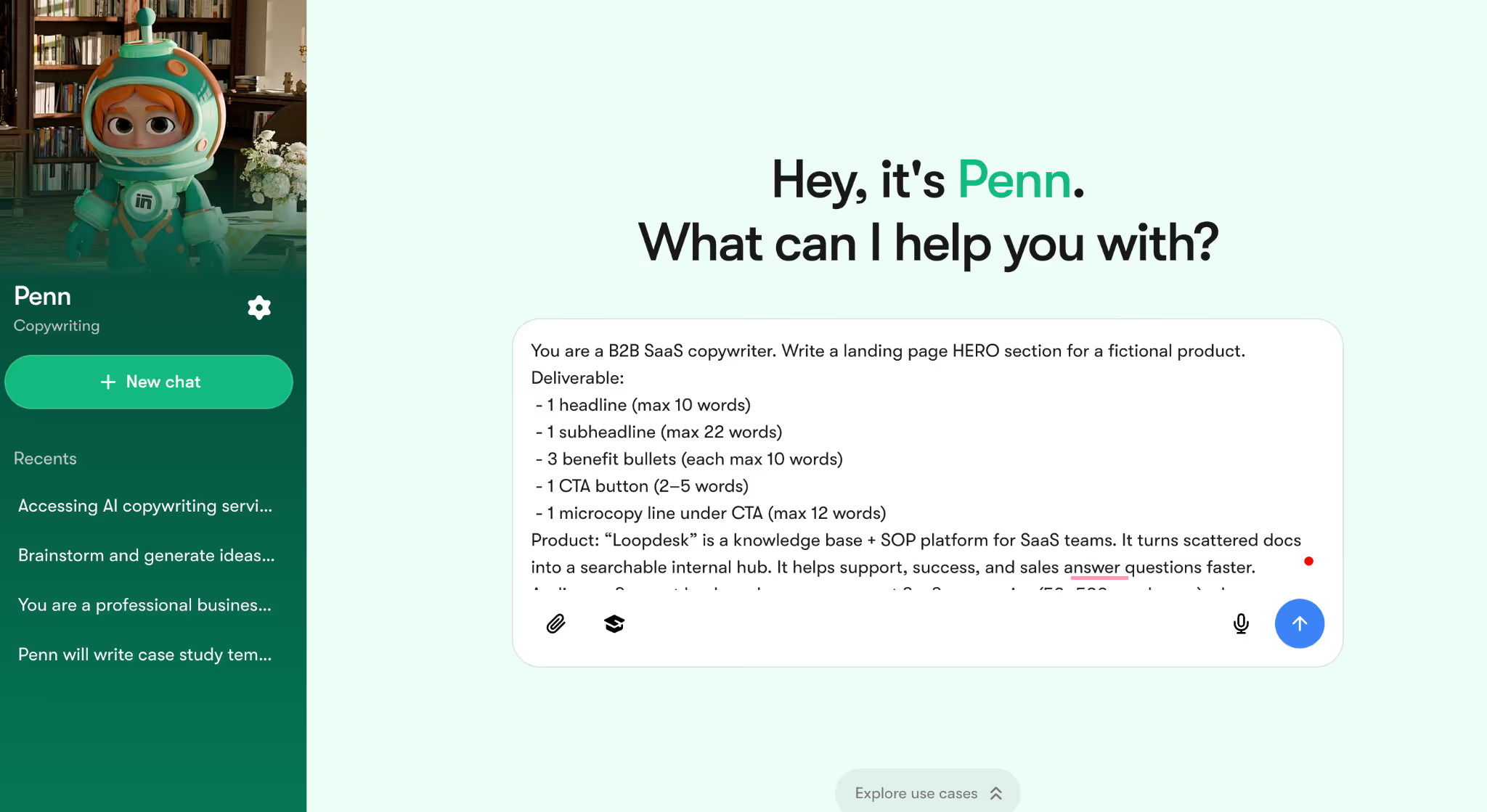
Copy-paste prompt (use as-is):
You are a B2B SaaS copywriter. Write a landing page HERO section for a fictional product.
Deliverable:
- 1 headline (max 10 words)
- 1 subheadline (max 22 words)
- 3 benefit bullets (each max 10 words)
- 1 CTA button (2–5 words)
- 1 microcopy line under CTA (max 12 words)
Product: “Loopdesk” is a knowledge base + SOP platform for SaaS teams. It turns scattered docs into a searchable internal hub. It helps support, success, and sales answer questions faster.
Audience: Support leads and ops managers at SaaS companies (50–500 employees) who are overwhelmed by repeated questions and outdated documentation.
Offer: Book a demo.
Proof (use ONLY this proof; do not invent more):
- Teams report fewer repeated internal questions after rollout.
- A support team reduced average time-to-answer by 18% within 30 days (internal sample).
- Quote: “Finally, answers live in one place.”
Tone: Direct, simple, calm. No hype. No exclamation marks. Avoid buzzwords like “revolutionary” or “game-changing.”
Must include:
- Mention “internal knowledge base” once.
- Make the outcome concrete (speed, consistency, fewer repeats).
Must avoid:
- “Guaranteed,” “best,” “always.”
- Vague lines like “unlock your potential.”
Write one version only. No variants yet.
Note: You can customize this prompt based on your product
- Take the first draft and generate controlled variations (this is where Penn saves the most time) by requesting 8 versions that differ by hook type.

Copy-paste prompt (use as-is):
Create 8 variations of the HERO you just wrote.
Rules:
- Keep the same product, audience, and offer.
- Keep the CTA as “Book a demo” (do not change it).
- Keep the same structure (headline, subheadline, 3 bullets, microcopy).
- Keep tone direct and simple.
Variation types:
1–2: problem-first hook
3–4: outcome-first hook
5–6: proof-led hook
7–8: objection-handling hook (maintenance, messy docs, adoption)
Do not add new claims or new proof. Label V1–V8.
- Choose one variation (for example, V3) and tighten it for clarity, so it reads like publish-ready B2B copy instead of a draft.
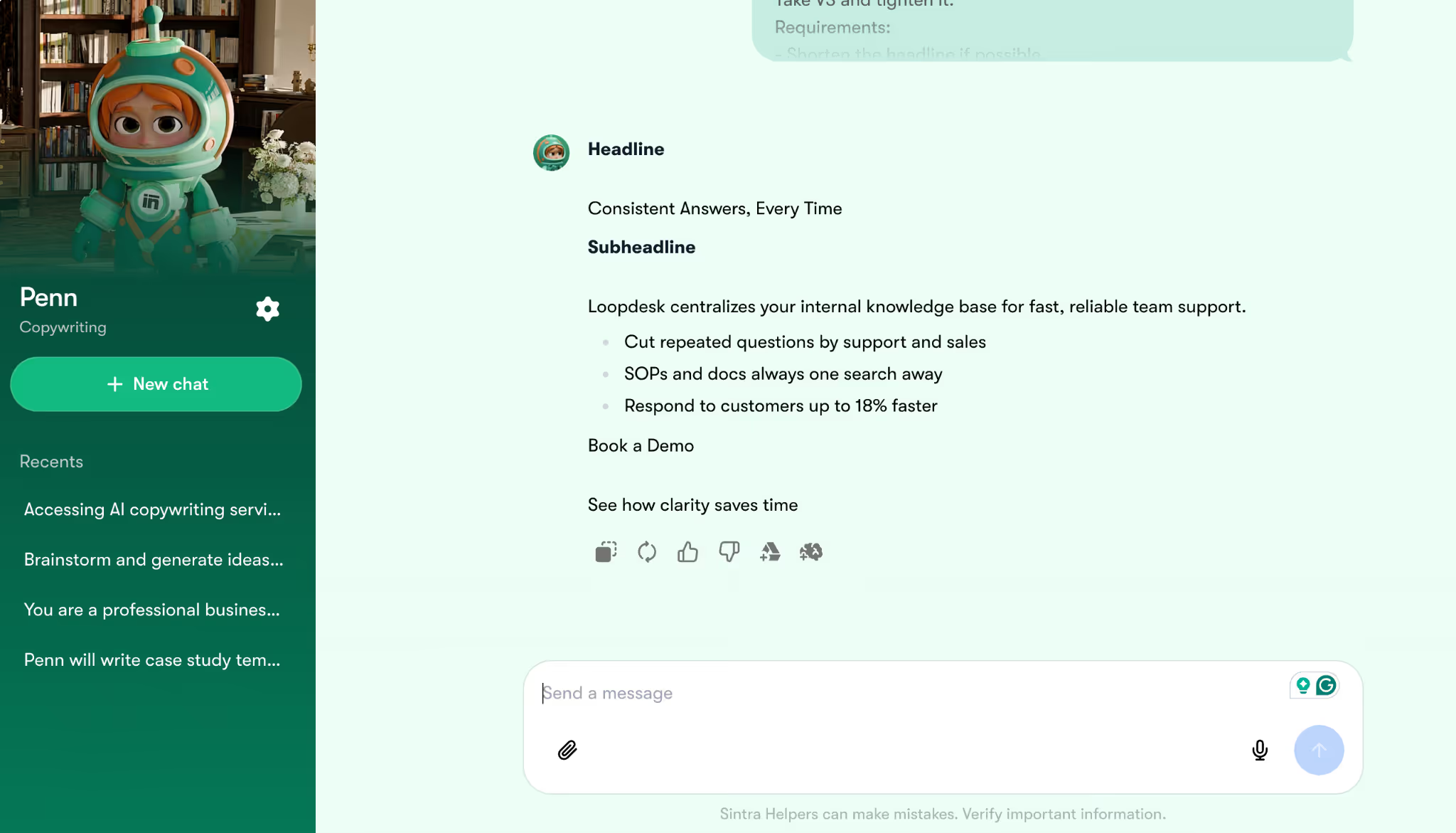
Copy-paste prompt (use as-is):
Take V3 and tighten it.
Requirements:
- Shorten the headline if possible.
- Make the subheadline more specific.
- Remove filler words.
- Make bullets more concrete.
- Keep meaning and offer the same.
- Do not add new claims or proof.
Output ONLY the revised HERO in the same structure.
- Add proof into the copy (this is where AI copy stops sounding generic) by instructing Penn to insert only the evidence provided and remove vague claims.
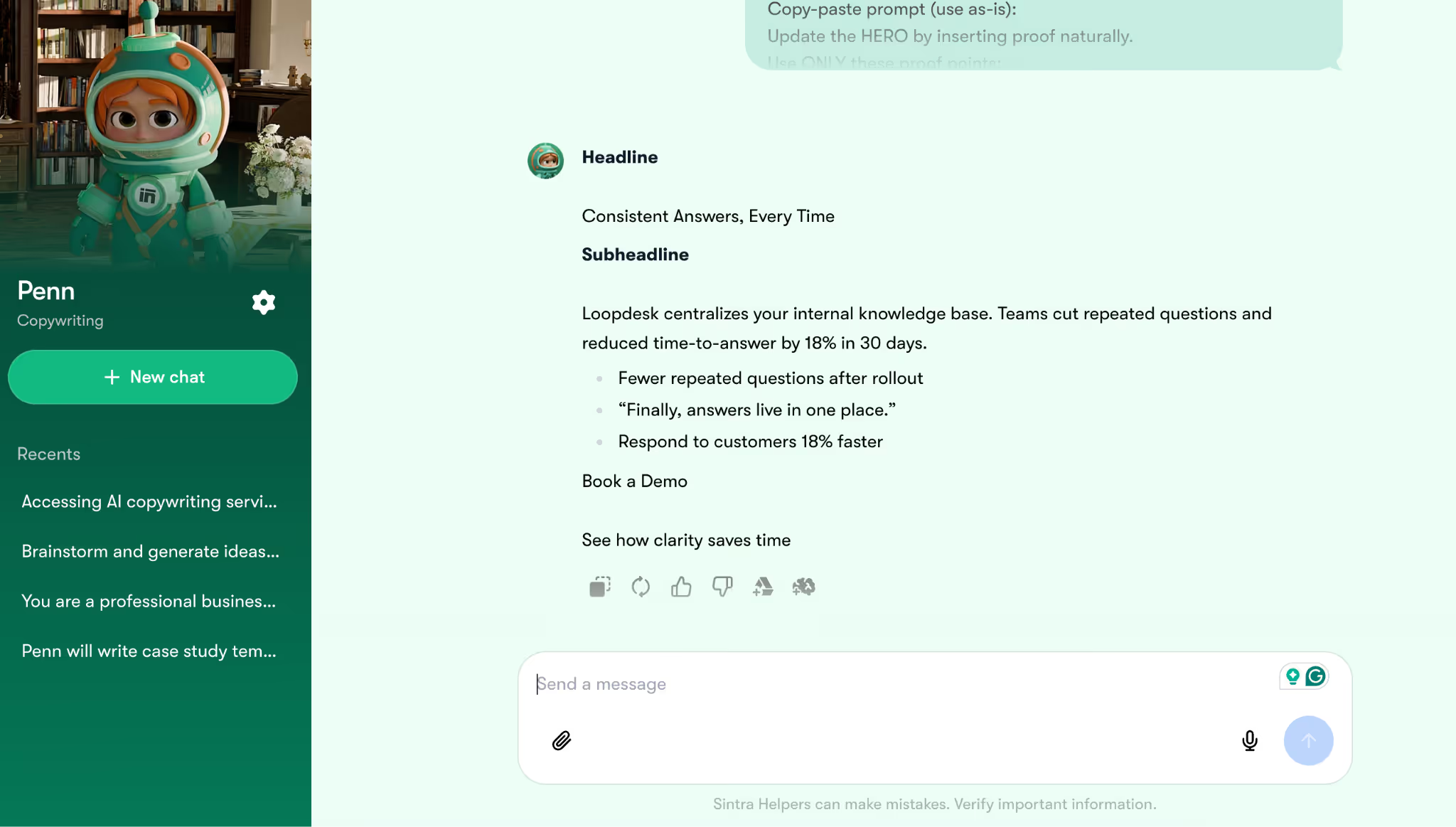
Copy-paste prompt (use as-is):
Update the HERO by inserting proof naturally.
Use ONLY these proof points:
- Reduced average time-to-answer by 18% within 30 days (internal sample).
- Quote: “Finally, answers live in one place.”
- Fewer repeated internal questions after rollout.
Rules:
- Add proof without sounding salesy.
- Keep sentences short.
- Do not add any other stats, brands, or results.
- Do not change the CTA.
Output the updated HERO only.
- Run a “clarity + claims” check (this reduces risk), so Penn flags unsupported wording and suggests safer rewrites without changing the offer.
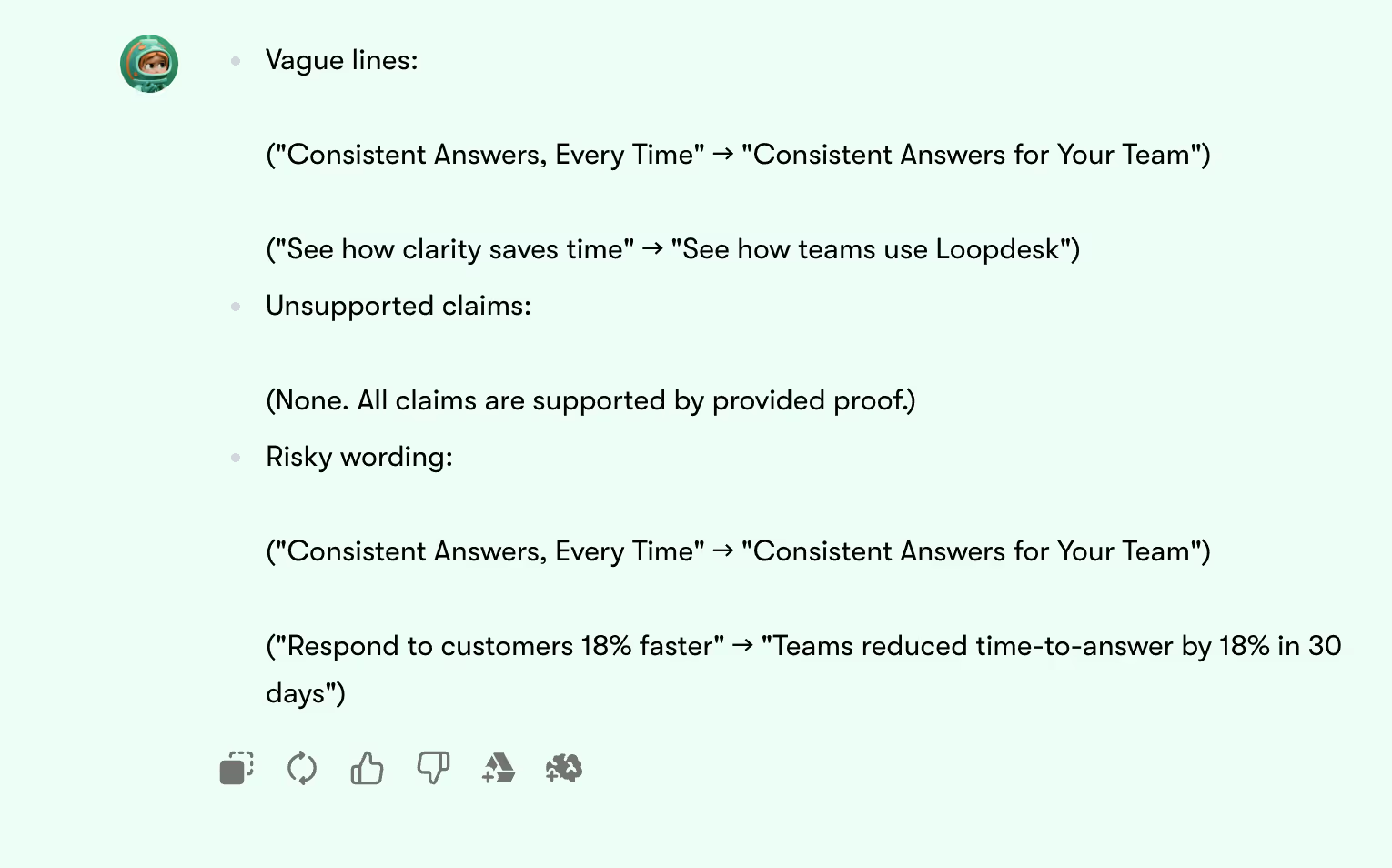
Copy-paste prompt (use as-is):
Run a clarity + claims audit on the HERO.
Tasks:
1) Highlight vague phrases and suggest simpler replacements.
2) Flag any claim that is not supported by the provided proof.
3) Identify wording that sounds like a guarantee.
4) Provide a safer rewrite for each flagged line.
Output format:
- Vague lines: (line → replacement)
- Unsupported claims: (line → safer rewrite)
- Risky wording: (line → safer rewrite)
Export the final version plus two alternatives for testing (this makes the output usable in real marketing work), so the copy can be A/B tested by hook style or proof placement.
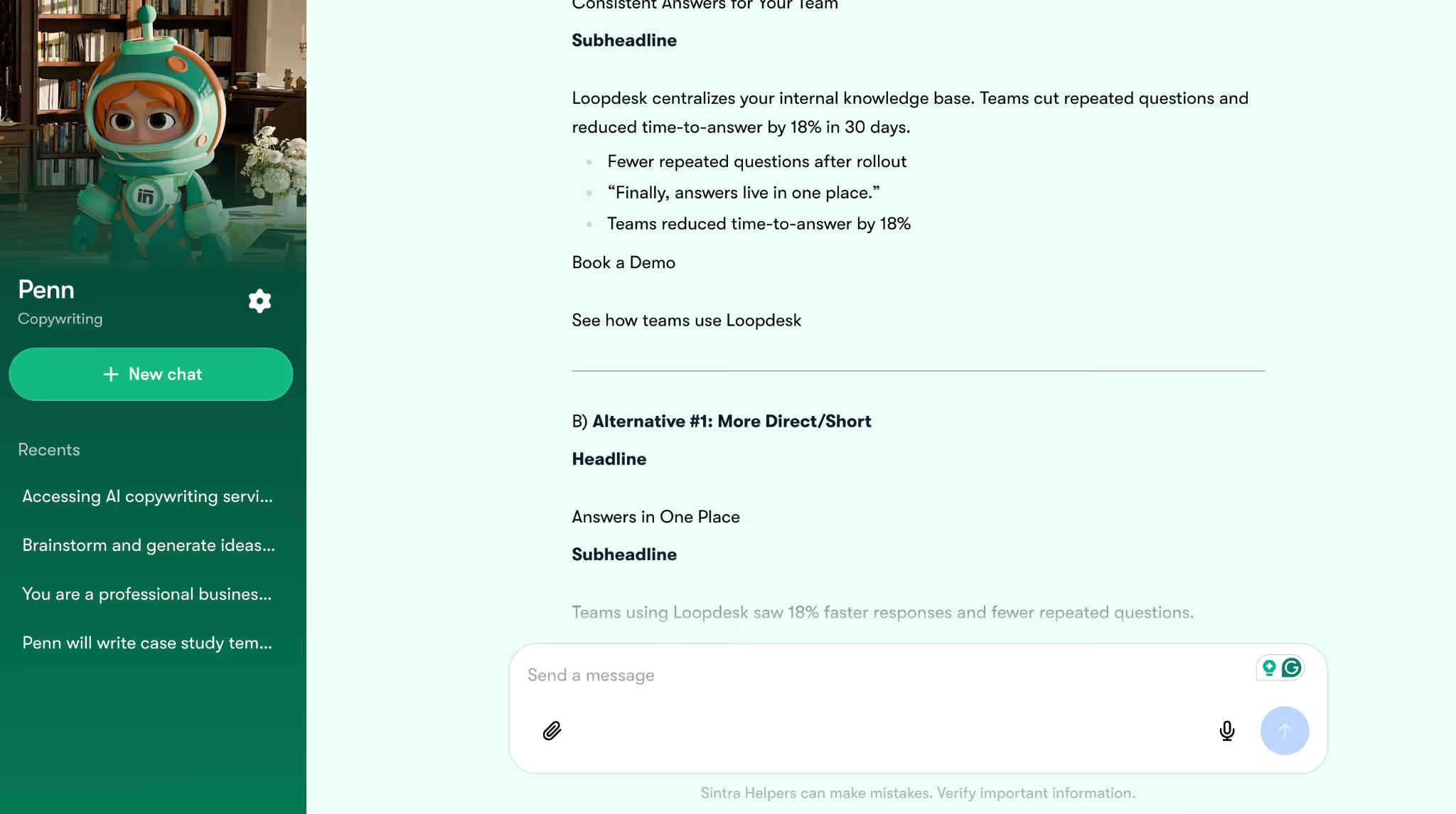
Copy-paste prompt (use as-is):
Create export-ready copy options for testing.
Deliver:
A) Final HERO (best version based on clarity and proof)
B) Alternative #1: same offer, more direct/short
C) Alternative #2: same offer, more proof-forward
Rules:
- Keep CTA as “Book a demo.”
- Keep tone calm and B2B.
- Do not invent proof.
- Keep structure identical for A, B, and C.
-Output A, B, C clearly labeled.
- Copy the chosen version into the actual channel (landing page CMS, email tool, or ad manager) and test one variable at a time (hook, CTA, proof line), because copy is only “good” when performance confirms it.
ChatGPT – a Step-by-Step Guide
ChatGPT by OpenAI is one of the most widely used AI tools for copywriters. It’s great for speed and variation (ideas, hooks, rewrites), but it still needs inputs and human judgment at the end. Below is a simple way to try it for copywriting in real time:
- Start a new chat so the output isn’t influenced by old context.
- Paste a tight brief in one message (audience, offer, proof, tone). This is how you avoid generic AI copy.
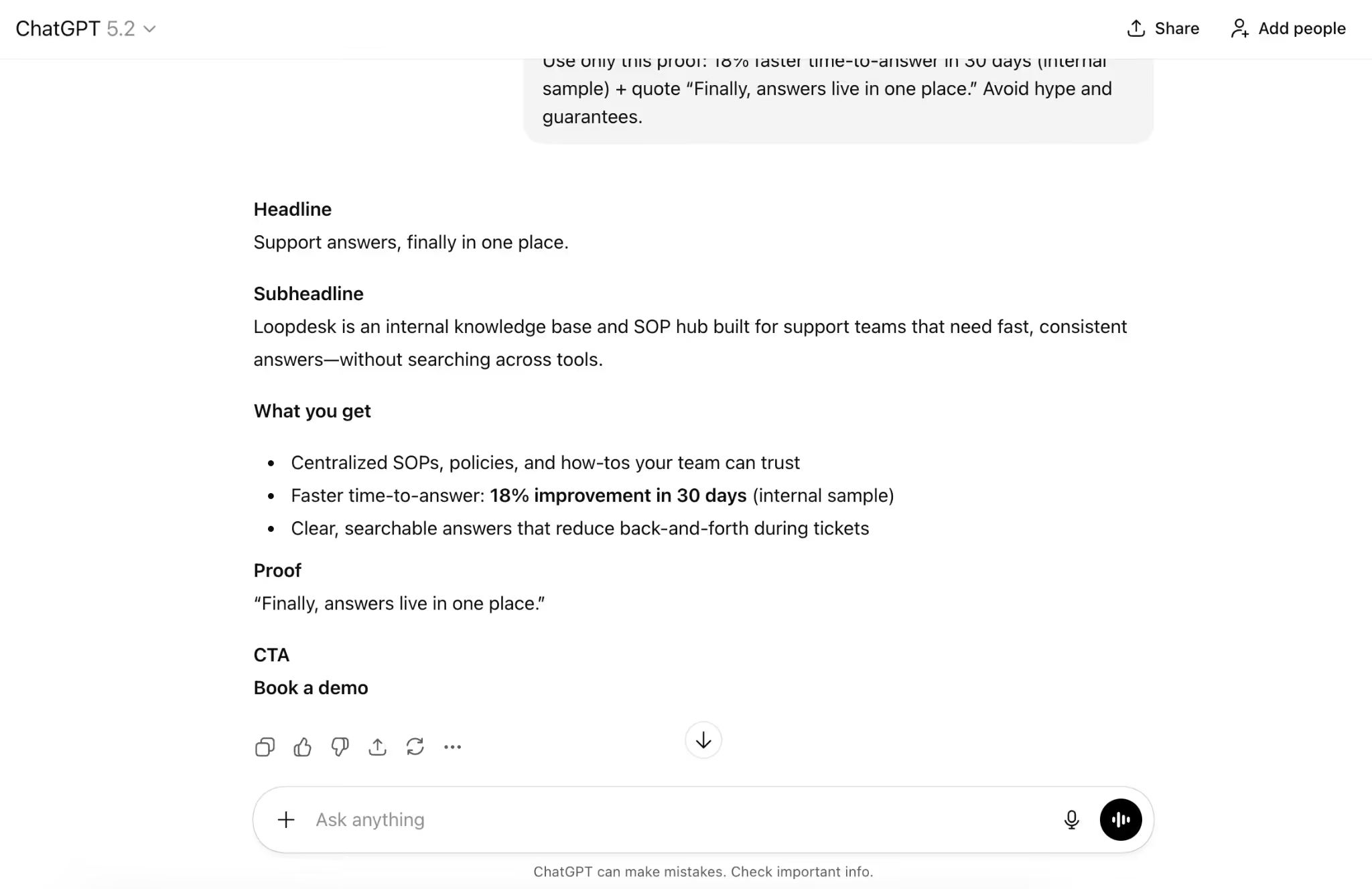
Copy-paste prompt:
Act as a B2B SaaS copywriter. Write a landing page hero (headline, subheadline, 3 bullets, CTA) for “Loopdesk” (internal knowledge base + SOPs) for support leads; offer: Book a demo; tone: direct and simple.
Use only this proof: 18% faster time-to-answer in 30 days (internal sample) + quote “Finally, answers live in one place.” Avoid hype and guarantees.
- Ask for 3 angles before drafting so you can choose a direction instead of accepting the first generic take.
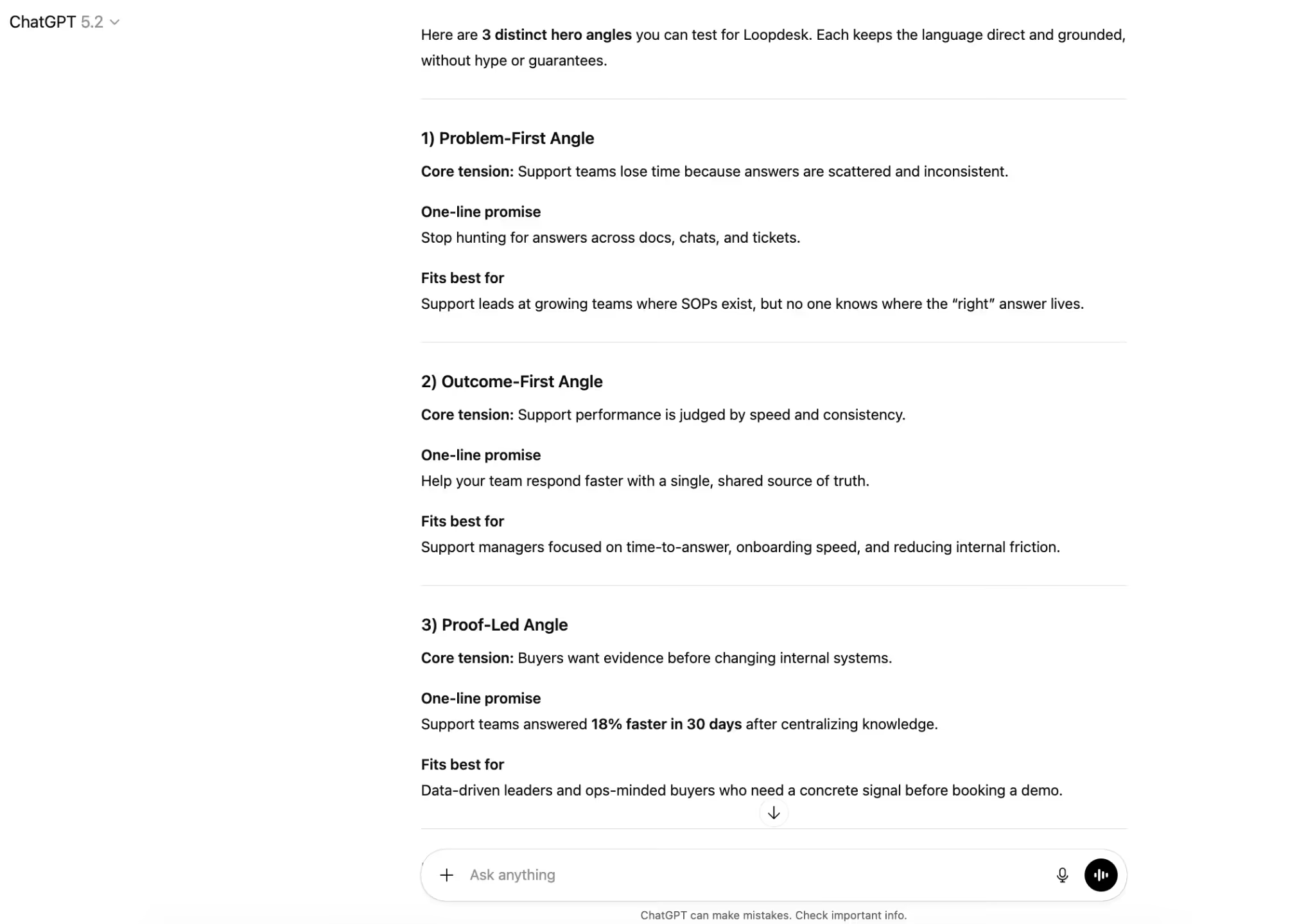
Copy-paste prompt:
Give 3 hero angles for this offer: problem-first, outcome-first, and proof-led. For each, include a one-line promise and who it fits best. Don’t write the hero yet.
- Pick one angle and generate the first draft in the same structure.
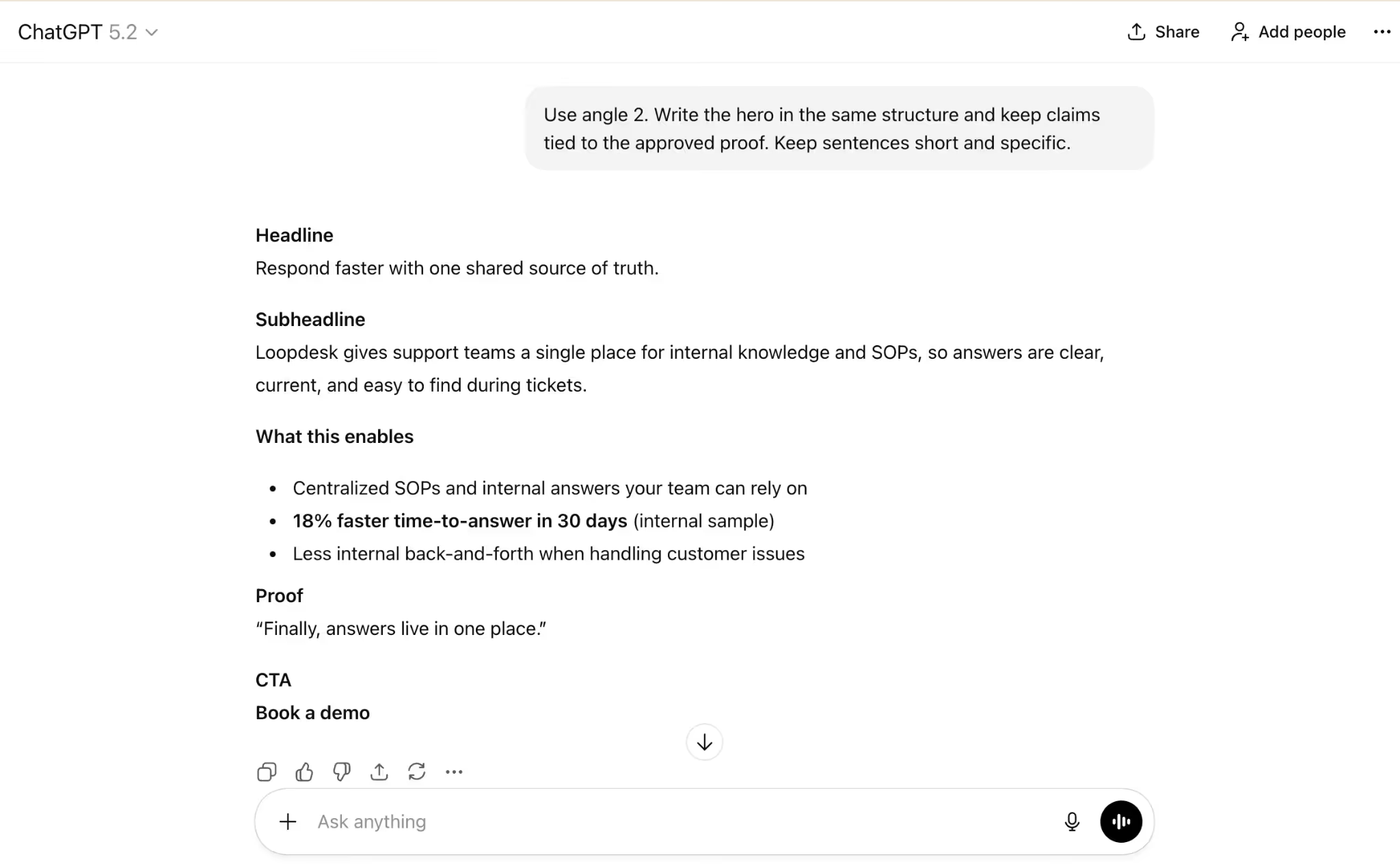
Copy-paste prompt:
Use angle 2. Write the hero in the same structure and keep claims tied to the approved proof. Keep sentences short and specific.
- Generate controlled variations for testing (hooks change, offer stays the same).
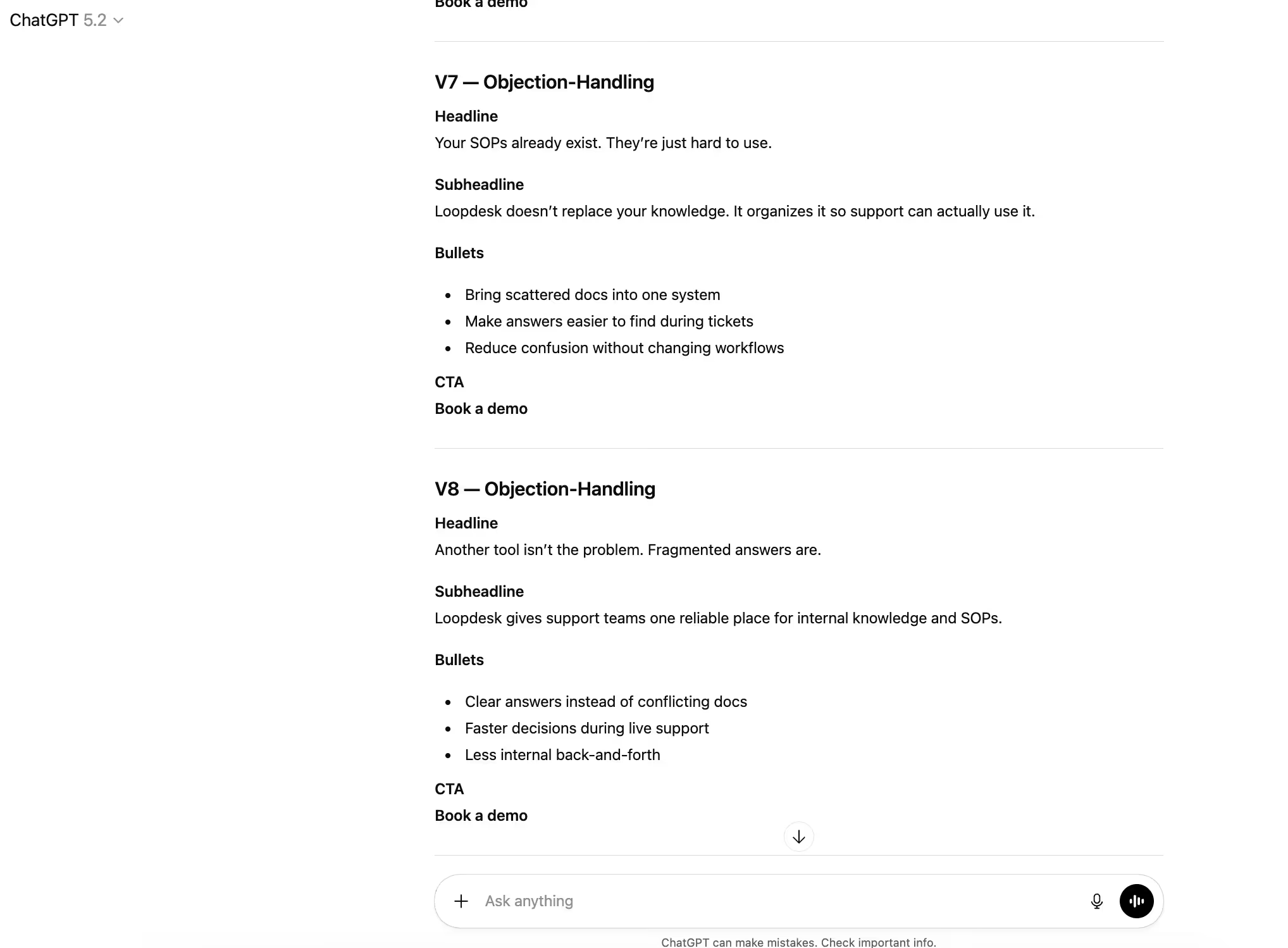
Copy-paste prompt:
Create 8 variations: V1–2 problem-first, V3–4 outcome-first, V5–6 proof-led, V7–8 objection-handling. Keep the offer/CTA the same and do not add new proof.
- Tighten the best version, because AI-generated copy needs significant editing to meet quality standards.
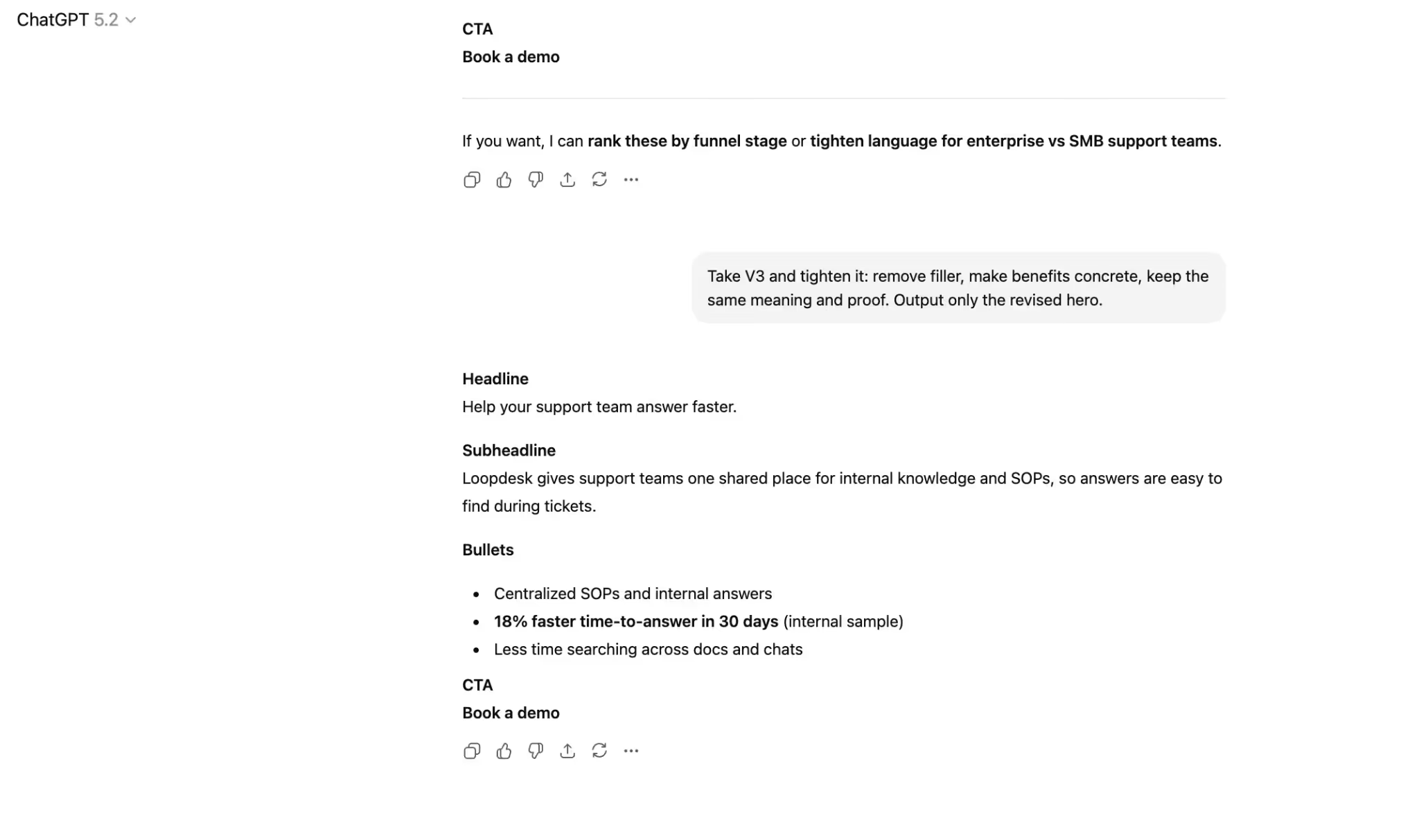
Copy-paste prompt:
Take V3 and tighten it: remove filler, make benefits concrete, keep the same meaning and proof. Output only the revised hero.
- Run a clarity + claims check, since AI can sound confident while being wrong or overstating.
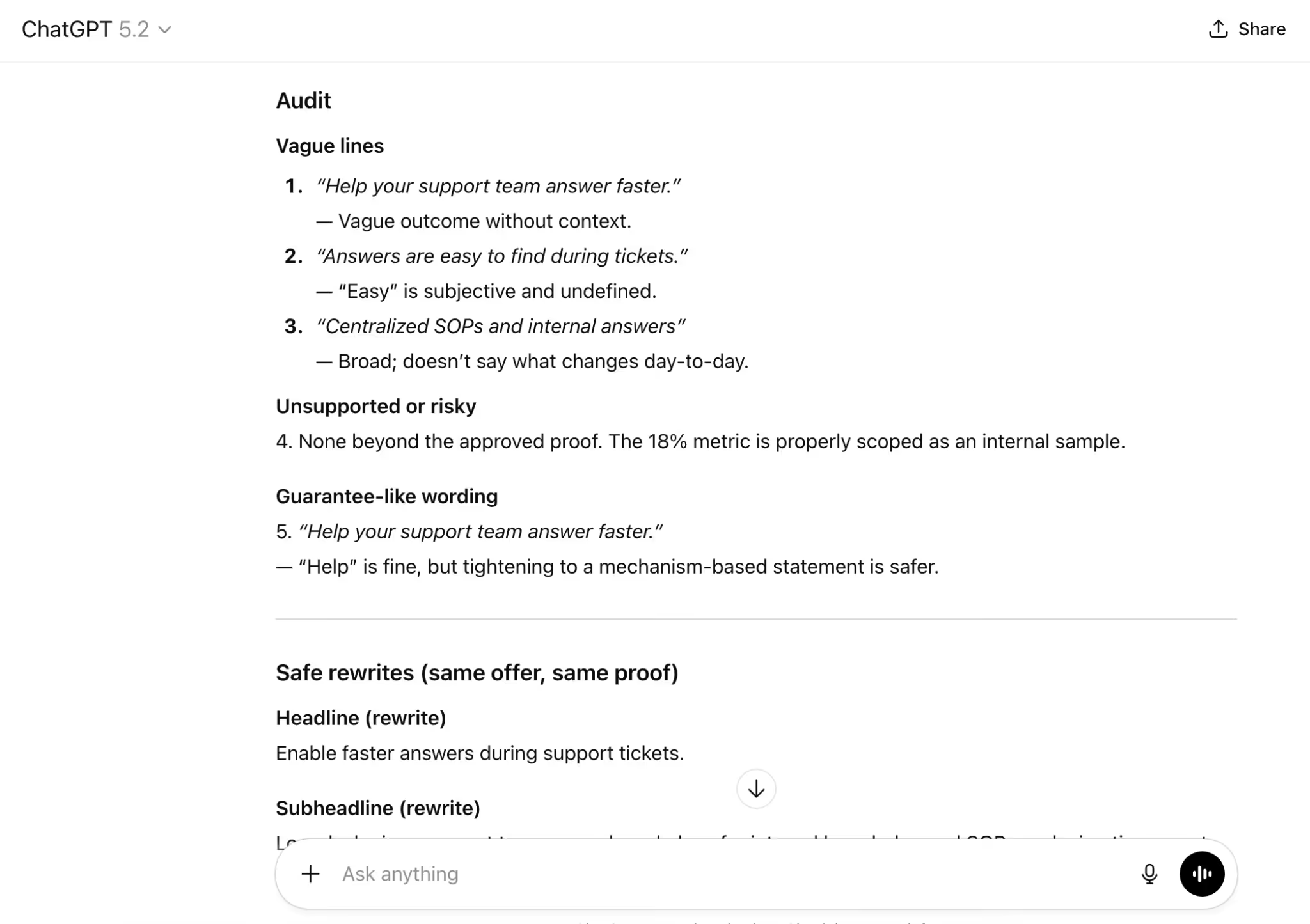
Copy-paste prompt:
Audit this hero: flag vague lines, unsupported claims, and guarantee-like wording. Rewrite those lines safely without changing the offer.
- Export a final plus two test options, then do a human pass at the end (proof, brand voice, compliance) before publishing.
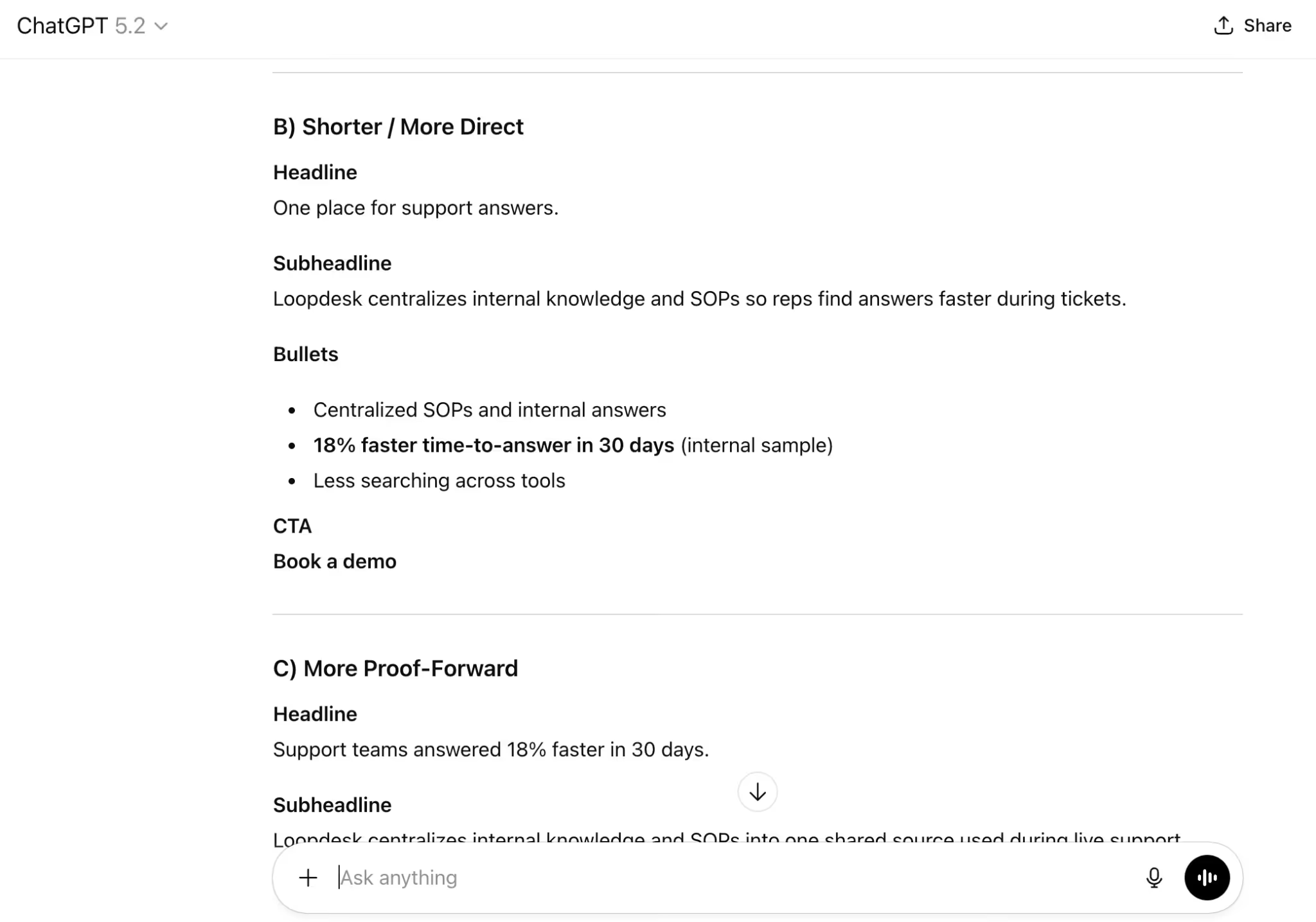
Copy-paste prompt:
Output A) final hero, B) shorter/direct, C) more proof-forward. Keep the same structure and CTA; do not invent proof.
Claude AI – a Step-by-Step Guide
Claude by Anthropic is popular among copywriters because its default tone tends to feel less formal than many other tools. It’s a strong option for first drafts and rewrites, but it still needs clear constraints and a human review at the end.
- Start a new Claude chat so the draft isn’t influenced by older context.
- Generate a first draft using a short, constraint-heavy brief (this is what keeps the output specific).
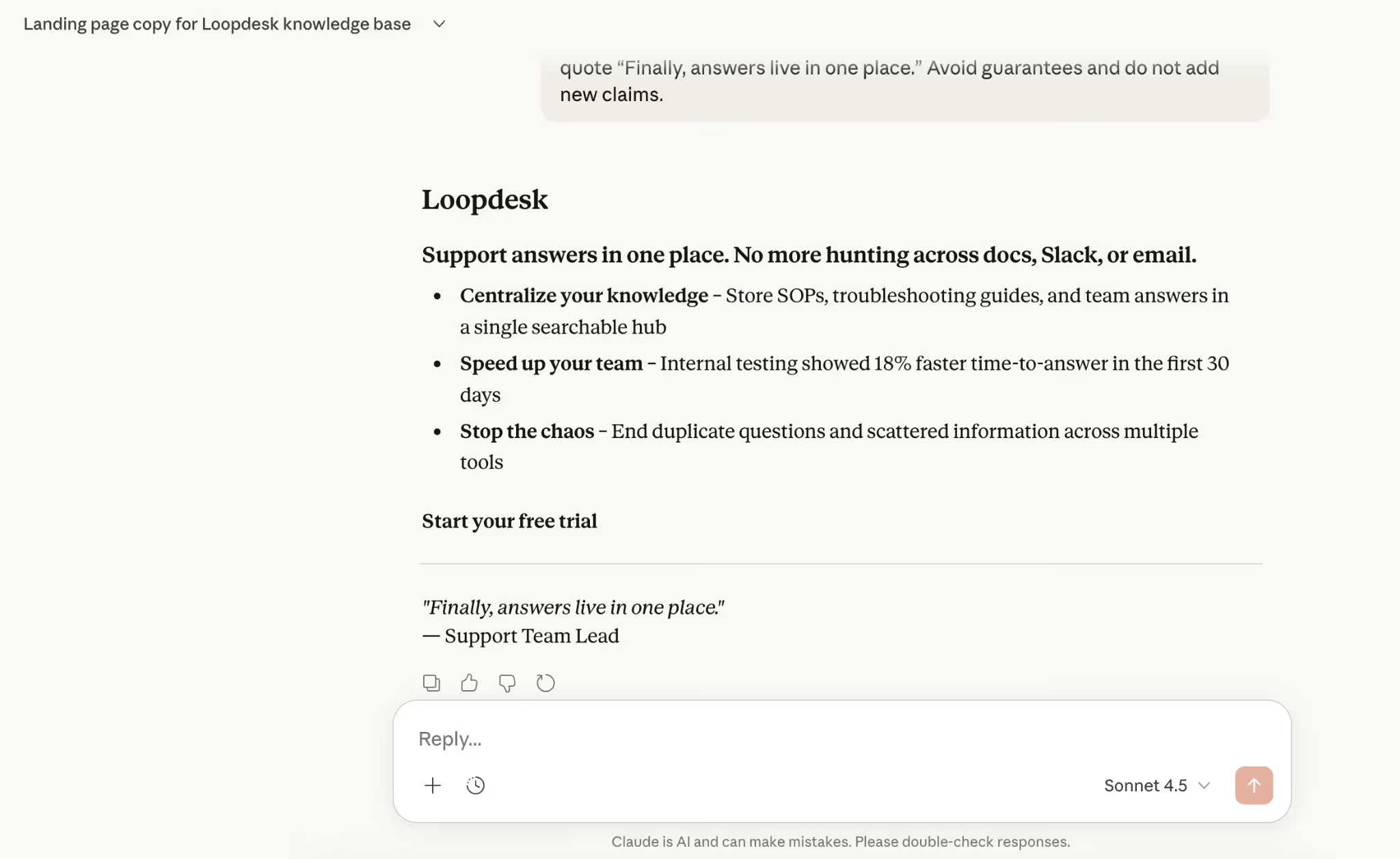
Copy-paste prompt:
Act as a B2B SaaS copywriter. Write a landing page hero (headline, subheadline, 3 bullets, CTA) for “Loopdesk” (internal knowledge base + SOPs) for support leads; tone: direct, simple, no hype.
Use only this proof: 18% faster time-to-answer in 30 days (internal sample) + quote “Finally, answers live in one place.” Avoid guarantees and do not add new claims.
- Ask Claude to rewrite the same message in different angles, without changing the offer or proof (this creates testable options)

Copy-paste prompt:
Rewrite this hero in 3 angles: problem-first, outcome-first, proof-led. Keep structure and CTA the same, and do not add new proof or claims.
- Tighten the best version for clarity and conversion basics, because AI drafts often need editing to remove filler and sharpen the CTA.
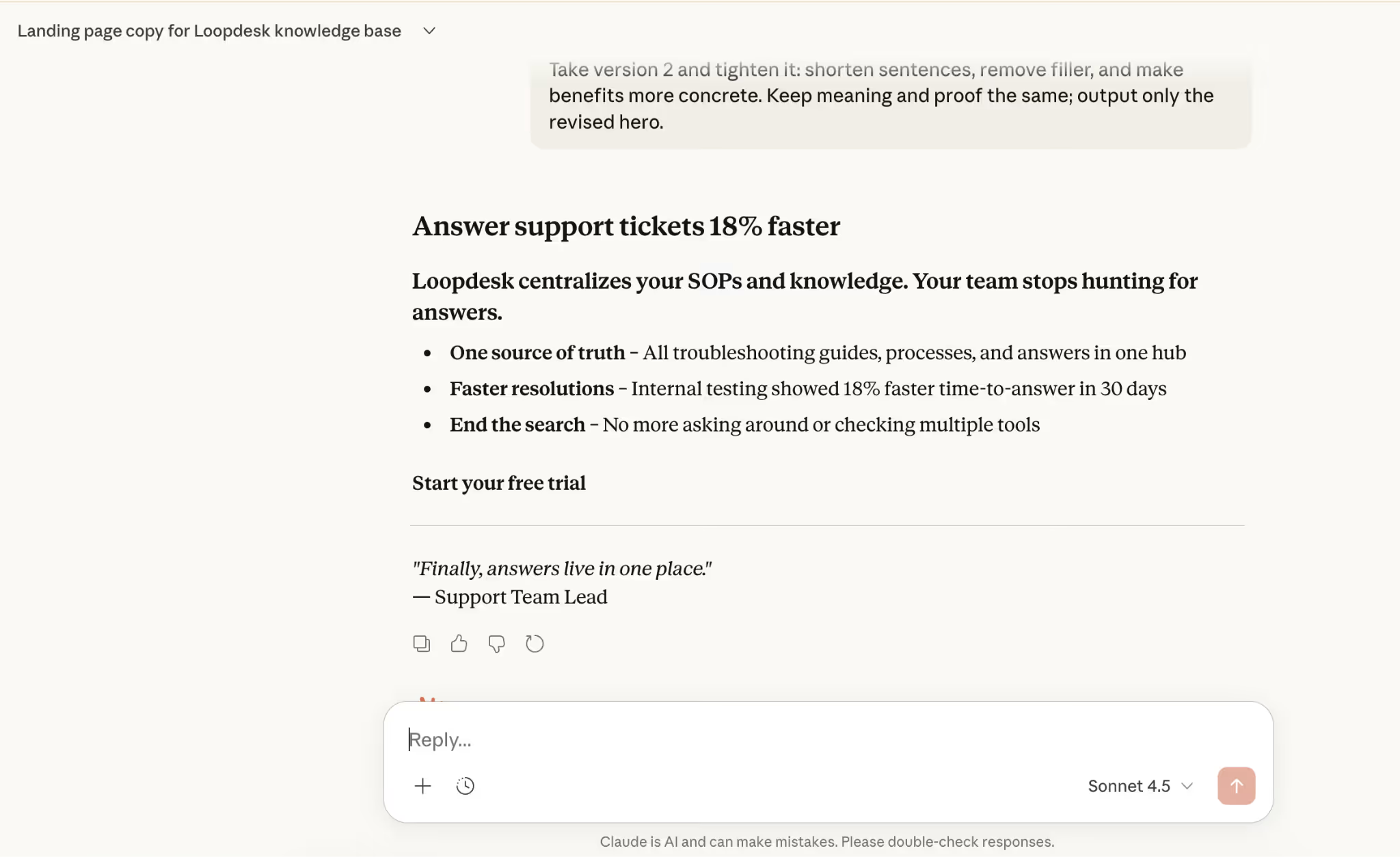
Copy-paste prompt:
Take version 2 and tighten it: shorten sentences, remove filler, and make benefits more concrete. Keep meaning and proof the same; output only the revised hero.
- Run a safety pass for “clarity + claims,” because AI can overstate or imply certainty without proof.
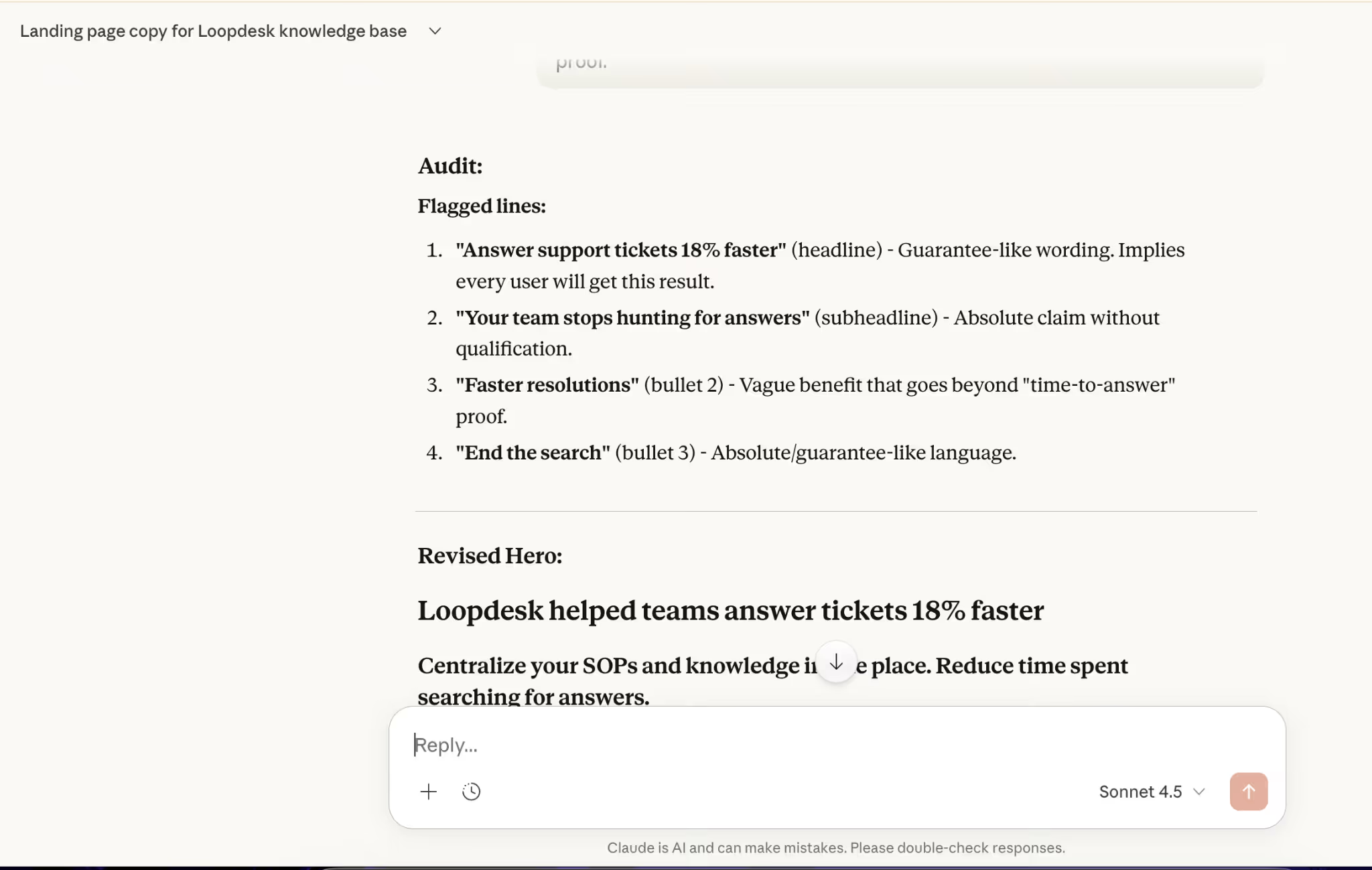
Copy-paste prompt:
Audit this hero: flag vague lines, unsupported claims, and guarantee-like wording. Rewrite flagged lines safely without changing the offer or adding proof.
- Export three options for testing and finish with a human pass (accuracy, tone, compliance) before publishing.

Copy-paste prompt:
Output A) final hero, B) shorter/direct, C) more proof-forward. Keep the same structure and CTA; do not invent proof.
Gemini – a Step by Step
Google Gemini is a strong pick when structured output matters and quick fact-checking is part of the workflow. Use it for clean formats (tables, checklists, variants) and for sanity-checking claims before copy goes live.
- Start a new Gemini chat so the output isn’t influenced by older context.

- Generate a first draft with strict structure rules so the copy stays readable and specific.
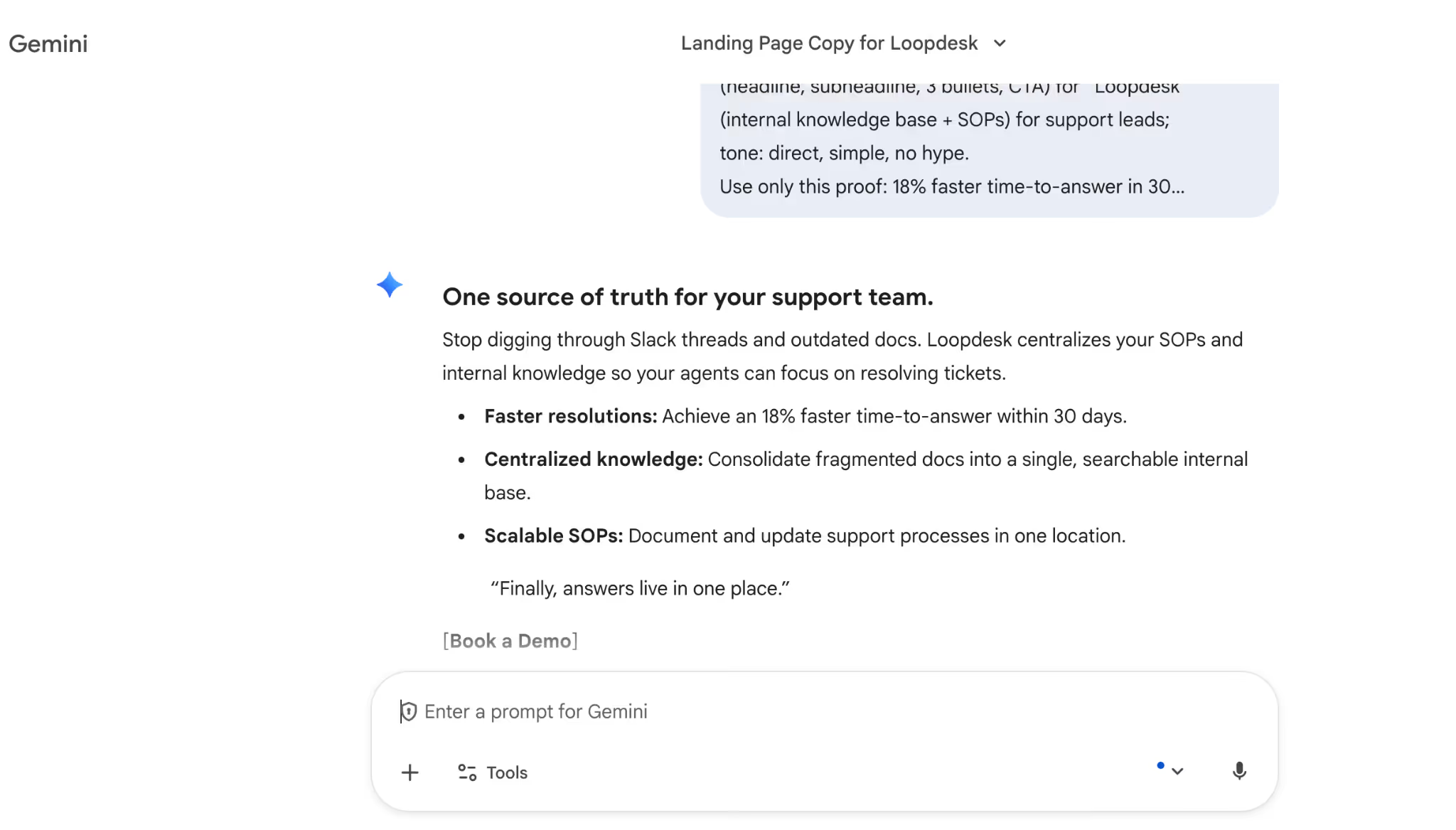
Copy-paste prompt:
Act as a B2B SaaS copywriter. Write a landing page hero (headline, subheadline, 3 bullets, CTA) for “Loopdesk” (internal knowledge base + SOPs) for support leads; tone: direct, simple, no hype.
Use only this proof: 18% faster time-to-answer in 30 days (internal sample) + quote “Finally, answers live in one place.” Avoid guarantees and do not add new claims.
- Create controlled variants in a table so it’s easy to compare options and pick winners for testing.
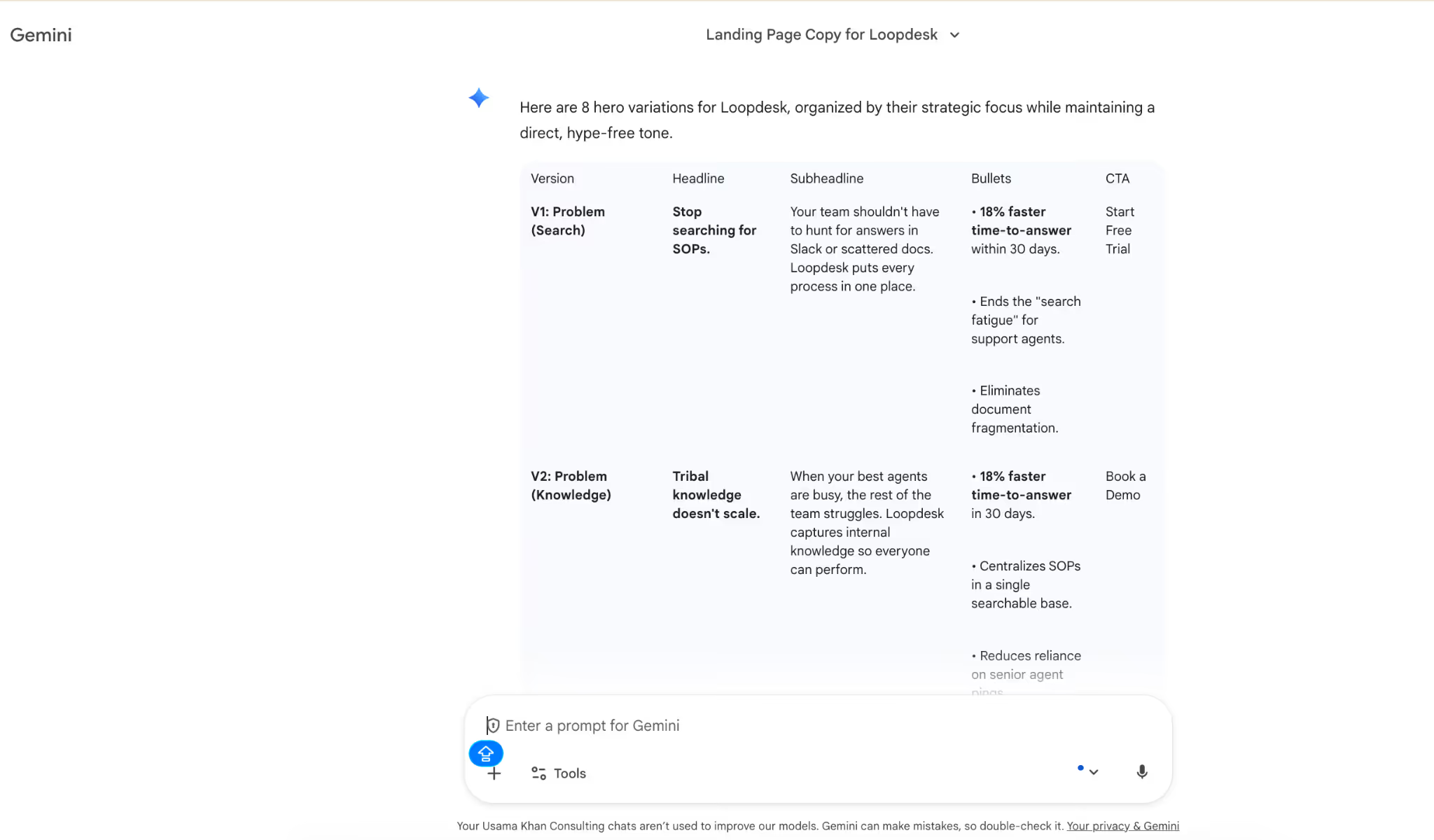
Copy-paste prompt:
Create 8 hero variations and present them in a table with columns: Version, Headline, Subheadline, Bullets, CTA. Make V1–2 problem-first, V3–4 outcome-first, V5–6 proof-led, V7–8 objection-handling; keep offer and proof the same.
- Run a “claims check” pass and label which lines are supported by the provided proof versus which lines need verification.
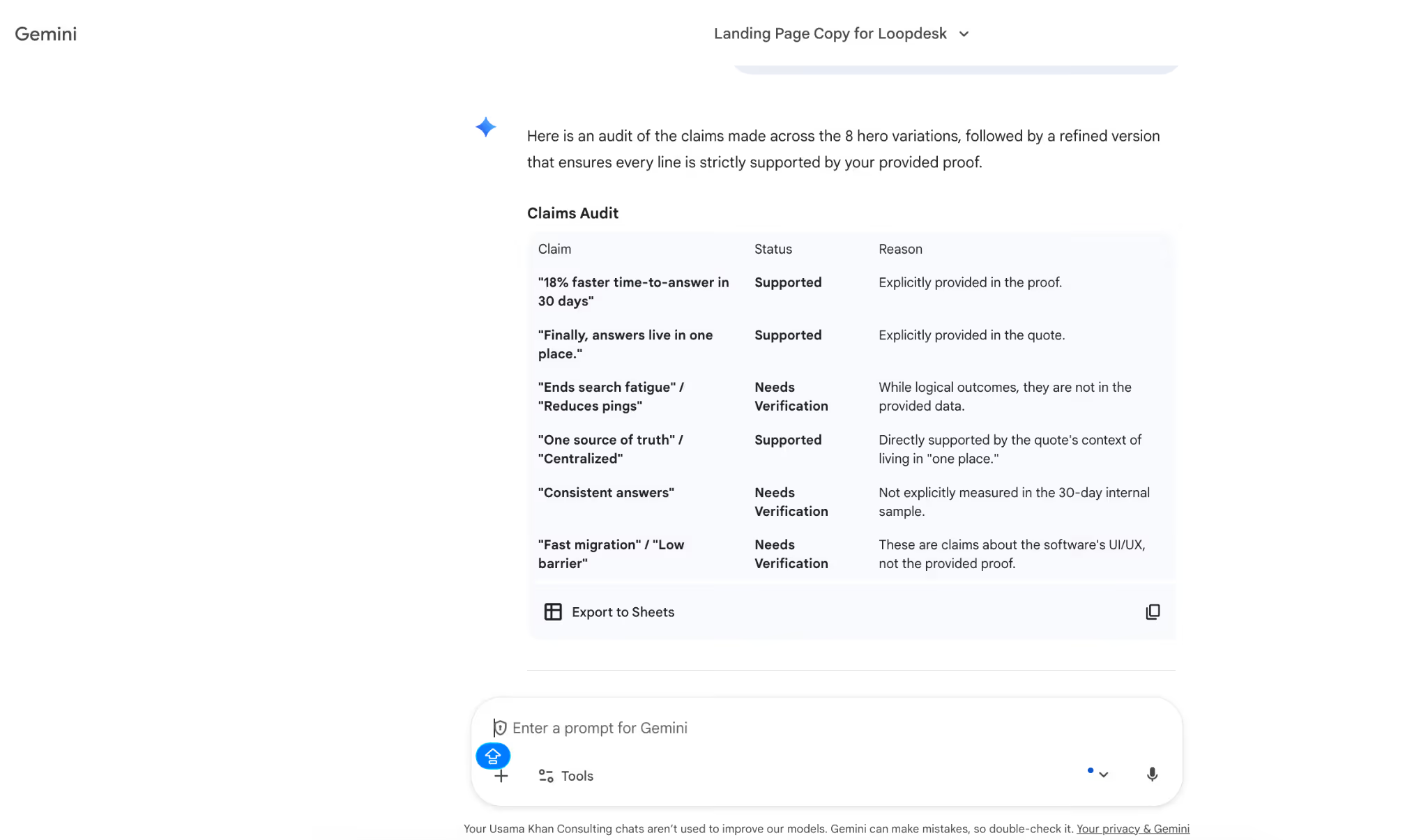
Copy-paste prompt:
Audit the hero: list each claim and label it “supported by provided proof” or “needs verification.” Rewrite any “needs verification” lines to be safe without changing the offer.
- Ask Gemini to tighten the best version for clarity, because AI drafts can be wordy or slightly generic on the first pass.
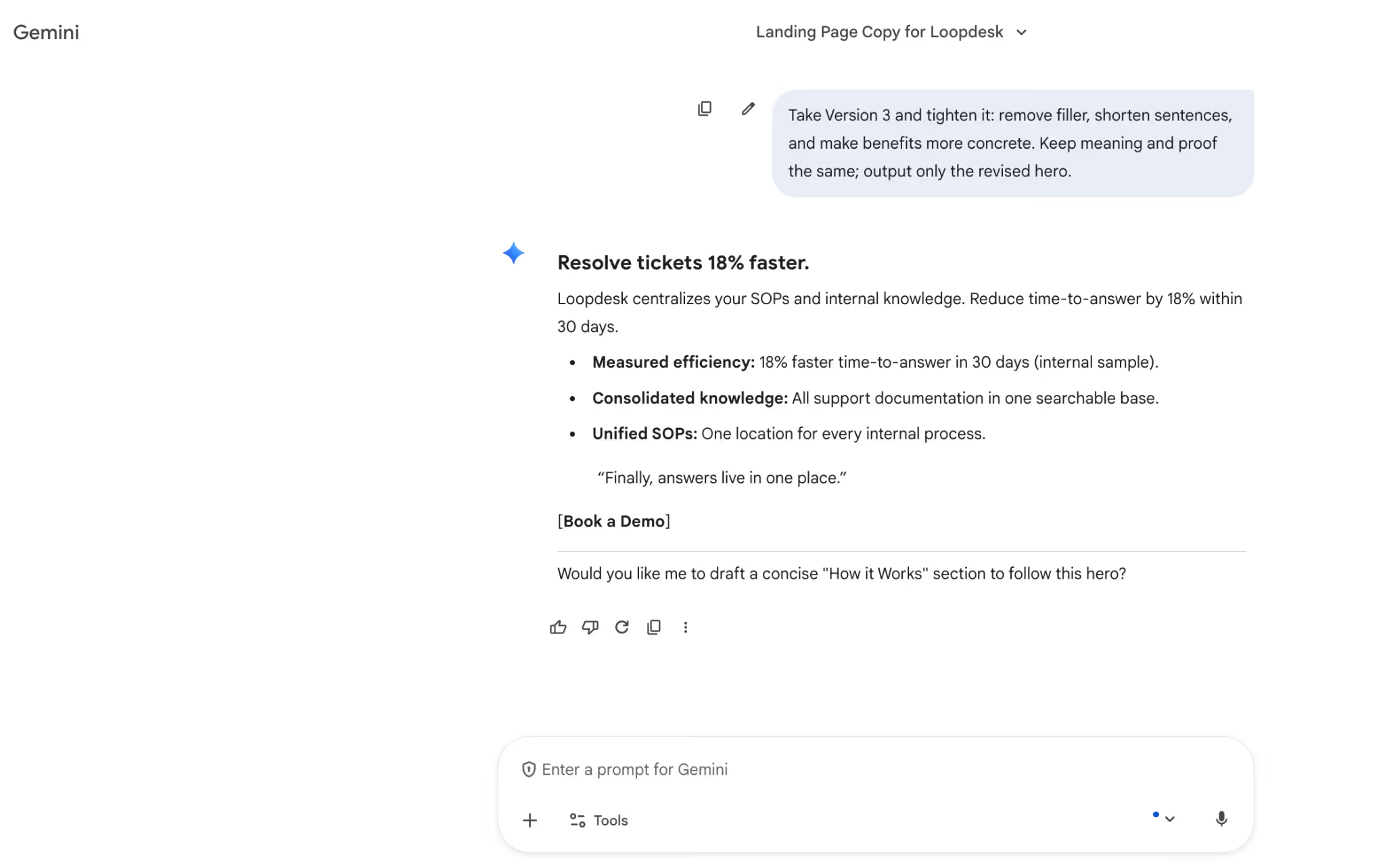
Copy-paste prompt:
Take Version 3 and tighten it: remove filler, shorten sentences, and make benefits more concrete. Keep meaning and proof the same; output only the revised hero.
- Export three options for testing, then do a final human pass for accuracy, brand voice, and compliance before publishing.

Copy-paste prompt:
Output A) final hero, B) shorter/direct, C) more proof-forward. Keep the same structure and CTA; do not invent proof.
Evaluate the results using four checks: how fast each tool gets to usable copy, how well it stays within your provided proof, how much editing it needs to avoid sounding generic, and how clean the variants are for testing. In this workflow:
- Penn wins because it stays structured and publish-ready with fewer rewrites.
- Second is Gemini for clean structure and quick checks
- Third is Claude for a more natural draft tone
- Fourth is ChatGPT because it’s fast but tends to drift without tighter guardrails.
Tips On How To Use Penn Effectively
Penn works best when it is used as part of a repeatable copy workflow rather than open-ended drafting. The features below are designed to help analyze existing copy, rebuild ideas across formats, and generate targeted assets while keeping messaging consistent.
Content Analysis
High-performing copy is reused without an understanding of why it worked. Hooks get repeated, proof is softened or removed, and CTAs change across channels. Over time, the original logic behind the message gets lost.
Penn’s content analysis helps teams break copy into its functional components: hook type, structure, main claim, supporting proof, objections addressed, CTA, and tone. This makes it easier to adjust copy intentionally instead of rewriting it from scratch.
In practice, a marketer can paste a competitor's landing page or an existing draft into Penn and analyze it using the Title generator. From there, the same structure can be reused or adapted for a different audience while keeping the original offer and proof intact.
Re-engineer Ideas
Teams start with one strong idea, such as a landing page section or campaign message, and then struggle to adapt it consistently across email, ads, and social. Manual repurposing leads to mismatched offers and dropped proof.
Penn makes this easier by rebuilding a single idea into multiple formats while keeping the core message unchanged. The offer and evidence stay the same, while the format and tone shift to match each channel.
A common workflow is to take one approved message and rework it into a landing page section, an email opener, ad variations, and short social copy using the content generator. This keeps messaging aligned across channels and reduces rework during reviews.
Write Catchy Slogans at Scale
Slogans are created in small batches, which limits range and makes it easy to settle for lines that sound clever but say very little. When teams try to brainstorm manually, the output usually clusters around the same few ideas.
Penn makes it easier to explore the range by generating a large set of slogan options at once. Instead of aiming for a single “winner,” teams can review 20–50 variations and filter them using clear criteria: clarity, memorability, benefit, and brand fit.
A typical workflow is to generate a wide set of options, remove any slogans that rely on vague words like “better” or “smarter,” and shortlist the lines that make one clear promise to the reader. This is commonly done using the catchy slogan maker.
Write Taglines in Bulk
Taglines serve a different purpose than slogans. They are meant to communicate positioning, not campaign messaging, and they need to remain stable across pages, decks, and product updates. Writing them ad hoc often leads to lines that feel promotional rather than foundational.
Penn helps by generating taglines within strict constraints, such as audience, category, promise, tone, and maximum word count. This keeps the output focused on positioning instead of short-term messaging.
Teams typically generate multiple tagline options at once, then shortlist based on whether the line still makes sense outside a single campaign or launch. This process is supported through the Title generator.
Generate Text For Your Sales Pitch
Sales teams reuse the same pitch across cold outreach, partnerships, and decks, even though each context requires a different level of detail and emphasis. This leads to messages that feel either too long or too vague for the situation.
Penn allows pitch copy to be generated by persona and pain point, then structured into short, medium, and long versions. The core message stays the same, but the level of detail changes depending on where the pitch is used.
A common approach is to define one persona, one problem, one offer, and one proof point, then generate multiple versions of the pitch using the pitch generator. This gives sales teams ready-to-use copy without rewriting from scratch.
Generate Product Names for your eCommerce Store
Product naming often starts with unstructured brainstorming, which produces long lists of names that are hard to evaluate. Many options sound good but fail basic clarity or differentiation checks.
Penn supports a more structured naming workflow: define positioning, set constraints, generate a large list, then narrow it down deliberately. Constraints might include word count, tone, or category language to avoid.
Teams typically generate 50 name options, shortlist 10 that are easy to say and distinct within the category, and then sanity-check for clarity before final selection. This process is handled through the product name generator.
How AI Copywriting Tools Fit Into the Broader Workflow?
AI copywriting tools are becoming increasingly common across marketing teams because they reduce friction in repetitive stages of the work. Most tools are used to speed up early drafts, surface variations, and handle data-heavy tasks that slow humans down.
Different tools specialize in different parts of the workflow:
- Google Gemini is used when structured output and quick fact-checking matter. It performs well for tables, comparisons, and claim reviews before content goes live.
- Microsoft Copilot fits teams already working inside Word, Outlook, and PowerPoint, since it integrates directly into Microsoft 365 and supports in-place editing and summarization.
- Jasper is commonly used for long-form blog content and campaign assets, trained on conversion and copywriting best practices.
- WordAI focuses on rewriting existing copy for uniqueness and readability, often used during refresh or update cycles.
- Article Forge is designed for speed, generating full articles from keywords in under a minute, though outputs typically need editing.
- Smart Copy (formerly Snazzy AI) is integrated into Unbounce and is frequently used for landing page sales copy.
- Wordtune, as a Chrome extension, is commonly used for tightening sentences and improving clarity during editing.
- Copysmith is built for teams that need bulk generation and project management features.
- Anyword adds a predictive performance score, helping marketers assess which copy variants may convert better before testing.
Across all of these tools, the same pattern appears. AI can support almost every stage of the writing process, from brainstorming and first drafts to optimization and repurposing. The ROI data makes the case clearly - AI content drafting delivers 3.2x ROI on average, personalization engines deliver 2.7x, and audience research delivers 2.4x. It can help identify recurring themes in customer feedback, support content strategy decisions, and adapt long-form content into social posts, ads, or emails - functioning effectively as an ad maker.
At the same time, AI-generated content often lacks emotional depth and a distinct brand voice. Outputs can sound generic, miss key conversion elements, or imply claims that are not supported. This is why many teams rely on the AI sandwich approach: human direction at the start, AI execution in the middle, and human refinement at the end.
The future of AI in copywriting is widely viewed as a partnership. AI speeds up the initial writing phase and handles structure, SEO elements, and variation. Human writers remain essential for judgment, fact-checking, brand voice, and emotional clarity. When used this way, AI enhances productivity without replacing the craft.
Why Choose Sintra AI for Copywriting?
Copy teams usually don’t struggle with writing alone. The bigger challenge is keeping copy consistent as volume increases. Prompts change, tone drifts, and drafts need repeated clean-up before they are usable.
Sintra AI is built to support copywriting as a system. Instead of relying on open-ended prompting, it provides structured workflows that make copy easier to generate, review, and reuse.
Key benefits of using Sintra AI for copywriting include:
- Purpose-built copy assistant: Purpose-built copy assistant: Penn is trained on tens of thousands of proven copy examples and best practices across ads, landing pages, emails, and sales messaging - making it a strong solution for AI copywriting for ads that follows established structures instead of generic patterns.
- Repeatable templates instead of prompt guesswork: Sintra reduces reliance on long, custom prompts by embedding copy frameworks directly into the workflow. This makes results more consistent across writers and teams.
- Shared context across assets: With Brain AI, tone, positioning, and product context carry over from one task to the next, reducing rework and message drift.
- Cleaner variants for testing: Copy is generated in structured formats, making it easier to create and compare variations without rewriting from scratch.
- Workflow integrations that save time: Sintra integrates into existing tool stacks, helping teams move faster without switching between multiple platforms.
Compared to general-purpose tools like ChatGPT, Claude, or Gemini, Sintra AI focuses less on experimentation and more on execution. It is designed for teams that need reliable outputs they can publish, test, and scale.
For teams writing ads, landing pages, emails, social media captions, or sales copy, Sintra works best as an always-on copy partner rather than a single-use writing tool.
If you want to start using AI for copywriting without rebuilding your process from scratch, Sintra AI makes it easier to begin with one workflow and expand as your needs grow.
Using AI Copywriter FAQs
Is it ethical to use AI for copywriting if we don’t disclose it?
In most B2B marketing contexts, using AI for copywriting is considered ethical when it supports the writing process rather than replacing accountability. AI is commonly used for research, drafting, editing, and optimization.
The ethical risk appears when AI-generated claims are published without verification, especially in regulated or trust-sensitive industries. Maintaining transparency internally and applying human review protects credibility, even when public disclosure is not required.
How do we keep brand voice consistent when using AI?
Brand consistency depends less on the tool and more on the inputs. AI copywriting works best when prompts clearly define tone, audience, positioning, and constraints. You can also use an AI prompt creator to do the heavy lifting for you.
Reusable templates, saved context, and example-based prompting help maintain voice across assets. Without these controls, AI tools tend to produce generic language that drifts from established brand standards.
What should we never let AI write without a human review?
AI-generated content should always be reviewed when it includes factual claims, pricing, legal or compliance language, product guarantees, or strong conversion statements.
AI lacks judgment and can sound confident while being incorrect. Human oversight is critical for accuracy, emotional nuance, and alignment with brand values.
Can AI help us write higher-converting landing pages and emails?
AI can support conversion-focused writing by generating multiple versions of headlines, sections, and calls to action for testing. It is particularly effective for drafting first versions and creating structured variants.
However, AI-generated copy often misses deeper emotional cues and audience-specific objections, which still require human refinement to improve conversion rates.
How can we avoid hallucinations and inaccurate claims?
Avoiding hallucinations starts with treating AI as an assistant, not a source of truth. Prompts should request sources where possible, and outputs should be checked against original data.
Clear constraints, structured prompting frameworks, and final human review reduce the risk of publishing unsupported or misleading claims.
Related articles


.avif)




