



7 Best AI Document Generators for Businesses in 2026

Table of Contents

TL;DR - Top AI Document Generator
The best AI for document creation depends on the document type. The top AI document generators, including Sintra AI, Gamma, and Jotform, create structured, business-ready documents that fit into your workflows rather than producing standalone text. Below, we compare the 7 best tools for creating documents, from reports and SOPs to branded decks.
- Sintra AI — best for full workflow automation with AI agents
- Docupilot — best for high-volume, data-driven documents
- Notion AI — best for internal docs and team collaboration
- Gamma — best for visual documents and presentations
- JotForm — best for form-based document workflows
AI document generator tools are now widely used by teams to create business documents, standardize templates, and support repeatable workflows. Yet many organizations struggle to get consistent results. That challenge is reflected at scale: 42% of companies abandoned most of their AI initiatives in 2025 because the tools failed to integrate into everyday operations.
The most common issues appear after document creation. Generated files don’t match internal formats, content lacks context, and teams still rely on manual editing, approvals, and external tools to finish the job. Instead of improving efficiency, these gaps introduce friction into the document workflow. The potential is clearly there - in Microsoft's own Copilot study, users edited 10% more documents across Word, Excel, and PowerPoint, with the highest-impact companies seeing a 20% increase in document creation.
This article compares seven AI document generator tools based on how well they fit real team workflows, not surface-level feature lists. Each tool was tested hands-on to determine where it performs best in a business environment and which types of teams it is designed to support.
A Quick Glance at the Best AI Document Generators
| Tool | Best For | Key Features | Starting Price | Rating |
|---|---|---|---|---|
| Sintra AI | Multi-function business automation | 12 AI helpers, Brain AI knowledge hub, 90+ power-ups, proactive automation | $39/month | 4.6/5 |
| Gamma | Visual documents & presentations | AI-powered design, one-click restyling, interactive embeds | $8/month | 4.3/5 |
| JotForm | Form-based document generation | AI form builder, 250+ integrations, workflow automation | $34/month | 4.5/5 |
| Visme | Design-heavy documents | Visual content creation, brand kit, design templates | $29/month | 4.2/5 |
| Scribe | Process documentation | Automatic screen capture, step-by-step guides | $23/month | 4.4/5 |
| Docupilot | Data-driven automation | 70+ integrations, AI template builder, bulk generation | $29/month | 4.7/5 |
| Notion AI | Internal documentation | Workspace integration, AI properties, database autofill | $10/month | 4.3/5 |
What Is an AI Document Generator?
An AI document generator is a tool built to create structured, reusable, and business-ready documents such as SOPs, proposals, reports, meeting summaries, contracts, and policy documents. Teams use these tools to turn project details into full project proposals, synthesize data into structured quarterly reports, generate onboarding or training manuals, or produce compliance records for audits and reviews.
The main difference is output type. AI text generators focus on producing text fragments. AI document generators focus on assembling formatted documents with consistent structure, standardized sections, and predictable organization.
These tools use context such as brand voice, team role, and past documents to keep outputs aligned across teams. Businesses adopt AI document generators to reduce manual drafting and formatting, enable automation, and support repeatable and scalable documentation workflows.
How We Evaluated These AI Document Generator Tools?
We've spent years building AI automation systems that process millions of business documents monthly across marketing, sales, and operations workflows. This hands-on experience gives us insight into where AI document generators deliver real value vs where they create more manual work. There is no single best AI for document generation. The best AI for creating documents depends on the format and workflow, so we compared the best AI tools for document generation side by side.
Our evaluation is based on direct testing and side-by-side comparison in production-like scenarios. Each tool was assessed against seven factors that matter when generating documents at scale. Below are the selection criteria:
- Template Flexibility and Customization: How easily outputs adapt to your brand and specific requirements
- Integration Breadth: Whether tools pull data automatically from CRMs, databases, and business systems
- Automation Beyond Creation: What happens after generation (delivery, signatures, storage, follow-ups)
- Document Depth and Structure: Whether outputs include the nuance and detail that business documents require
- Brand and Context Awareness: How well tools maintain consistent voice and style without re-prompting
- Team Visibility and Collaboration: Whether multiple members can work together and track workflows
- Execution Handoff: How documents move to the next step in your process
Top AI Document Generator Tools Compared
This comparison is use-case driven and focused on practical fit. Each tool is evaluated by how well it supports real documentation workflows, including how documents are created, reused, and shared. Team maturity, document volume, and workflow alignment guide the right choice.
1. Sintra AI – Best AI Document Generator for Teams & Workflows

Sintra's AI team is especially useful for business documents that need context, structure, and consistency. You can use it to create SOPs, business proposals, strategy documents, sales playbooks, pitch materials, competitive research reports, product launch plans, process documentation, and internal knowledge docs.
The main advantage is that each document can use the context stored in Brain AI. That means a proposal can include your product details, a strategy document can reflect your goals, and a sales playbook can follow your ICP, tone, and past instructions instead of sounding like a generic AI draft.
Different helpers support different document needs. Our AI copywriter - Penn is useful for long-form business writing and structured copy. Buddy - the AI business assistant helps with strategy documents, planning docs, and business analysis. Milli, as any AI sales assistant should, supports sales documents like proposals, scripts, and playbooks. And our dedicated AI data analyst helps turn data into reports, insights, and analysis.
For teams, this makes Sintra a stronger fit when document creation is tied to real business workflows, not just one-off text generation.
Key Features
- 12 specialized AI helpers for different business functions (content, strategy, sales, marketing, support)
- Brain AI's centralized knowledge hub stores brand guidelines and company data, accessible to all helpers
- 90+ power-ups for specific document workflows like proposals, SOPs, and landing pages
- Proactive automation suggests next steps and executes tasks beyond document creation
- 70+ business tool integrations pull live data from CRMs, project management, and databases
- Multi-helper collaboration shares context across document creation, marketing, and follow-up tasks
- Team visibility tracks document creation, edits, and handoffs across all helpers
- 100+ language support for global teams and multilingual document generation
Sintra AI Pricing
Single helper plans start at $39/month. The Sintra X bundle (all 12 helpers, Brain AI, 90+ power-ups) costs $97/month with a 14-day money-back guarantee.
User Reviews
"I can't even begin to explain what a game changer Sintra has been for my business. I am a small business owner and my knowledge is very limited on how to do most of the things Sintra helps me do. I would be lost without Sintra and my Sintra helpers." – User review
"My experience with Sintra AI over the past two weeks has been nothing but positive. The platform has been consistently helpful, intuitive to use, and surprisingly efficient at simplifying tasks that would normally take much longer." – User review
2. Gamma – Best for Visual-First Documents

Gamma generates presentations, documents, and web pages by combining AI content creation with automated design. The platform targets users who need visually polished output without design expertise.
The AI Agent feature conducts real-time web research to pull supporting data and citations, then visualizes complex concepts through smart diagrams that auto-generate from text descriptions.
Template variety covers business presentations, sales decks, and web pages with one-click restyling that changes visual themes without touching content.
Integration with Notion, Google Docs, and workflow tools like Zapier enables some automation, though the focus remains on creation speed rather than post-creation workflows.
Export options include PDF and PowerPoint, though formatting can break when moving to traditional presentation software, requiring manual fixes that reduce the time savings.
Key Features
- AI-powered content generation creates presentations and documents from text prompts
- One-click restyling changes entire visual themes while preserving content
- Smart diagrams automatically visualize concepts with 12+ diagram types
- AI Agent conducts real-time web research and adds citations to strengthen content
- Interactive embeds support Figma, Miro, and other collaboration tools
- API access (Pro plan) enables mass personalization for bulk deck creation
- Flexible card system customizes slides with adjustable tone and format
- Export to PDF, PowerPoint, and HTML for sharing across platforms
Gamma Pricing
The free plan includes 400 AI credits. Plus plan costs $9/month (billed annually) with 400 monthly credits and branding removal. Pro plan runs $18/month (annual billing) with unlimited AI creation, advanced models, and detailed analytics.
3. Jotform Document Generator – Best for Form-Based Documents

JotForm connects document generation directly to form submissions. When someone fills out your intake form, the platform automatically generates the corresponding contract, proposal, or report using that data.
The AI Document maker creates both forms and document templates from natural language prompts, useful when you know the data you need to collect but want AI to structure both the form and output document.
What makes this approach effective for repeatable workflows is the 250+ integrations with CRMs, payment processors, and cloud storage that trigger document generation automatically when forms are submitted.
Key Features
- AI documentation generator creates forms and documents from natural language prompts
- Automatic document generation triggered by form submissions with data pre-filled
- 250+ integrations with CRMs, payment processors, e-signature tools, and cloud storage
- Smart PDF Forms editor with drag-and-drop customization for layouts and branding
- Workflow automation routes documents for approval, signatures, and notifications
- 7,000+ form templates across industries for quick setup and deployment
- HIPAA compliance (Gold plan) for healthcare and regulated industries
- Collaboration features for team review, tracking, and shared document access
JotForm Pricing
The starter plan is free with 5 AI documents. Bronze starts at $34/month (annual billing), Silver at $39/month, and Gold at $99/month with HIPAA compliance and a 100 AI document limit.
4. Visme AI Document Generator – Best for Branded Visual Content

Visme focuses on visual content creation where design quality matters more than text-heavy documentation. This includes presentations, infographics, reports, and branded materials that need strong visual hierarchy.
The platform provides templates with built-in design elements rather than text-generation AI, targeting users who want polished visual output without learning design software.
The Brand Kit stores colors, fonts, logos, and brand assets for consistent styling across documents, useful for teams where multiple members create client-facing materials.
Integration capabilities are limited compared to workflow-focused platforms, and export options (PDF, PowerPoint, HTML, images) provide flexibility for publishing but don't include automated delivery or signature collection.
Key Features
- Visual templates for presentations, infographics, reports, and social graphics
- Brand Kit stores colors, fonts, and logos for consistent branding across all documents
- Drag-and-drop editor for customizing layouts, adding elements, and adjusting design
- Data visualization tools for charts, graphs, and interactive infographics
- Animation and transition effects for engaging presentations
- Collaboration features for team editing and feedback collection
- Export to PDF, PowerPoint, HTML, and image formats
- Template library with design-focused options across industries
Visme Pricing
Free plan available with limited features and Visme branding. Individual plan starts at $29/month (annual billing) for unlimited projects and premium templates. Team and Business plans are available with custom pricing for collaboration features.
5. Scribe – Best for Process Documentation

Scribe takes a fundamentally different approach to document generation. Instead of creating documents from prompts or data, it captures your actual workflow and converts it into step-by-step documentation automatically.
Add the browser extension, click record, complete your process, and Scribe generates a guide with annotated screenshots showing exactly what actions to take. This eliminates the hours typically spent manually creating screenshots, writing instructions, and formatting process documentation.
Integration capabilities focus on embedding and sharing rather than data pulling. You can export to PDF, share via links, or embed directly into Confluence, Notion, Google Docs, or knowledge base systems your team already uses.
Key Features
- Automatic workflow capture records your screen actions and generates step-by-step guides
- Annotated screenshots with highlights, arrows, and instructions for visual clarity
- Browser extensions for Chrome and Edge enable one-click recording
- Works across web, desktop, and mobile apps for comprehensive process documentation
- Edit and customize generated Scribes to add context or redact sensitive information
- Combine multiple Scribes into comprehensive guides for complex workflows
- Export to PDF or embed in Confluence, Notion, Google Docs, knowledge bases
- Team features for sharing, collaboration, and centralized process documentation
Scribe Pricing
Free plan available with basic features and Scribe branding. Pro plan starts at $25/month per user (annual billing) with branding removal, custom branding, and advanced team features.
6. Docupilot - Best for Data-Driven Document Automation
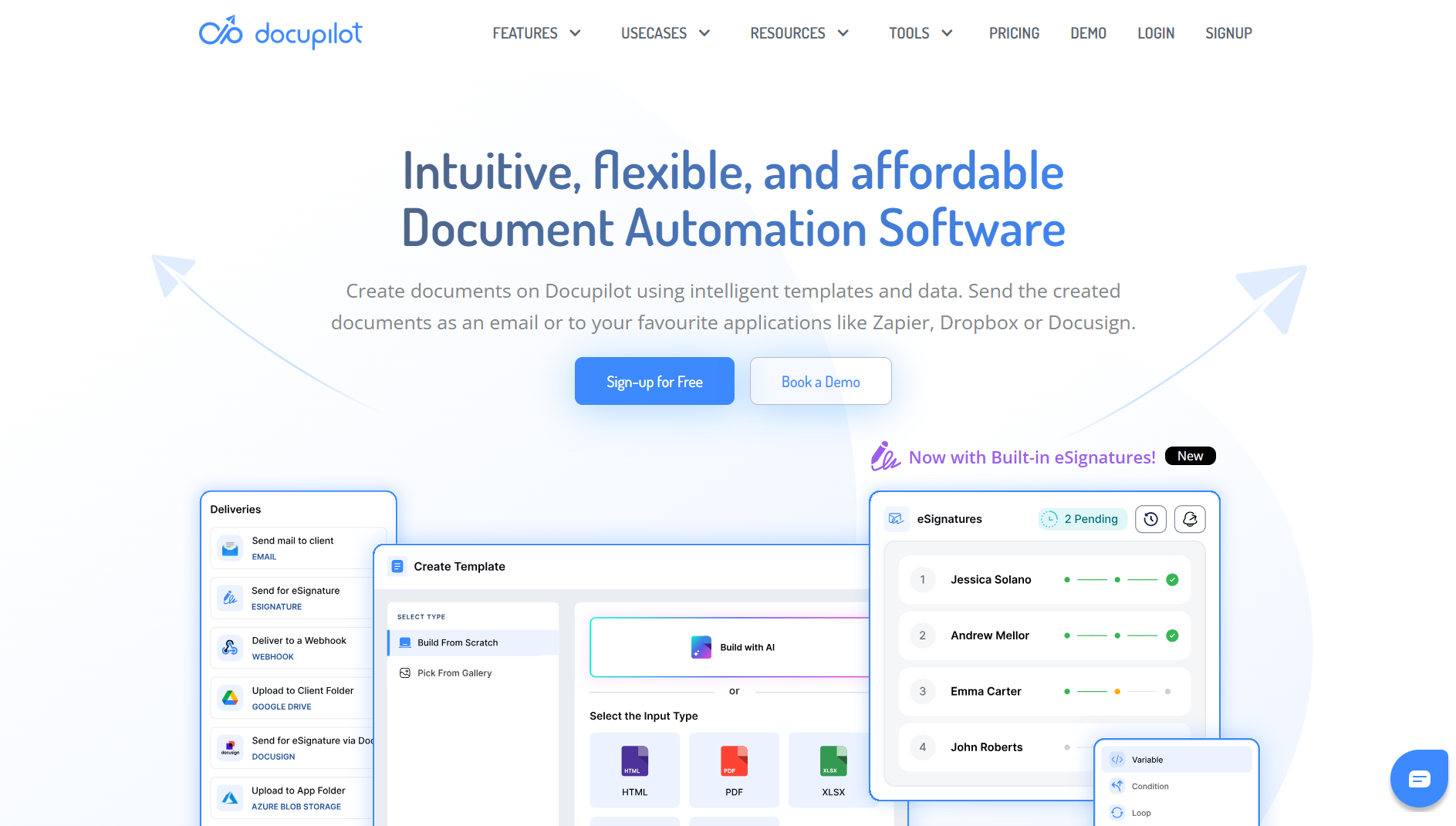
Docupilot specializes in high-volume document generation where the same document type is created repeatedly with different data. This can be contracts for each client, invoices for each order, certificates for each participant, or onboarding documents for each employee.
The platform merges data from business systems into templates using placeholders, conditional logic, and dynamic content that adjusts based on data inputs. The AI-powered template builder generates professional templates from prompts, allowing non-technical users to create templates in Microsoft Word or the native builder without coding knowledge.
Integration with 70+ business tools (Salesforce, HubSpot, Airtable, Google Forms, DocuSign, and cloud storage) is offered.
Key Features
- AI-powered template builder generates templates from natural language prompts
- 70+ integrations with CRMs, forms, databases, e-signature tools, and cloud storage
- Dynamic content and conditional logic adjust document sections based on data inputs
- Bulk document generation creates hundreds of customized documents simultaneously
- Automated workflow triggers generate, route, sign, and store documents automatically
- SOC 2 Type II, GDPR, and HIPAA compliance for regulated industries
- Multiple output formats, including PDF, Word, HTML, and custom formats
- Webhook and API support for custom integrations and workflow automation
Docupilot Pricing
Plans start at $29/month for 100 document credits. Pricing scales based on document volume, with custom enterprise pricing available. E-signature add-on starts at $1.50 per envelope with volume discounts.
7. Notion AI - Best for Internal Documentation & Knowledge Bases

Notion AI integrates directly into Notion workspaces, making it valuable specifically for teams already using Notion for documentation, wikis, project management, and knowledge bases.
The AI assists with creating, editing, and organizing documents where they're being used rather than generating documents to export elsewhere. Context awareness is Notion AI's strength. It understands page relationships, recognizes team documentation patterns, and adapts outputs to match existing workspace style without explicit instructions.
Notion AI works mostly inside Notion and does not directly connect with external CRMs, form tools, or business systems to trigger document creation. For teams that rely on multi-tool workflows, approvals, or e-signatures, this can be restrictive. But for internal documentation that lives entirely in Notion, its deep integration and context awareness are still valuable.
Key Features
- Deep integration with Notion workspaces maintains context across pages and databases
- AI Properties in databases auto-generate summaries, keywords, and translations for entries
- Custom AI blocks create recurring document sections that update based on page content
- Context-aware generation understands page relationships and workspace patterns
- Summarize, translate, adjust tone, and improve clarity through conversational commands
- Multiple AI models, including GPT-4 and Claude, for sophisticated content generation
- Collaborative editing with team members on AI-generated documents
- Database templates with built-in AI automation for repeatable documentation workflows
Notion AI Pricing
Notion AI costs $10/month per user as an add-on to Free/Plus plans, or included in Business plans starting at $18/month per user (annual billing). Enterprise plans with advanced security and controls available with custom pricing.
Why Sintra AI Is Different from Traditional AI Document Generation Platforms?
Most AI document creators focus on creating documents. Sintra AI is built for teams that create multiple document types across different roles:
Role-Based Helpers vs. Generic AI
One AI trying to handle everything produces mediocre results across document types. Sintra provides role-specific helpers where:
Penn is an AI document generator that handles marketing plans and SOPs
- Cassie creates support documentation and help guides
- Buddy builds strategy documents and internal playbooks
- Emmie generates email campaigns.
Each helper is trained on specific business functions rather than being a generalist. When you need an SOP, Penn understands operational documentation structure better than a generic writing tool because that's one of Penn's core functions.
Brain Memory for Shared Context
With most tools, you re-enter company information, brand guidelines, and terminology for every document. Brain AI stores this knowledge once through uploaded documents, brand guidelines, product specs, and past work.
When Penn drafts an SOP, Cassie creates support docs, or Buddy writes an internal playbook, all three pull from the same knowledge base automatically.
Designed for Repeatable Workflows
Traditional AI document creators optimize for one-off creation. Sintra is built for teams generating dozens of documents weekly, documenting standard processes, creating marketing materials at scale, and building comprehensive support libraries.
The 90+ power-ups provide workflow templates for common document tasks (SOPs, proposals, content calendars, competitive analysis) that adapt based on your stored knowledge rather than requiring manual customization each time.
Execution Beyond Document Creation
Traditional tools stop once the document is generated. You download it, then manually handle distribution, follow-ups, and next steps.
Sintra's helpers automate connected workflows: Penn drafts the marketing plan, Emmie creates the email sequence promoting it, Soshie builds supporting social content, and Seomi optimizes web pages, all sharing context about the campaign.
Strong Fit for Operations, Marketing, and Support Teams
Document generation for teams isn't about creating one impressive document. It's about maintaining consistent documentation at scale.
- Operations teams need SOPs that match existing procedures
- Marketing teams need campaign assets with unified messaging
- Support teams need help docs that stay current with product changes
Sintra's shared memory and role-based helpers solve the consistency problem that single-purpose generators can't address.
Common Use Cases for AI Document Generators
Businesses use AI document creator tools to automate repetitive documentation work across departments:

Marketing Plans and Content Briefs
Marketing teams create plans, campaign briefs, content calendars, and strategy documents repeatedly. AI document generation tools speed this up by pulling from past campaigns, competitive research, and performance data to generate new plans with relevant structure.
We've seen teams cut planning time from days to hours by using AI to generate initial drafts of quarterly plans, then refining based on strategic decisions rather than starting from blank pages.
SOPs and Internal Playbooks
Standard operating procedures document how work gets done, but creating them manually is time-consuming. AI document generators that capture workflows or generate from prompts turn tribal knowledge into documented processes faster. Sales playbooks, onboarding guides, and process documentation benefit most. The AI provides structure and initial content, and subject matter experts refine for accuracy.
Help Docs, FAQs, and Support Responses
Customer support teams maintain help documentation, FAQs, and templated responses. AI document generation platforms create this content from product information, common questions, and support ticket data.
As products change, AI can regenerate updated documentation from new specifications rather than manually updating dozens of help articles.
Sales Decks and Proposals
Sales teams create similar proposals for different clients repeatedly. AI document creators pull client information from CRMs, customize proposals based on deal specifics, and maintain brand consistency across all materials.
Business Plans and Strategy Documents
Long-form strategic documents require research, data analysis, and structured thinking. AI document makers assist by researching relevant data, creating document structure, drafting sections from outlines, and maintaining consistency across lengthy documents.
We use AI to generate first drafts of strategy documents from bullet points and research notes, then spend editing time on strategic refinement rather than writing mechanics.
How to Choose the Right AI Document Generation Tool
Your choice depends on what documents you create, how often, and what needs to happen after creation.
One-Off Documents vs. Repeatable Workflows
Creating occasional documents? Tools with strong templates and AI writing assistance work fine. Look at Gamma for presentations or Notion AI for internal docs.
Generating the same document types repeatedly with different data? Choose tools built for workflow automation, like Docupilot (data merging) or JotForm (form-based generation). The upfront template work pays off through automated generation.
Individual Use vs. Team Collaboration
Solo professionals can prioritize ease of use and direct output quality. Team scenarios require collaboration features, approval workflows, shared templates, and brand consistency controls.
Sintra's multi-helper AI employees approach works well for small teams where different members handle different document types but need shared context. Notion AI fits teams already collaborating in Notion workspaces.
Content and Brand Consistency
If brand voice matters, choose tools that store brand guidelines and apply them automatically. Look for features like Brain AI (Sintra), Brand Kits (Visme), or workspace context awareness (Notion AI).
Generic AI writing tools produce inconsistent output without brand context. The more customer-facing your documents are, the more brand consistency features matter.
Document Types and Complexity
Visual presentations need different tools than text-heavy contracts. Match the tool to your primary document types:
- Presentations and visual content work best with Gamma
- Forms and data-driven documents fit JotForm and Docupilot
- Process documentation needs Scribe
- Internal wikis and knowledge bases suit Notion AI
- Multi-type business documents across departments benefit from Sintra AI's specialized helper approach
Execution After Creation
Does your workflow end at document creation, or do you need automated delivery, signature collection, storage, and follow-up tasks? Tools that only generate documents work when you handle distribution manually.
For automated workflows, prioritize platforms with strong integrations and post-creation automation like Sintra, Docupilot, and JotForm that can trigger next steps without manual intervention.
Ready to Build Documents That Actually Drive Work Forward?
Manual document creation costs your team dozens of hours weekly. The right AI document generator cuts that time dramatically while improving consistency and reducing errors.
Start by identifying your primary use case: legal documents, marketing content, project-connected docs, or multi-function business automation. Then pick the tool that specializes in solving that specific problem.
For teams looking for a comprehensive platform that combines document generation with broader business automation, Sintra AI provides specialized helpers, centralized knowledge management, and workflow automation in one platform. Get started with Sintra now to simplify document creation and execution across your workflows.
AI Document Generator FAQs
What's the difference between an AI text generator and an AI document generator?
AI text generators produce content from prompts but don't handle document structure, formatting, data integration, or workflow automation. AI document generators create complete, formatted documents by pulling data from business systems, applying templates, and often automating delivery and next steps. The distinction: text generators assist with writing, document generators automate the full document creation and distribution process.
Are AI document generators reliable for business use?
Yes, when implemented correctly. The technology handles formatting, data accuracy, and consistency better than manual creation. However, critical documents (contracts, legal filings, financial reports) should undergo human review before finalization. Reliability improves when you provide clear templates, accurate data sources, and brand guidelines for the AI to follow.
Which AI is best for creating documents?
It depends on the document. For visual-first docs and decks, Gamma and Visme lead. For form-based and data-driven documents, Jotform and Docupilot are strongest. For SOPs and process docs, Scribe and Notion AI work well. For creating business documents end-to-end and pushing them into real workflows, Sintra AI is the best all-in-one pick.
Can AI document generators create SOPs and internal documentation?
Absolutely. Tools like Scribe automatically document processes by capturing your workflow. Others generate SOPs from prompts or outlines. The AI provides structure and initial content, then subject matter experts refine for accuracy and completeness. This approach cuts SOP creation time from days to hours while ensuring consistent formatting across documentation.
Are there free AI document generators worth using?
Several offer free tiers with limitations. Gamma provides 400 AI credits, JotForm includes basic document generation on the Starter plan, and Notion AI offers limited responses. Free plans work for occasional use or testing, but volume users quickly hit limits. For ongoing business use, paid plans provide necessary features like unlimited generation, brand customization, and automation capabilities.
How accurate are AI-generated business documents?
Accuracy depends on the data sources and context provided. When AI document generators pull from your CRM, databases, or stored knowledge, accuracy matches your source data. Content created from prompts requires more review. Best practice: use AI for structure and initial drafts, then verify specific facts, figures, and critical details before distributing business documents.
Can AI document generators maintain brand voice and consistency across teams?
The better ones can. Look for features like centralized knowledge bases (Brain AI in Sintra), brand kits (Visme), or workspace context awareness (Notion AI). These systems store your brand guidelines, tone, and style preferences, then apply them automatically to every AI-generated document. Without these features, teams get inconsistent output requiring heavy editing to maintain brand standards.
Related articles







Copyright © 2026 PlayOS, Inc. All rights reserved