How To Use AI For Outbound Email Automation


Table of Contents

Quick Answer
AI handles the repetitive parts of outbound: researching leads, writing personalized emails, scheduling sequences, and triaging replies. The best outbound email automation tools go beyond sending. They protect sender reputation, enrich contact data, and use behavioral signals to keep improving results. Set the strategy, let AI run the workflow, and focus your team on conversations that are ready to close.
Most sales teams running outbound email automation are stuck in the same loop: large lists, generic templates, and reply rates that barely crack 2%.
The problem is not that cold email has stopped working.
The problem is that buying teams have learned to ignore anything that feels mass-produced, and most outbound still does.
AI fixes this by replacing volume-first thinking with precision. It researches each prospect before a message is written, generates copy tied to that person's specific situation, sends at the moment they are most likely to read it, and follows up based on what they actually did with your last email. Deploying a dedicated AI team allows you to automate these workflows seamlessly.
This guide walks through exactly how to build that system, from technical setup to lead scoring, sequencing, and B2B outbound automation at scale.
What Is Outbound Email Automation and Why It Matters
Outbound email automation is the use of software to send targeted emails to prospects without manually writing or sending each one. It handles contact lists, message delivery, follow-up scheduling, and performance tracking automatically.
Add AI employees to that foundation, and it enriches lead data, writes context-aware copy, optimizes send timing per recipient, and learns from engagement patterns over time.
The Cost of Manual Outbound
- Slow and Inconsistent: Reps waste time by manually copying contacts, drafting near-identical emails, and updating CRM records.
- Surface-Level Personalization: Customization is usually limited to just swapping out a first name.
- Missed Opportunities: Follow-ups are easily forgotten, causing most outbound strategies to underperform.
The Solution
- Outbound Automation Tools: Solve the consistency and speed problem by automating workflows and scheduling.
- AI-Enhanced Platforms: Solve the quality and relevance problem by layering intelligent, context-aware personalization on top of that automation.
Example: Consider a typical manual SDR week. Monday morning starts with pulling lists from LinkedIn Sales Navigator, copying data into spreadsheets, verifying emails individually, and drafting multi-version templates for different industries; a friction-heavy process that delays the actual send until Tuesday afternoon. With AI-powered outbound automation, that entire workflow runs autonomously overnight on thousands of contacts while the SDR is offline.
How Outbound Email Automation Works: 5 Steps
- Define your ICP and identify intent signals like recent funding, hiring activity, or tech stack changes.
- Enrich and verify contacts so you are reaching real decision-makers with valid addresses.
- Generate personalized first-touch emails using AI that pulls from each prospect's specific data, not just name and company.
- Schedule adaptive follow-ups that trigger based on whether a prospect opened, clicked, or ignored your last message.
- Track metrics and optimize based on what is producing replies, meetings, and closed revenue.
Step-by-Step: How To Use AI For Outbound Email Automation
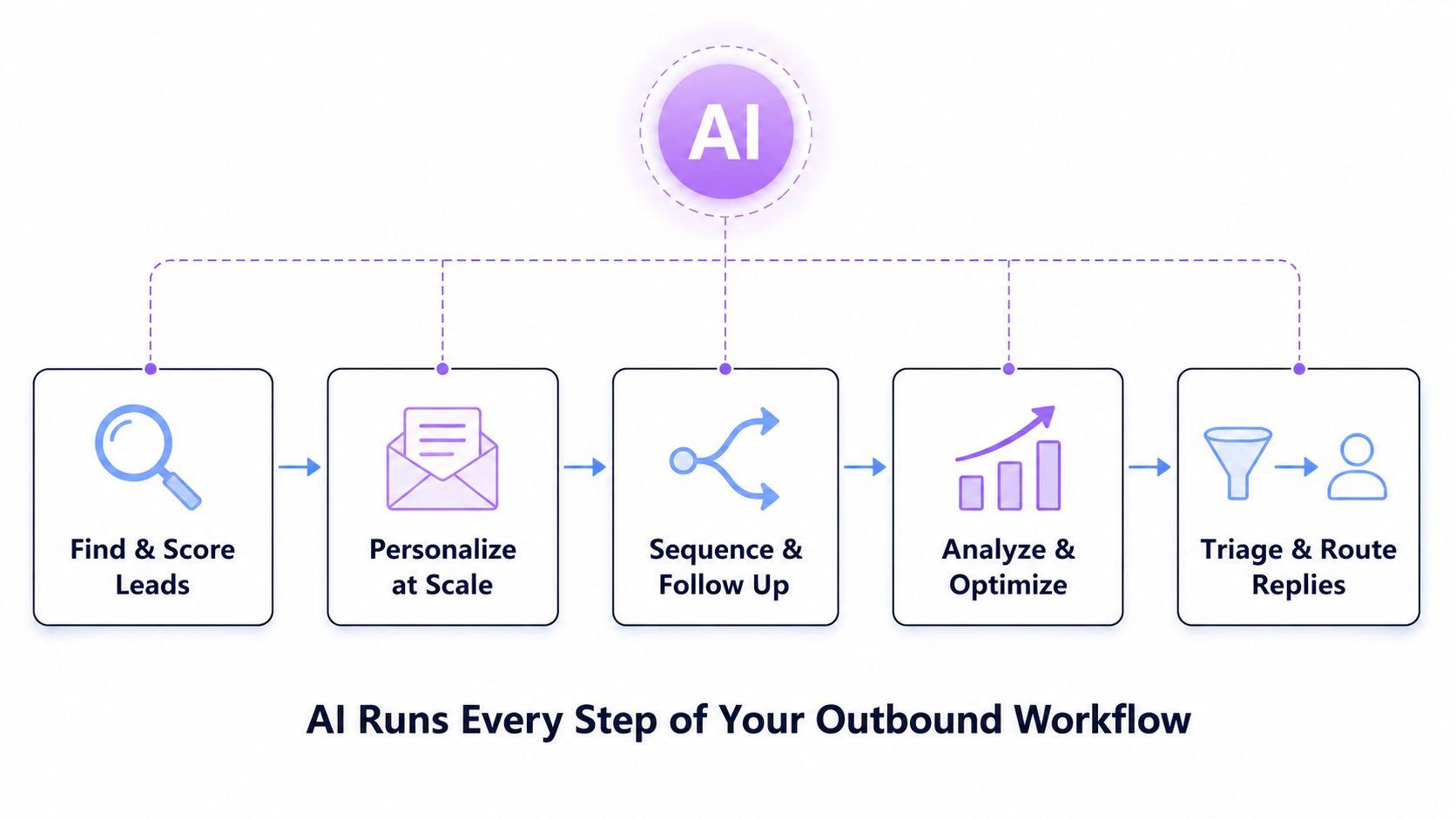
AI takes over the repetitive parts of the outbound workflow, so your team can focus on conversations. Here is the full process, from setup to optimization.
The Prerequisite: Deliverability and Technical Setup
Before you contact a single prospect, your email infrastructure needs to be in order. AI cannot fix emails that land in spam. This step is not glamorous, but skipping it makes everything else useless.
Also, the technical foundation for email automation should include domain authentication (SPF, DKIM, DMARC) to improve inbox placement. These three DNS records tell receiving mail servers your domain is legitimate. Without them, your emails get filtered out before anyone reads them.
- Set up SPF, DKIM, and DMARC on every domain you use for outreach, including secondary sending domains.
- Use a separate subdomain or secondary domain for cold outreach. This keeps your main business domain protected if anything goes wrong. For example, if your company domain is acme.com, run cold outreach from mail.acme.com or a separate domain like acmemail.com.
- Gradually increasing send volume over 4 to 8 weeks helps build a positive reputation for new domains. This signals to inbox providers that your sending behavior is normal and low-risk.
- Domain warm-up builds trust with inbox providers before scaling cold email outreach, which is essential for maintaining a good sender reputation.
Do not skip warm-up. A team at a SaaS company skipped warm-up on a new domain and sent 500 emails on day one. Their open rate was 4%, bounce rate hit 6%, and their domain was flagged within 72 hours. It took three weeks of remediation before they could send again.
Step 1: Identify and Research High-Quality Leads
AI-powered lead research pulls from multiple data sources simultaneously: firmographic data (company size, industry, revenue), technographic signals (what software they currently use), and behavioral intent data (what topics they are actively searching for or researching online).
Intent signals are especially useful for B2B outbound automation. A company posting job listings for roles your product replaces, or one that recently hired a new VP of Sales, is signaling that the timing may be right. AI-powered tools can automate lead scoring and ranking, allowing sales teams to prioritize high-intent prospects for outreach.
Example: A revenue intelligence platform might use AI to track companies posting multiple SDR roles, signaling they are scaling outbound but likely hitting efficiency bottlenecks. Instead of blasting 2,000 cold contacts, the AI isolates 180 high-signal accounts to prioritize and matches the pitch perfectly to their immediate hiring needs.
Data Verification and Lead Scoring
Maintaining a bounce rate below 2% is critical for effective email automation. Hard bounces quickly damage your sender score. Verify every address before importing it using NeverBounce, ZeroBounce, or the built-in verification in tools like Apollo or Clay.
Once your list is clean, you can score your leads based on three critical data dimensions:
- Technographic Signals: Identifying the prospect's tech stack (e.g., a 200-person firm still using basic spreadsheets for complex tracking).
- Intent Signals: Spotting active buying behavior (e.g., a company freshly posting a job listing for a "Digital Transformation Manager").
- Engagement Signals: Tracking direct interactions (e.g., their COO accepting a LinkedIn connection request from your sales rep).
To automatically prioritize these accounts, plug these signals into the following weighted formula:
Lead Score = (Firmographic Fit x 0.4) + (Intent Signals x 0.4) + (Engagement x 0.2)
Example in Practice: Imagine you sell project management software to construction companies.
- Firmographic Fit (10/10): A 200-person construction firm perfectly matches your Ideal Customer Profile (ICP).
- Intent Signals (8/10): They just posted a job listing for a "Digital Transformation Manager" and their technographic data shows they are still using basic spreadsheets.
- Engagement (5/10): Their COO recently accepted a LinkedIn connection request from your sales rep but hasn't replied to any messages yet.
Plugs into the formula like this:
Lead Score = (10 \times 0.4) + (8 \times 0.4) + (5 \times 0.2)$$
Lead Score = 4.0 + 3.2 + 1.0 = 8.2$$
With a strong score of 8.2 out of 10, this high-intent account automatically jumps to the top of your SDR's outreach queue.
This weights the most predictive factors most heavily. A company that fits your ICP perfectly and is actively researching your category scores far higher than one that merely matches your industry with no visible buying signals.
AI can enhance email deliverability by analyzing engagement metrics and adjusting sending patterns to avoid spam filters, ensuring that emails reach the intended inboxes. This is why the research and scoring phase matters so much. When you email the right people, engagement rates improve, and better engagement automatically protects your sender reputation.
Step 2: Create Personalized Email Campaigns at Scale
This is where AI cold email software earns its cost. Real personalization uses enriched data to reference a prospect's specific situation. Not their name, their situation. The industry challenge they face. The tool they use creates friction. The recent news item makes your outreach timely.
Successful outreach strategies in 2026 favor shorter, high-value touches over long pitches, keeping first-touch emails to 50-125 words to increase reply rates. A focused email that speaks to a real business problem outperforms a detailed feature list every time.
Personalization features in cold email tools enable users to create tailored messages that resonate with recipients, increasing engagement and response rates.
Compare these two opening lines for a CFO at a 150-person logistics company:
Generic (low reply rate)
"Hi Sarah, I wanted to reach out about how our finance software helps companies like yours streamline their operations..."
AI-personalized (higher reply rate)
"Hi Sarah, logistics CFOs managing 100 to 200 trucks usually tell us their biggest headache is reconciling fuel expense reports at month-end. Is that something your team still handles manually?"
The second line shows research. It names the role, the company size, and the specific pain, and asks one direct question. The AI email assistant generates this by pulling the contact's title, the company's size, and the industry from the enriched profile, then matching it to a pain point pattern from past successful campaigns in the same vertical.
Prompt Bank: 3 Templates for AI Cold Email Software, feel the difference yourself
Prompt 1: Pain-Led Outreach
Given this lead profile: [Name], [Title] at [Company], [Industry], currently using [Tech Stack], recently [Intent Signal]. Write a 75-word cold email that opens with a specific pain point common to [Industry], connects it to a capability we offer, and ends with a low-friction call to action. Do not mention our company name in the first sentence. No buzzwords.
Prompt 2: Trigger-Based Outreach
This leads just [Trigger: new funding/job posting/product launch]. Write a 90-word email that connects their growth moment to a challenge we help solve. Keep the tone conversational. End with one specific question.
Prompt 3: Follow-Up After No Reply
Write a 50-word follow-up for a prospect who opened but did not reply. Reference that we reached out without being pushy. Add one concrete value point (a stat, insight, or short case study). Ask if now is a better time.
Signature format: Name, Title, Company, and one link only (calendar or website). No images, logos, or legal disclaimers. These trigger spam filters in cold outreach.
Step 3: Automate Email Sequences and Follow-Ups
Most replies come from follow-ups, not the first email. Research from Belkins consistently shows that 50 to 70% of replies in cold outreach campaigns come from the second, third, or fourth touchpoint, not the opener. Tracking who needs a follow-up and when becomes unmanageable manually once you reach hundreds of prospects. AI handles this based on what each prospect actually does, not a fixed schedule.
Engagement in outbound email campaigns is maximized by sending during peak times, particularly Tuesday to Thursday, between 9:00 AM and 11:00 AM in the recipient's time zone. Good outbound automation tools handle timezone adjustments per contact automatically. A team sending to prospects across the US, UK, and Australia does not need to manually calculate send times for three time zones. The system manages it.
Creating multi-touch, multi-channel sequences that respond to behavioral triggers enhances the effectiveness of outreach efforts. A prospect who opens your email three times but never replies is a different case from someone who never opens it. A well-configured system sends them different messages. The repeat-opener gets a shorter, more direct follow-up that treats them as warm. The non-opener gets a subject line test with a completely different angle.
Multi-Channel Cadence: 5-Touch Sequence
A practical example of how this plays out: A prospect opens the Day 1 email twice but does not reply. On Day 5, instead of sending the standard follow-up, the AI detects those two opens and switches to a variant that says: "Noticed you may have seen my last note, wanted to add one thing..." This acknowledgment feels human and often breaks the silence. A rigid rule-based system would just send the generic follow-up regardless of what the prospect did.
Step 4: Analyze Performance and Optimize Campaigns
AI tracks what happens after every email lands: open rates, reply rates, click rates, time-to-reply, and meeting conversion rates. That data feeds back into the system, so each campaign cycle improves on the last.
Advanced analytics in cold email tools help users track performance metrics such as open rates, click rates, and reply rates, allowing for data-driven adjustments to improve future campaigns. Every sequence starts as a hypothesis. Analytics tell you whether it was right.
For example, a B2B software company might run two subject line variants across 400 contacts: "Quick question about your ops workflow" vs. "How [Company] handles [specific problem]." After 200 sends each, the first gets a 38% open rate, and the second gets a 51% open rate. The AI flags the winner, pauses the underperformer, and automatically routes remaining contacts to the winning variant. No spreadsheet analysis required.
KPI Benchmarks and A/B Testing
Run each A/B test for a minimum of 200 sends before drawing conclusions. Test one variable at a time: subject line, opening line, CTA format, or email length. Track positive reply rate, not just opens. Opens measure curiosity. Replies measure relevance.
Step 5: Triage Replies and Route Leads
Replies are where human judgment matters most, but AI can handle the triage that determines which needs immediate attention. Without this, a sales rep logging in after a busy day faces a mixed inbox of warm leads, objections, out-of-office auto-replies, and unsubscribe requests, all lumped together. Time-sensitive hot leads get buried.
AI reply categorization sorts incoming responses automatically:
- Positive intent: The prospect is interested and ready to talk. Route to a human rep within the hour. Example: "Yes, I would be open to a 15-minute call next week."
- Soft interest: The prospect has a question or wants more information. AI drafts a response for rep review. Example: "Can you send me more details about pricing?"
- Objection: The prospect pushed back on timing, budget, or relevance. Flag for human handling with suggested talking points. Example: "We already have a solution for this."
- Out of office: Auto-pause the sequence and reschedule follow-up for after their return date, pulled from the auto-reply message.
- Unsubscribe: Remove from all active sequences immediately and suppress permanently across all campaigns.
Integrating email automation with CRM synchronization enables immediate, relevant outreach based on leads' actions. When a positive reply comes in, the system logs it in the CRM, creates a follow-up task for the rep, and sends a Slack notification so no warm lead sits unattended. The rep sees a clean, prioritized queue instead of an unsorted inbox.
How AI Transforms Outbound Email Automation
Standard email outbound automation follows fixed rules. Send this, wait three days, send the follow-up, stop after five touches. Those rules do not adjust based on what the prospect does. AI-powered systems do, and that difference is significant at scale.
AI can significantly improve outbound email automation by personalizing messages, optimizing send times, and adjusting follow-ups based on recipient engagement. Instead of a single sequence for everyone, each prospect gets a path tailored to their actual behavior.
From Rule-Based Automation to AI-Driven Systems
Traditional outbound automation tools are logic-based. If contact is in segment X, send template Y at time Z. They do not learn. A template that stops working keeps running until a human catches it and makes a manual change.
AI-driven systems monitor performance in the background. They detect when open rates fall on a specific template and surface alternatives. They learn that contacts from one industry respond better to shorter emails and adjust accordingly. The best outbound email automation tools in 2026 are designed to streamline the sales process, allowing sales professionals to focus on engaging with prospects rather than managing repetitive tasks.
Example Here:
- Traditional Outbound: A fintech startup used a rigid, 5-step email sequence. It treated every contact exactly the same, resulting in a 32% open rate and a 2.1% reply rate.
- AI-Driven Alternative: An AI system analyzed behavioral data for the exact same audience. It automatically shifted send times to Wednesday mornings for specific company sizes and moved the highest-performing content to the front of the sequence.
- The Result: Within six weeks, performance jumped to a 48% open rate and a 6.4% reply rate.
Smarter Lead Research and Data Analysis
Manual lead research is slow. An SDR might spend a morning researching ten companies and find five worth contacting. AI does the same analysis across thousands of prospects in minutes.
It simultaneously pulls data from LinkedIn activity, company news, funding databases, job boards, and technographic sources. It surfaces prospects most likely to convert based on patterns learned from past closed deals. This is why AI-driven outbound sales teams consistently outperform those that still rely on manual prospecting. The research is not just faster, it is more consistent. A human researcher's quality varies day to day. AI applies the same criteria and standards to every single contact.
Intelligent Email Sequencing and Timing Optimization
Sending at the wrong time is almost as costly as sending the wrong message. A Friday afternoon email gets buried in end-of-week cleanup. Outbound AI tools solve this by learning when each individual recipient tends to engage with email and scheduling accordingly.
The general benchmark is solid: engagement in outbound email campaigns is maximized by sending during peak times, particularly from Tuesday to Thursday between 9:00 AM and 11:00 AM in the recipient's timezone. But AI goes further by personalizing timing for each contact, rather than applying the same window to everyone on the list.
For a team reaching prospects across North America, Europe, and Asia-Pacific, this matters a lot. A rule-based system sends everything at 9 AM Eastern and lets the chips fall where they may. An AI system sends to each contact at the time they are most likely to be at their desk and engaged, based on their historical open patterns. Over a large campaign, this timing optimization alone can add two to three percentage points to open rate.
Guardrails to Prevent AI Hallucinations
A common concern raised in sales communities like r/sales and r/coldoutreach is AI inventing facts in outbound emails: claiming a prospect uses a tool they have never heard of, referencing a company event that never happened, or misattributing a quote. Sending an email with a false claim about someone's business ends the conversation before it starts.
How to prevent it:
- Mark templates with company-specific claims as "requires manual approval" before sending.
- Restrict AI prompts to rewriting verified inputs, not generating facts from scratch. If you want the email to mention that the prospect uses Salesforce, verify that in your data first and pass it to the AI as a fact; do not ask the AI to guess.
- Cross-check claims about tech stack, headcount, or recent news against your CRM or a verified data source before the email queues.
- Spot-check 10 to 15 AI-generated emails per campaign each week for factual accuracy and appropriate tone.
A useful rule: if the AI is writing from data you gave it, the output is relatively safe. If the AI is researching and asserting on its own, that output needs human review before it sends.
Key Features of the Best Outbound Email Automation Tools
Best practices in outbound email automation emphasize system design over volume, focusing on precision targeting, multi-channel orchestration, and behavioral triggers. Not every platform meets this standard. Here is what separates the best outbound email automation tools from the rest.
Outbound email automation tools vary significantly in their features, pricing, and target audiences, making it essential to evaluate them based on specific business needs.
Advanced Personalization Engines
Basic merge tags are no longer enough. The top platforms pull in dynamic variables from enriched lead data: recent company news, industry-specific pain points, job title changes, technographic context, and signals from a prospect's own public activity. This creates emails that feel researched rather than templated.
A good personalization engine lets you build a template like this:
The AI fills each variable from verified enriched data per contact. The output looks handwritten. The process is automated.
Keep first-touch messages short. Emails in the 50 to 125-word range consistently outperform longer ones for cold outreach. A specific three-sentence email with a real reason for reaching out beats a polished seven-paragraph pitch every time. Many outbound email automation tools now incorporate AI features to enhance personalization, optimize send times, and improve overall outreach effectiveness, which can be a deciding factor in tool selection.
Lead Enrichment and Data Intelligence
Good outbound starts with good data. Top platforms automatically enrich contact records with firmographic data (company size, revenue, industry), technographic data (which software they use), and intent data (which topics they are actively researching). This enrichment updates continuously, not just at import.
If a prospect changes jobs or their company closes a funding round, the system detects the update and can trigger a new outreach sequence based on that signal. This is important because stale data is one of the main reasons cold emails get ignored. Emailing someone about their role at a company they left six months ago is worse than not emailing them at all. Integrating email automation with CRM synchronization enables immediate, relevant outreach based on leads' actions.
Example: A platform selling to HR leaders might watch for the signal "company just announced a headcount increase of 25% or more." When that signal triggers, the system enriches the HR leader contact, verifies their current email, and queues them for outreach within 24 hours of the news, while the timing is still relevant.
Automated Email Sequencing and Smart Follow-Ups
Automation capabilities in cold email tools enable users to set up multi-step outreach sequences, including follow-ups and A/B testing, streamlining the process and improving efficiency.
Conditional logic examples in a well-built sequence:
- Opened but no reply after 48 hours: send a shorter follow-up that acknowledges the open without being aggressive. "I wanted to add one thing to what I sent earlier..."
- Clicked a link in the email: switch from a nurture-style follow-up to a product-specific one. If they clicked a case study link, they showed interest. Match the next message to that interest.
- No engagement after three touches: pause for seven days, then re-engage with a completely different subject line and angle. Do not keep sending the same message type to someone who is clearly not responding.
Performance Analytics and AI Optimization
Effective outbound email automation tools prioritize metrics such as volume, deliverability, or personalization. The best ones track all three simultaneously and surface recommendations rather than just numbers.
AI optimization means the system does not wait for a human to notice a problem. It automatically tests subject line variants, identifies underperforming sequences, and surfaces patterns across all campaigns in the account. This is what makes outbound marketing software that actively improves results different from one that only reports on them after the fact.
Example: A platform might detect that emails sent to VP-level contacts perform 22% better when the subject line includes a number rather than a question. That insight is automatically applied to future campaigns targeting the same persona, without anyone having to run a manual analysis.
Seamless Integrations with Existing Tools
Outbound email automation tools help sales teams manage follow-ups at scale and improve the entire outbound sales process by protecting sender reputation and optimizing outreach strategies. They work best when they connect cleanly with the rest of your stack.
Key integrations to prioritize when evaluating outbound marketing tools:
- CRM sync (Salesforce, HubSpot, Pipedrive) to avoid duplicate outreach and keep records current in both directions.
- LinkedIn Sales Navigator for multi-channel sequences that combine email and social touchpoints.
- Calendar tools for direct meeting booking from email CTAs so prospects can book without back-and-forth.
- Enrichment providers (Clay, Apollo, ZoomInfo) for continuous lead enrichment that keeps data fresh.
- Slack or Teams for real-time rep notifications when a warm reply comes in, so no hot lead sits unanswered.
A team without CRM integration ends up with a common problem: the same prospect gets contacted by three different reps because no one can see who has already reached out. Bi-directional CRM sync eliminates this by making every touchpoint visible to everyone managing the account.
Built-in Compliance and Privacy Safeguards
CAN-SPAM, GDPR, and CCPA compliance is not optional. The best tools manage this automatically: opt-out links in every email, instant unsubscribe handling, maintained suppression lists across all active campaigns, and alerts before bounce thresholds hit dangerous levels.
Some platforms include automatic timezone detection to avoid restricted contact hours in certain jurisdictions and built-in GDPR consent tracking for European contacts. For teams running email outbound automation across multiple geographies, this is not a nice-to-have. One compliance violation in a regulated market can cost far more than the tool itself.
Comparing Outbound Email Automation Tools: What to Look For
Key factors to consider when comparing outbound email automation tools include setup and onboarding speed, deliverability infrastructure, sequence-building capabilities, and pricing models at scale.
In 2026, effective outbound email automation requires tools that not only send emails but also personalize messages, manage sender reputation, and automate follow-ups based on recipient engagement.
When evaluating tools, run a trial campaign before committing. Send a small batch of 100-200 contacts through the full workflow: enrichment, personalization, sequencing, and reply handling. You will learn more about a tool's real capabilities in one live test than in any feature comparison document.
Common Mistakes to Avoid in AI Outbound Email Automation
AI improves outbound significantly when implemented well. When implemented poorly, it creates the same problems it was supposed to solve, just at a higher volume and faster. Here are the most common mistakes and how to fix each one.
- Skipping list verification. To maintain good list hygiene, it is important to verify email addresses before importing leads and remove contacts who never engage, as invalid addresses can cause hard bounces that damage the sender's reputation. A team importing 5,000 unverified contacts from a scraped LinkedIn list might have a 15% invalid rate. That is 750 hard bounces waiting to happen.
- Ignoring warm-up. Sending high volume from a fresh domain without warming immediately triggers spam filters. Follow the 4- to 8-week ramp. No exceptions, even if your list quality looks clean.
- Surface-level personalization. Swapping in a first name is not personalization. Buyers have seen it thousands of times. "Hi John, I wanted to reach out to Acme Inc," says John, but says nothing about why you contacted him specifically.
- Running too many sequences from one domain. More active sequences mean more daily sends, which pushes you into spam territory faster. Use inbox rotation to spread the load across multiple sending addresses.
- Targeting outside your ICP. Even well-written, well-timed emails produce low reply rates when sent to people who have no reason to care about your product. Targeting precision matters as much as copy quality.
- Treating the system as fully autonomous. AI makes outbound scalable. It does not make it hands-off. Without regular human review, quality drifts, errors compound, and reputation damage can go unnoticed until it is expensive to fix.
Sender Reputation: When to Stop Immediately
Pause all campaigns and investigate if you see any of these warning signs:
- Open rate drops more than 15 percentage points within 48 hours. This often means your emails are landing in spam or promotions folders rather than the inbox.
- Bounce rate climbs above 2%. Stop sending immediately, clean the list, then diagnose before resuming. Continuing to send while the bounce rate is high quickly worsens the situation.
- A blacklist alert on your sending domain. Check MXToolbox or Google Postmaster Tools right away. A blacklisted domain needs remediation before any further sending.
- Spam complaint rate above 0.1%. Both Gmail and Outlook use the complaint rate as a core deliverability signal. Crossing this threshold causes inbox placement to deteriorate rapidly, often within days.
Over-Reliance on AI Output
The most common mistake after adopting AI outbound sales tools is treating campaigns as set-and-forget. A team might build a sequence, press launch, and check back in three weeks. By then, a subject line that was working has burned out, reply quality has shifted, and a deliverability issue that started in week two has now affected the entire domain.
Weekly review cadence to keep campaigns healthy:
- Spot-check 10 to 15 AI-generated emails per campaign for tone and factual accuracy. Check whether the personalization variables are being pulled correctly from the enriched data.
- Review deliverability metrics: bounce rate trend, open rate movement, spam complaint count. Look for directional changes, not just absolute numbers.
- Assess reply quality: Are warm replies coming from the right titles at the right company sizes? If you are getting responses from contacts outside your ICP, your targeting needs adjustment.
- Retire or refresh any sequence that has run for more than six weeks without meaningful performance changes. Contacts who have seen the same sequence with no reply are unlikely to respond to more of the same.
Benefits of Using AI for Outbound Email Automation
More relevant outreach reaches more of the right people in less time. Because AI learns from results, the system compounds over time. Here is what that looks like in practice across the three areas that matter most to a sales team.
Increased Efficiency and Time Savings
A typical SDR spends three to four hours a day on administrative outbound tasks before having a single real conversation: building lists, researching prospects, writing emails, tracking follow-ups, and updating CRM records. AI automates most of that. Lead research runs in the background. Email drafts are generated from enriched data. Follow-up scheduling happens based on behavior, not calendar reminders.
That time shifts to what actually moves deals: discovery calls, live conversations, and closing. The best outbound email automation tools in 2026 are designed to streamline the sales process, allowing sales professionals to focus on engaging with prospects rather than managing repetitive tasks.
A practical example: A five-person SDR team using manual outbound might send a combined total of 300 personalized emails per week. The same team using AI-powered automation can send 1,500 to 2,000 genuinely personalized emails per week without hiring additional headcount. The difference is not more hours. It is eliminating the time spent on tasks that the AI handles better and faster.
Scalable Outreach Without Losing Quality
Scaling traditional outbound means hiring more SDRs and accepting quality variance across the team. Different reps write differently, research differently, and follow up with different consistency. Scaling AI-powered outbound means adding more domains, sequences, and leads to the system. Personalization quality does not drop as volume increases because the AI handles individualization at the data layer, not the template layer.
Cold email tools improve email deliverability by managing sender reputation, detecting invalid addresses, rotating unlimited email accounts, and gradually increasing sending volume during the warm-up phase. This makes it practical to run hundreds of personalized conversations simultaneously without burning through your sender reputation or your team's capacity.
A useful way to think about scale: a human SDR can hold about 50 active conversations in their head at once before things start getting missed. An AI-managed sequence can hold 5,000 active threads simultaneously, each at a different stage, each getting a different message based on its own behavioral history. The human rep steps in only when a thread reaches genuine engagement and needs a real person.
Higher Conversion Rates and ROI
Better targeting gets your emails in front of people who actually have the problem you solve. Better personalization gets them to reply. Better timing gets your message in front of them when they are ready to engage. Each improvement stacks on the others.
According to Litmus's 2024 State of Email Trends report, which surveyed over 480 email marketers, more than 80% saw performance improvements from dynamic, real-time personalization. A Belkin's study analyzing 16.5 million cold emails sent in 2024 found that advanced personalization beyond first name produced reply rates up to 18%, more than double the generic template average.
You can measure the return directly:
Example: Your outbound stack costs $1,500 per month. It generates $18,000 in closed revenue that month. ROI = 1,100%. That return is achievable when targeting, personalization, and deliverability work together rather than as separate tactics.
To make that ROI concrete: if your average deal size is $6,000 and your AI-powered campaign closes three additional deals per month that would not have closed otherwise, that is $18,000 in new revenue. Subtract $1,500 for tools and data. You are left with $16,500 in net return from a system that also frees up your team to pursue even more opportunities.
Ready to Automate Your Outbound Email Strategy?
Outbound does not have to be a volume game. With the right AI system behind it, every email you send is specific to that person, arrives at the right moment, and follows up based on what they actually do with it. That is what separates teams hitting 8-10% reply rates from those stuck at 2%.
In 2026, effective outbound email automation requires tools that not only send emails but also personalize messages, manage sender reputation, and automate follow-ups based on recipient engagement. Sintra AI brings lead research, personalized email generation, intelligent sequencing, and reply triage together in one place. No fragile six-tool stack to manage.
If you are ready to build outbound that actually scales, explore Sintra AI's outbound email automation features and see the system in action.
Outbound Email Automation FAQs
What is outbound email automation?
Outbound email automation is the use of software to send targeted, sequenced emails to prospects without manually writing and delivering each one. It handles list management, delivery, follow-up scheduling, and tracking. AI-powered versions also personalize content per recipient and adapt sequences based on real-time engagement.
How does AI improve outbound email campaigns?
AI makes personalization scalable, timing more precise, and sequences adaptive. Instead of sending the same email to everyone on a list, AI generates messages tailored to each prospect's specific data. It then analyzes engagement to determine when to follow up and what to say, resulting in higher reply rates than static, rule-based sequences.
Can AI fully automate outbound sales emails?
AI handles most of the outbound workflow: lead research, email generation, sequencing, timing, and reply triage. Human oversight is still needed to review AI-generated content for accuracy, handle objections, and manage high-value relationships. AI runs the workflow. People run the conversations.
Is outbound email automation still effective in 2026?
Yes, but the approach has shifted. High-volume, low-personalization campaigns are increasingly filtered or ignored. What works now is precision targeting, genuine personalization, proper deliverability setup, and multi-channel sequencing. AI makes this practical to execute at the scale a sales team actually needs.
How do I personalize automated outbound emails at scale?
Use enriched data to reference industry-specific pain points, recent company events, technology the prospect currently uses, or job postings that signal what problem they are trying to solve. Keep first-touch emails between 50 and 125 words. Every email should have one specific, relevant reason for reaching out that connects to the prospect's actual situation, not a generic pitch.
Related articles