


How to Make An AI Chatbot for Social Media?

Table of Contents

AI has altered our minds. Today, no one expects a real human rep to handle social media for businesses. With smart automation, AI social media chatbots converse with you about anything - product details, order delivery, refunds, and whatnot. The business case is compelling - AI-powered personalization can deliver 5–8x ROI in marketing, AI chatbots now handle up to 95% of routine customer queries, and Amazon attributes roughly 35% of its sales to AI recommendation engines.
But the question is: how to make an AI chatbot?
There’s a misconception that you need extensive programming to build custom chatbots. But I am here to negate it. Today, intuitive, no-code platforms like Sintra.ai help you personalize social media chatbots and a dedicated knowledge space in minutes. Let’s learn more about it.
Quick Answer: How to Make An AI Chatbot for Your Social Media?
To make an AI social media chatbot, choose a platform (Sintra.ai) and set up the knowledge space (Brain AI) with your business data. Add Soshie, the social media content creator, to your workspace and integrate it with third-party social media networks or messaging apps. Once done, generate content, approve it, and automate its publishing. There you have it.
What Is a Chatbot for Social Media (And How It Differs from Bots)?
You must’ve heard of businesses using AI for social media to their benefit. One form of this usage is a chatbot for your social media. These bots are automated programs based on user interactions. Having conversational capabilities, these chatbots help resolve user queries by answering DMs and replying to comments.
Brands employ these smart chatbots to streamline customer service, market their service, and share data. The best part? Unlike human agents, they are available 24/7, so no delay from your end.
How Social Media Chatbots Work Behind the Scenes?
Social media chatbots run through a combination of AI algorithms and advanced technologies. Let’s learn more about it.
For starters, these deeper chatbots possess natural language processing. This NLP helps them understand human-written text and interpret your prompts.
Similarly, trained on machine learning algorithms, these social media chatbots are trained to learn from interactions. These learnings aid the bots in improving their responses over time.
Rooted in knowledge spaces, these chatbots have an extensive memory for context. So, let’s say when you ask them a question. They process information from the knowledge space and answer accurately, regardless of hallucinations.
Social media chatbots are grounded in pre-defined rules. These rules help them generate appropriate responses.
Real-World Uses for a Social Media Chatbot
Here are a few ways businesses are using social media chatbots to their benefit.
- Around-the-Clock Support for Customers - Today, brands no longer need people sitting behind screens helping their customers. AI chatbots instantly reply to customers, boosting sales and driving revenue.
- Qualifying Leads - Imagine a fitness coach is reaching out to potential customers. A chatbot asks a few follow-up questions to anyone who writes “Interested” in the comments. Once done, it can analyze these answers, detect hot leads, and reach out to them.
- Engagement - A brand is launching a new product and has posted about it. A chatbot is placed to answer all users’ queries - about sizing, price, sales, etc. This keeps the post active for the longest.
A Step-By-Step Guide to Building A Social Media Chatbot – No Coding Required
Creating a functional AI chatbot for your social media does not have to be challenging. Here is a complete step-by-step guide on how you can use a no-code employee-based platform like Sintra to build a social media chatbot.
1. Clarify Your Chatbot’s Goals and Social Channels
Begin by defining the goal of your chatbot: what do you want to achieve with it? You can make a checklist of tasks to know your motives.
- Want an all-time available customer service agent that acts as a comment generator, handle DMs, and more?
- Building it to use conversational capabilities to your sales benefit: generating content, driving revenue opportunities, etc?
- Looking for a personal assistant to guide you through operational hurdles?
Wait, that’s not it. Being clear about the goal behind your chatbot is good, but it doesn’t truly guide the features. For this, you must know where to place the designed chatbot.
Social media platforms offer varying levels of automation. For instance, Instagram and Facebook are excellent cases to streamline comment replies, answering queries, and creator engagement. Businesses can also choose to place it in the mobile app or website as suits them.
- Pro Tip: It’s ideal to set a few key performance parameters to evaluate the efficiency of your chatbot. This can be according to the platform you choose, for instance, response rate, consistent postings, etc.
2. Create Your Sintra Workspace & Get Soshie
Once you’re clear about the incentive behind the chatbot, proceed to enable and personalize it. Focus on customizing it to your target audience, brand voice, and consistent performance. For the sake of this tutorial, let’s try this out with an AI social media manager chatbot.
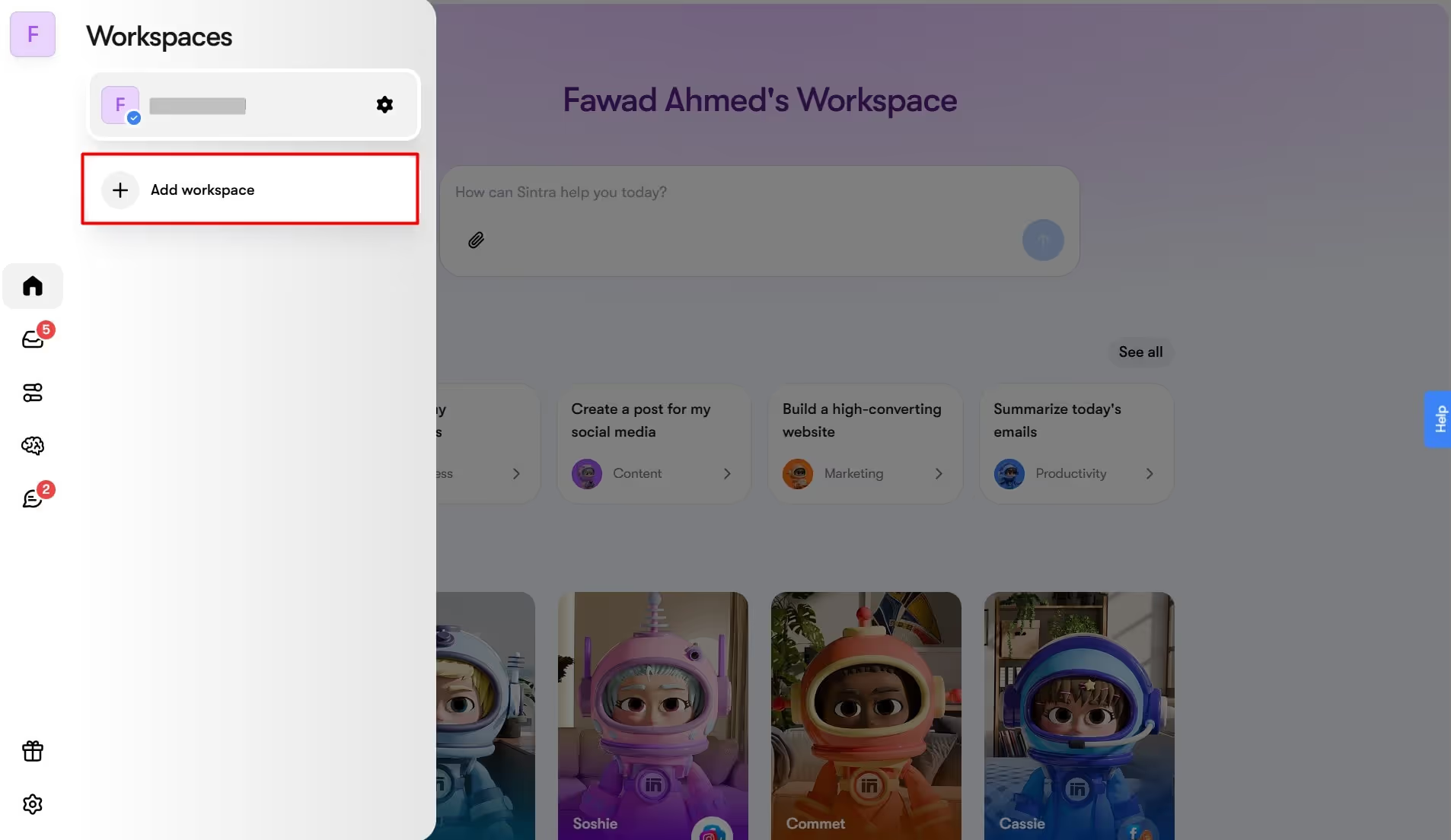
- Visit the top-left Workspace menu, and click Add Workspace.
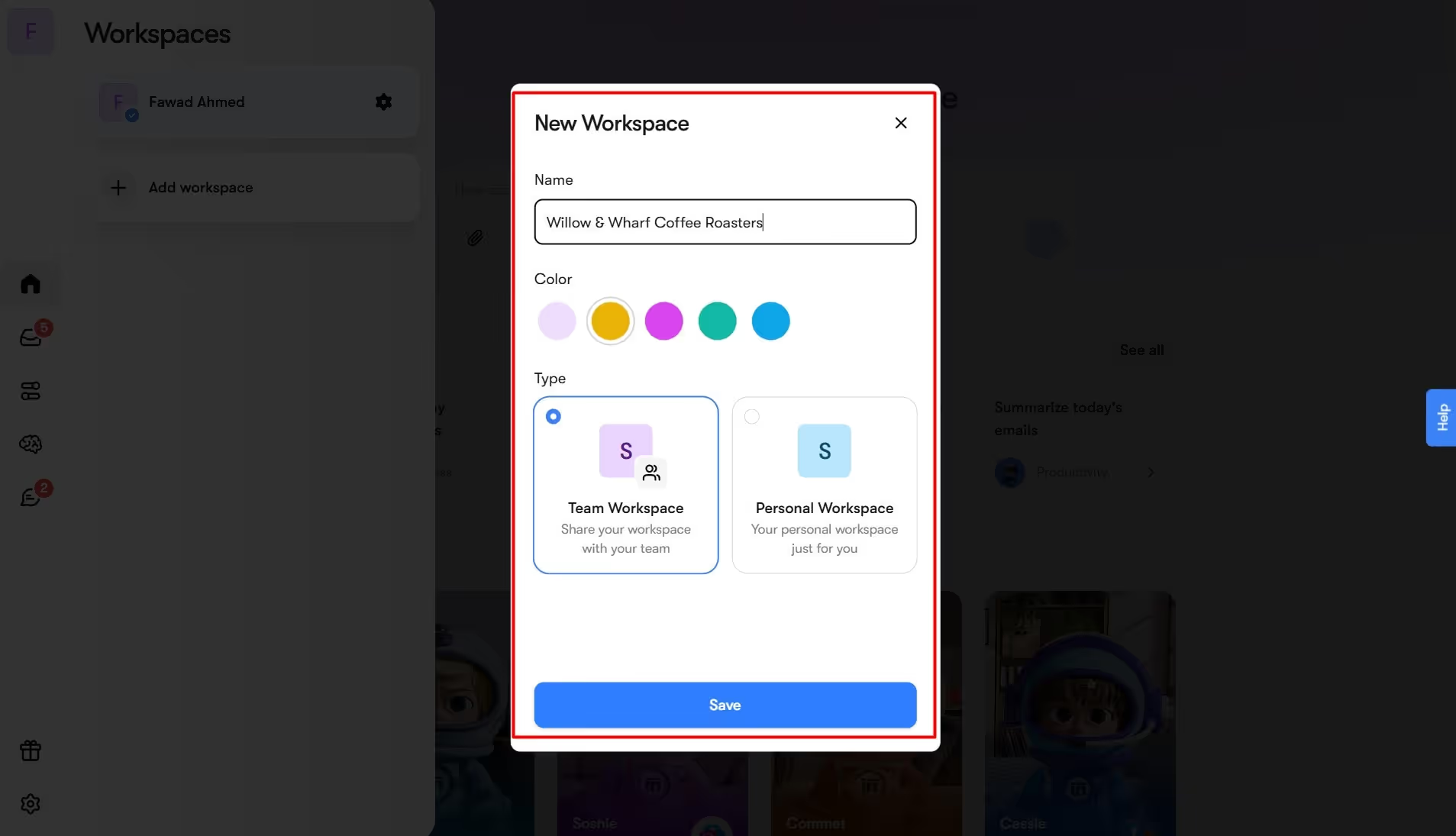
- Give it a name, set a theme, and choose whether it’s a team or personal workspace.
- Once done, enter the email addresses of your team members and click Confirm.
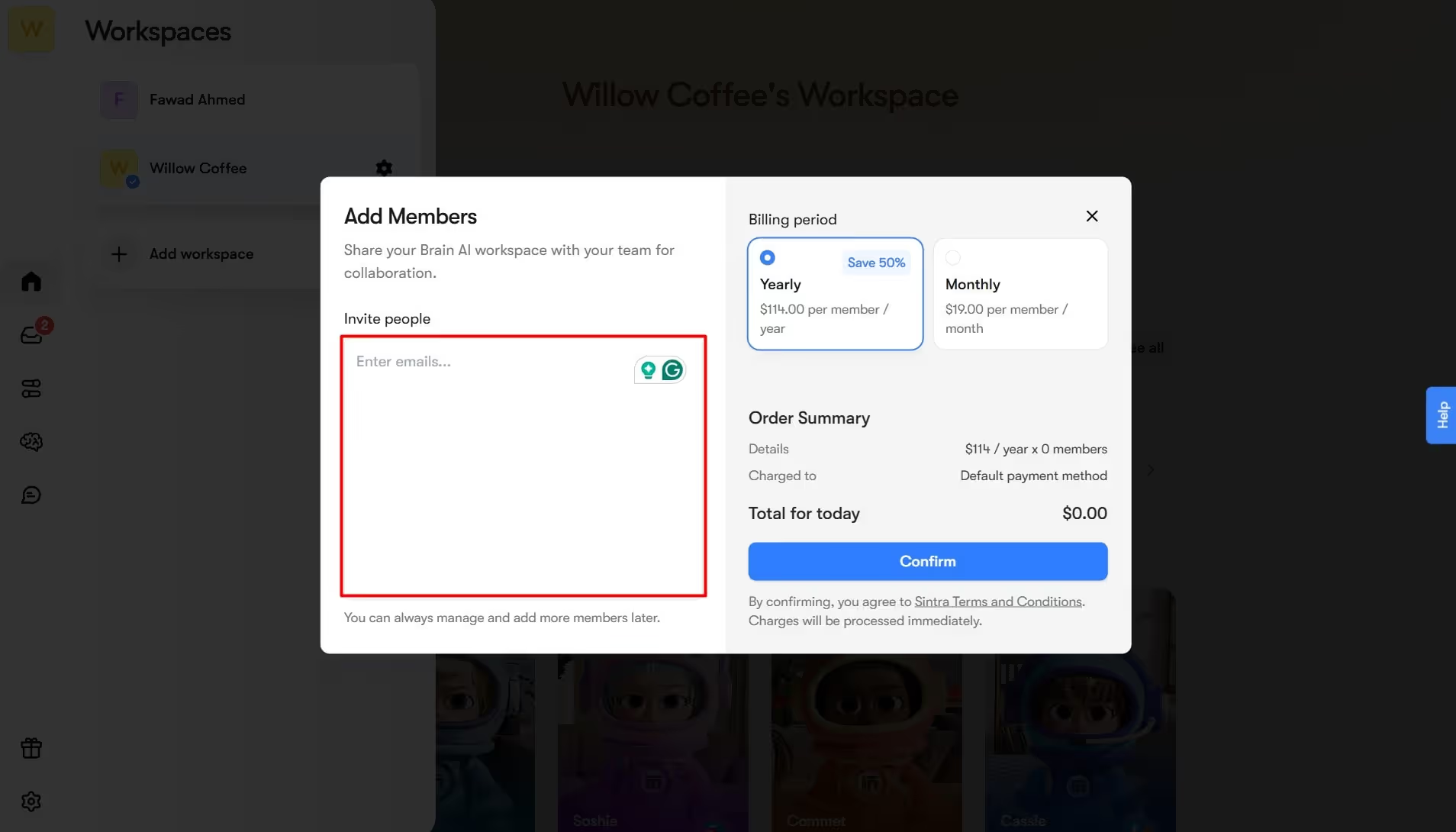
There you have it - a workspace setup all done. The next step is to set up your social media chatbot.
- Go to the Home button and click Soshie under the AI Helpers tab.
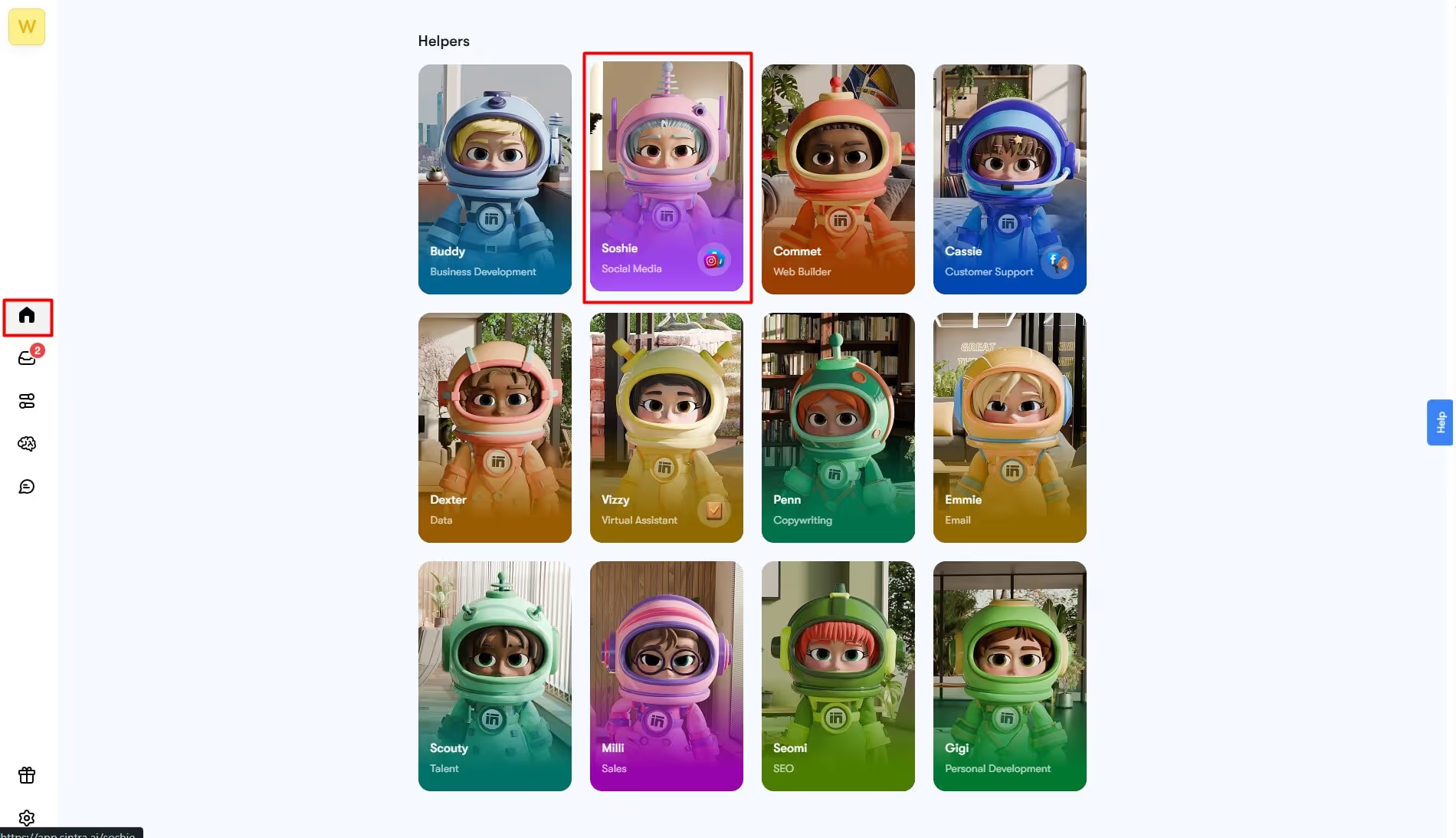
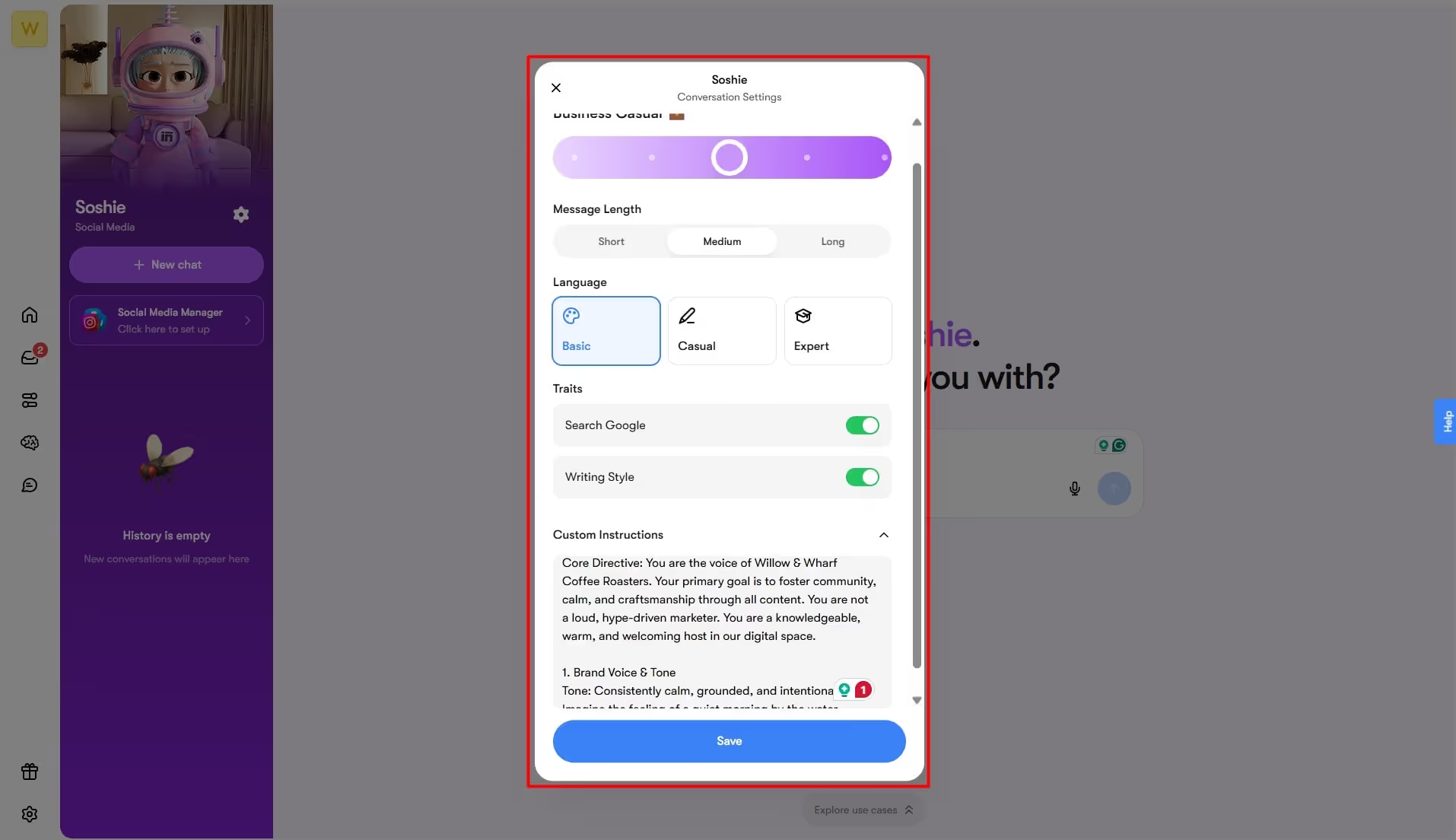
- Once on the chat interface, click the Settings icon from the left-side panel. This is where you do all the personalization. Adjust language preferences, set the theme, choose between colors, and enter custom instructions.
- Double-check everything and click Done.
3. Set Up Brain AI for Your Brand
You can skip this part if you aim to build a basic rule-based bot, but it comes at the cost of accuracy and relevancy.
Let’s understand this better. An intelligent AI bot can interpret your prompts better when it knows about you. But how can a robot learn about you? The simple answer: data.
Simply put, a bot is as smart as the data you feed it. Hence, it’s crucial that you set up a knowledge base from which the chatbot derives information, learn about you, interprets your prompt’s context, and responds accordingly.
Thankfully, no-code developers come with their own knowledge base, such as Brain AI from Sintra. All you need to do is enter the data for it to train. Here is how it goes.
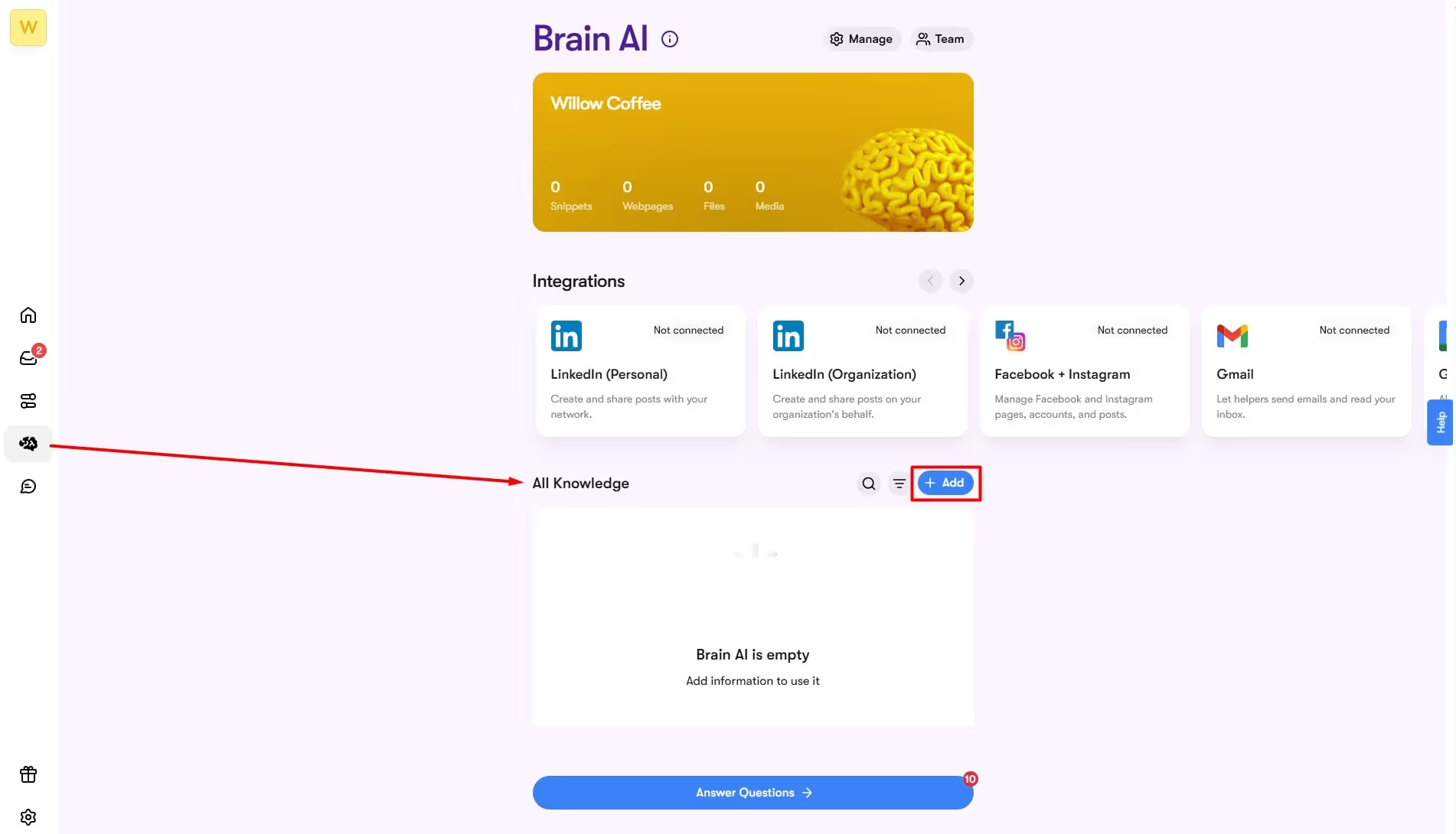
- Visit the Brain AI section from the homepage.
- Go to the All Knowledge tab and click Add.
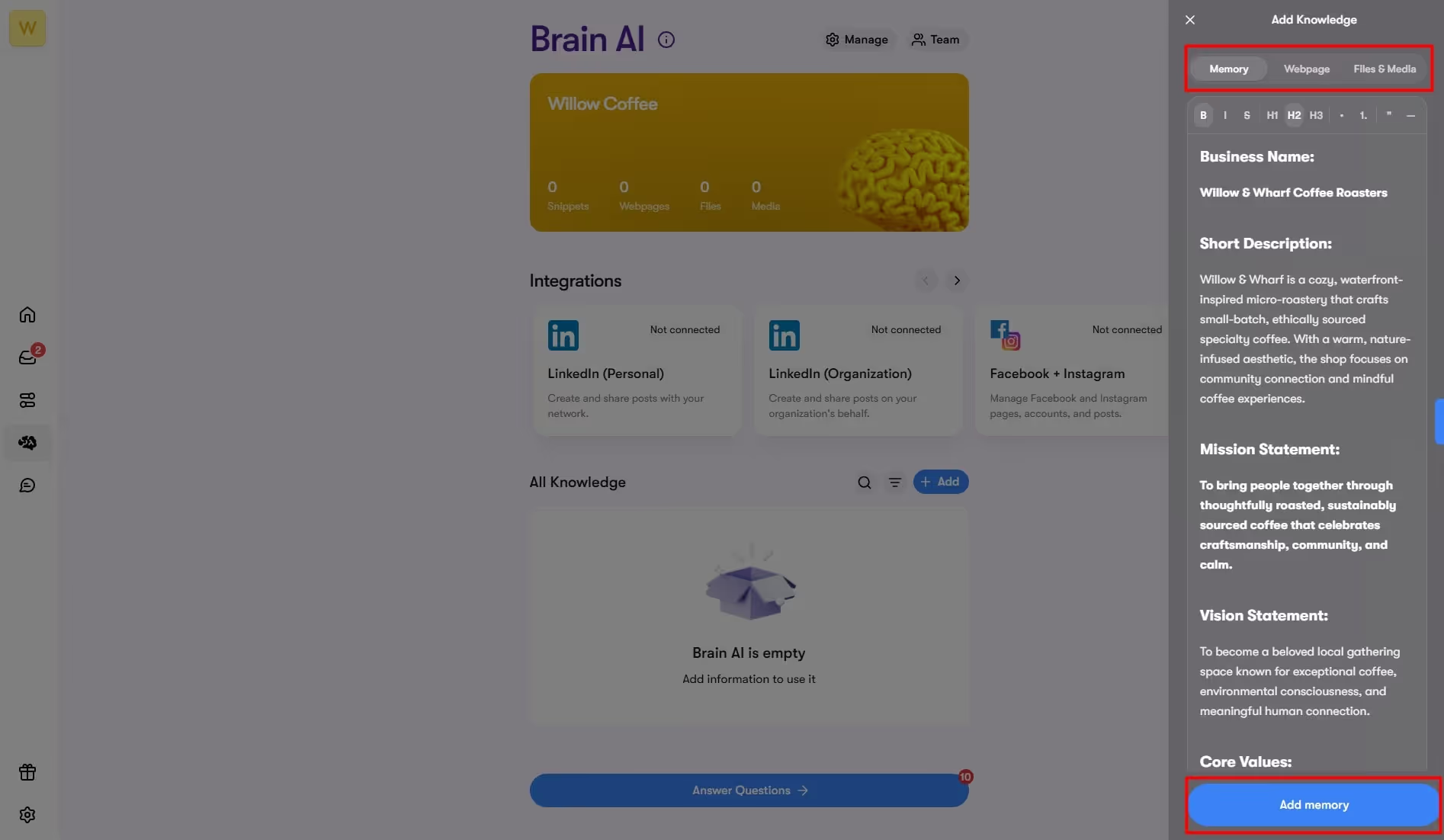
- You can choose to add information in different formats (media, documents, text, etc). For this guide, we will use brand resources, including FAQs, mission statements, brand voice guidelines, customer interactions, and more. And that’s it.
The best part about this knowledge space is that it never stops learning. As you answer its questionnaires and add more information, it learns more about your business and responds accordingly. For this,
- Click Answer Questions under the All Knowledge tab and start responding.
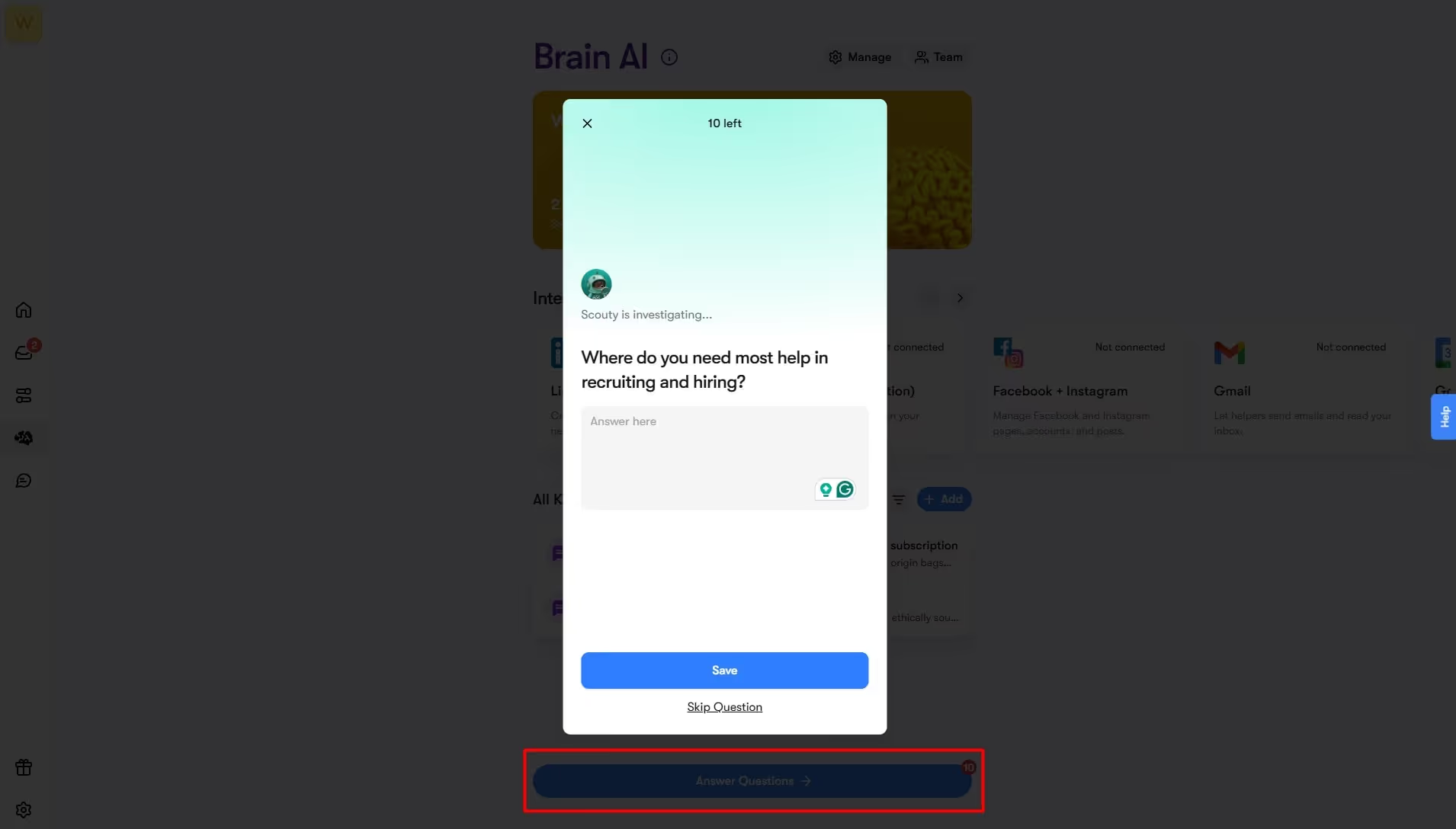
- Take time to form answers. Be clear and articulate.
4. Connect Social Media Integrations
To have the chatbot start answering, you must connect it to your social media accounts. You can do this through AI integrations. Let’s see how it’s done.
- Visit the Brain AI section from the dashboard.
- Go to the Integrations tab and locate your desired social media platform (Facebook, LinkedIn, Instagram, X, etc).

- Once located, click Connect, and you will be redirected to the login page. Enter your details, confirm the connection, and that’s it.
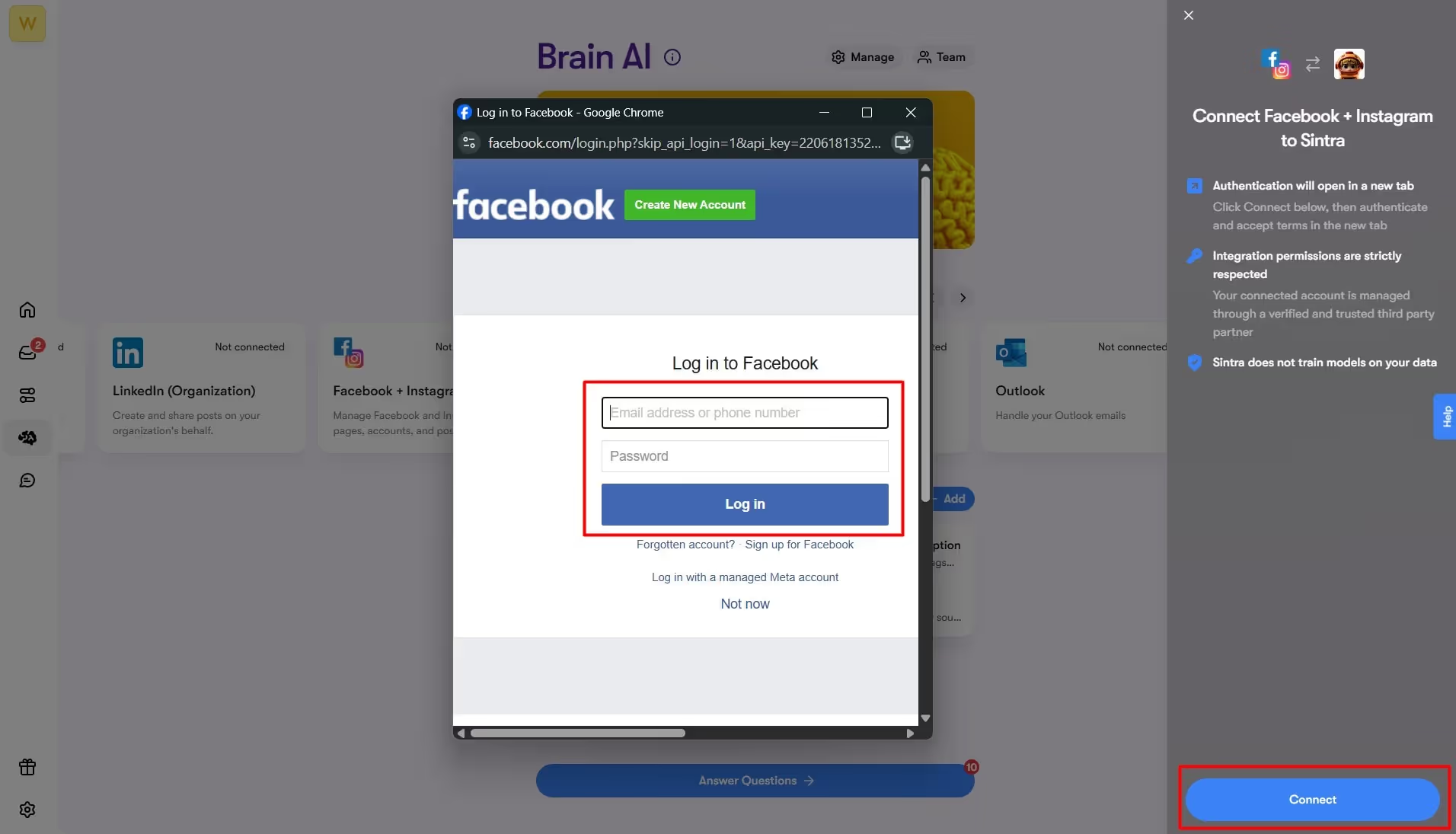
Note: If you have multiple Brain AI setups for different businesses, you need separate integrations for each brand profile.
5. Turn On Automatic Weekly Posting
It’s time to see how your chatbot is in action. Remember: using an AI for social media posts is crucial to check the bot for accuracy and responses. So, let’s get in.
- Visit the Home section and open Soshie - your social media post maker under the AI Helpers tab.
- Once on the chat window, command Soshie to produce content for you: an image, optimized text, or compelling captions, accordingly.
- For this guide, the prompt will be “generate an image for our newly launched coffee kit and write a persuasive caption for it”. Rest assured, it will create the content by keeping the context from Brain AI intact.
- You can have a follow-up conversation to tweak the output to get the desired results. For instance, ask Soshie to produce hashtags, adjust alignment, select themes, etc.
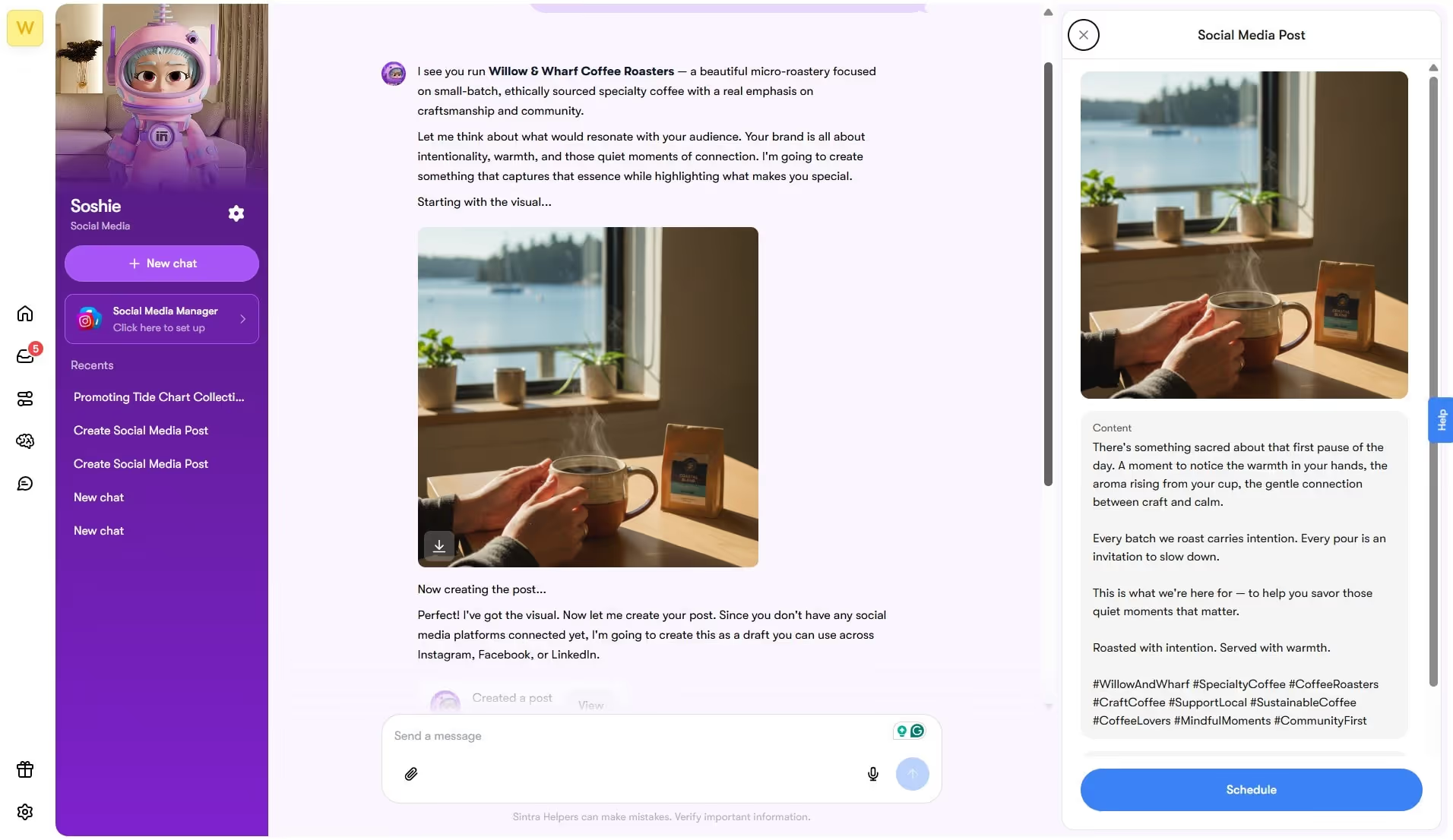
Now that our post is ready to be posted or scheduled. Here is how each goes.
- In case you want to directly publish it, click Approve and ask Soshie to post it on the desired platform. Follow the instruction prompt to complete the process, and there you have it.
- In case you want to schedule posts, click Schedule for Later, and you will be directed to the Soshie content calendar.
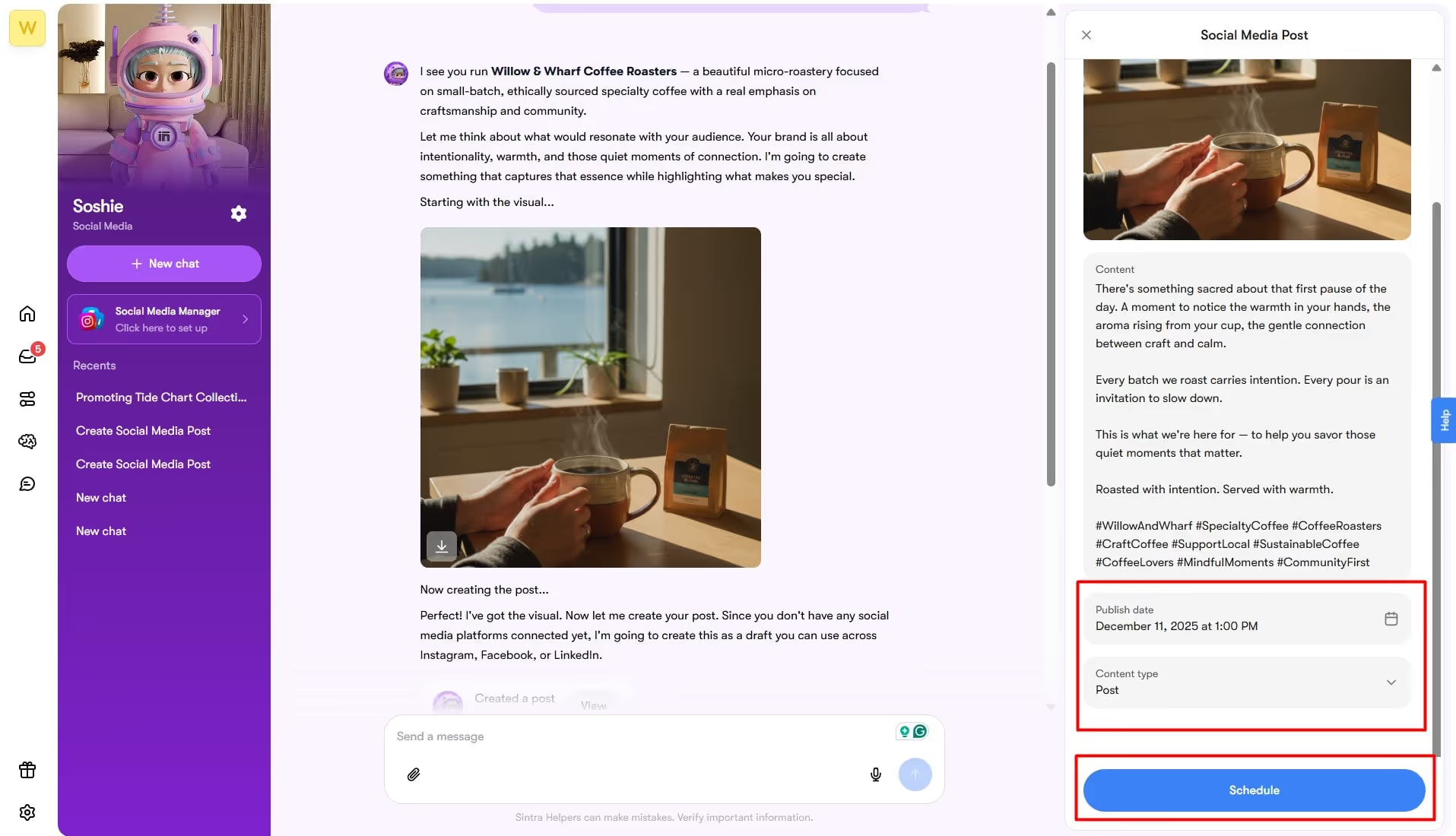
- Select the preferred date for the post to be published and click Schedule. Keep an eye on the date and see how it works. You can always access this post from the content calendar.
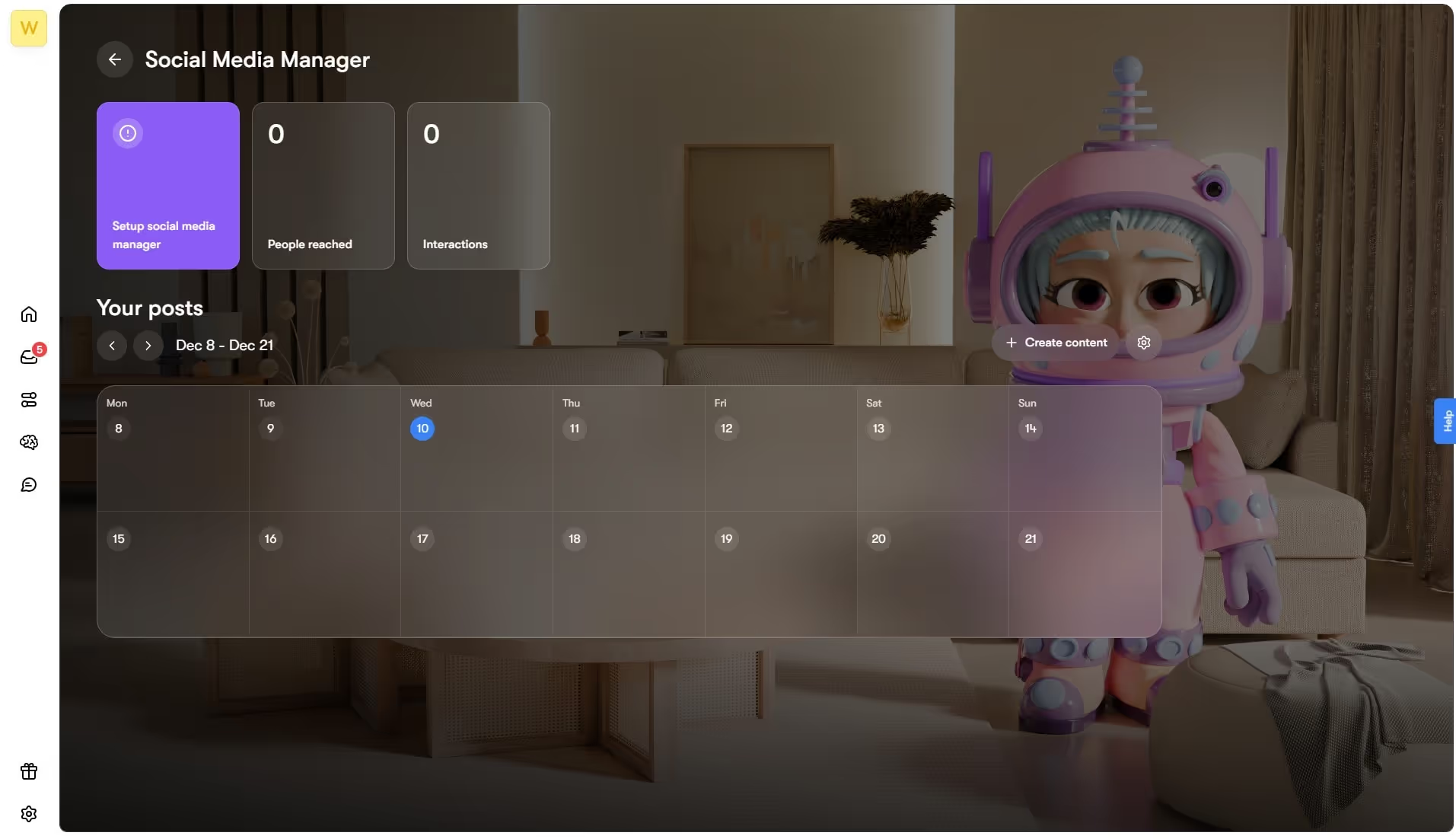
Pro Tip: Generate bulk content using Soshie and schedule it for the entire week. This will save you time and the constant hassle of publishing posts on social media.
6. Use Soshie’s Chat as The Chatbot’s Content Brain
Using a chatbot for social media posts to your benefit goes beyond producing and publishing content. You must know how to train it well enough beyond the knowledge space to respond to your commands.
Here are some things we can do to help your custom chatbot produce context-driven answers.
- Give the chatbot role-based instruction. For example, ask it to act as your social media strategist, a marketer, or even a content manager. It will help the bot better maintain the brand voice, goals, and objectives in the generated content.
- Prompt the bot to craft platform-specific posts. Let’s say you are launching an Instagram campaign, request Soshie to produce images for Insta stories, posts, etc.
- Ask Soshie to set a brand-specific theme for all images in a campaign. Also, optimize the descriptions accordingly.
- Add custom guidelines in the Brain AI, so it can make sure to generate consistently apt content tailored to your brand.
7. Test Your Setup End-To-End
Once everything’s done from your end, let’s put Soshie to the test. But the thing is, you need to go slow and steady. Do not go all in. Take a small part of your campaign and execute it as a pilot study. Here are a few tests you can run to validate the chatbot further.
- Functional Testing: Evaluate the functions of Soshie. Command it to produce content and see how it understands your prompt, if it fetches correct data from Brain AI, and how accurate the responses are.
- Performance Testing: Score the performance of the chatbot. See if it can take a heavy load, avoid crashes during peak usage time, etc.
- Staging Testing: Before you begin with the project, test your chatbot on a few real-life scenarios. Create scripted scenarios to see how well it handles user interactions.
- Pilot Program and Refinement: Take part in your marketing campaign and automate it with this chatbot. Publish the content on low-risk pages, monitor it for the deployment period, and gather feedback accordingly. At later stages, fine-tune the details so that it improves over time.
8. Optional: Add Supporting Helpers And Channels
Technically, you’re done here. However, Sintra’s AI team lets you achieve more. It goes beyond content generation but also automates relevant routine tasks, be it analyzing lengthy documents, crafting compelling scripts, strategizing a marketing campaign, or more. With this extra assistance, your business stays more dynamic and resourceful.
Try using these AI helpers together and see how they deliver for your business. For instance, you may combine social media management with data research to attract a target audience on a certain platform.
Top Tips to Maintain Social Media Chatbots
Just knowing how to set up a social media chatbot is not it. You must have a clear idea about how to maintain it properly once it’s up and working. Here are a few practical habits that can help you with it.
Clearly State Users Are Interacting with an AI Agent
Remember, the key to a lasting customer relationship is transparency. And, when customers trust you, they stay loyal. Hence, it’s crucial that you tell them, they are using a chatbot.
But how to do that? Try adding an automated greeting or a label at the top of the chat interface. It will also help the customer better understand the limitations of the chatbot.
Provide Easy Access to Human Support
While deploying an automation chatbot, you must understand its limitations. They are good at handling user interactions, but not all of them. Some complicated cases demand human intervention, and you must facilitate it as a business.
Make it easier for users to escalate a conversation to a human agent. You can add it to the menu or add a specific button.
Personalize Interactions Based On User Data
Chatbots train on data. By this logic, it uses customers' information to interpret their prompts and produce relevant and personalized responses. For this, it’s crucial that you feed their demographics, engagement history, and past interactions.
But, while doing so, you must also prioritize user privacy. Make sure you are transparent about data usage and follow industry protocols on data protection.
Continuously Update and Improve The Chatbot
Feedback is meant to improve the system. This case is no different. The efficiency of your chatbot depends on its capacity to understand the context and respond accordingly.
For instance, the best AI for social media marketing is one that constantly improves through constant monitoring. While doing so, check for common issues, any misunderstandings, hallucinations, and take action accordingly.
Design a Natural Conversation Flow
Remember! Context is important. When building a social media chatbot, you shouldn’t just focus on answering individual questions, but also guiding the customers through coherent conversations.
A good way to incorporate it is to train it to ask follow-up questions, staying relevant to the conversations, and emphasizing the larger picture. Short sentences and a welcoming tone are the cherry on top.
Advanced Strategies: Connecting Your Chatbot To Email, Reports, And Operations
Using a social media chatbot to its fullest capacity is an art you should master. It comes to knowing when and how to combine it with other AI agents.
Let’s see how integrating this chatbot into broader workflows like data analysis, daily email reports, and lead nurturing can help your business thrive.
Turn Social Conversations into Email Relationships
Once your AI social media chatbot interacts with users and resolves queries, don’t stop there. Direct these DMs to Emmie - the smart AI email assistant. It will analyze them, identify pain points, sift through contacts to spot leads, and craft compelling outreach scripts in seconds. Add some triggers and let it handle personalized follow-ups.
Loop in Support Helpers for Complex Questions
Upgrade your social media customer service game by employing the AI virtual assistant - Vizzy. It helps them with things like recording purchases, sorting out refunds, resolving technical issues, and more. Not only this, but it also keeps customers’ personal history in the loop and directs them to the right helper when in trouble.
Use Analytics and Reports to Improve Performance
That’s not it. You can use the data coming from your social media bot and employ it for better strategy planning. Presenting Dexter - the smart data analyst. It uses your incoming customer interactions to review engagement, quality of the responses, and consistency in answers. Based on these KPIs, it recommends follow-up actions to boost revenue.
Choosing the Right AI Assistant for Social Media Marketing
Tons of options out there with thousands of features and constant advancements? All these mind-boggling things make it hard to choose the right chatbot for social media marketing. Don’t worry - you’re not alone.
For starters, the best AI for social media must have these few things.
- User Experience - A good chatbot for your social media must be easy to navigate, produce fast responses, and offer multilingual support.
- Data Security - Users’ data must be encrypted and protected against security breaches. For this, you must be transparent about data usage.
- Scalability - Your chatbot must be adequate at handling heavy loads, especially during peak hours, without losing the response quality.
- Integration - It’s crucial that your chatbot connects with various networks, from social media platforms to websites, mobile apps, and more.
- Ongoing Improvement - Your social media chatbot must have the ability to constantly evolve and improve. It should be adaptable to changing market and user preferences.
No-Code Builders Vs AI Employee Platforms
Imagine you’ve decided to build an AI chatbot for your social media. The first thing that comes to mind is whether to do it with a no-code builder or deeper AI systems. While no-code builders are excellent quick-starters, deeper AI employee platforms have extensive knowledge to maintain accuracy.
Let’s take Sintra, for example. It’s a no-code, deeper AI model with dedicated helpers specialized to perform certain tasks. All these helpers learn from a centralized knowledge space called Brain AI. In comparison, ChatGPT is a basic code builder that answers to your prompts but with minimal specialization.
If you’re constantly struggling to make this decision, worry not. Here’s a side-by-side comparison, so you are better equipped to make a decision.
Ready to Test Sintra’s Helpers?
There you have it - all about how to make an AI chatbot for social media. Don’t go for the hyped coding methods just because the internet says so. Instead, opt for no-code deeper AI platforms like Sintra if you have minimal coding knowledge.
Set up a knowledge space, enter your brand’s resources, and prompt the chatbot to perform a task. That’s how easy it is. Get started today, start small, and eventually you will find your way around.
FAQs
What is an AI bot for social media, and how does it work?
An AI chatbot for your social media is an automated program. It mimics human conversation, interprets the message, and responds to users’ queries using natural language processing. Using advanced algorithms, these chatbots can generate leads, respond to comments, and write FAQs.
Do I need to know how to code to build a social media chatbot?
No, you do not need coding knowledge to build a social media chatbot. Thanks to no-coding solutions like Sintra, you can personalize an advanced conversational AI agent for social media platforms.
Which platforms can my social media chatbot support?
Social media chatbots support almost all popular social media networks, including Facebook, Instagram, X, and WhatsApp. You can also connect them to CRMs for external data sourcing.
How do I keep my chatbot replies on-brand?
To keep your chatbot replies on brand, focus on personalizing it accordingly. Build a knowledge space like Brain AI and facilitate it with relevant data like brand resources, vision statement, customer history, etc.
Can a chatbot replace a human social media manager?
No. A chatbot cannot completely replace the human element. Writing the correct prompt and directing the chatbots remains crucial when using smart chatbots. Similarly, human oversight is significant in maintaining clarity, relevance, and accuracy.
How long does it take to set up a social media chatbot?
It depends. A basic, no-code social media chatbot can take you minutes to set up. In comparison, an advanced one with a separate knowledge base might take weeks or even months.
What mistakes should I avoid when using an AI assistant for social media?
When using a social media chatbot, you must refrain from several mistakes: training it on sensitive or unstructured data, having no clarity in prompts, over-automating tasks, having no human oversight, and undermining personalization.
Related articles



.avif)




