6 Lead Enrichment Tools (and How to Automate Them) in 2026

%20in%202026.avif)
Table of Contents

Quick Answer: What Are Lead Enrichment Tools and How Do You Automate Them?
Lead enrichment tools are platforms that take incomplete lead data and fill in the gaps using external sources. This includes details like job titles, company size, industry, contact information, and sometimes buying intent. Data enrichment tools enhance CRM records by appending missing contact and company information from third-party databases, improving accuracy and targeting.
Automation comes in when this enriched data is continuously updated and pushed into workflows without manual effort. Instead of exporting and cleaning data manually, modern systems connect enrichment tools with CRMs, email platforms, and outreach systems. This allows sales lead enrichment to trigger real actions like segmentation, lead scoring, and campaign activation automatically.
Believe it or not, there's a high chance your business might be working with outdated data. And that bad data is expensive for you.
Studies show that more than 22% of B2B data decays every year, which means a big chunk of your CRM has expired before you could even act on it. That’s exactly why lead enrichment tools have become a core part of modern sales and marketing stacks.
At its core, lead enrichment is about turning incomplete records into stable intelligence. That includes job roles, company size, and even buying signals pulled from external sources.
Lead enrichment tools enhance CRM accuracy by automatically appending missing contact and company data, improving targeting and conversion rates. As a result, better data leads to better decisions, faster outreach, and higher-quality pipelines.
We have curated this list of some of the best lead enrichment tools for teams looking to connect the dots between data and execution. Also, systems like Sintra's AI team help bridge that gap by turning insights into action instead of just storage. Let's get started.
Refer to the table below to have an overview of the best data enrichment tools and how they compare with each other:
What Is Lead Enrichment (and Why It Matters in 2026)
Lead enrichment is the process of turning basic lead data into something you can actually use. Instead of just a name and email, you get a clearer picture of who the person is, where they work, and whether they are worth targeting.
All that is made possible through B2B data enrichment. Data enrichment can add contact details, company insights, and even buying signals, giving a clearer picture of each lead.
Here's how B2B data enrichment improves your overall results:
- Better targeting: You can quickly filter leads based on company size, industry, or role
- Stronger segmentation: Group leads more accurately for campaigns instead of broad lists
- More personalization: Tailor messaging using real data instead of assumptions
- Higher conversions: Enriched data helps sales teams reach the right people and improve close rates
- Faster sales cycles: Less time wasted on unqualified or incomplete leads
Another big shift in 2026 is that enrichment is no longer static. Lead enrichment is an ongoing process that keeps records updated as roles, companies, and markets change. Modern tools continuously update your CRM without your manual efforts. This ensures that you are not working with outdated data.
One more advantage of lead enrichment is the near-perfect accuracy.
- Clean data improves campaign performance and reduces bounce rates
- Accurate data is important for compliance with regulations like GDPR and CCPA
- It protects your brand from sending messages to the wrong contacts
In short, data enrichment helps you work with better data, make better decisions, and get better results.
6 Best Lead Enrichment Tools in 2026
Investing in reliable lead enrichment tools has now become a technical business decision. Here's why: Poor data quality costs organizations $12.9 million per year on average. Poor data is no longer just an inconvenience; it compromises results and shatters trust.
That said, the best tools in 2026 differ in a few key areas:
- Data quality: How accurate and verified the information is
- Coverage: How broad and global is the dataset
- Compliance: Whether the data meets regulations like GDPR
- Automation potential: How easily the tool fits into workflows and updates data in real time
Below is a curated list of the most effective B2b data enrichment tools, based on how well they perform across these factors and how useful they are in real-world workflows.
1. Clearbit
Clearbit is one of the most recognized lead enrichment tools, especially for inbound-focused teams. It is known for real-time enrichment, meaning it can take a form submission or website visit and instantly turn it into a detailed profile.
Instead of asking potential clients to fill out long forms, Clearbit pulls firmographic and technographic data from multiple sources using identifiers like email or domain. This makes it a strong fit for B2B data enrichment workflows where speed and context matter, particularly in marketing and RevOps setups.
Strengths
- Real-time enrichment: Enriches leads instantly as they enter your CRM or fill a form
- Visitor identification: Matches anonymous website traffic to company profiles
- Deep data attributes: Provides 100+ data points, including company size, tech stack, and industry
- Strong integrations: Works natively within HubSpot and connects with marketing tools
- Segmentation-ready: Helps create dynamic audience segments based on enriched data
Use Cases
Clearbit is especially useful for inbound pipelines. For example, when someone requests a demo, the tool can instantly enrich their profile with company and role data, then route the lead to the right sales rep.
This removes manual qualification and significantly speeds up response time. It is also widely used for personalizing website experiences and segmenting leads based on firmographic filters.
Pricing
- Starts around $45–$50/month for 100 enrichment credits.
- Requires a HubSpot subscription, as Clearbit now operates as part of HubSpot’s ecosystem.
- Total cost can scale significantly depending on usage, often reaching thousands per month for larger teams.
Limitations
- No standalone product anymore: Clearbit is now bundled inside HubSpot, limiting flexibility
- Pricing complexity: Credit-based model + HubSpot subscription can make costs harder to predict
- Better for inbound than outbound: Strong on company data, but less focused on direct contact data compared to some competitors
- Scaling costs: Can become expensive as enrichment volume increases
2. ZoomInfo
ZoomInfo is one of the most powerful data enrichment tools in the enterprise space. It is widely used for sales lead enrichment at scale and is built around a massive B2B database that includes verified contacts, company profiles, and intent data.
The platform is designed for large sales teams that need depth, precision, and advanced filtering to build highly targeted outbound pipelines. It stands out because of its data depth and continuous updates, making it a go-to for enterprise-level prospecting and account-based sales strategies.
Strengths
- Massive B2B database: Over 100M+ business profiles and contacts
- Intent data signals: Identifies companies actively researching solutions
- Advanced segmentation: Filters by industry, revenue, role, tech stack, and more
- Frequent data updates: Continuously refreshed for enterprise use cases
- Strong enterprise adoption: Widely used in global sales organizations
- Deep enrichment + CRM sync: Supports structured data enrichment workflows
Use Cases
ZoomInfo is best suited for targeting outbound lists in account-based marketing (ABM). A sales team targeting mid-market SaaS companies can filter by industry, revenue range, hiring trends, and intent signals to identify companies actively in-market. This allows reps to focus only on high-probability accounts instead of broad, cold outreach.
Pricing
- Starts around $15,000–$25,000+ per year for entry-level plans
- Can exceed $40,000+ annually, depending on seats and credits
- Uses custom quote-based pricing (no public pricing page)
Limitations
- Very expensive: Often out of reach for small teams or startups
- Complex pricing model: Credits + seats + contracts make costs unpredictable
- Enterprise-heavy setup: Requires onboarding and training
- Overkill for SMBs: Many features are unused by smaller teams
- Rigid contracts: Annual commitments limit flexibility
3. Apollo.io
Apollo.io is a popular lead enrichment tool that combines prospecting, enrichment, and outbound engagement in one platform. It is widely used by startups and SMBs because it removes the need to switch between multiple tools for finding leads and reaching out to them.
In the broader lead enrichment space, Apollo is often positioned as an “all-in-one” alternative, with strong adoption across growing sales teams. It is also highly rated on review platforms, holding a 4.7/5 rating on G2 based on thousands of reviews, showing strong user satisfaction in the sales intelligence category.
Strengths
- All-in-one workflow: Combines lead discovery, enrichment, and outreach in one platform
- Large B2B database: Access to 200M+ contacts for prospecting and enrichment
- Strong CRM integrations: Works with tools like HubSpot and Salesforce for seamless sync
- Automation-ready: Supports sequences, scoring, and enrichment workflows
- Cost-effective entry point: More affordable compared to enterprise tools like ZoomInfo
Use Cases
Apollo.io is ideal for startups and SMBs that want to run outbound campaigns without building a full tech stack. A founder can search for ideal customer profiles, enrich those contacts with verified emails and job titles, and immediately launch cold email sequences from the same dashboard. This makes it especially useful for lean teams trying to generate a pipeline quickly without separate enrichment and outreach tools.
Pricing
- Free plan available with limited credits
- Paid plans start at around $49–$59 per user/month for Basic tiers
- Professional plans typically range from $79 to $99 per user/month, depending on billing
Limitations
- Data accuracy can vary: Some contacts may be outdated compared to enterprise tools
- Credit-based system: Heavy usage can increase costs quickly
- Less depth than enterprise platforms: Not as strong in advanced intent or niche segmentation
- Learning curve for full-stack use: Features can feel overwhelming for beginners at first
4. Cognism
Cognism is a B2B data enrichment platform best known for its strong focus on GDPR-compliant data, especially in European markets. Its data is continuously refreshed, with decision-maker information regularly updated to maintain accuracy. Hence, it is widely used by sales teams that need reliable contact data without worrying about compliance risks or outdated records.
Unlike many tools that prioritize volume, Cognism focuses on verified accuracy, particularly for direct dials and decision-maker data. It is especially popular among teams expanding into international markets where data privacy laws are strict and accuracy matters more than sheer database size.
Strengths
- GDPR-first data approach: Built with strict compliance standards for EU and global regulations
- High-quality verified contacts: Strong focus on phone-verified mobile numbers (Diamond Data®)
- Strong EMEA coverage: Particularly effective in the UK and European markets
- Intent signals available: Helps identify accounts actively researching solutions
- CRM integrations: Works smoothly with major sales and marketing tools
Use Cases
Cognism is ideal for companies expanding into Europe or running outbound campaigns where compliance is critical. A sales team entering the UK market can use Cognism to build lists of verified decision-makers, ensuring they only reach compliant, up-to-date contacts. It is also useful for account-based outreach where phone accuracy and senior-level targeting matter more than volume.
Pricing
- Estimated $15,000–$25,000+/year for entry-level plans
- Can scale to $40,000–$50,000+/year for advanced tiers
- Pricing is custom and quote-based, depending on users and data needs
Limitations
- High cost: Positioned as a premium enterprise tool
- Limited transparency in pricing: Requires a sales contact for quotes
- Best fit for EMEA: Less comprehensive for some US-focused datasets
- No full execution layer: Focused on data, not outreach workflows
- Learning curve: Advanced features require onboarding
5. Lusha
Lusha is a lightweight lead enrichment tool designed for quickly finding verified contact details like emails and direct phone numbers. It is widely used in sales enrichment workflows where speed matters more than deep analytics or complex data layers.
Instead of heavy enterprise systems, Lusha focuses on giving reps fast access to accurate contact information directly from LinkedIn or company pages. It is especially popular with individual sales reps and small teams because it reduces the time spent manually researching prospects.
Strengths
- Fast contact discovery: Instantly reveals emails and direct dials from profiles
- Chrome extension: Works directly on LinkedIn and websites for quick enrichment
- Simple workflow: Minimal setup, easy for non-technical users
- Verified contact focus: Strong emphasis on direct phone numbers and emails
- CRM integration: Syncs with tools like Salesforce and HubSpot
Ideal Use Case
Lusha is ideal for fast, manual-style prospecting. A sales rep browsing LinkedIn can instantly enrich a decision-maker’s profile with verified contact details and reach out within seconds. This makes it especially useful for outbound SDR workflows where speed and volume matter more than deep segmentation or complex data modeling.
Pricing
- Free plan: ~40 credits/month for basic use
- Pro plan: around $29–$49 per user/month (credits included)
- Premium plan: around $69–$79 per user/month with higher credits
- Scale plan: custom pricing for larger teams and API usage
Limitations
- Limited data depth: Focuses mostly on contact info, not advanced firmographics or intent signals
- Credit constraints: Heavy usage can quickly exhaust monthly credits
- Not built for complex workflows: Lacks advanced automation compared to enterprise platforms
- Smaller dataset vs competitors: Less depth than tools like ZoomInfo or Cognism
- Scaling costs: Per-user pricing can add up for larger teams
6. Clay
Clay is a flexible data enrichment tool designed for teams that want full control over how their lead data is built, cleaned, and automated. Instead of relying on a single database, it pulls information from multiple sources and lets users combine them into custom enrichment workflows.
This makes Clay especially powerful for enrichment at scale, where teams need more than plug-and-play data and want to design their own sourcing logic. It is often used by growth teams and advanced operators who prefer building systems rather than relying on fixed datasets.
Strengths
- Multi-source enrichment: Combines data from multiple APIs and providers in one workflow
- Custom workflows: Users can design step-by-step enrichment pipelines
- High flexibility: Supports advanced logic, filtering, and conditional enrichment
- Automation-first design: Built for scalable outbound and growth systems
- Strong integration options: Works with CRMs, spreadsheets, and outreach tools
Ideal Use Case
Clay is best used for building highly targeted lead lists with layered enrichment logic. For example, a growth team can combine multiple data providers to identify SaaS companies hiring engineers, then enrich those companies with decision-maker contacts, and finally filter by funding stage or tech stack. This makes it ideal for advanced outbound strategies where precision and customization matter more than simplicity.
Pricing
- Free plan available with limited credits
- Starter plans begin around $149/month
- Growth and Pro tiers scale based on usage and enrichment volume
- Enterprise pricing is custom for high-volume teams
Limitations
- Steep learning curve: Requires time to build and optimize workflows
- Not plug-and-play: Less suitable for beginners or non-technical users
- Credit-based costs: Can become expensive at high enrichment volumes
- Setup complexity: Requires understanding of data flows and logic building
- Overkill for simple use cases: Best value comes at advanced usage levels
Final Verdict
- Clearbit: Best for real-time inbound enrichment and instant lead routing inside marketing workflows.
- ZoomInfo: Best for enterprise teams that need deep data, intent signals, and highly targeted outbound at scale.
- Apollo.io: Best all-in-one option for startups and SMBs, combining enrichment with outbound execution.
- Cognism: Best for GDPR-compliant enrichment and high-quality contact data, especially in European markets.
- Lusha: Best for quick, no-friction contact enrichment during day-to-day prospecting.
- Clay: Best for advanced users who want to build custom enrichment and automation workflows across multiple data sources.
How to Automate Lead Enrichment Workflows?
Most lead enrichment tools stop after turning your bad data into better data. But data collection is only the beginning. What follows is the automation that connects everything together and triggers actions like outreach, segmentation, and follow-ups.
Lead enrichment tools automatically append missing contact and company data to CRM records. However, without automation, teams still need to act on that data manually. And this is exactly where most teams get stuck.
To fix this, modern workflows connect data enrichment tools directly to execution systems like Sintra AI. Instead of static records sitting in a CRM, enriched leads move through a structured process automatically:
- Collection: Capture leads from forms, inbound requests, or outbound sources
- Enrichment: Add missing data like company details, roles, and intent signals
- Qualification: Filter and score leads based on fit and priority
- Personalization: Use enriched data to tailor messaging and targeting
- Follow-ups: Trigger sequences, reminders, or outreach automatically
Automation allows enriched data to flow through connected systems, reducing manual work and ensuring faster, more consistent execution.
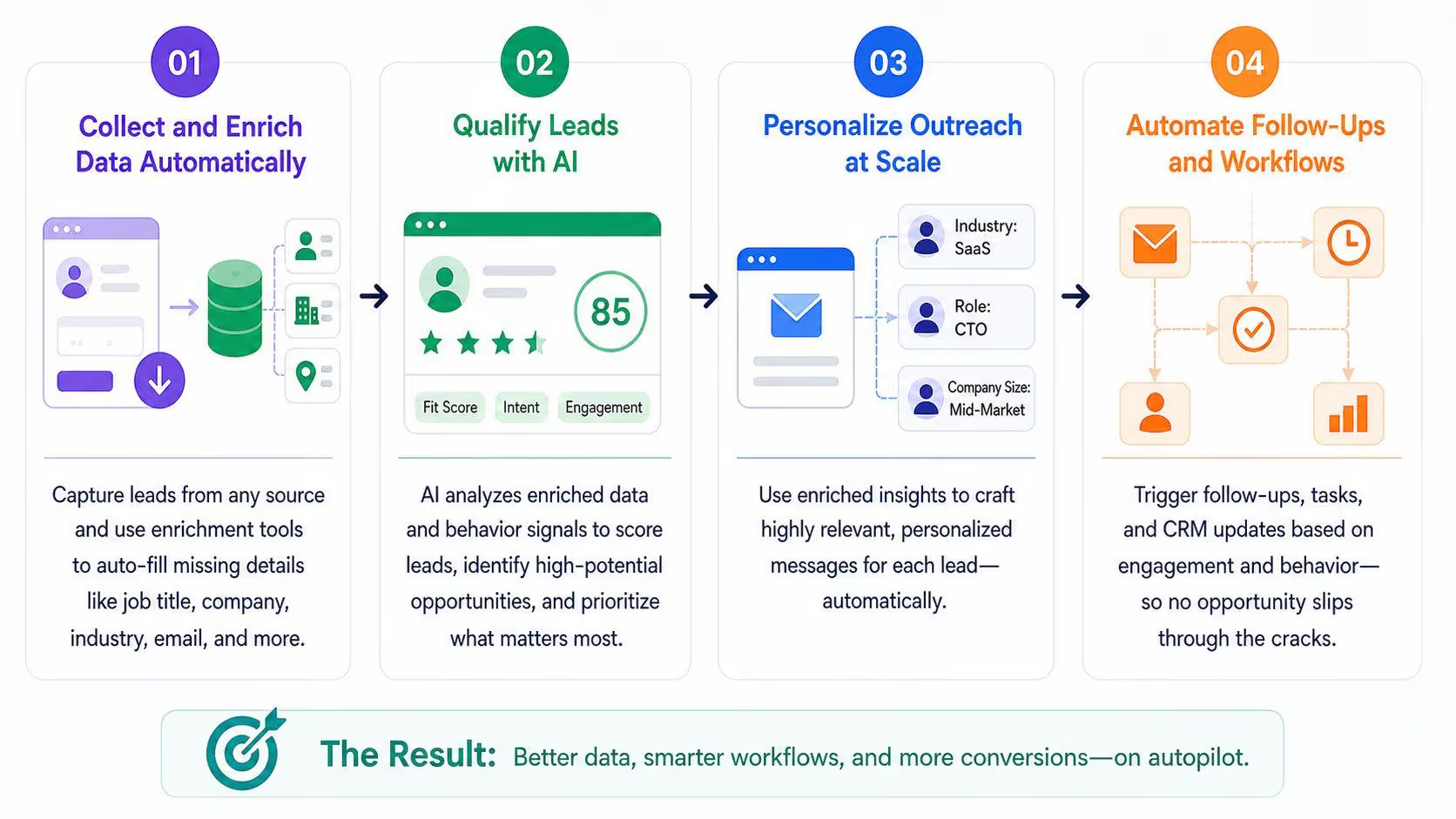
Let's take a look at the steps involving the journey from data enrichment to automation that turn into sales.
Step 1: Collect and Enrich Data Automatically
The first step is to get your data flowing in without manual work. Modern tools are built to capture and enrich data as soon as a lead appears. That can be a form fill, a new CRM entry, or even a prospect pulled from LinkedIn.
Here's how it works in practice:
- A lead submits a demo request on your website
- The tool uses their email or domain to find company details
- It pulls in data like role, company size, and industry
- The enriched record is pushed into your CRM instantly
This process usually connects using AI integrations across multiple systems:
- CRMs like HubSpot or Salesforce
- Email platforms for outreach
- LinkedIn for prospecting
- Data providers for enrichment layers
Accuracy and data quality are the key factors here. Bad data leads to poor targeting, outdated data causes missed opportunities, and incomplete data links to weak personalization.
Let's take a look at a simple example: a SaaS company captures a demo request. Instead of asking 10 questions, they collect just an email. The enrichment tool fills in the rest. The lead is now complete, qualified, and ready for the next step.
This is where automation starts. Clean, fresh, and complete data enrichment sets the foundation for everything that follows.
Step 2: Qualify Leads with AI
Now you have complete data on the potential leads, but you still need to filter out who actually matters. This is where AI becomes crucial. AI helpers like Sintra's Penn and Dexter can analyze enriched data in real time and score leads based on fit and intent. They look at signals such as:
- Company size and industry fit
- Job role and decision-making power
- Website activity or engagement
- Buying intent signals
In a real-life scenario, imagine receiving 50 demo requests in a day. Penn analyzes each lead's company and role, while Dexter evaluates engagement and intent signals. High-quality leads are instantly flagged and routed to sales, while low-fit leads are automatically filtered out or moved into nurture flows.
This removes manual review completely and helps your team focus only on leads that are most likely to convert, speeding up response time and improving overall efficiency.
Step 3: Personalize Outreach at Scale
Once leads are qualified, you need to personalize the outreach to make it feel relevant, not generic. Instead of sending the same message to everyone, you can use enriched data like job title, company size, industry, or recent activity to tailor your messaging. Data enrichment can add firmographic details and buyer signals, helping teams create more relevant and targeted outreach.
A founder reaching out to a startup CTO might highlight speed and flexibility, while the same product pitched to an enterprise VP would focus on scalability and security. This kind of segmentation can happen automatically. Messages adjust based on the data without needing to write each one manually.
The goal is balance. You automate the process, but the message still feels personal. With strong B2B data enrichment, teams can scale outreach across email, LinkedIn, and other channels while keeping it relevant enough to actually get replies.
Step 4: Automate Follow-Ups and Workflows
Once outreach starts, consistency is everything. Instead of relying on reps to remember follow-ups, workflows trigger actions based on behavior like opens, clicks, or no response.
Here’s how it works:
- Email opened, no reply: Send a follow-up after 2–3 days
- Link clicked: Notify sales or trigger priority outreach
- No activity: Continue automated email sequences
- High-intent action: Create a task for immediate follow-up
This ensures consistent timing and persistence, which are key for conversions. Instead of chasing leads manually, your system handles it at scale. The result is a smoother pipeline, better response rates, and more time for high-value work like closing deals.
Why Sintra AI Is More Than a Lead Enrichment Tool

Data enrichment tools are great for filling in the gaps, but they cannot implement automation on their own. They collect, clean, and enhance information so your CRM is more complete. But after that, the data usually sits there unless someone manually acts on it.
This is where Sintra AI comes in as an execution layer. It does not replace data enrichment tools; it sits on top of them. It takes enriched data and turns it into actual workflows like outreach, follow-ups, task creation, and coordination across systems
Instead of a single assistant, Sintra operates as an AI-powered team made up of specialized Helpers that continuously work across different parts of your workflow. This shifts the focus from just collecting information to actually using it in real time. In simple terms, enrichment builds the foundation, but execution is what turns that foundation into results.
From Data to Action: Closing the Execution Gap
The enriched data needs manual intervention to turn it into sales. This gap between enriched data and real action is where opportunities are lost, response times slow down, and sales lead enrichment never reaches its full value.
Sintra AI bridges this gap by turning enriched data into immediate action. Instead of leaving leads sitting in a CRM, it triggers workflows like qualification, outreach, and follow-ups automatically through its AI Helpers.
For example, when a new enriched lead enters the system, it can be instantly scored, assigned, and added to an outreach sequence without manual input. No delays, no waiting for a rep to review it later. And Sintra does it all using the shared memory technology called Brain AI.
As a result, the enriched data doesn't just sit in your CRM anymore; it moves, gets acted on, and contributes directly to pipeline growth instead of becoming another unused record.
AI Helpers That Run Sales Workflows Automatically
Sintra AI uses specialized AI Helpers that act like a coordinated team, each handling a different part of the workflow. These include Penn for copywriting, Dexter for data analysis, Cassie for customer support, and Milli for sales execution.
Penn can personalize outreach copy using enriched lead data, Dexter can analyze lead quality and behavior, and Milli can support sales follow-ups or outreach decisions based on those insights. This turns enrichment from a static dataset into an active system that keeps working in the background.
Personalized Outreach Without Manual Work
Sintra AI uses enriched data to create highly personalized outreach without requiring manual effort. By pulling from B2B data enrichment, it adapts messaging based on real lead attributes like industry, job role, company size, and behavior signals. This ensures every message feels tailored instead of templated.
For example, a SaaS startup targeting both agencies and enterprise teams can automatically generate different messages for each segment. Agencies may receive messaging focused on speed and flexibility, while enterprise leads get messaging around security and scalability. The personalization happens automatically, driven entirely by enriched data, not static templates.
Continuous Automation Across the Entire Funnel
Sintra AI continues managing engagement across the full funnel, from follow-ups to pipeline updates. Using data enrichment tools and real-time signals, workflows adjust automatically based on lead behavior like opens, clicks, replies, or inactivity.
This means leads are continuously nurtured without manual tracking or reminders. Follow-ups trigger automatically, opportunities get updated in real time, and high-intent actions escalate instantly. The system runs 24/7, keeping momentum even when teams are offline.
Built on Brain AI for Context-Aware Execution
Sintra AI runs on Brain AI, which acts as the central memory layer that stores business context and keeps improving how tasks are executed over time. Instead of treating every action in isolation, it uses past interactions, workflows, and outcomes to make better decisions going forward. This makes execution more accurate and aligned with real business goals.
Because of this shared context, you don't have to keep updating the Hlpers individually. They already know about your business and adapt to it. This improves consistency across messaging and reduces errors caused by missing context or disconnected tools.
Over time, this creates compounding value. The more the system runs, the better it understands your leads, your tone, and your processes. Instead of short-term automation wins, you get long-term performance improvements driven by continuous learning and contextual execution.
Ready to Turn Lead Data Into Revenue?
Most lead enrichment tools stop at better data, but real growth happens when that data is actually used. If you’re ready to turn data enrichment tools into real revenue-driving execution, get started with Sintra AI.
Lead Enrichment Tools FAQs
What is a lead enrichment tool?
A lead enrichment tool is software that fills in missing details in your lead data, such as job title, company size, industry, and contact information. It helps turn basic leads into complete profiles that sales teams can actually use for outreach and targeting.
How does lead enrichment improve sales performance?
Lead enrichment improves sales performance by giving teams better-quality data to work with. This leads to more accurate targeting, stronger personalization, and higher conversion rates because outreach is based on real, complete information instead of guesswork.
How accurate is B2B data enrichment?
B2B data enrichment is generally highly accurate when using reputable providers, but accuracy depends on data sources and update frequency. High-quality platforms continuously refresh their databases, but no system is perfect, so some level of data decay still exists over time.
Can lead enrichment be automated?
Yes, lead enrichment can be fully automated through integrations with CRMs, websites, and outreach tools. Once set up, data is automatically collected, updated, and synced without manual input, keeping lead records fresh in real time.
Which lead enrichment tools are best for small businesses?
Small businesses often use tools like Apollo.io and Lusha because they are affordable, easy to use, and require minimal setup. These tools provide enough data enrichment and contact discovery features without the complexity of enterprise platforms.
Related articles