


How to Automate Tasks with AI in 4 Steps (With Examples)

Table of Contents

Quick Answer: How Do You Automate Tasks with AI?
To automate tasks with AI, begin by identifying use cases that are repetitive, high-frequency, and add value to your business operations. Then, choose an AI-driven autonomous agent that will help you automate tasks backed by communication and context.
Once done, build the AI workflow by defining the key performance indicators and deploy it under human supervision. Finally, gradually scale the task automations, depending on the success of the previous one.
AI task automation has been the hot topic ever since chatbots entered the market. Earlier models were capable of rule-based tasks. They could predict things, perform data analysis, produce content, and spot patterns. But all, without understanding the context.
Thankfully, AI has come a long way. Today, powerful LLMs can actually interpret nuances in your prompts, understand your business goals, and streamline repetitive work at scale. The macro shift is equally significant - by 2030, up to 30% of hours worked globally could be automated, requiring 12 million occupational transitions each in Europe and the US, but with AI, Europe could reach 3% annual productivity growth versus just 0.3% under slow adoption.
Want to explore more about AI task automations, driven by shared memory, context, and communication. Here is a detailed tutorial on how to automate tasks with AI in four steps. So, dive right in.
Step 1 – Identify Repetitive and High-Impact Tasks
Not all tasks consume the same energy. Hence, not all of them should be automated. The entire point of productivity automation is to work smarter and identify the right activities that take up most of your team’s time and add little value to your business.
What Makes a Good Candidate for Task Automation?
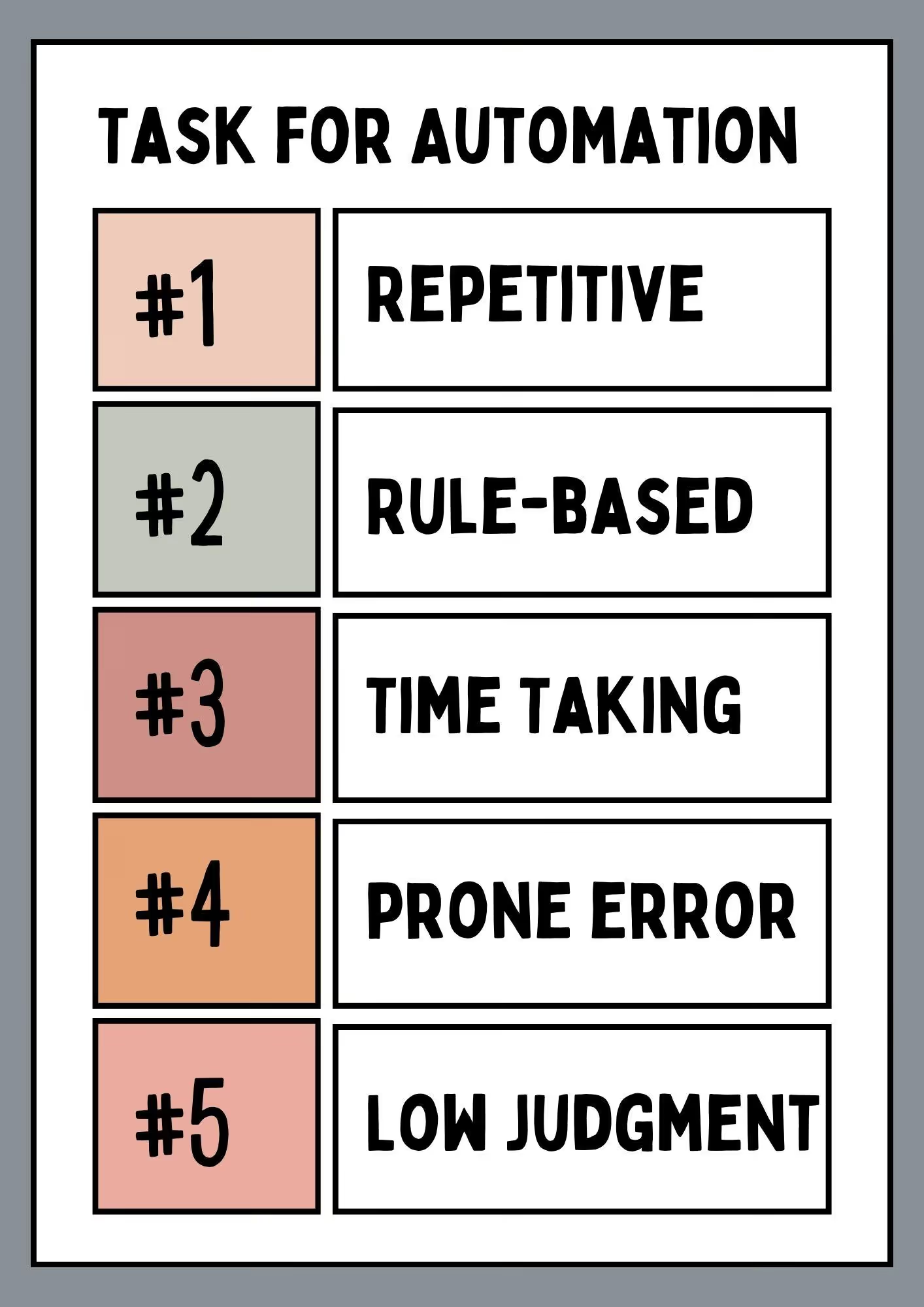
Here are a few prerequisites that make a task a good candidate for automation.
- Repetitive: Done frequently (daily or weekly) with similar steps, such as data entry, report generation, etc.
- Rule-Based: Follows certain rules, conditions, predictable patterns, or a set of steps.
- Time-Consuming: Takes significant effort and time, leaving little for strategic tasks.
- Prone to Error: Manually processing such tasks impacts efficiency and compliance.
- Cross-Departmental: Involves multiple systems or stakeholders where task exchanges can create bottlenecks.
- Low-Judgment: Don’t rely on emotions or a human’s discretion.
If a task ticks at least three to four boxes on this list, you should definitely include it in the AI workflow and automation list.
For instance, repetitiveness refers to several actions in data analysis, such as regularly reading data tables, filling in data tables, and analyzing performance metrics. Other common tasks include updating your CRM records after every customer interaction, generating documents (payrolls, expense reports), and sending automated notifications.
Use the Impact-Effort Matrix to Prioritize Tasks
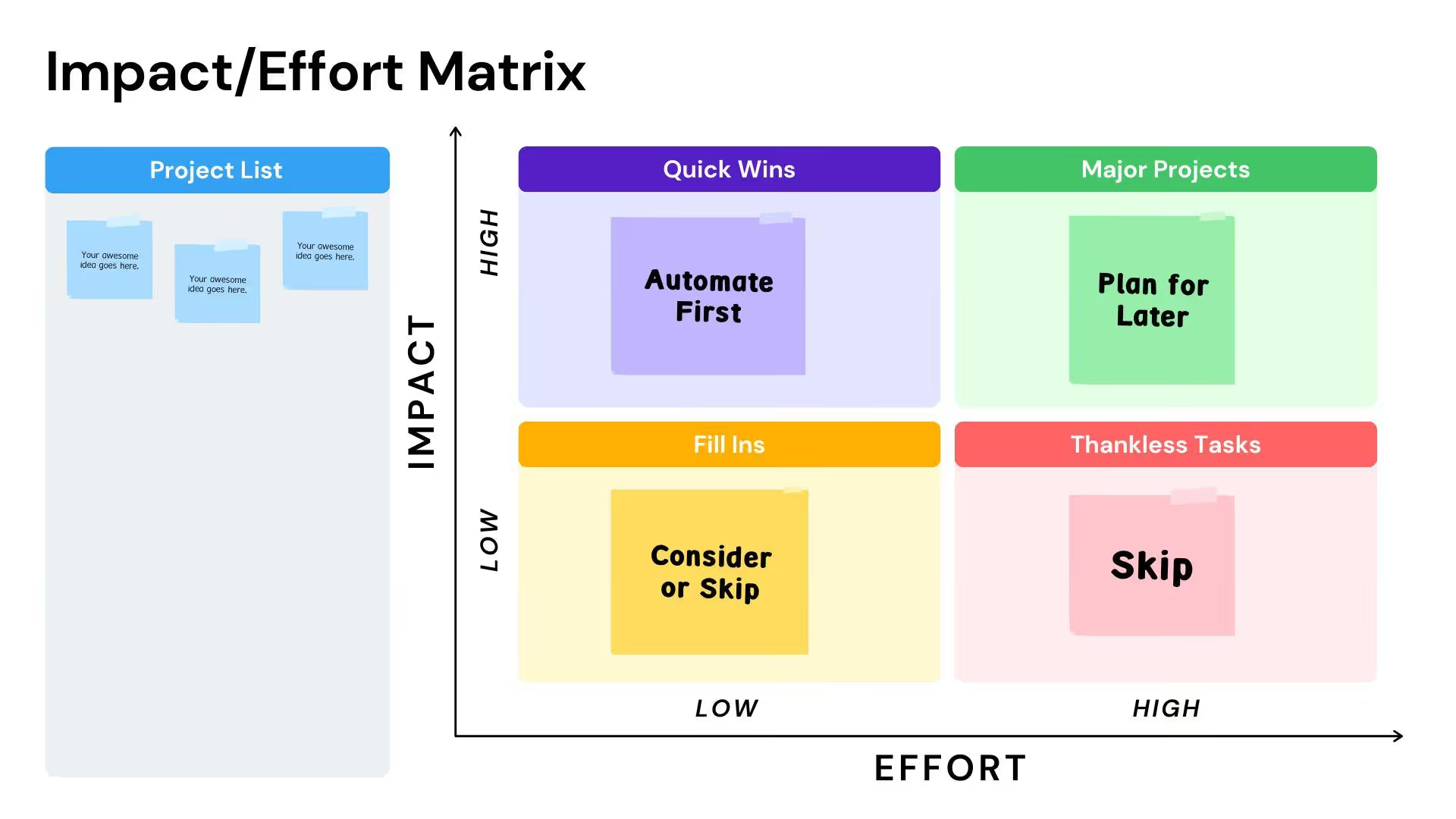
Once you’ve identified potential tasks in your workflow, it’s time to prioritize. The two primary factors when prioritizing are frequency and complexity.
- Frequency: Whether the tasks are performed daily or weekly.
- Complexity and ROI: How much effort is put into the task? Consider the resources saved against the effort to automate.
A quick way to find the right fit for repetitive, high-frequency, low-effort tasks is to use the visual matrix.
Let’s say a startup with fewer human resources aims to prioritize tasks for business automation. Here is how they did it using the impact-effort matrix.
High-Impact, Low-Effort Tasks: Happens daily and takes 20 minutes (sending invoice reminders to clients).
High-Impact, High-Effort Tasks: Take hours, and are critical for decisions (generating monthly financial reports).
Low-Impact, Low-Effort Tasks: Happen rarely, take minutes, but make a somewhat difference (sending birthday wishes to clients).
Low-Impact, High-Effort Tasks: Take hours but add no value to business (manually reformatting data between two systems that don’t interact with each other at all).
Step 2 – Choose the Right AI Automation Tools
Your AI automation tool selection matters! A hyped-up automation platform randomly picked and stacked with other AI tools can get chaotic. To avoid this, here are some things you must consider while selecting the best automation tools.
Understand the Difference Between Generic AI and Operational AI Systems
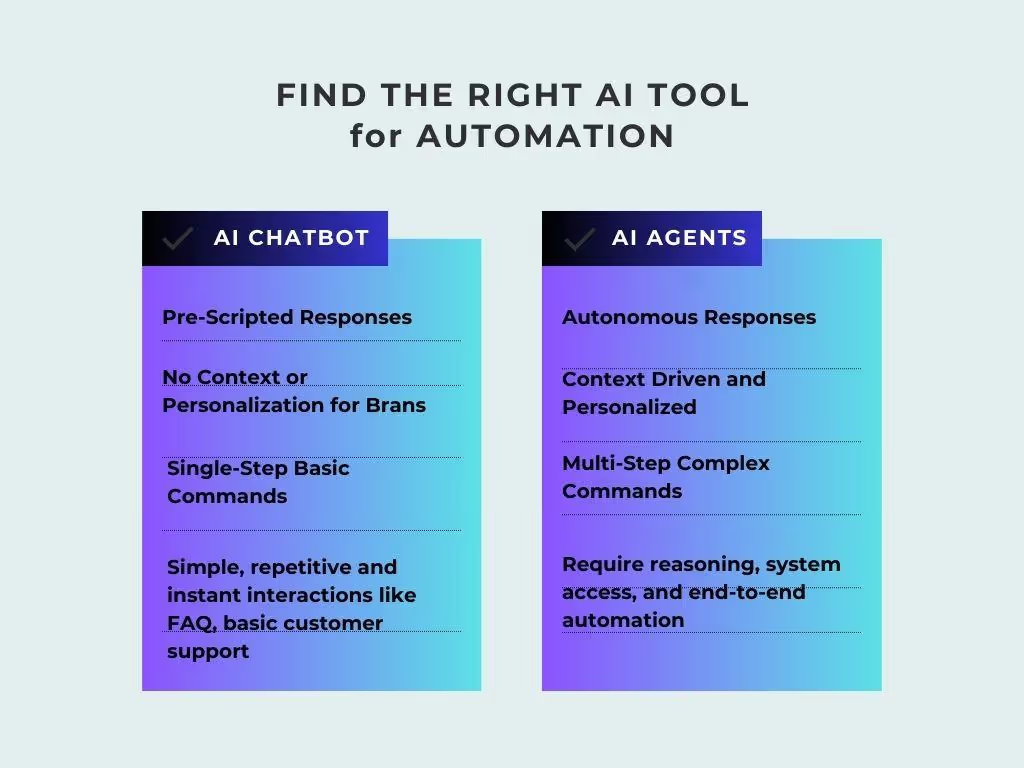
For starters, the difference between generic AI chatbots and operational AI agents is their ability to act.
- Generic AI Chatbots: Conversational AI that interacts with scripted queries, retrieves information, and executes basic tasks, such as finding FAQs, writing an email, etc. This software is reactive and rule-based. Powered by less advanced AI, chatbots require lengthy training and fine-tuning to respond accurately.
- Operational AI Agents: Autonomous and goal-oriented AI automation tools that can think, plan, and execute complex tasks, such as automating employee onboarding. Unlike chatbots, these AI employees are built on LLMs and trained on large datasets, making them better at context-aware interactions.
While chatbots are great at simple, one-step commands, their limitations are clear. Ask it to summarize your project meeting notes or compare different datasets. However, you will always have to rely on a human to check accuracy and follow up with actions. In comparison, AI agents are transformative for handling multi-layer, complex AI task automations.
Imagine a customer demanding a replacement as the order has not arrived yet.
Here is how an AI chatbot and an AI agent would respond.
AI Chatbot Response
The chatbot will craft a reply stating something like, “I am sorry to hear that. Please contact the sales team at [email protected] or call at 1-xxxxxx.” It cannot
- Search the order from the database.
- Check the tracking system.
- Issue a refund as per the business policy.
- Create a replacement order.
- Send a follow-up email.
AI Agent Response
The AI agent gets the same message but treats it differently. It interprets the message, understands the goal, breaks it down into tasks, and executes them autonomously from within your AI workflows. The approach would be something like,
- Searching the internal ordering system to find the order status as delayed.
- Next, tracks the order with the courier and finds that the package is stuck in transit for a week.
- Upon confirmation, the agent issues the refund. It asks the customer for payment details and issues a gift card.
- Then, refers to the inventory system to place a new order with urgent shipping.
- Emails the customer with a personalized apology and refund confirmation.
- Enter the conversation details into the CRM.
Evaluate Workflow Execution Capabilities
Not all AI agents are meant for you. Teams must assess whether their desired automation platform can handle their unique requirements. While doing so, here are some things to keep in mind.
Types of Agents
If you aim to employ autonomous agents to automate workflow, here are some main types you need to understand.
- Goal-based agents are developed to plan, execute, and adapt to achieve specific goals.
- Learning agents have dedicated learning setups that use historical actions and interactions to adjust their reasoning.
- Multi-agent systems (MAS) are AI assistants, each with a specific skill set, collaborating to solve a complex, multi-step business issue.
Ability to Adapt and Learn
Always look beyond the rigid AI agents. An assistant that learns from your data and improves over time to your unique business requirements must be a preference. This is especially important in areas like onboarding, HR, customer service, and operational workflows.
Context Awareness and Autonomy
Not all AI agents are developed to be autonomous. Some require constant human supervision or approval outside the AI workflow.
However, if you want to leave all high-frequency tasks entirely to AI, choose AI assistants that reason via context. Trained on LLMs and advanced decision algorithms, these agents handle edge cases and keep the processes running. With this, you can also program these AI workflow tools to loop in people when needed.
Orchestration and Scalability
Multi-agent systems with a centralized memory coordinate AI agents into a goal-driven system. Simply put, in such a system, autonomous agents collaborate and communicate via context to complete multi-step complex commands. This avoids conflicts and helps the agents adapt to your growing business.
However, not all agent systems possess this capability. For this, evaluate the following.
- How do agents share memory and context?
- How do the AI workflows handle dependencies and edge cases?
- What happens when the workload complexity increases?
Governance and Operational Visibility
AI workflow automations help businesses grow substantially. Yet, control should take priority. Ethical practices and strong data privacy standards are fundamental to maintain trust with customers, employees, and partners. Governance systems, such as monitoring dashboards, audit trails, access controls, and performance metrics, help business leaders trust AI assistants.
Prioritize Integration and System Compatibility
Your agent’s AI integrations potential determines whether it adds value or just creates isolated automation. Today, businesses rely on interconnected systems, including messaging apps, CRM tools, databases, knowledge inventories, and project management platforms.
To entertain this, your AI automation tools must connect seamlessly to these work platforms. So, make a list of your routine workflow tools and compare them with the desired agent systems. Here is a quick checklist to match each AI assistant against your business’s integration needs.
- Does the business automation software have native integrations with your work tools?
- Can you customize integrations with APIs?
- How does the platform handle information at rest or in transit?
- Can your desired AI agents trigger actions across multiple channels?
Assess Role-Based Automation Across Departments
Businesses don't run on single functions, and AI automations work the same. Different departments within your AI workflow (marketing, sales, customer support) demand differently abled agents with unique skill sets and expertise.
Imagine this: you need to launch an email outreach campaign for lead conversion. The manager would never ask an operational rep to write an email. AI helpers work the same way. To automate marketing tasks, you will need an AI that understands campaign briefs, brand guidelines, and content-related events.
Similarly, for support, an AI that has specialized knowledge about products, information retrieval mechanisms, and communication protocols is ideal.
Step 3 – Build and Deploy AI Workflows
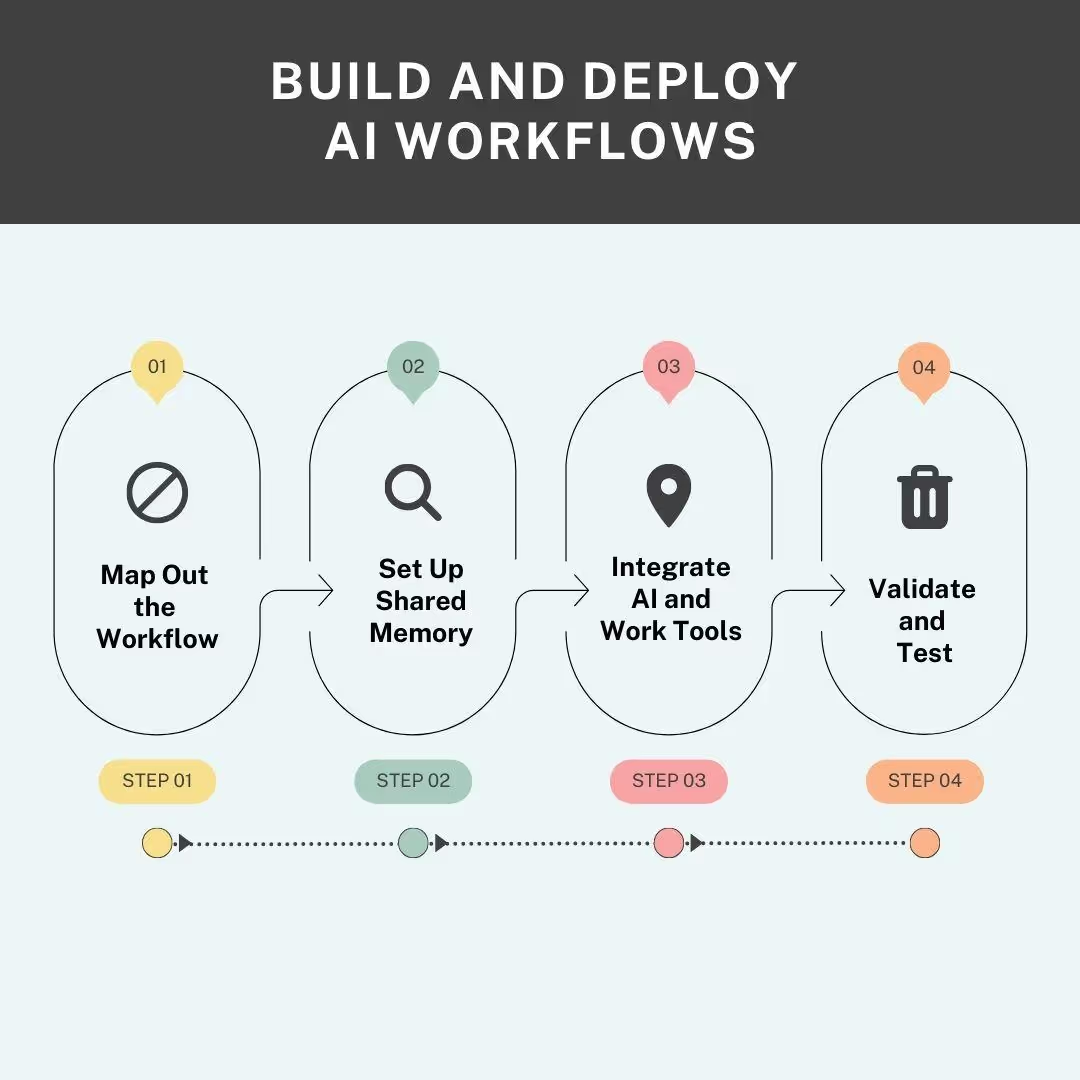
It’s time to build and deploy your first AI workflow automation.
Map Out the Workflow
Start by listing task sequences you want to automate. While doing so, you must be clear about key stages in the AI workflows, your business’s objectives, and user requirements. For instance, a startup might automate workflows like customer support, data gathering, and data analysis. This clarity helps structure the task automations effectively and efficiently.
Set Up a Communication Channel
Once you know the task sequences, it’s time to set up the communication channels for agents. In a multi-agent system, communication relies on a shared memory, such as Brain AI. This memory stores everything from your business documents to customer data. Agents use this memory as a context and execute tasks with consistent output and tone.
Let’s say you prompt an AI social media manager to generate a brand visual for marketing. It retrieves business information from the knowledge base and produces a response.
Integrate Workflows and AI Components
It’s time to integrate automation software with your routine work platforms. Usually, the process is simple. You choose from a list of integrations, enter login credentials, and that’s it. With this, you can also integrate relevant AI components, such as AI chatbots, goal-based automations, and more. Remember! Integrations are crucial to data flow and inter-agent coherence.
Test and Validate
Before deploying the setup under real-world conditions, you should test it on a small use case. Let’s say you use an AI copywriter to produce homepage copy and CTAs and post it on your website. Analyze website engagement and see how the users behave.
Step 4 – Scale, Govern, and Optimize AI Automation
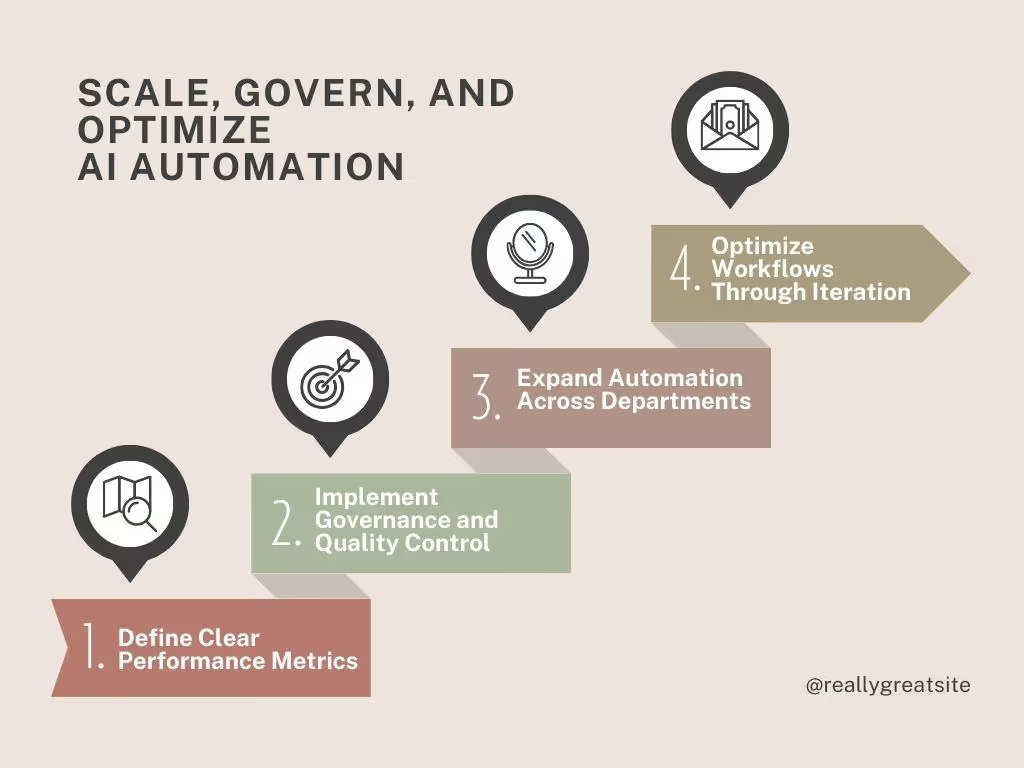
Once your AI automations are in place, the next step is scaling them strategically. And here is how you do it.
Define Clear Performance Metrics
Defining success in multi-agent AI automation software is possible with clearly defined KPIs (Key Performance Indicators). These metrics not only help you quantify the results but also show how effectively the agents interact within the system throughout.
Here are a few common performance metrics you can employ to analyze your productivity automation.
- Action Completion - Check if the agent fully accomplishes the desired goal and provides clear answers for every request.
- Tool Selection Quality - Determine if the agent triggered the right actions as per the query.
- Tool Error - Detect failures during the agent’s attempt to use external tools and APIs during task execution.
- Agent Efficiency - Evaluate how effectively the agent uses resources, time, and actions, with consistent and high-quality outcomes against the cost applied.
- Context Awareness - Evaluates whether the responses are guided by context or hallucinations.
- Correctness - Measures the accuracy of responses through systematic chain-of-thought analysis.
- Instruction Adherence - Analyze how consistently the agents follow prompt instructions when producing responses.
- Conversation Quality - Evaluate the coherence, relevancy, and user satisfaction across interactions.
- Intent Change - Monitors how and when user intentions change during interactions and adapts accordingly.
Implement Governance and Quality Control
Many undermine it, but it’s crucial to set up governance protocols for your autonomous AI agents. It helps businesses manage risks and optimize performance.
For starters, basic single-agent governance guardrails are enough. Some common ones include human feedback loops that put a human rep for overseeing the agent behavior, adversarial testing that builds resilience against real-world scenarios, and output controls by applying post-processing checks.
With multi-agent systems, you need to go beyond basic AI workflows and governance practices. This is because in such systems, the complexity grows as agents collaborate and communicate for decision-making. Here are some ways you can promote quality control in your automation platform.
- Applying multi-layered governance models with pre-filters, real-time monitoring, and post-prompt checks to see how agents are adjusting to user queries.
- Establishing MAS constitutions with clear rules and principles to guide interactions. This is especially helpful in high-stakes situations.
- Setting up secondary role-based agents (managers and contributors) to oversee agentic operations throughout the automation software workflows.
Expand Automation Across Departments Strategically
Most AI workflow automation platforms have consistent patterns: one agent is only for one problem. Automated email campaigns are for marketing, lead-scoring efforts are for sales, and so on. Everything works on the surface, but there is no data sharing between these use cases.
The problem: a stack of business automation tools that don’t coordinate and create more issues than solving them.
The solution: You shift from isolated task automation to organization-wide deployment. And here are the fundamentals you must work on.
- Shared knowledge base that acts as your agent’s business playbook. It stores all your business data, usage guidelines, and company goals, providing agents with context. So, when a marketing agent tags a lead as high-intent, the sales team can pick from there.
- Standardize triggers that any agent’s automation can subscribe to. This establishes coordination between the agents and helps optimize performance.
- Feedback loops that share reports in the shared system for all agentic teams to easily access. If you lose a lead, the signals should dictate marketing strategy, sales’ efforts, and support rules for escalation.
The result looks something like this: A marketing team automated lead nurturing using triggers like page visits, downloads, etc. Upon qualifying a lead, the agent enters the data into the shared CRM (buying signals, lead score (>80), etc). Enter your sales agents. It creates a personalized outreach sequence. And, once it successfully converts the lead, the customer support agent comes in, helping them make purchases, recommend products, and more.
Optimize Workflows Through Iteration
Deploying AI workflow automation is only the first step of the agent management process. Once deployed, you must put effort into constant refinement and optimization. Such efforts over time help you improve performance. Here is how it goes.
For starters, prompt refinement is crucial. A slight change of words can dramatically change the output’s consistency and quality. Also, you have to be mindful that it’s not a one-time task. Once an unexpected situation occurs, see it as an opportunity to improve the prompt.
Sequencing tasks to automate workflow is unlike theory. In practice, a small issue can get bigger. Let’s say a step happens before the data (the step relies on) feeds into the system. The solution: regularly try to improve sequencing. Ask yourself if the order of steps is reflective of how things are done in your business setup.
Moreover, automation tools' rules are temporary, depending on what signals at a time mean. A lead threshold of 60 might’ve made sense, but if the sales team proves to close deals at an even lower score, the rules change. Hence, rule adjustment should be your priority. And, it should be backed by data-driven insights.
Measure ROI and Long-Term Business Impact
Having a clear plan to measure the success of your AI automation is important. It proves that your productivity automation setup works and helps meet your business goals. At its simplest, measuring the ROI relies on these three stages.
Start by defining what success means for you. Is it reduced time, increased output capacity, or fewer operational errors? Each goal has different metrics. For instance, a healthcare setup defines success as reduced admin time, while the finance department may focus on risk prediction.
Once your goal of using automation software is clear, it’s time to put metrics in place. Balance quantifying indicators (processing speed, time saved, or cost reduction) and qualitative improvements (better customer experience or personal productivity).
AI agents are developed for continuous learning, and your ROI measurement process should also adapt. Let’s say emphasis on cost saving led to you missing long-term growth. For that, feedback loops might be a better option.
Real AI Task Automation Examples Across Teams
AI task automations work strongest where assistants can communicate and execute tasks. Here are some examples across departments to help you visualize how organizations use automations to drive productivity at scale.
Marketing AI Task Automation Examples
Approximately 51% of marketers use AI tools to optimize content. As AI evolves, there are endless opportunities for marketers to employ AI automation tools and create personalized, scalable campaigns that convert.
- AI Predictive Analytics and Customer Segmentation: Marketers use AI automation tools to process huge amounts of customer data and make predictions. Let’s say it processes your business’s conversion data to tell whether the conversion was triggered by an email or social media promotion.
- Hyper-Personalized Content Generation: Gen AI assistants help businesses create multimodal marketing content: images, text, and videos. On top, the AI SEO agents ensure the copy is visible to search engines.
- Improved Campaign Optimization: Monitoring your marketing campaign’s performance is simpler with AI-driven tools. They track selected KPIs and provide real-time feedback for actionable insights.
- Lead Scoring and Sales Automation: Salesforce reports that 98% of sales teams think automated lead scoring improves lead prioritization. Here, the AI agents use algorithms to analyze user interactions and past patterns to forecast which lead has the most potential to convert and drive sales.
- Conversational Chatbots: Conversational AI agents help businesses craft more personalized customer service. Let’s say an AI Email assistant receives the leads’ scores from the sales agent and writes a personalized outreach message.
Customer Support AI Automation Examples
Today, with numerous online businesses, customers expect more than ever before. They want fast answers, up-to-date FAQs, and seamless ticketing experiences. Thankfully, AI in customer service offers both efficiency and user satisfaction.
- Automated Ticketing Systems: AI automates ticket creation by letting visitors ask questions via a bot or “Contact Us” forms. Once received, the AI prioritizes tickets based on urgency and complexity. This removes the biggest bottlenecks in customer support.
- AI Chatbots: Conversational bots are most common in customer service. They are used for varying reasons, including automated customer interactions and repetitive order-related inquiries.
- Sentimental Analysis: Businesses use AI support agents to identify how a customer feels with the ticket request. Capable of analyzing sentiments, these agents can recognize patterns that help customers and inform their strategy.
- Data-Driven Improvements: AI is also helping businesses improve customer service via past interactions. It analyzes tickets, order entries, and agent notes to identify gaps in the strategy and resolutions.
Sales and Lead Management Automation Examples
Sales teams using AI report a 40% increase in productivity and 25% reduction in sales cycle length. Here are some ways you can also benefit from sales business automation.
- Automated Lead Scoring and Qualification: AI-powered scoring tools rank leads based on behavioral data, engagement signals, and firmographics. These systems connect to professional platforms (LinkedIn) to extract key prospects and update their details in the CRMs.
- Smart Meeting Scheduling and Follow-Ups: AI sales managers help you find the best meeting time, handle calendar events, and send frequent reminders if someone does not answer. After the meeting, these assistants also summarize key points, generate follow-up discussions, and draft emails to keep things going.
- Sales Forecasting: AI-driven forecasting tools use historical data, communication patterns, and routine user activity to manage risks and opportunities. Businesses use them to identify flag deals, poor engagement signals, and valuable insights in real time.
- Personalized Sales Outreach: AI outreach automation platforms craft tailored messages for individual prospects using information like their role, company size, and qualifications. Instead of sounding generic, these systems use NLP to mimic humans and sound relevant.
E-commerce and Product Operations Automation Examples
AI task automation in e-commerce helps businesses increase conversions, reduce costs, and improve customer service, with zero manual intervention. Here are a few examples you can replicate in your automation workflow.
- Abandoned Cart Tracking and Recovery: E-commerce agents can now detect when a customer abandons the cart. Once recognized, these agents send personalized messages to recover them via email, WhatsApp, or chatbots, improving conversions significantly.
- Automated Returns and Claims: Autonomous AI agents can process returns with minimal human interference. These agents validate requests, label them, and notify the customers in real time, reducing logistical errors and improving post-sales experience.
- Automated Post-Sales Recommendations: After a sales event, AI assistants send complementary products, tailored recommendations, and more based on a customer’s history. This promotes repurchase and maximizes revenue opportunities.
- 24/7 Customer Service: Businesses with high order volume use chatbots to resolve customer queries regarding shipping, payments, returns, or availability. It reduces the response time to half.
- Intelligent Recommendations: Ecommerce AI agents use your browsing history and previous purchases to suggest personalized product recommendations. This promotes enhanced user experience and increases conversions.
Reporting and Data Automation Examples
AI data automation refers to the use of artificial intelligence in managing, processing, and using data across platforms for improvements. The following are some ways AI data analysts are helping businesses achieve more.
- Automated Data Ingestion, Cleaning, and Integration: As businesses expand, the data from CRM, ERP, e-commerce, and analytics platforms becomes overwhelming. AI data analysts automatically collect, clean, structure, and merge data from across channels to facilitate informed strategy planning.
- Document Handling: AI tools eliminate bottlenecks caused by manual data entry from unstructured data (invoices, contracts, images). These agents extract information from complex, unstructured data into machine-readable data.
- Reporting and Predictive Insights: AI business strategists help operational teams act proactively via AI-driven suggestions. This includes reasons customers churn, detecting data anomalies, or recommending the next best action.
Cross-Department Workflow Automation in Action
Automations yield maximum outcomes when they are connected across departments. Simply put, when the output from one assistant becomes the input for the other, the system truly becomes productive.
Imagine a marketing team executing an automated campaign. Once the campaign goes live, the AI marketer tags every lead (with potential to convert), scores them, and enters the details into the CRM automatically.
The sales agent resumes the process directly from here. It picks every lead’s entry point to narrow down high-signal conversions. For instance, a lead who read the pricing page twice is flagged for same-day outreach, while one who downloaded an e-book will wait until intent signals trigger action.
Common Mistakes That Break AI Workflow Automation
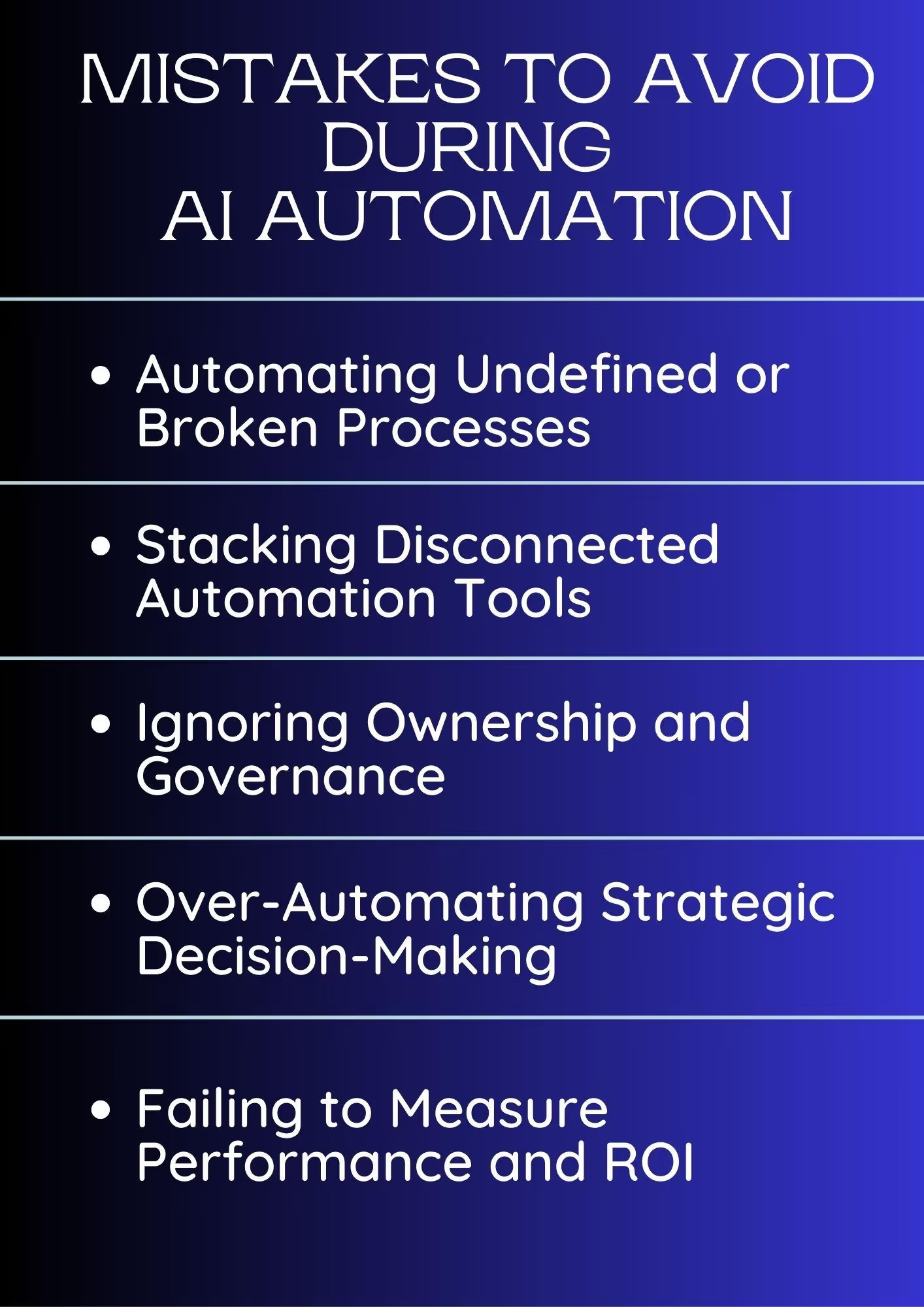
Automating workflows is not just about plugging into a new platform. Rather, it is about aligning the technology with your unique strategy, data, and employees. As companies try to embrace this technology, here are some hidden pitfalls they stumble over.
Automating Undefined or Broken Processes
Most companies rush to automate workflows just because everyone else is doing it. Automations without a carefully outlined strategy indicate you are not adding any value to the routine.
Let’s say a tech startup wants to automate its customer support. However, they have not defined what success means or KPIs to measure the outcomes. They will most likely end up with misaligned expectations and overwhelming resources.
Stacking Disconnected Automation Tools
When each team has a dedicated tool, the result is a stack of disconnected tools. One assistant does not talk with the other, and there is no shared memory. The agent planning the campaign does not enter details into CRM, sales reps are manually retrieving information, and support teams navigate on a helpdesk system that other assistants will never see.
When the workflow becomes fragmented, no one knows what is actually happening. Business owners and project managers cannot trace why the content or campaign is underperforming.
Ignoring Ownership and Governance
AI task automation without governance can turn risky, as security breaches and operational failures stem from inadequate human oversight. It is especially concerning in marketing, where you are dealing with customer data, brand voice, and third-party platforms. The results: you lose ROI, customers no longer trust you, and the brand’s reputation takes a blow in the market.
Over-Automating Strategic Decision-Making
Handing over everything to AI can be tempting. But rushing automations and eliminating human judgment from processes entirely can result in operational errors and erode trust. A study conducted by SHRM suggested that rushed AI automations harmed employee engagement, attributed to the lack of communication and training during the initial phases.
Let’s say a bank has an AI-driven loan-approval system with no human supervision. In the absence of human oversight, the system can misjudge applications, deny loans, or approve inadequate profiles. This can lead to customer complaints.
Failing to Measure Performance and ROI
Most companies deploy AI workflow automations and forget about them. No KPIs to follow up on success, time saved, response speed, or cost reduction. In such a case, where you don’t know which direction the business is growing, scalability becomes impossible.
Expanding Automation Without Proper Integration
AI thrives on quality data. Task execution is as good as the data and integration potential. If your system lacks this, it will inevitably result in siloed systems that don’t collaborate and communicate. What you will end up with is a stack of disconnected tools and faulty outputs.
Ready to Automate Your Workflows with AI?
There you have it - all about AI task automations and how you can use them to your business's benefit. Always remember! The selection of tools makes all the difference. Autonomous agents that communicate through a shared memory, like Sintra’s MAS, are an excellent way to improve productivity and reduce operational costs.
Plus, it’s a no-code platform, so there is minimal setup involved. Get started with Sintra today and see how it works for you.
AI Task Automation FAQs
What is AI task automation, and how does it work?
AI task automation refers to the use of artificial intelligence, NLP, and machine learning to execute daily repetitive tasks without human interference. Unlike traditional automations, this process runs on shared memory that helps agents make autonomous decisions and improve constantly with new queries.
What tasks should you automate first with AI?
You must automate workflows that are repetitive and high-frequency. Common examples are email management, meeting transcriptions, report generation, data entry, and customer service.
How long does it take to implement AI workflows?
It depends! Implementing an AI task automation can take anywhere between two and four weeks. For instance, no-code multi-agent systems like Sintra are quick and do not take more than a few days.
What are the risks of AI automation?
Thought great at handling repetitive work, AI automations bring significant risks, including data security breaches, governance issues, algorithmic biases, and no transparency in decision-making. Hence, organizations need to ensure that their AI implementations comply with industry-specific standards, such as GDPR General Data Protection Regulation and SOC II.
How do AI workflow automation tools differ from traditional automation software?
Traditional process automation software relies on rule-based pre-scripted responses. In comparison, AI workflow automation tools use sophisticated machine learning and LLMs to handle unstructured data, contextual awareness, and shared memory to make autonomous decisions in real time.
Related articles



.avif)




