


How to use AI as a personal assistant

Table of Contents

Quick Answer
To use AI as an assistant, start by setting a clear purpose for using it. Once you're done, do your research and choose an AI virtual assistant, such as Sintra Gigi, Google Alexa, etc. Set it up by setting your preferences, connecting it to your productivity tools, and begin delegating tasks. Ask it to schedule meetings, summarize documents, and more.
Learning how to use AI as a personal assistant is a must for businesses. Whether a busy corporate official, small business owner, or just a tech-curious person, AI employees have become the need of the time.
AI-powered virtual assistants have transformed how we interact with technology and manage routine tasks. They are available when you need them to handle the digital busywork - which matters more than ever given that knowledge workers spend 60% of their time in Microsoft 365 on emails, chats, and meetings, leaving only 40% for creation work like writing and analysis.
But this does not mean you can rely on them completely, especially when dealing with sensitive information. Want to explore more about AI as a personal assistant? Keep reading and set up an AI personal assistant, always ready to help you through a workday.
What It Means to Use AI as a Personal Assistant?

An AI personal assistant, or VA, is an AI program that helps you navigate work in both personal and professional capacities. It uses advanced NLP, CRM data, deep learning, and predictive analytics to mimic a human conversation. With these capabilities, you can ask them to plan your travels or clear bills, send emails, and more.
Many people think only of ChatGPT or Alexa when using AI as an assistant. These are your general-purpose chatbot assistants. They respond to your queries and perform tasks once assigned.
But there are more specialised ones, such as Apple’s Siri and Sintra’s Gigi. Unlike traditional chatbots, these specialist personal assistants have a dedicated knowledge base like Brain AI.
This space helps them learn your style, understand your work, and handle digital noise that is eating your day. Professionally, they manage your calendar, communicate on your behalf, etc. In a personal capacity, modern voice assisted AI can also help you control your smart home devices.
Step-by-Step: How to Set Up Sintra AI Helpers
Check out this detailed guide on how to set up Sintra AI personal assistants in minutes.
Step 01: Register an Account
Begin by setting up your Sintra account. Here is how it goes.
- Once decided on your desired subscription, visit the Sintra login page.
- Enter your mailing address and click Continue with Email.
- You will receive an OTP code on the registered email. Use it to complete the process.
Step 02: Set Up a Knowledge Base
Before you activate Sintra’s AI personal assistants, it’s better to set up the Brain AI. For starters, it is a central knowledge base for your business. Here, your AI personal assistant can find all relevant data, from your emails to essential documents, and more.
Follow these steps to set up this space.
- Visit the Brain AI section from the dashboard and locate the All Knowledge tab.
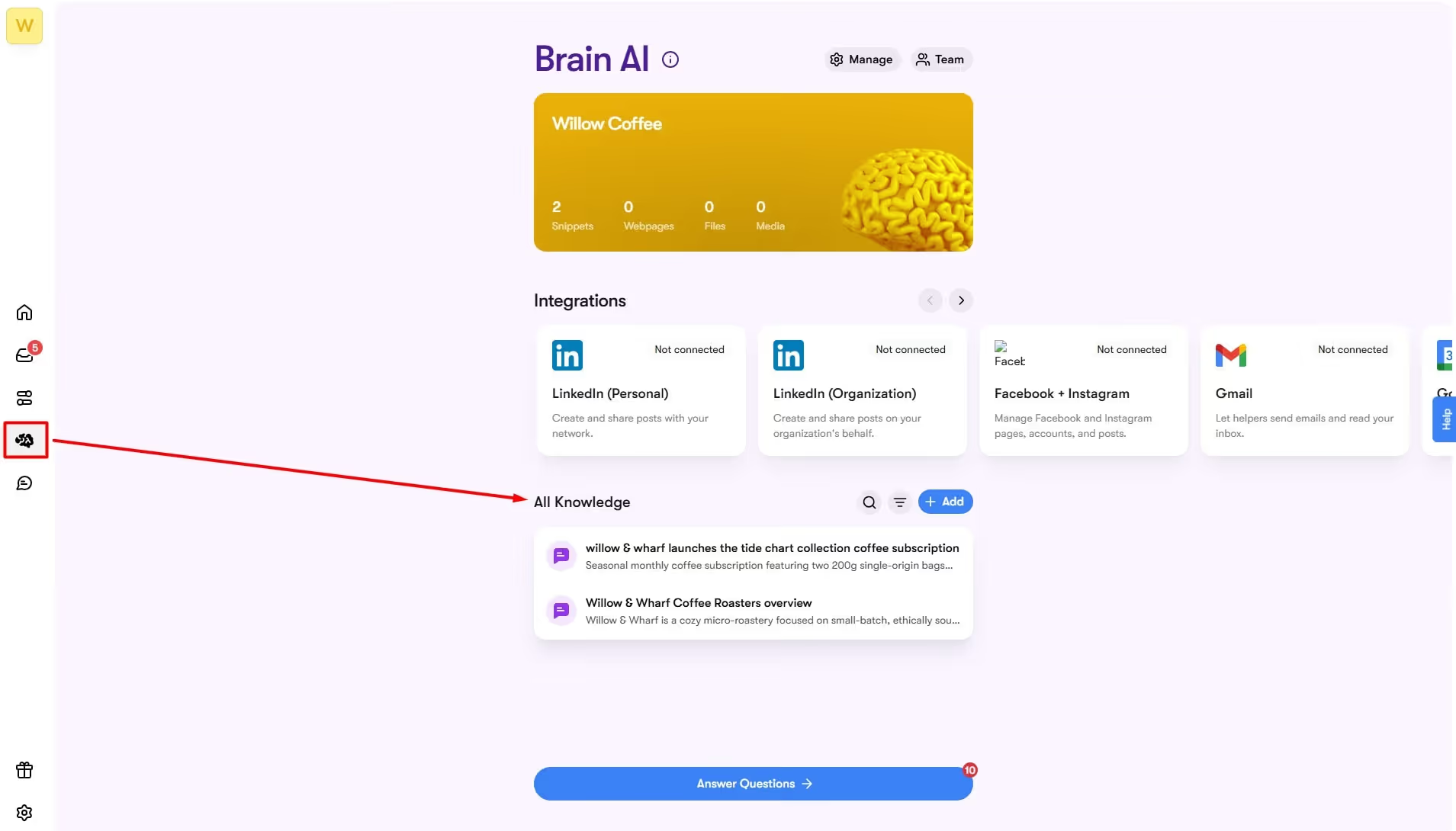
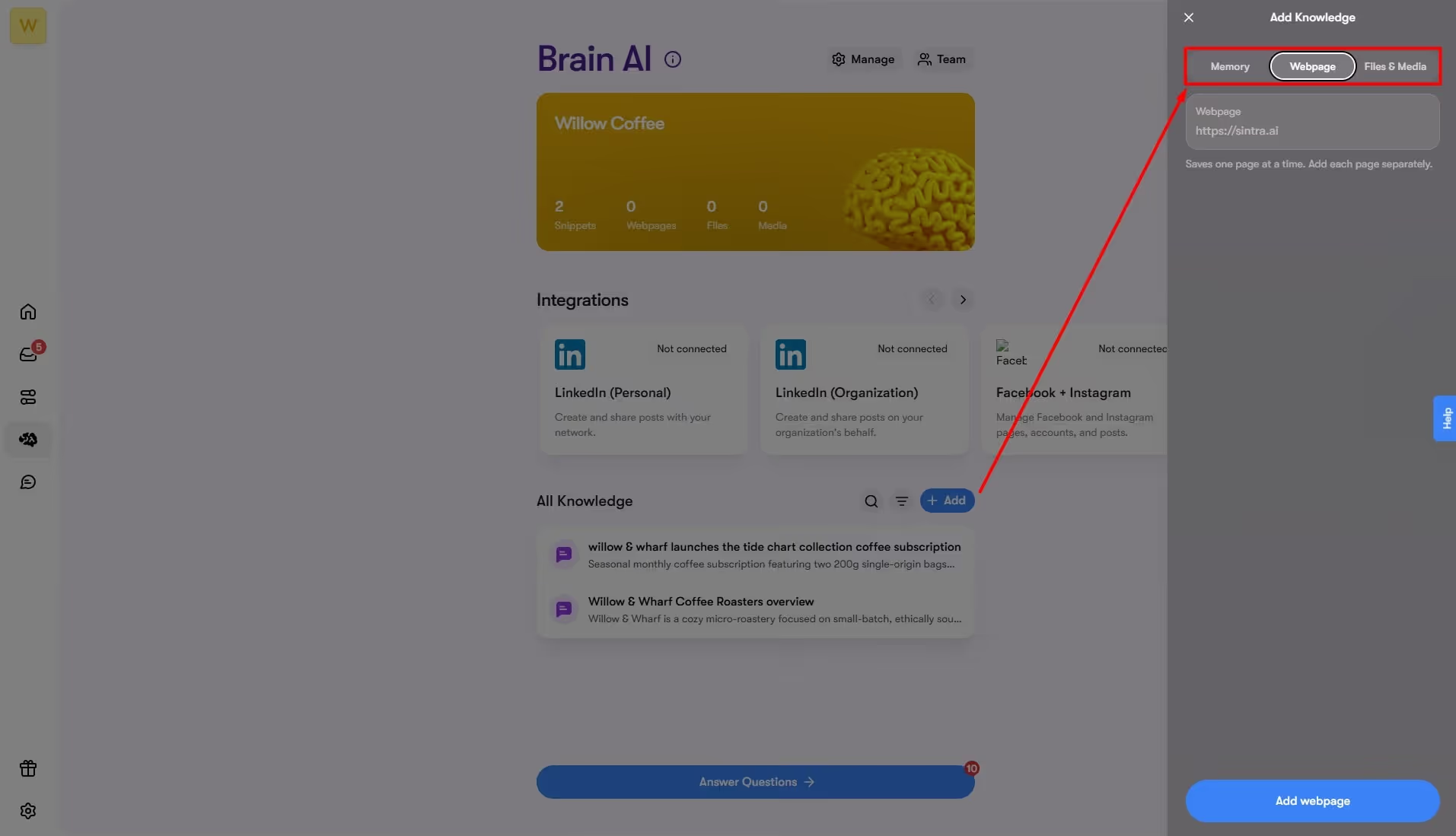
- Click Add and insert your data. You may enter supplementary notes, documents, images, URLs, and more.
Step 03: Activate Your Personal Assistant
Once done, proceed to activate your personal assistant.
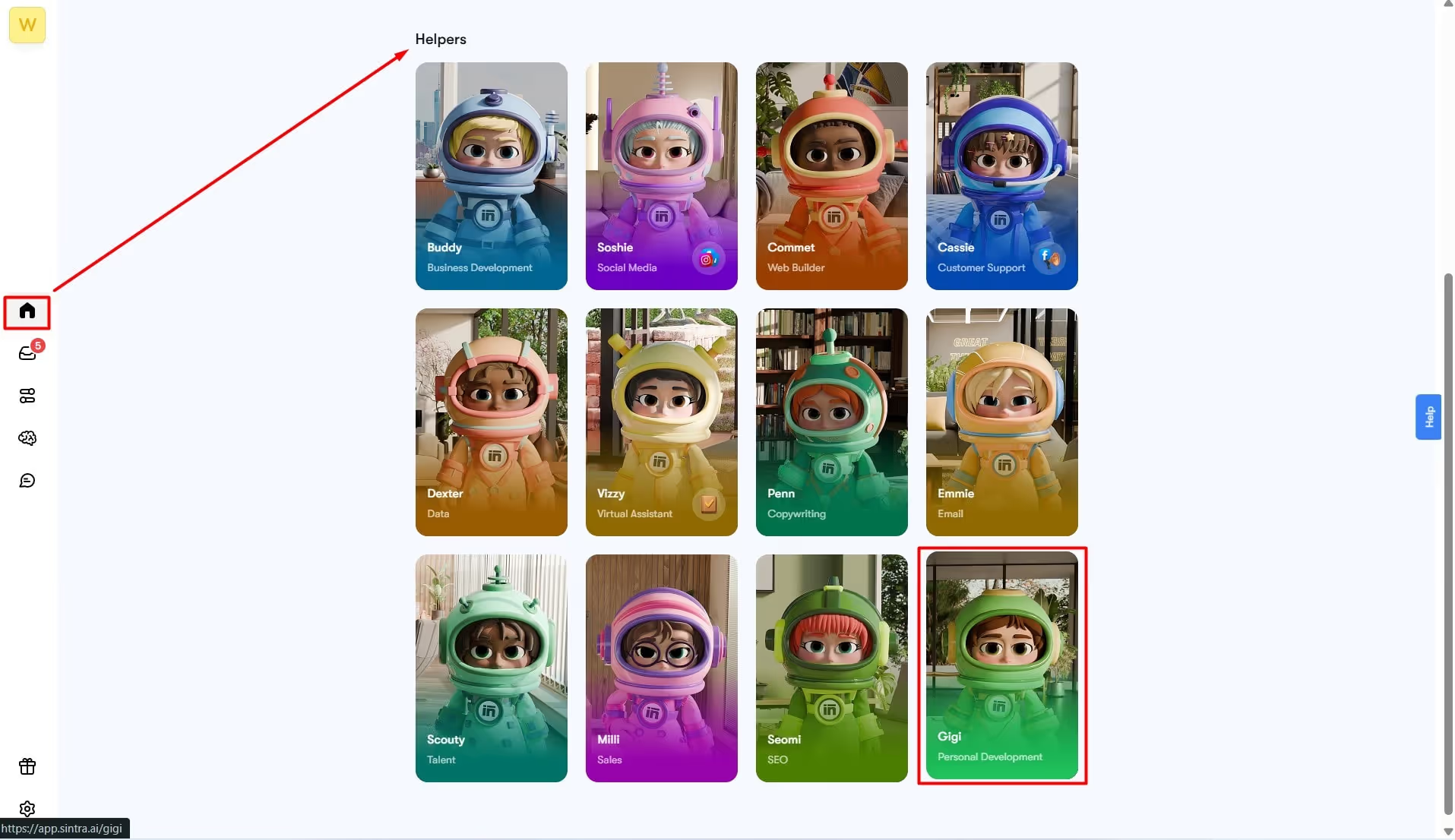
- Open the Home section from the dashboard and locate the AI Helpers tab.
- Choose Gigi - AI personal assistant from the menu. It will take you to the chat interface.
- Click Settings from the left-side panel and personalize it. Adjust language preferences, set a unique colour, provide custom instructions, etc.

Don’t stop here and use Sintra's built-in AI integrations - quick and easy to set up. With this capability, your AI virtual assistant seamlessly integrates into the specialized industry tools and automates tasks specific to your domain. Here is how you can set them up.
- Locate the Integrations tab from the Brain AI section on the dashboard.
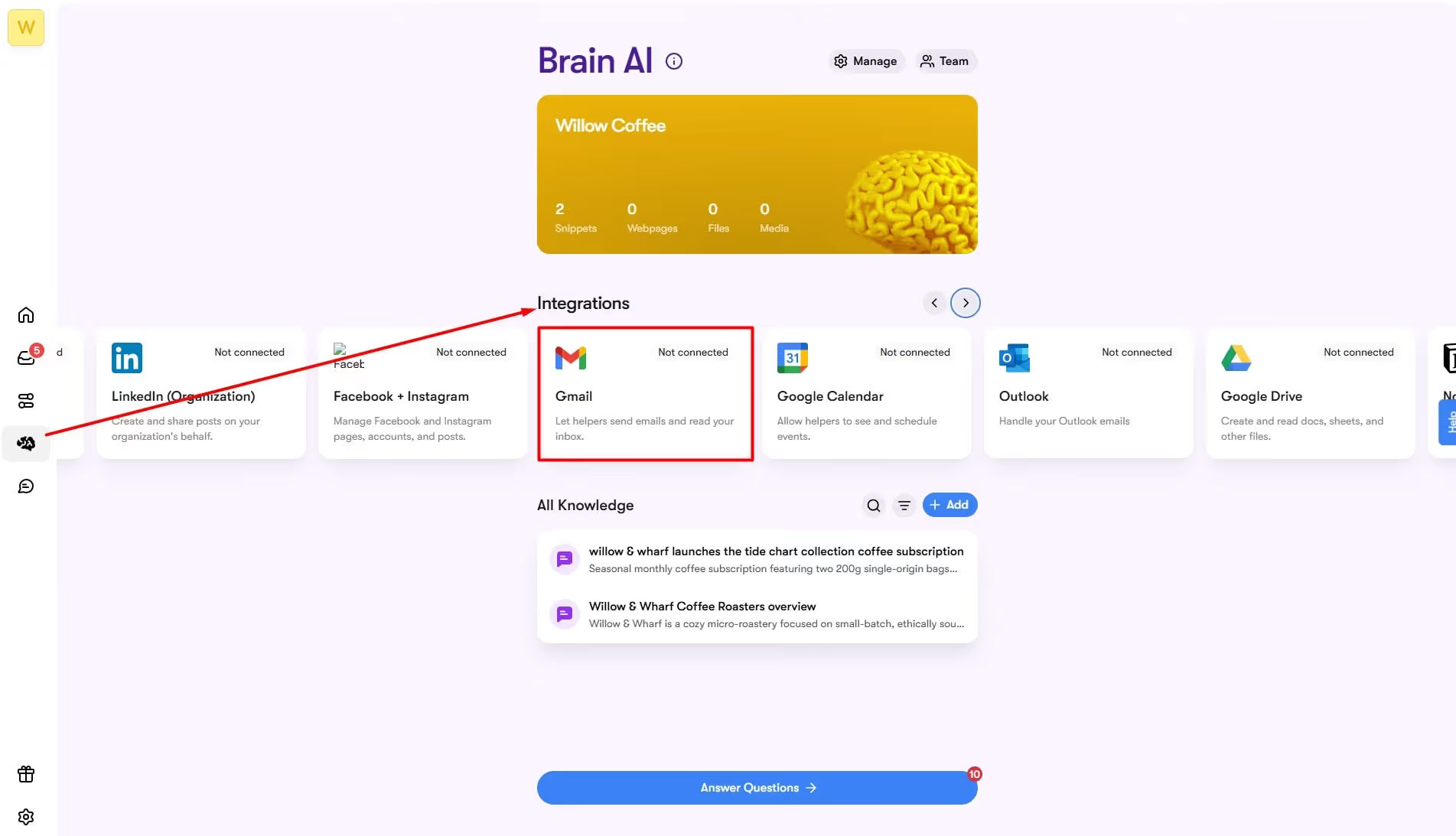
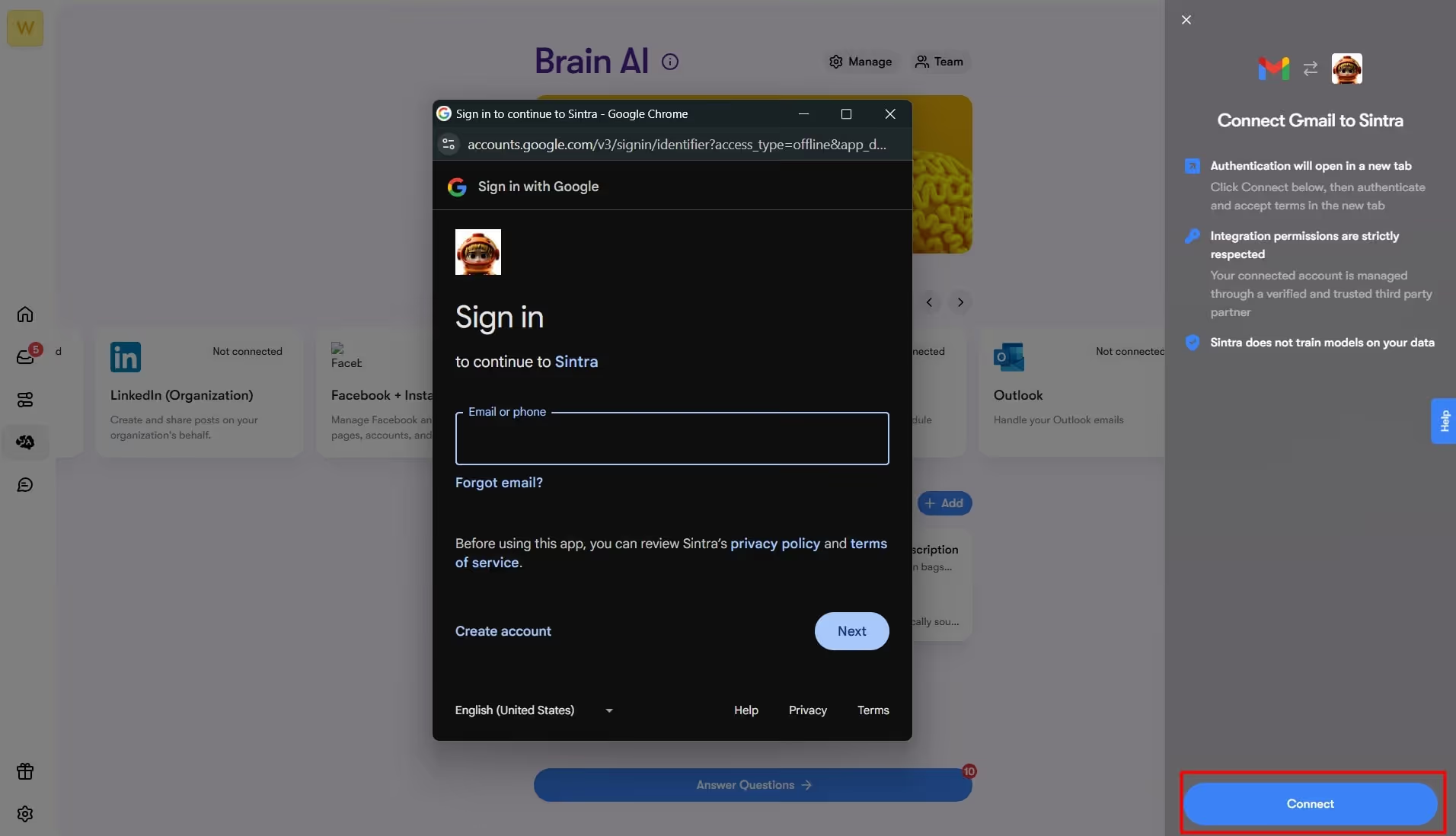
- Select your desired platform (Gmail, Outlook, Shopify, etc.) and click Connect.
- Enter your login credentials and follow the instructions.
Step 04: It’s Time to Test!
Congratulations, your AI personal assistant is all good to go. Let’s check how it performs for your routine tasks.
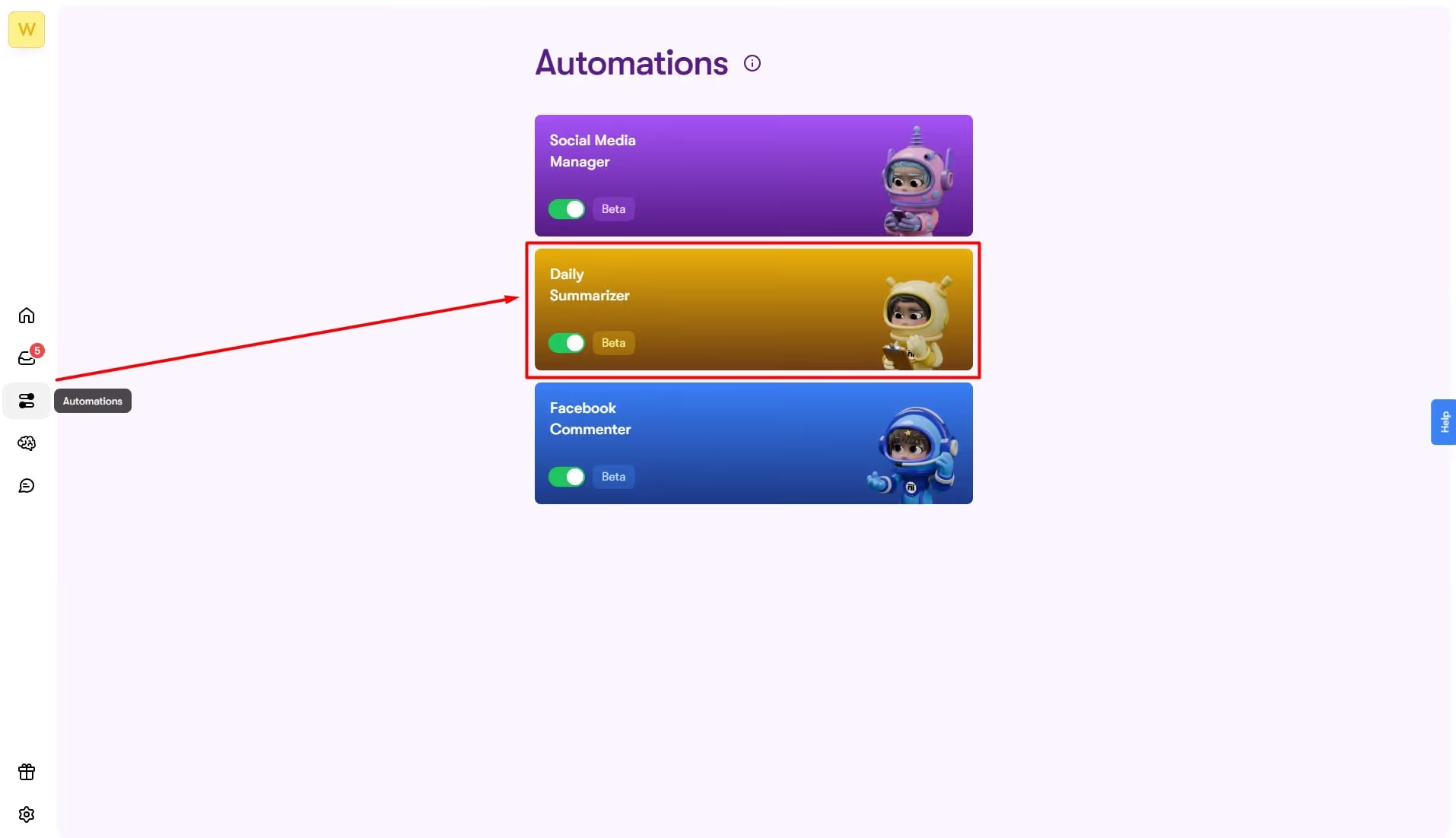
- Go to the Automations tab from the dashboard and click Daily Summarizer.
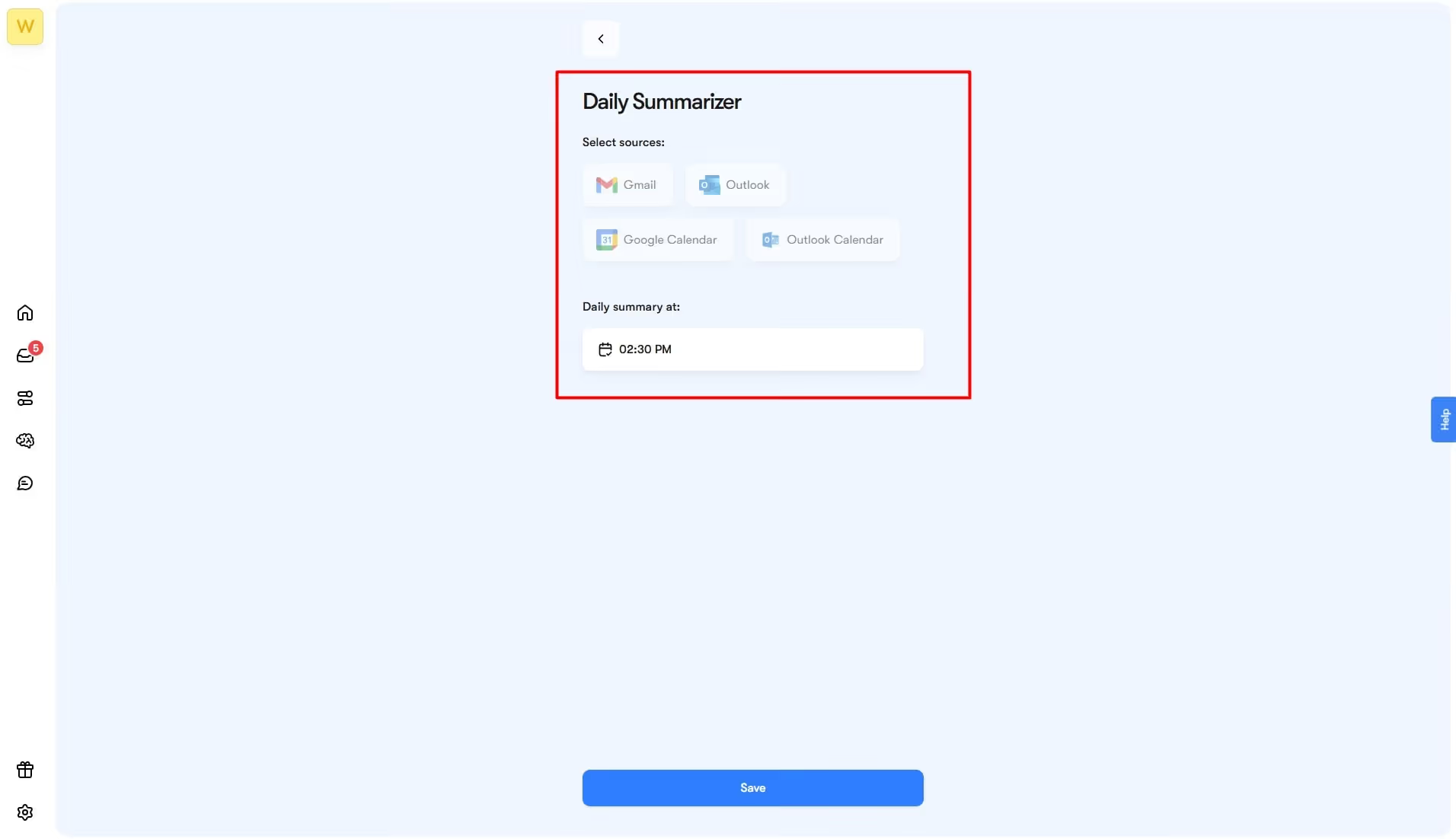
- Click Set Up, enable your desired platform, and select timing for the summary. Once decided, click Confirm.
Now, you can check the daily summaries with a few clicks. For this,
- Go to the Home tab and click Use Cases.

- From the list, choose Summarize Today’s Emails, and it will display the summaries of all received emails in a chat interface.

Test it for different AI personal assistant use cases and see how it works for you.
Common Personal AI Assistant Task List
Learning how to use AI as an AI personal assistant requires careful thinking. You cannot dump all on it, thinking of it as a magic move. Instead, having a personal assistant task list to their AI capabilities can help you plan better.
Admin Tasks
Assistants like Gigi and Vizzy are excellent at catering to admin tasks, such as
- Manual data entry
- Tracking expenses and recording purchases
- Organizing files and sorting folders
- Updating CRM in real time
Communication Management
Personal copywriters and email marketers, Penn and Emmie, can help you convey your message while maintaining recipients' interest.
- Drafting personalized emails and responding to the answers
- Generating professional follow-ups.
- Writing and scheduling outreach messages
Calendar Coordination
AI assistants are built to handle planning on your behalf. Gigi does that by
- Managing calendars, setting reminders, and prioritizing essential tasks.
- Scheduling meetings across remote teams with different time zones.
- Marking daily and weekly agendas in the calendar.
Content Creation and SEO Optimization
With VAs like Seomi and Soshie, you also don’t have to worry about crafting content and optimizing it for your search engines. Here are some things these assistants can do for you.
- Generating original blog posts, newsletters, and social media captions.
- Proofreading content for grammar, tone, and style.
- Repurposing articles on websites.
- Keyword and clustering research.
- On-page SEO suggestions, including meta title, description, etc.
Practical Virtual Assistant Use Cases
Let’s find out more about how businesses are using AI personal assistants to make their lives better and easier.

How to Use AI as a Shopping Assistant?
AI can truly revolutionize shopping, leaving both the business and customer satisfied. IBM Watson Assistant is a powerful AI virtual assistant, designed to help businesses with customer support. Such VAs support the shopper throughout their journey, whether by understanding their preferences, recommending products, or helping them make a purchase.
Imagine you need a laptop that’s affordable and apt for video editing. An AI personal assistant is tasked with helping you make a purchase.
It will first pull out data from the knowledge base to learn about your previous purchases, interactions, and demographics. Depending on these insights, the assistant will connect with the product base to help you with available options and narrow down the final laptop.
Once you’ve decided on the product, simply prompt the AI shopping assistant to complete the purchase via the system's integrated payment protocol. Businesses can also program AI assistants to provide around-the-clock customer support, answer their queries, resolve issues, and more almost instantly. Learn more about how Click Hive, a marketing agency, used Sintra’s VAs for proactive sales processes.
How to Use AI as an Administrative Assistant?
That’s not it. Your AI virtual assistant, Gigi, also manages your busy schedule by seamlessly integrating into your workflow and getting the job done. Let’s find out how.
For starters, it plans your entire week by scheduling meetings, setting reminders, and sorting out team activities, all with no effort. You can also customize it to understand your priorities better and allocate time for them effectively.
To make things even easier, Gigi transcribes your meetings like a human assistant. It generates key insights, records decisions, tracks follow-up emails, and offers suggestions. With most of your admin tasks covered, you have ample time to engage with stakeholders.
Furthermore, modern AI agents can also be personalized to your specific industry platforms. For instance, Simply Precious Hands, a wellness company, used Sintra AI helpers as an administrative assistant for performing the proper diagnosis by analyzing customers’ previous medical history and responding to emails.
How to Use AI as an Executive Assistant?
Want your workdays sorted and stress-free? Add an AI assistant to your routine. Traditional VAs might just answer your questions. But the best AI assistant is one that tracks routine tasks, communicates on your behalf, records meetings, and more. Let’s find out how to use AI as a virtual assistant.
- Calendar Optimization and Task Management: VAs like Gigi sort your team activities by directly managing your calendar. It handles everything from setting reminders to scheduling meetings, tracking deadlines, and resolving conflicts. So, you don’t always have to micromanage.
- Sort Meetings: Conducting meetings is no issue with Gigi. This VA checks the team member’s availability, sends emails, and prepares proposals - all in minutes. You can also personalize it for follow-up action suggestions, mark priority emails, refine drafts, and go back and forth with feedback.
- Promotes Communication: Using AI as an executive assistant to communicate on your behalf can declutter your entire day. It acts as an internal chatbot that responds to team queries, handles questions, and evaluates policies. Plus, with this, handling repetitive tasks like documenting payroll or sending references is no longer a headache.
Using AI as a Research & Analysis Assistant
Yet another role a VA assumes is an always-present research partner. Beyond simply pulling relevant information, data analysts are trained to help users better interpret it. Here are some ways it is helping businesses achieve more.
- Competitive Research: Using AI as a research assistant means you are always ahead of competitors. Smart VAs like Gigi can analyze competitors’ websites and see what customers are saying. Accordingly, it helps you craft content with the most impact - feature pages, blog posts, or social media assets.
- Proactive Recommendations: Gigi is capable of predictive analytics and sentiment analysis. Simply put, it helps them track keywords, emotions, and intent in the Brain AI data. With these insights, the assistant gives you a highly personalized experience.
- Automatic Report Generation: Generic VAs give you helpful summaries. But Gigi does not stop here. Built on continuous learning from user interactions, this virtual AI assistant automates report generation, highlighting the key points, risks, and benefits that may be beneficial to you.
Using AI as Your SEO Assistant
Your VA also knows how to act as an AI SEO agent. Rather than juggling tasks and programs, it helps teams work in a centralized space and make faster, smarter decisions. Let’s see what using AI as your SEO assistant means.
- Keyword Detection and Competitor Search: Seomi can identify high-impact opportunities with search intent and trending key topics. Beyond that, it helps businesses focus on long-term targets by spotting what’s working on competitors’ sites. With this information, you can better plan and position the content.
- Content Planning: That’s not it. VAs turn your research into action. It helps you plan SEO-friendly content, suggest headings, and more. With this, you can also plan content that matches the search intent.
- Rank Optimization: Beyond content planning, VAs like Seomi rank your content by analyzing keyword movement and evaluating performance. It also knows when to get in and suggest improvements before the traffic drops.
Using AI for Social Media, Sales, and eCommerce Tasks
Modern personal assistants go beyond helping with admin and research tasks. Today, you can also employ them to support effective marketing and sales processes. Here are some other virtual assistant use cases you can also try to simplify your life.
Social Media Management
Your social media marketing no longer takes effort, all thanks to VAs. AI social media managers craft posts and publish directly according to your campaign. The best part: they know what your audience likes and adapt the messaging accordingly. You can employ AI virtual assistants to generate original content based on user inputs or predefined parameters.
E-commerce Management
Another area where VAs are leaving the most impact is e-commerce. Let’s take Sintra’s e-commerce AI agent, for instance. It helps shoppers find the right products, make purchases, and leave satisfied. Moreover, it analyzes customer segments, optimizes their product recommendations, and documents feedback. This way, businesses can better plan campaigns and pitch deals.
Sales Management
Want to broaden your reach and convert leads? Sintra’s AI sales manager has you covered here as well. It detects prospects against an ideal customer profile and invests energy in them, so no opportunity slips through the cracks. There’s more. It also plans personalized outreach messages tailored to individual leads for maximum conversions. While doing so, always use clear, simple, and natural language, so the AI personal assistant can better understand you.
Why Use Sintra AI Instead of a General AI Tool?
People feel comfortable with general-purpose VAs like Gemini and ChatGPT. This is because they only know them as conversational AI agents. That’s right, these AI engines are powerful at handling your queries.
However, they are reactive in approach. Simply put, they react to your prompts and keep forgetting context in between. Plus, they only focus on one task at a time. So, what does using AI as a personal assistant truly mean? Let’s find out more about it.
Specialization
In comparison, specialized AI assistants like Sintra are dynamic and resourceful. Instead of a single all-encompassing helper, Sintra has a 12-agent AI team, each specializing in a specific task. So, be it personal assistance, email marketing, content creation, or sales, it’s got you covered with almost everything.
Context-Driven
Unlike traditional assistants, Sintra agents are optimized and trained through a shared knowledge base called Brain AI. Think of it as your business inventory. It stores every detail, including customer interactions, mission, goals, projects, and more. Using this information, agents build context and perform tasks.
Let’s say you task Soshie, the social media manager, with creating an Instagram post for the newly-launched project. Based on your prompt, the AI will then pull data from the Brain AI and generate an original post (article, script, poetry, etc) that speaks to your target audience while keeping the brand messaging intact.
Proactive Approach
Another thing that makes Sintra better than traditional assistants like Gemini and Claude is the proactive approach. Instead of responding to queries, specialized AI agents anticipate your request before you do and suggest future action accordingly. This helps businesses be ready for any challenges.
Want to explore more options like Sintra? Learn all about the best AI assistants for marketers and businesses, and how to use AI as an assistant.
More AI Assistant Examples and Comparisons
Beyond top AI sales assistants for businesses, VAs are making an impact across industries. Here are a few more AI assistant examples you might find beneficial in your situation.
Finance Management
Managing finances is no longer a daunting task with AI assistants like Vizzy. It employs advanced machine learning algorithms to evaluate spending patterns, identify areas for improvement, and suggest investments. Such assistants integrate with your banking apps and personalize financial advice to help you achieve long-term individual goals.
Education and Learning
Struggling to keep up with your studies? Ask your AI virtual assistant to act like a personal tutor and tailor the learning experience to your needs. Gigi can help you with that. It evaluates your tests, provides personalized feedback, and adjusts the teaching style accordingly. You can also ask it to transcribe lectures, translate content, and summarize documents.
Healthcare Support
Using AI as a personal assistant in healthcare is also a trend now. The revenue for medical VAs is expected to increase by $19.5 billion by 2035. VAs help clinical staff with primary screenings, answer patients’ questions, analyse medical histories, and suggest treatment options. Not only this, but VAs are also helping patients and their families with emotional support.
Language Interpretation
Another area where VAs are making a difference is language understanding and translation. Capable of advanced Natural Language Processing, VAs can help you make sense of broken written or spoken text. Whether interacting with global clients or helping travellers in a foreign land, AI virtual assistants can give real-time translations.
Ready to Get Started?
There you have it - all about how to use AI as a personal assistant, so you get maximum done in less time. However, research is crucial to finding the right VA. Instead of a generic VA that responds to your queries, specialized platforms like Sintra give you one solution for all problems. With specialized agents in one platform, you no longer have to juggle between tabs.
So, get started today and see how it works for you.
AI as a Personal Assistant – FAQs
What is the best way to start using AI as a virtual assistant?
The best way to use AI as a virtual assistant is to start slow with general-purpose VAs like ChatGPT. See how they respond to queries. Gradually, shift to specialized VAs according to your need - scheduling, summarizing, etc.
Can AI really manage scheduling, emails, and admin tasks?
Yes, of course. Specialized AI agents can write emails for you, refine them, schedule them, and more. They can also handle repetitive admin tasks like data entry, file formatting, and document summarisation to save time during your busy workday.
How does an AI assistant learn my preferences over time?
AI assistants learn your preferences over time through knowledge bases. These knowledge bases evolve as you store data and interact with the system. For this, VAs use technologies such as data collection, feedback loops, and machine learning.
Are AI personal assistants safe to use for sensitive information?
Using AI as a personal assistant has some privacy risks, especially with sensitive information. To avoid them, you must follow legal protocols, be transparent, and avoid inputting confidential information into public platforms.
What types of tasks should I delegate to an AI assistant first?
Begin by assigning repetitive, time-consuming manual tasks to your AI assistant. This can be email writing, data entry, research, summaries, etc.
Related articles




.avif)




