12 Chatbot Best Practices to Improve CX in 2026


Table of Contents
Quick Answer
A chatbot that genuinely improves CX follows 12 practices working together. It starts with a specific goal and a real map of customer intent, built on one accurate knowledge base. From there, conversations should stay simple, stay upfront about being AI, and use relevant context to feel personalized. It should connect to your business tools, build clean human handoffs, and train on real conversations rather than guesswork.
Finally, it tracks outcomes instead of volume and keeps improving after launch. When all 12 work together, the bot stops being a FAQ page and starts resolving issues.
Chatbots aren't just FAQ popups anymore. Built around a clear goal, real brand context, and the right automation, they now support sales conversations, resolve service issues, keep operations running, and follow up with customers long after the first reply.
That's what these chatbot best practices are really about, turning a bot that just answers into one that does real work. Sintra's AI employees are a practical example of that shift already in motion, helping CX teams move past basic chatbot replies and into real workflow support.
In this guide, you will learn how to set a clear CX goal for your chatbot, map what customers actually ask, build conversations that feel natural, handle handoffs the right way, and track the metrics that show whether the bot is genuinely helping. Each practice is practical and specific so you can apply it directly to your setup.
Why Chatbot Best Practices Matter More in 2026
Customer expectations have moved faster than most chatbot setups have. A bot that answered three FAQs and handed people a contact form used to be enough. That bar is gone now.
Today, customers expect a single conversation to resolve something, not just respond to it. A bot that gives a wrong answer, loops through the same options, or refuses to admit it doesn't know something creates a support ticket that a well-built bot would have prevented.
Well-built bots absorb repetitive, low-complexity questions so support teams can focus on issues that need real judgment, at any hour, across any volume.
According to Salesforce's latest service research, AI resolved 30% of service cases in 2025. That figure is projected to reach 50% by 2027. The same research found 61% of customers prefer self-service for simple issues, which is exactly the volume a well-configured chatbot is built to handle.
Modern bots can also interpret what someone actually means, not just the exact phrase they typed. That shift is what separates a bot that feels like a search bar from one that feels like it's listening.
1. Define the Customer Experience Goal First
A chatbot without a specific goal drifts. It ends up answering whatever comes in rather than solving the problem the business actually needs it to solve. Before writing a single conversation flow, decide what the bot is there to fix.
A real goal is specific:
- Cut first-response time on billing questions from four hours to under two minutes
- Reduce repetitive password-reset tickets by half
- Qualify inbound leads before they reach a sales rep
- Stop new users from abandoning setup halfway through onboarding
- Keep support running when the team is offline
Each of those goals produces a different bot. A bot built to speed up first response looks different from one built to guide onboarding or catch after-hours questions. That is why the goal has to come before the conversation flows, not after.
Tie the goal to a number the business already tracks like resolution time, CSAT, ticket deflection, lead quality, or conversion rate. "Reduce ticket deflection on shipping questions by 30%" gives the team something concrete to check the bot against. "Be more helpful" gives them nothing.
2. Map Customer Intents Before Writing Responses
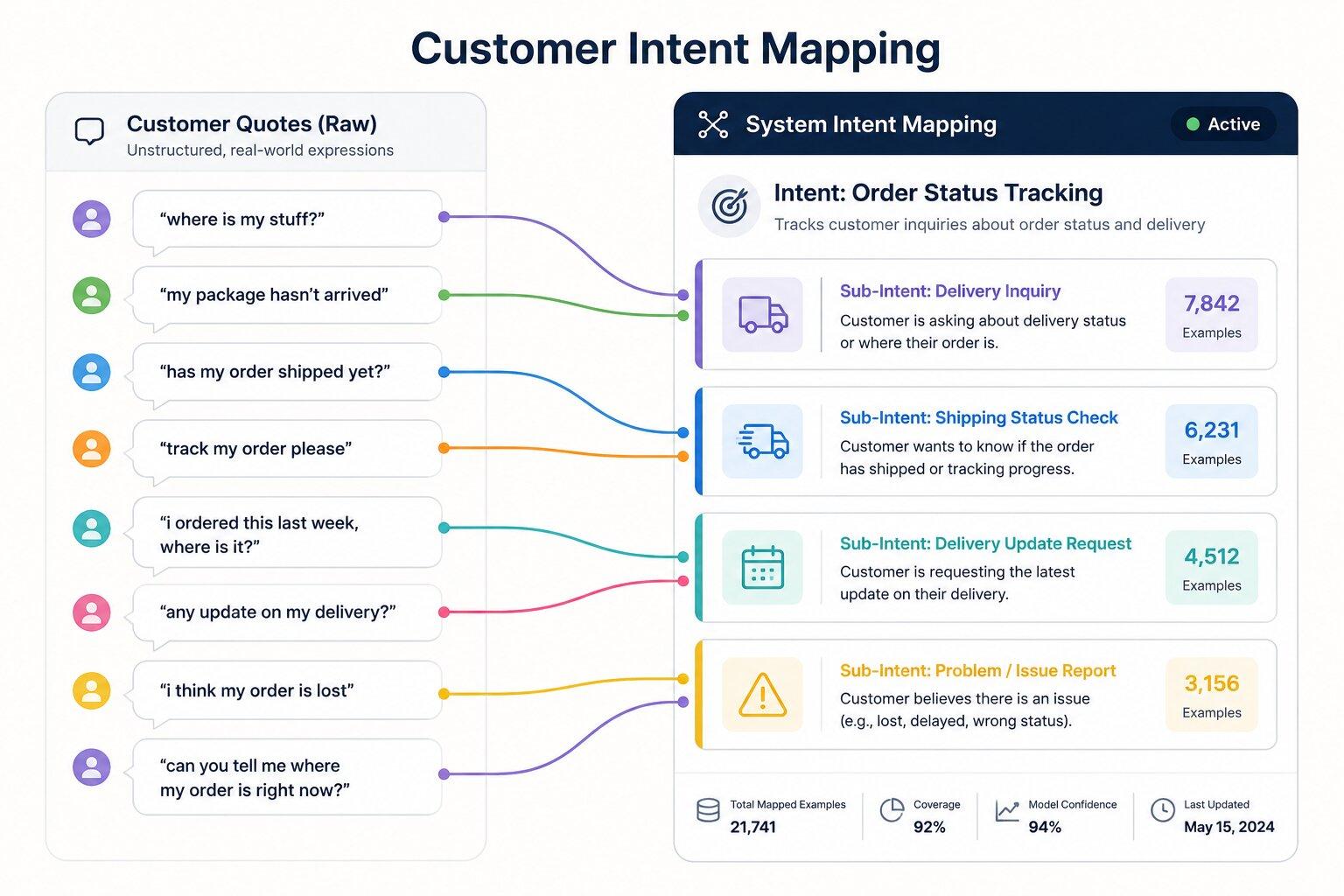
Before anyone writes a chatbot response, someone should read what customers actually ask, not what the team assumes they ask. Pull real tickets, sales call notes, live chat transcripts, site search queries, and help center data. Look for the patterns that come up again and again. This is the step most teams skip because it's slower than writing flows from a whiteboard.
A study covered by InformationWeek found that 48% of respondents say their chat technology doesn't accurately solve issues or gets the intent wrong. That usually traces back to one thing: the bot was trained on company language instead of customer language. Internally it's a "shipment status inquiry." To the person typing, it's "my order didn't show up."
Once real intents are mapped, sort them by risk. Order status, business hours, and pricing tiers are safe to fully automate. A partial refund or plan change is fine to walk through step by step. Anything touching account security, money moving the wrong direction, or a customer who is already frustrated should go to a person fast.
3. Use a Central Knowledge Base So Answers Stay Consistent
Nothing kills trust in a chatbot faster than two different answers to the same question. ProProfs found that 44% of consumers have received the wrong answer from customer service at some point. A bot pulling from five different sources is a reliable way to land in that statistic.
A pricing page gets updated. An old FAQ doc doesn't. By Thursday the bot is telling one customer something it told another customer the opposite of on Monday. One trusted source for policies, product details, pricing rules, support steps, and escalation logic fixes this.
Brain AI works this way inside Sintra. It is shared business memory that every AI helper draws from, so a support reply and a sales email aren't working off two different versions of the truth.
None of this holds without upkeep. FAQs, help docs, pricing notes, support macros, policy pages, and internal procedures all need regular attention. A bot only knows what someone bothered to keep current.
4. Design Conversations That Feel Simple, Not Clever
There's a temptation to make a chatbot sound impressive, with witty replies, long explanations, and a personality that tries hard to entertain. Resist most of it. Good chatbot design is about getting the customer to the right answer with the least possible effort.
In practice, that means short messages instead of paragraphs, clear choices instead of open-ended questions, plain labels instead of internal jargon, and predictable next steps at every turn. A quick comparison of a weak prompt against a strong one:
- Weak: "Please provide your order number, email address, and a brief description of the issue in a single message."
- Strong: "What's your order number?" followed by "And what happened, in your own words?"
That second version works for three reasons:
- One question at a time, instead of stacking three requests into a single message
- Plain language, no internal terminology the customer has to decode
- A reason attached when it helps, like "I need your account email so I can pull up your order" instead of a bare request for information
Buttons and quick-reply options do a lot of quiet work too. They cut down on typos, reduce the chance of the bot misreading intent, and make it obvious what the bot can actually help with. A menu that loops back on itself after three clicks, or a wall of text before the first real question, is usually where customers give up and leave.
5. Be Transparent That Users Are Talking to AI
Trust goes up, not down, when customers know exactly what they're dealing with. Zendesk's research found that 75% of businesses believe a lack of AI transparency increases the risk of customer churn. This makes transparency one of the easiest chatbot practices to get right and one of the most commonly skipped anyway.
A bot that pretends to be a person, using a human name with no disclosure and dodging the "am I talking to a bot?" question, tends to backfire the moment the customer figures it out. And they usually do.
The better approach is a short, honest opener. Something like: "Hi, I'm an AI assistant here to help with order status, account questions, and product guidance. I can connect you with a real person anytime." That single line states what the bot can do, admits what it can't, and makes clear that human help is one request away.
A customer who knows the limits of what they're talking to asks better questions and trusts the answers more. Transparency is what makes that possible.
6. Personalize Responses With Real Customer Context
Personalization should make the task easier, not make the customer feel watched. A logged-in customer getting greeted by name, with their open order already pulled up, saves them a step. A bot referencing something unrelated to why they're there, just to prove it knows them, does the opposite.
The safe zone is context a customer would already expect the business to have: name, plan, order status, the issue they raised last time, or where they are in their lifecycle. Stick to what's directly relevant to the current reply.
"Hi Sarah, I see your order #4521 hasn't shipped yet, want an update?" is helpful. "Hi Sarah, I noticed you've been browsing our site for three hours" is not, even if both are technically accurate.
The difference is whether the customer would expect the business to know it. Good personalization is a shortcut for the customer, not a demonstration of how much data the business has collected.
7. Connect the Chatbot to the Tools Your Team Already Uses
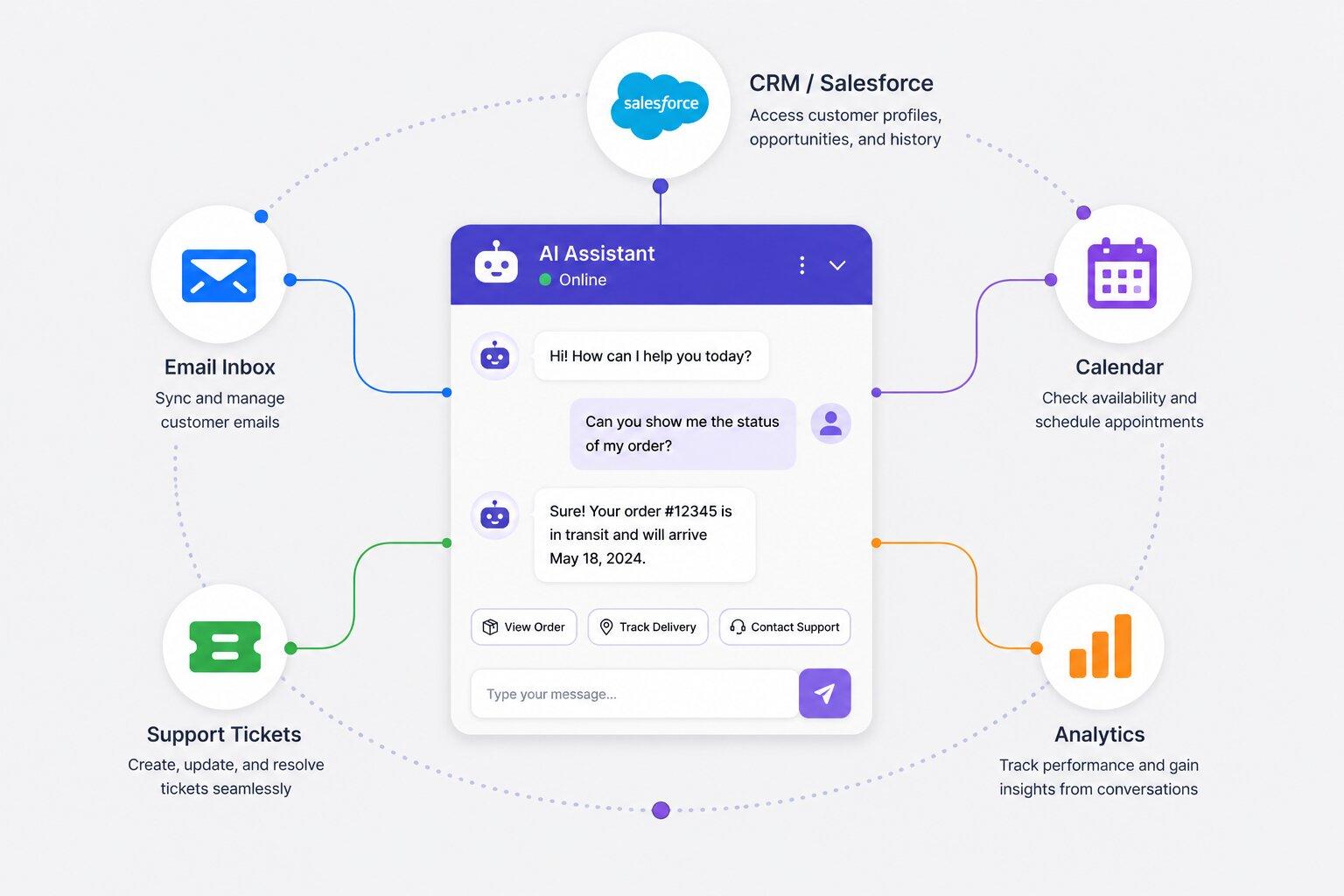
A chatbot that only answers questions in isolation is limited by design. The more useful version lives inside the business stack instead of sitting off to the side as its own disconnected thing:
- CRM (deal stage, account activity, contact history)
- Inbox and calendar
- Docs and knowledge tools
- Support and ticketing systems
- Analytics and project management platforms
An integrated chatbot can create tasks, draft replies, update records, and summarize a conversation for whoever picks it up next. It does not ask the next person to start from zero.
On the CRM side, this looks like a bot that checks where a deal actually stands before answering a sales question. A chatbot connected to Salesforce, for example, can read pipeline stage and account activity directly and draft outreach in the business's own voice.
On the service side, the same principle applies: a bot that can see a customer's ticket history and past resolutions gives a more accurate answer than one starting from zero every time.
Sintra's AI integrations work this way, connecting into the tools a team already runs on. The specific tool matters less than the principle: whatever system your team lives in, the chatbot should reach into it, not sit next to it.
8. Use AI Customer Service Agents for Repetitive Support Work
Repetitive support work, the same questions answered the same way dozens of times a day, is exactly where AI customer service agents earn their place. They handle the volume that drains human time without adding judgment value.
That's the model Sintra's AI customer service agent follows. It drafts support responses and documentation pulled from shared business knowledge. The actual send stays with a human. That distinction matters: it drafts, it doesn't autonomously reply to customers.
Complex, emotional, legal, billing, or high-risk responses should still get human review before anything goes out. Speed only helps if accuracy comes with it.
9. Build Smooth Human Handoffs
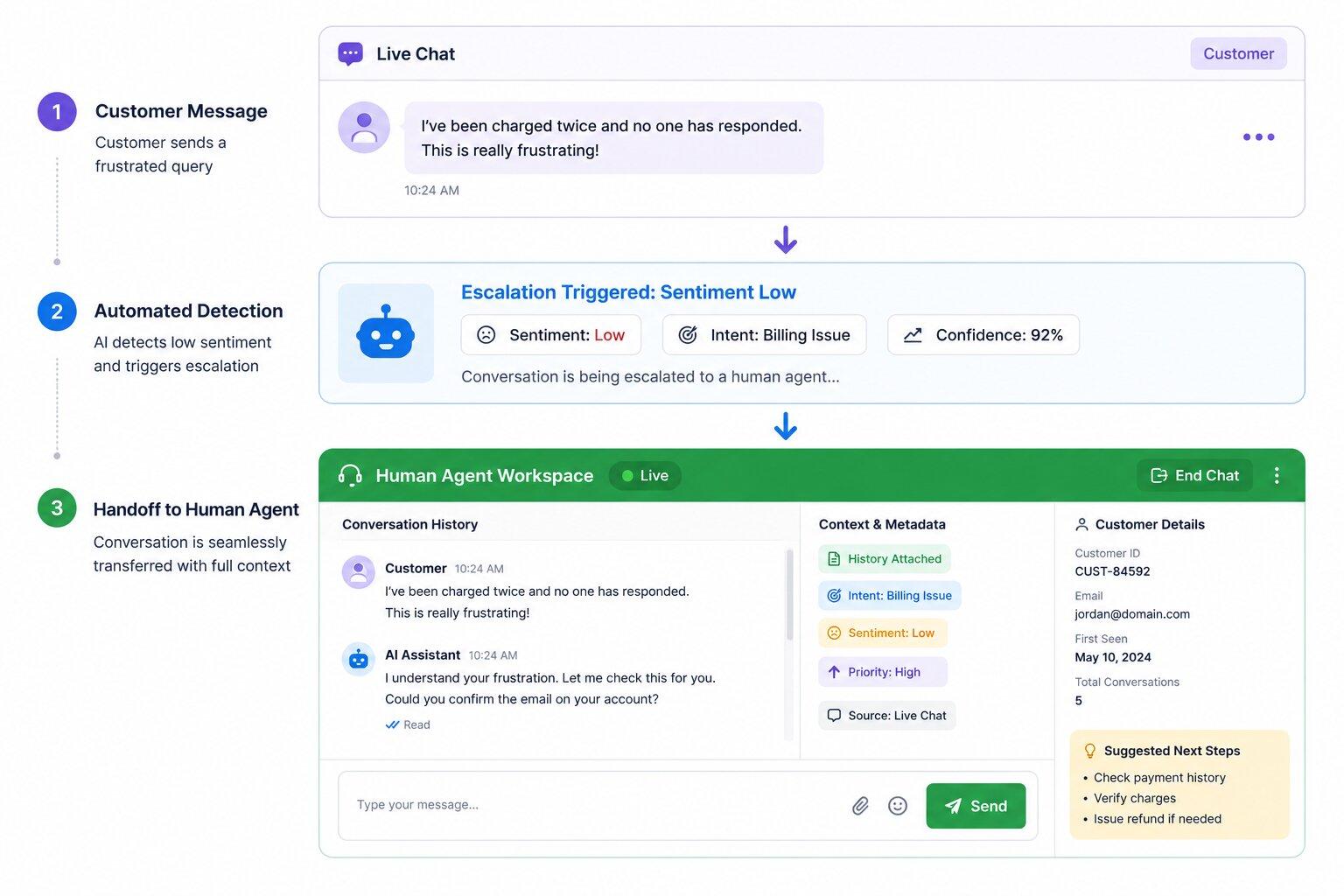
Even the best chatbot needs a fast, clean path to a real person, and how that handoff happens says as much about a company's CX as the bot itself does. Escalation should trigger automatically in a handful of predictable situations:
- Repeated confusion, where the bot keeps missing the point
- Language that signals real frustration or anger
- High-value leads worth a human touch
- Account security concerns
- Refund requests or formal complaints
- A technical issue the bot genuinely can't resolve
The part teams get wrong most often isn't deciding when to escalate. It's what gets carried over when they do. A good handoff passes along the customer's original question, everything the bot already tried, a read on sentiment, relevant account details, and the specific reason for escalation. Without that, the customer explains their entire problem again from scratch to a new person, which undoes most of the goodwill the bot built up in the first place.
This is where chatbot best practices and chatbot ux best practices overlap directly: a bot can follow every rule in this guide and still fail the customer at the exact moment a human takes over, if the context doesn't travel with them.
10. Train the Chatbot With Real Conversations
Imagined scripts age badly. Real customer language from actual tickets, chat transcripts, sales questions, failed searches, and direct feedback is a far better training source. It reflects how people actually phrase problems, not how a team assumes they will.
Failed conversations specifically are underused as a data source. Every time a chatbot gets stuck, misroutes a customer, or gives a flat "I don't understand that," it's flagging something concrete:
- A missing intent nobody accounted for
- A prompt that's unclear or confusing to the customer
- Poor routing sending people to the wrong flow
- A weak answer that's technically correct but doesn't actually help
- A gap in the knowledge base the bot had no way to fill
Reviewing that data regularly treats every failed conversation as something to fix rather than something to bury. This is where chatbot optimization actually happens in practice, not as a one-time setup step but as a habit.
11. Track Metrics That Show Real CX Impact
Conversation volume is the easiest chatbot metric to report and the least useful one on its own. A bot handling ten thousand conversations a month says nothing about whether any of those conversations actually helped someone. The metrics that matter are the ones tied to outcomes: resolution rate, escalation rate, CSAT, average handle time, lead quality, deflection rate, repeat contact rate, and customer effort.
It's worth being honest about a tension here. High automation isn't automatically a win. A chatbot resolving 90% of conversations without a human but leaving customers annoyed isn't succeeding, it's just moving the problem somewhere less visible, usually straight into a churn number nobody connects back to the bot.
Chatbot optimization has to weigh efficiency against quality, trust, and how customers actually felt about the interaction, not just whether it closed fast. That balance is what separates chatbot best practices that look good on a dashboard from ones that actually hold up when customers are asked how the experience felt.
12. Keep Improving the Chatbot After Launch
Launch day is the starting line, not the finish line. Products change, policies get updated, customer needs shift, and a chatbot that isn't kept current drifts out of sync with all of it, quietly, usually without anyone noticing until a customer complains about an answer that used to be correct.
Set a standing review rhythm, monthly or quarterly depending on how fast the business moves. Someone should look at the data, update outdated content, test flows that seem to be underperforming, and tighten up the handoff points that keep tripping people up.
That someone matters. Chatbot performance needs an owner, whether that's a CX lead, a support operations manager, an AI operations lead, or a small cross-functional team responsible for accuracy, privacy, and keeping customer trust intact.
This is really what best practices in chatbot building comes down to once the initial build is finished, not a project with an end date, but an ongoing habit that keeps chatbot optimization from stalling out three months after everyone stopped paying attention. Chatbot best practices only hold up when someone is actually accountable for them past launch day.
Common Chatbot Mistakes That Hurt Customer Experience
Even well-built chatbots frustrate customers when they're designed around what's convenient for the business instead of what the customer actually needs. These are the failure points that show up most often:
- Vague goals and no intent mapping: "improve support" instead of a measurable target, built on assumptions instead of real customer language
- Outdated or robotic answers: old FAQs, wrong pricing, missing policy updates, stiff scripted language that reads like it was written by committee
- Hiding AI use or burying human support: especially risky on billing, account, or security issues, where trust matters most
- Too much friction before help arrives: long menus, repeated questions, unnecessary forms standing between the customer and an answer
- No integrations and no ongoing review: a bot that can't update records or trigger a follow-up, and one nobody revisits, decays fast
How to Choose the Right Chatbot Solution for Better CX
Picking a chatbot solution in 2026 comes down to one real question:
Does it support the whole customer journey, or just the first reply?
A chatbot that handles the opening question well but hands everything else to five disconnected tools is solving a smaller problem than the one most CX teams actually have. Shared context, real integrations, and human review in the loop all matter.
The table below shows how a disconnected single-purpose tool compares to a chatbot solution built for the full customer journey at each stage:
Sintra's role-based AI employees cover these stages from one shared AI team instead of stitching together separate tools for each one.
Ready to Improve CX With AI Employees?
Better CX doesn't come from a faster chatbot reply. It comes from a system that knows the business and knows when to bring in a person. That's the gap Sintra closes.
AI employees work from the same Brain AI context, connect to the tools a team already runs on, and handle customer support workflows that draft, summarize, and prepare, while humans stay in control of what actually goes out. Try Sintra AI and see the difference a connected AI team makes.
Chatbot Best Practices FAQs
What are the most important chatbot best practices for 2026?
A measurable goal instead of "improve support," real customer intents pulled from actual tickets, an accurate single knowledge base, upfront AI disclosure, and a handoff that carries context so customers don't repeat themselves.
How do chatbots improve customer experience?
They absorb repetitive, low-complexity questions instantly and at any hour, so human agents spend their time on issues that actually need judgment instead of answering the same three questions on repeat.
What are chatbot UX best practices?
One question at a time, plain language over internal jargon, and a reason given when the bot asks for information. Buttons and quick replies cut down on misreads and dead-end menu loops.
How do you hand off from a chatbot to a human agent?
Escalate on clear signals: repeated confusion, frustrated language, high-value requests, or security concerns. Carry over what was asked, what the bot already tried, sentiment, and the reason for escalation, so the human isn't starting from zero.
How often should a chatbot be optimized?
Monthly or quarterly, depending on how fast the product and policies change, with someone specifically owning the review instead of leaving it to whoever notices a bad answer first.
Related articles