


Best AI Note Taking Apps for 2026

Table of Contents

Quick Answer: The Best AI Note Taking Apps for 2026
The best AI note-taking apps include Sintra AI, Notion, Otter.AI, and Fireflies.AI. However, choosing the right one depends on what you need the notes to do after writing.
- Sintra AI - Best for turning notes into full business execution.
- HappyScribe - Best for multilingual transcription and summaries with EU-grade privacy.
- Notion AI - Best for turning notes into structured databases and tasks.
- Otter.ai - Best for transcribing and summarizing meetings.
- Fireflies.ai - Best for auto-joining meetings and extracting action items.
Note-taking apps were once used to store thoughts and useful information for later use. Now, with the evolution of AI, storage is just not enough. The best AI note-taking apps perform and drive results after you create a note. A 63-person randomized trial found that a generative AI assistant boosted summarization tasks by 69%, instruction creation by 45.9%, and presentation outlines by 24.8%, with the biggest gains on exactly the kind of structured content creation that note-taking apps are built for.
This list takes you through six best AI note-taking apps and how they perform post-capture: how well they organize knowledge, generate outputs, automate follow-ups, and integrate with daily tools. Let's dive in.
Best AI Note Taking Apps for 2026 (Compared)
AI note takers can enhance meeting productivity by allowing participants to focus on discussions rather than note-taking. We tested and compared the most talked-about AI note takers based on real execution, team readiness, AI depth, and workflow impact. Tools were tested in live business scenarios such as meetings, project planning, client calls, and daily operations.
Sintra AI
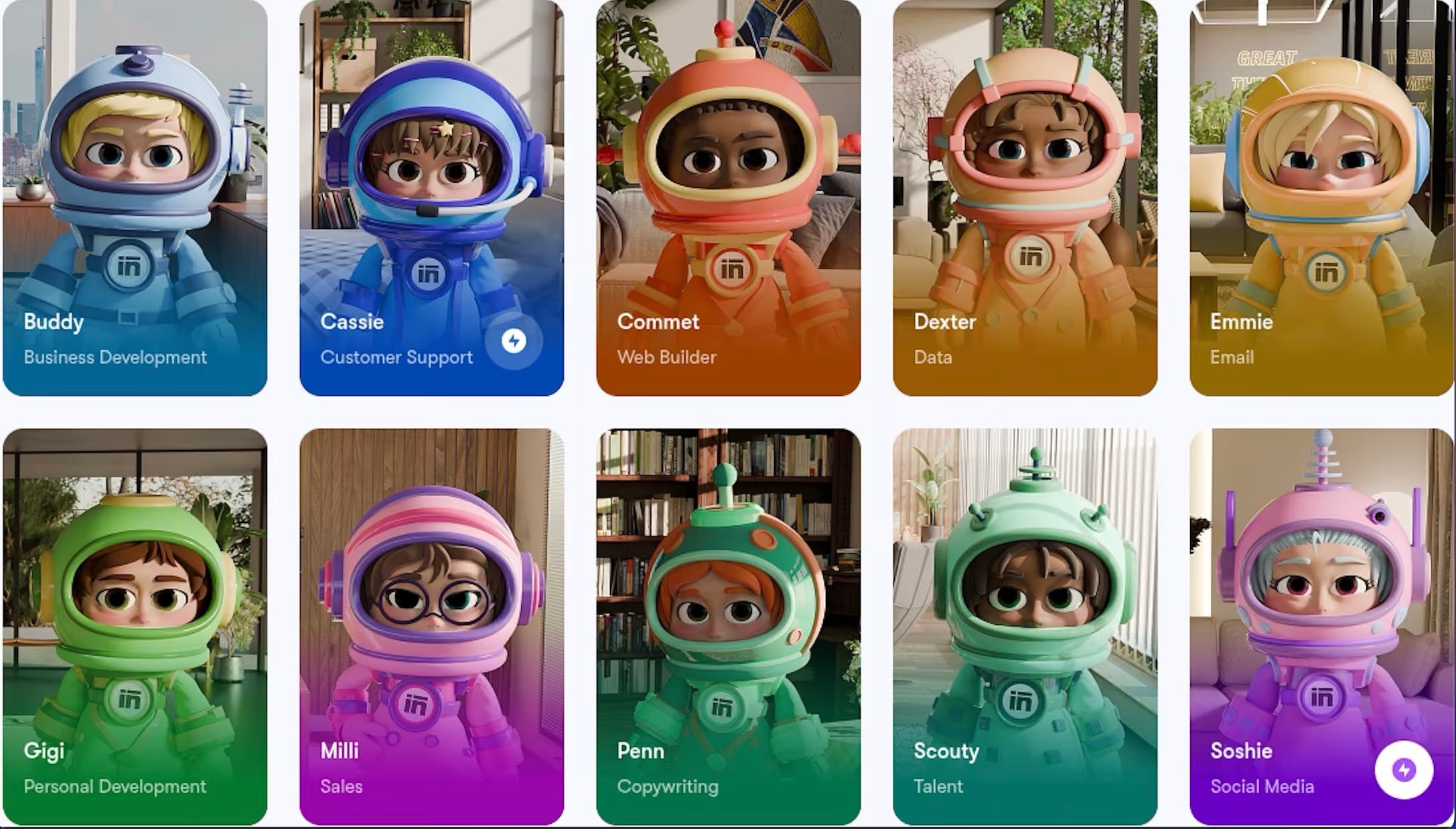
Sintra AI is a role-based AI team platform that helps turn meeting notes into shared business context. Our AI virtual assistant, Vizzy, can record, transcribe, and summarize online meetings in real time, then suggest action items from the discussion. Brain AI can also store notes, files, links, and other workspace knowledge so AI helpers can use that context later.
What it does in 2026: Sintra captures meeting notes through Vizzy, creates summaries, and suggests action items. Notes and related knowledge can then support other AI helpers when creating content, planning tasks, writing replies, or producing business outputs based on shared context.
Best for: Small to mid-size teams that want meeting notes to become useful business context, not just transcripts saved in a folder.
Execution after capture: Meeting notes can become summaries, action items, task context, and follow-up material for other AI helpers.
Integration depth: Vizzy supports meeting note-taking through online meetings, and Brain AI can connect with workspace knowledge. Its Notion integration also lets teams manage notes, pages, tasks, and ideas in one place.
Shared memory: Brain AI works as a knowledge base for each workspace. It stores business context, files, links, snippets, and instructions that helpers can use when generating outputs or completing tasks.
Post-note automation: Notes can support summaries, action items, drafts, task planning, and workflow context. I would avoid claiming automatic sending or task assignment unless you have a specific Sintra source for that exact behavior.
Pros
- Notes become active inputs for emails, content, support, and strategy
- Team-wide consistency via shared Brain AI
- Role-based outcomes from the same notes
Cons
- Overkill for solo personal note-taking
- Requires initial role/workflow setup
HappyScribe
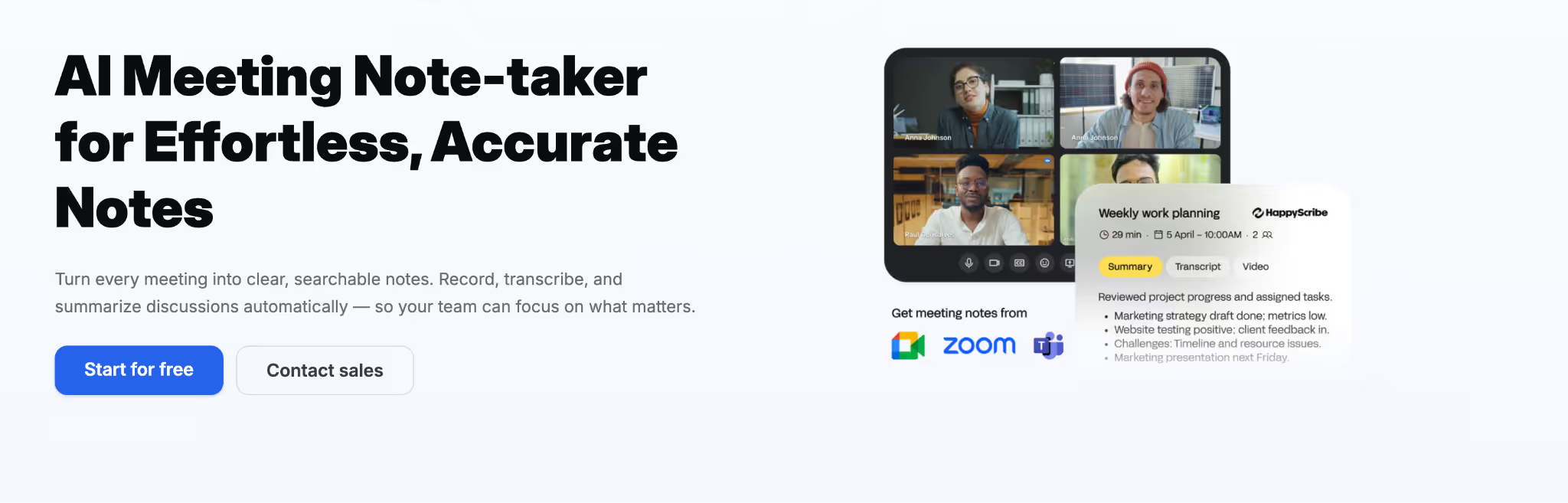
HappyScribe is an AI meeting notetaker and transcription platform that auto-joins Zoom, Meet, and Teams calls and delivers accurate summaries in 120+ languages.
What it does in 2026: Calendar sync triggers auto-join for Zoom, Meet, and Teams calls, records audio and video, and delivers a transcript, structured summary, and action items minutes after the call ends.
Best for: Teams needing accurate multilingual meeting transcripts and summaries with EU-grade privacy and compliance baked in.
Execution after capture: Low - outputs transcripts, summaries, and action items; no automatic task creation or sending.
Integration depth: High - Zoom/Meet/Teams, Google/Outlook calendars, YouTube, Drive, Dropbox, Zapier, plus an open API.
Shared memory: Medium - team workspaces and searchable archives of past meetings; no persistent cross-session AI memory.
Post-note automation: Low - delivers summaries and action items, but no autonomous follow-ups or workflow triggers.
Pros
- 95%+ transcription accuracy in 120+ languages
- EU-built with GDPR and SOC 2 Type II compliance
- Generous free plan with unlimited 45-minute meeting recordings
Cons
- No real-time transcription during live calls
- Notes stop at summaries and action items
- No native CRM or workflow execution
Jamie
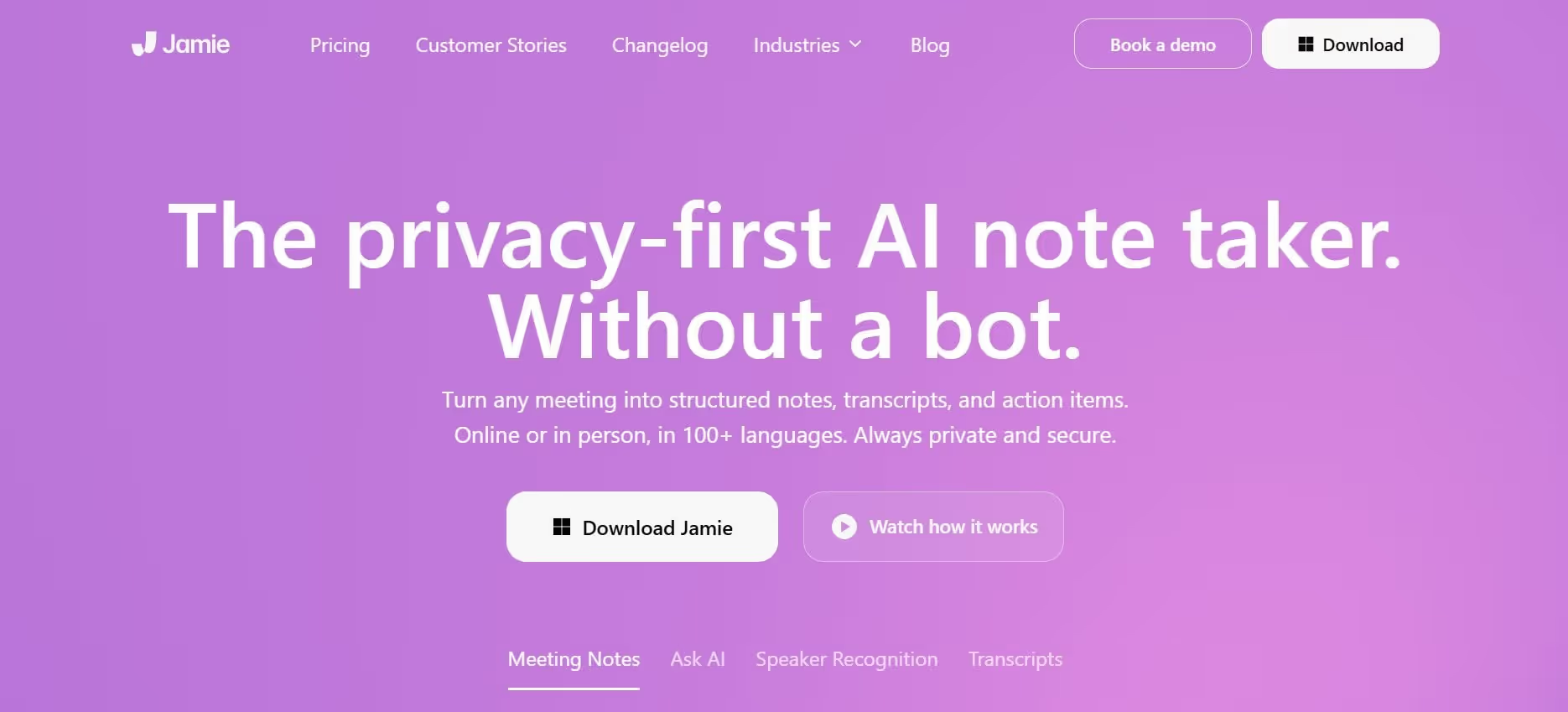
Jamie is a privacy-first, bot-free meeting transcription tool that generates structured summaries and action items from online and offline recordings.
What it does in 2026: Transcribes calls/recordings, produces clean summaries with key points, quotes, and action items; exports to Word/PDF.
Best for: Individuals and small teams needing accurate, private meeting recaps without bots or cloud dependency.
Execution after capture: Low - stops at summaries and action lists; no automatic task creation or sending.
Integration depth: Medium - basic calendar link and CRM push in Pro+; mostly export-based.
Shared memory: Limited - team sharing available, but no persistent organizational context across sessions.
Post-note automation: Low — no proactive actions, follow-ups, or workflow triggers from notes.
Pros
- High-accuracy transcription and readable summaries
- Privacy-focused local processing
- Easy setup for calls and recordings
Cons
- No execution beyond summaries
- No deep automation or integrations
- No shared team memory
tl;dv

tl;dv is a meeting recording and highlight tool that transcribes, summarizes, and creates timestamped clips for async review. It can produce time-stamped transcripts and concise action-oriented recaps.
What it does in 2026: Auto-records/transcribes Zoom/Meet/Teams calls, generates summaries, chapters, highlights, and shareable video clips.
Best For: Async and remote teams that need quick, searchable meeting recaps and clip sharing.
Execution after capture: Low - outputs are passive summaries and clips; no task creation or follow-up actions.
Integration depth: Medium-high - Zoom/Meet/Teams + basic CRM/Zapier; mainly sharing-focused.
Shared memory: Medium - team sharing of clips/summaries, but no persistent cross-session organizational knowledge.
Post-note automation: Low - no AI-driven tasks, emails, or workflow triggers.
Pros
- Fast review of long meetings via clips and chapters
- Strong timestamping and async sharing
- Good for distributed teams
Cons
- Notes/clips remain passive review material
- No execution or follow-up automation
- Not built for ongoing team memory
Notion AI

Notion AI is an add-on layer inside Notion workspaces for writing, summarizing, and database enhancement. Unlike others, it is not a standalone note-taking app.
What it does in 2026: Assists with drafting, summarizing notes/meetings, autofilling databases, brainstorming, and page reformatting inside Notion.
Best For: Teams already using Notion as their central knowledge/project hub.
Execution after capture: Medium - suggests/drafts but requires manual application; no autonomous actions outside Notion.
Integration depth: High inside Notion ecosystem - works with pages, databases, calendars; limited outside.
Shared memory: Excellent within the workspace - shared pages/databases keep context for team members.
Post-note automation: Medium - autofill and agents help, but execution stays manual/user-triggered.
Pros
- Flexible organization in databases and linked pages
- AI-assisted writing and summaries in Notion
- Strong for documentation-heavy teams
Cons
- Execution remains manual
- AI does not proactively trigger actions
- No role-based reasoning
Otter.ai

Otter is a long-standing real-time transcription platform for meetings, calls, and recordings.
What it does in 2026: Provides live captions, transcription, AI summaries, speaker ID, and searchable notes from Zoom/Teams/Meet.
Best For: Users needing reliable real-time transcription and meeting review.
Execution after capture: Low - summaries and transcripts are static; no task/follow-up automation.
Integration depth: Medium - calendar sync and basic sharing; no deep CRM/project tool push.
Shared memory: Medium - team folders/sharing, but no persistent organizational context.
Post-note automation: Low - no automatic actions, drafts, or triggers.
Pros
- Reliable real-time transcription and captions
- Familiar and widely adopted
- Good search and speaker identification
Cons
- Notes remain static after the summary
- Limited automation
- Not built for cross-team execution
Fireflies.ai

Fireflies.ai auto-joins meetings, transcribes, summarizes, and pushes notes/action items to CRMs and tools.
What it does in 2026: It offers integration with popular platforms like Slack and Google Meet. Auto-records/transcribes calls, and generates summaries/action items.
Best For: Sales/support teams wanting meeting notes to flow into CRM or project tools.
Execution after capture: Medium-high - pushes summaries and actions to CRM/Slack; limited beyond basic push.
Integration depth: High - direct CRM (HubSpot/Salesforce) and Slack sync.
Shared memory: Good - team hubs and searchable library, but not deeply persistent.
Post-note automation: Medium-high - auto-pushes notes/actions; no role-based or multi-step workflows.
Pros
- Strong CRM/Slack integration for post-meeting updates
- Auto-join and action-item extraction
- Team hubs for shared notes
Cons
- Execution is limited to push actions
- No deep role-based reasoning
- Memory is shared but not organizational-grade
Which AI Note Taking App Is Best for You?
Let's summarize our list and help you choose the best one for you:
Solo users / personal knowledge
Best: Jamie, Otter, tl;dv
Why: Fast, private transcription and summaries for individual meetings or notes. Low cost, minimal setup, high accuracy for capture and review.
Meeting-heavy roles
Best: Otter, Fireflies.ai, tl;dv, HappyScribe
Why: Reliable transcription, summaries, and basic sharing/CRM push. Strong for quick recaps and action-item extraction from calls. HappyScribe adds 120+ language coverage and EU-grade privacy for cross-border or compliance-sensitive teams.
Documentation teams / workspace-centric
Best: Notion AI
Why: Deep integration with shared pages, databases, and docs. Excellent for organizing, summarizing, and linking knowledge in a central hub.
Execution-focused teams
Best: Sintra AI
Why: The only AI note-taking app that treats notes as triggers for real execution (emails, content plans, support replies, tasks, workflows). All others stop at storage, search, or summary.
Among all this chaos of smart AI note-taking apps, Sintra AI is built around what happens after you create a note. If your notes need to become emails sent, tasks assigned, content published, or support resolved without manual effort, Sintra is the clear choice.
Best AI Note Takers by Use Case
You may go through many featured lists showing the right note-taking apps, but it all comes down to what you want to execute from your notes.
This section cuts through the lists and shows which AI note taker fits your real workflow, while keeping basic use cases in mind:
- Personal reference and quick ideas
- Meeting-heavy roles (sales, consulting, support)
- Documentation and knowledge-heavy teams
- Execution-focused teams (marketing, ops, sales)
Best AI Note Taker for Teams That Need Execution, Not Just Notes
Sintra AI is the best AI note-taking app for teams that expect notes to do the real work. It turns captured notes into shared organizational memory that powers execution across departments.
Why it fits this use case
- Notes become shared organizational memory: The Brain AI keeps brand voice, guidelines, goals, past decisions, and notes accessible to every helper and team member forever.
- AI helpers actively use notes in real workflows: Role-based AI assistants reason over the same notes to automatically generate emails, content plans, support replies, SOPs, strategy summaries, task assignments, and follow-ups.
- Built for marketing, sales, support, and ops teams: Notes trigger marketing campaigns, sales sequences, customer responses, and operational updates without manual translation or copy-paste.
Limitations:
- Steep learning curve: For complete beginners, setting up Sintra's helpers may require some time.
- No dedicated note interface: Lacks a standalone editor, canvas, tagging, or bi-directional linking.
- Higher cost: No free tier available for testing.
Best AI Note Taker for Meeting Summaries and Transcriptions
Jamir and Otter are the best AI meeting note takers for users who primarily need clean meeting notes, accurate transcripts, and quick summaries.
Why they fit this use case
- Strong automated summaries: both deliver concise recaps, key points, quotes, and action items from calls or recordings.
- Minimal setup: Jamie (bot-free, calendar link or upload) and Otter (calendar sync, real-time captions) start working instantly.
- Good for call-heavy roles: sales, consulting, interviews, support, or any role with frequent meetings benefits from fast, searchable recaps.
Limitations
- Notes stop at summaries: excellent transcription and highlights, but no automatic task creation, email drafts, or CRM updates.
- Little to no workflow automation: outputs remain passive review material; no triggers for follow-ups, scheduling, or integrations beyond basic sharing.
Best AI Note Taker for Async Teams Reviewing Conversations
tl;dv is the best AI note taker for teams that need to revisit long meetings asynchronously. It focuses on fast playback, highlights, and timestamps rather than deep execution.
Why it fits this use case
- Excellent meeting playback and highlights: auto-generates timestamped chapters, one-click highlight reels, speaker labels, and searchable clips so anyone can jump to key moments without rewatching the full recording.
- Helpful for distributed teams: shareable video summaries and clips work perfectly for time-zone-spread or async teams who can’t attend live; supports 30+ languages for global use.
Limitations
- Notes are passive: summaries, chapters, and clips are great for review but remain static review material.
- No post-note execution: no automatic task creation, follow-up emails, CRM updates, or workflow triggers from notes.
Best AI Note Taker for Documentation and Knowledge Bases
Notion AI is a strong AI note-taking app fit for teams that prioritize structured documentation, internal wikis, project knowledge bases, and collaborative content organization.
Why it fits this use case
- Flexible pages and databases: notes become linked pages, wikis, task databases, and searchable knowledge hubs with custom templates and relations.
- AI-assisted writing and summaries: generates drafts, reformats content, summarizes long notes or docs, autofills databases, and suggests outlines directly in your workspace.
Limitations
- AI doesn’t proactively use notes: it waits for user prompts; no automatic task creation, email drafts, or workflow triggers from captured content.
- Execution remains manual: you must apply AI suggestions yourself; no autonomous follow-ups, assignments, or cross-tool actions.
Best Free AI Note Takers for Basic Needs
For students and solo users, free AI note takers offer no-cost entry with basic AI summaries and transcription. These lightweight options work well for personal use but come with clear trade-offs like limited memory, minimal automation, and no scale for teams.
Let's take a look at some of the free AI note-taking apps:
Obsidian (completely free, open-source)
Why it fits: Free community plugins enable AI summarization, local LLM integration (e.g., Ollama), and task extraction for personal notes and knowledge graphs.
Limitations: No native AI; plugins require manual setup; no team sharing or cloud sync in free core (local-first).
Logseq (completely free, open-source)
Why it fits: Free plugins add AI summarization, task extraction, and basic reasoning for outline-style notes and daily journaling.
Limitations: AI features need plugin configuration; no built-in cloud/team sync in free; manual integration.
Anytype (generous free tier)
Why it fits: Built-in AI for writing, summarizing, and linking personal notes/docs with local-first privacy and unlimited free storage.
Limitations: AI usage caps in the free tier; no team collaboration or shared memory; limited automation.
These free AI note takers are great for solo basic needs like lectures, ideas, and journaling, with no cost. But the free cost comes with limited memory, no team sharing, and minimal to no automation. For real execution, teams, or deeper AI, paid tools like Sintra AI are needed.
How to Choose the Right AI Note Taker in 2026
Before choosing an AI note-taking tool, you should ask: What happens after you have created the notes?
Here's a simple framework for you to follow:
- Personal reference: Choose storage-first tools (Jamie, Otter, tl;dv). You want fast summaries, transcripts, and to search for your own review.
- Team execution: Choose action-first tools (Sintra AI). You want notes to automatically become emails, tasks, replies, content, or workflows.
- Storage-first: Notes stay archives (summaries, folders, search). Good for reference, bad for productivity.
- Action-first: Notes become inputs (drafts sent, tasks assigned, plans built). Drives real work and saves hours.
- Notes as archives: Passive records you revisit manually. Fine for solo use, weak for teams.
- Notes as inputs: Active triggers for execution. Essential for scaling without burnout.
Simply put, if your note list needs to stay passive, pick a lightweight AI note taker. But if your focus is execution, you need tools like Sintra AI.
How We Evaluated AI Note Taking Apps in 2026
We tested dozens of AI note-taking apps in real business scenarios. Our goal was simple: find tools that do more than store notes and turn captured information into action. Here's the criteria we followed:
- Execution power - Does the app finish tasks like summarizing meetings, extracting tasks, drafting follow-ups, and updating databases?
- AI context usage - How well does it remember and apply notes, brand voice, previous decisions, and user history across sessions?
- Integrations - Can it read/write directly in email, calendars, CRMs, Slack, Google Drive, or other daily tools without copy-paste friction?
- Team memory - Does it maintain shared knowledge for multiple users so the whole team sees consistent context and outputs?
- Post-note intelligence - After capture, how smartly does it organize, connect, query, automate, and surface insights without manual effort?
We used these apps in live workflows for weeks, including daily standups, client calls, project tracking, and content planning. Below you see the result of this evaluation, and only the tools that reliably reduced manual work made it into the list.
Why Traditional AI Note Apps Fall Short in 2026
In 2026, AI note-taking apps have nearly perfected transcription. Real-time transcription helps students concentrate on understanding complex concepts instead of manual note-taking. They provide fast summaries with smart searching options. However, traditional AI note takers still stop at information storage.
Traditional note-taking tools organize what you write, tag it, and let you find it later. But they rarely turn notes into action. Here, the real problem is not the lack of intelligence; it is the lack of execution.
Let's take a closer look at what makes traditional note-taking apps outdated in 2026, followed by some of the best AI note-taking apps.
Notes Are Still Treated as a Final Destination
Most AI note takers treat notes as the endpoint. Once the note is captured, transcribed, or summarized, the workflow halts. The note lands in a folder, database, or timeline and stays there as a static artifact.
But what happens with those summaries and tags? Nothing! User manually:
- Read the summary
- Decide what needs action
- Create tasks
- Assign follow-ups
- Send emails or updates
This manual labor wastes time and creates gaps in the workflows. A good AI tool should trigger tasks, draft replies, update projects, or schedule next steps automatically.
Personal Silos Instead of Shared Organizational Memory
Most note-taking apps are built for solo users, not teams. Notes stay private by default, which fails the purpose of a business.
Key problems include:
- No automatic sharing or visibility to others
- No shared reasoning across teams. Any insights, summaries, or follow-ups by an individual remain hidden.
- Knowledge gets lost when people leave. This forces the team to rebuild context from scratch when someone leaves the job.
Personal notebooks fail quickly once multiple people need the same context. It results in failed collaborations, increased errors, and a risk of company knowledge leaking out.
Shared organizational memory fixes this. A strong AI note taker keeps notes, context, and reasoning accessible to the entire team. It automatically updates everyone when new information or decisions are added.
AI That Summarizes Instead of Reasons
An effective summary should be comprehensive enough to help you make decisions. If an AI note-taking app repeats what you already know, it is a mere summary generator, not a smart tool. Here's what it does wrong:
- AI rewrites what you already know: Adds nothing new to the notes.
- No decision-making or planning: Notes don't become prioritized tasks, next steps, or automated plans.
- No role-based interpretation: The AI assistant doesn't act as support, marketer, or ops lead. It always stays generic.
Many note-taking apps support multiple languages for transcription. Summarization might look smart, but it doesn't move the workflow forward. True value comes from AI that reasons over notes by extracting actions, assigning owners, drafting follow-ups, and executing workflows.
Notes Don’t Connect to Real Workflows
The biggest weakness of most note-taking apps is isolation. Notes stay disconnected from the tools teams use every day.
- No direct link to email, support, or content tools: Captured AI meeting notes or ideas stay trapped in the app instead of flowing into Gmail, Slack, Zendesk, Notion, or social schedulers.
- Manual copy-paste between systems: Users must manually transfer summaries, tasks, or action items, creating friction, delays, and errors.
- Notes don’t power execution: Even smart summaries or transcripts remain passive. They don’t automatically create tickets, draft replies, schedule follow-ups, or update projects.
Disconnected apps do nothing for your team except take up space in storage. The best AI note-taking app closes this gap by integrating deeply and turning notes into active inputs for real workflows.
The Wrong Question Is Being Asked
Most note-taking tools still function around the storage of a note. They prioritize capture, organization, search, and summarization.
Modern teams ask a different question: "What should we do next using the info this note has?" They want notes to automatically trigger action:
- Create tasks and assign owners
- Draft follow-up emails or messages
- Schedule meetings or reminders
- Update projects or databases
- Notify the right people
Execution-first systems are the only winning tools in 2026. AI note-taking app doesn't just hold information; it uses it to drive real work forward. And this approach is exactly where Sintra AI excels compared to other traditional AI note takers.
Sintra AI — Notes That Actually Do the Work
Sintra AI is not your average note-taking app; it is an entire AI team. It treats your notes as active inputs for real business execution.
Whether your notes are meeting takeaways, client feedback, ideas, tasks, or strategy points, Sintra's role-based AI assistants immediately turn them into action.
The difference between a traditional note-taking app and Sintra AI is based on the outcome after you capture a note. Sintra's AI employees remember your brand, goals, and processes, and work as a team to prioritize execution rather than mere storage.
From Notes to Execution (Not Storage)
With Sintra AI, your notes no longer sit idle in storage after capturing. They contribute to your workflow, decision-making, and positive outcomes for your business. Here's what happens when you add a note and let Sintra's AI team handle it:
- Draft follow-up emails in your tone and send them (or queue for approval)
- Turns ideas into content workflows (social posts, blogs, newsletters)
- Extracts action items and assigns them to helpers or calendars
- Creates SOPs, reports, or strategy docs from scattered notes
- Triggers support replies, lead follow-ups, or task updates in connected tools
This shift from storage to execution is what makes Sintra different. Notes stop being passive records and start driving business forward automatically.
Shared AI Brain vs Personal Notebooks
Sintra's Brain AI is a central layer that all AI helpers access. It stores your brand voice, guidelines, goals, documents, past decisions, and notes permanently. All these resources become available to every role-based AI employee.
Here's why Shared AI Brain beats folders and files:
- One source of truth: Every AI assistant uses the same context, so outputs stay consistent across tasks and team members.
- No silos: Notes, preferences, and knowledge are instantly shared; no manual forwarding or “did you see my note?” messages.
- Persistent across people: Knowledge doesn’t disappear when someone leaves; the Brain keeps everything.
- Active, not passive: Notes don’t sit in folders. They become inputs that trigger emails, plans, replies, and workflows automatically.
- Improves over time: The more you use it, the smarter and more accurate the entire AI team becomes.
Notes That Connect to Real Tools
An intelligent note-taking app doesn't keep notes trapped inside its own system. It actively integrates with the tools your team already uses every day.
Sintra AI's notes interact and connect directly with real work environments:
- Gmail: AI meeting notes trigger draft replies, follow-up emails, or task assignments without copy-paste.
- Internal docs: Notes update Notion, Google Drive, or Confluence pages automatically (e.g., add action items to project docs).
- Workflows: Notes feed into calendars for scheduling, CRMs for lead updates, Slack for team notifications, or support tools for ticket creation.
This integration turns captured information into immediate action. You don't have to manually transfer chunks of data while repeating context.
Role-Based AI Helpers That Use Your Notes
Sintra's AI helpers are role-based assistants, each specialized for a specific aspect of your business. They reason over the same note but produce different outcomes tailored to their job.
Let's take a look at a few examples of these AI assistants and how they use your notes:
- Cassie (support helper): Reads meeting notes or customer feedback, identifies complaints or questions, drafts polite replies in your tone, creates support tickets, and schedules follow-ups.
- Penn (AI writing assistant): Takes the same notes, extracts key messages or ideas, writes blog posts, social captions, email campaigns, or ad copy that aligns with your brand voice.
- Soshie (social media assistant): Scans the notes for content ideas, generates weekly social posts, adds hashtags, schedules them, and suggests replies to engagement.
All helpers pull memory from the same shared Brain AI. Your notes become the source for all helpers to keep your brand voice consistent.
When a Free AI Note Taker Is Enough (and When It’s Not)
Many free AI note-taking apps provide substantial features without requiring a paid subscription. Some free AI note-taking apps allow users to test their features before committing to a paid plan. They also offer unlimited transcriptions and summaries for individual users. Solo entrepreneurs, individuals, and students, or anyone starting out, can benefit greatly.
This section helps you decide when a free AI note taker is enough and when its limitations become a real bottleneck.
When a Free AI Note Taker Is Enough
Users should be cautious of free plans that are essentially demos with low limits designed to push for paid subscriptions. Free tools perform well when:
- Personal notes and reminders: quick capture of ideas, to-dos, or daily reflections.
- Occasional meeting summaries: light transcription and key points from infrequent calls or lectures.
- Students or solo users: study notes, lecture recaps, or personal knowledge without team sharing.
- Low-stakes information capture: temporary lists, brainstorming, or one-off research.
- No cost: zero payment for core use.
- Fast setup: install and start in minutes.
- Basic AI summaries and transcription: good enough for personal review and quick insights.
If your use stays personal, infrequent, and low-stakes, a free note-taker AI tool handles it perfectly. But the free options quickly become a bottleneck if you want automation and execution for your business.
The Hidden Limitations of Free AI Note Takers
The limitations of free AI note-taking apps usually appear later, when your needs grow beyond casual capture.
Common friction points are:
- Usage caps and feature limits: transcription minutes, AI responses, or storage run out fast; advanced features are locked behind paywalls.
- No long-term or shared memory: notes lose context over time or across devices/sessions; no persistent team-wide recall or brand guidelines.
- Notes remain static: summaries and transcripts stay passive; no automatic task creation, follow-ups, or workflow triggers.
- Minimal integrations — basic sharing at best; no direct read/write with email, calendars, CRMs, or project tools—manual copy-paste required.
When Free Tools Start Slowing Teams Down
Free AI note takers work well for solo users or low-volume personal notes. But as soon as collaboration is reached, the limitations create real inefficiency.
- Multiple people needing shared context: notes stay locked in one person’s account or device.
- Notes used for decisions or planning: summaries sit idle; team members must manually read, interpret, and act, rather than have the notes trigger outcomes.
- Repeated copy-paste into other tools: action items, decisions, or follow-ups get manually transferred to email, Slack, CRM, or project boards every time.
- Knowledge loss across teams: when someone leaves or switches devices, context disappears or must be rebuilt.
The Cost of “Free” When Notes Don’t Lead to Action
The zero price tag on the free AI note takers looks attractive, but the real cost appears in wasted time and missed execution. Here's what happens when:
Notes don't trigger workflows
- Summaries sit idle; no automatic tasks, emails, or follow-ups are created.
- You spend hours manually translating notes into action every single time.
AI doesn't reason over past notes
- Context is lost between sessions.
- Decisions and plans get duplicated or inconsistent because there’s no shared, persistent memory.
When teams redo the same work
- Every person re-reads, re-summarizes, and re-assigns notes manually.
- Delayed follow-through, duplicated effort, and lost momentum.
How to Know You’ve Outgrown a Free AI Note-Taker
Use this checklist to see if you've outgrown your current free tool:
- Your notes need to power emails, plans, or replies
- Multiple tools depend on the same context, and you copy-paste notes into email, Slack, CRM, or project boards every time.
- Teams ask, “Did we already write this down?” Knowledge is scattered or lost, forcing re-explanation and duplicated work.
- You want tasks created, reminders set, or updates triggered without manual effort.
- You spend more time translating notes into work than using the actual information.
If 2 or more of these sound familiar, your free app is likely slowing you down. It is time to invest in a better tool that focuses on execution rather than storage.
Free vs Paid AI Note Takers: The Real Difference in 2026
The divide between free and paid AI note-taking apps isn't about price; it's about whether the tool treats notes as archives or inputs for work. Free tools are perfect when you need:
- Simple capture
- Basic summaries/transcription
- Personal reference only
But paid tools become essential when notes must drive outcomes:
- Shared team context and memory
- Automatic execution (tasks, emails, replies, plans)
- Deep integrations and workflows
The best AI note-taking isn't the most expensive. They are simply the ones that match your business needs.
The Future of AI Note Taking Apps After 2026
AI note-taking will no longer be about capture or even smart summaries. Notes need to participate in automation and execution after they are created. They need to automatically:
- Create and assign tasks
- Draft emails, replies, or follow-ups in your voice
- Update projects, CRMs, calendars, or databases
- Generate content, SOPs, or strategy documents
- Notify the right people with context-aware alerts
The question will change from "Where should I store this?" to "What work should this note start?" And this is something Sintra AI is already excelling at. Its AI team treats the notes as active inputs for execution with seamless integration with tools that you already use.
With Sintra AI, your notes will help your business scale, and your teams will move faster with better consistency.
Ready to Turn Notes Into Work?
So far, you must have noticed the gap that the traditional AI note takers offer and how smart AI note takers help your business. You only need to capture once, and the AI will take care of the rest without much human intervention.
If you are tired of notes that end at storage, this is your call to get started with Sintra as your next natural step. Pick your first AI helper today and let your notes start working for you.
Best AI Note Taking Apps FAQs
What is the best AI note-taking app in 2026?
The best tool depends on your needs. For full business execution, Sintra AI is the best, while for meeting transcription and summaries, Otter or Fireflies will work great.
Are AI note takers safe for business data?
AI note-taking apps can store user data securely and comply with privacy regulations. However, look for SOC 2 compliance, end-to-end encryption, no "training on your data" policies, and GDPR/CCPA compliance.
What’s the difference between AI meeting notes and AI note-taking apps?
AI meeting notes tools specialize in transcribing and summarizing calls/recordings with action items. AI note-taking apps handle broader notes (ideas, plans, docs) and often go further with organization, linking, or execution.
Can AI note-taking apps replace manual documentation?
Not fully; they assist and accelerate. They auto-summarize, draft, organize, and autofill docs, but humans still need to review, refine, add nuance, and ensure accuracy.
How do AI note-taking tools help teams work faster?
They take the manual repetition out of the day. They auto-summarize meetings and pull out the action items, then share that context across the team right away. From those notes they can draft follow-ups, replies, or docs, and trigger tasks, reminders, or updates on their own. They also cut down search time by linking related notes and remembering what came before.
Related articles
.avif)


.avif)




